Introduction
Model Distillation & Compression Tooling helps teams reduce the size, cost, and latency of machine learning models without losing too much accuracy. In simple words, these tools make large AI models smaller, faster, and easier to run on real systems such as cloud servers, edge devices, mobile apps, embedded systems, and enterprise applications.
This matters because modern AI workloads are becoming heavier, while businesses still need fast response times, lower infrastructure costs, privacy-friendly deployment, and better scalability. Instead of always using the largest model, teams can use distillation, quantization, pruning, sparsity, compilation, and runtime optimization to create models that are practical for production.
Common use cases include faster inference, lower cloud GPU costs, edge AI deployment, mobile AI apps, private AI systems, and real-time recommendation or detection workloads.
Buyers should evaluate accuracy retention, supported frameworks, hardware compatibility, compression methods, deployment flexibility, performance benchmarks, integration depth, governance support, documentation quality, and long-term ecosystem strength.
Best for: AI engineers, ML engineers, MLOps teams, platform teams, startups, enterprises, research teams, and product companies building production AI systems.
Not ideal for: teams that only run small experiments, use third-party AI APIs without model control, or do not have enough ML expertise to validate accuracy and performance trade-offs.
Key Trends in Model Distillation & Compression Tooling
- Smaller AI models are becoming more important as companies look for lower inference costs and faster response times.
- Quantization is now one of the most common optimization methods because it can reduce memory and compute needs significantly.
- Edge AI adoption is increasing, making compression tools valuable for mobile, IoT, robotics, automotive, and offline applications.
- Open model ecosystems are pushing teams to optimize models for specific hardware instead of relying only on large cloud models.
- Hardware-aware optimization is becoming critical, especially for GPU, CPU, NPU, TPU, and accelerator-specific deployments.
- MLOps pipelines are starting to include compression, benchmarking, validation, and regression testing as standard steps.
- Enterprise teams are focusing more on governance, repeatability, and explainability when compressing models.
- Developer-first tooling is improving, with better Python APIs, model hubs, notebooks, and framework integrations.
- Multi-framework compatibility is becoming a major buying factor because teams often use PyTorch, TensorFlow, ONNX, and custom runtimes together.
- Cost optimization is now a business driver, not just a technical improvement.
How We Selected These Tools
- Selected tools with strong recognition in AI optimization, inference, compression, or model deployment.
- Prioritized tools that support widely used ML frameworks and production workflows.
- Considered support for quantization, pruning, distillation, sparsity, compilation, runtime optimization, or hardware acceleration.
- Included a mix of open-source, enterprise-friendly, cloud-connected, and hardware-specific solutions.
- Evaluated practical fit for developers, MLOps teams, platform engineers, and AI product teams.
- Considered documentation maturity, ecosystem activity, and integration flexibility.
- Favored tools that support real deployment scenarios, not only academic experimentation.
- Avoided unsupported or unclear tools where practical adoption is limited.
- Did not guess ratings, certifications, or compliance claims.
- Balanced usability, performance potential, flexibility, and enterprise readiness.
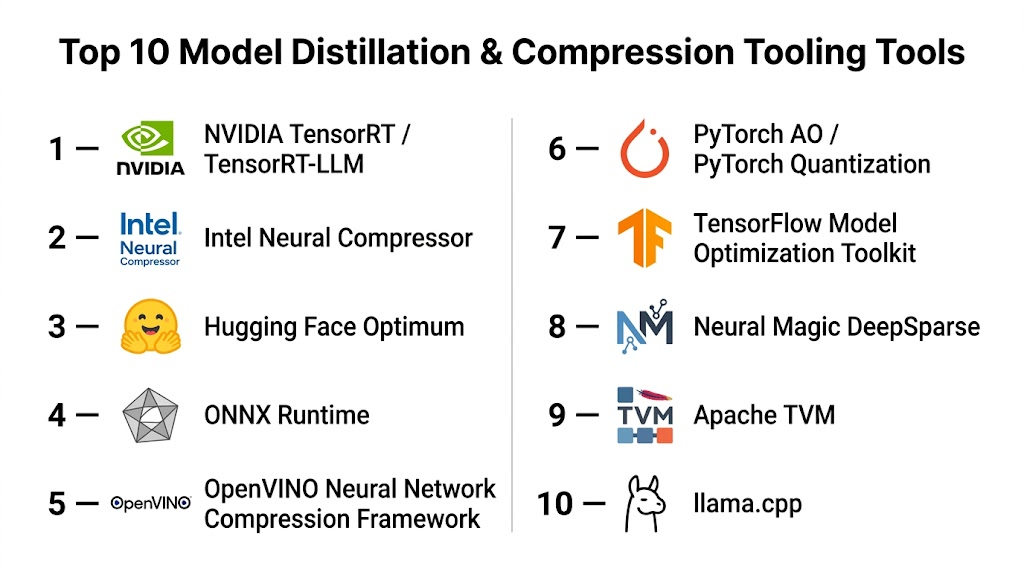
Top 10 Model Distillation & Compression Tooling Tools
Number 1 — Hugging Face Optimum
Overview: Hugging Face Optimum is a model optimization toolkit designed to help teams accelerate and compress transformer models across different hardware backends. It is useful for NLP, generative AI, and production teams already working with Hugging Face models.
Key Features
- Supports model optimization for transformers and popular Hugging Face workflows.
- Offers quantization support across selected backends.
- Works with ONNX Runtime, Intel, NVIDIA, and other hardware-focused ecosystems.
- Helps export and optimize models for faster inference.
- Useful for LLM, NLP, and transformer-based workloads.
- Strong integration with Hugging Face model and dataset ecosystem.
- Developer-friendly Python experience.
Pros
- Excellent fit for teams already using Hugging Face models.
- Strong ecosystem and community support.
- Practical for transformer optimization and deployment preparation.
Cons
- Best value comes when used inside the Hugging Face ecosystem.
- Advanced optimization may still require hardware-specific knowledge.
- Not a complete enterprise governance platform by itself.
Platforms / Deployment
Linux / Windows / macOS
Cloud / Self-hosted / Hybrid
Security & Compliance
Not publicly stated for the toolkit itself. Security depends on how it is deployed, governed, and integrated in the user’s environment.
Integrations & Ecosystem
Hugging Face Optimum integrates naturally with transformer models and common inference backends. It is often used as a bridge between model development and optimized deployment.
- Hugging Face Transformers
- ONNX Runtime
- Intel optimization tools
- NVIDIA acceleration workflows
- Python ML pipelines
- Model hub workflows
Support & Community
Strong documentation and active community support are available through the Hugging Face ecosystem. Enterprise support may vary depending on Hugging Face service usage and deployment model.
Number 2 — NVIDIA TensorRT
Overview: NVIDIA TensorRT is a high-performance inference optimization SDK built for NVIDIA GPUs. It is commonly used when teams need maximum inference performance, lower latency, and optimized deployment for deep learning models.
Key Features
- Optimizes neural networks for NVIDIA GPU inference.
- Supports precision optimization such as FP16 and INT8.
- Provides graph optimization and layer fusion.
- Works well for computer vision, speech, recommendation, and generative workloads.
- Integrates with NVIDIA deployment and serving ecosystems.
- Designed for high-throughput and low-latency production inference.
- Supports deployment through TensorRT engines.
Pros
- Strong performance on NVIDIA GPU infrastructure.
- Mature and widely adopted in production AI systems.
- Excellent fit for latency-sensitive workloads.
Cons
- Best suited for NVIDIA hardware, so portability may be limited.
- Requires engineering skill for tuning and troubleshooting.
- Not focused on general model governance or lifecycle management.
Platforms / Deployment
Linux / Windows
Cloud / Self-hosted / Hybrid
Security & Compliance
Not publicly stated for the SDK itself. Security depends on infrastructure, container controls, access management, and deployment governance.
Integrations & Ecosystem
TensorRT is deeply connected to NVIDIA’s AI ecosystem and can be used in advanced inference pipelines.
- NVIDIA Triton Inference Server
- CUDA
- ONNX
- PyTorch export workflows
- TensorFlow export workflows
- GPU-accelerated inference stacks
Support & Community
NVIDIA provides strong documentation, developer resources, and enterprise ecosystem support. Community knowledge is also strong because TensorRT is widely used in production AI infrastructure.
Number 3 — Intel Neural Compressor
Overview: Intel Neural Compressor is an open-source toolkit for model compression and acceleration, especially useful for teams deploying AI workloads on Intel hardware. It supports quantization, pruning, distillation, and optimization workflows.
Key Features
- Supports post-training quantization and quantization-aware training.
- Includes pruning and knowledge distillation capabilities.
- Works with common frameworks such as TensorFlow, PyTorch, and ONNX.
- Optimized for Intel CPUs and hardware acceleration paths.
- Helps improve inference performance and reduce model footprint.
- Supports automated tuning workflows.
- Useful for enterprise CPU-based AI workloads.
Pros
- Strong choice for Intel infrastructure.
- Supports multiple compression methods, not just quantization.
- Good fit for teams optimizing models without relying only on GPUs.
Cons
- Best performance benefits are tied to Intel hardware environments.
- Requires ML validation to avoid accuracy loss.
- May be less simple for beginners compared with higher-level tools.
Platforms / Deployment
Linux / Windows
Cloud / Self-hosted / Hybrid
Security & Compliance
Not publicly stated for the toolkit itself. Security and compliance depend on deployment architecture and organizational controls.
Integrations & Ecosystem
Intel Neural Compressor fits well into enterprise ML pipelines where CPU optimization and hardware-aware compression matter.
- TensorFlow
- PyTorch
- ONNX
- Intel oneAPI ecosystem
- MLOps pipelines
- Python-based automation
Support & Community
Documentation is available, and community support exists through Intel’s open-source ecosystem. Enterprise support may depend on broader Intel engagement.
Number 4 — ONNX Runtime
Overview: ONNX Runtime is a cross-platform inference engine that helps teams run optimized machine learning models across hardware and frameworks. It is not only a compression tool, but it plays a major role in optimized model deployment.
Key Features
- Supports optimized inference for ONNX models.
- Works across CPU, GPU, and selected accelerator backends.
- Supports graph optimization and execution providers.
- Offers quantization tooling for supported models.
- Enables framework interoperability.
- Useful for production inference pipelines.
- Supports many deployment environments.
Pros
- Strong portability across platforms and frameworks.
- Useful for teams standardizing model deployment.
- Good ecosystem support and broad adoption.
Cons
- Requires ONNX model conversion and validation.
- Compression workflows may require additional tooling.
- Performance depends heavily on execution provider and hardware.
Platforms / Deployment
Linux / Windows / macOS / Android / iOS
Cloud / Self-hosted / Hybrid
Security & Compliance
Not publicly stated for the runtime itself. Security depends on how applications, models, and infrastructure are managed.
Integrations & Ecosystem
ONNX Runtime is valuable when teams want a common inference layer across different model sources and hardware platforms.
- PyTorch export
- TensorFlow export
- ONNX model format
- Azure ML workflows
- NVIDIA, Intel, and CPU execution providers
- Edge and application deployment pipelines
Support & Community
Strong documentation and broad community usage are available. Support depends on whether teams use it independently or through enterprise platforms.
Number 5 — OpenVINO
Overview: OpenVINO is a toolkit focused on optimizing and deploying AI inference across Intel hardware and supported environments. It is commonly used for computer vision, generative AI acceleration, edge workloads, and CPU-friendly inference.
Key Features
- Optimizes models for Intel CPUs, GPUs, and accelerators.
- Supports model conversion and graph optimization.
- Offers quantization and performance tuning capabilities.
- Useful for edge AI and computer vision workloads.
- Supports multiple model formats and frameworks.
- Provides deployment tooling for production inference.
- Helps reduce latency and improve hardware utilization.
Pros
- Strong for Intel-based edge and enterprise deployments.
- Good fit for vision and real-time inference use cases.
- Mature toolkit with practical deployment focus.
Cons
- Best results are typically seen with Intel hardware.
- Requires model conversion and testing.
- May be overkill for small or simple ML workloads.
Platforms / Deployment
Linux / Windows / macOS
Cloud / Self-hosted / Hybrid
Security & Compliance
Not publicly stated for the toolkit itself. Compliance depends on the deployment environment and organizational security controls.
Integrations & Ecosystem
OpenVINO works well in hardware-aware AI deployment pipelines and supports common model development frameworks.
- PyTorch
- TensorFlow
- ONNX
- Intel hardware ecosystem
- Edge AI workflows
- Computer vision applications
Support & Community
OpenVINO has strong documentation, tutorials, and community resources. Enterprise support may depend on Intel ecosystem engagement.
Number 6 — TensorFlow Model Optimization Toolkit
Overview: TensorFlow Model Optimization Toolkit helps TensorFlow users reduce model size and improve inference efficiency. It supports techniques such as quantization and pruning for models intended for production or edge deployment.
Key Features
- Supports quantization-aware training.
- Includes pruning capabilities.
- Works with TensorFlow and Keras workflows.
- Helps reduce model size for mobile and edge use cases.
- Supports deployment preparation for TensorFlow Lite.
- Useful for production teams already using TensorFlow.
- Offers developer-friendly APIs.
Pros
- Natural choice for TensorFlow-based teams.
- Strong fit for mobile and embedded AI use cases.
- Helps optimize models before deployment to constrained environments.
Cons
- Primarily useful for TensorFlow users.
- May not be ideal for PyTorch-first teams.
- Accuracy validation remains a critical responsibility.
Platforms / Deployment
Linux / Windows / macOS
Cloud / Self-hosted / Hybrid
Security & Compliance
Not publicly stated for the toolkit itself. Security depends on model pipeline, deployment controls, and infrastructure.
Integrations & Ecosystem
The toolkit fits into TensorFlow development pipelines and is especially relevant when teams plan to deploy with TensorFlow Lite.
- TensorFlow
- Keras
- TensorFlow Lite
- Python ML workflows
- Mobile AI deployment
- Edge AI pipelines
Support & Community
Documentation and examples are available through the TensorFlow ecosystem. Community support is strong, but enterprise support depends on broader platform choices.
Number 7 — PyTorch AO
Overview: PyTorch AO focuses on architecture optimization and model efficiency within the PyTorch ecosystem. It is useful for teams working on quantization, sparsity, and optimization of PyTorch models.
Key Features
- Supports PyTorch-native optimization workflows.
- Provides quantization-related capabilities.
- Supports model efficiency improvements for selected workloads.
- Useful for research-to-production PyTorch pipelines.
- Works with modern PyTorch development practices.
- Helps optimize model execution and memory use.
- Supports experimentation with efficient model techniques.
Pros
- Strong fit for PyTorch-first teams.
- Developer-friendly for ML engineers already using PyTorch.
- Useful for experimentation and production preparation.
Cons
- Requires technical understanding of PyTorch internals.
- Some capabilities may require careful implementation.
- Not a full MLOps or serving platform by itself.
Platforms / Deployment
Linux / Windows / macOS
Cloud / Self-hosted / Hybrid
Security & Compliance
Not publicly stated for the toolkit itself. Security depends on the ML pipeline and deployment environment.
Integrations & Ecosystem
PyTorch AO fits naturally with PyTorch model development and optimization pipelines.
- PyTorch
- Python ML workflows
- Torch export workflows
- Model training pipelines
- Research experimentation
- Production model preparation
Support & Community
Support comes through PyTorch documentation, community channels, and ecosystem resources. Community strength is strong because PyTorch is widely adopted.
Number 8 — Neural Magic SparseML
Overview: Neural Magic SparseML focuses on sparsity, pruning, and model optimization workflows, especially for improving inference efficiency. It is useful for teams that want to reduce compute cost and improve model performance through sparse model techniques.
Key Features
- Supports sparsification workflows.
- Provides pruning and quantization capabilities.
- Helps optimize models for efficient inference.
- Supports selected deep learning frameworks and model types.
- Useful for CPU-friendly inference improvement.
- Offers recipes for structured optimization workflows.
- Helps reduce model size and compute requirements.
Pros
- Strong focus on sparsity and compression.
- Useful for teams exploring CPU-efficient AI.
- Practical recipes can help standardize optimization workflows.
Cons
- May require deeper ML optimization knowledge.
- Fit depends on model type and deployment target.
- Ecosystem may be narrower than broader framework-native tools.
Platforms / Deployment
Linux / Windows / macOS
Cloud / Self-hosted / Hybrid
Security & Compliance
Not publicly stated.
Integrations & Ecosystem
SparseML can fit into model training and optimization workflows where pruning, quantization, and sparsity are part of the deployment strategy.
- PyTorch workflows
- ONNX workflows
- Python ML pipelines
- CPU inference workflows
- Model compression recipes
- MLOps experimentation pipelines
Support & Community
Documentation and community resources are available. Support depth may vary based on product usage, open-source adoption, and enterprise requirements.
Number 9 — Apache TVM
Overview: Apache TVM is an open-source machine learning compiler stack that helps optimize models for different hardware targets. It is especially useful for teams that need deep performance tuning across CPUs, GPUs, and specialized accelerators.
Key Features
- Compiles machine learning models for multiple hardware targets.
- Supports graph-level and operator-level optimization.
- Enables hardware-aware performance tuning.
- Useful for edge, embedded, and accelerator-focused deployments.
- Supports multiple model formats and frontends.
- Provides flexibility for custom deployment needs.
- Strong research and systems engineering relevance.
Pros
- Very powerful for advanced optimization.
- Strong flexibility across hardware targets.
- Useful for teams building custom AI runtimes or accelerators.
Cons
- Steeper learning curve than higher-level tools.
- Requires systems and compiler expertise.
- Not ideal for teams seeking a simple plug-and-play experience.
Platforms / Deployment
Linux / Windows / macOS
Cloud / Self-hosted / Hybrid
Security & Compliance
Not publicly stated.
Integrations & Ecosystem
Apache TVM is best suited for technical teams that need compiler-level control and broad hardware targeting.
- ONNX
- TensorFlow
- PyTorch model import workflows
- Edge AI deployment
- Custom hardware workflows
- Compiler and runtime systems
Support & Community
Community support exists through the Apache open-source ecosystem. Documentation is available, but successful adoption may require strong technical expertise.
Number 10 — Qualcomm AI Hub
Overview: Qualcomm AI Hub helps developers optimize and deploy AI models for Qualcomm hardware platforms. It is useful for mobile, edge, and device-focused teams that need efficient models running on Snapdragon and related hardware.
Key Features
- Supports model optimization for Qualcomm hardware.
- Helps prepare AI models for edge and mobile deployment.
- Offers workflows for supported model architectures.
- Useful for device-side AI inference.
- Helps validate performance on target hardware.
- Supports practical deployment planning for mobile AI.
- Focuses on hardware-aware model acceleration.
Pros
- Strong fit for mobile and edge AI teams.
- Useful when Qualcomm hardware is a deployment target.
- Helps bridge model development and device performance testing.
Cons
- Best suited for Qualcomm hardware environments.
- Less general-purpose than framework-neutral tools.
- Advanced usage may require device and hardware knowledge.
Platforms / Deployment
Web / Linux / Android-focused deployment workflows
Cloud / Edge / Hybrid
Security & Compliance
Not publicly stated.
Integrations & Ecosystem
Qualcomm AI Hub is relevant when teams need to optimize models for device-side AI and mobile hardware acceleration.
- Qualcomm hardware ecosystem
- Mobile AI workflows
- Edge AI deployment
- ONNX-supported workflows
- Android application pipelines
- Device performance testing workflows
Support & Community
Documentation and developer resources are available. Support depth may depend on Qualcomm platform engagement and developer program access.
Comparison Table
| Tool Name | Best For | Platform(s) Supported | Deployment | Standout Feature | Public Rating |
|---|---|---|---|---|---|
| Hugging Face Optimum | Transformer and LLM optimization | Linux, Windows, macOS | Cloud, Self-hosted, Hybrid | Strong Hugging Face ecosystem integration | N/A |
| NVIDIA TensorRT | High-performance NVIDIA GPU inference | Linux, Windows | Cloud, Self-hosted, Hybrid | GPU inference acceleration | N/A |
| Intel Neural Compressor | Intel CPU and hardware optimization | Linux, Windows | Cloud, Self-hosted, Hybrid | Quantization, pruning, and distillation support | N/A |
| ONNX Runtime | Cross-platform optimized inference | Linux, Windows, macOS, Android, iOS | Cloud, Self-hosted, Hybrid | Framework and hardware portability | N/A |
| OpenVINO | Intel edge and enterprise inference | Linux, Windows, macOS | Cloud, Self-hosted, Hybrid | Intel hardware-aware optimization | N/A |
| TensorFlow Model Optimization Toolkit | TensorFlow model compression | Linux, Windows, macOS | Cloud, Self-hosted, Hybrid | TensorFlow and TensorFlow Lite optimization | N/A |
| PyTorch AO | PyTorch-native optimization | Linux, Windows, macOS | Cloud, Self-hosted, Hybrid | PyTorch-focused quantization and efficiency | N/A |
| Neural Magic SparseML | Sparsity and pruning workflows | Linux, Windows, macOS | Cloud, Self-hosted, Hybrid | Sparse model optimization recipes | N/A |
| Apache TVM | Compiler-level model optimization | Linux, Windows, macOS | Cloud, Self-hosted, Hybrid | Hardware-targeted ML compilation | N/A |
| Qualcomm AI Hub | Mobile and edge AI on Qualcomm hardware | Web, Linux, Android-focused workflows | Cloud, Edge, Hybrid | Device-side AI optimization | N/A |
Evaluation & Scoring of Model Distillation & Compression Tooling
| Tool Name | Core (25%) | Ease (15%) | Integrations (15%) | Security (10%) | Performance (10%) | Support (10%) | Value (15%) | Weighted Total |
|---|---|---|---|---|---|---|---|---|
| Hugging Face Optimum | 9 | 8 | 9 | 6 | 8 | 8 | 9 | 8.25 |
| NVIDIA TensorRT | 9 | 6 | 8 | 6 | 10 | 8 | 8 | 8.05 |
| Intel Neural Compressor | 9 | 7 | 8 | 6 | 8 | 7 | 8 | 7.75 |
| ONNX Runtime | 8 | 8 | 9 | 6 | 8 | 8 | 9 | 8.05 |
| OpenVINO | 8 | 7 | 8 | 6 | 8 | 8 | 8 | 7.65 |
| TensorFlow Model Optimization Toolkit | 8 | 8 | 7 | 6 | 7 | 8 | 8 | 7.55 |
| PyTorch AO | 8 | 7 | 7 | 6 | 7 | 8 | 8 | 7.35 |
| Neural Magic SparseML | 8 | 6 | 7 | 5 | 8 | 6 | 7 | 6.95 |
| Apache TVM | 9 | 5 | 8 | 5 | 9 | 7 | 8 | 7.55 |
| Qualcomm AI Hub | 7 | 7 | 7 | 5 | 8 | 7 | 7 | 6.95 |
These scores are comparative, not absolute. A higher score does not mean the tool is best for every team. Hardware fit, model type, framework choice, and deployment environment can change the best option. Teams should use this table to shortlist tools, then run real benchmarks using their own models and infrastructure.
Which Model Distillation & Compression Tooling Tool Is Right for You?
Solo / Freelancer
Solo developers should prioritize simplicity, documentation, and low setup effort. Hugging Face Optimum is a strong option for transformer models, while TensorFlow Model Optimization Toolkit is better for TensorFlow-based mobile or edge experiments. ONNX Runtime is also useful when portability matters.
SMB
Small and medium businesses should focus on value, performance improvement, and easy integration. ONNX Runtime, OpenVINO, and Intel Neural Compressor can be practical choices when infrastructure cost matters. Hugging Face Optimum is a strong fit for AI teams building NLP or LLM-powered applications.
Mid-Market
Mid-market teams usually need repeatable optimization workflows, CI/CD integration, and model validation. ONNX Runtime, TensorRT, OpenVINO, and Intel Neural Compressor are strong candidates. Teams should standardize performance testing before moving compressed models into production.
Enterprise
Enterprises should prioritize governance, hardware strategy, security controls, support maturity, and deployment consistency. NVIDIA TensorRT is strong for GPU-heavy environments, OpenVINO and Intel Neural Compressor are useful for Intel-based infrastructure, and ONNX Runtime is valuable for standardizing inference across teams.
Budget vs Premium
For budget-conscious teams, open-source tools such as ONNX Runtime, TensorFlow Model Optimization Toolkit, PyTorch AO, Apache TVM, and Intel Neural Compressor are attractive. Premium value often comes from enterprise support, managed platforms, hardware partnerships, or deeper vendor ecosystems rather than the compression tool alone.
Feature Depth vs Ease of Use
Apache TVM and TensorRT offer deep performance potential but require technical expertise. Hugging Face Optimum and TensorFlow Model Optimization Toolkit are easier for teams already working inside those ecosystems. ONNX Runtime sits in the middle with strong portability and practical production fit.
Integrations & Scalability
Teams using multiple frameworks should consider ONNX Runtime because it helps create a common deployment layer. Teams using NVIDIA infrastructure should evaluate TensorRT. TensorFlow teams should review TensorFlow Model Optimization Toolkit, while PyTorch-heavy teams should consider PyTorch AO and Hugging Face Optimum.
Security & Compliance Needs
Most model compression tools do not provide full compliance features by themselves. Security depends on the full ML platform, access control, model registry, audit logging, data handling, container security, and deployment pipeline. Enterprises should validate security at the platform and infrastructure level, not only at the tooling level.
Frequently Asked Questions
1. What is Model Distillation & Compression Tooling?
It is a category of tools that helps make AI models smaller, faster, and cheaper to run. These tools use methods such as quantization, pruning, distillation, sparsity, compilation, and runtime optimization.
2. Is model compression only useful for large AI models?
No. It is useful for both large and medium-sized models. Even smaller models can benefit when they need to run on mobile devices, edge systems, CPUs, or high-traffic production environments.
3. What is the difference between distillation and quantization?
Distillation trains a smaller model to behave like a larger model. Quantization reduces numerical precision to make the model faster and smaller. Many teams use both methods together.
4. Do these tools reduce model accuracy?
They can reduce accuracy if not applied carefully. That is why teams must test compressed models against real validation data, business metrics, and production-like workloads.
5. Which tool is best for NVIDIA GPU inference?
NVIDIA TensorRT is usually a strong option for NVIDIA GPU-focused inference. It is designed for high-performance deployment and can significantly improve latency and throughput when configured correctly.
6. Which tool is best for transformer models?
Hugging Face Optimum is a strong choice for transformer-based workloads, especially when teams already use Hugging Face Transformers. ONNX Runtime can also be valuable for optimized transformer inference.
7. Are open-source tools enough for enterprise use?
They can be, but enterprises must add governance, access control, monitoring, model registry, audit trails, and security processes around them. The tool alone usually does not provide complete enterprise compliance.
8. How long does onboarding usually take?
Basic experiments can be done quickly by experienced ML engineers. Production onboarding takes longer because teams must validate accuracy, latency, infrastructure cost, deployment compatibility, and rollback plans.
9. What are common mistakes when using compression tools?
Common mistakes include optimizing only for speed, ignoring accuracy loss, skipping real-world benchmarks, choosing the wrong hardware target, and failing to monitor model behavior after deployment.
10. Can these tools help reduce cloud costs?
Yes. Smaller and faster models can reduce GPU usage, CPU load, memory consumption, and infrastructure scaling needs. The actual savings depend on workload volume, architecture, and deployment efficiency.
Conclusion
Model Distillation & Compression Tooling is becoming a practical requirement for teams that want AI systems to be faster, cheaper, and easier to deploy. The best tool depends on your model framework, hardware target, latency requirements, team skill level, and production environment. Hugging Face Optimum is strong for transformer workflows, NVIDIA TensorRT is powerful for GPU inference, ONNX Runtime is excellent for portability, OpenVINO and Intel Neural Compressor fit Intel-focused environments, and Apache TVM is valuable for advanced hardware-aware optimization. Instead of choosing one universal winner, shortlist two or three tools, run a pilot with your real model, compare accuracy and latency, validate integrations, and confirm security requirements before standardizing your model optimization workflow.
