Introduction
AR Education Apps help teachers, students, trainers, and institutions make learning more visual, interactive, and practical. AR means augmented reality, where digital objects, animations, labels, models, or learning content appear on top of the real world through a mobile device, tablet, or supported headset.
Instead of only reading about a human organ, a planet, a machine, a geometry shape, or a science concept, learners can see and interact with it in a more engaging way. This makes AR useful for schools, colleges, online training companies, STEM labs, medical education, corporate learning, and skill-based learning programs.
AR Education Apps are commonly used for:
- Science and STEM visualization
- Anatomy and biology learning
- Mathematics and geometry exploration
- Interactive classroom activities
- Student-created projects
- Virtual models and 3D demonstrations
- Skill-based and concept-based learning
When selecting an AR Education App, buyers should evaluate:
- Subject coverage
- Ease of use for teachers and students
- Device compatibility
- 3D model quality
- Classroom management features
- Content creation options
- Offline or online access
- Safety and privacy controls
- Pricing flexibility
- Documentation and support quality
Best for: schools, colleges, teachers, STEM educators, medical educators, EdTech companies, training providers, and learners who need visual and hands-on learning.
Not ideal for: institutions that only need simple PDF-based study material, text-only learning, or classrooms where students do not have access to compatible devices.
Key Trends in AR Education Apps
- Visual-first learning is becoming more important because students understand complex topics faster when they can see and interact with models.
- STEM-focused AR apps are gaining strong adoption because physics, chemistry, biology, engineering, and space concepts become easier to explain visually.
- Student-created AR content is becoming popular because learners can build their own projects instead of only consuming ready-made content.
- Mobile-first learning is growing because many AR apps work through tablets and smartphones without needing expensive hardware.
- RAG-style and AI-assisted content creation is influencing education tools, helping teachers create visual assets, lesson material, and interactive activities faster.
- Hybrid classroom use is increasing because AR can support both in-person and remote learning when used with screen sharing or recorded demonstrations.
- Assessment-linked AR activities are becoming more useful because educators want interactive learning connected with measurable outcomes.
- Cross-subject AR platforms are gaining value because schools prefer apps that can support science, art, history, geography, and design in one place.
- Medical and anatomy AR continues to grow because detailed 3D visualization helps learners understand body systems more clearly.
- Teacher-friendly onboarding is becoming a major buying factor because schools need tools that are easy to introduce without heavy technical training.
How We Selected These Tools
These AR Education Apps were selected based on practical classroom value, learning use cases, app recognition, ease of use, and fit across different learning environments. The goal is to include a balanced mix of classroom platforms, STEM tools, anatomy apps, creation tools, and subject-focused AR experiences.
Selection factors included:
- Usefulness for real education and training scenarios
- Support for AR-based learning activities
- Availability for teachers, students, or institutions
- Strength of 3D visualization and interactive content
- Ease of use for classroom adoption
- Subject coverage and curriculum usefulness
- Content creation or ready-made content availability
- Device compatibility across common platforms
- Support resources, documentation, or educator materials
- Fit for different learning levels and budgets
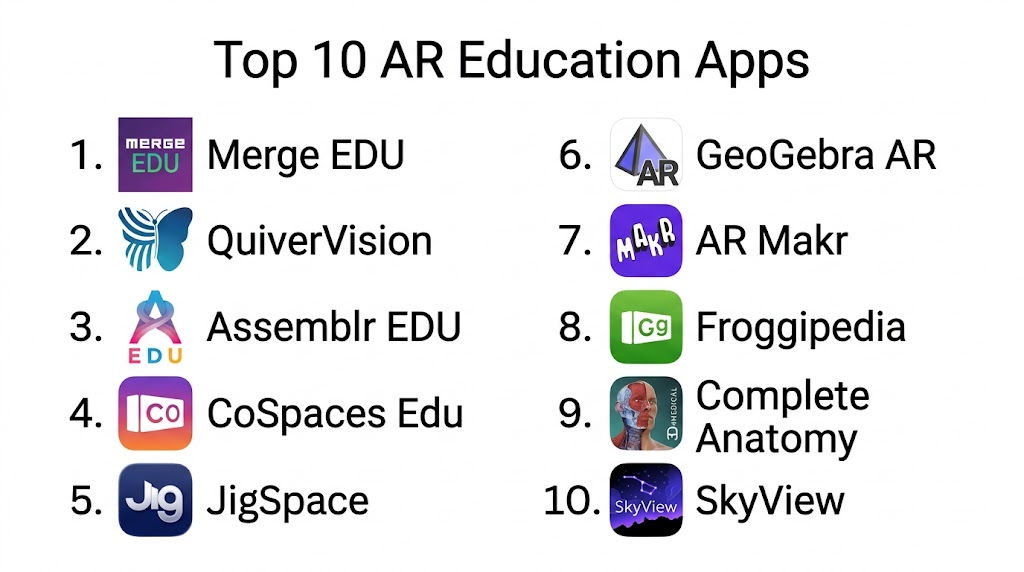
Top 10 AR Education Apps
1. Merge EDU
Merge EDU is an immersive AR and VR learning platform designed for schools and STEM classrooms. It allows students to interact with digital objects in a hands-on way, making abstract concepts easier to understand. It is especially useful for science, technology, engineering, and classroom exploration.
Key Features
- Interactive AR and VR learning experiences
- Strong STEM-focused educational content
- Support for hands-on classroom activities
- Lesson and activity resources for teachers
- Works well with physical learning objects like Merge Cube
- Useful for science visualization and exploration
- Student-friendly interactive learning experience
Pros
- Strong classroom fit for STEM education.
- Makes abstract topics more visual and practical.
- Good for hands-on learning and student engagement.
Cons
- May require supported devices and classroom setup.
- Best results may depend on teacher preparation.
- Some features or resources may vary by subscription.
Platforms / Deployment
Web, iOS, Android, Cloud, Device-based classroom use
Security & Compliance
School and account-level security details may vary by plan. Specific compliance certifications are not publicly stated for all usage levels.
Integrations & Ecosystem
Merge EDU works well in classrooms where teachers want ready-made immersive activities and hands-on STEM experiences.
Common ecosystem areas include:
- STEM classrooms
- Science activities
- Merge Cube-based learning
- Teacher lesson plans
- Student exploration activities
- Mobile and tablet-based learning
Support & Community
Merge EDU provides teacher resources, classroom support material, and educational guidance. Support depth may vary depending on school or subscription plan.
2. QuiverVision
QuiverVision is an AR coloring and learning app that brings printed coloring pages to life through augmented reality. It is especially useful for younger students and creative classrooms where teachers want to combine art, storytelling, and interactive learning.
Key Features
- AR coloring pages
- Interactive 3D animations
- Curriculum-friendly activity options
- Simple student experience
- Good for early learning and creative education
- Printable learning resources
- Engaging visual activities for classroom use
Pros
- Very easy for young learners to understand.
- Combines creativity with AR-based engagement.
- Good for classrooms that want low-barrier AR adoption.
Cons
- Less suitable for advanced technical or higher education use.
- Content depth may be limited compared with full STEM platforms.
- Some resources may require subscription access.
Platforms / Deployment
iOS, Android, Printed worksheets, Mobile app-based deployment
Security & Compliance
Detailed enterprise compliance information is not publicly stated. Schools should review privacy and account settings before classroom deployment.
Integrations & Ecosystem
QuiverVision is useful in classrooms where teachers want printable activities that become interactive through mobile devices.
Common ecosystem areas include:
- Printable worksheets
- Creative learning
- Early education
- Art-based learning
- Classroom activities
- Mobile AR experiences
Support & Community
QuiverVision provides learning resources and activity-based materials. Support is suitable for basic classroom usage, but institutions should confirm support options for larger deployments.
3. Assemblr EDU
Assemblr EDU is an immersive 3D and AR platform for teachers and students. It helps educators create interactive learning materials and allows students to explore topics through 3D objects and AR scenes. It is useful for schools that want both ready-made content and content creation options.
Key Features
- 3D and AR content creation
- Ready-to-use educational materials
- Teacher and student-friendly interface
- Interactive topic slides and visual aids
- Supports creative classroom projects
- Useful for multiple subjects
- AI-assisted 3D content creation features may be available
Pros
- Good balance between ready-made content and creation tools.
- Useful for teachers who want more engaging lessons.
- Supports project-based learning.
Cons
- Teachers may need time to learn content creation features.
- Advanced features may depend on plan.
- Device performance can affect AR experience quality.
Platforms / Deployment
Web, iOS, Android, Cloud-based platform
Security & Compliance
Security features may vary by plan. Specific compliance certifications are not publicly stated for all plans.
Integrations & Ecosystem
Assemblr EDU fits well into creative and visual classrooms where teachers want interactive learning material across different subjects.
Common ecosystem areas include:
- 3D learning content
- AR lessons
- Teacher-created resources
- Student projects
- Classroom presentations
- Visual learning workflows
Support & Community
Assemblr EDU provides educational resources, platform guidance, and user support. Support quality and onboarding may vary depending on the selected plan.
4. CoSpaces Edu
CoSpaces Edu is a creative education platform that allows students and teachers to build interactive virtual and augmented reality projects. It is often used for coding, storytelling, design, STEM, and project-based learning.
Key Features
- AR and VR project creation
- Student-friendly coding options
- 3D scene building
- Interactive storytelling support
- Classroom management features
- Useful for STEM and creative learning
- Supports project-based assignments
Pros
- Strong for student creativity and project work.
- Useful for coding and digital storytelling.
- Good fit for classrooms that want learners to build, not just view.
Cons
- Requires teacher planning for best results.
- May be more creation-focused than ready-made content-focused.
- Younger students may need guidance.
Platforms / Deployment
Web, iOS, Android, Cloud-based classroom platform
Security & Compliance
Classroom account controls may be available, but detailed compliance certifications are not publicly stated for every plan. Schools should verify privacy and data handling requirements.
Integrations & Ecosystem
CoSpaces Edu is useful for teachers who want students to build interactive projects across subjects.
Common ecosystem areas include:
- Coding education
- STEM projects
- AR and VR classroom activities
- Digital storytelling
- 3D design
- Project-based learning
Support & Community
CoSpaces Edu has teacher resources, tutorials, and education-focused guidance. Community use is strong among educators interested in creative technology and coding.
5. JigSpace
JigSpace is an interactive 3D presentation and AR app that helps users explain objects, processes, and concepts step by step. It is useful for education, product training, technical learning, and visual demonstrations.
Key Features
- Interactive 3D presentations
- AR-based explanation workflows
- Step-by-step visual learning
- Useful for technical and product concepts
- 3D model-based communication
- Mobile and tablet AR support
- Good for demonstrations and guided learning
Pros
- Strong for explaining how things work.
- Useful for technical education and product training.
- Professional visual presentation experience.
Cons
- May be more suitable for demonstrations than full classroom management.
- Advanced content creation may require planning.
- Some education-specific features may be limited compared with dedicated school platforms.
Platforms / Deployment
iOS, Web, AR-supported devices, Cloud-based workflows
Security & Compliance
Security and compliance details may vary by plan. Specific education compliance details are not publicly stated.
Integrations & Ecosystem
JigSpace works well for teachers, trainers, and product educators who need visual step-by-step explanations.
Common ecosystem areas include:
- 3D presentations
- Product training
- Technical education
- AR demonstrations
- Visual communication
- Interactive learning content
Support & Community
JigSpace provides documentation and platform support. Its strongest value is for users who need polished 3D explanation experiences rather than broad curriculum management.
6. GeoGebra AR
GeoGebra AR is an augmented reality mathematics learning app that helps students explore 3D graphs, geometry, surfaces, and mathematical models. It is useful for math teachers and learners who want to make abstract concepts more visible.
Key Features
- AR-based mathematics visualization
- 3D graphs and surfaces
- Geometry exploration
- Interactive math models
- Useful for classrooms and self-study
- Strong fit for visual learners
- Helps connect formulas with spatial understanding
Pros
- Very useful for mathematics learning.
- Helps students understand abstract 3D concepts visually.
- Good fit for teachers explaining geometry and graphing.
Cons
- Focused mainly on mathematics.
- May not replace a complete math learning platform.
- Some learners may still need teacher guidance to interpret models.
Platforms / Deployment
iOS, Mobile app-based AR learning
Security & Compliance
Detailed compliance certifications are not publicly stated. Since the app is subject-focused, schools should review device and account settings based on their own policies.
Integrations & Ecosystem
GeoGebra AR fits naturally into math classrooms and works well alongside broader GeoGebra learning resources.
Common ecosystem areas include:
- Mathematics education
- Geometry visualization
- 3D graphing
- Classroom demonstrations
- Student exploration
- Visual problem-solving
Support & Community
GeoGebra has a strong education community and widely used math learning resources. Support depends on available documentation, community material, and platform channels.
7. AR Makr
AR Makr is an augmented reality creation app that allows learners to build and place digital objects in real-world spaces. It is useful for creativity, storytelling, design thinking, and classroom projects.
Key Features
- AR scene creation
- Student-friendly creative tools
- Supports drawings and digital objects
- Good for storytelling and project work
- Encourages learner creativity
- Useful for art and design education
- Simple mobile AR creation workflow
Pros
- Good for creative classrooms.
- Helps students make their own AR experiences.
- Useful for project-based learning.
Cons
- Less suitable for advanced STEM simulations.
- May require teacher guidance for structured learning outcomes.
- Platform availability may be more limited than broader tools.
Platforms / Deployment
iOS, Mobile app-based deployment
Security & Compliance
Detailed school-level security and compliance information is not publicly stated. Institutions should review app permissions and device policies before use.
Integrations & Ecosystem
AR Makr is useful for creative learning environments where students build and explain ideas through AR.
Common ecosystem areas include:
- Creative projects
- Storytelling
- Art education
- Design thinking
- Student presentations
- Mobile AR creation
Support & Community
Support information may be limited compared with larger education platforms. Teachers should test the app before classroom-wide use and create simple activity instructions for students.
8. Froggipedia
Froggipedia is an AR-based educational app focused on frog anatomy and biology learning. It helps students explore frog life cycles, internal structures, and biological concepts through interactive visuals.
Key Features
- Frog anatomy visualization
- AR-based biology learning
- Interactive 3D models
- Life cycle exploration
- Useful for science classrooms
- Supports visual understanding of biological systems
- Helps reduce dependence on physical dissection in some contexts
Pros
- Strong subject-specific biology learning experience.
- Useful for students who need visual anatomy support.
- Helps make biology more interactive and engaging.
Cons
- Focused on a narrow biology use case.
- Not suitable as a broad AR education platform.
- May not meet all curriculum requirements by itself.
Platforms / Deployment
iOS, Mobile app-based deployment
Security & Compliance
Detailed compliance and enterprise security details are not publicly stated. Schools should review device use policies before adoption.
Integrations & Ecosystem
Froggipedia is best used as a supporting biology learning tool rather than a full classroom platform.
Common ecosystem areas include:
- Biology education
- Anatomy learning
- Life cycle study
- Science demonstrations
- Visual learning
- Mobile AR exploration
Support & Community
Support and classroom resources may be more limited than broader education platforms. It is best used as a focused learning aid for biology topics.
9. Complete Anatomy
Complete Anatomy is a detailed anatomy learning platform used by students, educators, and healthcare learners. Its AR-supported visualization can help learners explore body systems in a more immersive and practical way.
Key Features
- Detailed human anatomy models
- Body system visualization
- Medical education support
- Interactive 3D learning
- Useful for students and educators
- Supports anatomy exploration and demonstration
- Strong fit for healthcare-related learning
Pros
- High-value tool for anatomy and medical education.
- Helps learners understand complex body structures.
- Useful for demonstrations, study, and teaching.
Cons
- More suitable for anatomy than general education.
- May be too advanced for younger learners.
- Pricing and feature access may vary by plan.
Platforms / Deployment
iOS, Windows, macOS, Web, Mobile and desktop-based learning, Cloud-supported workflows may vary
Security & Compliance
Security and compliance details may vary by plan. Specific compliance certifications are not publicly stated for all editions.
Integrations & Ecosystem
Complete Anatomy fits into medical, nursing, healthcare, and life sciences education.
Common ecosystem areas include:
- Anatomy education
- Medical training
- Healthcare learning
- Student study workflows
- Classroom demonstrations
- Interactive 3D body models
Support & Community
Complete Anatomy provides professional learning resources and support options. It is best suited for institutions and learners focused on human anatomy and health sciences.
10. SkyView
SkyView is an AR astronomy app that lets learners identify stars, planets, constellations, and objects in the sky using a mobile device. It is useful for science teachers, astronomy learners, and informal education settings.
Key Features
- AR sky identification
- Star and planet discovery
- Constellation learning
- Mobile-based astronomy exploration
- Useful for outdoor learning
- Student-friendly visual interface
- Supports informal science learning
Pros
- Easy and engaging for astronomy learning.
- Good for outdoor science activities.
- Helps students connect classroom concepts with the real sky.
Cons
- Focused mainly on astronomy.
- Not a full classroom management or assessment platform.
- Accuracy and experience can depend on device sensors and location settings.
Platforms / Deployment
iOS, Android, Mobile app-based deployment
Security & Compliance
Detailed education compliance information is not publicly stated. Schools should review privacy settings, location permissions, and device policies before use.
Integrations & Ecosystem
SkyView is useful for astronomy lessons, outdoor science learning, and student exploration activities.
Common ecosystem areas include:
- Astronomy education
- Outdoor learning
- Science classrooms
- Space exploration topics
- Mobile AR learning
- Informal education
Support & Community
SkyView is simple to use and suitable for guided activities. Support resources may be more app-focused than institution-focused.
Comparison Table
| Tool Name | Best For | Platform(s) Supported | Deployment | Standout Feature | Public Rating |
|---|---|---|---|---|---|
| Merge EDU | STEM classrooms and hands-on learning | Web, iOS, Android | Cloud / Mobile | Immersive STEM learning with AR and VR | N/A |
| QuiverVision | Early learning and creative classrooms | iOS, Android | Mobile app | AR coloring and interactive worksheets | N/A |
| Assemblr EDU | Teachers creating interactive AR lessons | Web, iOS, Android | Cloud / Mobile | 3D and AR content creation for classrooms | N/A |
| CoSpaces Edu | Coding, storytelling, and student projects | Web, iOS, Android | Cloud / Mobile | Student-created AR and VR projects | N/A |
| JigSpace | Technical education and visual demonstrations | Web, iOS | Cloud / Mobile | Step-by-step 3D AR presentations | N/A |
| GeoGebra AR | Mathematics and geometry learning | iOS | Mobile app | AR-based 3D math visualization | N/A |
| AR Makr | Creative AR projects and storytelling | iOS | Mobile app | Student-friendly AR scene creation | N/A |
| Froggipedia | Biology and frog anatomy learning | iOS | Mobile app | AR-based frog anatomy exploration | N/A |
| Complete Anatomy | Medical and anatomy education | Web, iOS, Windows, macOS | Cloud / Desktop / Mobile | Detailed human anatomy visualization | N/A |
| SkyView | Astronomy and outdoor science learning | iOS, Android | Mobile app | AR sky and constellation identification | N/A |
Evaluation & Scoring of AR Education Apps
| Tool Name | Core (25%) | Ease (15%) | Integrations (15%) | Security (10%) | Performance (10%) | Support (10%) | Value (15%) | Weighted Total |
|---|---|---|---|---|---|---|---|---|
| Merge EDU | 9 | 8 | 7 | 7 | 8 | 8 | 8 | 8.00 |
| QuiverVision | 7 | 9 | 6 | 6 | 8 | 7 | 8 | 7.35 |
| Assemblr EDU | 8 | 8 | 7 | 7 | 8 | 7 | 8 | 7.65 |
| CoSpaces Edu | 8 | 7 | 7 | 7 | 8 | 8 | 8 | 7.60 |
| JigSpace | 8 | 8 | 7 | 7 | 8 | 7 | 7 | 7.50 |
| GeoGebra AR | 8 | 8 | 6 | 6 | 8 | 8 | 9 | 7.65 |
| AR Makr | 7 | 8 | 5 | 6 | 7 | 6 | 8 | 6.85 |
| Froggipedia | 7 | 8 | 5 | 6 | 7 | 6 | 7 | 6.75 |
| Complete Anatomy | 9 | 7 | 7 | 7 | 8 | 8 | 7 | 7.75 |
| SkyView | 7 | 9 | 5 | 6 | 8 | 6 | 8 | 7.05 |
The scoring is comparative and should be used as a practical decision guide. A higher total does not mean the tool is best for every classroom. For example, GeoGebra AR may be the best option for mathematics, while Complete Anatomy is stronger for medical education. Schools should test tools with their own devices, students, subjects, and classroom goals before making a final decision.
Which AR Education App Is Right for You?
Solo / Freelancer
Independent educators, trainers, tutors, and content creators should choose tools that are easy to use and do not require complex setup. Simple mobile-first apps are usually better for quick demonstrations and small learning sessions.
Recommended options:
- QuiverVision for creative learning
- GeoGebra AR for mathematics
- SkyView for astronomy lessons
- AR Makr for creative AR projects
- JigSpace for visual explanations
These tools are useful when the goal is to make one lesson, topic, or concept more engaging without building a full AR learning program.
SMB
Small training providers, coaching centers, and growing EdTech teams need tools that are affordable, easy to manage, and flexible across topics. They should focus on apps that support both ready-made content and basic content creation.
Recommended options:
- Assemblr EDU for creating AR learning materials
- CoSpaces Edu for project-based learning
- Merge EDU for STEM learning
- JigSpace for technical demonstrations
- QuiverVision for younger learners
SMBs should avoid overcomplicating the setup. The best approach is to start with one subject area, one teacher group, and one simple AR activity before expanding.
Mid-Market
Mid-sized schools, colleges, and training organizations need more structure, repeatability, and teacher adoption support. They should select tools that provide classroom-friendly workflows, content libraries, and clear educational use cases.
Recommended options:
- Merge EDU for STEM programs
- Assemblr EDU for multi-subject AR lessons
- CoSpaces Edu for coding and project-based work
- Complete Anatomy for healthcare education
- GeoGebra AR for math departments
Mid-market teams should look beyond visual appeal and check whether the tool supports lesson planning, repeat usage, student participation, and practical learning outcomes.
Enterprise
Large institutions, universities, medical colleges, and education networks need scalable tools, access controls, support, and predictable deployment models. They should also review privacy, data handling, and device management requirements.
Recommended options:
- Complete Anatomy for medical and anatomy education
- Merge EDU for STEM-focused institutions
- Assemblr EDU for broad AR learning content
- CoSpaces Edu for student-created projects
- JigSpace for technical and professional training
Enterprises should run a pilot before full rollout. The pilot should test device compatibility, teacher readiness, student engagement, support quality, and long-term content value.
Budget vs Premium
Budget-focused users can start with subject-specific apps such as GeoGebra AR, SkyView, AR Makr, QuiverVision, and Froggipedia. These are useful when the learning need is focused and the classroom does not require a full platform.
Premium buyers may prefer Merge EDU, Assemblr EDU, CoSpaces Edu, JigSpace, or Complete Anatomy when they need deeper content, structured workflows, better presentation quality, or institution-level learning use cases.
Feature Depth vs Ease of Use
If ease of use is most important, QuiverVision, SkyView, GeoGebra AR, and AR Makr are practical choices. If feature depth matters more, Merge EDU, Assemblr EDU, CoSpaces Edu, JigSpace, and Complete Anatomy offer stronger learning workflows.
The best choice depends on whether students only need to view AR content or also create, edit, explain, and present their own AR learning projects.
Integrations & Scalability
For schools planning wider adoption, tools like Merge EDU, Assemblr EDU, CoSpaces Edu, and Complete Anatomy are stronger because they are more suitable for structured learning environments. For single-subject use, GeoGebra AR, Froggipedia, and SkyView are easier to introduce.
Scalability should be judged by:
- Device availability
- Teacher training needs
- Content management
- Student access
- Classroom workflow
- Support quality
- Repeat usage across subjects
Security & Compliance Needs
Schools and institutions should review privacy policies, student account handling, location permissions, camera access, data storage, and admin controls. This is especially important when apps are used with minors or in formal education settings.
If the tool does not clearly state compliance details, institutions should mark those items as Not publicly stated and confirm directly before large-scale use.
Frequently Asked Questions
1. What is an AR Education App?
An AR Education App uses augmented reality to place digital learning content into the real world through a phone, tablet, or supported device. It helps students see and interact with concepts visually.
2. Why are AR Education Apps useful in classrooms?
They make learning more interactive and easier to understand. Students can explore 3D models, animations, body systems, planets, shapes, and science concepts instead of only reading about them.
3. Are AR Education Apps only for science subjects?
No. AR apps can support science, math, art, storytelling, geography, astronomy, anatomy, coding, and creative projects. However, many popular AR education tools are strong in STEM learning.
4. Do schools need special hardware for AR Education Apps?
Many AR apps work on smartphones or tablets. Some tools may work better with specific devices, physical learning objects, or stronger hardware, so schools should test compatibility first.
5. Which AR Education App is best for STEM learning?
Merge EDU, Assemblr EDU, CoSpaces Edu, and GeoGebra AR are strong options for STEM learning. The right choice depends on whether the classroom needs ready-made lessons, student projects, or math visualization.
6. Which AR Education App is best for younger students?
QuiverVision is a good option for younger learners because it combines coloring, creativity, and AR interaction. It is simple, visual, and easy to introduce in early learning environments.
7. Which AR Education App is best for medical education?
Complete Anatomy is a strong option for anatomy and healthcare education. It helps learners explore detailed human body systems through interactive 3D visualization.
8. What is the biggest mistake schools make when adopting AR apps?
The biggest mistake is choosing an app only because it looks impressive. Schools should check learning value, teacher readiness, device access, student safety, and repeat classroom use.
9. Can AR Education Apps replace teachers?
No. AR apps support teachers but do not replace them. Teachers are still needed to explain concepts, guide activities, ask questions, assess learning, and connect AR experiences with curriculum goals.
10. How should a school start using AR Education Apps?
Start with one subject, one classroom, and one simple activity. Test the app with real students, collect teacher feedback, check device performance, and then expand gradually if the results are useful.
Conclusion
AR Education Apps can make learning more visual, practical, and engaging when they are selected carefully. The best app depends on the subject, learner age, classroom setup, device availability, teacher comfort, and learning goals. Merge EDU is strong for STEM classrooms, QuiverVision is useful for creative early learning, Assemblr EDU and CoSpaces Edu support interactive content creation, GeoGebra AR helps with math visualization, and Complete Anatomy is valuable for medical education. There is no single best app for every institution. The smarter approach is to shortlist a few tools, test them with real lessons, review privacy and support needs, and choose the app that improves learning outcomes without adding unnecessary complexity.
