Introduction
Mail merge tools help users create personalized emails, letters, labels, documents, certificates, proposals, invoices, and outreach messages from a structured data source such as a spreadsheet, CRM, form, or database. Instead of writing the same message repeatedly, teams can insert fields like first name, company name, job title, renewal date, invoice amount, or custom note into a reusable template.
Mail merge matters more now because teams want personalization without manual work. Sales teams need targeted outreach, HR teams need offer letters, schools need certificates, marketers need segmented campaigns, and operations teams need document automation. Modern mail merge tools now go beyond basic name insertion and include scheduling, tracking, AI writing assistance, CRM sync, unsubscribe handling, attachments, compliance controls, and workflow automation.
Real-world use cases include:
- Sales outreach: Send personalized prospecting emails from Gmail, Outlook, or CRM systems.
- Marketing campaigns: Personalize newsletters, announcements, and promotional messages.
- HR and admin documents: Generate offer letters, appointment letters, certificates, and notices.
- Customer success: Send onboarding emails, renewal reminders, and account updates.
- Operations workflows: Merge form or CRM data into PDFs, contracts, invoices, and internal documents.
What buyers should evaluate:
- Personalization depth: Basic merge fields, conditional content, dynamic attachments, and custom variables.
- Email platform fit: Gmail, Outlook, Microsoft 365, Google Workspace, or CRM-native sending.
- Deliverability controls: Sending limits, throttling, unsubscribe management, bounce handling, and domain protection.
- Automation: Follow-ups, scheduling, recurring campaigns, triggers, and workflow integrations.
- Tracking and analytics: Opens, clicks, replies, bounces, campaign status, and engagement reporting.
- Data security: Permissions, encryption, access controls, audit logs, and privacy posture.
- Integrations: CRM, spreadsheets, forms, calendars, document tools, e-signature, and automation platforms.
- Ease of use: Template creation, spreadsheet mapping, onboarding, and non-technical usability.
- Scalability: Fit for solo users, teams, sales organizations, marketing teams, or enterprise workflows.
- Value: Pricing model, sending volume, included features, and admin control.
Best for: Mail merge tools are best for sales teams, marketers, recruiters, HR teams, educators, administrators, founders, customer success teams, legal operations teams, and small businesses that need to send personalized messages or documents at scale.
Not ideal for: They may not be necessary for users sending only a few manual emails per week. Large marketing teams with complex omnichannel journeys may prefer full marketing automation platforms, while enterprise legal or finance teams with complex approval workflows may need dedicated document automation or contract lifecycle tools.
Key Trends in Mail Merge Tools
- AI-assisted personalization: More tools are adding AI writing support, subject-line suggestions, tone changes, message variations, and smart follow-up drafts.
- CRM-driven mail merge: Teams increasingly want mail merge connected directly to Salesforce, HubSpot, Pipedrive, Zoho, or internal customer databases.
- Native inbox workflows: Gmail and Outlook-based tools remain popular because users prefer sending from familiar inboxes rather than separate campaign platforms.
- Deliverability protection: Sending limits, warm-up guidance, unsubscribe handling, bounce detection, throttling, and sender reputation management are becoming more important.
- Compliance-first personalization: Teams need clear consent handling, opt-out support, role-based access, data retention controls, and privacy-friendly permissions.
- Document plus email workflows: Mail merge is expanding beyond email into PDFs, proposals, contracts, certificates, invoices, labels, and approval-ready documents.
- No-code automation: Business users want spreadsheet-to-email, form-to-document, and CRM-to-PDF automation without developer support.
- Multi-channel outreach support: Some mail merge tools now connect personalized email with calls, LinkedIn tasks, CRM notes, and follow-up reminders.
- Team governance: Admin controls, shared templates, approval workflows, and audit visibility are becoming important for larger teams.
- Value-based pricing pressure: Buyers are comparing simple low-cost mail merge add-ons against premium sales engagement and marketing automation suites.
How We Selected These Tools
The tools in this list were selected using a practical buyer-focused evaluation approach:
- Market adoption and recognition: Preference was given to tools widely used by Gmail, Outlook, Microsoft 365, Google Workspace, sales, marketing, and operations teams.
- Feature completeness: Tools were evaluated for merge fields, templates, scheduling, tracking, follow-ups, attachments, document generation, and reporting.
- Platform fit: The list balances Gmail-native, Outlook/Microsoft-native, CRM-native, sales engagement, marketing, and document automation tools.
- Ease of use: Tools that non-technical users can adopt quickly were prioritized.
- Scalability: The selection includes options for solo users, SMBs, mid-market teams, and larger organizations.
- Integration ecosystem: CRM, spreadsheet, email, document, e-signature, and automation integrations were considered.
- Security posture signals: Tools with clearer permissions, admin controls, authentication options, or privacy positioning were favored.
- Reliability and workflow maturity: Tools with practical campaign handling, tracking, bounce handling, and operational use cases were included.
- Use-case diversity: The list avoids focusing only on cold email and includes document, marketing, CRM, and office productivity workflows.
- Fair comparison: Ratings and certifications are not guessed. Where details are unclear, “N/A” or “Not publicly stated” is used.
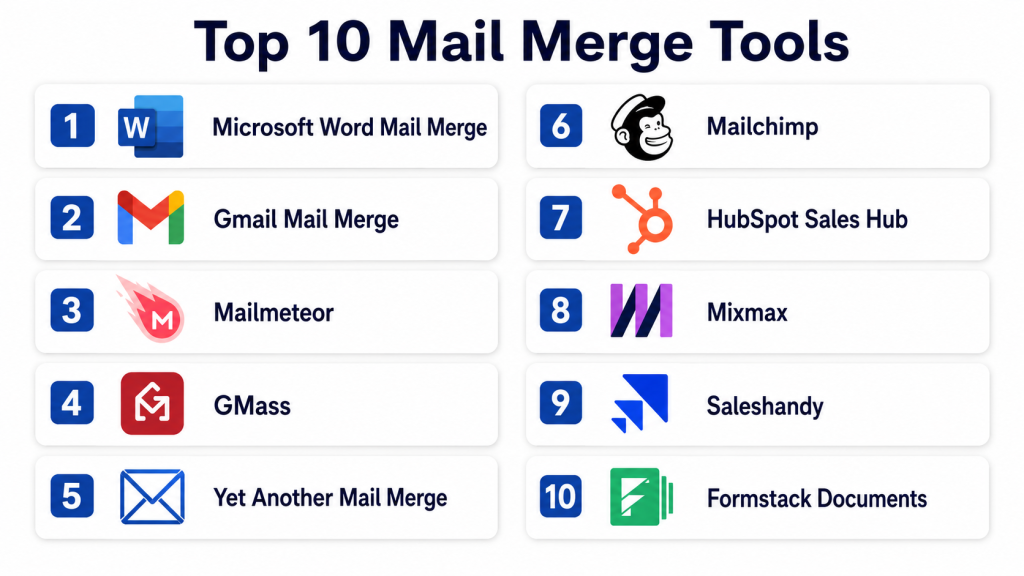
Top 10 Mail Merge Tools
1- Microsoft Word Mail Merge
Short description: Microsoft Word Mail Merge is the classic mail merge solution for creating personalized letters, labels, envelopes, documents, and email messages using data from Excel, Outlook contacts, or other structured sources. It is best for Microsoft 365 users, administrators, schools, legal teams, and operations teams that already work heavily in Word and Excel.
Key Features
- Create personalized letters, labels, envelopes, and email messages.
- Connect Word templates with Excel spreadsheets and recipient lists.
- Insert merge fields for names, addresses, greetings, custom values, and document variables.
- Preview merged records before final generation.
- Supports printed and email-based communication workflows.
- Useful for certificates, notices, letters, forms, and administrative documents.
- Works well with existing Microsoft Office document formats.
Pros
- Familiar and widely available for Microsoft 365 users.
- Strong for printed documents, labels, envelopes, and formal letters.
- Does not require a separate sales or marketing platform for basic use.
Cons
- Less modern than dedicated outreach or email automation platforms.
- Setup can feel manual for users unfamiliar with Word and Excel formatting.
- Limited campaign analytics compared with email marketing and sales engagement tools.
Platforms / Deployment
Web / Windows / macOS
Cloud / Desktop / Microsoft 365 environment
Security & Compliance
Uses Microsoft 365 account, file, and tenant security controls where applicable. Specific compliance depends on the Microsoft 365 plan and organizational configuration. Advanced controls such as MFA, access policies, encryption, and admin governance may be available through Microsoft 365. Certifications vary by Microsoft service and plan.
Integrations & Ecosystem
Microsoft Word Mail Merge works best inside the Microsoft ecosystem. It connects naturally with Excel as a data source and Outlook for email sending. Organizations already using SharePoint, OneDrive, and Microsoft 365 can fit it into document-heavy workflows.
- Microsoft Excel
- Microsoft Outlook
- Microsoft Word
- Microsoft 365
- OneDrive
- SharePoint
Support & Community
Microsoft provides broad documentation, help articles, community forums, and enterprise support through Microsoft 365 plans. Because Word Mail Merge has existed for a long time, users can find many tutorials and internal training resources.
2- Gmail Mail Merge
Short description: Gmail Mail Merge is Google’s native option for sending personalized emails to a wide audience directly from Gmail. It is best for Google Workspace users who need simple personalized announcements, updates, newsletters, and lightweight campaigns without installing a third-party add-on.
Key Features
- Send personalized emails from Gmail.
- Use recipient-specific fields for basic personalization.
- Useful for newsletters, announcements, and simple outreach.
- Works inside the Gmail compose experience.
- Reduces the need for separate tools for basic email merge workflows.
- Suitable for Google Workspace users who want native simplicity.
- Can be paired with Google Sheets and Apps Script workflows for more advanced use cases.
Pros
- Simple for users already working inside Gmail.
- No separate email platform needed for basic mail merge.
- Helpful for lightweight internal or external communication.
Cons
- Limited compared with dedicated mail merge tools.
- Advanced analytics, follow-ups, and automation may require third-party tools.
- Sending limits and Workspace plan rules must be considered.
Platforms / Deployment
Web / Android / iOS
Cloud
Security & Compliance
Security is tied to Google Account and Google Workspace controls. MFA, admin policies, access management, and data protection capabilities depend on the Workspace plan and organization settings. Specific compliance posture varies by Google Workspace configuration.
Integrations & Ecosystem
Gmail Mail Merge fits naturally into Google Workspace. Teams can use it with Gmail contacts, Google Sheets workflows, and Apps Script-based automation when more customization is needed.
- Gmail
- Google Contacts
- Google Sheets
- Google Workspace
- Google Apps Script
- Google Drive
Support & Community
Google provides product documentation and Workspace support depending on plan. Community resources are strong because Gmail and Google Sheets are widely used, but advanced automation may require technical knowledge.
3- Mailmeteor
Short description: Mailmeteor is a popular mail merge tool for Gmail, Google Sheets, Outlook, and related workflows. It is well suited for teams that want easy personalized email sending, tracking, scheduling, reply handling, and privacy-conscious permissions.
Key Features
- Send personalized campaigns from Gmail, Google Sheets, Outlook, and related tools.
- Supports merge fields for recipient-specific personalization.
- Email tracking for campaign engagement.
- Scheduling and follow-up support depending on plan.
- Unsubscribe management for outreach and campaign workflows.
- Designed for ease of use by non-technical teams.
- Useful for sales, education, recruiting, marketing, and operations teams.
Pros
- Simple interface for Gmail and spreadsheet-based users.
- Good fit for lightweight to mid-level personalized email campaigns.
- Privacy-focused positioning makes it attractive for teams cautious about permissions.
Cons
- Advanced sales engagement workflows may require more specialized platforms.
- Large enterprise governance needs may require deeper admin controls.
- Feature availability can vary by plan.
Platforms / Deployment
Web / Gmail / Google Sheets / Outlook
Cloud
Security & Compliance
Mailmeteor emphasizes minimal permissions and privacy-conscious access. Specific enterprise certifications, audit controls, or compliance details should be verified during procurement. If not confirmed for your plan, use “Not publicly stated.”
Integrations & Ecosystem
Mailmeteor is strongest for users working with Gmail, Google Sheets, and Outlook. It also fits into broader productivity workflows where spreadsheet data is the source of personalization.
- Gmail
- Google Sheets
- Google Workspace
- Outlook
- Contact lists
- CSV or spreadsheet-based recipient data
Support & Community
Mailmeteor provides documentation, product guidance, and support resources. Community strength is good among Gmail and Google Workspace users, while larger teams should confirm onboarding and support tiers before buying.
4- GMass
Short description: GMass is a Gmail-based mail merge and email outreach tool designed for sending personalized campaigns, follow-ups, and scheduled email sequences directly from Gmail. It is useful for salespeople, recruiters, founders, agencies, and outreach teams that want advanced capabilities inside the Gmail interface.
Key Features
- Send mail merge campaigns from Gmail.
- Connect campaigns with Google Sheets recipient lists.
- Automated follow-ups based on recipient behavior.
- Scheduling and recurring campaign options.
- Open, click, reply, and bounce tracking depending on configuration.
- Email verification and deliverability-focused features.
- Useful for outreach, recruiting, link building, sales, and customer communication.
Pros
- Strong for Gmail-based outreach and follow-up automation.
- Keeps users inside the familiar Gmail workflow.
- More advanced than basic native Gmail mail merge for campaign execution.
Cons
- Best suited to Gmail users, not organizations standardized on Outlook.
- Outreach-heavy features may be more than basic admin users need.
- Teams must manage sending practices carefully to protect deliverability.
Platforms / Deployment
Web / Gmail / Chrome
Cloud
Security & Compliance
GMass uses Gmail and Google account connectivity. Security and compliance details depend on account configuration, Google Workspace settings, and GMass plan capabilities. Specific certifications should be verified before enterprise adoption. If not confirmed, write “Not publicly stated.”
Integrations & Ecosystem
GMass integrates closely with Gmail and Google Sheets. It is strongest where Gmail is the primary sending tool and spreadsheets hold prospect or contact data.
- Gmail
- Google Sheets
- Google Workspace
- Chrome
- CSV-style recipient workflows
- Outreach and follow-up workflows
Support & Community
GMass has documentation, product guides, and a strong user base among Gmail power users. Support expectations should be checked by plan, especially for teams running high-volume campaigns.
5- Yet Another Mail Merge
Short description: Yet Another Mail Merge, commonly called YAMM, is a Google Sheets and Gmail mail merge tool for sending personalized emails from spreadsheet data. It is best for educators, small businesses, recruiters, nonprofit teams, and Google Workspace users who want simple spreadsheet-driven campaigns.
Key Features
- Send personalized emails from Gmail using Google Sheets data.
- Track opens, clicks, replies, bounces, and unsubscribes depending on plan.
- Uses Gmail drafts as templates.
- Real-time campaign status inside Google Sheets.
- Supports basic personalization fields from spreadsheet columns.
- Useful for newsletters, invitations, updates, and outreach.
- Simple workflow for users already comfortable with Sheets.
Pros
- Easy to understand for Google Sheets users.
- Good lightweight option for simple personalized sending.
- Useful for teams that do not need a full CRM or sales engagement suite.
Cons
- Less suitable for complex sales sequences or multi-channel outreach.
- Reporting is useful but not as deep as advanced marketing platforms.
- Spreadsheet formatting needs to be clean to avoid merge issues.
Platforms / Deployment
Web / Gmail / Google Sheets
Cloud
Security & Compliance
YAMM uses Google Workspace and Gmail connectivity. Security features and permissions should be reviewed before deployment. Specific compliance certifications are not assumed here. If not verified, write “Not publicly stated.”
Integrations & Ecosystem
YAMM is tightly connected to Google Sheets and Gmail. Its ecosystem is strongest for teams that already manage contact lists in spreadsheets.
- Gmail
- Google Sheets
- Google Workspace
- Gmail drafts
- Spreadsheet contact lists
- Google account workflows
Support & Community
YAMM provides documentation and support resources for common setup, sending, tracking, and troubleshooting workflows. Community knowledge is strong among Google Workspace users and educators.
6- Mailchimp
Short description: Mailchimp is an email marketing platform that supports personalization through merge tags, audience fields, segments, and campaign templates. It is best for marketing teams, small businesses, ecommerce brands, and creators that want mail merge-style personalization inside a broader email marketing system.
Key Features
- Personalize campaigns using merge tags and audience fields.
- Segment contacts based on profile, behavior, or campaign data.
- Email templates and campaign design tools.
- Audience management and signup forms.
- Automation journeys depending on plan.
- Reporting for campaign engagement and audience performance.
- Useful for newsletters, promotions, lifecycle messages, and customer updates.
Pros
- Strong for marketing campaigns, newsletters, and audience segmentation.
- More complete than simple mail merge tools for subscriber-based communication.
- Good template and campaign management features.
Cons
- Not ideal for simple one-off document or label mail merge.
- Sales outreach users may prefer inbox-native tools.
- Pricing and feature access can vary by list size and plan.
Platforms / Deployment
Web / iOS / Android
Cloud
Security & Compliance
Mailchimp provides account security features and privacy-related capabilities, but exact compliance and enterprise controls depend on plan and configuration. Buyers should verify SSO, audit, retention, and compliance requirements before purchase. If a specific certification is not confirmed, write “Not publicly stated.”
Integrations & Ecosystem
Mailchimp has a broad ecosystem for marketing, ecommerce, CRM, forms, and automation workflows. Its merge capabilities work best when audience data is clean and well segmented.
- Ecommerce platforms
- CRM tools
- Signup forms
- Landing pages
- Automation platforms
- Audience and contact databases
Support & Community
Mailchimp has broad documentation, onboarding resources, and a large user community. Support availability depends on plan, and teams with complex marketing operations should review support tiers before adoption.
7- HubSpot Sales Hub
Short description: HubSpot Sales Hub is not a traditional mail merge tool, but it provides CRM-based email templates, personalization tokens, sequences, tracking, and sales automation. It is best for sales teams that want personalized outreach tied directly to contact, company, deal, and activity data.
Key Features
- Use CRM data for personalized sales emails.
- Email templates and personalization tokens.
- Sales sequences for timed follow-ups.
- Contact and company record integration.
- Email tracking and engagement visibility.
- Task creation and sales workflow support.
- Useful for pipeline-driven outreach and customer follow-up.
Pros
- Strong CRM context for personalized communication.
- Good fit for teams that need more than spreadsheet-based mail merge.
- Helps align outreach with deals, contacts, and sales activities.
Cons
- May be too much for users who only need simple bulk personalization.
- Some advanced capabilities may require paid seats or higher-tier plans.
- Requires CRM data hygiene to work well.
Platforms / Deployment
Web / iOS / Android / Browser extensions
Cloud
Security & Compliance
HubSpot provides business and enterprise security features depending on plan, but buyers should verify SSO, permissions, audit logs, data residency, and compliance requirements directly for their subscription. If not confirmed for the selected plan, write “Not publicly stated.”
Integrations & Ecosystem
HubSpot Sales Hub is strongest when used as part of the HubSpot CRM ecosystem. It also connects with email inboxes and many third-party tools.
- HubSpot CRM
- Gmail
- Outlook
- Calendar tools
- Sales automation workflows
- Marketing and service tools
Support & Community
HubSpot has extensive documentation, academy-style learning resources, onboarding options, and a large partner ecosystem. Support level depends on subscription tier.
8- Mixmax
Short description: Mixmax is a sales engagement and email productivity platform that supports personalized email workflows, sequences, scheduling, tracking, and CRM-connected outreach. It is best for sales and customer-facing teams that want mail merge-style personalization with deeper engagement automation.
Key Features
- Personalized email sequences and templates.
- Email tracking for opens, clicks, and replies depending on configuration.
- Scheduling and calendar coordination.
- CRM sync for sales teams.
- Workflow automation for outreach and follow-ups.
- Team templates and productivity tools.
- Useful for account executives, SDRs, customer success, and recruiting teams.
Pros
- Strong for sales teams that need more than basic merge fields.
- Combines personalization, scheduling, tracking, and workflow automation.
- Helpful for team-based outreach consistency.
Cons
- Not ideal for printed letters, labels, or document generation.
- May be more expensive than lightweight Gmail add-ons.
- Best value depends on CRM and sales workflow maturity.
Platforms / Deployment
Web / Gmail / Outlook depending on setup
Cloud
Security & Compliance
Security features may include account controls, permissions, and enterprise options depending on plan. Buyers should verify SSO, audit logs, data handling, and compliance requirements directly. If not confirmed, write “Not publicly stated.”
Integrations & Ecosystem
Mixmax fits into sales engagement ecosystems where inbox activity, CRM data, calendars, and team templates need to work together.
- Gmail
- Outlook
- Salesforce
- Calendar tools
- Sales workflows
- Productivity integrations
Support & Community
Mixmax provides product documentation and customer support resources. Sales teams should check onboarding, admin support, and enterprise support availability before buying.
9- Saleshandy
Short description: Saleshandy is an email outreach and sales engagement platform that supports personalized email campaigns, sequences, tracking, and deliverability-focused workflows. It is best for outbound sales teams, agencies, recruiters, and growth teams that need scalable personalized email outreach.
Key Features
- Personalized email campaigns using merge fields.
- Multi-step email sequences and follow-ups.
- Email tracking and campaign analytics.
- Prospect list management and campaign controls.
- Deliverability-focused sending practices.
- Team collaboration features depending on plan.
- Useful for outbound sales, recruiting, partnerships, and agency outreach.
Pros
- Strong for outreach teams that need structured sequences.
- More scalable than simple spreadsheet-based mail merge.
- Practical analytics for campaign optimization.
Cons
- Not designed for document mail merge or printed communications.
- Requires careful sending strategy to avoid deliverability issues.
- May be more than needed for occasional mail merge users.
Platforms / Deployment
Web
Cloud
Security & Compliance
Security and compliance details should be verified for the selected plan. Buyers should check MFA, SSO, role permissions, data handling, and audit requirements before adoption. If not confirmed, write “Not publicly stated.”
Integrations & Ecosystem
Saleshandy is designed around outbound email workflows and can connect with inboxes, prospecting workflows, and sales operations tools.
- Gmail or Google Workspace
- Outlook or Microsoft 365
- CRM workflows
- CSV contact lists
- Sales outreach processes
- Team campaign management
Support & Community
Saleshandy provides documentation and customer support resources. Agencies and outbound teams should review support response levels and onboarding options by plan.
10- Formstack Documents
Short description: Formstack Documents is a document generation and automation platform that supports mail merge-style workflows for PDFs, contracts, reports, proposals, invoices, and forms. It is best for operations, legal, HR, finance, healthcare administration, education, and sales teams that need document automation rather than simple email personalization.
Key Features
- Generate documents from form, CRM, spreadsheet, or system data.
- Supports templates for PDFs, DOCX files, contracts, reports, and proposals.
- Merge fields for personalized document creation.
- Workflow automation for sending, storing, and routing documents.
- Can connect with e-signature and business process tools.
- Useful for high-volume operational document workflows.
- Supports no-code document automation for business users.
Pros
- Strong for document-heavy workflows beyond email.
- Useful for contracts, invoices, certificates, and compliance documents.
- Fits business process automation better than basic mail merge tools.
Cons
- Not the best choice for simple Gmail or Outlook email merges.
- Setup may require more planning than lightweight add-ons.
- Pricing and complexity may be higher for small occasional users.
Platforms / Deployment
Web
Cloud
Security & Compliance
Formstack provides business workflow and document automation capabilities, but specific compliance and security details should be verified by plan and use case. Buyers should check SSO, encryption, role access, audit logs, HIPAA, and data retention requirements if relevant. If not confirmed, write “Not publicly stated.”
Integrations & Ecosystem
Formstack Documents is strongest in workflow automation environments where documents need to be generated from business data and passed to storage, approval, CRM, or signature systems.
- Salesforce
- Google Sheets
- Microsoft tools
- Forms
- E-signature tools
- Cloud storage platforms
Support & Community
Formstack provides product documentation, onboarding resources, and customer support options. Larger teams should review implementation assistance, admin support, and workflow design help before adoption.
Comparison Table
| Tool Name | Best For | Platform Supported | Deployment | Standout Feature | Public Rating |
|---|---|---|---|---|---|
| Microsoft Word Mail Merge | Formal letters, labels, envelopes, office documents | Web, Windows, macOS | Cloud / Desktop | Classic Word and Excel mail merge workflow | N/A |
| Gmail Mail Merge | Simple Gmail-based personalized sending | Web, Android, iOS | Cloud | Native Gmail personalization | N/A |
| Mailmeteor | Gmail, Sheets, and Outlook-based personalized campaigns | Web, Gmail, Google Sheets, Outlook | Cloud | Easy privacy-conscious mail merge | N/A |
| GMass | Gmail outreach and follow-up automation | Web, Gmail, Chrome | Cloud | Advanced Gmail mail merge and sequences | N/A |
| Yet Another Mail Merge | Google Sheets-based Gmail campaigns | Web, Gmail, Google Sheets | Cloud | Spreadsheet-driven Gmail campaign tracking | N/A |
| Mailchimp | Marketing campaigns and audience personalization | Web, iOS, Android | Cloud | Merge tags and audience segmentation | N/A |
| HubSpot Sales Hub | CRM-based sales personalization | Web, iOS, Android | Cloud | CRM tokens and sales sequences | N/A |
| Mixmax | Sales engagement and inbox productivity | Web, Gmail, Outlook | Cloud | Personalized sales sequences with workflow tools | N/A |
| Saleshandy | Outbound email outreach at scale | Web | Cloud | Personalized cold email sequences | N/A |
| Formstack Documents | Document generation and PDF workflows | Web | Cloud | Mail merge-style document automation | N/A |
Evaluation & Scoring of Mail Merge Tools
| Tool Name | Core 25% | Ease 15% | Integrations 15% | Security 10% | Performance 10% | Support 10% | Value 15% | Weighted Total |
| Microsoft Word Mail Merge | 8 | 7 | 8 | 8 | 8 | 8 | 9 | 8.0 |
| Gmail Mail Merge | 7 | 9 | 7 | 8 | 8 | 7 | 8 | 7.7 |
| Mailmeteor | 8 | 9 | 8 | 8 | 8 | 8 | 8 | 8.1 |
| GMass | 9 | 8 | 8 | 7 | 8 | 8 | 8 | 8.2 |
| Yet Another Mail Merge | 8 | 9 | 8 | 7 | 8 | 8 | 8 | 8.1 |
| Mailchimp | 8 | 8 | 9 | 8 | 8 | 8 | 7 | 8.1 |
| HubSpot Sales Hub | 9 | 8 | 10 | 8 | 8 | 9 | 7 | 8.6 |
| Mixmax | 8 | 8 | 9 | 8 | 8 | 8 | 7 | 8.1 |
| Saleshandy | 8 | 8 | 8 | 7 | 8 | 8 | 8 | 7.9 |
| Formstack Documents | 9 | 7 | 9 | 8 | 8 | 8 | 7 | 8.1 |
These scores are comparative, not absolute. A higher score does not mean the tool is best for every organization. For example, HubSpot may score highly for CRM-connected sales teams, while Microsoft Word Mail Merge may be better for printed letters and formal documents. Security scores are conservative where detailed controls are plan-dependent or not clearly stated. Buyers should use this table as a shortlist guide and validate fit through a pilot.
Which Mail Merge Tool Is Right for You?
Solo / Freelancer
Solo users usually need speed, simplicity, and low cost. If you mainly send personalized Gmail messages, Mailmeteor, YAMM, or GMass are strong options. If you create letters, certificates, proposals, or labels, Microsoft Word Mail Merge may be enough.
For freelancers doing outreach, GMass or Saleshandy can help with follow-ups and campaign tracking. For basic newsletters or audience updates, Mailchimp may be easier than managing spreadsheets manually.
SMB
Small and midsize businesses should choose based on workflow type. If the team uses Google Workspace, Mailmeteor, YAMM, and GMass are practical. If the team uses Microsoft 365, Microsoft Word Mail Merge and Outlook-centered workflows are natural starting points.
SMBs with marketing needs should consider Mailchimp, while sales-led SMBs should evaluate HubSpot Sales Hub, Mixmax, or Saleshandy. If document generation is part of the workflow, Formstack Documents becomes more relevant.
Mid-Market
Mid-market teams often need shared templates, team controls, CRM sync, reporting, and better operational consistency. HubSpot Sales Hub is a strong choice when CRM data is central. Mixmax and Saleshandy are useful for structured sales outreach.
For marketing personalization, Mailchimp can support audience-based campaigns. For operations, HR, legal, or finance document automation, Formstack Documents is better than simple inbox-based merge tools.
Enterprise
Enterprises should focus on governance, permissions, SSO, audit visibility, data handling, admin controls, and integration architecture. HubSpot Sales Hub, Microsoft Word Mail Merge inside Microsoft 365, Mailchimp for marketing workflows, and Formstack Documents are stronger candidates depending on use case.
Enterprise teams should avoid choosing based only on ease of sending. They should evaluate legal approval, compliance, data retention, deliverability, consent, CRM accuracy, and user access policies before deployment.
Budget vs Premium
Budget-friendly users can start with Gmail Mail Merge, Microsoft Word Mail Merge, YAMM, or Mailmeteor. These tools are often enough for basic personalization and lightweight campaigns.
Premium options such as HubSpot Sales Hub, Mixmax, Saleshandy, and Formstack Documents make sense when workflows need automation, CRM sync, reporting, team management, or document generation at scale.
Feature Depth vs Ease of Use
For ease of use, Gmail Mail Merge, Mailmeteor, and YAMM are strong. For deeper features, GMass, HubSpot, Mixmax, and Saleshandy provide more automation and tracking.
For document workflows, Formstack Documents offers more depth than standard email merge tools, but it requires clearer workflow planning.
Integrations & Scalability
If integrations matter, start by identifying the system of record. If contact data lives in Google Sheets, Gmail-based tools are simple. If it lives in a CRM, HubSpot, Mixmax, Saleshandy, or Formstack may be better.
For scalable workflows, look for APIs, CRM sync, template governance, team permissions, automation triggers, and reporting exports.
Security & Compliance Needs
Teams handling sensitive data should evaluate permission scopes, encryption, access control, audit logs, user roles, opt-out handling, and data retention. For regulated industries, do not assume compliance from marketing language. Ask vendors to confirm certifications, data processing terms, and plan-specific controls.
For simple low-risk communication, Gmail or Word-based workflows may be enough. For regulated document automation, evaluate Formstack Documents or enterprise-grade platforms carefully.
Frequently Asked Questions
1. What is a mail merge tool?
A mail merge tool combines a reusable template with recipient or record data. It creates personalized emails, letters, labels, documents, certificates, or PDFs without manually editing each version.
2. Are mail merge tools only for email?
No. Mail merge can be used for emails, printed letters, envelopes, labels, certificates, contracts, invoices, proposals, and PDF documents. Some tools focus on email, while others focus on document automation.
3. What is the best mail merge tool for Gmail?
For Gmail users, Mailmeteor, GMass, YAMM, and Gmail’s native mail merge are common options. The right choice depends on whether you need simple sending, tracking, follow-ups, or more advanced outreach automation.
4. What is the best mail merge tool for Microsoft users?
Microsoft Word Mail Merge is a practical option for Microsoft 365 users who work with Word, Excel, and Outlook. It is especially useful for formal documents, labels, envelopes, and office communication.
5. How much do mail merge tools cost?
Pricing varies by tool, plan, sending volume, team size, and feature depth. Simple tools may offer free or low-cost plans, while CRM, sales engagement, and document automation platforms usually cost more.
6. Are mail merge tools secure?
Security depends on the platform, permissions, data handling, and account configuration. Buyers should review MFA, SSO, encryption, audit logs, access controls, and vendor data processing policies before using sensitive data.
7. Can mail merge tools hurt email deliverability?
Yes, poor sending practices can harm deliverability. Sending too many emails too quickly, using low-quality lists, ignoring opt-outs, and sending irrelevant messages can increase bounces, spam complaints, and domain reputation risk.
8. Do mail merge tools support attachments?
Many tools support attachments, but the level of control varies. Some support static attachments, while others support personalized attachments or document generation based on recipient data.
9. What are common mail merge mistakes?
Common mistakes include messy spreadsheet fields, missing personalization data, broken merge tags, duplicate contacts, no unsubscribe process, weak subject lines, and sending without testing a small sample first.
10. Can mail merge tools integrate with CRM systems?
Yes, several tools integrate with CRM systems or work inside CRM platforms. HubSpot, Mixmax, Saleshandy, Formstack Documents, and other platforms can connect personalization workflows with contact and deal data.
Conclusion
Mail merge tools remain essential because they solve a simple but high-value problem: sending or generating personalized communication without repetitive manual work. The best tool depends on your workflow. Gmail users may prefer Mailmeteor, GMass, YAMM, or Gmail Mail Merge. Microsoft users may rely on Word Mail Merge for letters, labels, and formal documents. Marketing teams may choose Mailchimp, sales teams may prefer HubSpot, Mixmax, or Saleshandy, and operations-heavy teams may need Formstack Documents for document automation. Before choosing, shortlist two or three tools based on your platform, test them with real data, review permissions and security needs, validate integrations, and run a small pilot before scaling across the team.
