Introduction
Code review tools are platforms that help development teams systematically review code changes before merging them into the main codebase. They enable structured collaboration, catch bugs early, enforce coding standards, and improve overall software quality. Instead of relying on manual checks or informal reviews, these tools provide workflows, automation, and visibility across the development lifecycle.
In today’s fast-moving development environments, where teams deploy frequently and work across distributed locations, code review tools are no longer optional—they are essential. They reduce production issues, improve security posture, and help maintain maintainable, scalable codebases.
Common real-world use cases:
- Reviewing pull requests and merge requests
- Enforcing coding standards and best practices
- Automating static code analysis and security checks
- Tracking changes for compliance and auditing
- Improving team collaboration and onboarding
What buyers should evaluate:
- Integration with Git and version control systems
- Automation capabilities (CI/CD, linting, AI suggestions)
- Ease of use and developer experience
- Scalability for large teams and repositories
- Security features (SSO, audit logs, RBAC)
- Custom workflows and approval processes
- Reporting and analytics
- Performance with large codebases
- Pricing and licensing flexibility
Best for: Development teams, DevOps engineers, engineering managers, and enterprises building scalable software systems.
Not ideal for: Solo developers or very small projects where lightweight Git workflows or direct commits are sufficient without formal review processes.
Key Trends in Code Review Tools
- AI-powered code suggestions improving review speed and accuracy
- Automated security scanning integrated into review workflows
- Shift-left testing and validation during early development stages
- Cloud-native collaboration platforms replacing legacy tools
- Deep CI/CD integration for continuous feedback loops
- Real-time collaboration features like live comments and suggestions
- Support for multi-language and microservices architectures
- Code quality analytics dashboards for tracking trends
- Developer-first UX improvements reducing friction
- Hybrid deployment models supporting both cloud and on-prem
How We Selected These Tools (Methodology)
- High market adoption and developer popularity
- Strong feature sets covering full review workflows
- Proven reliability and scalability in production environments
- Security readiness and enterprise-grade controls
- Integration depth with CI/CD, SCM, and DevOps tools
- Fit across startups, SMBs, and enterprises
- Developer experience and usability
- Flexibility in deployment models
- Active product development and innovation
- Community and support ecosystem strength
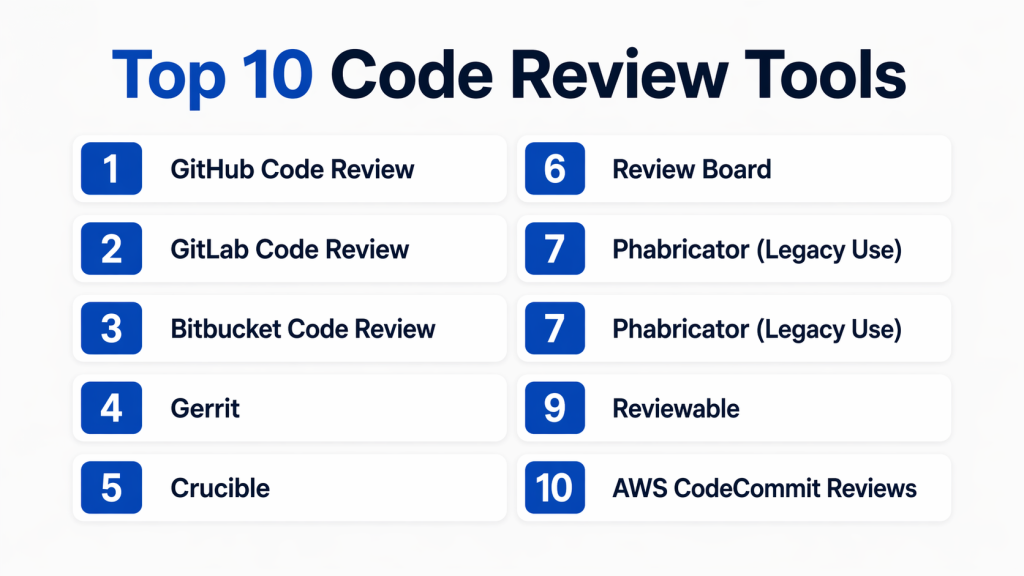
Top 10 Code Review Tools Tools
#1 — GitHub Code Review
Short description: GitHub’s built-in code review system is based on pull requests and is widely adopted across teams of all sizes. It provides seamless collaboration, integrates deeply with repositories, and supports automation through workflows. Ideal for teams already using GitHub for version control and DevOps pipelines.
Key Features
- Pull request-based review workflows
- Inline comments and suggestions
- Code owners and approval rules
- Automated checks with workflows
- Security scanning integration
- Review history tracking
Pros
- Extremely easy to adopt
- Massive ecosystem and integrations
Cons
- Advanced analytics are limited
- Enterprise configurations can be complex
Platforms / Deployment
- Web / Cloud
Security & Compliance
- SSO/SAML, MFA, encryption, audit logs
Integrations & Ecosystem
Strong integration with modern DevOps stacks and automation tools.
- CI/CD pipelines
- Issue tracking systems
- Security scanners
- IDE integrations
Support & Community
Very strong community with extensive documentation and global adoption.
#2 — GitLab Code Review
Short description: GitLab provides an integrated DevOps platform with built-in code review capabilities through merge requests. It combines version control, CI/CD, security, and collaboration into a single platform, making it ideal for teams seeking an all-in-one solution.
Key Features
- Merge request workflows
- Integrated CI/CD pipelines
- Code quality and security scanning
- Approval rules and workflows
- Built-in DevOps lifecycle management
Pros
- All-in-one DevOps platform
- Strong automation capabilities
Cons
- Interface can feel complex
- Learning curve for new users
Platforms / Deployment
- Cloud / Self-hosted
Security & Compliance
- SSO, RBAC, audit logs
Integrations & Ecosystem
Supports a wide DevOps ecosystem and infrastructure integrations.
- Kubernetes integration
- CI/CD pipelines
- Security tools
Support & Community
Large enterprise and open-source community with solid support options.
#3 — Bitbucket Code Review
Short description: Bitbucket offers pull request-based code reviews with tight integration into the Atlassian ecosystem. It is ideal for teams using Jira and other Atlassian tools for project and issue management.
Key Features
- Pull request reviews
- Inline commenting
- Jira integration
- Branch permissions
- CI/CD pipelines
Pros
- Strong integration with Atlassian tools
- Good for enterprise workflows
Cons
- Limited flexibility outside ecosystem
- UI can feel cluttered
Platforms / Deployment
- Cloud / Self-hosted
Security & Compliance
- SSO, MFA, audit logs
Integrations & Ecosystem
Works best within Atlassian-centric environments.
- Jira integration
- DevOps tools
- CI/CD pipelines
Support & Community
Enterprise-grade support with strong documentation.
#4 — Gerrit
Short description: Gerrit is a powerful, Git-based code review tool designed for large-scale development environments. It offers fine-grained control and strict review workflows, making it ideal for organizations requiring strong governance.
Key Features
- Patch-based review system
- Fine-grained access control
- Workflow automation
- Inline commenting
- Plugin ecosystem
Pros
- Highly customizable workflows
- Strong control and governance
Cons
- Steep learning curve
- Complex setup
Platforms / Deployment
- Self-hosted
Security & Compliance
- RBAC, audit logs
Integrations & Ecosystem
Extensible with plugins and integrates with development pipelines.
- Git integration
- CI/CD tools
- Plugin extensions
Support & Community
Active open-source community with enterprise adoption.
#5 — Crucible
Short description: Crucible is a collaborative code review tool focused on peer reviews and audit tracking. It integrates with Atlassian tools and is often used in regulated environments.
Key Features
- Peer review workflows
- Inline comments
- Audit trails
- Reporting features
- Jira integration
Pros
- Strong audit capabilities
- Good for compliance-heavy environments
Cons
- Older user interface
- Limited modern updates
Platforms / Deployment
- Self-hosted
Security & Compliance
- RBAC, audit logs
Integrations & Ecosystem
Best suited for Atlassian environments.
- Jira integration
- Dev tools
Support & Community
Enterprise-focused support with moderate community activity.
#6 — Review Board
Short description: Review Board is a flexible web-based code review tool supporting multiple version control systems. It is suitable for teams needing customizable workflows across diverse repositories.
Key Features
- Multi-SCM support
- Inline reviews
- Custom workflows
- Reporting tools
Pros
- Flexible and extensible
- Supports multiple repositories
Cons
- Outdated interface
- Setup complexity
Platforms / Deployment
- Self-hosted
Security & Compliance
- RBAC
Integrations & Ecosystem
Supports integration with various development tools.
- SCM systems
- CI/CD tools
Support & Community
Moderate community support with stable documentation.
#7 — Phabricator (Legacy Use)
Short description: Phabricator is a suite of development tools that includes code review functionality. While no longer actively maintained, it is still used in legacy systems requiring robust workflows.
Key Features
- Differential code review
- Workflow automation
- Inline comments
- Task management
Pros
- Comprehensive feature set
- Strong workflow capabilities
Cons
- No active maintenance
- Migration challenges
Platforms / Deployment
- Self-hosted
Security & Compliance
- Not publicly stated
Integrations & Ecosystem
Supports integrations with development tools and APIs.
- Dev tools
- APIs
Support & Community
Declining community with limited updates.
#8 — CodeScene
Short description: CodeScene focuses on behavioral analysis of code and identifies risks, hotspots, and technical debt. It complements traditional code reviews with data-driven insights.
Key Features
- Code health analysis
- Risk detection
- Behavioral analytics
- Visualization dashboards
Pros
- Unique analytics approach
- Helps prioritize improvements
Cons
- Not a traditional review tool
- Requires learning curve
Platforms / Deployment
- Cloud / Self-hosted
Security & Compliance
- Not publicly stated
Integrations & Ecosystem
Integrates with version control and CI tools.
- Git systems
- CI/CD tools
Support & Community
Growing niche community with specialized use cases.
#9 — Reviewable
Short description: Reviewable enhances GitHub’s pull request experience by adding structured review tracking and improved collaboration features.
Key Features
- Review progress tracking
- Inline discussions
- File-level status tracking
- GitHub integration
Pros
- Improves GitHub workflows
- Better visibility into reviews
Cons
- Dependent on GitHub
- Limited standalone capability
Platforms / Deployment
- Cloud
Security & Compliance
- Not publicly stated
Integrations & Ecosystem
Focused on enhancing GitHub workflows.
- GitHub integration
- Dev tools
Support & Community
Moderate support with niche adoption.
#10 — AWS CodeCommit Reviews
Short description: AWS CodeCommit provides secure code review capabilities integrated with AWS services. It is suitable for teams already operating within the AWS ecosystem.
Key Features
- Pull request reviews
- IAM-based access control
- Integration with AWS services
- Notifications and alerts
Pros
- Strong AWS integration
- High security standards
Cons
- Limited outside AWS ecosystem
- UI not as modern
Platforms / Deployment
- Cloud
Security & Compliance
- IAM, encryption
Integrations & Ecosystem
Deep integration with AWS infrastructure and services.
- AWS CI/CD tools
- Cloud services
Support & Community
Enterprise-grade AWS support and documentation.
Comparison Table (Top 10)
| Tool Name | Best For | Platform(s) Supported | Deployment | Standout Feature | Public Rating |
|---|---|---|---|---|---|
| GitHub | Developers | Web | Cloud | Pull request workflow | N/A |
| GitLab | DevOps teams | Web | Hybrid | Integrated CI/CD | N/A |
| Bitbucket | Atlassian users | Web | Hybrid | Jira integration | N/A |
| Gerrit | Large teams | Web | Self-hosted | Fine-grained control | N/A |
| Crucible | Enterprises | Web | Self-hosted | Audit trails | N/A |
| Review Board | Flexible teams | Web | Self-hosted | Multi-SCM support | N/A |
| Phabricator | Legacy users | Web | Self-hosted | Workflow automation | N/A |
| CodeScene | Analytics users | Web | Hybrid | Code insights | N/A |
| Reviewable | GitHub users | Web | Cloud | Review tracking | N/A |
| AWS CodeCommit | AWS users | Web | Cloud | IAM integration | N/A |
Evaluation & Scoring of Code Review Tools
| Tool Name | Core (25%) | Ease (15%) | Integrations (15%) | Security (10%) | Performance (10%) | Support (10%) | Value (15%) | Weighted Total (0–10) |
|---|---|---|---|---|---|---|---|---|
| GitHub | 9 | 9 | 10 | 9 | 9 | 9 | 8 | 9.1 |
| GitLab | 9 | 7 | 9 | 9 | 8 | 8 | 8 | 8.4 |
| Bitbucket | 8 | 8 | 9 | 8 | 8 | 8 | 8 | 8.1 |
| Gerrit | 8 | 6 | 7 | 8 | 8 | 7 | 7 | 7.4 |
| Crucible | 7 | 7 | 8 | 8 | 7 | 7 | 7 | 7.3 |
| Review Board | 7 | 6 | 7 | 7 | 7 | 6 | 7 | 6.8 |
| Phabricator | 7 | 6 | 7 | 6 | 7 | 6 | 7 | 6.7 |
| CodeScene | 8 | 7 | 7 | 7 | 8 | 7 | 7 | 7.5 |
| Reviewable | 7 | 8 | 8 | 7 | 7 | 7 | 7 | 7.4 |
| AWS CodeCommit | 8 | 7 | 8 | 9 | 8 | 8 | 7 | 7.9 |
How to interpret scores:
- Scores are comparative across tools, not absolute
- 8+ indicates strong overall capability
- 7–8 shows balanced tools with trade-offs
- Below 7 suggests niche or specialized use
- Always prioritize fit over raw score
Which Code Review Tools Tool Is Right for You?
Solo / Freelancer
Use GitHub or Reviewable for simplicity, minimal setup, and ease of collaboration.
SMB
GitLab or Bitbucket offer balanced features with strong integrations and scalability.
Mid-Market
GitLab and CodeScene provide deeper insights and better scalability for growing teams.
Enterprise
Gerrit, Crucible, and AWS CodeCommit are ideal for strict workflows, governance, and compliance.
Budget vs Premium
- Budget: Open-source tools like Gerrit
- Premium: GitLab, AWS solutions
Feature Depth vs Ease of Use
- Easy: GitHub
- Advanced: Gerrit, GitLab
Integrations & Scalability
Choose tools that integrate deeply with CI/CD, cloud platforms, and DevOps ecosystems.
Security & Compliance Needs
Enterprise users should prioritize tools with audit logs, RBAC, and identity management.
Frequently Asked Questions (FAQs)
1. What is a code review tool?
A code review tool helps developers review, comment, and approve code changes before merging them into the main branch.
2. Why are code reviews important?
They improve code quality, catch bugs early, and ensure adherence to coding standards.
3. Do all teams need code review tools?
Not necessarily, but they are highly beneficial for teams collaborating on shared codebases.
4. Can code review tools integrate with CI/CD?
Yes, most modern tools integrate with CI/CD pipelines for automated checks.
5. Are there free code review tools?
Yes, tools like GitHub and Gerrit offer free tiers or open-source options.
6. How do AI features help in code reviews?
They identify bugs, suggest improvements, and automate repetitive checks.
7. What are common mistakes when choosing a tool?
Ignoring integrations, scalability, and developer experience.
8. Is migration between tools difficult?
It depends on repository size and workflow complexity.
9. Do these tools support security compliance?
Many enterprise tools include features like audit logs and access controls.
10. What alternatives exist to code review tools?
Manual reviews, pair programming, or IDE-based collaboration.
Conclusion
Code review tools play a critical role in modern software development by improving code quality, enabling collaboration, and reducing risks before deployment. The right tool depends on your team size, development workflow, and integration requirements. While platforms like GitHub and GitLab provide strong all-in-one capabilities, specialized tools offer deeper control or analytics depending on your needs. There is no single “best” option—only the one that aligns with your ecosystem and goals. Start by shortlisting a few tools, test them in real workflows, and evaluate how well they integrate with your CI/CD, security, and team collaboration practices before making a final decision.
