Introduction
Whiteboard collaboration tools are digital platforms that replicate the experience of a physical whiteboard—allowing teams to brainstorm, plan, and collaborate visually in real time from anywhere. These tools go beyond simple drawing, offering templates, integrations, and AI-powered assistance to streamline ideation and execution.
distributed work is no longer optional—it’s the default. Teams need fast, intuitive ways to collaborate asynchronously and synchronously across time zones. Whiteboard tools have evolved into central hubs for product planning, design thinking, agile workflows, and strategic discussions.
Common use cases include:
- Brainstorming sessions and mind mapping
- Agile sprint planning and retrospectives
- UX/UI wireframing and design collaboration
- Remote workshops and training sessions
- Strategic planning and roadmapping
What buyers should evaluate:
- Real-time collaboration performance
- Ease of use and onboarding
- Template library and flexibility
- Integrations with productivity tools
- Security and compliance features
- Scalability across teams
- Offline and mobile support
- AI-powered features
- Pricing and licensing models
Best for: Remote teams, product managers, designers, educators, consultants, and enterprises managing distributed collaboration.
Not ideal for: Teams that rely heavily on structured documentation or require strict version control—traditional document tools or project management platforms may be better suited.
Key Trends in Whiteboard Collaboration Tools
- AI-assisted ideation: Tools now auto-generate diagrams, summaries, and workflows from prompts.
- Embedded collaboration hubs: Whiteboards are becoming central workspaces—not just add-ons.
- Deeper integrations: Seamless syncing with project management, design, and dev tools.
- Real-time + async hybrid workflows: Support for both live sessions and independent contributions.
- Enterprise-grade security: Increased demand for SSO, RBAC, audit logs, and compliance.
- Template marketplaces: Community-driven templates for faster onboarding.
- Cross-device optimization: Mobile and tablet experiences are now fully capable.
- Multiplayer performance scaling: Handling hundreds of concurrent users smoothly.
- Visual AI copilots: Suggest layouts, cluster ideas, and generate diagrams automatically.
How We Selected These Tools (Methodology)
- Evaluated market adoption and brand recognition
- Assessed feature completeness and innovation
- Reviewed real-time performance and scalability signals
- Considered security posture and enterprise readiness
- Analyzed integration ecosystems and APIs
- Ensured coverage across SMB, mid-market, and enterprise needs
- Included tools with distinct positioning (design-first, dev-first, etc.)
- Prioritized active development and modern relevance
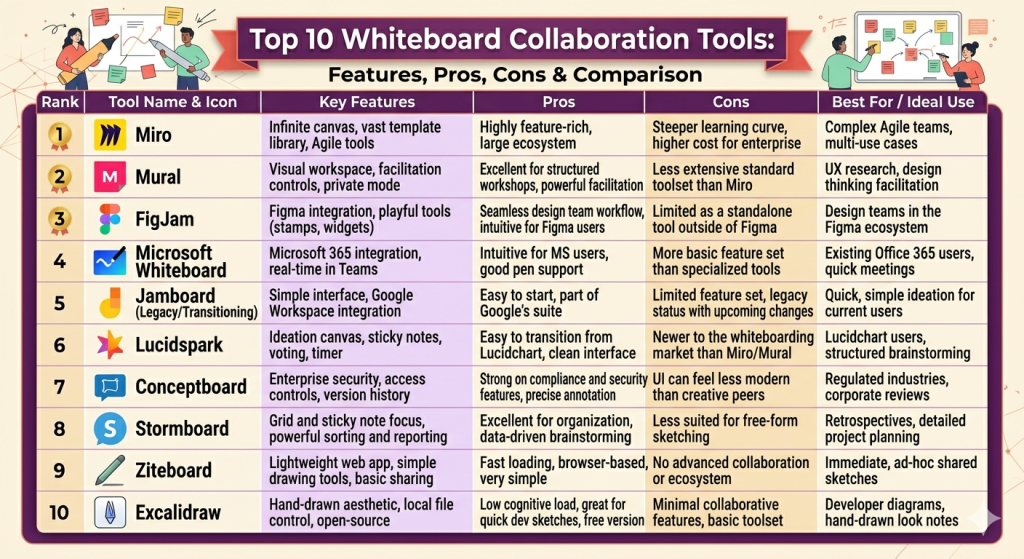
Top 10 Whiteboard Collaboration Tools Tools
#1 — Miro
Short description: A widely adopted visual collaboration platform designed for teams of all sizes. Known for its extensive template ecosystem and scalability.
Key Features
- Infinite canvas with real-time collaboration
- Large template library (agile, UX, strategy)
- AI-powered idea clustering and summaries
- Voting, timers, and workshop tools
- Presentation mode and frames
- Advanced permissions and roles
- Integration with major productivity tools
Pros
- Highly scalable for enterprise use
- Strong template ecosystem
Cons
- Can feel overwhelming for new users
- Pricing increases with advanced features
Platforms / Deployment
Web / Windows / macOS / iOS / Android
Cloud
Security & Compliance
SSO/SAML, MFA, encryption, audit logs, RBAC
SOC 2, GDPR
Integrations & Ecosystem
Miro integrates deeply with productivity and design ecosystems.
- Slack
- Microsoft Teams
- Jira
- Google Workspace
- Figma
- API access
Support & Community
Strong documentation, enterprise support tiers, and a large global community.
#2 — Mural
Short description: A collaborative whiteboarding tool focused on structured facilitation and workshops.
Key Features
- Facilitator tools (timers, voting)
- Visual frameworks and templates
- Collaboration zones and private areas
- Commenting and feedback tools
- Workshop mode
- Enterprise controls
Pros
- Excellent for structured workshops
- Strong facilitation tools
Cons
- Less flexible than some competitors
- Smaller ecosystem
Platforms / Deployment
Web / Windows / macOS / iOS
Cloud
Security & Compliance
SSO/SAML, encryption
SOC 2
Integrations & Ecosystem
- Microsoft Teams
- Slack
- Jira
- Google Drive
Support & Community
Good onboarding and enterprise support; moderate community presence.
#3 — FigJam
Short description: A whiteboarding tool by Figma, tailored for designers and product teams.
Key Features
- Seamless integration with design workflows
- Interactive widgets (stickers, polls)
- Real-time cursor presence
- Audio chat integration
- Templates for UX workflows
- Simple UI
Pros
- Excellent for design collaboration
- Easy to use
Cons
- Limited enterprise features
- Less suited for non-design teams
Platforms / Deployment
Web / macOS / Windows / iOS
Cloud
Security & Compliance
SSO, encryption
Not publicly stated
Integrations & Ecosystem
- Figma ecosystem
- Slack
- Jira
Support & Community
Strong community due to Figma user base; good documentation.
#4 — Microsoft Whiteboard
Short description: A native whiteboard tool integrated into the Microsoft ecosystem.
Key Features
- Deep integration with Teams
- Sticky notes and drawing tools
- Cloud syncing
- Templates
- Real-time collaboration
Pros
- Seamless for Microsoft users
- Included in many enterprise plans
Cons
- Limited advanced features
- Less flexible than competitors
Platforms / Deployment
Web / Windows / iOS
Cloud
Security & Compliance
Microsoft enterprise security stack (varies by tenant)
Integrations & Ecosystem
- Microsoft Teams
- OneDrive
- Outlook
Support & Community
Enterprise-grade support via Microsoft; large user base.
#5 — Jamboard (Legacy/Transitioning)
Short description: A simple whiteboarding tool historically tied to Google Workspace.
Key Features
- Basic drawing and notes
- Google integration
- Simple collaboration
Pros
- Easy to use
- Lightweight
Cons
- Limited features
- Being phased out/replaced
Platforms / Deployment
Web / iOS / Android
Cloud
Security & Compliance
Google Workspace standards
Integrations & Ecosystem
- Google Drive
- Google Meet
Support & Community
Varies; transitioning product.
#6 — Lucidspark
Short description: A visual collaboration tool from Lucid, focused on ideation and diagramming.
Key Features
- Sticky notes and freeform canvas
- Voting and sorting tools
- Integration with Lucidchart
- Templates for planning
- Real-time collaboration
Pros
- Strong diagramming integration
- Easy transition from ideation to execution
Cons
- Limited compared to Miro in scale
- Some features locked behind tiers
Platforms / Deployment
Web / Windows / macOS
Cloud
Security & Compliance
SSO, encryption
SOC 2
Integrations & Ecosystem
- Lucidchart
- Slack
- Microsoft Teams
Support & Community
Good documentation; moderate community.
#7 — Conceptboard
Short description: A secure online whiteboard designed for enterprise collaboration and compliance.
Key Features
- Real-time collaboration
- Secure commenting and feedback
- Task management overlays
- Version control
- GDPR-focused design
Pros
- Strong security posture
- Enterprise-friendly
Cons
- UI feels dated
- Smaller ecosystem
Platforms / Deployment
Web
Cloud
Security & Compliance
GDPR, encryption, audit logs
Integrations & Ecosystem
- Jira
- Trello
- Slack
Support & Community
Enterprise support available; smaller community.
#8 — Stormboard
Short description: A structured brainstorming and reporting tool.
Key Features
- Idea management system
- Reporting and export tools
- Templates
- Task tracking
- Collaboration tools
Pros
- Strong reporting features
- Structured workflows
Cons
- Less flexible canvas
- UI not as modern
Platforms / Deployment
Web / Windows
Cloud
Security & Compliance
SSO, encryption
Not publicly stated
Integrations & Ecosystem
- Microsoft Teams
- Jira
Support & Community
Good enterprise support; niche community.
#9 — Ziteboard
Short description: A lightweight online whiteboard focused on simplicity and speed.
Key Features
- Minimalist canvas
- Real-time drawing
- Voice/video integration
- Low bandwidth usage
Pros
- Very lightweight
- Fast performance
Cons
- Limited advanced features
- Minimal integrations
Platforms / Deployment
Web
Cloud
Security & Compliance
Not publicly stated
Integrations & Ecosystem
Limited integrations
Support & Community
Basic support; small user base.
#10 — Excalidraw
Short description: An open-source whiteboard tool known for its hand-drawn aesthetic and simplicity.
Key Features
- Open-source
- Hand-drawn style visuals
- Local-first storage option
- Real-time collaboration
- Lightweight interface
Pros
- Free and open-source
- Privacy-friendly
Cons
- Limited enterprise features
- Minimal integrations
Platforms / Deployment
Web
Cloud / Self-hosted
Security & Compliance
Varies / N/A
Integrations & Ecosystem
- GitHub ecosystem
- API (limited)
Support & Community
Strong open-source community; documentation available.
Comparison Table (Top 10)
| Tool Name | Best For | Platform(s) Supported | Deployment | Standout Feature | Public Rating |
|---|---|---|---|---|---|
| Miro | Enterprise teams | Web, Desktop, Mobile | Cloud | Template ecosystem | N/A |
| Mural | Workshops | Web, Desktop | Cloud | Facilitation tools | N/A |
| FigJam | Designers | Web, Desktop | Cloud | Design integration | N/A |
| Microsoft Whiteboard | Microsoft users | Web, Desktop | Cloud | Teams integration | N/A |
| Jamboard | Basic use | Web, Mobile | Cloud | Simplicity | N/A |
| Lucidspark | Diagram teams | Web, Desktop | Cloud | Lucid integration | N/A |
| Conceptboard | Enterprise security | Web | Cloud | Compliance focus | N/A |
| Stormboard | Structured brainstorming | Web | Cloud | Reporting | N/A |
| Ziteboard | Lightweight use | Web | Cloud | Speed | N/A |
| Excalidraw | Developers/open-source | Web | Cloud/Self-hosted | Open-source | N/A |
Evaluation & Scoring of Whiteboard Collaboration Tools
| Tool Name | Core (25%) | Ease (15%) | Integrations (15%) | Security (10%) | Performance (10%) | Support (10%) | Value (15%) | Weighted Total |
|---|---|---|---|---|---|---|---|---|
| Miro | 9 | 8 | 9 | 9 | 9 | 9 | 7 | 8.6 |
| Mural | 8 | 8 | 7 | 8 | 8 | 8 | 7 | 7.8 |
| FigJam | 8 | 9 | 7 | 7 | 8 | 8 | 8 | 8.0 |
| Microsoft Whiteboard | 6 | 9 | 8 | 8 | 7 | 8 | 9 | 7.9 |
| Lucidspark | 7 | 8 | 8 | 8 | 8 | 7 | 7 | 7.6 |
| Conceptboard | 7 | 6 | 6 | 9 | 7 | 7 | 7 | 7.1 |
| Stormboard | 7 | 7 | 6 | 7 | 7 | 7 | 7 | 7.0 |
| Ziteboard | 5 | 8 | 4 | 5 | 8 | 5 | 8 | 6.3 |
| Excalidraw | 6 | 8 | 5 | 6 | 8 | 6 | 9 | 7.0 |
| Jamboard | 5 | 9 | 6 | 7 | 7 | 6 | 8 | 6.9 |
How to interpret scores:
- Scores are comparative across this list, not absolute benchmarks
- Higher scores reflect stronger all-around capability
- Enterprise tools tend to score higher in security and integrations
- Simpler tools score higher in ease of use and value
- Choose based on your specific use case, not just total score
Which Whiteboard Collaboration Tools Tool Is Right for You?
Solo / Freelancer
- Best: Excalidraw, Ziteboard
- Why: Lightweight, low cost, simple workflows
SMB
- Best: FigJam, Lucidspark
- Why: Balance of usability and features
Mid-Market
- Best: Miro, Mural
- Why: Scalable collaboration with structured workflows
Enterprise
- Best: Miro, Microsoft Whiteboard, Conceptboard
- Why: Security, compliance, and integration depth
Budget vs Premium
- Budget: Excalidraw, Ziteboard
- Premium: Miro, Mural
Feature Depth vs Ease of Use
- Feature-rich: Miro
- Simple: FigJam
Integrations & Scalability
- Strongest: Miro, Microsoft Whiteboard
Security & Compliance Needs
- Best: Conceptboard, Miro
Frequently Asked Questions (FAQs)
What do whiteboard collaboration tools cost?
Pricing varies widely—free tiers exist, while enterprise plans scale per user.
Are these tools secure?
Most enterprise tools offer SSO, encryption, and compliance features.
Can I use them offline?
Some tools offer limited offline capabilities; most are cloud-first.
Do they integrate with project management tools?
Yes, most integrate with tools like Jira, Slack, and Teams.
Are they suitable for large teams?
Yes, tools like Miro are designed for hundreds of users.
What is the biggest mistake when choosing a tool?
Ignoring integration and scalability needs.
Can I switch tools later?
Yes, but migration of boards may be manual.
Are open-source options viable?
Yes, for smaller teams or privacy-focused use cases.
Do these tools support AI features?
Increasingly yes—AI assists with ideation and summarization.
What’s the best tool overall?
Depends on your needs—there is no universal winner.
Conclusion
Whiteboard collaboration tools have evolved into essential platforms for modern teamwork. From lightweight brainstorming apps to enterprise-grade collaboration hubs, the category offers something for every use case. The right choice depends on your team size, workflow complexity, and integration needs. Rather than chasing the “best” tool, focus on alignment with your processes. Shortlist 2–3 options, run pilot sessions, and validate how well they integrate into your existing stack before committing.
