Introduction
Waterfall Project Management Tools are software platforms designed to support structured, sequential project execution. In the Waterfall methodology, projects move through clearly defined phases such as planning, requirements, design, execution, testing, and delivery. Each stage is typically completed before the next begins.
In the business environment, Waterfall tools remain highly relevant for industries where predictability, compliance, budgeting, documentation, and milestone control matter most. Construction, manufacturing, engineering, government, healthcare, and large enterprise IT teams still rely on Waterfall-style planning for many initiatives.
Common Real-World Use Cases
- Construction project scheduling
- Engineering product rollouts
- Government contract delivery
- ERP implementation planning
- Infrastructure deployments
- Budget-heavy enterprise programs
- Vendor milestone management
What Buyers Should Evaluate
- Gantt chart quality and usability
- Dependency management
- Baseline and milestone tracking
- Resource planning
- Budget and cost controls
- Reporting and dashboards
- Security and permissions
- Portfolio management support
- Integration ecosystem
- Ease of stakeholder collaboration
Best for: PMOs, construction firms, engineering teams, enterprise program managers, consultants, operations teams, and regulated industries.
Not ideal for: Teams needing rapid iteration, startup experimentation, or highly adaptive Agile workflows where requirements change weekly.
Key Trends in Waterfall Project Management Tools
- Hybrid Agile + Waterfall support inside one platform
- AI scheduling assistants for timelines and risks
- Predictive resource planning for capacity balancing
- Advanced scenario modeling for large programs
- Cloud-first PM platforms replacing desktop-only tools
- Executive portfolio dashboards for governance visibility
- Compliance-ready documentation workflows
- Deeper ERP and finance integrations
- Mobile approvals and status reporting
- Automated critical path alerts for schedule risk
How We Selected These Tools (Methodology)
We selected these tools based on:
- Market reputation and adoption
- Strength of Waterfall planning features
- Gantt chart and scheduling depth
- Resource and cost management capabilities
- Reliability and scalability signals
- Security posture indicators
- Integration ecosystem quality
- Ease of onboarding and daily use
- Fit across SMB to enterprise buyers
- Relevance for 2026+ structured delivery needs
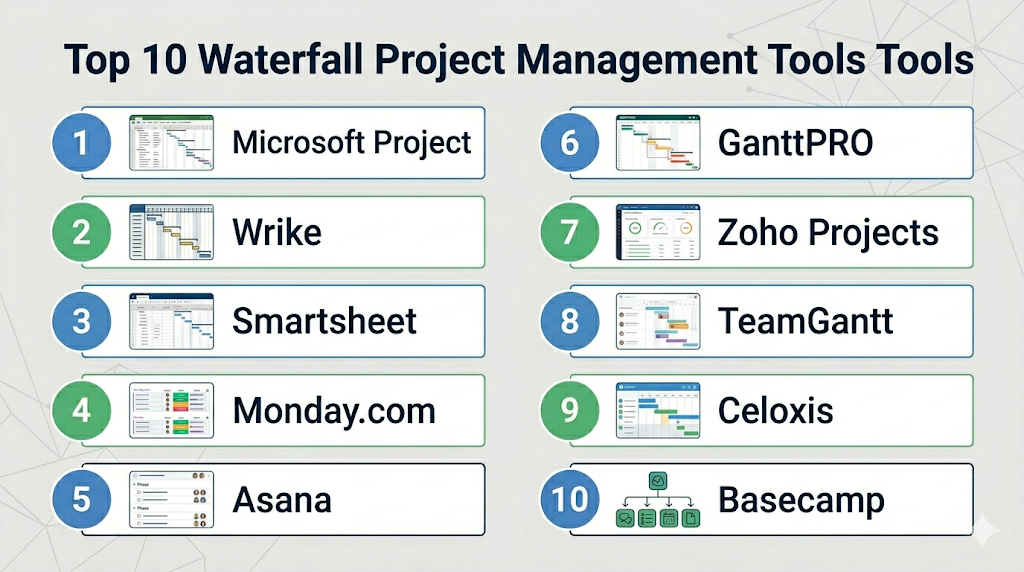
Top 10 Waterfall Project Management Tools Tools
Standalone Top 10 Tool Names
- Microsoft Project
- Wrike
- Smartsheet
- Monday.com
- Asana
- GanttPRO
- Zoho Projects
- TeamGantt
- Celoxis
- Basecamp
#1 — Microsoft Project
Short description (2–3 lines): Microsoft Project is one of the most recognized Waterfall planning tools, built for scheduling-heavy environments and PMOs needing strong timeline control.
Key Features
- Advanced Gantt charts
- Critical path analysis
- Resource allocation
- Budget forecasting
- Portfolio planning
- Milestone tracking
- Scenario modeling
Pros
- Excellent for structured planning
- Powerful scheduling depth
- Strong enterprise credibility
Cons
- Learning curve can be steep
- Less intuitive for casual users
Platforms / Deployment
Web / Windows / Cloud / On-premise
Security & Compliance
Microsoft identity controls, MFA, RBAC, enterprise governance.
Integrations & Ecosystem
Strong Microsoft ecosystem alignment.
- Teams
- Power BI
- Excel
- SharePoint
- Dynamics 365
Support & Community
Large enterprise support ecosystem and training resources.
#2 — Wrike
Short description (2–3 lines): Wrike is a modern project platform that supports Waterfall execution with timelines, resource planning, and enterprise collaboration.
Key Features
- Gantt charts
- Dependencies
- Workload balancing
- Dashboards
- Request forms
- Reporting
- Automation
Pros
- Strong reporting depth
- Great for large teams
- Good hybrid methodology support
Cons
- Higher-tier plans often needed
- More complex than lightweight tools
Platforms / Deployment
Web / Windows / macOS / iOS / Android
Security & Compliance
SSO, permissions, audit controls, enterprise admin tools.
Integrations & Ecosystem
- Adobe
- Salesforce
- Slack
- Microsoft 365
- APIs
Support & Community
Strong onboarding and enterprise support tiers.
#3 — Smartsheet
Short description (2–3 lines): Smartsheet combines spreadsheet familiarity with robust Waterfall planning, making it attractive for operations and PMO teams.
Key Features
- Grid + Gantt views
- Dependencies
- Dashboards
- Forms
- Automation
- Resource management
- Reporting
Pros
- Familiar spreadsheet style
- Strong cross-functional workflows
- Useful dashboards
Cons
- UI preference varies by user
- Advanced features may require premium plans
Platforms / Deployment
Web / iOS / Android
Security & Compliance
Enterprise controls, SSO, permissions.
Integrations & Ecosystem
- Google Workspace
- Microsoft 365
- Salesforce
- Slack
Support & Community
Strong business adoption and documentation.
#4 — Monday.com
Short description (2–3 lines): Monday.com offers visual Waterfall planning with timelines, dependencies, dashboards, and customizable workflows.
Key Features
- Gantt view
- Timelines
- Workload planning
- Automations
- Dashboards
- Templates
- Forms
Pros
- Highly visual and modern UI
- Flexible workflows
- Good cross-department fit
Cons
- Pricing can rise with scale
- Setup planning recommended
Platforms / Deployment
Web / Windows / macOS / iOS / Android
Security & Compliance
SSO, permissions, enterprise admin features.
Integrations & Ecosystem
- Teams
- Slack
- Zoom
- Gmail
- APIs
Support & Community
Strong onboarding and commercial support.
#5 — Asana
Short description (2–3 lines): Asana is known for collaborative project management and also supports Waterfall planning through timelines and dependencies.
Key Features
- Timeline planning
- Dependencies
- Goals tracking
- Dashboards
- Templates
- Automation
- Portfolio views
Pros
- Excellent usability
- Great for cross-functional teams
- Strong collaboration
Cons
- Less deep than specialist schedulers
- Premium plans unlock more value
Platforms / Deployment
Web / Windows / macOS / iOS / Android
Security & Compliance
SSO, MFA, RBAC, admin controls.
Integrations & Ecosystem
- Slack
- Google Workspace
- Microsoft 365
- Salesforce
Support & Community
Large user community and strong documentation.
#6 — GanttPRO
Short description (2–3 lines): GanttPRO is purpose-built for timeline-heavy project planning and is well suited for classic Waterfall management.
Key Features
- Gantt-first planning
- Dependencies
- Milestones
- Progress tracking
- Resource workload
- Baselines
- Collaboration comments
Pros
- Excellent timeline usability
- Good for structured projects
- Faster learning curve than legacy tools
Cons
- Narrower ecosystem than giants
- Less broad business suite depth
Platforms / Deployment
Web / iOS / Android
Security & Compliance
Varies / Not publicly stated.
Integrations & Ecosystem
- Imports/exports
- Collaboration apps
- APIs vary
Support & Community
Good commercial support reputation.
#7 — Zoho Projects
Short description (2–3 lines): Zoho Projects provides affordable planning tools including Gantt charts, dependencies, and milestone tracking.
Key Features
- Gantt charts
- Time tracking
- Dependencies
- Reports
- Task automation
- Collaboration
- Templates
Pros
- Strong SMB value
- Broad features for price point
Cons
- Less enterprise depth
- UI preferences vary
Platforms / Deployment
Web / iOS / Android
Security & Compliance
Permissions and admin tools vary by plan.
Integrations & Ecosystem
- Zoho apps
- Google Workspace
- Microsoft tools
- APIs
Support & Community
Good SMB support ecosystem.
#8 — TeamGantt
Short description (2–3 lines): TeamGantt focuses on simple, collaborative Gantt chart planning for small and mid-sized teams.
Key Features
- Drag-and-drop Gantt charts
- Dependencies
- Milestones
- Team availability
- File sharing
- Progress tracking
- Comments
Pros
- Easy to learn
- Great for visual planners
Cons
- Less enterprise depth
- Limited broader PM suite features
Platforms / Deployment
Web / iOS / Android
Security & Compliance
Varies / Not publicly stated.
Integrations & Ecosystem
- Calendar tools
- File storage tools
- Imports/exports
Support & Community
Known for usability.
#9 — Celoxis
Short description (2–3 lines): Celoxis is built for enterprise portfolio and resource management with strong Waterfall planning capabilities.
Key Features
- Project scheduling
- Portfolio dashboards
- Resource planning
- Budget controls
- Risk tracking
- Reports
- Workflow automation
Pros
- Strong PMO focus
- Good portfolio visibility
Cons
- More enterprise-oriented
- Smaller brand mindshare than largest vendors
Platforms / Deployment
Cloud / Self-hosted
Security & Compliance
Enterprise controls vary by deployment.
Integrations & Ecosystem
- ERP tools
- CRM tools
- APIs
Support & Community
Commercial support model.
#10 — Basecamp
Short description (2–3 lines): Basecamp is a simple collaboration platform that can support lightweight Waterfall projects needing communication and milestones.
Key Features
- To-do lists
- Milestones
- Messaging
- File sharing
- Schedules
- Notifications
- Check-ins
Pros
- Very easy to use
- Great for client communication
Cons
- Limited advanced scheduling
- Not built for heavy PMOs
Platforms / Deployment
Web / iOS / Android
Security & Compliance
Basic permissions and admin controls.
Integrations & Ecosystem
- Zapier
- Calendar tools
- File tools
Support & Community
Known for simplicity and quick adoption.
Comparison Table (Top 10)
| Tool Name | Best For | Platform(s) Supported | Deployment | Standout Feature | Public Rating |
|---|---|---|---|---|---|
| Microsoft Project | PMOs | Web/Windows | Cloud/On-premise | Advanced scheduling | N/A |
| Wrike | Enterprises | All major platforms | Cloud | Resource planning | N/A |
| Smartsheet | Ops teams | Web/Mobile | Cloud | Spreadsheet + Gantt | N/A |
| Monday.com | Flexible teams | All major platforms | Cloud | Visual timelines | N/A |
| Asana | Cross-functional teams | All major platforms | Cloud | Ease of use | N/A |
| GanttPRO | Timeline planners | Web/Mobile | Cloud | Gantt-first design | N/A |
| Zoho Projects | SMBs | Web/Mobile | Cloud | Affordable planning | N/A |
| TeamGantt | Small teams | Web/Mobile | Cloud | Simple Gantt charts | N/A |
| Celoxis | PMOs | Cloud/Web | Hybrid | Portfolio visibility | N/A |
| Basecamp | Lightweight teams | Web/Mobile | Cloud | Simplicity | N/A |
Evaluation & Scoring of Waterfall Project Management Tools
| Tool Name | Core (25%) | Ease (15%) | Integrations (15%) | Security (10%) | Performance (10%) | Support (10%) | Value (15%) | Weighted Total |
|---|---|---|---|---|---|---|---|---|
| Microsoft Project | 10 | 5 | 8 | 9 | 8 | 8 | 6 | 7.85 |
| Wrike | 8 | 7 | 8 | 8 | 8 | 8 | 7 | 7.75 |
| Smartsheet | 8 | 7 | 8 | 8 | 8 | 8 | 7 | 7.75 |
| Monday.com | 8 | 8 | 8 | 8 | 8 | 8 | 7 | 7.95 |
| Asana | 7 | 9 | 9 | 8 | 8 | 9 | 8 | 8.10 |
| GanttPRO | 8 | 8 | 7 | 7 | 8 | 7 | 8 | 7.70 |
| Zoho Projects | 7 | 8 | 7 | 7 | 8 | 7 | 9 | 7.65 |
| TeamGantt | 7 | 9 | 6 | 7 | 8 | 7 | 8 | 7.55 |
| Celoxis | 8 | 6 | 8 | 8 | 8 | 8 | 7 | 7.50 |
| Basecamp | 6 | 9 | 6 | 7 | 8 | 7 | 8 | 7.15 |
These scores are comparative. Traditional PMOs may prioritize Microsoft Project or Celoxis, while modern business teams may prefer Asana or Monday.com. Adoption and workflow fit matter as much as raw features.
Which Waterfall Project Management Tools Is Right for You?
Solo / Freelancer
Choose TeamGantt, Basecamp, or Zoho Projects.
SMB
Choose Zoho Projects, Monday.com, or GanttPRO.
Mid-Market
Choose Smartsheet, Asana, or Wrike.
Enterprise
Choose Microsoft Project, Wrike, Smartsheet, or Celoxis.
Budget vs Premium
- Budget-friendly: Zoho Projects, TeamGantt
- Premium: Microsoft Project, Wrike, Smartsheet
Feature Depth vs Ease of Use
- Deep features: Microsoft Project, Celoxis
- Easy adoption: Asana, Monday.com, TeamGantt
Integrations & Scalability
Choose Microsoft ecosystem tools, Wrike, Smartsheet, Asana.
Security & Compliance Needs
Choose enterprise plans from Microsoft, Wrike, Smartsheet, Asana.
Frequently Asked Questions (FAQs)
1. What is Waterfall project management software?
It supports sequential project planning with phases, milestones, and dependencies.
2. Is Waterfall still relevant?
Yes. It remains strong for regulated, construction, engineering, and fixed-scope projects.
3. Which tool is best for large enterprises?
Microsoft Project remains a common enterprise choice.
4. Are Gantt charts important in Waterfall?
Yes. They are one of the core planning tools.
5. Can these tools support Agile too?
Many modern platforms now support hybrid approaches.
6. Is Microsoft Project hard to learn?
It can have a steeper learning curve than modern visual tools.
7. What is critical path analysis?
It identifies tasks that directly impact project completion dates.
8. Are mobile apps available?
Many modern platforms offer mobile apps.
9. Is free pricing available?
Some tools offer free tiers or trials, though advanced planning often requires paid plans.
10. How should I choose?
Select based on project complexity, stakeholder needs, budget, and scheduling depth.
Conclusion
Waterfall project management tools remain essential where predictability, control, and documentation matter most. The best choice depends on whether you need enterprise-grade scheduling, easier collaboration, portfolio visibility, or affordable planning. Microsoft Project leads for deep traditional PMOs, while Wrike, Smartsheet, and Monday.com bring modern usability. GanttPRO and TeamGantt are excellent for teams focused on timelines. Shortlist two or three options, test them with a real project plan, and choose the platform your team can execute with consistently.
