Introduction
Text-to-Speech platforms convert written text into spoken audio using synthetic or AI-generated voices. These platforms help teams create narration, voice assistants, learning content, accessibility tools, product audio, customer support automation, app voice features, and multilingual audio experiences without recording every line manually.
TTS platforms matter because audio is now part of everyday digital content. Businesses use spoken content in training modules, product tutorials, mobile apps, websites, contact centers, podcasts, learning platforms, accessibility features, and marketing videos. Instead of hiring voice artists for every small update, teams can use TTS to create repeatable, scalable, and consistent spoken output.
Common use cases include eLearning narration, app voice responses, customer service automation, accessibility reading tools, product tutorials, audiobook-style content, video voiceovers, internal training, and multilingual content localization.
Buyers should evaluate voice quality, language coverage, pronunciation control, API access, scalability, security, commercial usage rights, integrations, editing workflow, pricing model, and support quality.
Best for: developers, product teams, educators, marketers, SaaS companies, accessibility teams, customer support teams, content creators, training departments, and businesses that need scalable spoken audio.
Not ideal for: projects requiring highly emotional human voice acting, brands needing exclusive voice talent, or teams that only need occasional manual narration and do not require automation or scale.
Key Trends in Text-to-Speech (TTS) Platforms
- AI voice quality is improving quickly, with more natural pacing, tone, emotion, and pronunciation control.
- API-first TTS is growing, especially for apps, SaaS platforms, learning systems, accessibility products, and customer support automation.
- Multilingual voice generation is becoming a core requirement, helping businesses localize product audio, training, and customer-facing content.
- Voice cloning and custom voices are becoming more common, but buyers must manage consent, governance, and ethical usage carefully.
- Enterprise teams are focusing more on voice governance, including user permissions, auditability, brand rules, and approved voice libraries.
- Accessibility use cases are expanding, with TTS helping users consume documents, websites, learning content, and product information through audio.
- Real-time and low-latency speech generation is becoming more important, especially for conversational agents, support bots, and interactive apps.
- SSML and pronunciation controls remain important for technical, medical, legal, product, and brand-specific terms.
- Content production workflows are merging with TTS, allowing users to create scripts, generate audio, edit voiceovers, translate content, and export files in one platform.
- Pricing models are becoming more usage-based, with character limits, credits, API usage, team plans, and enterprise contracts shaping buying decisions.
How We Selected These Tools
The tools in this list were selected based on their practical value for text-to-speech generation, business narration, developer workflows, accessibility use cases, content production, and enterprise scalability.
Selection criteria included:
- Market recognition among creators, developers, enterprises, educators, and product teams
- Core TTS capabilities such as voice generation, language support, pronunciation control, and export options
- Voice quality, naturalness, reliability, and suitability for different content types
- Developer-readiness, including APIs, SDKs, documentation, and automation support
- Fit for different users, from solo creators to large enterprises
- Support for content workflows such as video narration, eLearning, product audio, and customer communication
- Security posture signals such as account controls, enterprise options, permissions, and data handling transparency
- Integration ecosystem with cloud platforms, apps, video tools, learning systems, and content workflows
- Ease of use for non-technical users such as marketers, educators, and creators
- Value for money based on quality, scale, feature depth, and workflow fit
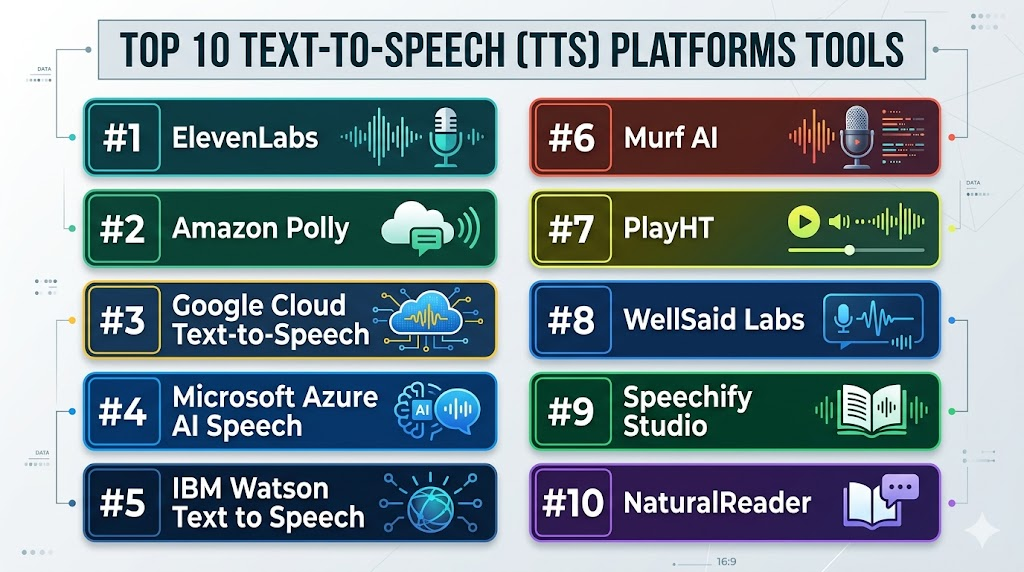
Top 10 Text-to-Speech (TTS) Platforms Tools
#1 — ElevenLabs
Short description: ElevenLabs is an AI voice and text-to-speech platform used by creators, developers, media teams, educators, and businesses. It is known for natural-sounding voices, multilingual speech generation, and advanced voice workflows.
Key Features
- AI text-to-speech voice generation
- Natural-sounding synthetic voices
- Multilingual voice support
- Voice cloning options depending on plan and consent rules
- API access for developers
- Dubbing and localization workflow options
- Useful for narration, apps, games, videos, and learning content
Pros
- Strong voice realism for creative and business use cases
- Useful for multilingual and storytelling workflows
- Good fit for both creators and developer-led products
Cons
- Voice cloning needs careful consent and internal governance
- Commercial usage terms should be reviewed before publishing
- Enterprise security details should be verified by plan
Platforms / Deployment
Web / API workflows
Cloud
Security & Compliance
ElevenLabs provides account-based access and business options depending on plan. Specific details such as SSO, audit logs, RBAC, SOC 2, ISO 27001, GDPR, and HIPAA should be verified directly. Unknown details should be treated as Not publicly stated.
Integrations & Ecosystem
ElevenLabs works well for teams that need AI-generated voice inside content production or application workflows. It is often useful where realistic voice output and API access are both important.
Common ecosystem areas include:
- Video narration workflows
- Game and interactive media projects
- Learning platforms
- App voice experiences
- Localization workflows
- Developer API workflows
Support & Community
ElevenLabs provides documentation, help resources, developer guidance, and support options depending on plan. It has strong visibility among creators and technical teams working with AI voice generation.
#2 — Amazon Polly
Short description: Amazon Polly is a cloud-based text-to-speech service designed for developers and businesses that need scalable speech generation through APIs. It is best suited for applications, contact centers, accessibility tools, and automated voice workflows.
Key Features
- Cloud-based text-to-speech API
- Multiple voices and language options
- SSML support for speech control
- Scalable speech generation for applications
- Real-time and batch-style voice generation use cases
- Works well inside cloud-based application architectures
- Useful for apps, support systems, learning platforms, and accessibility tools
Pros
- Strong fit for developer-led TTS workflows
- Scales well for automated and application-based speech generation
- Useful for teams already using cloud infrastructure
Cons
- Not designed as a simple visual voiceover editor
- Requires technical setup for best results
- Content creators may prefer more user-friendly production tools
Platforms / Deployment
Web / API workflows
Cloud
Security & Compliance
Amazon Polly operates within a broader cloud infrastructure environment with identity, access, and account security controls. Exact compliance coverage, data handling, permissions, logging, and regional requirements should be verified directly based on the buyer’s cloud configuration. Unknown details should be listed as Not publicly stated.
Integrations & Ecosystem
Amazon Polly is strongest for technical teams building TTS into applications, platforms, and automated workflows.
Common ecosystem areas include:
- Cloud applications
- Contact center workflows
- Learning systems
- Accessibility tools
- Notification systems
- Developer APIs
Support & Community
Amazon Polly has technical documentation, developer resources, cloud support options, and a broad developer ecosystem. It is best for teams with engineering resources.
#3 — Google Cloud Text-to-Speech
Short description: Google Cloud Text-to-Speech is a cloud-based speech synthesis service for developers and businesses building spoken audio into applications, products, accessibility tools, and customer experiences. It is best suited for teams already comfortable with cloud-based development.
Key Features
- API-based text-to-speech generation
- Multiple language and voice options
- Neural voice options depending on configuration
- SSML and speech customization support
- Scalable cloud infrastructure
- Useful for apps, product experiences, and accessibility workflows
- Works within broader cloud development environments
Pros
- Strong developer-first TTS platform
- Useful for scalable product and application workflows
- Good fit for teams already using cloud infrastructure
Cons
- Not ideal for non-technical users needing a simple voiceover studio
- Requires cloud setup and developer knowledge
- Creative workflow features are limited compared with dedicated voiceover platforms
Platforms / Deployment
Web / API workflows
Cloud
Security & Compliance
Google Cloud Text-to-Speech runs within a broader cloud environment with identity, access, and security configuration options. Specific compliance coverage, data processing controls, audit capabilities, and regional requirements should be verified directly. Unknown details should be treated as Not publicly stated.
Integrations & Ecosystem
Google Cloud Text-to-Speech is suited for product teams that need speech generation inside digital experiences.
Common ecosystem areas include:
- Web applications
- Mobile apps
- Accessibility tools
- Customer support systems
- Voice interfaces
- Developer APIs
Support & Community
Google Cloud provides technical documentation, developer resources, support options, and a large cloud developer community. It is best for teams that can manage technical implementation.
#4 — Microsoft Azure AI Speech
Short description: Microsoft Azure AI Speech includes text-to-speech capabilities for developers and enterprises building voice into applications, contact centers, learning platforms, and business workflows. It is especially relevant for organizations already using Microsoft cloud and productivity ecosystems.
Key Features
- Cloud-based text-to-speech generation
- Neural voice options depending on configuration
- Language and voice customization capabilities
- API access for developers
- Support for speech synthesis in apps and enterprise workflows
- Integration potential with Microsoft cloud services
- Useful for contact centers, accessibility, learning, and product experiences
Pros
- Strong option for Microsoft-centered organizations
- Useful for enterprise and developer-led speech workflows
- Supports scalable TTS use cases through cloud APIs
Cons
- Requires technical setup and cloud knowledge
- Not a dedicated creator-first voiceover studio
- Configuration and pricing may require careful planning
Platforms / Deployment
Web / API workflows
Cloud
Security & Compliance
Microsoft Azure AI Speech operates within the Azure cloud environment. Identity management, access controls, logging, and compliance coverage depend on configuration, contract, and region. Specific security and compliance details should be verified directly. Unknown details should be written as Not publicly stated.
Integrations & Ecosystem
Azure AI Speech fits teams building voice into enterprise apps, automation systems, and Microsoft cloud-based workflows.
Common ecosystem areas include:
- Enterprise applications
- Contact center systems
- Learning platforms
- Accessibility tools
- Developer APIs
- Microsoft cloud workflows
Support & Community
Microsoft provides cloud documentation, developer resources, enterprise support options, and a broad technical community. It is strongest for teams with IT or engineering support.
#5 — IBM Watson Text to Speech
Short description: IBM Watson Text to Speech is a cloud-based TTS service designed for developers and businesses that need speech synthesis in applications, customer service workflows, and enterprise systems. It is useful for teams building voice-enabled product or support experiences.
Key Features
- API-based text-to-speech generation
- Voice options for different languages and use cases
- Speech customization features depending on configuration
- Useful for customer service, apps, and accessibility workflows
- Cloud-based deployment model
- Developer documentation and integration support
- Suitable for business and enterprise speech use cases
Pros
- Good fit for enterprise-style application workflows
- Useful for customer experience and support automation
- API-first model supports product integration
Cons
- Less friendly for creators who need a visual editing studio
- Requires technical implementation
- Buyers should verify current feature availability and support scope
Platforms / Deployment
Web / API workflows
Cloud
Security & Compliance
IBM Watson Text to Speech operates within IBM’s cloud and enterprise service environment. Specific security controls, compliance certifications, audit capabilities, SSO options, and data handling commitments should be verified directly. Unknown details should be treated as Not publicly stated.
Integrations & Ecosystem
IBM Watson Text to Speech is useful for application and enterprise system workflows where speech generation is part of a broader software experience.
Common ecosystem areas include:
- Customer service automation
- Enterprise applications
- Accessibility features
- Voice interfaces
- Developer APIs
- Cloud workflows
Support & Community
IBM provides documentation, developer resources, and enterprise support options depending on plan and customer type. It is best for teams with technical implementation capability.
#6 — Murf AI
Short description: Murf AI is a text-to-speech and voiceover platform designed for marketers, educators, businesses, and content creators. It helps users create AI-generated narration for videos, presentations, training modules, advertisements, and eLearning content.
Key Features
- AI text-to-speech voice generation
- Voiceover editor for script-based narration
- Multiple voice and language options
- Timing and voice editing controls
- Voice cloning options depending on plan and permissions
- Team collaboration features depending on plan
- Useful for videos, training, presentations, and marketing content
Pros
- Easy for non-technical users to create polished narration
- Good fit for business videos and eLearning workflows
- Helpful editor for aligning audio with scripts and visuals
Cons
- Advanced features may require higher plans
- Automated voices may still need review for pronunciation and tone
- Developers may prefer API-first platforms for large-scale automation
Platforms / Deployment
Web
Cloud
Security & Compliance
Murf AI provides account-based access and team features depending on plan. Specific enterprise controls such as SSO, audit logs, RBAC, compliance certifications, and advanced admin features should be verified directly. Unknown details should be written as Not publicly stated.
Integrations & Ecosystem
Murf AI fits content production workflows where users need voiceovers without recording studios or complex audio tools.
Common ecosystem areas include:
- eLearning content
- Marketing videos
- Product demos
- Presentations
- Training modules
- Explainer videos
Support & Community
Murf AI provides help resources, documentation, and customer support options depending on plan. It is especially useful for business users and creators who want a guided TTS workflow.
#7 — PlayHT
Short description: PlayHT is an AI voice and text-to-speech platform used by creators, developers, product teams, and businesses. It supports voice generation, audio content workflows, and API-based speech synthesis.
Key Features
- AI text-to-speech generation
- Multiple voices and language options
- API access for developer workflows
- Voice cloning options depending on plan and consent rules
- Audio export for content and product use cases
- Support for narration and long-form audio
- Useful for creators, apps, learning platforms, and business content
Pros
- Good fit for both creator and developer use cases
- Useful for scalable TTS workflows through APIs
- Supports a wide range of narration and content production needs
Cons
- Voice output should be reviewed before publishing important content
- Voice cloning requires careful policy and consent management
- Enterprise security details should be verified directly
Platforms / Deployment
Web / API workflows
Cloud
Security & Compliance
PlayHT provides account-based access and business options depending on plan. Specific details such as SSO, audit logs, RBAC, SOC 2, ISO 27001, GDPR, and HIPAA should be verified directly. Unknown items should be treated as Not publicly stated.
Integrations & Ecosystem
PlayHT is useful where voice generation needs to support both manual content creation and product-level automation.
Common ecosystem areas include:
- Developer APIs
- Video narration
- Podcast-style audio
- eLearning platforms
- App voice experiences
- Content automation workflows
Support & Community
PlayHT provides documentation, user guidance, and support options depending on plan. Developer users should review API documentation, usage limits, and output controls carefully.
#8 — WellSaid Labs
Short description: WellSaid Labs is a business-focused AI voice and text-to-speech platform used for professional narration, training content, product education, internal communications, and brand-consistent audio. It is a strong fit for teams needing controlled and polished voice production.
Key Features
- AI text-to-speech voice generation
- Professional voice options for business narration
- Script and pronunciation controls
- Team collaboration features depending on plan
- Useful for training, product education, and internal content
- Consistent voice output for repeatable business workflows
- Enterprise-oriented options depending on plan
Pros
- Strong fit for professional business and training content
- Useful for teams needing consistent narration style
- Good option for learning and development workflows
Cons
- May be more business-focused than casual creator tools
- Pricing may not suit very occasional users
- Buyers should verify commercial usage and security requirements
Platforms / Deployment
Web
Cloud
Security & Compliance
WellSaid Labs provides business-oriented account and team capabilities depending on plan. Specific details such as SSO, audit logs, RBAC, SOC 2, ISO 27001, GDPR, and HIPAA should be verified directly. Unknown details should be written as Not publicly stated.
Integrations & Ecosystem
WellSaid Labs fits business content workflows where voice quality, consistency, and review control matter.
Common ecosystem areas include:
- Corporate training
- Product education
- Internal communications
- Learning content
- Marketing narration
- Brand voice workflows
Support & Community
WellSaid Labs provides documentation, customer support, and business-focused resources depending on plan. It is most useful for teams that need a professional TTS production environment.
#9 — Speechify Studio
Short description: Speechify Studio is a text-to-speech and voice generation platform used by creators, educators, marketers, and businesses. It supports AI narration for videos, learning content, social media, and digital audio workflows.
Key Features
- AI text-to-speech voice generation
- Multiple voice and language options depending on plan
- Voiceover creation for videos and learning content
- Script-based narration workflow
- Audio export options
- Voice cloning features depending on consent and offering
- Useful for creators, educators, and lightweight business workflows
Pros
- Easy for beginners and creators to use
- Useful for quick narration and learning content
- Good fit for simple TTS and content production workflows
Cons
- Advanced enterprise controls should be verified directly
- Voice quality and language performance may vary by voice
- Developers may need more API-focused tools for automation
Platforms / Deployment
Web / iOS / Android
Cloud
Security & Compliance
Speechify provides account-based access and business features depending on product and plan. Specific enterprise security details, SSO, audit logs, RBAC, and compliance certifications should be verified directly. Unknown details should be treated as Not publicly stated.
Integrations & Ecosystem
Speechify Studio is useful for spoken content creation, learning workflows, and creator-focused narration.
Common ecosystem areas include:
- Learning content
- Creator videos
- Social media narration
- Audiobook-style content
- Marketing videos
- Accessibility-focused listening experiences
Support & Community
Speechify provides user support resources and help documentation depending on product and plan. It is approachable for creators and business users who need simple TTS workflows.
#10 — NaturalReader
Short description: NaturalReader is a text-to-speech platform used by individuals, educators, professionals, and businesses to convert documents, webpages, PDFs, and text into spoken audio. It is useful for accessibility, productivity, learning, and lightweight narration workflows.
Key Features
- Text-to-speech for documents and written content
- Support for reading webpages, PDFs, and text files depending on product
- Multiple voices and language options depending on plan
- Personal, education, and commercial usage options depending on offering
- Audio export features depending on plan
- Useful for accessibility and productivity
- Simple interface for reading and listening workflows
Pros
- Easy for personal, education, and productivity use cases
- Good fit for reading documents and long-form text aloud
- Useful for accessibility and learning support
Cons
- Not as developer-focused as cloud API platforms
- May not offer the same production workflow depth as voiceover studios
- Business and commercial usage terms should be verified carefully
Platforms / Deployment
Web / Windows / macOS / iOS / Android
Cloud / Desktop options may vary by offering
Security & Compliance
NaturalReader provides account-based access and product-specific options. Specific business security controls, SSO, audit logs, compliance certifications, and enterprise governance details should be verified directly. Unknown details should be listed as Not publicly stated.
Integrations & Ecosystem
NaturalReader fits accessibility, reading, education, and lightweight content workflows where written material needs to become spoken audio.
Common ecosystem areas include:
- Document reading
- Education workflows
- Accessibility support
- Productivity tools
- Webpage listening
- Audio export workflows
Support & Community
NaturalReader provides help resources, product guidance, and support options depending on product type and plan. It is especially useful for users who want a simple reading and listening experience.
Comparison Table
| Tool Name | Best For | Platform(s) Supported | Deployment | Standout Feature | Public Rating |
|---|---|---|---|---|---|
| ElevenLabs | Creators, developers, and realistic AI voices | Web / API workflows | Cloud | Natural AI voice generation and voice cloning options | N/A |
| Amazon Polly | Developers and scalable application TTS | Web / API workflows | Cloud | Cloud-based TTS API for applications | N/A |
| Google Cloud Text-to-Speech | Product teams and cloud-based voice applications | Web / API workflows | Cloud | Developer-first speech synthesis infrastructure | N/A |
| Microsoft Azure AI Speech | Enterprises and Microsoft cloud users | Web / API workflows | Cloud | Enterprise cloud speech generation | N/A |
| IBM Watson Text to Speech | Enterprise apps and customer experience workflows | Web / API workflows | Cloud | API-based business speech synthesis | N/A |
| Murf AI | Marketing, eLearning, and business voiceovers | Web | Cloud | Guided voiceover editor for non-technical users | N/A |
| PlayHT | Creator and developer TTS workflows | Web / API workflows | Cloud | AI voice generation with API access | N/A |
| WellSaid Labs | Professional business narration and training content | Web | Cloud | Consistent business-grade synthetic voices | N/A |
| Speechify Studio | Creators, educators, and simple narration workflows | Web / iOS / Android | Cloud | Easy AI narration and spoken content creation | N/A |
| NaturalReader | Accessibility, document reading, and productivity | Web / Windows / macOS / iOS / Android | Cloud / Desktop options may vary | Simple text and document reading experience | N/A |
Evaluation & Scoring of Text-to-Speech (TTS) Platforms
The scoring below is comparative and practical. It is based on common TTS buying needs such as voice quality, ease of use, developer readiness, integrations, security posture, performance, support, and value. A higher score does not mean the platform is best for every user. A developer, creator, accessibility team, and enterprise buyer may need very different TTS capabilities.
| Tool Name | Core (25%) | Ease (15%) | Integrations (15%) | Security (10%) | Performance (10%) | Support (10%) | Value (15%) | Weighted Total (0–10) |
|---|---|---|---|---|---|---|---|---|
| ElevenLabs | 9 | 8 | 8 | 7 | 8 | 7 | 8 | 8.05 |
| Amazon Polly | 8 | 6 | 9 | 8 | 9 | 8 | 8 | 8.00 |
| Google Cloud Text-to-Speech | 8 | 6 | 9 | 8 | 9 | 8 | 8 | 8.00 |
| Microsoft Azure AI Speech | 8 | 6 | 9 | 8 | 9 | 8 | 8 | 8.00 |
| IBM Watson Text to Speech | 7 | 6 | 8 | 8 | 8 | 8 | 7 | 7.35 |
| Murf AI | 8 | 9 | 7 | 7 | 8 | 8 | 8 | 7.95 |
| PlayHT | 8 | 8 | 8 | 7 | 8 | 7 | 8 | 7.80 |
| WellSaid Labs | 8 | 8 | 7 | 8 | 8 | 8 | 7 | 7.75 |
| Speechify Studio | 7 | 9 | 7 | 6 | 8 | 7 | 8 | 7.45 |
| NaturalReader | 7 | 9 | 6 | 6 | 8 | 7 | 8 | 7.30 |
How to interpret these scores:
- These scores are comparative and should be used for shortlisting, not as a final buying decision.
- Developer teams should give more weight to API access, uptime, scalability, SSML, and cloud integration.
- Creator and marketing teams should focus more on ease of use, voice quality, editing workflow, and export options.
- Enterprise buyers should prioritize security documentation, permissions, auditability, governance, and vendor support.
- Always test each platform with your own scripts, language needs, pronunciation terms, and real production workflow.
Which Text-to-Speech (TTS) Platforms Tool Is Right for You?
Solo / Freelancer
Solo creators and freelancers usually need affordable, fast, and easy TTS tools. They may create YouTube narration, podcast intros, short explainer videos, online courses, social media clips, or client demo audio. They need clean voices, simple exports, and manageable pricing.
Good options include:
- ElevenLabs for realistic and expressive AI voices
- Murf AI for guided business-style narration
- PlayHT for flexible creator and developer workflows
- Speechify Studio for simple spoken content creation
- NaturalReader for document reading and lightweight narration
For solo users, the best tool is usually the one that gives good voice quality with minimal setup and clear usage rules.
SMB
Small and mid-sized businesses often need TTS for product demos, training modules, customer onboarding, social media videos, internal communication, and eLearning content. They need a balance of quality, ease of use, pricing, and team workflow.
Good options include:
- Murf AI for marketing and training voiceovers
- WellSaid Labs for professional business narration
- ElevenLabs for realistic AI voice content
- PlayHT for scalable narration and API needs
- NaturalReader for accessibility and productivity use cases
SMBs should compare commercial rights, voice quality, language options, export limits, collaboration features, and editing workflow.
Mid-Market
Mid-market teams often manage more content, more users, more scripts, and more approval steps. They may need consistent brand voice, multilingual narration, internal training, product education, and integration with video or learning workflows.
Good options include:
- WellSaid Labs for professional and consistent business narration
- Murf AI for structured content production
- ElevenLabs for advanced AI voice and multilingual workflows
- PlayHT for teams needing creator tools and API flexibility
- Microsoft Azure AI Speech or Google Cloud Text-to-Speech for product-integrated TTS
Mid-market buyers should validate project organization, user permissions, export formats, review workflows, pronunciation controls, and support options.
Enterprise
Enterprise teams often need TTS for customer support automation, accessibility features, internal learning, product audio, employee training, contact centers, and global applications. They also need stronger governance, security review, and vendor management.
Good options include:
- Amazon Polly for cloud-scale developer workflows
- Google Cloud Text-to-Speech for cloud-native product teams
- Microsoft Azure AI Speech for Microsoft ecosystem organizations
- IBM Watson Text to Speech for enterprise application workflows
- WellSaid Labs for professional training and internal content narration
- ElevenLabs or PlayHT where advanced AI voice quality and APIs are important
Enterprise teams should include IT, security, legal, procurement, product, accessibility, and content operations stakeholders in the evaluation.
Budget vs Premium
Budget-conscious users should avoid paying for complex enterprise platforms if they only need occasional narration or document reading. Creator-focused tools may be enough for simple videos, learning content, and social media.
Budget-friendly or simple options may include:
- Speechify Studio
- NaturalReader
- Murf AI
- PlayHT
- ElevenLabs, depending on usage volume
Premium or enterprise-oriented options may include:
- Amazon Polly
- Google Cloud Text-to-Speech
- Microsoft Azure AI Speech
- IBM Watson Text to Speech
- WellSaid Labs
The best value depends on whether you need low-cost narration, scalable API usage, enterprise controls, professional voice consistency, or multilingual output.
Feature Depth vs Ease of Use
Some platforms are designed for creators and marketers. Others are built for developers and enterprise infrastructure.
For ease of use:
- Murf AI
- Speechify Studio
- NaturalReader
- WellSaid Labs
- ElevenLabs
For deeper technical workflows:
- Amazon Polly
- Google Cloud Text-to-Speech
- Microsoft Azure AI Speech
- IBM Watson Text to Speech
- PlayHT
Choose a visual studio if your team creates narrated content manually. Choose API-first TTS if your product or system must generate speech automatically at scale.
Integrations & Scalability
TTS platforms become more powerful when they fit into product, learning, support, and content workflows. Developers may need APIs and low-latency generation, while marketers may need script editing and audio export.
Strong integration and scalability choices include:
- Amazon Polly for cloud applications and automated systems
- Google Cloud Text-to-Speech for product and app workflows
- Microsoft Azure AI Speech for enterprise Microsoft environments
- PlayHT for API and creator workflows
- ElevenLabs for advanced AI voice workflows
- Murf AI for content production workflows
Scalability should include API limits, generation speed, language coverage, data handling, cost per usage, project organization, and support availability.
Security & Compliance Needs
Security matters when TTS platforms process confidential scripts, customer messages, internal training, regulated content, proprietary product information, or custom voice data. Voice cloning and synthetic speech can also create brand and legal risk if not controlled properly.
Teams should evaluate:
- SSO and enterprise authentication options
- MFA availability
- Role-based access control
- Audit logs
- Data retention and deletion controls
- Script and audio privacy
- Voice cloning consent controls
- Commercial usage rights
- API security practices
- Regional data processing requirements
- Vendor security documentation
- Internal approval workflow support
For sensitive business content, teams should request security documentation, define usage rules, and review legal terms before scaling TTS usage.
Frequently Asked Questions
1. What is a Text-to-Speech platform?
A Text-to-Speech platform converts written text into spoken audio using synthetic or AI-generated voices. It can be used for apps, videos, training, accessibility, customer support, and content production.
2. How is TTS different from voiceover software?
TTS focuses on converting text into speech. Voiceover software may include TTS plus editing tools, timing controls, video sync, voice styling, script management, and production workflows.
3. Which TTS platform is best for developers?
Amazon Polly, Google Cloud Text-to-Speech, Microsoft Azure AI Speech, IBM Watson Text to Speech, PlayHT, and ElevenLabs are strong options for developers. The best choice depends on cloud stack, API needs, voice quality, and scale.
4. Which TTS platform is best for creators?
ElevenLabs, Murf AI, PlayHT, Speechify Studio, WellSaid Labs, and NaturalReader can work well for creators. The best tool depends on whether the creator needs video narration, document reading, voice cloning, or multilingual voices.
5. Can TTS platforms support multiple languages?
Yes, many TTS platforms support multiple languages and voice styles. Buyers should test language quality, accents, pronunciation, and naturalness before using a platform for public or customer-facing content.
6. What pricing models do TTS platforms use?
Pricing may be based on characters, minutes, credits, API calls, subscriptions, team seats, or enterprise contracts. Buyers should estimate real usage before selecting a plan.
7. Are AI-generated voices safe for commercial use?
They can be safe for commercial use if the platform’s terms allow it and the team follows licensing rules. Buyers should review usage rights, voice cloning terms, and restrictions before publishing.
8. What common mistakes should buyers avoid?
Common mistakes include choosing based only on voice demos, ignoring API costs, skipping pronunciation tests, using cloned voices without consent, and failing to check security rules for sensitive scripts.
9. Can TTS platforms replace human voice actors?
TTS platforms can replace human voice actors for many routine workflows such as training, demos, accessibility, and internal content. Human voice actors may still be better for emotional ads, storytelling, premium campaigns, or character performances.
10. What is SSML and why does it matter?
SSML is a markup approach that helps control speech output, such as pauses, pronunciation, emphasis, and pacing. It is useful when teams need more control over how generated speech sounds.
Conclusion
Text-to-Speech platforms help teams turn written content into spoken audio for apps, videos, learning, accessibility, support, and business communication. The best platform depends on the use case. A solo creator may prefer ElevenLabs, Murf AI, Speechify Studio, or NaturalReader. A developer team may choose Amazon Polly, Google Cloud Text-to-Speech, Microsoft Azure AI Speech, IBM Watson Text to Speech, PlayHT, or ElevenLabs. A business training team may prefer WellSaid Labs or Murf AI for more controlled narration workflows. No single platform is best for every team because voice quality, API needs, security, cost, language support, and workflow fit all matter. The best next step is to shortlist two or three tools, test them with real scripts, validate pricing and security needs, compare output quality, and choose the platform that fits your production or application workflow.
