Introduction
Self-Service Analytics Tools empower business users to explore, analyze, and visualize data without heavy dependence on IT teams. In simple terms, they allow non-technical users to create dashboards, run queries, and generate insights on their own. This shift toward data democratization is helping organizations move faster and make more informed decisions across departments.
These tools are widely used for ad-hoc analysis, reporting, forecasting, and operational monitoring. Common use cases include marketing campaign analysis, sales performance tracking, financial reporting, customer segmentation, and executive dashboards. Buyers should evaluate ease of use, visualization capabilities, integration with data sources, scalability, governance features, collaboration, and pricing.
Best for: business analysts, marketing teams, finance teams, operations teams, and organizations promoting data-driven decision-making.
Not ideal for: teams requiring heavy data engineering, advanced data science workflows, or extremely complex data transformations.
Key Trends in Self-Service Analytics Tools
- No-code and low-code analytics interfaces
- AI-powered insights and automated recommendations
- Natural language query and conversational analytics
- Real-time dashboards and streaming analytics
- Cloud-native and SaaS-based platforms
- Embedded analytics in applications
- Strong governance and data security controls
- Integration with modern data warehouses and lakes
How We Evaluate Self-Service Analytics Tools (Methodology)
- Market adoption and popularity
- Ease of use for non-technical users
- Visualization and dashboard capabilities
- Data integration and connectivity
- Performance and scalability
- Security and governance features
- Collaboration and sharing capabilities
- AI-driven analytics features
- Deployment flexibility
- Cost versus value
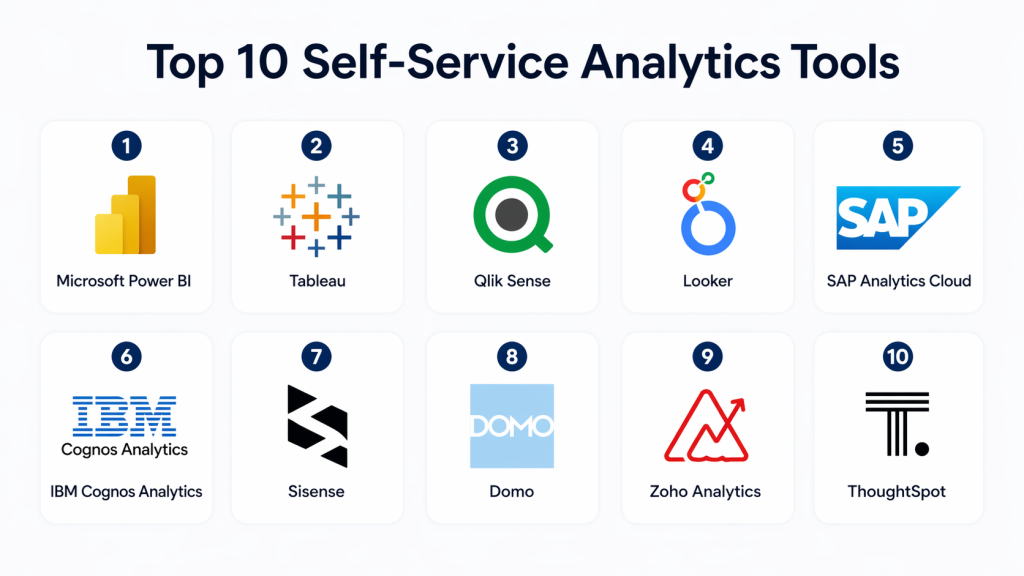
Top 10 Self-Service Analytics Tools
#1 — Microsoft Power BI
Short description : Power BI is one of the most popular self-service analytics tools, enabling users to create interactive dashboards and reports easily. It integrates seamlessly with Microsoft products and supports both beginners and advanced users. The platform is widely used across industries for reporting and analytics. It offers strong visualization and real-time insights. It is ideal for organizations already using Microsoft ecosystems.
Key Features
- Drag-and-drop dashboard creation
- Data visualization and reporting
- AI-powered insights
- Natural language queries
- Data modeling capabilities
- Real-time dashboards
- Integration with Excel
Pros
- Easy to use
- Affordable pricing
- Strong ecosystem integration
Cons
- Limited customization
- Performance issues at large scale
- Learning curve for advanced features
Platforms / Deployment
- Web / Windows / Mobile
- Cloud / Self-hosted
Security & Compliance
Supports RBAC, encryption, and audit logging.
Integrations & Ecosystem
Integrates with Microsoft tools and data platforms.
- Excel and Azure integration
- API connectivity
- Data warehouse support
Support & Community
Large community and strong documentation.
#2 — Tableau
Short description : Tableau is known for its powerful data visualization capabilities and intuitive interface. It allows users to explore data and build visually appealing dashboards quickly. The platform is widely used for business analytics and reporting. It supports real-time analytics and data blending. It is a strong choice for visualization-focused teams.
Key Features
- Drag-and-drop analytics
- Advanced visualization tools
- Real-time data analysis
- Data blending
- Dashboard sharing
- Mobile BI
- Multi-source integration
Pros
- Best-in-class visualization
- User-friendly interface
- Strong community support
Cons
- Expensive
- Requires additional data preparation
- Performance challenges at scale
Platforms / Deployment
- Web / Windows / macOS
- Cloud / Self-hosted
Security & Compliance
Supports encryption, RBAC, and audit logs.
Integrations & Ecosystem
Connects with multiple data sources and platforms.
- API connectivity
- Database integration
- Cloud data sources
Support & Community
Extensive community and learning resources.
#3 — Qlik Sense
Short description : Qlik Sense offers flexible self-service analytics using an associative data model. It allows users to explore relationships between datasets and uncover insights. The platform supports interactive dashboards and AI-driven analytics. It is suitable for organizations needing deep data exploration. It also supports scalability for growing data environments.
Key Features
- Associative data model
- Interactive dashboards
- AI-powered insights
- Real-time analytics
- Data integration
- Mobile access
- Self-service exploration
Pros
- Powerful data exploration
- Flexible analytics
- Scalable
Cons
- Learning curve
- Complex interface
- Pricing considerations
Platforms / Deployment
- Web / Windows
- Cloud / Self-hosted
Security & Compliance
Supports RBAC, encryption, and audit logs.
Integrations & Ecosystem
Integrates with databases and analytics platforms.
- API connectivity
- Data pipelines
- Cloud integrations
Support & Community
Active user community and support.
#4 — Looker
Short description : Looker is a modern analytics platform that combines data modeling with self-service analytics. It enables users to explore and share data insights easily. The platform is known for its scalability and embedding capabilities. It is widely used in cloud-based data environments. It supports governed analytics across teams.
Key Features
- Data modeling layer
- Self-service dashboards
- Embedded analytics
- Real-time reporting
- API-driven architecture
- Collaboration tools
- Cloud integration
Pros
- Strong governance
- Scalable architecture
- Flexible embedding
Cons
- Requires technical expertise
- Cost considerations
- Learning curve
Platforms / Deployment
- Web / Cloud
- Cloud
Security & Compliance
Supports RBAC, encryption, and audit logging.
Integrations & Ecosystem
Integrates with cloud data warehouses.
- API connectivity
- Embedded analytics
- Data pipeline integration
Support & Community
Strong support and growing ecosystem.
#5 — SAP Analytics Cloud
Short description : SAP Analytics Cloud combines BI, planning, and predictive analytics into a unified platform. It is designed for enterprise-level analytics and reporting. The platform offers strong integration with SAP systems. It supports real-time insights and collaboration. It is ideal for large organizations.
Key Features
- Self-service dashboards
- Predictive analytics
- Planning tools
- Real-time analytics
- Collaboration features
- Mobile support
- SAP integration
Pros
- Strong enterprise capabilities
- Integrated planning
- Scalable
Cons
- Complex setup
- Expensive
- Best for SAP users
Platforms / Deployment
- Web / Cloud
- Cloud
Security & Compliance
Supports RBAC, encryption, and compliance standards.
Integrations & Ecosystem
Integrates with SAP ecosystem and data platforms.
- API connectivity
- Data warehouse integration
- Analytics pipelines
Support & Community
Enterprise support and documentation.
#6 — IBM Cognos Analytics
Short description : IBM Cognos Analytics provides reporting, dashboards, and AI-powered insights. It is designed for enterprise analytics and governance. The platform supports self-service analytics and advanced reporting. It is suitable for large organizations. It offers strong data exploration capabilities.
Key Features
- Self-service reporting
- AI insights
- Interactive dashboards
- Data exploration
- Real-time analytics
- Mobile access
- Collaboration tools
Pros
- Strong reporting features
- Enterprise-grade
- AI-driven insights
Cons
- Complex interface
- Learning curve
- Cost
Platforms / Deployment
- Web / Windows
- Cloud / Self-hosted
Security & Compliance
Supports RBAC, encryption, and audit logs.
Integrations & Ecosystem
Integrates with enterprise systems and databases.
- API connectivity
- Data warehouse support
- Analytics integration
Support & Community
Strong enterprise support.
#7 — Sisense
Short description : Sisense is a self-service analytics platform focused on embedded analytics and scalable data processing. It enables users to build dashboards and integrate analytics into applications. It is suitable for organizations needing customization. It supports real-time analytics and data modeling. It is widely used for embedded analytics.
Key Features
- Embedded analytics
- Data visualization
- Dashboard customization
- API-driven architecture
- Real-time analytics
- Data modeling
- Integration support
Pros
- Strong embedding capabilities
- Scalable
- Flexible
Cons
- Complex setup
- Cost considerations
- Requires technical expertise
Platforms / Deployment
- Web / Cloud
- Cloud / Hybrid
Security & Compliance
Supports RBAC, encryption, audit logs.
Integrations & Ecosystem
Integrates with applications and databases.
- API connectivity
- Data pipelines
- Cloud platforms
Support & Community
Enterprise support available.
#8 — Domo
Short description : Domo is a cloud-based analytics platform that enables real-time dashboards and collaboration. It is designed for business users who need quick insights. The platform supports data integration and visualization. It is easy to use and deploy. It is suitable for organizations focusing on collaboration.
Key Features
- Dashboard creation
- Real-time analytics
- Collaboration tools
- Data integration
- Alerts and notifications
- Mobile support
- Workflow automation
Pros
- Easy to use
- Strong collaboration
- Cloud-native
Cons
- Expensive
- Limited customization
- Performance issues
Platforms / Deployment
- Web / Mobile
- Cloud
Security & Compliance
Supports RBAC, encryption, and compliance features.
Integrations & Ecosystem
Integrates with SaaS apps and databases.
- API connectivity
- Data connectors
- Cloud integration
Support & Community
Good support and documentation.
#9 — MicroStrategy
Short description (5-6 lines): MicroStrategy provides advanced analytics and reporting with enterprise-grade capabilities. It supports self-service dashboards and mobile BI. It is suitable for large organizations. The platform offers strong scalability. It is widely used for enterprise analytics.
Key Features
- Advanced analytics
- Reporting dashboards
- Mobile BI
- Data modeling
- AI insights
- Data integration
- Security features
Pros
- Scalable
- Strong enterprise features
- Mobile capabilities
Cons
- Complex setup
- Learning curve
- Cost
Platforms / Deployment
- Web / Windows / Mobile
- Cloud / Self-hosted
Security & Compliance
Supports RBAC, encryption, and audit logs.
Integrations & Ecosystem
Integrates with enterprise systems.
- API connectivity
- Data warehouse integration
- Analytics platforms
Support & Community
Strong enterprise support.
#10 — Zoho Analytics
Short description : Zoho Analytics is a user-friendly self-service analytics platform designed for small and mid-sized businesses. It offers dashboard creation, reporting, and AI-powered insights. It is easy to use and cost-effective. It supports collaboration and data integration. It is ideal for SMBs.
Key Features
- Data visualization
- Dashboard creation
- AI insights
- Data blending
- Collaboration tools
- Mobile BI
- Zoho integration
Pros
- Affordable
- Easy to use
- Good for SMBs
Cons
- Limited advanced features
- Less scalable
- Smaller ecosystem
Platforms / Deployment
- Web / Mobile
- Cloud
Security & Compliance
Supports RBAC and encryption.
Integrations & Ecosystem
Integrates with Zoho apps and databases.
- API connectivity
- Data connectors
- Cloud integration
Support & Community
Active support and community.
Comparison Table (Top 10)
| Tool Name | Best For | Platforms | Deployment | Standout Feature | Public Rating |
|---|---|---|---|---|---|
| Power BI | SMB & Enterprise | Web/Windows | Cloud/On-prem | Ease of use | N/A |
| Tableau | Visualization | Web/Desktop | Cloud/On-prem | Advanced visuals | N/A |
| Qlik Sense | Data exploration | Web/Desktop | Cloud/On-prem | Associative model | N/A |
| Looker | Data modeling | Web | Cloud | Embedded analytics | N/A |
| SAP Analytics Cloud | Enterprise planning | Web | Cloud | Planning + BI | N/A |
| IBM Cognos | Enterprise reporting | Web/Desktop | Cloud/On-prem | Reporting strength | N/A |
| Sisense | Embedded analytics | Web | Cloud | API-first analytics | N/A |
| Domo | Collaboration | Web/Mobile | Cloud | Real-time dashboards | N/A |
| MicroStrategy | Enterprise analytics | Web/Desktop | Cloud/On-prem | Mobile BI | N/A |
| Zoho Analytics | SMB analytics | Web/Mobile | Cloud | Affordability | N/A |
Which Self-Service Analytics Tool Is Right for You?
Solo / Freelancer
Zoho Analytics or Power BI is ideal due to simplicity and affordability. They allow quick setup and easy dashboard creation. These tools require minimal technical knowledge. They are suitable for individual users. Start small and scale later.
SMB
Power BI, Tableau, or Zoho Analytics provide a balance of features and cost. They support multiple data sources and collaboration. These tools are easy to adopt. They provide strong visualization. Ideal for growing businesses.
Mid-Market
Qlik Sense, Domo, or Sisense offer scalability and integration. They support complex data workflows. These tools provide flexibility. They are suitable for expanding teams. Good for advanced analytics needs.
Enterprise
SAP Analytics Cloud, MicroStrategy, or IBM Cognos are best for large organizations. They offer advanced analytics and governance. These tools handle large datasets. They support compliance requirements. Ideal for enterprise environments.
Budget vs Premium
Zoho Analytics is budget-friendly. Tableau and SAP are premium tools. Choose based on budget and needs. Avoid overspending early. Scale as required.
Feature Depth vs Ease of Use
Power BI balances both. Tableau offers deeper visualization. Choose based on skill level. Simplicity improves adoption. Complexity offers more power.
Integrations & Scalability
Looker and Sisense excel here. They integrate well with data systems. Scalability is critical for growth. Choose tools aligned with your ecosystem. Ensure long-term compatibility.
Security & Compliance Needs
Enterprise tools provide stronger compliance features. Ensure RBAC and encryption support. Choose based on industry needs. Security is critical. Governance should not be ignored.
Frequently Asked Questions (FAQs)
1. What is self-service analytics?
Self-service analytics allows users to explore and analyze data independently without relying on IT teams. It provides tools for creating dashboards and reports easily. This approach speeds up decision-making. It also improves data accessibility across teams. It is widely used in modern organizations.
2. Why are self-service analytics tools important?
They reduce dependency on technical teams and enable faster insights. Business users can access and analyze data directly. This improves efficiency and productivity. It also helps organizations become data-driven. Faster decisions lead to better outcomes.
3. Are these tools easy to use?
Yes, most self-service analytics tools are designed with user-friendly interfaces. They offer drag-and-drop features and simple dashboards. Non-technical users can easily create reports. However, advanced features may require training. Overall, usability is a key focus.
4. Can these tools integrate with multiple data sources?
Yes, they support integration with databases, cloud platforms, and applications. This allows data from different systems to be combined. Integration improves data accuracy and insights. Most tools offer connectors and APIs. Choosing the right tool depends on your data sources.
5. Do self-service analytics tools support real-time analytics?
Yes, many tools provide real-time or near real-time analytics. This helps track business performance instantly. Real-time dashboards are useful for monitoring operations. However, capabilities vary by tool. Evaluate based on your needs.
6. Are these tools secure?
Yes, they include security features like encryption, RBAC, and audit logs. These features protect sensitive data. Enterprise tools offer advanced security controls. Proper configuration is important. Security should always be a priority.
7. What industries use self-service analytics tools?
Industries like finance, healthcare, retail, and technology use these tools. They help analyze data and improve decision-making. These tools are widely applicable. Any data-driven organization can benefit. Adoption continues to grow.
8. How much do these tools cost?
Pricing varies widely depending on features and scale. Some tools offer free or low-cost plans. Enterprise tools are more expensive. Pricing models may include subscriptions or usage-based costs. Evaluate based on budget.
9. Can one tool handle all analytics needs?
Some tools offer comprehensive features, but many organizations use multiple tools. Different tools serve different purposes. A combination can provide flexibility. Choose based on your requirements. Integration is important.
10. How do I choose the right tool?
Identify your business needs and data sources. Evaluate tools based on usability, integration, and scalability. Test with real data. Consider long-term growth. Choose a tool that aligns with your strategy.
Conclusion
Self-Service Analytics Tools play a crucial role in modern organizations by enabling users to explore data independently and make faster decisions. They reduce dependency on IT teams and improve overall efficiency. From beginner-friendly tools like Zoho Analytics to enterprise platforms like SAP Analytics Cloud, the market offers solutions for every level of complexity.
The best tool depends on your organization’s size, data maturity, and goals. Instead of choosing a single “best” option, focus on tools that align with your ecosystem and user needs. Start with a pilot, validate performance, and scale gradually. This approach ensures long-term success in building a strong data-driven culture.
