Introduction
Presentation software refers to tools used to create visual slideshows for communicating ideas, data, and stories. These tools combine text, images, charts, animations, and multimedia elements to deliver engaging presentations for business, education, and marketing.
In modern digital workflows, presentation tools have evolved beyond static slides into dynamic, collaborative platforms. They now support real-time teamwork, cloud-based access, and interactive elements—making them essential for remote communication, pitching, training, and storytelling.
Common use cases include:
- Business presentations and sales pitches
- Educational lectures and training sessions
- Investor decks and startup fundraising
- Marketing and product demos
- Internal reports and strategy presentations
What buyers should evaluate:
- Ease of use and design flexibility
- Templates and design assets
- Collaboration features
- Multimedia and animation support
- Integration with other tools
- Cloud storage and sharing
- Performance and reliability
- Export formats (PDF, video, etc.)
- Platform compatibility
- Pricing and licensing
Best for: Professionals, educators, marketers, founders, and teams creating visual presentations for communication and storytelling.
Not ideal for: Users needing advanced design or video editing—dedicated design or video tools may be more suitable.
Key Trends in Presentation Software
- AI-assisted slide creation: Auto-generating slides, layouts, and content suggestions
- Real-time collaboration: Multiple users editing simultaneously
- Cloud-first platforms: Access presentations from anywhere
- Interactive presentations: Embedded polls, links, and live content
- Design automation: Smart templates and formatting tools
- Integration with productivity tools: Seamless workflows with office suites
- Multimedia-rich presentations: Video, audio, and animation support
- Remote presentation features: Presenter tools for virtual meetings
- Template marketplaces: Pre-designed professional slides
- Cross-device compatibility: Smooth usage across desktop and mobile
How We Selected These Tools (Methodology)
We selected tools based on:
- Market adoption and widespread usage
- Feature completeness for presentation creation
- Ease of use for different user levels
- Collaboration and sharing capabilities
- Integration with productivity ecosystems
- Performance across devices
- Availability of templates and design assets
- Support for multimedia and interactivity
- Community and support resources
- Scalability for individuals and teams
Top 10 Presentation Software
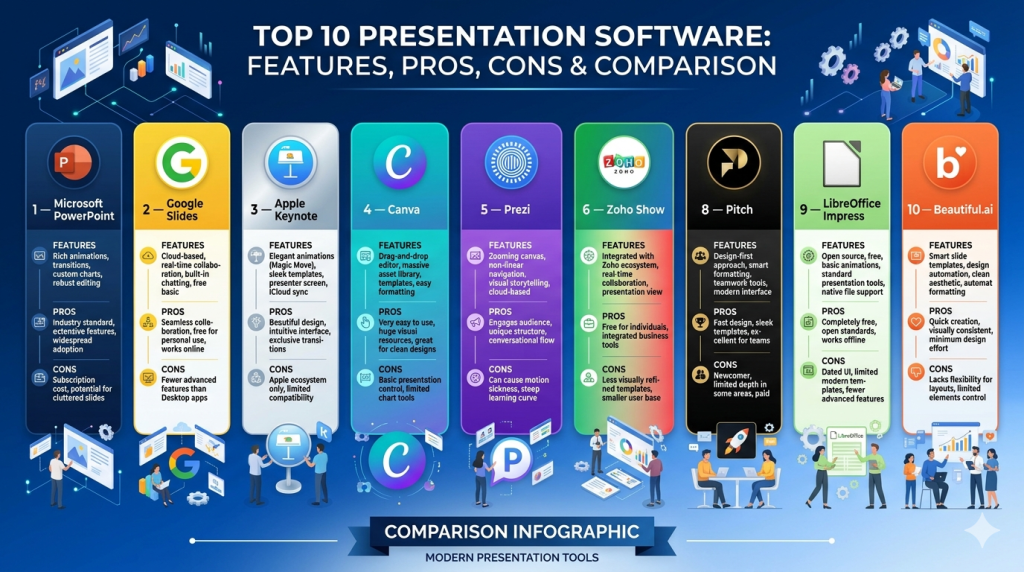
#1 — Microsoft PowerPoint
Short description: A widely used presentation tool offering powerful features for business, education, and professional presentations.
Key Features
- Slide creation and formatting tools
- Advanced animations and transitions
- Template library
- Integration with Office tools
- Presenter view
- Multimedia support
- Export options
Pros
- Industry standard
- Highly versatile
Cons
- Can feel complex
- Limited collaboration compared to newer tools
Platforms / Deployment
Windows / macOS / Web / Mobile
Cloud + Local
Security & Compliance
SSO, encryption, enterprise controls
Other certifications not publicly stated
Integrations & Ecosystem
Part of Microsoft ecosystem.
- Word
- Excel
- Teams
Support & Community
Extensive documentation and global user base.
#2 — Google Slides
Short description: A cloud-based presentation tool focused on collaboration and ease of use.
Key Features
- Real-time collaboration
- Cloud storage
- Templates
- Easy sharing
- Integration with Google Workspace
- Version history
Pros
- Free and accessible
- Excellent collaboration
Cons
- Limited advanced design features
- Requires internet for full functionality
Platforms / Deployment
Web / Mobile
Cloud
Security & Compliance
SSO, encryption
Other details not publicly stated
Integrations & Ecosystem
Strong integration with productivity tools.
- Google Docs
- Google Drive
- Gmail
Support & Community
Large user base and documentation.
#3 — Apple Keynote
Short description: A visually polished presentation tool designed for Apple users.
Key Features
- Elegant templates
- Smooth animations
- Real-time collaboration
- Multimedia support
- Apple ecosystem integration
- Export options
Pros
- High-quality visuals
- Free for Apple users
Cons
- Limited to Apple ecosystem
- Compatibility issues with other formats
Platforms / Deployment
macOS / iOS / Web
Cloud + Local
Security & Compliance
Not publicly stated
Integrations & Ecosystem
Apple ecosystem integration.
Support & Community
Strong documentation.
#4 — Canva
Short description: A design-focused presentation tool with templates and drag-and-drop simplicity.
Key Features
- Template library
- Drag-and-drop editor
- Collaboration tools
- Multimedia support
- Brand kits
- Cloud storage
Pros
- Easy to use
- Great for non-designers
Cons
- Limited advanced customization
- Internet-dependent
Platforms / Deployment
Web / Mobile
Cloud
Security & Compliance
SSO, encryption
Other details not publicly stated
Integrations & Ecosystem
Strong integrations with productivity tools.
- Google Drive
- Slack
Support & Community
Extensive tutorials.
#5 — Prezi
Short description: A unique presentation tool offering zoom-based, non-linear storytelling.
Key Features
- Zoomable canvas
- Non-linear presentations
- Templates
- Multimedia support
- Cloud sharing
- Presenter tools
Pros
- Engaging storytelling format
- Visually dynamic
Cons
- Learning curve
- Not suitable for all presentation styles
Platforms / Deployment
Web / Desktop
Cloud
Security & Compliance
Not publicly stated
Integrations & Ecosystem
Limited integrations.
Support & Community
Moderate support resources.
#6 — Zoho Show
Short description: A cloud-based presentation tool integrated into the Zoho ecosystem.
Key Features
- Slide creation tools
- Collaboration features
- Templates
- Cloud storage
- Multimedia support
- Integration with Zoho apps
Pros
- Affordable
- Good collaboration
Cons
- Smaller ecosystem
- Limited advanced features
Platforms / Deployment
Web / Mobile
Cloud
Security & Compliance
Not publicly stated
Integrations & Ecosystem
Zoho ecosystem integration.
Support & Community
Moderate support.
#7 — Visme
Short description: A presentation and content creation tool focused on visual storytelling and data visualization.
Key Features
- Templates
- Data visualization tools
- Interactive content
- Multimedia support
- Brand kits
- Collaboration tools
Pros
- Strong design features
- Great for marketing
Cons
- Paid plans required for full features
- Learning curve
Platforms / Deployment
Web
Cloud
Security & Compliance
Not publicly stated
Integrations & Ecosystem
Basic integrations.
Support & Community
Good documentation.
#8 — Pitch
Short description: A modern presentation tool built for teams and collaboration.
Key Features
- Real-time collaboration
- Templates
- Analytics
- Integrations
- Cloud-based workflows
- Version control
Pros
- Designed for teams
- Clean interface
Cons
- Limited offline use
- Smaller ecosystem
Platforms / Deployment
Web / Desktop
Cloud
Security & Compliance
SSO, encryption
Other details not publicly stated
Integrations & Ecosystem
Supports team workflows.
- Slack
- Notion
Support & Community
Growing community.
#9 — LibreOffice Impress
Short description: A free and open-source presentation tool similar to PowerPoint.
Key Features
- Slide creation
- Templates
- Basic animations
- Offline usage
- File compatibility
- Open-source
Pros
- Free
- Works offline
Cons
- Limited modern features
- UI feels outdated
Platforms / Deployment
Windows / macOS / Linux
Local
Security & Compliance
Not publicly stated
Integrations & Ecosystem
Limited integrations.
Support & Community
Active open-source community.
#10 — Beautiful.ai
Short description: An AI-driven presentation tool that automates slide design and formatting.
Key Features
- AI-powered slide design
- Templates
- Smart formatting
- Collaboration tools
- Cloud storage
- Analytics
Pros
- Saves time
- Easy to use
Cons
- Limited customization
- Subscription required
Platforms / Deployment
Web
Cloud
Security & Compliance
Not publicly stated
Integrations & Ecosystem
Basic integrations.
Support & Community
Moderate support.
Comparison Table (Top 10)
| Tool Name | Best For | Platform(s) Supported | Deployment | Standout Feature | Public Rating |
|---|---|---|---|---|---|
| PowerPoint | Professionals | Web, Desktop, Mobile | Hybrid | Industry standard | N/A |
| Google Slides | Collaboration | Web, Mobile | Cloud | Real-time editing | N/A |
| Keynote | Apple users | macOS, iOS | Hybrid | Visual quality | N/A |
| Canva | Beginners | Web, Mobile | Cloud | Templates | N/A |
| Prezi | Storytelling | Web, Desktop | Cloud | Zoom canvas | N/A |
| Zoho Show | SMB | Web, Mobile | Cloud | Zoho integration | N/A |
| Visme | Marketing | Web | Cloud | Data visuals | N/A |
| Pitch | Teams | Web, Desktop | Cloud | Collaboration | N/A |
| Impress | Open-source | Win, macOS, Linux | Local | Free use | N/A |
| Beautiful.ai | AI design | Web | Cloud | Smart slides | N/A |
Evaluation & Scoring of Presentation Software
| Tool Name | Core (25%) | Ease (15%) | Integrations (15%) | Security (10%) | Performance (10%) | Support (10%) | Value (15%) | Weighted Total |
|---|---|---|---|---|---|---|---|---|
| PowerPoint | 10 | 7 | 9 | 8 | 9 | 10 | 7 | 8.6 |
| Google Slides | 8 | 10 | 9 | 7 | 8 | 9 | 10 | 8.8 |
| Keynote | 8 | 9 | 7 | 6 | 9 | 8 | 9 | 8.2 |
| Canva | 7 | 10 | 8 | 7 | 8 | 9 | 9 | 8.4 |
| Prezi | 8 | 7 | 6 | 6 | 8 | 7 | 7 | 7.4 |
| Zoho Show | 7 | 8 | 7 | 6 | 7 | 7 | 8 | 7.4 |
| Visme | 8 | 8 | 6 | 6 | 7 | 7 | 7 | 7.5 |
| Pitch | 8 | 9 | 8 | 7 | 8 | 8 | 8 | 8.2 |
| Impress | 6 | 7 | 5 | 5 | 7 | 6 | 10 | 6.9 |
| Beautiful.ai | 7 | 9 | 6 | 6 | 7 | 7 | 8 | 7.5 |
How to interpret:
- Scores are relative comparisons across tools
- Higher scores indicate better overall balance
- Choose based on your workflow needs
- Teams should prioritize collaboration features
- Individuals may prioritize ease and value
Which Presentation Software Is Right for You?
Solo / Freelancer
- Canva, Google Slides, Beautiful.ai
- Focus on simplicity and speed
SMB
- Google Slides, Zoho Show, Canva
- Balance collaboration and usability
Mid-Market
- PowerPoint, Pitch
- Advanced features and workflows
Enterprise
- PowerPoint ecosystem
- Security, scalability, and integration
Budget vs Premium
- Free: Google Slides, Impress
- Premium: PowerPoint, Prezi
Feature Depth vs Ease of Use
- Easy: Canva, Google Slides
- Advanced: PowerPoint, Prezi
Integrations & Scalability
- Strong: PowerPoint, Google Slides
- Limited: Impress, Beautiful.ai
Security & Compliance Needs
- Enterprise-ready: PowerPoint
- Basic: Most others
Frequently Asked Questions (FAQs)
What is presentation software?
It is used to create slideshows for visual communication and storytelling.
Which tool is best for teams?
Google Slides and Pitch are strong for collaboration.
Is PowerPoint still relevant?
Yes, it remains the industry standard.
Are free tools enough?
Yes for most use cases, but advanced needs may require paid tools.
Can I present online?
Yes, most tools support online presentations.
Do these tools support video?
Yes, most tools allow video embedding.
Can I collaborate in real-time?
Yes, especially in cloud-based tools.
Are these tools easy to learn?
Many are beginner-friendly, especially Canva and Google Slides.
Can I export to PDF?
Yes, most tools support PDF export.
Can I switch tools easily?
Yes, but formatting may vary.
Conclusion
Presentation software is a critical tool for communicating ideas effectively in business, education, and marketing. With a wide range of options available, users can choose tools based on their needs—whether it’s simplicity, collaboration, or advanced design capabilities.
There is no single best solution. The right tool depends on your workflow, team size, and presentation goals.
Start by testing a few tools, evaluate their features, and choose the one that best aligns with your communication style and requirements.
