Introduction
Desktop publishing (DTP) software refers to tools used to create visually rich documents that combine text, images, and layout design. These tools are commonly used for designing print and digital materials such as brochures, magazines, books, reports, marketing collateral, and more.
As businesses and creators increasingly rely on high-quality visual communication, desktop publishing software has become essential across industries. Whether you’re producing a company report, designing a magazine, or creating branded marketing assets, DTP tools provide the precision and control needed for professional layouts.
Common use cases include:
- Magazine and book publishing
- Marketing materials (brochures, flyers, catalogs)
- Business reports and presentations
- Print design and packaging
- Digital publications (PDFs, eBooks)
What buyers should evaluate:
- Layout and typography control
- Template availability
- Image and asset management
- File format support (PDF, EPUB, print-ready formats)
- Collaboration and version control
- Ease of use and learning curve
- Integration with design tools
- Performance with large documents
- Print and export capabilities
- Pricing and licensing
Best for: Publishers, designers, marketers, agencies, and businesses creating structured visual documents.
Not ideal for: Users needing quick graphic edits or simple documents—word processors or design tools may be more suitable.
Key Trends in Desktop Publishing Software
- AI-assisted layout design: Auto-formatting, smart alignment, and content suggestions
- Cloud-based publishing: Real-time collaboration and remote workflows
- Cross-platform publishing: Designing once and exporting to print, web, and mobile
- Integration with creative ecosystems: Seamless workflows with image and vector tools
- Template-driven workflows: Faster production for non-designers
- Enhanced typography tools: Advanced font and layout control
- Digital-first publishing: Interactive PDFs and eBooks gaining traction
- Automation features: Batch publishing and dynamic content insertion
- Subscription-based models: Shift from perpetual licenses
- Collaboration and version control: Shared editing and commenting features
How We Selected These Tools (Methodology)
We selected tools based on:
- Industry adoption and reputation
- Depth of layout and typography features
- Performance with large and complex documents
- Integration with design and creative tools
- Ease of use for different user levels
- Support for print and digital publishing
- Collaboration capabilities
- Platform compatibility
- Community and support ecosystem
- Pricing flexibility and value
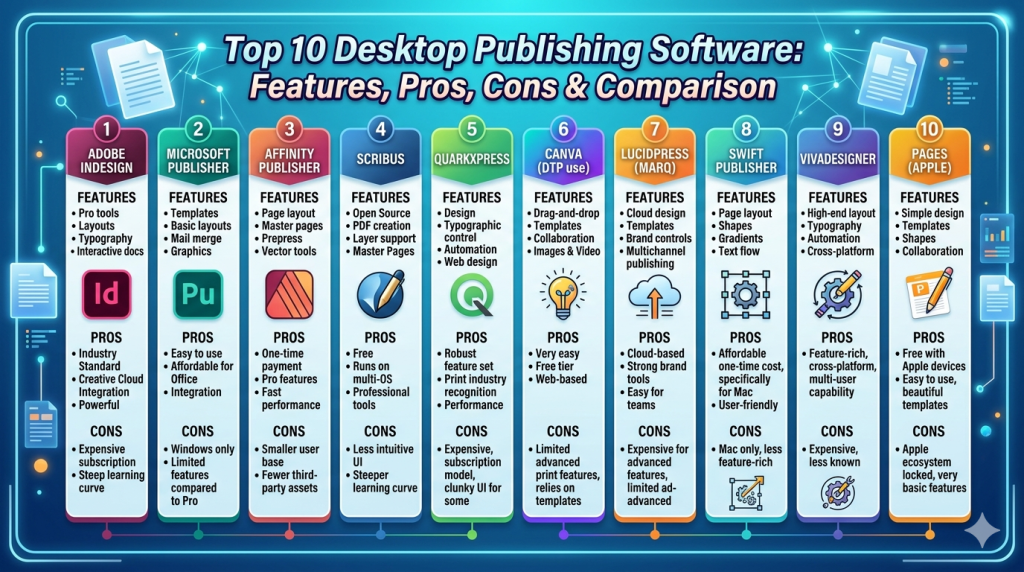
Top 10 Desktop Publishing Software
#1 — Adobe InDesign
Short description: Industry-leading desktop publishing tool used for professional print and digital layouts.
Key Features
- Advanced layout and typography tools
- Master pages and grids
- Interactive PDF and EPUB export
- Integration with design ecosystem
- Preflight and print-ready output
- Styles and templates
- Asset management
Pros
- Industry standard
- Highly powerful and flexible
Cons
- Subscription pricing
- Steep learning curve
Platforms / Deployment
Windows / macOS
Cloud + Local
Security & Compliance
SSO, encryption
Other details not publicly stated
Integrations & Ecosystem
Strong integration with creative tools.
- Photoshop
- Illustrator
- Creative Cloud
Support & Community
Extensive documentation and large global community.
#2 — Microsoft Publisher
Short description: A user-friendly desktop publishing tool designed for small businesses and basic publishing needs.
Key Features
- Templates for brochures and flyers
- Drag-and-drop layout
- Basic typography tools
- Integration with Office apps
- Print-ready output
- Easy formatting tools
Pros
- Easy to use
- Affordable
Cons
- Limited advanced features
- Windows-only
Platforms / Deployment
Windows
Local
Security & Compliance
Not publicly stated
Integrations & Ecosystem
Works within Microsoft ecosystem.
- Word
- Excel
- PowerPoint
Support & Community
Strong documentation and widespread usage.
#3 — Affinity Publisher
Short description: A modern desktop publishing tool offering professional features without subscription pricing.
Key Features
- Advanced layout tools
- Master pages
- StudioLink integration
- Real-time performance
- Preflight checks
- Print-ready export
- Asset management
Pros
- One-time purchase
- High performance
Cons
- Smaller ecosystem
- Limited integrations
Platforms / Deployment
Windows / macOS
Local
Security & Compliance
Not publicly stated
Integrations & Ecosystem
Works with Affinity suite tools.
Support & Community
Growing user base and documentation.
#4 — Scribus
Short description: A free and open-source desktop publishing tool suitable for print and layout design.
Key Features
- Layout and typography tools
- PDF creation
- Color management
- Prepress support
- Templates
- Script automation
Pros
- Free
- Strong print features
Cons
- Outdated UI
- Learning curve
Platforms / Deployment
Windows / macOS / Linux
Local
Security & Compliance
Not publicly stated
Integrations & Ecosystem
Open-source ecosystem.
Support & Community
Active community support.
#5 — QuarkXPress
Short description: A long-standing desktop publishing solution known for advanced print and digital publishing capabilities.
Key Features
- Layout design tools
- Typography controls
- Digital publishing
- Automation features
- Interactive content support
- Asset management
Pros
- Professional-grade features
- Strong publishing tools
Cons
- Expensive
- Smaller user base
Platforms / Deployment
Windows / macOS
Local
Security & Compliance
Not publicly stated
Integrations & Ecosystem
Limited integrations.
Support & Community
Established but smaller community.
#6 — Canva (DTP use)
Short description: A cloud-based design tool increasingly used for simple desktop publishing tasks.
Key Features
- Templates for documents
- Drag-and-drop editor
- Collaboration tools
- Cloud storage
- Export options
- Brand kits
Pros
- Easy to use
- Great for teams
Cons
- Limited advanced layout control
- Internet-dependent
Platforms / Deployment
Web / Mobile
Cloud
Security & Compliance
SSO, encryption
Other details not publicly stated
Integrations & Ecosystem
Strong integrations with productivity tools.
- Google Drive
- Slack
Support & Community
Extensive guides and tutorials.
#7 — Lucidpress (Marq)
Short description: A cloud-based publishing tool focused on brand consistency and collaboration.
Key Features
- Brand templates
- Layout tools
- Collaboration features
- Asset management
- Cloud publishing
- Automation
Pros
- Strong collaboration
- Brand control features
Cons
- Limited advanced design tools
- Subscription required
Platforms / Deployment
Web
Cloud
Security & Compliance
Not publicly stated
Integrations & Ecosystem
Supports business workflows.
Support & Community
Moderate support.
#8 — Swift Publisher
Short description: A lightweight desktop publishing tool designed for macOS users.
Key Features
- Templates
- Layout tools
- Typography features
- Image editing
- Print support
Pros
- Easy to use
- Affordable
Cons
- macOS-only
- Limited advanced features
Platforms / Deployment
macOS
Local
Security & Compliance
Not publicly stated
Integrations & Ecosystem
Limited integrations.
Support & Community
Basic support.
#9 — VivaDesigner
Short description: A flexible desktop publishing tool supporting both print and digital layouts.
Key Features
- Layout design
- Cross-platform support
- Print and digital output
- Templates
- Asset management
Pros
- Flexible deployment
- Affordable
Cons
- Less popular
- Limited community
Platforms / Deployment
Web / Desktop
Hybrid
Security & Compliance
Not publicly stated
Integrations & Ecosystem
Limited integrations.
Support & Community
Limited documentation.
#10 — Pages (Apple)
Short description: A document creation tool with basic desktop publishing capabilities for Apple users.
Key Features
- Templates
- Layout tools
- Typography features
- Cloud sync
- Easy export
Pros
- Free for Apple users
- Simple interface
Cons
- Limited professional features
- Apple-only
Platforms / Deployment
macOS / iOS
Cloud + Local
Security & Compliance
Not publicly stated
Integrations & Ecosystem
Apple ecosystem integration.
Support & Community
Strong documentation.
Comparison Table (Top 10)
| Tool Name | Best For | Platform(s) Supported | Deployment | Standout Feature | Public Rating |
|---|---|---|---|---|---|
| InDesign | Professionals | Win, macOS | Hybrid | Industry standard | N/A |
| Publisher | SMB | Windows | Local | Ease of use | N/A |
| Affinity Publisher | Budget pros | Win, macOS | Local | One-time pricing | N/A |
| Scribus | Open-source users | Win, macOS, Linux | Local | Free publishing | N/A |
| QuarkXPress | Publishers | Win, macOS | Local | Advanced publishing | N/A |
| Canva | Teams | Web, Mobile | Cloud | Templates | N/A |
| Lucidpress | Branding teams | Web | Cloud | Brand control | N/A |
| Swift Publisher | Mac users | macOS | Local | Simplicity | N/A |
| VivaDesigner | Flexible users | Web, Desktop | Hybrid | Cross-platform | N/A |
| Pages | Casual users | macOS, iOS | Hybrid | Ease of use | N/A |
Evaluation & Scoring of Desktop Publishing Software
| Tool Name | Core (25%) | Ease (15%) | Integrations (15%) | Security (10%) | Performance (10%) | Support (10%) | Value (15%) | Weighted Total |
|---|---|---|---|---|---|---|---|---|
| InDesign | 10 | 6 | 9 | 8 | 9 | 10 | 6 | 8.5 |
| Publisher | 7 | 9 | 7 | 6 | 7 | 8 | 8 | 7.6 |
| Affinity Publisher | 9 | 8 | 6 | 6 | 9 | 7 | 9 | 8.1 |
| Scribus | 8 | 6 | 5 | 5 | 7 | 8 | 10 | 7.4 |
| QuarkXPress | 9 | 6 | 6 | 6 | 8 | 8 | 6 | 7.5 |
| Canva | 7 | 10 | 8 | 7 | 8 | 9 | 9 | 8.4 |
| Lucidpress | 7 | 9 | 7 | 6 | 7 | 7 | 8 | 7.6 |
| Swift Publisher | 6 | 9 | 5 | 5 | 7 | 6 | 8 | 6.9 |
| VivaDesigner | 6 | 7 | 5 | 5 | 6 | 5 | 7 | 6.2 |
| Pages | 6 | 10 | 6 | 6 | 8 | 8 | 9 | 7.6 |
How to interpret:
- Scores are comparative across tools
- Higher scores indicate better overall capability
- Professionals should prioritize core features
- Beginners should focus on ease of use
- Value depends on pricing and features
Which Desktop Publishing Software Is Right for You?
Solo / Freelancer
- Canva, Pages, Scribus
- Focus on ease and affordability
SMB
- Microsoft Publisher, Canva
- Balance usability and functionality
Mid-Market
- Affinity Publisher, InDesign
- Advanced workflows and performance
Enterprise
- Adobe InDesign ecosystem
- Collaboration and scalability
Budget vs Premium
- Free: Scribus, Pages
- Premium: InDesign, QuarkXPress
Feature Depth vs Ease of Use
- Easy: Canva, Publisher
- Advanced: InDesign, QuarkXPress
Integrations & Scalability
- Strong: InDesign ecosystem
- Limited: Swift Publisher, VivaDesigner
Security & Compliance Needs
- Enterprise-ready: InDesign ecosystem
- Basic: Most others
Frequently Asked Questions (FAQs)
What is desktop publishing software?
It is used to design and produce visually structured documents for print and digital formats.
What is the best tool for professionals?
Adobe InDesign is widely considered the industry standard.
Are free tools good enough?
Yes for basic publishing, but professionals may need advanced tools.
Can I create eBooks?
Yes, many tools support EPUB and digital exports.
Do these tools support collaboration?
Some cloud-based tools offer collaboration features.
Can I use templates?
Yes, most tools include templates for faster design.
Are these tools beginner-friendly?
Some are (Canva, Publisher), while others require training.
Do I need design skills?
Basic tools require minimal skills; advanced tools require experience.
Can I switch tools easily?
File compatibility varies, but switching is possible.
Are these tools used for print?
Yes, many tools support print-ready outputs.
Conclusion
Desktop publishing software remains essential for creating professional documents, whether for print or digital distribution. From simple tools to advanced publishing platforms, there is a wide range of options available depending on your needs.
The best choice depends on your workflow—whether you prioritize ease of use, advanced layout control, or collaboration features.
Start by testing a few tools, evaluate their capabilities, and select the one that best fits your publishing requirements.
