Introduction
PLC Programming Tools are software platforms used to develop, configure, simulate, and maintain programs for Programmable Logic Controllers (PLCs). These tools enable engineers to automate industrial processes by writing control logic that governs machinery, sensors, and production systems.
In modern industrial environments, PLCs are the backbone of manufacturing, energy, automotive, oil & gas, and smart factories. With Industry 4.0 and IIoT adoption, PLC programming tools now support real-time monitoring, simulation, cloud integration, and advanced diagnostics. They also integrate with Identity Management, Cybersecurity frameworks, Zero Trust architectures, and Access Control systems to ensure secure and compliant industrial operations.
Real-world use cases include:
- Industrial automation and control systems
- Manufacturing line optimization
- Process control in energy and utilities
- Robotics and motion control
- SCADA and HMI integration
What buyers should evaluate:
- Supported PLC brands and hardware compatibility
- Programming languages (Ladder Logic, Structured Text, etc.)
- Simulation and debugging capabilities
- Integration with SCADA, HMI, and IoT systems
- Ease of use and learning curve
- Security and compliance features
- Licensing and cost structure
- Vendor ecosystem and support
Best for: Automation engineers, industrial developers, system integrators, and manufacturing enterprises.
Not ideal for: Non-industrial use cases or applications not requiring hardware-level control.
Key Trends in PLC Programming Tools
- Integration with Industry 4.0 and IIoT platforms
- Cloud-enabled PLC programming and monitoring
- Digital twin and simulation capabilities
- Advanced cybersecurity for industrial systems
- Multi-language programming support improving flexibility
- AI-driven predictive maintenance integration
- Edge computing for real-time processing
- Cross-platform and vendor-neutral solutions emerging
- Improved visualization and HMI integration
- Scalable automation for smart factories
How We PLC Programming Tools (Methodology)
We evaluated tools based on:
- Compatibility with PLC hardware
- Programming capabilities and flexibility
- Simulation and debugging features
- Integration with industrial systems
- Performance and scalability
- Security and compliance readiness
- Ease of use and developer experience
- Industry adoption and vendor support
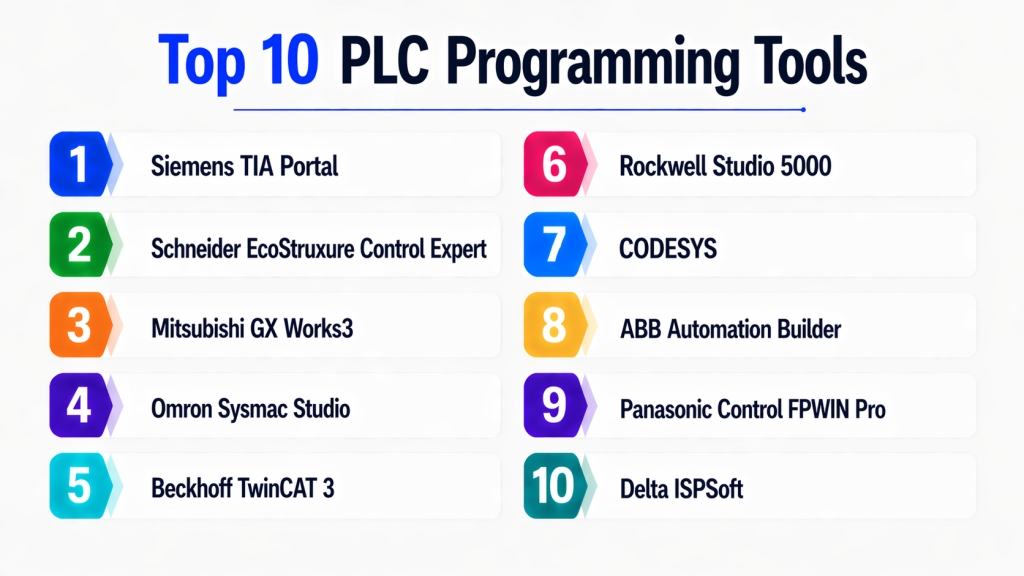
Top 10 PLC Programming Tools
#1 — Siemens TIA Portal
Short description :
Siemens TIA Portal is a comprehensive engineering platform for PLC programming and industrial automation. It integrates PLC, HMI, and SCADA development into a single environment. Widely used in manufacturing industries. Offers advanced simulation and diagnostics. Ideal for large-scale automation projects.
Key Features
- Unified engineering platform
- Multi-language support
- Simulation tools
- SCADA integration
- Advanced diagnostics
Pros
- Feature-rich
- Industry standard
Cons
- Expensive
- Steep learning curve
Platforms / Deployment
Windows
Security & Compliance
RBAC, encryption
Compliance: Varies
Integrations & Ecosystem
- Siemens ecosystem
- Industrial systems
Support & Community
Strong global support.
#2 — Rockwell Studio 5000
Short description :
Studio 5000 by Rockwell Automation is a leading PLC programming tool. It supports Allen-Bradley controllers. Provides robust development and debugging features. Widely used in industrial automation.
Key Features
- PLC programming
- Debugging tools
- Integration with hardware
- Visualization tools
Pros
- Reliable
- Industry adoption
Cons
- Costly
- Vendor lock-in
Platforms / Deployment
Windows
Security & Compliance
Enterprise controls
Integrations & Ecosystem
- Rockwell ecosystem
Support & Community
Strong support.
#3 — Schneider EcoStruxure Control Expert
Short description :
EcoStruxure Control Expert is Schneider Electric’s PLC programming platform. It supports advanced automation and control systems. Ideal for energy and industrial applications.
Key Features
- Multi-language programming
- Simulation tools
- SCADA integration
Pros
- Flexible
- Scalable
Cons
- Complex
- Learning curve
Platforms / Deployment
Windows
Security & Compliance
Varies
Integrations & Ecosystem
- Schneider ecosystem
Support & Community
Enterprise support.
#4 — Mitsubishi GX Works3
Short description :
GX Works3 is a PLC programming tool for Mitsubishi controllers. It provides advanced development features and intuitive interface. Suitable for industrial automation.
Key Features
- Ladder logic programming
- Simulation
- Debugging tools
Pros
- Easy to use
- Reliable
Cons
- Limited ecosystem
- Vendor-specific
Platforms / Deployment
Windows
Security & Compliance
Not publicly stated
Integrations & Ecosystem
- Mitsubishi systems
Support & Community
Good support.
#5 — Omron Sysmac Studio
Short description :
Sysmac Studio is an integrated development environment for Omron PLCs. It supports motion control and robotics integration. Ideal for advanced automation systems.
Key Features
- Motion control
- Integrated development
- Multi-language support
Pros
- Advanced features
- Integrated platform
Cons
- Complex
- Vendor-specific
Platforms / Deployment
Windows
Security & Compliance
Varies
Integrations & Ecosystem
- Omron ecosystem
Support & Community
Strong support.
#6 — CODESYS
Short description :
CODESYS is a vendor-independent PLC programming platform supporting multiple hardware systems. It is widely used for flexible automation projects. Supports IEC 61131-3 languages.
Key Features
- Multi-vendor support
- IEC programming languages
- Simulation tools
Pros
- Flexible
- Open ecosystem
Cons
- Requires setup
- Learning curve
Platforms / Deployment
Windows
Security & Compliance
Varies
Integrations & Ecosystem
- Multiple PLC vendors
Support & Community
Large community.
#7 — Beckhoff TwinCAT 3
Short description :
TwinCAT 3 is a PLC and automation platform based on PC control technology. It integrates with Visual Studio. Ideal for advanced industrial systems.
Key Features
- PC-based control
- Integration with Visual Studio
- Real-time processing
Pros
- High performance
- Flexible
Cons
- Complex
- Requires expertise
Platforms / Deployment
Windows
Security & Compliance
Varies
Integrations & Ecosystem
- Beckhoff ecosystem
Support & Community
Active support.
#8 — ABB Automation Builder
Short description :
Automation Builder is ABB’s PLC programming platform. It supports industrial automation and control systems. Ideal for large-scale projects.
Key Features
- PLC programming
- Integration tools
- Visualization
Pros
- Reliable
- Scalable
Cons
- Complex
- Vendor-specific
Platforms / Deployment
Windows
Security & Compliance
Enterprise controls
Integrations & Ecosystem
- ABB ecosystem
Support & Community
Enterprise support.
#9 — Panasonic Control FPWIN Pro
Short description :
FPWIN Pro is a PLC programming tool for Panasonic controllers. It provides a user-friendly interface and reliable performance. Suitable for small to mid-scale automation.
Key Features
- Ladder logic
- Debugging tools
- Simulation
Pros
- Easy to use
- Cost-effective
Cons
- Limited features
- Smaller ecosystem
Platforms / Deployment
Windows
Security & Compliance
Not publicly stated
Integrations & Ecosystem
- Panasonic systems
Support & Community
Moderate support.
#10 — Delta ISPSoft
Short description :
ISPSoft is a PLC programming tool for Delta controllers. It supports automation and control applications. Ideal for cost-effective solutions.
Key Features
- PLC programming
- Simulation
- Debugging
Pros
- Affordable
- Easy to use
Cons
- Limited scalability
- Vendor-specific
Platforms / Deployment
Windows
Security & Compliance
Not publicly stated
Integrations & Ecosystem
- Delta systems
Support & Community
Growing support.
Comparison Table (Top 10)
| Tool Name | Best For | Platform(s) | Deployment | Standout Feature | Public Rating |
|---|---|---|---|---|---|
| TIA Portal | Enterprise | Windows | Local | Unified platform | N/A |
| Studio 5000 | Industry | Windows | Local | Reliability | N/A |
| EcoStruxure | Energy | Windows | Local | Flexibility | N/A |
| GX Works3 | Industrial | Windows | Local | Simplicity | N/A |
| Sysmac Studio | Robotics | Windows | Local | Motion control | N/A |
| CODESYS | Multi-vendor | Windows | Local | Flexibility | N/A |
| TwinCAT | Advanced | Windows | Local | PC control | N/A |
| ABB Builder | Enterprise | Windows | Local | Scalability | N/A |
| FPWIN Pro | SMB | Windows | Local | Ease | N/A |
| ISPSoft | Budget | Windows | Local | Cost | N/A |
Evaluation & Scoring of PLC Programming Tools
| Tool | Core | Ease | Integration | Security | Performance | Support | Value | Total |
|---|---|---|---|---|---|---|---|---|
| TIA Portal | 10 | 7 | 10 | 9 | 9 | 10 | 7 | 9.0 |
| Studio 5000 | 9 | 7 | 9 | 9 | 9 | 9 | 7 | 8.6 |
| EcoStruxure | 9 | 7 | 9 | 8 | 8 | 9 | 7 | 8.4 |
| GX Works3 | 8 | 8 | 7 | 7 | 8 | 8 | 8 | 7.9 |
| Sysmac | 9 | 7 | 8 | 8 | 9 | 8 | 7 | 8.3 |
| CODESYS | 9 | 8 | 9 | 7 | 8 | 9 | 9 | 8.6 |
| TwinCAT | 9 | 6 | 9 | 8 | 10 | 8 | 7 | 8.5 |
| ABB | 8 | 7 | 8 | 8 | 8 | 8 | 7 | 7.9 |
| FPWIN | 7 | 9 | 7 | 6 | 7 | 7 | 9 | 7.6 |
| ISPSoft | 7 | 9 | 6 | 6 | 7 | 7 | 9 | 7.5 |
Which PLC Programming Tool Is Right for You?
Solo / Beginner
Use FPWIN Pro, ISPSoft
SMB
Use GX Works3, CODESYS
Mid-Market
Use Sysmac Studio, EcoStruxure
Enterprise
Use TIA Portal, Studio 5000
Budget vs Premium
Budget: ISPSoft
Premium: TIA Portal
Feature Depth vs Ease
Depth: TIA Portal
Ease: FPWIN Pro
Security & Compliance
Best: TIA Portal, Studio 5000
Frequently Asked Questions (FAQs)
1. What are PLC programming tools?
PLC programming tools are software platforms used to create, test, and manage programs for programmable logic controllers. These tools allow engineers to automate machines and industrial processes efficiently. They support multiple programming languages like Ladder Logic and Structured Text. PLC tools are essential in manufacturing and industrial automation environments. They also help in monitoring and debugging control systems.
2. Why are PLC programming tools important?
PLC tools are critical for controlling industrial operations and ensuring consistent performance. They help automate repetitive tasks and improve efficiency in production systems. These tools also provide real-time monitoring and diagnostics. By reducing manual intervention, they minimize errors and downtime. They are widely used in industries where reliability and precision are required.
3. Are PLC programming tools scalable?
Yes, PLC programming tools are designed to scale from small systems to large industrial setups. Enterprise tools can handle complex automation environments with multiple controllers. Scalability depends on hardware compatibility and system architecture. Cloud and IIoT integration further enhance scalability. Proper planning ensures efficient scaling.
4. Are PLC programming tools secure?
Security depends on the platform and configuration used. Modern PLC tools offer features like encryption, role-based access control, and secure communication protocols. These features help protect industrial systems from cyber threats. Organizations must follow best practices to ensure secure deployments. Compliance varies depending on the vendor and industry standards.
5. Which PLC programming tool is best for beginners?
Tools like FPWIN Pro and ISPSoft are often recommended for beginners due to their simple interfaces. They provide easy-to-understand programming environments and basic features. These tools are ideal for learning core PLC concepts. Beginners can gradually move to advanced platforms as they gain experience. Choosing the right tool depends on learning goals and hardware access.
6. Can PLC programming tools integrate with IoT systems?
Yes, modern PLC programming tools support integration with IoT and industrial IoT platforms. They can connect with sensors, cloud systems, and analytics tools. This enables real-time data collection and monitoring. IoT integration improves automation and decision-making. It is a key feature in Industry 4.0 environments.
7. Are PLC programming tools expensive?
Pricing varies depending on the tool and features offered. Some vendor-specific tools are expensive due to licensing and support costs. There are also cost-effective or free options available for smaller projects. Enterprise tools usually require higher investment. Organizations should evaluate cost versus functionality before choosing.
8. What industries use PLC programming tools?
PLC programming tools are widely used in industries such as manufacturing, energy, automotive, oil and gas, and utilities. They are essential for controlling machinery and industrial processes. These tools help improve efficiency, safety, and productivity. Their adoption is increasing with smart factory initiatives. They are a core component of industrial automation.
9. What are the limitations of PLC programming tools?
PLC programming tools can have a steep learning curve, especially for beginners. Vendor-specific tools may lead to lock-in and limited flexibility. Complex systems require expertise and proper configuration. Integration with other systems can sometimes be challenging. Despite these limitations, they remain essential for industrial automation.
10. How do I choose the right PLC programming tool?
Choosing the right tool depends on your hardware, use case, and technical expertise. Evaluate compatibility with PLC devices and supported programming languages. Consider ease of use, scalability, and integration capabilities. Testing tools in real-world scenarios is highly recommended. Select a tool that aligns with your long-term automation strategy.
Conclusion
PLC programming tools are essential for modern industrial automation, enabling precise control, monitoring, and optimization of complex systems. With the rise of smart factories and Industry 4.0, these tools are evolving to support advanced features like simulation, IoT integration, and real-time analytics, making them more powerful and versatile than ever before.
Choosing the right PLC programming tool depends on your specific requirements, including hardware compatibility, scalability, ease of use, and security needs. While enterprise-grade tools like Siemens TIA Portal and Rockwell Studio 5000 offer comprehensive features for large-scale deployments, flexible solutions like CODESYS provide vendor-independent options for diverse environments. The best approach is to evaluate your operational needs, test different tools, and select the one that aligns with your automation strategy.
