Introduction
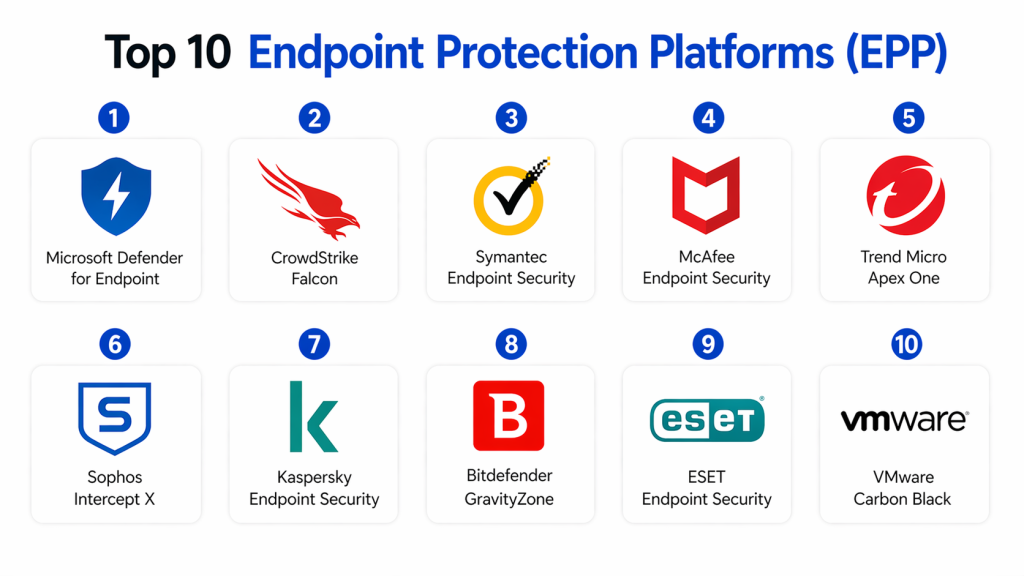
Endpoint Protection Platforms (EPP) are cybersecurity solutions designed to protect devices such as laptops, desktops, servers, and mobile endpoints from malware, ransomware, and other threats. These platforms combine antivirus, threat prevention, and device control into a single system to secure endpoints across an organization.
In today’s threat landscape, where remote work, cloud usage, and sophisticated cyberattacks are increasing, EPP has become a foundational layer of endpoint security. Modern EPP solutions go beyond traditional antivirus by incorporating behavior analysis, AI-driven threat detection, and Zero Trust principles.
Real-world use cases:
- Protecting employee laptops from malware and ransomware
- Securing remote workforce endpoints
- Preventing unauthorized applications and device access
- Monitoring endpoint activity for suspicious behavior
- Enforcing security policies across devices
What buyers should evaluate:
- Malware detection and prevention capabilities
- Behavioral analysis and AI features
- Device and application control
- Integration with EDR/XDR tools
- Ease of deployment and management
- Performance impact on endpoints
- Scalability across environments
- Compliance and reporting features
- Cloud vs on-prem deployment
- Pricing and licensing
Best for: Enterprises, SMBs, IT security teams, remote workforce environments, and organizations with distributed endpoints
Not ideal for: Very small environments with minimal endpoint exposure
Key Trends in Endpoint Protection Platforms (EPP)
- Shift toward AI-driven threat detection and automation
- Integration with EDR and XDR platforms
- Cloud-native endpoint protection
- Behavioral and anomaly-based detection
- Zero Trust endpoint security models
- Increased focus on ransomware protection
- Real-time threat intelligence integration
- Automated response and remediation
- Lightweight agents with minimal performance impact
- Unified endpoint security platforms
How We Selected These Tools (Methodology)
- Strong market adoption and reputation
- Comprehensive endpoint protection capabilities
- Proven threat detection performance
- Integration with modern security ecosystems
- Scalability across organizations
- Ease of deployment and management
- Performance efficiency
- Security posture and compliance readiness
- Vendor maturity and support
- Fit across SMB and enterprise use cases
Top 10 Endpoint Protection Platforms (EPP)
#1 — Microsoft Defender for Endpoint
Short description :
Microsoft Defender for Endpoint is a widely used EPP solution offering strong protection across Windows environments. It integrates deeply with Microsoft ecosystem. It provides advanced threat detection and response. It is scalable for enterprises. It offers cloud-based management. It is ideal for organizations using Microsoft tools.
Key Features
- Threat protection
- Endpoint detection
- Automated response
- Integration with Microsoft ecosystem
- Cloud security
Pros
- Strong integration
- Scalable
- Enterprise-ready
Cons
- Limited outside Microsoft
- Requires configuration
Platforms / Deployment
- Windows / macOS / Linux
- Cloud
Security & Compliance
- MFA, RBAC, encryption
- Compliance: Not publicly stated
Integrations & Ecosystem
- Microsoft ecosystem
- APIs
Support & Community
- Enterprise support
#2 — CrowdStrike Falcon
Short description :
CrowdStrike Falcon is a cloud-native EPP solution known for its strong threat intelligence and lightweight agent. It offers AI-driven threat detection and response. It is widely used by enterprises. It supports real-time monitoring. It is scalable. It provides strong endpoint visibility.
Key Features
- AI-based detection
- Threat intelligence
- Real-time monitoring
- Lightweight agent
- Cloud-native platform
Pros
- High detection rate
- Lightweight
- Scalable
Cons
- Expensive
- Requires expertise
Platforms / Deployment
- Windows / macOS / Linux
- Cloud
Security & Compliance
- Encryption, RBAC
- Compliance: Not publicly stated
Integrations & Ecosystem
- APIs
- Security tools
Support & Community
- Strong support
#3 — Symantec Endpoint Security
Short description :
Symantec Endpoint Security provides protection against malware and threats. It offers strong threat detection and prevention. It supports enterprise environments. It integrates with security systems. It is scalable. It provides centralized management.
Key Features
- Threat protection
- Malware detection
- Device control
- Centralized management
- Security policies
Pros
- Reliable
- Enterprise-ready
- Strong features
Cons
- Complex
- Resource heavy
Platforms / Deployment
- Windows / macOS
- Cloud / On-prem
Security & Compliance
- Encryption, RBAC
- Compliance: Not publicly stated
#4 — McAfee Endpoint Security
Short description :
McAfee Endpoint Security offers protection against advanced threats. It includes malware prevention and device control. It supports enterprise environments. It provides strong security features. It is scalable. It offers centralized management.
Key Features
- Threat prevention
- Malware protection
- Device control
- Policy management
- Monitoring
Pros
- Strong protection
- Enterprise-ready
- Scalable
Cons
- Heavy resource usage
- Complex setup
Platforms / Deployment
- Windows / macOS
- Cloud / On-prem
Security & Compliance
- Encryption
- Compliance: Not publicly stated
#5 — Trend Micro Apex One
Short description :
Trend Micro Apex One provides endpoint protection with advanced threat detection. It supports hybrid environments. It offers strong security controls. It integrates with enterprise systems. It is scalable. It provides centralized visibility.
Key Features
- Threat detection
- Behavior monitoring
- Endpoint control
- Policy management
- Reporting
Pros
- Strong detection
- Flexible deployment
- Scalable
Cons
- Complex UI
- Learning curve
Platforms / Deployment
- Windows / macOS
- Cloud / Hybrid
Security & Compliance
- RBAC, encryption
- Compliance: Not publicly stated
#6 — Sophos Intercept X
Short description :
Sophos Intercept X is an EPP solution focused on ransomware protection and threat prevention. It offers strong AI-based detection. It is easy to deploy. It supports SMB and enterprise. It provides centralized management. It is scalable.
Key Features
- Ransomware protection
- AI detection
- Endpoint control
- Threat response
- Reporting
Pros
- Easy deployment
- Strong ransomware protection
- User-friendly
Cons
- Limited advanced features
- Requires integration
Platforms / Deployment
- Windows / macOS / Linux
- Cloud
Security & Compliance
- MFA, encryption
- Compliance: Not publicly stated
#7 — Kaspersky Endpoint Security
Short description :
Kaspersky Endpoint Security offers protection against malware and advanced threats. It provides strong detection capabilities. It supports multiple platforms. It is scalable. It offers centralized control. It is widely used globally.
Key Features
- Threat detection
- Malware protection
- Device control
- Policy enforcement
- Reporting
Pros
- Strong detection
- Reliable
- Scalable
Cons
- Compliance concerns in some regions
- Complex UI
Platforms / Deployment
- Windows / macOS / Linux
- Cloud / On-prem
Security & Compliance
- Encryption
- Compliance: Not publicly stated
#8 — Bitdefender GravityZone
Short description :
Bitdefender GravityZone provides endpoint protection with strong threat detection. It supports cloud and on-prem environments. It offers centralized management. It is scalable. It provides strong security features. It is suitable for SMB and enterprise.
Key Features
- Threat protection
- Malware detection
- Centralized management
- Policy control
- Reporting
Pros
- Strong detection
- Flexible deployment
- Scalable
Cons
- Complex setup
- UI limitations
Platforms / Deployment
- Windows / macOS / Linux
- Cloud / Hybrid
Security & Compliance
- Encryption
- Compliance: Not publicly stated
#9 — ESET Endpoint Security
Short description :
ESET Endpoint Security provides lightweight endpoint protection with strong detection. It offers malware protection and device control. It is easy to deploy. It is scalable. It is suitable for SMBs. It provides centralized management.
Key Features
- Malware detection
- Device control
- Policy management
- Reporting
- Endpoint monitoring
Pros
- Lightweight
- Easy deployment
- Affordable
Cons
- Limited advanced features
- Smaller ecosystem
Platforms / Deployment
- Windows / macOS / Linux
- Cloud / On-prem
Security & Compliance
- Encryption
- Compliance: Not publicly stated
#10 — VMware Carbon Black
Short description :
VMware Carbon Black provides endpoint protection with advanced threat detection. It focuses on behavioral analysis. It supports enterprise environments. It integrates with VMware ecosystem. It is scalable. It offers strong monitoring.
Key Features
- Behavioral analysis
- Threat detection
- Monitoring
- Endpoint control
- Integration
Pros
- Strong analytics
- Enterprise-ready
- Scalable
Cons
- Complex setup
- Requires expertise
Platforms / Deployment
- Windows / macOS / Linux
- Cloud
Security & Compliance
- RBAC, encryption
- Compliance: Not publicly stated
Comparison Table
| Tool | Best For | Platform | Deployment | Feature | Rating |
|---|---|---|---|---|---|
| Microsoft Defender | Enterprise | Multi | Cloud | Integration | N/A |
| CrowdStrike | Enterprise | Multi | Cloud | AI detection | N/A |
| Symantec | Enterprise | Multi | Hybrid | Protection | N/A |
| McAfee | Enterprise | Multi | Hybrid | Security | N/A |
| Trend Micro | Enterprise | Multi | Hybrid | Detection | N/A |
| Sophos | SMB | Multi | Cloud | Ransomware | N/A |
| Kaspersky | Enterprise | Multi | Hybrid | Detection | N/A |
| Bitdefender | SMB | Multi | Hybrid | Protection | N/A |
| ESET | SMB | Multi | Hybrid | Lightweight | N/A |
| VMware | Enterprise | Multi | Cloud | Analytics | N/A |
Evaluation & Scoring of EPP Tools
| Tool | Core | Ease | Integration | Security | Performance | Support | Value | Total |
|---|---|---|---|---|---|---|---|---|
| Microsoft | 9 | 9 | 10 | 9 | 9 | 9 | 9 | 9.2 |
| CrowdStrike | 10 | 8 | 9 | 10 | 9 | 9 | 7 | 9.0 |
| Symantec | 9 | 7 | 8 | 9 | 8 | 8 | 7 | 8.3 |
| McAfee | 9 | 7 | 8 | 9 | 8 | 8 | 7 | 8.3 |
| Trend Micro | 9 | 8 | 8 | 9 | 8 | 8 | 8 | 8.6 |
| Sophos | 8 | 9 | 7 | 9 | 8 | 8 | 9 | 8.5 |
| Kaspersky | 9 | 7 | 8 | 9 | 8 | 7 | 8 | 8.3 |
| Bitdefender | 9 | 8 | 8 | 9 | 8 | 8 | 8 | 8.6 |
| ESET | 8 | 9 | 7 | 8 | 9 | 7 | 9 | 8.4 |
| VMware | 9 | 7 | 8 | 9 | 8 | 8 | 7 | 8.3 |
Which EPP Tool Is Right for You?
Solo / Freelancer
- ESET
SMB
- Sophos, Bitdefender
Mid-Market
- Trend Micro, CrowdStrike
Enterprise
- Microsoft Defender, CrowdStrike
Budget vs Premium
- Budget → ESET
- Premium → CrowdStrike
Feature Depth vs Ease
- Easy → Sophos
- Advanced → CrowdStrike
Integrations & Scalability
- Best → Microsoft Defender
Security Needs
- High security → CrowdStrike
Frequently Asked Questions (FAQs)1. What is an Endpoint Protection Platform (EPP)?
An Endpoint Protection Platform (EPP) is a security solution designed to protect devices like laptops, desktops, and servers from cyber threats. It combines antivirus, malware protection, and security controls in one platform. EPP tools monitor endpoint activity continuously. They help prevent attacks before they can cause damage.
2. Why is EPP important for organizations?
EPP is important because endpoints are often the main entry point for cyberattacks. It helps protect devices from malware, ransomware, and unauthorized access. With remote work increasing, endpoint security has become critical. EPP ensures consistent protection across all devices.
3. How does EPP work?
EPP works by scanning files, monitoring behavior, and blocking suspicious activities on endpoints. It uses signature-based and behavior-based detection methods. Many tools also use AI to identify unknown threats. It enforces security policies across all connected devices.
4. Who should use EPP solutions?
EPP solutions are used by businesses of all sizes, from SMBs to large enterprises. IT teams rely on EPP to secure employee devices and company data. It is especially important for organizations with remote or distributed workforces. Any environment with multiple endpoints benefits from EPP.
5. Is EPP scalable for large environments?
Yes, modern EPP solutions are highly scalable and can support thousands of devices. Cloud-based EPP platforms allow centralized management across global environments. This makes them suitable for growing organizations. Scalability is a key advantage of EPP tools.
6. Does EPP include Endpoint Detection and Response (EDR)?
Some EPP solutions include EDR features, while others integrate with separate EDR tools. EPP focuses mainly on prevention, while EDR focuses on detection and response. Together, they provide complete endpoint security. Many modern platforms combine both capabilities.
7. Is EPP enough for complete security?
EPP is a foundational security layer, but it is not enough on its own. Organizations often combine it with EDR, XDR, and network security tools. A layered security approach provides better protection. EPP should be part of a broader cybersecurity strategy.
8. What is the difference between cloud and on-prem EPP?
Cloud-based EPP is easier to deploy and manage, especially for remote teams. On-prem EPP offers more control over data and infrastructure. Hybrid models combine both approaches. The choice depends on organizational needs and security policies.
9. Is EPP expensive to implement?
The cost of EPP depends on the vendor, features, and number of endpoints. SMB solutions are generally more affordable. Enterprise platforms can be more expensive but offer advanced capabilities. Investing in EPP helps prevent costly security breaches.
10. What are alternatives to EPP?
EPP works alongside tools like EDR, XDR, and antivirus solutions. EDR provides deeper visibility into threats, while XDR integrates multiple security layers. These tools are complementary, not replacements. Together, they create a strong endpoint security framework.
Conclusion
Endpoint Protection Platforms (EPP) are essential for protecting devices and preventing cyber threats in modern organizations. As cyberattacks become more advanced, EPP solutions have evolved to include AI-driven detection, automation, and integration with broader security ecosystems.
The right EPP solution depends on your organization’s size and requirements. Enterprise tools like CrowdStrike and Microsoft Defender offer advanced capabilities, while solutions like ESET and Sophos provide cost-effective protection. Organizations should evaluate their needs, test solutions, and implement EPP as part of a comprehensive security strategy.
