Introduction
Product Lifecycle Management (PLM) is a centralized approach to managing a product’s entire journey—from concept and design to manufacturing, maintenance, and retirement. It connects teams, data, and processes into a single system so organizations can build better products faster and with fewer errors.
In today’s environment, PLM is more critical than ever. As products become more complex and globally distributed, organizations must manage engineering changes, compliance requirements, and collaboration across multiple stakeholders. Modern PLM platforms now integrate with identity management, cybersecurity, Zero Trust frameworks, and access control systems to ensure data security and governance.
Real-world use cases:
- Managing product design collaboration across global teams
- Ensuring regulatory compliance in manufacturing and healthcare
- Tracking product changes and revisions in engineering workflows
- Integrating IoT data into product lifecycle decisions
- Enabling digital twins for simulation and optimization
What buyers should evaluate:
- Feature depth and lifecycle coverage
- Ease of use and adoption
- Integration capabilities with ERP, CAD, and SCM
- Security, access control, and compliance readiness
- Scalability for global teams
- Deployment flexibility (cloud vs on-prem)
- Customization and workflow automation
- Vendor support and ecosystem
Best for: Manufacturing companies, engineering teams, product managers, automotive, aerospace, electronics, and industrial sectors.
Not ideal for: Very small teams with simple workflows, startups without structured product development processes, or businesses that only need basic project management tools.
Key Trends in Product Lifecycle Management (PLM)
- AI-powered design optimization improving product iterations and reducing time-to-market
- Cloud-native PLM adoption replacing legacy on-prem systems
- Digital twins integration for simulation and predictive maintenance
- Zero Trust security models embedded into PLM platforms
- Stronger access control & identity management integration with SSO and RBAC
- Low-code customization for workflows and dashboards
- IoT and real-time data integration for lifecycle insights
- Sustainability tracking for ESG and compliance reporting
- API-first ecosystems enabling seamless integration with enterprise tools
- Subscription-based pricing models replacing perpetual licensing
How We Evaluated Product Lifecycle Management (PLM)
- Market adoption and enterprise usage
- Feature completeness across lifecycle stages
- Performance and reliability indicators
- Security posture and compliance capabilities
- Integration ecosystem strength
- Flexibility across industries and company sizes
- Ease of implementation and onboarding
- Vendor reputation and long-term viability
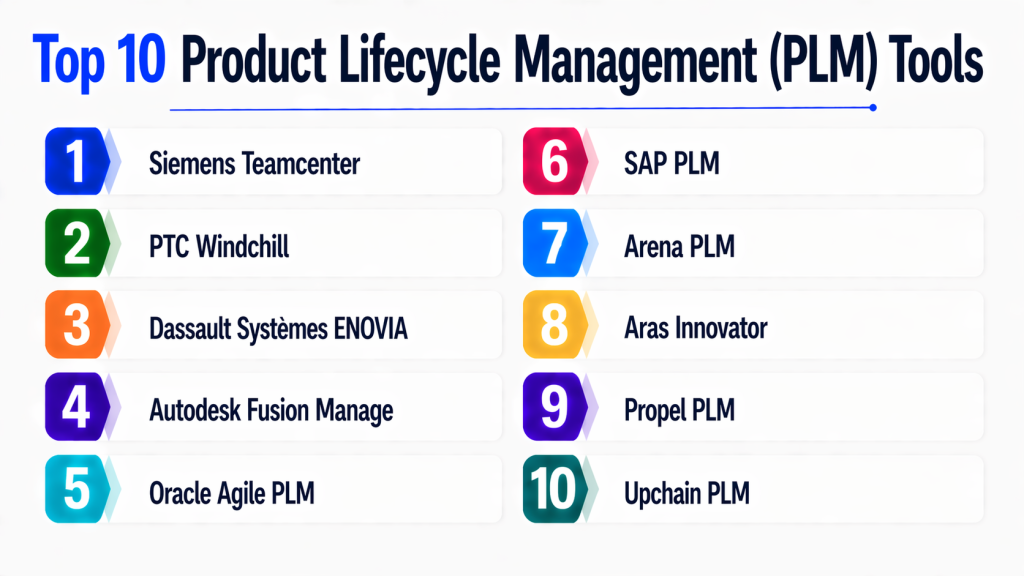
Top 10 Product Lifecycle Management (PLM)
#1 — Siemens Teamcenter
Short description:
Siemens Teamcenter is a comprehensive enterprise PLM platform designed for complex product development environments. It supports large-scale engineering operations, offering deep integration with CAD tools and manufacturing systems. The platform enables collaboration across global teams while maintaining strict data governance. It is widely used in automotive, aerospace, and industrial sectors. Teamcenter excels in managing product data, workflows, and digital twins. Its scalability makes it suitable for large enterprises with complex requirements.
Key Features
- End-to-end lifecycle management
- Advanced BOM management
- Digital twin capabilities
- Workflow automation
- Multi-CAD integration
- Change management tools
Pros
- Highly scalable for enterprise use
- Strong integration ecosystem
Cons
- Complex implementation
- Higher cost
Platforms / Deployment
Cloud / On-prem / Hybrid
Security & Compliance
SSO, RBAC, encryption, audit logs; compliance varies
Integrations & Ecosystem
Integrates with CAD tools, ERP systems, and manufacturing platforms
- SAP
- NX CAD
- SolidWorks
- APIs
Support & Community
Strong enterprise support and extensive documentation
#2 — PTC Windchill
Short description:
Windchill is a robust PLM solution focused on product data management and collaboration. It enables organizations to manage product structures, changes, and workflows efficiently. The platform supports IoT integration and digital thread capabilities. It is widely used in manufacturing industries. Windchill provides flexibility for customization and scaling. It is ideal for companies needing deep engineering integration.
Key Features
- Product data management
- Digital thread integration
- Change and configuration management
- CAD integration
- Workflow automation
Pros
- Strong engineering capabilities
- Flexible customization
Cons
- Learning curve
- UI complexity
Platforms / Deployment
Cloud / On-prem
Security & Compliance
SSO, encryption, RBAC
Integrations & Ecosystem
Integrates with IoT and CAD tools
- ThingWorx
- Creo
- ERP systems
Support & Community
Enterprise-grade support available
#3 — Dassault Systèmes ENOVIA
Short description:
ENOVIA provides collaborative product lifecycle management with a strong focus on innovation and design collaboration. It is part of the 3DEXPERIENCE platform. It enables real-time collaboration across teams. The platform is widely used in engineering-heavy industries. ENOVIA excels in managing complex product structures. It also supports cloud deployment.
Key Features
- Collaboration tools
- Product data management
- Workflow automation
- Real-time updates
- Integration with 3D tools
Pros
- Strong collaboration features
- Integrated ecosystem
Cons
- Expensive
- Complex setup
Platforms / Deployment
Cloud / Hybrid
Security & Compliance
SSO, RBAC
Integrations & Ecosystem
- CATIA
- SOLIDWORKS
- APIs
Support & Community
Strong enterprise support
#4 — Autodesk Fusion Manage
Short description:
Fusion Manage is a cloud-based PLM solution designed for flexibility and ease of use. It supports product development workflows and change management. It integrates well with Autodesk design tools. The platform is suitable for mid-sized companies. It offers customization capabilities. It simplifies product lifecycle tracking.
Key Features
- Cloud PLM
- Workflow automation
- Change management
- Integration with Autodesk tools
Pros
- Easy to deploy
- User-friendly
Cons
- Limited enterprise depth
- Customization limits
Platforms / Deployment
Cloud
Security & Compliance
SSO, encryption
Integrations & Ecosystem
- Autodesk tools
- APIs
Support & Community
Good documentation and support
#5 — Oracle Agile PLM
Short description:
Oracle Agile PLM focuses on product value chain management. It helps manage product development, quality, and compliance. It is widely used in regulated industries. The platform integrates with Oracle ERP systems. It supports global collaboration. Agile PLM is known for strong compliance features.
Key Features
- Product governance
- Quality management
- Compliance tracking
- Change management
Pros
- Strong compliance capabilities
- Enterprise integration
Cons
- Legacy interface
- Complex setup
Platforms / Deployment
Cloud / On-prem
Security & Compliance
RBAC, audit logs
Integrations & Ecosystem
- Oracle ERP
- APIs
Support & Community
Enterprise-level support
#6 — SAP PLM
Short description:
SAP PLM integrates deeply with SAP ERP systems, enabling seamless product lifecycle management. It is designed for large enterprises. It supports engineering, manufacturing, and compliance processes. The platform offers scalability. It is ideal for organizations already using SAP.
Key Features
- ERP integration
- Product data management
- Compliance tracking
- Workflow automation
Pros
- Strong SAP ecosystem
- Enterprise scalability
Cons
- High cost
- Complex implementation
Platforms / Deployment
Cloud / Hybrid
Security & Compliance
SSO, RBAC, compliance tools
Integrations & Ecosystem
- SAP ecosystem
- APIs
Support & Community
Extensive enterprise support
#7 — Arena PLM
Short description:
Arena PLM is a cloud-native PLM solution designed for fast-growing companies. It focuses on product development and quality management. It is widely used in electronics and hardware startups. The platform offers ease of use. It supports collaboration and change tracking.
Key Features
- Cloud PLM
- BOM management
- Change control
- Supplier collaboration
Pros
- Easy to use
- Quick deployment
Cons
- Limited enterprise features
- Scaling limitations
Platforms / Deployment
Cloud
Security & Compliance
SSO, encryption
Integrations & Ecosystem
- APIs
- ERP tools
Support & Community
Good support for SMBs
#8 — Aras Innovator
Short description:
Aras Innovator is a flexible, open architecture PLM platform. It supports customization and scalability. It is suitable for enterprises needing tailored solutions. The platform offers strong lifecycle management features. It supports digital transformation initiatives. It is known for flexibility.
Key Features
- Open architecture
- Custom workflows
- Lifecycle management
- Integration capabilities
Pros
- Highly customizable
- Flexible deployment
Cons
- Requires technical expertise
- Setup complexity
Platforms / Deployment
Cloud / On-prem
Security & Compliance
RBAC, encryption
Integrations & Ecosystem
- APIs
- Enterprise tools
Support & Community
Active community and support
#9 — Propel PLM
Short description:
Propel PLM is built on Salesforce, offering cloud-native PLM capabilities. It combines product lifecycle and CRM data. It is ideal for companies using Salesforce. The platform supports collaboration and product tracking. It is easy to use. It integrates well with Salesforce ecosystem.
Key Features
- Salesforce integration
- Product tracking
- Collaboration tools
- Change management
Pros
- Seamless Salesforce integration
- Easy adoption
Cons
- Limited outside Salesforce ecosystem
- Feature depth
Platforms / Deployment
Cloud
Security & Compliance
SSO, RBAC
Integrations & Ecosystem
- Salesforce
- APIs
Support & Community
Good support ecosystem
#10 — Upchain PLM
Short description:
Upchain PLM focuses on cloud-based product lifecycle management for engineering teams. It provides collaboration and data management tools. It integrates with CAD and ERP systems. It is suitable for mid-sized companies. The platform is easy to deploy. It supports real-time collaboration.
Key Features
- Cloud collaboration
- CAD integration
- Data management
- Workflow tools
Pros
- Easy deployment
- Good collaboration
Cons
- Limited advanced features
- Smaller ecosystem
Platforms / Deployment
Cloud
Security & Compliance
Encryption, RBAC
Integrations & Ecosystem
- CAD tools
- ERP systems
Support & Community
Moderate support availability
Comparison Table (Top 10)
| Tool Name | Best For | Platform(s) Supported | Deployment | Standout Feature | Public Rating |
|---|---|---|---|---|---|
| Siemens Teamcenter | Large enterprises | Web/Windows | Hybrid | Digital twin | N/A |
| PTC Windchill | Engineering teams | Web | Cloud/On-prem | Digital thread | N/A |
| ENOVIA | Design collaboration | Web | Cloud | 3DEXPERIENCE | N/A |
| Fusion Manage | Mid-market | Web | Cloud | Ease of use | N/A |
| Oracle Agile | Compliance-heavy orgs | Web | Hybrid | Governance | N/A |
| SAP PLM | SAP users | Web | Hybrid | ERP integration | N/A |
| Arena PLM | SMBs | Web | Cloud | Simplicity | N/A |
| Aras Innovator | Custom needs | Web | Hybrid | Flexibility | N/A |
| Propel PLM | Salesforce users | Web | Cloud | CRM integration | N/A |
| Upchain | Mid-market | Web | Cloud | Collaboration | N/A |
Evaluation & Scoring of Batch Processing Frameworks
| Tool | Core | Ease | Integrations | Security | Performance | Support | Value | Total |
|---|---|---|---|---|---|---|---|---|
| Teamcenter | 9 | 6 | 9 | 9 | 9 | 9 | 7 | 8.4 |
| Windchill | 9 | 7 | 8 | 8 | 9 | 8 | 7 | 8.2 |
| ENOVIA | 8 | 7 | 8 | 8 | 8 | 8 | 6 | 7.8 |
| Fusion Manage | 7 | 8 | 7 | 7 | 7 | 7 | 8 | 7.4 |
| Oracle Agile | 8 | 6 | 8 | 9 | 8 | 8 | 6 | 7.7 |
| SAP PLM | 9 | 6 | 9 | 9 | 9 | 9 | 6 | 8.3 |
| Arena | 7 | 9 | 7 | 7 | 7 | 7 | 9 | 7.6 |
| Aras | 8 | 6 | 8 | 8 | 8 | 7 | 8 | 7.8 |
| Propel | 7 | 8 | 8 | 7 | 7 | 7 | 8 | 7.5 |
| Upchain | 7 | 8 | 7 | 7 | 7 | 6 | 8 | 7.3 |
Scores are comparative across tools, not absolute. A higher score indicates stronger overall capability relative to peers. Weighting prioritizes core features and value, reflecting enterprise buying patterns. Ease of use and integrations are key differentiators for mid-market buyers. Security scoring reflects baseline enterprise expectations. Use this table as a starting point, not a final decision.
Which Product Lifecycle Management (PLM) Is Right for You?
Solo / Freelancer
Lightweight tools or project management solutions may be better than full PLM systems.
SMB
Arena PLM or Fusion Manage offer ease of use and quick deployment.
Mid-Market
Upchain and Propel provide a balance between flexibility and cost.
Enterprise
Teamcenter, SAP PLM, and Windchill are ideal for large-scale operations.
Budget vs Premium
- Budget: Arena, Upchain
- Premium: Teamcenter, SAP
Feature Depth vs Ease of Use
- Deep features: Teamcenter, Windchill
- Simplicity: Fusion Manage, Arena
Integrations & Scalability
Choose tools with strong API ecosystems for long-term growth.
Security & Compliance Needs
Enterprise tools provide better compliance and access control features.
Frequently Asked Questions (FAQs)
1. What is PLM software used for?
PLM software manages the entire lifecycle of a product from design to retirement. It centralizes product data and workflows, ensuring teams work with consistent and accurate information. It also improves collaboration between engineering, manufacturing, and supply chain teams. Organizations use PLM to reduce errors, speed up development, and ensure compliance. It plays a key role in digital transformation strategies.
2. How much does PLM software cost?
PLM pricing varies widely depending on deployment type, features, and company size. Cloud solutions often use subscription models, while enterprise systems may require licensing and implementation costs. Pricing can range from affordable SMB tools to expensive enterprise solutions. Additional costs may include customization and integration. Always evaluate total cost of ownership.
3. Is PLM only for manufacturing companies?
While PLM is most common in manufacturing, it is also used in industries like healthcare, retail, and technology. Any business managing complex products can benefit from PLM. It helps manage product data, compliance, and workflows. Even software companies use PLM concepts for product development. Its applicability continues to expand.
4. How long does PLM implementation take?
Implementation timelines depend on complexity and organization size. SMB solutions can be deployed in weeks, while enterprise systems may take months or longer. Customization and integration increase implementation time. Proper planning and stakeholder alignment are critical. A phased rollout approach is often recommended.
5. What are common mistakes when choosing PLM?
Common mistakes include overestimating feature needs, ignoring integration requirements, and underestimating implementation complexity. Choosing a tool without considering scalability can cause issues later. Not involving key stakeholders leads to poor adoption. Security and compliance should also not be overlooked. Always evaluate long-term fit.
6. How does PLM improve product quality?
PLM ensures that all teams use accurate and up-to-date product data. It enables better collaboration and visibility across the lifecycle. Change management processes reduce errors. Quality checks and compliance tracking are built into workflows. This results in improved product reliability and consistency.
7. Can PLM integrate with ERP systems?
Yes, most PLM systems integrate with ERP platforms to synchronize product and operational data. This integration ensures seamless data flow between design and production. It helps in managing BOMs and supply chain processes. APIs and connectors make integration easier. Integration is critical for enterprise environments.
8. What security features should PLM have?
PLM systems should include role-based access control, encryption, audit logs, and SSO integration. Advanced systems also support Zero Trust security models. Compliance with standards like ISO or GDPR may be required. Security is especially important for intellectual property protection. Always verify vendor capabilities.
9. Is cloud PLM better than on-premise?
Cloud PLM offers faster deployment, scalability, and lower upfront costs. On-premise solutions provide more control and customization. The choice depends on organizational needs and compliance requirements. Hybrid models are also becoming common. Evaluate based on flexibility and security.
10. Can small businesses benefit from PLM?
Yes, small businesses can benefit from lightweight PLM solutions. These tools help manage product data and streamline workflows. They improve collaboration and reduce errors. However, full enterprise PLM may be unnecessary. Choose solutions aligned with business size and complexity.
Conclusion
Product Lifecycle Management (PLM) has evolved into a critical backbone for modern product-driven organizations. From managing design complexity to ensuring compliance and enabling collaboration, PLM platforms are no longer optional for companies operating at scale. The integration of AI, cloud computing, and Zero Trust security models has further expanded their capabilities, making them more powerful and accessible than ever before. However, choosing the right PLM system depends heavily on your organization’s size, industry, and technical maturity.
There is no one-size-fits-all solution in PLM. Enterprises may prioritize scalability and deep integrations, while SMBs may focus on ease of use and cost efficiency. The best approach is to shortlist 2–3 tools that align with your needs, run a pilot implementation, and validate how well they integrate with your existing systems and security requirements. This ensures you make a confident, future-proof decision.
