Introduction
Configure-Price-Quote (CPQ) Software is designed to help sales teams configure complex products, generate accurate pricing, and create professional quotes quickly. These platforms streamline the sales process by automating product configuration rules, pricing logic, approvals, and quote generation.
In modern B2B and enterprise sales environments, CPQ tools are critical for industries like manufacturing, SaaS, telecom, IT services, and industrial equipment. As product offerings become more complex and customizable, manual quoting leads to errors, delays, and revenue loss. CPQ systems integrate with CRM, ERP, billing systems, and e-commerce platforms, while also aligning with Identity Management, Cybersecurity frameworks, Zero Trust architectures, and Access Control systems for secure operations.
Real-world use cases include:
- Configuring complex product bundles
- Automating pricing and discount approvals
- Generating quotes and proposals
- Managing subscription and usage-based pricing
- Improving sales cycle efficiency
What buyers should evaluate:
- Product configuration capabilities
- Pricing and discount automation
- Integration with CRM and ERP systems
- Workflow and approval management
- Scalability and performance
- Security and compliance features
- Ease of use and customization
- Reporting and analytics
Best for: Sales teams, revenue operations teams, enterprises with complex product catalogs, and B2B organizations.
Not ideal for: Small businesses with simple pricing models and minimal customization needs.
Key Trends in CPQ Software
- AI-driven pricing recommendations and deal optimization
- Integration with CRM and revenue lifecycle platforms
- Subscription and usage-based pricing models
- Cloud-native CPQ solutions replacing legacy systems
- Real-time quote generation and approvals
- Guided selling and configuration workflows
- Integration with e-commerce and digital sales channels
- Advanced analytics for sales performance
- Mobile and remote sales enablement
- Low-code customization for workflows
How We CPQ Software (Methodology)
We evaluated tools based on:
- Product configuration and pricing capabilities
- Workflow automation and approvals
- Integration with CRM, ERP, and billing systems
- Performance and scalability
- Security and compliance readiness
- Ease of use and customization
- Vendor ecosystem and support
- Market adoption and reliability
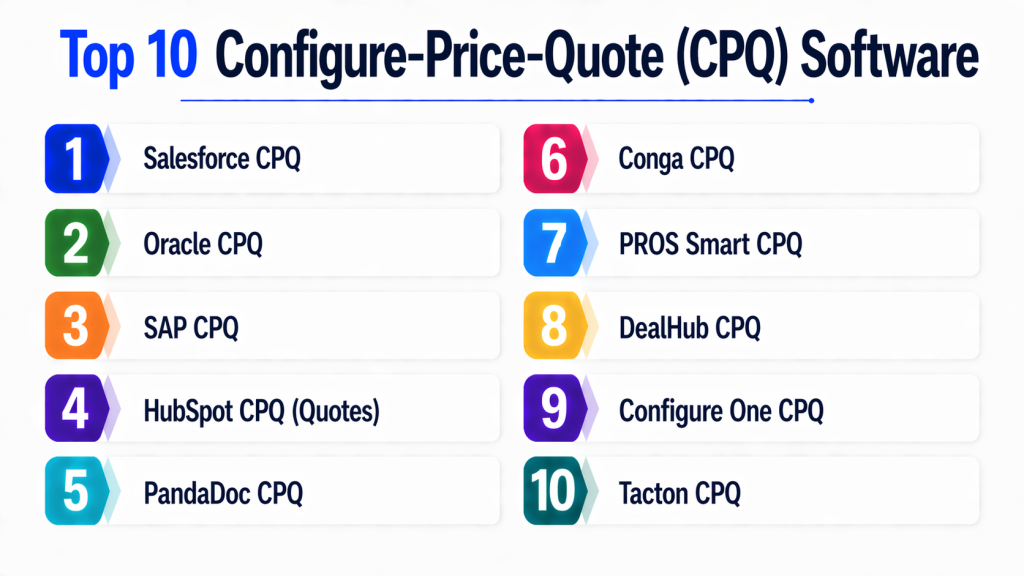
Top 10 Configure-Price-Quote (CPQ) Software
#1 — Salesforce CPQ
Short description :
Salesforce CPQ is a leading CPQ platform integrated with Salesforce CRM. It enables automated product configuration, pricing, and quote generation. Ideal for enterprise sales teams. Provides real-time insights and workflow automation. Widely adopted across industries. Supports scalable revenue operations.
Key Features
- Product configuration
- Pricing automation
- Quote generation
- Workflow approvals
- CRM integration
Pros
- Deep CRM integration
- Scalable
Cons
- Expensive
- Complex setup
Platforms / Deployment
Cloud
Security & Compliance
Enterprise-grade controls
Integrations & Ecosystem
- Salesforce ecosystem
- ERP systems
Support & Community
Large ecosystem.
#2 — Oracle CPQ
Short description :
Oracle CPQ provides advanced configuration and pricing capabilities. It supports complex product models and global sales operations. Ideal for enterprises. Offers strong automation and analytics.
Key Features
- Advanced configuration
- Pricing engine
- Workflow automation
Pros
- Powerful features
- Enterprise-ready
Cons
- Complex
- Costly
Platforms / Deployment
Cloud
Security & Compliance
Enterprise controls
Integrations & Ecosystem
- Oracle ecosystem
Support & Community
Enterprise support.
#3 — SAP CPQ
Short description :
SAP CPQ integrates with SAP ERP systems to manage pricing and quoting. It supports complex product configurations. Ideal for large enterprises.
Key Features
- Product configuration
- Pricing management
- Integration with ERP
Pros
- Strong integration
- Reliable
Cons
- Complex
- Expensive
Platforms / Deployment
Cloud / On-premise
Security & Compliance
Enterprise controls
Integrations & Ecosystem
- SAP ecosystem
Support & Community
Global support.
#4 — HubSpot CPQ (Quotes)
Short description :
HubSpot CPQ offers simple quoting tools integrated with its CRM. Ideal for SMBs. Easy to use and implement. Supports basic pricing and quoting workflows.
Key Features
- Quote generation
- CRM integration
- Automation
Pros
- Easy to use
- Affordable
Cons
- Limited advanced features
- Not enterprise-grade
Platforms / Deployment
Cloud
Security & Compliance
Varies
Integrations & Ecosystem
- HubSpot ecosystem
Support & Community
Strong support.
#5 — PandaDoc CPQ
Short description :
PandaDoc provides CPQ features with document automation. It helps create proposals and quotes quickly. Ideal for sales teams.
Key Features
- Document automation
- Pricing tables
- Workflow tools
Pros
- User-friendly
- Fast implementation
Cons
- Limited configuration
- Not for complex products
Platforms / Deployment
Cloud
Security & Compliance
Varies
Integrations & Ecosystem
- CRM tools
Support & Community
Good support.
#6 — Conga CPQ
Short description ):
Conga CPQ is a flexible platform for pricing and quoting automation. It supports complex workflows and integrations. Suitable for enterprises.
Key Features
- Pricing automation
- Workflow management
- Integration tools
Pros
- Flexible
- Scalable
Cons
- Learning curve
- Cost
Platforms / Deployment
Cloud
Security & Compliance
Enterprise controls
Integrations & Ecosystem
- CRM and ERP systems
Support & Community
Enterprise support.
#7 — PROS Smart CPQ
Short description :
PROS Smart CPQ focuses on pricing optimization and AI-driven recommendations. It helps maximize revenue and improve sales efficiency.
Key Features
- AI pricing
- Quote automation
- Analytics
Pros
- Advanced pricing
- Scalable
Cons
- Complex
- Premium pricing
Platforms / Deployment
Cloud
Security & Compliance
Enterprise controls
Integrations & Ecosystem
- Sales platforms
Support & Community
Strong support.
#8 — DealHub CPQ
Short description :
DealHub CPQ is a modern platform for sales and revenue teams. It offers guided selling and automation. Suitable for mid-market businesses.
Key Features
- Guided selling
- Workflow automation
- Subscription management
Pros
- Easy to use
- Flexible
Cons
- Limited enterprise features
- Cost
Platforms / Deployment
Cloud
Security & Compliance
Varies
Integrations & Ecosystem
- CRM tools
Support & Community
Growing support.
#9 — Configure One CPQ
Short description :
Configure One CPQ specializes in complex product configuration. It supports manufacturing and industrial use cases. Ideal for custom products.
Key Features
- Product configuration
- Pricing engine
- Integration tools
Pros
- Industry-focused
- Flexible
Cons
- Niche
- Learning curve
Platforms / Deployment
Cloud / On-premise
Security & Compliance
Varies
Integrations & Ecosystem
- ERP systems
Support & Community
Specialized support.
#10 — Tacton CPQ
Short description :
Tacton CPQ is designed for complex manufacturing environments. It provides advanced configuration and automation. Ideal for large enterprises.
Key Features
- Advanced configuration
- Automation
- Integration
Pros
- Powerful
- Scalable
Cons
- Complex
- Expensive
Platforms / Deployment
Cloud
Security & Compliance
Enterprise controls
Integrations & Ecosystem
- Manufacturing systems
Support & Community
Enterprise support.
Comparison Table (Top 10)
| Tool Name | Best For | Platform(s) | Deployment | Standout Feature | Public Rating |
|---|---|---|---|---|---|
| Salesforce CPQ | Enterprise | Cloud | Cloud | CRM integration | N/A |
| Oracle CPQ | Enterprise | Cloud | Cloud | Advanced config | N/A |
| SAP CPQ | Enterprise | Multi | Hybrid | ERP integration | N/A |
| HubSpot CPQ | SMB | Cloud | Cloud | Ease | N/A |
| PandaDoc | SMB | Cloud | Cloud | Docs | N/A |
| Conga | Enterprise | Cloud | Cloud | Flexibility | N/A |
| PROS | Enterprise | Cloud | Cloud | AI pricing | N/A |
| DealHub | Mid-market | Cloud | Cloud | Guided selling | N/A |
| Configure One | Manufacturing | Multi | Hybrid | Customization | N/A |
| Tacton | Enterprise | Cloud | Cloud | Advanced config | N/A |
Evaluation & Scoring of CPQ Software
| Tool | Core | Ease | Integration | Security | Performance | Support | Value | Total |
|---|---|---|---|---|---|---|---|---|
| Salesforce | 10 | 8 | 10 | 9 | 9 | 10 | 7 | 9.0 |
| Oracle | 9 | 7 | 9 | 9 | 9 | 9 | 7 | 8.6 |
| SAP | 9 | 7 | 10 | 9 | 9 | 9 | 7 | 8.6 |
| HubSpot | 7 | 10 | 7 | 7 | 7 | 8 | 9 | 7.9 |
| PandaDoc | 7 | 9 | 7 | 7 | 7 | 8 | 9 | 7.8 |
| Conga | 9 | 7 | 9 | 9 | 9 | 9 | 7 | 8.5 |
| PROS | 9 | 7 | 8 | 9 | 9 | 9 | 7 | 8.4 |
| DealHub | 8 | 9 | 8 | 8 | 8 | 8 | 8 | 8.1 |
| Configure One | 8 | 7 | 8 | 8 | 8 | 8 | 7 | 7.8 |
| Tacton | 9 | 7 | 9 | 9 | 9 | 9 | 7 | 8.5 |
Which CPQ Tool Is Right for You?
Solo / Small Business
Use HubSpot CPQ, PandaDoc
SMB
Use DealHub, PandaDoc
Mid-Market
Use Conga, DealHub
Enterprise
Use Salesforce, Oracle, SAP, Tacton
Budget vs Premium
Budget: HubSpot
Premium: Salesforce
Feature Depth vs Ease
Depth: Oracle
Ease: HubSpot
Security & Compliance
Best: Salesforce, SAP
Frequently Asked Questions (FAQs)
1. What is CPQ software?
CPQ software helps configure products, calculate pricing, and generate quotes. It automates the sales process. Used in complex sales environments. Improves efficiency.
2. Why is CPQ important?
CPQ reduces errors in pricing and quoting. Speeds up sales cycles. Improves accuracy and revenue. Helps manage complex products.
3. Is CPQ scalable?
Yes, most CPQ tools support scaling from SMB to enterprise. Cloud platforms enable growth. Scalability depends on architecture. Enterprise tools handle complex workflows.
4. Is CPQ secure?
Security depends on the vendor and deployment. Most enterprise tools provide encryption and access control. They also include audit logs and compliance features. Proper configuration ensures data protection. Security is critical for handling pricing and customer data.
5. Which CPQ tool is best for beginners?
HubSpot CPQ and PandaDoc are good options for beginners due to their simplicity. They offer easy-to-use interfaces and quick setup. These tools are ideal for small teams. They provide essential features without complexity. Beginners can later upgrade to advanced platforms.
6. Can CPQ integrate with CRM and ERP?
Yes, CPQ tools are designed to integrate with CRM and ERP systems. This helps unify sales, pricing, and operational data. Integration improves efficiency and reduces manual work. Many tools offer API-based connections. This makes them flexible for enterprise environments.
7. Is CPQ software expensive?
Pricing varies depending on features and scale. Basic tools are affordable for SMBs. Enterprise solutions are more expensive due to advanced capabilities. Subscription-based pricing is common. Businesses should evaluate ROI before investing.
8. What industries use CPQ software?
CPQ is widely used in manufacturing, SaaS, telecom, and IT services. It helps manage complex product configurations. Many B2B companies rely on it. Adoption is growing across industries. It is essential for modern sales operations.
9. What are the limitations of CPQ software?
CPQ tools can be complex to implement and require training. Some platforms involve high costs. Customization may take time. Integration with legacy systems can be challenging. Despite this, they provide significant long-term value.
10. How do I choose the right CPQ tool?
Choosing the right CPQ tool depends on your business size and product complexity. Evaluate features like configuration, pricing, and integrations. Test tools through demos or trials. Consider scalability and support. Select a tool that aligns with your sales strategy.
Conclusion
Configure-Price-Quote (CPQ) software is essential for organizations dealing with complex products, pricing structures, and sales workflows. These tools streamline the quoting process, reduce errors, and improve overall sales efficiency by automating configuration, pricing, and approvals. As businesses continue to scale and diversify their offerings, CPQ platforms are becoming a critical component of modern revenue operations.
Selecting the right CPQ solution depends on your business size, complexity of offerings, and integration requirements. While enterprise platforms like Salesforce, Oracle, and SAP provide advanced capabilities for large organizations, simpler tools like HubSpot and PandaDoc are better suited for smaller teams. The best approach is to evaluate your needs, test multiple tools, and choose the one that aligns with your long-term growth strategy.
