Introduction
AI Video Generation Tools are platforms that use artificial intelligence to create, edit, and enhance videos automatically from text, images, or prompts. These tools leverage technologies like generative AI, deep learning, and computer vision to produce high-quality videos without traditional video production complexity.
In today’s content-driven world, video is the most powerful medium for communication. With the rise of generative AI, businesses, marketers, educators, and creators can now produce videos at scale—faster and more cost-effectively than ever before. AI video tools are transforming content creation by reducing dependency on studios, actors, and editing teams.
Common use cases include:
- Marketing and promotional videos
- Social media content creation
- Educational and training videos
- Product demos and explainers
- Personalized video messaging
Key evaluation criteria buyers should consider:
- Video quality and realism
- AI avatar and voice capabilities
- Ease of use and editing tools
- Customization and templates
- Integration with workflows
- Rendering speed and scalability
- Security and data privacy
- Pricing and licensing
Best for: Marketers, content creators, educators, startups, and enterprises scaling video production.
Not ideal for: High-end cinematic production requiring manual editing and creative direction.
Key Trends in AI Video Generation Tools
- Text-to-video generation: Creating videos directly from prompts
- AI avatars and presenters: Human-like digital actors
- Voice cloning: Realistic synthetic voices
- Multilingual video generation: Global content creation
- Real-time video editing: Faster rendering and automation
- Generative AI integration: Combining text, image, and video generation
- Short-form video focus: Content optimized for social media
- No-code video creation: Accessible for non-technical users
How We Evaluated AI Video Generation Tools (Methodology)
- Market adoption and popularity
- Feature completeness and innovation
- Video quality and realism
- Ease of use and accessibility
- Integration with content workflows
- Security and compliance features
- Performance and rendering speed
- Value for money
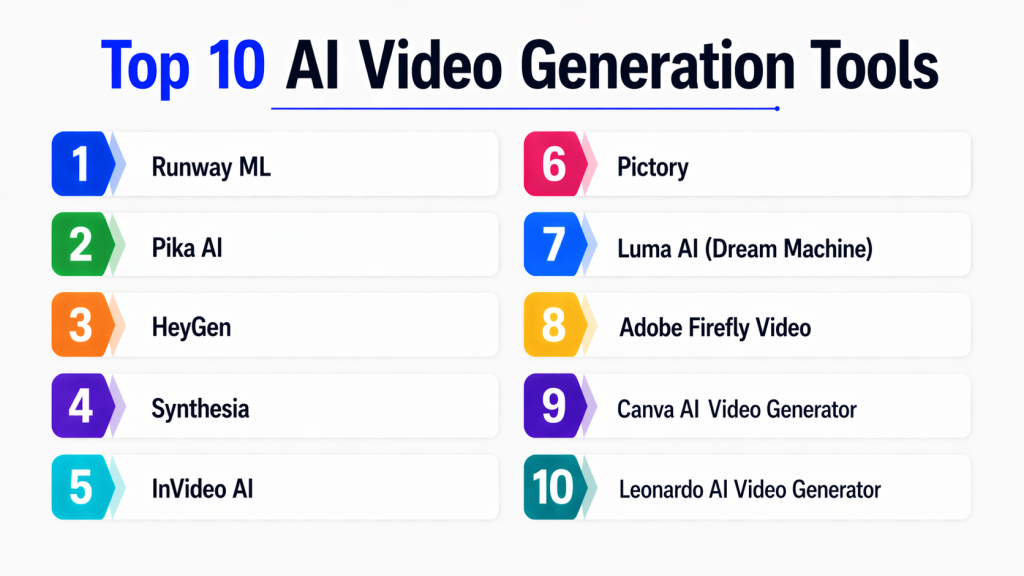
Top 10 AI Video Generation Tools
#1 — Synthesia
Short description:
Synthesia is a leading AI video generation platform that allows users to create videos using AI avatars and voiceovers. It is widely used for corporate training, marketing, and educational content. The platform supports multiple languages and offers realistic digital presenters. It eliminates the need for cameras or actors. It is ideal for scalable video production.
Key Features
- AI avatars
- Text-to-video
- Multilingual voiceovers
- Templates
- Screen recording
Pros
- Easy to use
- High-quality avatars
Cons
- Limited customization
- Premium pricing
Platforms / Deployment
- Cloud
Security & Compliance
- Enterprise-grade security
Integrations & Ecosystem
- APIs
- LMS platforms
Support & Community
Strong enterprise support
#2 — Runway ML
Short description:
Runway ML is an advanced AI creative platform offering video generation, editing, and effects powered by generative AI. It is popular among creators and filmmakers. The platform supports text-to-video and video-to-video transformations. It enables creative workflows without heavy technical skills. It is ideal for creative professionals.
Key Features
- Text-to-video
- Video editing tools
- AI effects
- Image-to-video
- Generative models
Pros
- Highly creative
- Powerful features
Cons
- Learning curve
- Resource-intensive
Platforms / Deployment
- Cloud
Security & Compliance
- Not publicly stated
Integrations & Ecosystem
- Creative tools
- APIs
Support & Community
Growing creator community
#3 — Pictory
Short description:
Pictory is an AI video creation tool designed for marketers and content creators. It converts text, blogs, and scripts into engaging videos. The platform is easy to use and requires no video editing experience. It includes automated captions and visuals. It is ideal for social media content.
Key Features
- Text-to-video
- Script-based video creation
- Auto captions
- Stock media integration
- Templates
Pros
- Beginner-friendly
- Fast video creation
Cons
- Limited advanced editing
- Template dependency
Platforms / Deployment
- Cloud
Security & Compliance
- Not publicly stated
Integrations & Ecosystem
- APIs
- Content tools
Support & Community
Good support
#4 — Lumen5
Short description:
Lumen5 is a video creation platform that transforms blog content into videos using AI. It is widely used for marketing and social media content. The platform offers drag-and-drop editing and templates. It simplifies video creation for non-technical users. It is ideal for businesses and marketers.
Key Features
- Blog-to-video conversion
- Drag-and-drop editor
- Templates
- Media library
- Branding tools
Pros
- Easy to use
- Marketing-focused
Cons
- Limited customization
- Basic editing features
Platforms / Deployment
- Cloud
Security & Compliance
- Not publicly stated
Integrations & Ecosystem
- Social media platforms
Support & Community
Good support
#5 — InVideo AI
Short description:
InVideo AI is a video creation platform that uses AI to generate videos from text prompts. It offers templates, automation, and editing tools. The platform is suitable for beginners and professionals. It supports quick video production for marketing. It is widely used for online content creation.
Key Features
- Text-to-video
- Templates
- Voiceovers
- Editing tools
- Automation
Pros
- Easy to use
- Fast rendering
Cons
- Limited advanced features
- Template-heavy
Platforms / Deployment
- Cloud
Security & Compliance
- Not publicly stated
Integrations & Ecosystem
- APIs
Support & Community
Moderate support
#6 — Descript
Short description:
Descript is an AI-powered video and audio editing tool that allows users to edit videos like text documents. It is widely used for podcasts and content creation. The platform includes transcription and voice cloning features. It simplifies editing workflows. It is ideal for creators and marketers.
Key Features
- Video editing
- Transcription
- Voice cloning
- Screen recording
- Collaboration tools
Pros
- Unique editing workflow
- Easy collaboration
Cons
- Limited video generation
- Learning curve
Platforms / Deployment
- Desktop / Cloud
Security & Compliance
- Not publicly stated
Integrations & Ecosystem
- Content tools
Support & Community
Strong community
#7 — HeyGen
Short description:
HeyGen is an AI video generation platform focused on creating videos with avatars and voiceovers. It supports multiple languages and customization options. The platform is easy to use and scalable. It is commonly used for marketing and training videos. It is ideal for businesses.
Key Features
- AI avatars
- Voiceovers
- Templates
- Custom branding
- Multilingual support
Pros
- High-quality avatars
- Easy setup
Cons
- Limited advanced editing
- Pricing tiers
Platforms / Deployment
- Cloud
Security & Compliance
- Not publicly stated
Integrations & Ecosystem
- APIs
Support & Community
Growing support
#8 — Colossyan
Short description:
Colossyan is an AI video platform that focuses on corporate training and business communication. It uses AI avatars and text-to-video capabilities. The platform supports localization and personalization. It is ideal for enterprise training. It simplifies video production.
Key Features
- AI avatars
- Text-to-video
- Localization
- Templates
- Custom branding
Pros
- Enterprise-focused
- Scalable
Cons
- Limited creative features
- Cost
Platforms / Deployment
- Cloud
Security & Compliance
- Enterprise security
Integrations & Ecosystem
- LMS platforms
Support & Community
Enterprise support
#9 — VEED.IO AI
Short description:
VEED.IO is an online video editing platform with AI features for generating and editing videos. It supports subtitles, effects, and automation. The platform is easy to use and suitable for social media content. It is widely used by creators. It is ideal for quick video production.
Key Features
- Video editing
- Subtitles
- AI tools
- Templates
- Effects
Pros
- Simple interface
- Fast editing
Cons
- Limited advanced AI generation
- Web-based limitations
Platforms / Deployment
- Cloud
Security & Compliance
- Not publicly stated
Integrations & Ecosystem
- Social platforms
Support & Community
Good support
#10 — Kaiber AI
Short description:
Kaiber AI is a creative AI video tool that generates videos from text and images. It is popular among artists and content creators. The platform supports animation and visual effects. It enables creative storytelling. It is ideal for artistic video generation.
Key Features
- Text-to-video
- Image-to-video
- Animation tools
- Effects
- Creative workflows
Pros
- Creative flexibility
- Unique visuals
Cons
- Limited enterprise use
- Learning curve
Platforms / Deployment
- Cloud
Security & Compliance
- Not publicly stated
Integrations & Ecosystem
- Creative tools
Support & Community
Growing community
Comparison Table (Top 10)
| Tool Name | Best For | Platform(s) Supported | Deployment | Standout Feature | Public Rating |
|---|---|---|---|---|---|
| Synthesia | Corporate videos | Web | Cloud | AI avatars | N/A |
| Runway ML | Creators | Web | Cloud | Generative AI | N/A |
| Pictory | Marketing | Web | Cloud | Script-to-video | N/A |
| Lumen5 | Social media | Web | Cloud | Blog conversion | N/A |
| InVideo AI | Beginners | Web | Cloud | Templates | N/A |
| Descript | Editing | Desktop | Hybrid | Text editing | N/A |
| HeyGen | Avatars | Web | Cloud | Voice AI | N/A |
| Colossyan | Training | Web | Cloud | Localization | N/A |
| VEED.IO | Editing | Web | Cloud | Subtitles | N/A |
| Kaiber AI | Creative | Web | Cloud | Animation | N/A |
Evaluation & Scoring of AI Video Generation Tools
| Tool Name | Core (25%) | Ease (15%) | Integrations (15%) | Security (10%) | Performance (10%) | Support (10%) | Value (15%) | Weighted Total (0–10) |
|---|---|---|---|---|---|---|---|---|
| Synthesia | 9 | 9 | 8 | 9 | 8 | 8 | 7 | 8.5 |
| Runway ML | 9 | 7 | 8 | 7 | 9 | 8 | 7 | 8.2 |
| Pictory | 8 | 9 | 7 | 7 | 8 | 7 | 8 | 8.0 |
| Lumen5 | 8 | 9 | 7 | 7 | 8 | 7 | 8 | 8.0 |
| InVideo AI | 8 | 9 | 7 | 7 | 8 | 7 | 8 | 8.0 |
| Descript | 8 | 8 | 7 | 7 | 7 | 8 | 8 | 7.8 |
| HeyGen | 9 | 8 | 7 | 7 | 8 | 7 | 7 | 7.9 |
| Colossyan | 8 | 8 | 7 | 8 | 8 | 7 | 7 | 7.8 |
| VEED.IO | 7 | 9 | 7 | 7 | 7 | 7 | 8 | 7.6 |
| Kaiber AI | 8 | 7 | 6 | 6 | 8 | 6 | 7 | 7.1 |
Which AI Video Generation Tools Is Right for You?
Solo / Freelancer
- Best tools: Kaiber AI, VEED.IO, Descript
These tools are lightweight, easy to use, and ideal for individuals who want to create videos quickly without complex setups. They provide basic editing, creative flexibility, and fast output, making them perfect for social media creators and freelancers working on tight timelines.
SMB (Small & Medium Businesses)
- Best tools: Pictory, InVideo AI, Lumen5
These platforms offer a balance between automation and customization. SMBs benefit from ready-made templates, AI-driven workflows, and quick content production. They are especially useful for marketing teams that need consistent video output without hiring large production teams.
Mid-Market
- Best tools: HeyGen, Runway ML
Mid-sized companies require more advanced capabilities like AI avatars, multilingual support, and creative control. These tools provide flexibility while still being manageable without a full production team. They are ideal for scaling content strategies.
Enterprise
- Best tools: Synthesia, Colossyan
Enterprises need scalability, compliance, and structured workflows. These platforms offer enterprise-grade features such as multilingual avatars, training video automation, and integration with corporate systems. They are best suited for large-scale content production and internal communication.
Budget vs Premium
- Budget-friendly: VEED.IO, Kaiber AI, Pictory
- Premium tools: Synthesia, Runway ML, Colossyan
Budget tools are ideal for basic needs and quick projects, while premium tools provide advanced AI capabilities, better quality, and scalability for professional use.
Feature Depth vs Ease of Use
- Advanced features: Runway ML, Synthesia
- Easy to use: Pictory, Lumen5, InVideo AI
If you need creative control and advanced generation, choose feature-rich tools. If simplicity is your priority, go for template-based platforms.
Integrations & Scalability
- Best scalability: Synthesia, Colossyan
- Best integrations: Runway ML, Descript
Choose tools that integrate well with your existing workflows, especially if you plan to scale video production across teams.
Security & Compliance Needs
- Best options: Synthesia, Colossyan
These platforms provide better enterprise security, making them suitable for organizations handling sensitive data or internal communication content.
Frequently Asked Questions (FAQs)
1. What are AI video generation tools?
AI video generation tools are platforms that create videos using artificial intelligence. They convert text, images, or prompts into videos automatically. These tools reduce the need for manual editing and production. They are widely used for marketing, education, and content creation. They enable faster and scalable video production.
2. Who should use AI video tools?
Marketers, educators, content creators, and businesses benefit the most from these tools. They help create videos quickly without technical expertise. Small teams can produce high-quality content at scale. Enterprises use them for training and communication. They are suitable for anyone needing frequent video production.
3. Are AI videos realistic?
Yes, modern tools can generate highly realistic videos with AI avatars and voiceovers. However, realism varies by platform. Some tools focus more on creativity than realism. Enterprise tools provide more polished outputs. Quality depends on use case and customization.
4. Do I need video editing skills?
No, most tools are designed for non-technical users. They provide templates and automation features. Users can create videos with minimal effort. Some advanced tools may require learning. Overall, they are beginner-friendly.
5. Can AI video tools replace human creators?
They complement rather than replace human creativity. AI tools automate repetitive tasks. Human input is still needed for storytelling and strategy. They enhance productivity rather than eliminate roles. They are best used as support tools.
6. Are these tools expensive?
Pricing varies widely across tools. Some offer free or affordable plans. Enterprise tools are more expensive. Costs depend on features and usage. Budget options are available for beginners.
7. Can I create videos in multiple languages?
Yes, many tools support multilingual video generation. They provide AI voiceovers in different languages. This helps create global content. It is useful for international businesses. Language support varies by platform.
8. What industries use AI video tools?
Industries like marketing, education, e-commerce, and media use these tools. They are also used in corporate training. Startups use them for product demos. Content creators use them for social media. Adoption is growing across sectors.
9. Are AI video tools secure?
Enterprise tools provide strong security features like encryption and access control. However, security varies by platform. Users should review data policies before use. Sensitive content should be handled carefully. Always choose trusted tools.
10. How do I choose the right tool?
Choose based on your goals, budget, and technical needs. Evaluate ease of use and features. Consider scalability and integrations. Test tools before committing. Select the one that fits your workflow best.
Conclusion
AI video generation tools are transforming content creation by making video production faster, more accessible, and scalable. From marketing videos to training content, these tools enable organizations and creators to produce high-quality videos without traditional production complexity. As AI technology continues to evolve, video generation is becoming more realistic, automated, and integrated into everyday workflows.
The right tool depends on your use case, whether it’s quick social media content or enterprise-level video production. While some platforms focus on ease of use and templates, others offer advanced creative capabilities. A smart approach is to shortlist a few tools, test them with real content, and evaluate how well they align with your workflow, scalability needs, and budget before making a final decision.
