Introduction
AI Code Assistants are intelligent tools that help developers write, review, debug, and optimize code using artificial intelligence. These platforms leverage large language models, machine learning, and code intelligence systems to provide real-time suggestions, automate repetitive tasks, and improve developer productivity.
In today’s fast-paced software development landscape, AI code assistants are becoming essential for building applications efficiently. They support code generation, error detection, documentation, testing, and even architecture suggestions, enabling teams to move faster without compromising quality. These tools also integrate with Identity Management, Cybersecurity frameworks, Zero Trust architectures, and Access Control systems, making them suitable for enterprise development environments.
Real-world use cases include:
- Code autocompletion and generation
- Debugging and error detection
- Writing documentation and comments
- Refactoring and optimization
- Automated test case generation
- Learning new programming languages
What buyers should evaluate:
- Code accuracy and relevance
- Language and framework support
- Integration with IDEs and tools
- Performance and response speed
- Security and compliance features
- Customization and context awareness
- Pricing and scalability
- Developer experience
Best for: Developers, software engineers, DevOps teams, startups, enterprises, and students learning programming.
Not ideal for: Highly specialized or safety-critical codebases without human review.
Key Trends in AI Code Assistants
- AI copilots integrated into IDEs and workflows
- Context-aware code generation improving accuracy
- Multi-language and cross-framework support
- AI-assisted debugging and testing tools
- Security-first coding with vulnerability detection
- Integration with DevOps and CI/CD pipelines
- Real-time collaboration with AI assistance
- Custom AI models for enterprise codebases
- Code explanation and learning features
- Growing adoption in enterprise development teams
How We AI Code Assistants (Methodology)
We evaluated tools based on:
- Code generation accuracy and quality
- Language and framework support
- Integration with development environments
- Performance and responsiveness
- Security and compliance readiness
- Ease of use and onboarding
- Customization capabilities
- Market adoption and developer feedback
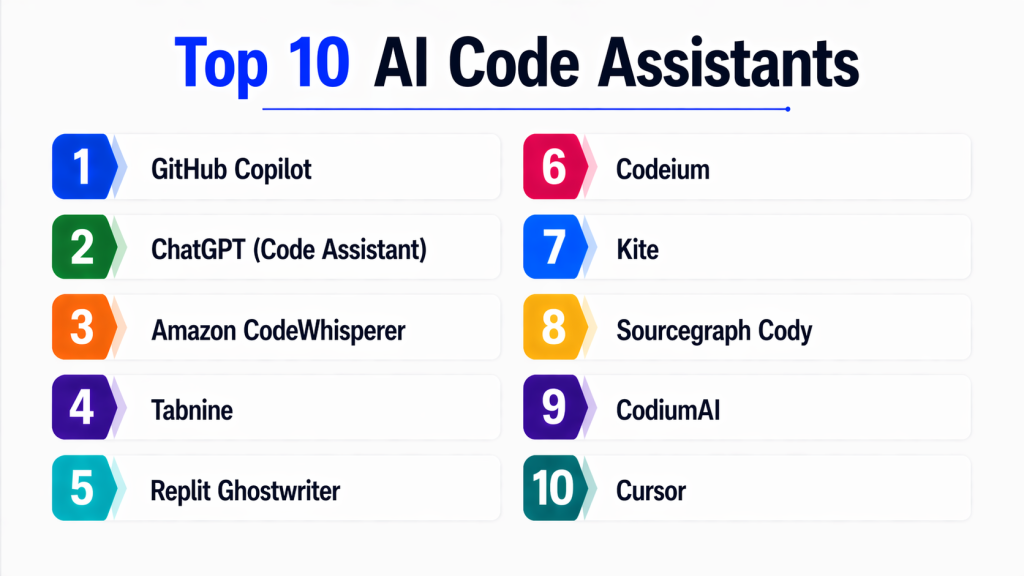
Top 10 AI Code Assistants
#1 — GitHub Copilot
Short description :
GitHub Copilot is one of the most widely used AI code assistants. It integrates directly into popular IDEs and provides real-time code suggestions. Designed for developers of all levels. Supports multiple programming languages. Helps improve productivity significantly.
Key Features
- Code autocompletion
- Multi-language support
- IDE integration
- Context-aware suggestions
- Code generation
Pros
- Easy to use
- Strong integration
Cons
- Requires internet
- May generate incorrect code
Platforms / Deployment
Windows / macOS / Linux
Cloud
Security & Compliance
Varies / enterprise controls available
Integrations & Ecosystem
- VS Code
- GitHub
Support & Community
Large developer community.
#2 — ChatGPT (Code Assistant)
Short description :
ChatGPT provides advanced coding assistance through conversational AI. It can generate, debug, and explain code across multiple languages. Ideal for developers and learners. Offers flexible interaction.
Key Features
- Code generation
- Debugging support
- Code explanation
- Multi-language support
Pros
- Versatile
- Easy to interact
Cons
- Requires prompts
- Not IDE-native
Platforms / Deployment
Web / Mobile
Cloud
Security & Compliance
Varies
Integrations & Ecosystem
- APIs
- Dev tools
Support & Community
Large global community.
#3 — Amazon CodeWhisperer
Short description :
CodeWhisperer is AWS’s AI coding assistant. It provides real-time suggestions and integrates with AWS services. Ideal for cloud developers. Supports secure coding practices.
Key Features
- Code suggestions
- AWS integration
- Security scanning
- Multi-language support
Pros
- Strong AWS support
- Security features
Cons
- AWS-focused
- Limited outside AWS
Platforms / Deployment
Web / IDE
Cloud
Security & Compliance
IAM, secure coding checks
Compliance: Varies
Integrations & Ecosystem
- AWS tools
- IDEs
Support & Community
Enterprise support.
#4 — Tabnine
Short description :
Tabnine is an AI code assistant focused on privacy and customization. It offers on-device and cloud-based solutions. Ideal for enterprise teams. Supports multiple languages.
Key Features
- Code completion
- Local AI models
- Privacy-focused
- Multi-language support
Pros
- Strong privacy
- Flexible deployment
Cons
- Limited advanced features
- Subscription cost
Platforms / Deployment
Multi-platform
Cloud / Local
Security & Compliance
Privacy-first architecture
Compliance: Not publicly stated
Integrations & Ecosystem
- IDEs
- Dev tools
Support & Community
Active community.
#5 — Replit Ghostwriter
Short description :
Ghostwriter is an AI coding assistant integrated into Replit. It supports real-time coding and debugging. Ideal for learners and developers working in cloud IDEs.
Key Features
- Code generation
- Debugging
- Cloud IDE integration
Pros
- Easy to use
- Beginner-friendly
Cons
- Limited advanced features
- Cloud dependency
Platforms / Deployment
Web
Cloud
Security & Compliance
Not publicly stated
Integrations & Ecosystem
- Replit IDE
Support & Community
Growing community.
#6 — Codeium
Short description :
Codeium is a free AI code assistant with strong capabilities. It supports multiple languages and IDEs. Focuses on performance and accessibility.
Key Features
- Code completion
- Multi-language support
- IDE integration
Pros
- Free to use
- Fast
Cons
- Smaller ecosystem
- Limited enterprise features
Platforms / Deployment
Multi-platform
Security & Compliance
Not publicly stated
Integrations & Ecosystem
- IDEs
Support & Community
Growing developer base.
#7 — Kite
Short description :
Kite was an AI-powered code completion tool focused on Python. It offered fast suggestions and local processing. Suitable for Python developers.
Key Features
- Python support
- Code completion
- Documentation suggestions
Pros
- Fast
- Easy to use
Cons
- Limited language support
- Reduced activity
Platforms / Deployment
Windows / macOS
Security & Compliance
Not publicly stated
Integrations & Ecosystem
- Python IDEs
Support & Community
Limited support.
#8 — Sourcegraph Cody
Short description :
Cody is an AI assistant designed for large codebases. It helps developers search, understand, and generate code. Ideal for enterprise teams.
Key Features
- Code search
- Code generation
- Context-aware suggestions
Pros
- Works with large repos
- Strong context
Cons
- Complex setup
- Enterprise focus
Platforms / Deployment
Cloud / Self-hosted
Security & Compliance
Enterprise controls
Compliance: Varies
Integrations & Ecosystem
- Dev tools
- Repositories
Support & Community
Enterprise support.
#9 — CodiumAI
Short description :
CodiumAI focuses on automated testing and code quality. It helps generate test cases and improve reliability. Ideal for developers focused on quality assurance.
Key Features
- Test generation
- Code analysis
- Quality checks
Pros
- Improves code quality
- Easy integration
Cons
- Limited general coding
- Niche use case
Platforms / Deployment
Multi-platform
Security & Compliance
Not publicly stated
Integrations & Ecosystem
- Dev tools
Support & Community
Growing support.
#10 — Cursor
Short description :
Cursor is an AI-powered code editor designed for modern development. It integrates AI directly into the coding environment. Ideal for developers looking for an AI-first workflow.
Key Features
- AI-powered editor
- Code generation
- Context awareness
Pros
- Modern UI
- Integrated AI
Cons
- New platform
- Limited ecosystem
Platforms / Deployment
Desktop
Security & Compliance
Not publicly stated
Integrations & Ecosystem
- Dev tools
Support & Community
Emerging community.
Comparison Table (Top 10)
| Tool Name | Best For | Platform(s) | Deployment | Standout Feature | Public Rating |
|---|---|---|---|---|---|
| Copilot | Developers | Multi | Cloud | IDE integration | N/A |
| ChatGPT | General coding | Multi | Cloud | Versatility | N/A |
| CodeWhisperer | AWS devs | Multi | Cloud | AWS integration | N/A |
| Tabnine | Enterprise | Multi | Hybrid | Privacy | N/A |
| Ghostwriter | Beginners | Web | Cloud | Simplicity | N/A |
| Codeium | Free users | Multi | Cloud | Cost | N/A |
| Kite | Python | Desktop | Local | Speed | N/A |
| Cody | Enterprise | Multi | Hybrid | Code search | N/A |
| CodiumAI | QA | Multi | Cloud | Testing | N/A |
| Cursor | Modern dev | Desktop | Local | AI editor | N/A |
Evaluation & Scoring of AI Code Assistants
| Tool | Core | Ease | Integration | Security | Performance | Support | Value | Total |
|---|---|---|---|---|---|---|---|---|
| Copilot | 10 | 9 | 10 | 8 | 10 | 10 | 8 | 9.2 |
| ChatGPT | 10 | 9 | 9 | 8 | 9 | 10 | 9 | 9.1 |
| CodeWhisperer | 9 | 8 | 10 | 9 | 9 | 9 | 8 | 8.9 |
| Tabnine | 8 | 8 | 8 | 9 | 8 | 8 | 7 | 8.0 |
| Ghostwriter | 7 | 9 | 7 | 7 | 8 | 7 | 8 | 7.6 |
| Codeium | 8 | 9 | 8 | 7 | 9 | 7 | 9 | 8.2 |
| Kite | 7 | 8 | 7 | 7 | 8 | 6 | 8 | 7.3 |
| Cody | 9 | 7 | 9 | 9 | 9 | 8 | 7 | 8.4 |
| CodiumAI | 8 | 8 | 8 | 7 | 8 | 7 | 8 | 7.9 |
| Cursor | 8 | 8 | 7 | 7 | 8 | 7 | 8 | 7.8 |
Which AI Code Assistant Is Right for You?
Solo / Freelancer
Use Codeium, ChatGPT
SMB
Use Copilot, Tabnine
Mid-Market
Use CodeWhisperer, Cody
Enterprise
Use Copilot, CodeWhisperer, Tabnine
Budget vs Premium
Budget: Codeium
Premium: Copilot
Feature Depth vs Ease
Depth: Copilot
Ease: ChatGPT
Security & Compliance
Best: Tabnine, CodeWhisperer
Frequently Asked Questions (FAQs)
1. What are AI code assistants?
AI code assistants are tools that help developers write and improve code using artificial intelligence. They provide suggestions, automate repetitive tasks, and assist in debugging. These tools improve productivity and reduce errors. They are widely used in modern development workflows. They support multiple programming languages and frameworks.
2. Are AI code assistants accurate?
AI code assistants can generate accurate code, but they are not perfect. Accuracy depends on context, input, and complexity. Developers should always review generated code. Advanced tools provide better results. Continuous improvements are making them more reliable.
3. Can AI replace developers?
AI tools assist developers but cannot replace them. They handle repetitive tasks and speed up coding. Human expertise is needed for architecture and decision-making. AI enhances productivity rather than replacing developers. Collaboration between AI and humans is key.
4. Are AI code assistants secure?
Enterprise tools provide security features such as encryption and access control. Security depends on deployment and configuration. Organizations must follow best practices. Sensitive code should be handled carefully. Compliance varies by platform.
5. Can AI assistants work offline?
Some tools offer local models for offline use. However, most advanced tools require cloud connectivity. Offline tools may have limited capabilities. Cloud-based tools provide better performance. Choice depends on requirements.
6. What languages do AI code assistants support?
Most tools support multiple programming languages including Python, JavaScript, Java, and more. Language support varies by tool. Advanced tools cover a wide range of frameworks. Developers should check compatibility before choosing.
7. Are AI code assistants expensive?
Some tools offer free plans with limited features. Premium plans provide advanced capabilities. Pricing varies based on usage and features. Enterprise tools are more expensive. Cost should be evaluated based on value.
8. Can AI code assistants integrate with IDEs?
Yes, most tools integrate with popular IDEs like VS Code and JetBrains. Integration improves workflow efficiency. Developers can get real-time suggestions. Compatibility varies across tools. IDE support is a key factor.
9. What are common mistakes when using AI code assistants?
Common mistakes include over-reliance on AI, ignoring code review, and not understanding generated code. Poor prompts can lead to incorrect outputs. Developers should validate results. Proper usage improves effectiveness.
10. How do I choose the right AI code assistant?
Choose based on your workflow, language support, and integration needs. Evaluate ease of use, performance, and cost. Test multiple tools before deciding. Consider long-term scalability. Select the tool that fits your development environment.
Conclusion
AI code assistants are transforming software development by enabling faster coding, improved accuracy, and enhanced productivity. From real-time code suggestions to automated testing and debugging, these tools are becoming an integral part of modern development workflows. They help developers focus on problem-solving while reducing repetitive tasks.
Choosing the right AI code assistant depends on your development needs, team size, and technical environment. Instead of relying on a single tool, it is advisable to experiment with a few options, evaluate their performance in real-world scenarios, and select the one that best aligns with your workflow and long-term goals.
