Introduction
Case Management Platforms help organizations track, manage, and resolve structured or semi-structured work that moves through stages, people, rules, and approvals. A “case” can be a customer complaint, insurance claim, legal request, employee issue, healthcare workflow, service inquiry, or compliance investigation. Instead of handling these processes through emails, spreadsheets, and disconnected tools, case management platforms centralize tasks, documents, communications, timelines, and decisions in one system.
These platforms matter even more now because organizations need faster response times, stronger compliance, better collaboration, and more visibility across customer-facing and internal operations. Modern case management tools also support automation, AI assistance, analytics, and low-code customization.
Real-world use cases:
- Insurance claims handling
- Customer service escalations
- HR employee relations cases
- Legal matter and document tracking
- Government service request management
What buyers should evaluate:
- Case workflow flexibility
- Document management features
- Rules and automation depth
- Audit trails and reporting
- Role-based access controls
- Integrations with CRM, ERP, and support tools
- Low-code customization
- Security and compliance readiness
- Scalability across teams and departments
- Pricing and implementation complexity
Best for: Enterprises, service operations teams, insurers, banks, healthcare organizations, legal teams, public sector departments, and businesses managing high-volume or compliance-sensitive cases.
Not ideal for: Very small teams with simple task tracking needs, startups that only need project management tools, or businesses with straightforward workflows better handled by lightweight help desk or workflow software.
Key Trends in Case Management Platforms
- AI-assisted case summarization and next-step recommendations
- Unified workspaces combining cases, documents, and communications
- Stronger low-code case configuration for operations teams
- Embedded analytics for SLA, backlog, and resolution tracking
- Hyperautomation with BPM, RPA, and decision engines
- Omnichannel intake from email, forms, chat, and portals
- Greater focus on compliance logs and explainable actions
- Mobile-first case updates for field and service teams
- Event-driven workflows replacing static stage-based processes
- Better support for human-in-the-loop automation
How We Selected These Tools (Methodology)
- Market recognition and long-term category credibility
- Strength of core case management capabilities
- Flexibility for structured and unstructured workflows
- Workflow automation and business rules support
- Security, governance, and audit readiness
- Integration ecosystem breadth
- Support for enterprise scale and multi-team use
- Low-code or configuration flexibility
- Documentation, onboarding, and support maturity
- Overall fit across industries and business sizes
Top 10 Case Management Platforms
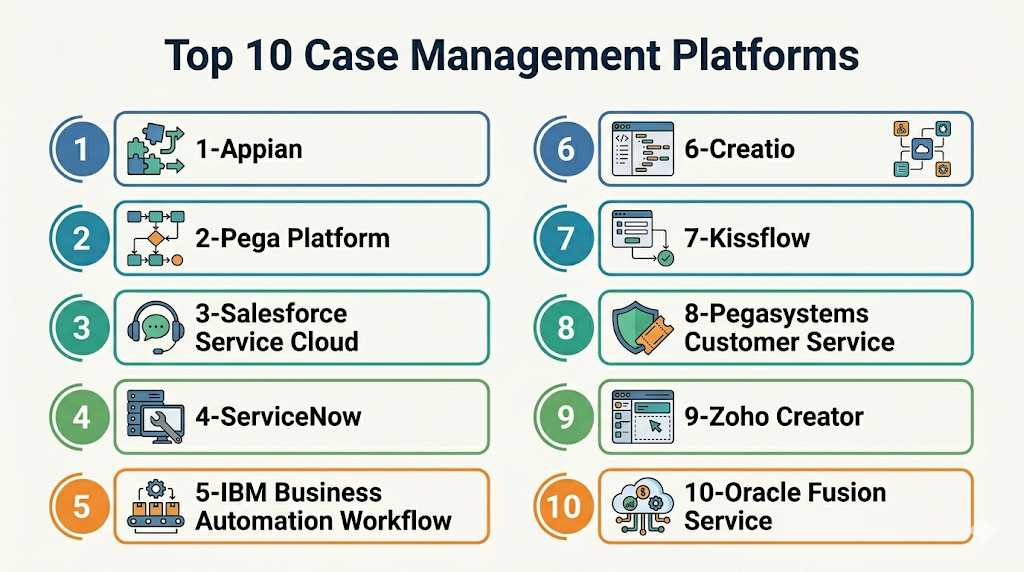
Top 10 Tools List
- Appian
- Pega Platform
- Salesforce Service Cloud
- ServiceNow
- IBM Business Automation Workflow
- Creatio
- Kissflow
- Pegasystems Customer Service
- Zoho Creator
- Oracle Fusion Service
#1 — Appian
Short description (2–3 lines): Appian is a leading low-code platform with strong case management, workflow automation, and process orchestration capabilities. It is best suited for enterprises that need complex, high-volume, and compliance-oriented case handling.
Key Features
- Dynamic case management with configurable workflows
- Low-code application development
- Task routing, SLAs, and escalation rules
- Document handling and audit trails
- AI-assisted automation and process insights
- Integration connectors for enterprise systems
- Dashboards and real-time reporting
Pros
- Strong balance of case management and low-code development
- Excellent for complex regulated workflows
- Good scalability across departments
Cons
- Premium pricing for broader deployments
- Implementation can require experienced teams
- May be too heavy for simple use cases
Platforms / Deployment
Web / iOS / Android
Cloud / Hybrid
Security & Compliance
SSO, RBAC, encryption, audit logs. Additional certifications vary by deployment and contract.
Integrations & Ecosystem
Appian fits well into enterprise environments where case workflows depend on data from multiple business systems. It supports API-based connectivity and is often used with ERP, CRM, identity, and document platforms.
- Salesforce
- SAP
- Microsoft tools
- Databases
- REST APIs
Support & Community
Strong enterprise support model, training ecosystem, and implementation partner network. Documentation is solid, though best results often come with guided onboarding or consulting support.
#2 — Pega Platform
Short description (2–3 lines): Pega Platform is a powerful case management and workflow automation suite known for dynamic case handling, decisioning, and enterprise customer operations. It is well suited for large organizations with sophisticated service processes.
Key Features
- Dynamic case lifecycle management
- AI-supported next-best-action capabilities
- Business rules and decision management
- Omnichannel service workflow support
- Low-code process design
- SLA tracking and escalations
- Reporting and operational dashboards
Pros
- Excellent for complex service and operations workflows
- Strong decisioning and automation depth
- Proven enterprise scale
Cons
- Premium pricing and implementation effort
- Requires trained teams for advanced deployments
- Can be more platform-heavy than smaller teams need
Platforms / Deployment
Web / Mobile
Cloud / Hybrid
Security & Compliance
Enterprise IAM support, RBAC, encryption, logging. Additional compliance details vary by deployment.
Integrations & Ecosystem
Pega is especially strong when case management needs to combine customer data, business rules, and multistep service operations. It is often used in telecom, banking, insurance, and large service organizations.
- CRM systems
- Contact center platforms
- APIs
- Databases
- Enterprise back-office systems
Support & Community
Strong enterprise support and services ecosystem. Good documentation and partner presence, especially for large transformation programs.
#3 — Salesforce Service Cloud
Short description (2–3 lines): Salesforce Service Cloud is a customer service platform with robust case management features for support teams, service operations, and customer-facing issue resolution. It is best for organizations already invested in Salesforce.
Key Features
- Customer case tracking and assignment
- Omnichannel case intake
- Knowledge base integration
- Automation rules and escalation paths
- SLA and entitlement management
- Reporting and dashboards
- AI assistance through Salesforce ecosystem tools
Pros
- Strong fit for customer support and service teams
- Excellent CRM integration
- Mature ecosystem and extensibility
Cons
- Best value within Salesforce environment
- Costs can rise with add-ons and scale
- Deep customization may require admins or developers
Platforms / Deployment
Web / iOS / Android
Cloud
Security & Compliance
SSO, RBAC, audit logs, encryption. Additional compliance varies by edition and contract.
Integrations & Ecosystem
Service Cloud is strongest when customer case management must stay close to CRM data, account history, service channels, and sales context. The ecosystem is one of its biggest strengths.
- Salesforce CRM
- Slack
- Marketing tools
- APIs
- Third-party app marketplace tools
Support & Community
Very strong documentation, admin community, training options, and partner network. Enterprise support tiers are widely available.
#4 — ServiceNow
Short description (2–3 lines): ServiceNow is a widely adopted enterprise workflow platform with strong case management across IT, HR, customer service, and internal operations. It is particularly strong for organizations standardizing service workflows.
Key Features
- Case lifecycle automation
- SLA tracking and service workflows
- Knowledge and self-service portals
- Cross-functional workflow orchestration
- Role-based task handling
- Reporting and auditability
- Low-code extensions and automation tools
Pros
- Excellent enterprise service workflow platform
- Strong governance and visibility
- Broad departmental use cases
Cons
- Premium enterprise pricing
- Configuration can become complex
- Best suited to medium-to-large organizations
Platforms / Deployment
Web / Mobile
Cloud
Security & Compliance
SSO, RBAC, audit logs, encryption. Additional compliance capabilities vary by offering.
Integrations & Ecosystem
ServiceNow works well where case handling overlaps with service management, employee workflows, and enterprise operations. It supports a broad range of enterprise integrations and workflow extensions.
- ITSM tools
- HR systems
- CRM tools
- APIs
- Identity systems
Support & Community
Strong support model, large enterprise customer base, extensive documentation, and a mature partner ecosystem.
#5 — IBM Business Automation Workflow
Short description (2–3 lines): IBM Business Automation Workflow combines workflow, content, and case management for enterprises with heavy governance and process requirements. It is especially suited to regulated industries and document-centric operations.
Key Features
- Case and workflow orchestration
- Content and document handling
- Business rules integration
- Audit trails and governance controls
- Task assignment and work queues
- Analytics and reporting
- Integration with broader IBM automation stack
Pros
- Strong governance and compliance posture
- Good for document-heavy and regulated workflows
- Reliable enterprise-grade platform
Cons
- Complexity can be high
- Best for larger organizations
- Premium implementation and support costs
Platforms / Deployment
Cloud / Self-hosted / Hybrid
Security & Compliance
Encryption, IAM integration, RBAC, audit controls. Additional certifications vary by deployment.
Integrations & Ecosystem
IBM’s platform is useful where cases depend on content, structured workflows, and enterprise systems across large organizations. It fits especially well in financial services, government, and regulated operations.
- IBM tools
- ERP systems
- Databases
- APIs
- Content repositories
Support & Community
Strong enterprise support and services. Documentation is solid, though onboarding often benefits from experienced technical teams or implementation partners.
#6 — Creatio
Short description (2–3 lines): Creatio is a low-code CRM and workflow platform with flexible case management capabilities for customer service and internal operations. It is a good fit for teams wanting BPM-style structure with user-friendly design.
Key Features
- Case routing and task management
- Low-code workflow builder
- Customer service process templates
- Dashboards and analytics
- Role-based permissions
- CRM-linked process management
- Integrations and API connectivity
Pros
- Good balance of usability and process depth
- Strong fit for customer-facing operations
- Low-code flexibility
Cons
- Smaller ecosystem than the biggest enterprise vendors
- Some advanced scenarios may need expert help
- Best fit is often customer and service workflows
Platforms / Deployment
Web / Mobile
Cloud / Hybrid
Security & Compliance
SSO, RBAC, encryption. Additional certifications not publicly stated in all cases.
Integrations & Ecosystem
Creatio is useful when organizations want case management closely connected to CRM processes, service teams, and low-code app customization. It supports both internal and customer service workflows.
- CRM systems
- Marketing apps
- APIs
- Databases
- Communication tools
Support & Community
Good commercial support, onboarding resources, and growing partner network. Community depth is smaller than larger enterprise vendors but improving.
#7 — Kissflow
Short description (2–3 lines): Kissflow is a no-code and low-code workflow platform that can be configured for lightweight case management across business teams. It is best for SMBs and mid-market organizations that want faster deployment and easier administration.
Key Features
- No-code case and workflow setup
- Forms and request intake
- Approvals and assignments
- Dashboards and process tracking
- Role-based access
- Workflow automation
- Basic app-building capabilities
Pros
- Easy for business teams to adopt
- Fast implementation compared with enterprise suites
- Good fit for operational case handling
Cons
- Less depth for very complex enterprise case models
- Smaller integration ecosystem than leading platforms
- Advanced governance needs may outgrow it
Platforms / Deployment
Web
Cloud
Security & Compliance
Access controls, encryption, admin permissions. Additional certifications vary by plan and offering.
Integrations & Ecosystem
Kissflow is a good option when organizations want case-style handling for internal requests, HR operations, approvals, or service tracking without a large enterprise software program.
- Google Workspace
- Microsoft tools
- APIs
- CRM apps
- Internal forms and workflows
Support & Community
Strong onboarding focus and approachable documentation. Good support for business-led implementation, though enterprise-scale community depth is more limited.
#8 — Pegasystems Customer Service
Short description (2–3 lines): Pegasystems Customer Service is a case-driven customer service platform built on Pega’s process and decisioning engine. It is designed for service organizations handling high-volume, complex customer interactions.
Key Features
- Customer service case workflows
- Omnichannel service management
- AI-driven recommendations
- SLA and escalation tracking
- Knowledge and interaction history support
- Decisioning and rules integration
- Workflow automation across departments
Pros
- Strong for sophisticated customer service operations
- Excellent decisioning and next-step guidance
- Built for enterprise service complexity
Cons
- Premium enterprise positioning
- Best suited to larger organizations
- Can overlap with broader Pega platform complexity
Platforms / Deployment
Web / Mobile
Cloud / Hybrid
Security & Compliance
SSO, RBAC, logging, encryption. Additional compliance details vary by deployment.
Integrations & Ecosystem
This platform is designed for customer service organizations that need case handling tied to customer context, service channels, and business rules. It is especially relevant in telecom, banking, and large service teams.
- CRM systems
- Contact center tools
- APIs
- Knowledge systems
- Back-office service tools
Support & Community
Strong enterprise support and implementation ecosystem. Best suited to teams ready for a more structured rollout.
#9 — Zoho Creator
Short description (2–3 lines): Zoho Creator is a low-code application platform that can be adapted for case management, request handling, and service workflows. It is a practical choice for SMBs and growing teams already using Zoho products.
Key Features
- Low-code app builder
- Custom forms and case records
- Workflow automation
- Role-based permissions
- Reports and dashboards
- Mobile app support
- Integration with Zoho ecosystem
Pros
- Good value for smaller teams
- Flexible custom case workflows
- Easy fit for Zoho users
Cons
- Less specialized than dedicated enterprise case platforms
- Advanced case models may require custom design
- Enterprise governance depth is lighter than top-tier suites
Platforms / Deployment
Web / iOS / Android
Cloud
Security & Compliance
Role permissions, encryption, admin controls. Additional certifications vary by service and contract.
Integrations & Ecosystem
Zoho Creator is useful for teams that need practical and affordable case handling across operations, customer service, or internal service requests without adopting a heavyweight enterprise suite.
- Zoho CRM
- Zoho Desk
- Email tools
- APIs
- Third-party business apps
Support & Community
Good documentation and broad small-business adoption. Support is generally approachable, especially for teams already using Zoho products.
#10 — Oracle Fusion Service
Short description (2–3 lines): Oracle Fusion Service offers customer service and case management capabilities for enterprises, especially those already invested in Oracle applications. It is well suited for organizations needing service workflows tied to broader Oracle operations.
Key Features
- Service request and case tracking
- Knowledge support
- Workflow and routing automation
- SLA and escalation handling
- Customer and account visibility
- Analytics and reporting
- Oracle ecosystem integration
Pros
- Strong fit for Oracle-centric enterprises
- Good enterprise service capabilities
- Useful for large customer operations
Cons
- Best value inside Oracle environment
- May require specialized expertise
- Premium enterprise pricing is common
Platforms / Deployment
Web / Mobile
Cloud
Security & Compliance
Enterprise IAM integration, encryption, logging. Additional compliance details vary by deployment and agreement.
Integrations & Ecosystem
Oracle Fusion Service is strongest in organizations already using Oracle for CRM, ERP, or service operations. It benefits teams that want service cases closely aligned with the broader Oracle stack.
- Oracle applications
- ERP systems
- APIs
- Databases
- Customer data platforms
Support & Community
Strong vendor support and enterprise services model. Documentation is solid, though the platform is usually best managed by experienced Oracle teams.
Comparison Table (Top 10)
| Tool Name | Best For | Platform(s) Supported | Deployment (Cloud/Self-hosted/Hybrid) | Standout Feature | Public Rating |
|---|---|---|---|---|---|
| Appian | Complex enterprise case workflows | Web / Mobile | Cloud / Hybrid | Low-code + dynamic case management | N/A |
| Pega Platform | Large-scale service and operations teams | Web / Mobile | Cloud / Hybrid | Decision-driven case handling | N/A |
| Salesforce Service Cloud | Customer support organizations | Web / Mobile | Cloud | CRM-connected case management | N/A |
| ServiceNow | Enterprise internal and external service cases | Web / Mobile | Cloud | Cross-department workflow strength | N/A |
| IBM Business Automation Workflow | Regulated, document-heavy environments | Web | Cloud / Self-hosted / Hybrid | Governance-heavy case automation | N/A |
| Creatio | Customer-facing low-code operations | Web / Mobile | Cloud / Hybrid | CRM + process automation | N/A |
| Kissflow | SMB and mid-market business teams | Web | Cloud | Easy no-code case setup | N/A |
| Pegasystems Customer Service | Complex enterprise customer service | Web / Mobile | Cloud / Hybrid | AI-guided service cases | N/A |
| Zoho Creator | Cost-conscious SMB teams | Web / Mobile | Cloud | Flexible custom app approach | N/A |
| Oracle Fusion Service | Oracle-centric service organizations | Web / Mobile | Cloud | Oracle ecosystem alignment | N/A |
Evaluation & Scoring of Case Management Platforms
| Tool Name | Core (25%) | Ease (15%) | Integrations (15%) | Security (10%) | Performance (10%) | Support (10%) | Value (15%) | Weighted Total (0–10) |
|---|---|---|---|---|---|---|---|---|
| Appian | 9 | 8 | 8 | 9 | 8 | 8 | 7 | 8.15 |
| Pega Platform | 10 | 6 | 8 | 9 | 9 | 8 | 6 | 7.95 |
| Salesforce Service Cloud | 8 | 8 | 9 | 8 | 8 | 9 | 7 | 8.05 |
| ServiceNow | 9 | 7 | 8 | 9 | 9 | 8 | 6 | 7.95 |
| IBM Business Automation Workflow | 9 | 6 | 8 | 9 | 9 | 8 | 6 | 7.80 |
| Creatio | 8 | 8 | 7 | 8 | 8 | 7 | 7 | 7.60 |
| Kissflow | 7 | 9 | 7 | 7 | 8 | 7 | 8 | 7.65 |
| Pegasystems Customer Service | 9 | 7 | 8 | 8 | 8 | 8 | 6 | 7.75 |
| Zoho Creator | 7 | 8 | 7 | 7 | 7 | 7 | 9 | 7.45 |
| Oracle Fusion Service | 8 | 7 | 8 | 8 | 8 | 8 | 6 | 7.45 |
These scores are comparative rather than absolute. A higher score suggests stronger all-around capability, but that does not automatically make a tool the best fit for every team. Enterprise suites often score well in governance, scale, and process depth, while mid-market platforms may score higher on usability or value. Buyers should weigh their own stack, process complexity, and budget alongside the score. The most practical choice is often the platform that fits existing workflows with the least friction.
Which Case Management Platform Is Right for You?
Solo / Freelancer
Most solo users do not need a dedicated case management platform. A simpler project management, CRM, or help desk tool is usually more practical. If custom tracking is still needed, Zoho Creator can be a lightweight option because it offers flexible app building without the cost of a full enterprise suite.
SMB
SMBs usually benefit most from tools that are easier to configure and faster to launch. Kissflow and Zoho Creator are strong choices for internal service requests, HR operations, and lightweight issue tracking. Salesforce Service Cloud can also work well if the business already runs customer-facing operations inside Salesforce.
Mid-Market
Mid-market organizations typically need more workflow depth, stronger reporting, and better cross-team collaboration. Creatio is a good choice for customer and service workflows, while ServiceNow becomes attractive for organizations standardizing internal services. Appian is a strong fit when case management is becoming part of a larger transformation effort.
Enterprise
Enterprises should focus on platforms with strong workflow control, auditability, security, and integration depth. Appian, Pega Platform, ServiceNow, and IBM Business Automation Workflow are the strongest overall options here. Oracle Fusion Service is especially compelling for Oracle-centric environments, while Salesforce Service Cloud is powerful for customer service-heavy enterprises.
Budget vs Premium
- Budget-focused: Zoho Creator, Kissflow
- Premium: Appian, Pega Platform, ServiceNow, IBM Business Automation Workflow
Budget-friendly tools are often enough for simpler case workflows and smaller teams. Premium tools make more sense when organizations need complex workflow rules, strong compliance controls, and enterprise-wide rollout.
Feature Depth vs Ease of Use
- Feature depth: Appian, Pega Platform, IBM Business Automation Workflow, ServiceNow
- Ease of use: Kissflow, Zoho Creator, Creatio
If your team wants fast adoption and minimal technical overhead, a lighter tool will often deliver better results. If you need highly dynamic case handling, policy-driven automation, or deep orchestration, the enterprise platforms will be more suitable.
Integrations & Scalability
Organizations with a broad app ecosystem should prioritize platforms with strong API support and mature enterprise integrations. Salesforce Service Cloud, ServiceNow, Appian, and Pega Platform are especially strong here. For smaller teams, Zoho Creator and Kissflow may offer enough flexibility without enterprise complexity.
Security & Compliance Needs
Teams operating in regulated environments should prioritize Appian, Pega Platform, ServiceNow, and IBM Business Automation Workflow because they are better positioned for audit trails, role controls, and enterprise governance. Oracle-heavy enterprises may also find Oracle Fusion Service a safer operational fit due to platform alignment.
Frequently Asked Questions (FAQs)
What is a case management platform?
A case management platform helps organizations track, organize, and resolve issues, requests, or service matters that move through multiple steps, people, and decisions. It centralizes tasks, documents, history, and workflow rules in one system.
How is case management different from project management?
Project management focuses on planned work with deadlines, milestones, and team deliverables. Case management focuses on individual matters or records that evolve based on events, data, approvals, and interactions.
Are case management platforms only for enterprises?
No. Many enterprise tools dominate the category, but smaller and mid-market teams can still use lighter options such as Kissflow or Zoho Creator. The right choice depends more on process complexity than company size alone.
Which industries use case management platforms most?
Insurance, banking, healthcare, legal, public sector, HR, and customer service operations are some of the most common users. These industries often manage structured processes that require auditability and collaboration.
Do these platforms support documents and attachments?
Yes. Most case management tools support file attachments, document records, notes, and linked communications. Some platforms also include stronger content management and document automation features than others.
Can these tools automate approvals and escalations?
Yes. Workflow automation is one of the main benefits of case management platforms. Most tools support assignment rules, SLA tracking, escalations, alerts, and multistep approvals.
Is coding required to use a case management platform?
Not always. Many modern platforms are low-code or no-code for common workflows. However, larger enterprise deployments often still require administrators, architects, or developers for advanced customization and integrations.
How are case management platforms usually priced?
Pricing varies widely. Some vendors charge per user, while others price by platform edition, workflow complexity, or enterprise contract. Total cost often depends on integrations, automation needs, and implementation services.
What common mistake should buyers avoid?
A common mistake is choosing a platform based only on brand or broad feature lists without mapping actual case workflows first. Buyers should validate intake methods, routing logic, reporting needs, and integration points before committing.
Can a help desk tool replace a case management platform?
Sometimes, but not always. Help desk tools are great for simpler ticketing and support use cases, while dedicated case management platforms are better for complex, compliance-sensitive, document-heavy, or cross-functional workflows.
Conclusion
Case management platforms are most valuable when organizations need structure, visibility, and accountability across complex service or operational workflows. Smaller teams often do well with simpler tools like Kissflow or Zoho Creator, while larger organizations usually benefit more from Appian, Pega, ServiceNow, or IBM. The best platform depends on case complexity, compliance needs, existing systems, and internal skills. Start with 2–3 shortlisted tools, test one real case workflow, and validate integrations, reporting, and user adoption before scaling.
