Introduction
Note-taking apps are digital tools designed to capture, organize, and retrieve information efficiently. They go far beyond simple text notes—modern note-taking platforms support multimedia content, task management, collaboration, and even AI-powered organization.
In today’s knowledge-driven world, professionals and students alike deal with large volumes of information daily. Note-taking apps have become essential for managing ideas, meeting notes, research, and personal knowledge systems. With remote work and asynchronous collaboration becoming standard, these tools are evolving into central hubs for productivity.
Common use cases include:
- Capturing meeting notes and action items
- Personal knowledge management (PKM)
- Research and documentation
- Task tracking and daily planning
- Content creation and outlining
What buyers should evaluate:
- Ease of use and interface design
- Organization structure (folders, tags, backlinks)
- Search capabilities
- Cross-platform availability
- Offline access
- Collaboration features
- Integrations with other tools
- Security and data ownership
- AI features and automation
- Pricing model
Best for: Students, knowledge workers, writers, developers, managers, and teams handling large volumes of information.
Not ideal for: Teams requiring rigid workflows, complex project tracking, or heavy database management—project management tools or document systems may be more suitable.
Key Trends in Note-Taking Apps
- AI-powered note organization: Automatic summarization, tagging, and linking
- Second brain systems: Tools designed for personal knowledge management
- Offline-first architecture: Greater control over data and availability
- Rich media support: Audio, video, and embedded content
- Collaboration-first features: Shared notes and team workspaces
- Cross-device syncing: Seamless experience across devices
- Markdown support: Popular among developers and power users
- Privacy-focused tools: Local storage and encryption options
How We Selected These Tools (Methodology)
- Evaluated market popularity and adoption
- Assessed feature depth and flexibility
- Reviewed organization and search capabilities
- Considered cross-platform performance
- Analyzed integration ecosystems
- Evaluated security and privacy features
- Included tools for different user types (casual to power users)
- Focused on actively developed and modern tools
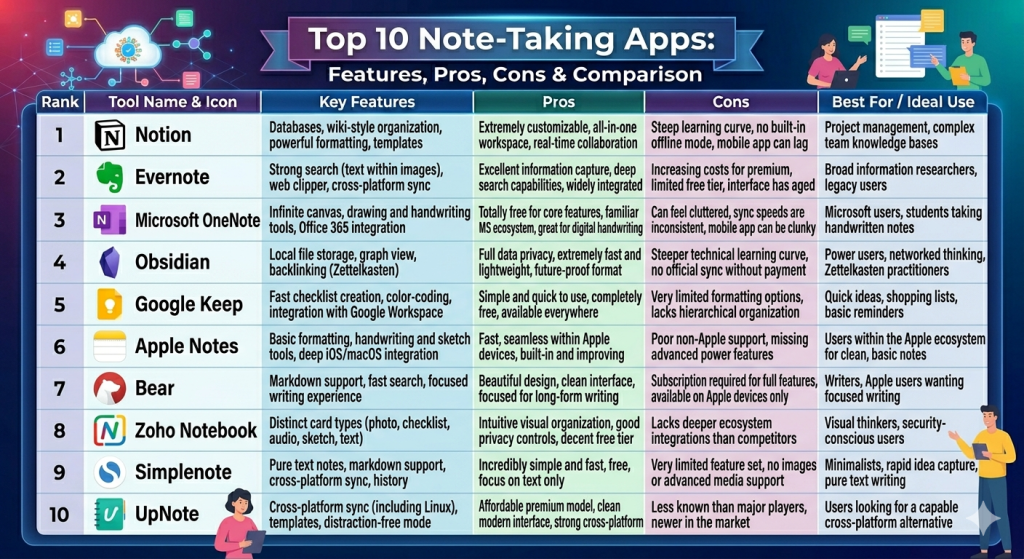
Top 10 Note-Taking Apps Tools
#1 — Notion
Short description: An all-in-one workspace combining notes, databases, and task management for individuals and teams.
Key Features
- Block-based editing system
- Databases and structured content
- Templates for various workflows
- AI-powered writing and summaries
- Collaboration and sharing
- Custom dashboards
Pros
- Extremely flexible and customizable
- Combines multiple tools in one
Cons
- Learning curve for new users
- Performance can slow with large workspaces
Platforms / Deployment
Web / Windows / macOS / iOS / Android
Cloud
Security & Compliance
SSO, encryption, RBAC
SOC 2
Integrations & Ecosystem
Notion integrates with a wide range of productivity tools.
- Slack
- Google Drive
- GitHub
- API access
Support & Community
Strong community, extensive templates, good documentation.
#2 — Evernote
Short description: One of the oldest note-taking apps, known for its robust organization and search capabilities.
Key Features
- Notebook and tag system
- Web clipping
- Document scanning
- Powerful search
- Cross-device sync
Pros
- Mature and reliable
- Strong search functionality
Cons
- Pricing can be high
- Interface feels dated to some users
Platforms / Deployment
Web / Windows / macOS / iOS / Android
Cloud
Security & Compliance
Encryption, MFA
Integrations & Ecosystem
- Google Workspace
- Slack
- Microsoft Teams
Support & Community
Established support and long-time user base.
#3 — Microsoft OneNote
Short description: A flexible note-taking tool deeply integrated into the Microsoft ecosystem.
Key Features
- Freeform canvas
- Notebook structure
- Handwriting support
- Real-time collaboration
- Integration with Office apps
Pros
- Free with many Microsoft plans
- Excellent for structured notes
Cons
- Interface can feel cluttered
- Sync issues occasionally reported
Platforms / Deployment
Web / Windows / macOS / iOS / Android
Cloud
Security & Compliance
Microsoft enterprise security stack
Integrations & Ecosystem
- Microsoft Office
- OneDrive
- Outlook
Support & Community
Strong enterprise support.
#4 — Obsidian
Short description: A powerful, offline-first note-taking tool focused on linking ideas and building a knowledge graph.
Key Features
- Markdown-based notes
- Backlinking and graph view
- Local storage
- Plugin ecosystem
- Custom themes
Pros
- Full data ownership
- Highly customizable
Cons
- No native collaboration
- Requires setup and learning
Platforms / Deployment
Windows / macOS / Linux / iOS / Android
Offline / Optional sync
Security & Compliance
Local storage; varies by setup
Integrations & Ecosystem
- Plugin ecosystem
- Community extensions
Support & Community
Very strong community and plugin support.
#5 — Google Keep
Short description: A simple note-taking app designed for quick capture and reminders.
Key Features
- Sticky note interface
- Voice notes
- Reminders
- Color coding
- Google sync
Pros
- Extremely easy to use
- Fast and lightweight
Cons
- Limited organization features
- Not suitable for complex workflows
Platforms / Deployment
Web / Android / iOS
Cloud
Security & Compliance
Google account security
Integrations & Ecosystem
- Google Workspace
Support & Community
Basic support; widely used.
#6 — Apple Notes
Short description: A native note-taking app for Apple devices with strong ecosystem integration.
Key Features
- Rich text notes
- Handwriting support
- Document scanning
- iCloud sync
- Folder organization
Pros
- Seamless Apple integration
- Free for Apple users
Cons
- Limited outside Apple ecosystem
- Basic collaboration features
Platforms / Deployment
macOS / iOS
Cloud
Security & Compliance
Apple ecosystem security
Integrations & Ecosystem
- Apple apps
Support & Community
Strong for Apple users.
#7 — Bear
Short description: A minimalist note-taking app focused on writing and Markdown support.
Key Features
- Clean writing interface
- Markdown support
- Tag-based organization
- Export options
- Themes
Pros
- Beautiful UI
- Great for writers
Cons
- Limited collaboration
- Apple-only ecosystem
Platforms / Deployment
macOS / iOS
Cloud
Security & Compliance
Not publicly stated
Integrations & Ecosystem
Limited integrations.
Support & Community
Moderate community.
#8 — Zoho Notebook
Short description: A free, visually rich note-taking app with multimedia support.
Key Features
- Card-based notes
- Multimedia support
- Sync across devices
- Web clipping
- Customization
Pros
- Free with strong features
- Good design
Cons
- Limited advanced features
- Smaller ecosystem
Platforms / Deployment
Web / Windows / macOS / iOS / Android
Cloud
Security & Compliance
Not publicly stated
Integrations & Ecosystem
- Zoho ecosystem
Support & Community
Moderate support.
#9 — Simplenote
Short description: A lightweight, Markdown-based note-taking app focused on speed and simplicity.
Key Features
- Fast syncing
- Markdown support
- Version history
- Cross-platform
- Minimal interface
Pros
- Very fast
- Free to use
Cons
- Limited features
- No rich media support
Platforms / Deployment
Web / Windows / macOS / Linux / iOS / Android
Cloud
Security & Compliance
Not publicly stated
Integrations & Ecosystem
Minimal.
Support & Community
Open-source backing.
#10 — UpNote
Short description: A modern note-taking app with a clean interface and strong organization features.
Key Features
- Rich text editing
- Notebook and tag system
- Cross-platform sync
- Focus mode
- Offline support
Pros
- Affordable pricing
- Clean UI
Cons
- Smaller ecosystem
- Limited integrations
Platforms / Deployment
Windows / macOS / iOS / Android
Cloud / Offline
Security & Compliance
Not publicly stated
Integrations & Ecosystem
Limited integrations.
Support & Community
Growing user base.
Comparison Table (Top 10)
| Tool Name | Best For | Platform(s) Supported | Deployment | Standout Feature | Public Rating |
|---|---|---|---|---|---|
| Notion | All-in-one workspace | Web, Desktop, Mobile | Cloud | Databases + notes | N/A |
| Evernote | Organization | Web, Desktop, Mobile | Cloud | Search | N/A |
| OneNote | Microsoft users | Web, Desktop, Mobile | Cloud | Freeform canvas | N/A |
| Obsidian | PKM | Desktop, Mobile | Offline | Graph view | N/A |
| Google Keep | Quick notes | Web, Mobile | Cloud | Simplicity | N/A |
| Apple Notes | Apple users | macOS, iOS | Cloud | Integration | N/A |
| Bear | Writers | macOS, iOS | Cloud | Markdown | N/A |
| Zoho Notebook | Free users | Web, Desktop, Mobile | Cloud | Multimedia cards | N/A |
| Simplenote | Minimalists | Web, Desktop, Mobile | Cloud | Speed | N/A |
| UpNote | Modern users | Desktop, Mobile | Cloud/Offline | UI | N/A |
Evaluation & Scoring of Note-Taking Apps
| Tool Name | Core | Ease | Integrations | Security | Performance | Support | Value | Weighted Total |
|---|---|---|---|---|---|---|---|---|
| Notion | 9 | 8 | 9 | 8 | 8 | 9 | 7 | 8.5 |
| Evernote | 8 | 8 | 8 | 8 | 8 | 8 | 6 | 7.8 |
| OneNote | 8 | 8 | 9 | 9 | 7 | 8 | 9 | 8.4 |
| Obsidian | 9 | 6 | 6 | 8 | 9 | 8 | 9 | 8.1 |
| Google Keep | 6 | 10 | 7 | 7 | 9 | 7 | 10 | 8.0 |
| Apple Notes | 7 | 9 | 6 | 8 | 8 | 7 | 10 | 7.9 |
| Bear | 7 | 9 | 5 | 6 | 8 | 6 | 8 | 7.3 |
| Zoho Notebook | 7 | 8 | 6 | 6 | 7 | 6 | 9 | 7.3 |
| Simplenote | 6 | 9 | 4 | 6 | 9 | 6 | 10 | 7.4 |
| UpNote | 7 | 9 | 5 | 6 | 8 | 6 | 9 | 7.5 |
How to interpret scores:
- Scores are relative across tools
- Higher scores indicate stronger overall balance
- Some tools prioritize flexibility, others simplicity
- Choose based on your workflow
Which Note-Taking Apps Tool Is Right for You?
Solo / Freelancer
- Best: Obsidian, Simplenote
SMB
- Best: Notion, Evernote
Mid-Market
- Best: Notion, OneNote
Enterprise
- Best: OneNote, Notion
Budget vs Premium
- Budget: Simplenote, Google Keep
- Premium: Notion, Evernote
Feature Depth vs Ease of Use
- Deep: Notion
- Easy: Google Keep
Integrations & Scalability
- Strong: Notion, OneNote
Security & Compliance Needs
- Best: OneNote
Frequently Asked Questions (FAQs)
What is the best note-taking app?
It depends on your needs—Notion is versatile, Obsidian is powerful for knowledge systems.
Are note-taking apps free?
Many offer free tiers; advanced features require paid plans.
Can I use them offline?
Some apps support offline mode.
Are they secure?
Most offer encryption and account security features.
Do they support collaboration?
Yes, especially tools like Notion and OneNote.
Can I switch apps easily?
Migration is possible but may require manual work.
Are they good for students?
Yes, widely used for studying and note organization.
Do they support AI features?
Many tools now include AI capabilities.
What’s the simplest app?
Google Keep or Simplenote.
Are open-source options available?
Yes, like Obsidian (partially open ecosystem).
Conclusion
Note-taking apps have become essential tools for managing information, improving productivity, and organizing knowledge. Whether you need a simple app for quick notes or a powerful system for managing complex ideas, there are many strong options available. The right choice depends on how you work, what features you need, and your preferred ecosystem. Start by identifying your workflow, test a few tools, and choose the one that fits naturally into your daily routine.
