Introduction
Image editing software refers to tools that allow users to modify, enhance, and manipulate digital images. These tools range from simple applications for cropping and resizing photos to advanced platforms used for professional graphic design, photo retouching, and digital art.
With the growing importance of visual content across marketing, social media, e-commerce, and product design, image editing software has become a critical part of modern workflows. Whether it’s creating brand visuals, editing product images, or designing marketing creatives, these tools enable users to produce high-quality visuals efficiently.
Common use cases include:
- Photo retouching and enhancement
- Social media graphics and marketing creatives
- UI/UX design and mockups
- E-commerce product image editing
- Digital illustration and artwork
What buyers should evaluate:
- Ease of use and learning curve
- Editing capabilities (layers, filters, effects)
- AI-powered features (background removal, auto-enhance)
- File format support
- Performance and speed
- Integration with other tools
- Collaboration features
- Pricing and licensing model
- Platform compatibility
- Export quality and flexibility
Best for: Designers, marketers, photographers, content creators, e-commerce businesses, and creative teams.
Not ideal for: Users needing only basic edits (mobile apps or built-in tools may suffice), or teams focused purely on video production.
Key Trends in Image Editing Software
- AI-driven editing: Automated background removal, object selection, and smart retouching
- Cloud-based workflows: Real-time collaboration and cloud storage integration
- Non-destructive editing: Layer-based editing becoming standard
- Cross-device compatibility: Seamless workflows across desktop, tablet, and mobile
- Template-driven design: Faster creation for non-designers
- Integration with design ecosystems: Strong links with marketing, CMS, and social tools
- Performance optimization: GPU acceleration and faster rendering
- Subscription-based pricing: Shift from one-time licenses to SaaS models
- Collaboration features: Shared libraries, comments, and version control
- Generative AI tools: Text-to-image and AI-assisted design elements
How We Selected These Tools (Methodology)
We selected these tools based on:
- Market popularity and widespread adoption
- Feature depth across editing, design, and automation
- Reliability and performance across devices
- Availability of AI and modern editing features
- Integration with creative and productivity ecosystems
- Ease of use for different skill levels
- Scalability for individuals, teams, and enterprises
- Platform support (desktop, web, mobile)
- Support resources and community strength
- Balance between professional and beginner-friendly tools
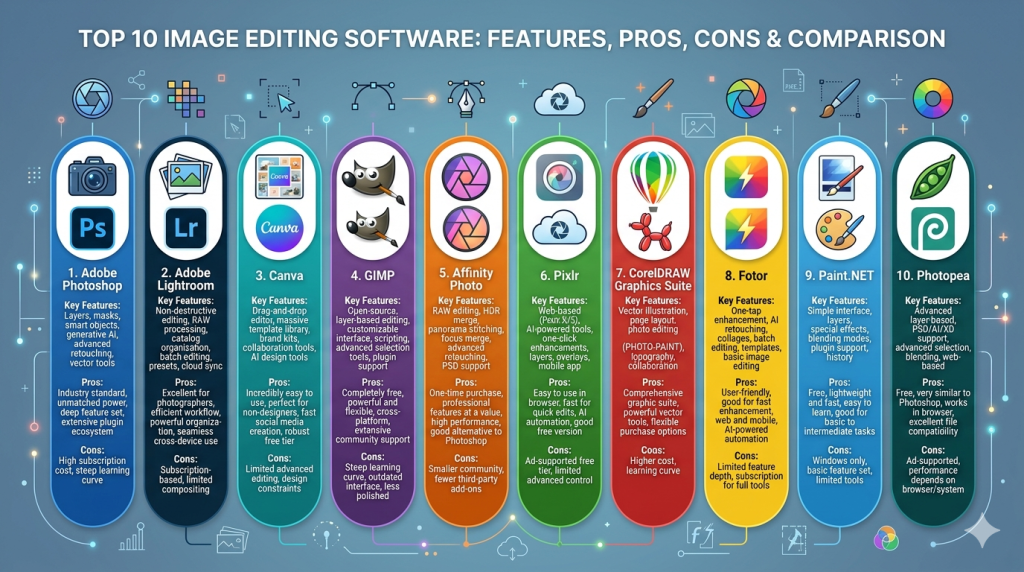
Top 10 Image Editing Software
#1 — Adobe Photoshop
Short description: Industry-standard image editing software used by professionals for advanced photo manipulation and design.
Key Features
- Layer-based editing
- Advanced selection tools
- AI-powered features (generative fill, auto-select)
- Extensive plugin ecosystem
- High-end retouching tools
- Smart objects and filters
- Support for multiple file formats
Pros
- Extremely powerful and flexible
- Industry standard with wide compatibility
Cons
- Steep learning curve
- Subscription-based pricing
Platforms / Deployment
Windows / macOS / iPad
Cloud + Local
Security & Compliance
SSO, encryption, enterprise controls
Other certifications not publicly stated
Integrations & Ecosystem
Part of a broader creative ecosystem with strong interoperability.
- Adobe Creative Cloud apps
- Cloud storage
- Third-party plugins
Support & Community
Extensive tutorials, documentation, and global community.
#2 — Adobe Lightroom
Short description: Photo editing and management tool optimized for photographers and batch editing workflows.
Key Features
- Non-destructive editing
- Presets and batch editing
- RAW image processing
- Cloud syncing
- AI-powered adjustments
- Color grading tools
Pros
- Excellent for photographers
- Easy batch processing
Cons
- Limited design tools
- Requires subscription
Platforms / Deployment
Web / Windows / macOS / Mobile
Cloud
Security & Compliance
Not publicly stated
Integrations & Ecosystem
Works seamlessly within Adobe ecosystem.
- Photoshop
- Adobe Cloud
Support & Community
Strong support and photography community.
#3 — Canva
Short description: A beginner-friendly design and image editing tool focused on templates and quick content creation.
Key Features
- Drag-and-drop editor
- Templates for social media
- AI image tools
- Background remover
- Stock asset library
- Team collaboration
- Brand kits
Pros
- Extremely easy to use
- Great for non-designers
Cons
- Limited advanced editing
- Internet-dependent
Platforms / Deployment
Web / Mobile
Cloud
Security & Compliance
SSO, encryption
Other details not publicly stated
Integrations & Ecosystem
Strong integration with productivity tools.
- Google Drive
- Slack
- Social platforms
Support & Community
Extensive guides and tutorials.
#4 — GIMP
Short description: Free and open-source image editor with advanced capabilities similar to Photoshop.
Key Features
- Layer-based editing
- Custom brushes
- Plugin support
- Advanced filters
- File format flexibility
- Script automation
Pros
- Completely free
- Highly customizable
Cons
- Complex UI
- Slower updates
Platforms / Deployment
Windows / macOS / Linux
Local
Security & Compliance
Not publicly stated
Integrations & Ecosystem
Plugin-based ecosystem.
Support & Community
Active open-source community.
#5 — Affinity Photo
Short description: A professional image editing tool offering Photoshop-like features without subscription pricing.
Key Features
- Non-destructive editing
- RAW processing
- Advanced retouching tools
- PSD compatibility
- Fast performance
- Live filters
Pros
- One-time purchase
- High performance
Cons
- Smaller ecosystem
- Fewer integrations
Platforms / Deployment
Windows / macOS / iPad
Local
Security & Compliance
Not publicly stated
Integrations & Ecosystem
Limited integrations.
Support & Community
Growing user base and documentation.
#6 — Pixlr
Short description: A web-based image editing tool offering quick edits and AI-powered features.
Key Features
- Browser-based editing
- AI background removal
- Filters and effects
- Templates
- Layer support
- Mobile support
Pros
- No installation required
- Easy to use
Cons
- Limited advanced features
- Ads in free version
Platforms / Deployment
Web / Mobile
Cloud
Security & Compliance
Not publicly stated
Integrations & Ecosystem
Basic integrations.
Support & Community
Moderate documentation.
#7 — CorelDRAW Graphics Suite
Short description: A comprehensive design suite including photo editing and vector design tools.
Key Features
- Photo editing tools
- Vector illustration
- Layout design
- Color management
- File compatibility
- Asset management
Pros
- All-in-one design suite
- Strong vector capabilities
Cons
- Expensive
- Steeper learning curve
Platforms / Deployment
Windows / macOS
Local
Security & Compliance
Not publicly stated
Integrations & Ecosystem
Supports design workflows.
Support & Community
Established support ecosystem.
#8 — Fotor
Short description: A simple online photo editor with AI enhancements and design templates.
Key Features
- One-click enhancements
- AI editing tools
- Templates
- Collage maker
- Filters
- Cloud storage
Pros
- Easy for beginners
- Quick editing
Cons
- Limited advanced tools
- Ads in free version
Platforms / Deployment
Web / Mobile
Cloud
Security & Compliance
Not publicly stated
Integrations & Ecosystem
Basic integrations.
Support & Community
Limited support resources.
#9 — Paint.NET
Short description: A lightweight image editor for Windows users with a simple interface and essential features.
Key Features
- Layer support
- Basic editing tools
- Plugin support
- Fast performance
- Simple UI
Pros
- Lightweight
- Easy to learn
Cons
- Windows-only
- Limited advanced tools
Platforms / Deployment
Windows
Local
Security & Compliance
Not publicly stated
Integrations & Ecosystem
Plugin-based.
Support & Community
Community-supported.
#10 — Photopea
Short description: A browser-based Photoshop alternative supporting PSD files and advanced editing.
Key Features
- PSD support
- Layer-based editing
- Browser-based
- No installation
- Advanced tools
- Multiple file formats
Pros
- Free and accessible
- Familiar interface
Cons
- Ads in free version
- Performance depends on browser
Platforms / Deployment
Web
Cloud
Security & Compliance
Not publicly stated
Integrations & Ecosystem
Limited integrations.
Support & Community
Moderate support and growing community.
Comparison Table (Top 10)
| Tool Name | Best For | Platform(s) Supported | Deployment | Standout Feature | Public Rating |
|---|---|---|---|---|---|
| Photoshop | Professionals | Win, macOS, iPad | Hybrid | Advanced editing | N/A |
| Lightroom | Photographers | Web, Desktop, Mobile | Cloud | Batch editing | N/A |
| Canva | Beginners | Web, Mobile | Cloud | Templates | N/A |
| GIMP | Open-source users | Win, macOS, Linux | Local | Free advanced editing | N/A |
| Affinity Photo | Budget professionals | Win, macOS, iPad | Local | One-time pricing | N/A |
| Pixlr | Quick edits | Web, Mobile | Cloud | Browser editing | N/A |
| CorelDRAW | Designers | Win, macOS | Local | Design suite | N/A |
| Fotor | Beginners | Web, Mobile | Cloud | AI enhancements | N/A |
| Paint.NET | Casual users | Windows | Local | Lightweight | N/A |
| Photopea | Web users | Web | Cloud | PSD support | N/A |
Evaluation & Scoring of Image Editing Software
| Tool Name | Core (25%) | Ease (15%) | Integrations (15%) | Security (10%) | Performance (10%) | Support (10%) | Value (15%) | Weighted Total |
|---|---|---|---|---|---|---|---|---|
| Photoshop | 10 | 6 | 9 | 8 | 9 | 10 | 6 | 8.5 |
| Lightroom | 9 | 8 | 8 | 7 | 9 | 9 | 7 | 8.3 |
| Canva | 7 | 10 | 8 | 7 | 8 | 9 | 9 | 8.4 |
| GIMP | 8 | 5 | 6 | 5 | 7 | 8 | 10 | 7.4 |
| Affinity Photo | 9 | 7 | 6 | 6 | 9 | 7 | 9 | 8.0 |
| Pixlr | 7 | 9 | 6 | 5 | 7 | 6 | 8 | 7.3 |
| CorelDRAW | 9 | 6 | 7 | 6 | 8 | 8 | 6 | 7.6 |
| Fotor | 6 | 9 | 5 | 5 | 7 | 6 | 8 | 6.9 |
| Paint.NET | 6 | 8 | 5 | 5 | 8 | 6 | 9 | 7.0 |
| Photopea | 8 | 8 | 6 | 5 | 7 | 7 | 9 | 7.6 |
How to interpret:
- Scores are relative comparisons across tools
- Higher totals indicate better overall balance
- Choose based on your workflow needs
- Professionals should prioritize core features
- Beginners should prioritize ease of use
Which Image Editing Software Is Right for You?
Solo / Freelancer
- Canva, Photopea, Pixlr
- Focus on ease and affordability
SMB
- Canva, Affinity Photo
- Balance between usability and features
Mid-Market
- Photoshop, Lightroom
- Strong workflows and integrations
Enterprise
- Adobe ecosystem (Photoshop + Lightroom)
- Focus on scalability and collaboration
Budget vs Premium
- Free: GIMP, Photopea, Pixlr
- Premium: Photoshop, CorelDRAW
Feature Depth vs Ease of Use
- Easy: Canva, Fotor
- Advanced: Photoshop, GIMP
Integrations & Scalability
- Strong: Adobe ecosystem, Canva
- Limited: Paint.NET, Fotor
Security & Compliance Needs
- Enterprise-ready: Adobe tools
- Basic: Most others
Frequently Asked Questions (FAQs)
What is image editing software used for?
It is used to enhance, modify, and create images for various purposes like marketing, design, and photography.
Is free software enough?
Yes for basic tasks, but professionals often need advanced paid tools.
What is the easiest tool to use?
Canva is widely considered the easiest for beginners.
Which tool is best for professionals?
Adobe Photoshop remains the industry standard.
Can I edit photos online?
Yes, tools like Photopea and Pixlr work in browsers.
Do these tools support RAW images?
Some do (Lightroom, Photoshop, Affinity Photo).
Are these tools secure?
Depends on the provider. Enterprise tools offer better security features.
Can I collaborate with teams?
Yes, especially in tools like Canva and Adobe Cloud.
Do I need a powerful computer?
Advanced tools like Photoshop benefit from higher specs.
Can I switch tools easily?
Yes, but file compatibility and workflows may vary.
Conclusion
Image editing software plays a crucial role in modern digital workflows, from simple edits to professional-grade design. The right tool depends on your skill level, budget, and specific use case.
There is no one-size-fits-all solution—some tools prioritize simplicity, while others offer deep customization and control.
Start by testing a few tools that match your needs, evaluate their features and performance, and choose the one that best fits your workflow.
