Introduction
RAW photo processing tools are specialized software applications designed to handle RAW image files captured directly from digital cameras. Unlike compressed formats like JPEG, RAW files retain maximum image data, allowing photographers and editors to make precise adjustments without losing quality.
These tools are essential for professionals and enthusiasts who need full control over exposure, color grading, white balance, and dynamic range. As visual content becomes more critical across industries—from photography and media to e-commerce and marketing—RAW processing tools have become a core part of modern creative workflows.
Common use cases include:
- Professional photo editing and retouching
- Color correction and grading
- Batch processing large image libraries
- Studio and commercial photography workflows
- Post-production for high-quality visual content
What buyers should evaluate:
- RAW file compatibility (camera support)
- Non-destructive editing capabilities
- Color grading and tone control
- Batch processing and workflow automation
- Performance with large image files
- AI-powered enhancements
- Asset management and cataloging
- Integration with editing ecosystems
- Export formats and quality
- Pricing and licensing model
Best for: Professional photographers, photo editors, studios, content creators, and agencies handling high-quality imagery.
Not ideal for: Casual users who only edit JPEGs or need quick edits—basic image editors may be sufficient.
Key Trends in RAW Photo Processing Tools
- AI-assisted editing: Auto exposure, smart masking, and subject detection
- Non-destructive workflows: Editing without altering original files
- Cloud-based libraries: Syncing edits across devices
- Improved GPU acceleration: Faster rendering and preview generation
- Advanced color grading tools: Precision controls for professionals
- Integration with editing suites: Seamless transition between RAW and pixel editing
- Batch automation: Presets and bulk editing for efficiency
- Mobile RAW editing: Increasing support on smartphones and tablets
- Lens correction automation: Built-in profiles for cameras and lenses
- Subscription vs perpetual licensing: Mixed pricing models
How We Selected These Tools (Methodology)
We selected tools based on:
- Popularity among professional photographers
- Depth of RAW editing capabilities
- Performance with large image libraries
- AI and automation features
- Workflow efficiency and usability
- Integration with other editing tools
- Cross-platform availability
- Support for various camera formats
- Community and ecosystem strength
- Balance between professional and accessible tools
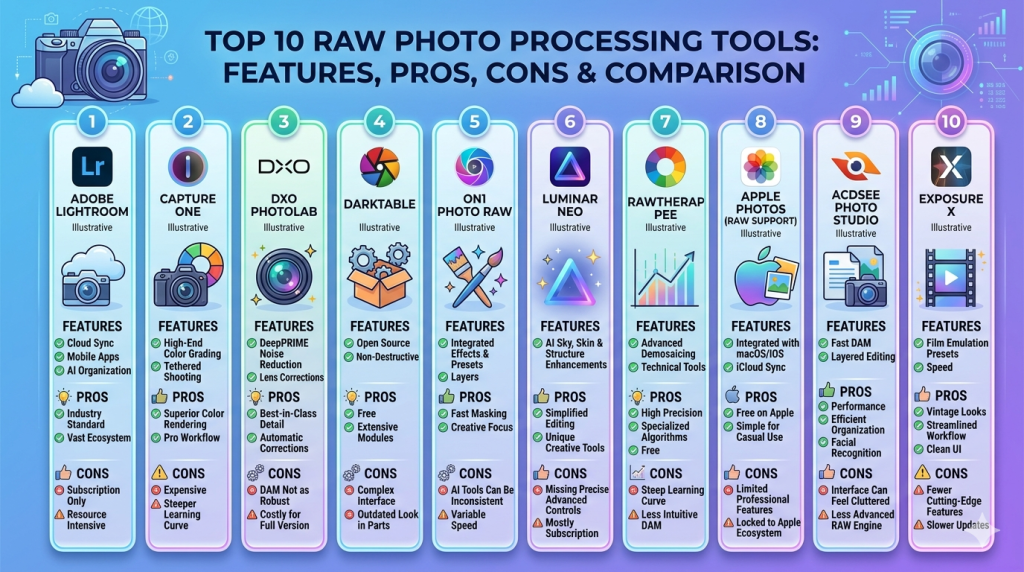
Top 10 RAW Photo Processing Tools
#1 — Adobe Lightroom
Short description: A leading RAW photo processing tool with powerful editing and catalog management features, widely used by professionals.
Key Features
- Non-destructive RAW editing
- Advanced color grading tools
- AI-powered masking and adjustments
- Presets and batch editing
- Cloud syncing and storage
- Lens correction profiles
- Library management
Pros
- Industry-standard workflow
- Excellent balance of power and usability
Cons
- Subscription-based
- Limited pixel-level editing
Platforms / Deployment
Web / Windows / macOS / Mobile
Cloud
Security & Compliance
Not publicly stated
Integrations & Ecosystem
Part of a broader creative ecosystem with seamless interoperability.
- Photoshop
- Adobe Cloud
- Plugins
Support & Community
Extensive tutorials, courses, and strong global community.
#2 — Capture One
Short description: A professional-grade RAW editor known for superior color grading and studio workflows.
Key Features
- Advanced color editor
- Tethered shooting support
- Layer-based editing
- High-end RAW processing engine
- Custom workspaces
- Noise reduction tools
- Catalog and session workflows
Pros
- Exceptional color accuracy
- Preferred for studio photography
Cons
- Expensive
- Steeper learning curve
Platforms / Deployment
Windows / macOS
Local
Security & Compliance
Not publicly stated
Integrations & Ecosystem
Supports professional workflows with limited integrations.
Support & Community
Strong documentation and professional user base.
#3 — DxO PhotoLab
Short description: A powerful RAW processor with advanced optics correction and noise reduction capabilities.
Key Features
- DeepPRIME noise reduction
- Lens and camera profiles
- Smart lighting adjustments
- Local adjustments
- Non-destructive editing
- Batch processing
- Optical corrections
Pros
- Excellent noise reduction
- High-quality image output
Cons
- Limited cataloging features
- Higher price
Platforms / Deployment
Windows / macOS
Local
Security & Compliance
Not publicly stated
Integrations & Ecosystem
Works alongside editing tools.
Support & Community
Good documentation and support.
#4 — Darktable
Short description: An open-source RAW editor offering advanced features similar to professional tools.
Key Features
- Non-destructive editing
- Color correction modules
- GPU acceleration
- Tethered shooting
- Presets and styles
- Batch processing
- Plugin support
Pros
- Free and open-source
- Feature-rich
Cons
- Complex interface
- Less polished UI
Platforms / Deployment
Windows / macOS / Linux
Local
Security & Compliance
Not publicly stated
Integrations & Ecosystem
Open-source ecosystem.
Support & Community
Active community and forums.
#5 — ON1 Photo RAW
Short description: An all-in-one photo editor combining RAW processing, effects, and asset management.
Key Features
- RAW editing
- AI-powered tools
- Effects and filters
- Cataloging system
- Layers and masking
- Batch processing
- Presets
Pros
- No subscription required
- All-in-one tool
Cons
- Performance can vary
- UI complexity
Platforms / Deployment
Windows / macOS
Local
Security & Compliance
Not publicly stated
Integrations & Ecosystem
Limited integrations.
Support & Community
Moderate support resources.
#6 — Luminar Neo
Short description: An AI-focused photo editor with strong RAW processing capabilities.
Key Features
- AI sky replacement
- Portrait enhancement
- RAW support
- Layers and masking
- Presets
- Batch editing
Pros
- Easy to use
- Strong AI tools
Cons
- Limited professional controls
- Performance issues on large files
Platforms / Deployment
Windows / macOS
Local
Security & Compliance
Not publicly stated
Integrations & Ecosystem
Works as standalone or plugin.
Support & Community
Growing user base.
#7 — RawTherapee
Short description: A free RAW processing tool with advanced controls for experienced users.
Key Features
- High-quality RAW processing
- Advanced color correction
- Non-destructive editing
- Batch processing
- Lens corrections
- Noise reduction
Pros
- Free
- High-quality output
Cons
- Complex UI
- Slower workflow
Platforms / Deployment
Windows / macOS / Linux
Local
Security & Compliance
Not publicly stated
Integrations & Ecosystem
Open-source ecosystem.
Support & Community
Active community.
#8 — Apple Photos (RAW support)
Short description: A consumer-friendly photo management app with built-in RAW editing capabilities.
Key Features
- Basic RAW editing
- Cloud sync
- Simple adjustments
- Organization tools
- Mobile integration
Pros
- Easy to use
- Integrated ecosystem
Cons
- Limited advanced features
- Apple-only
Platforms / Deployment
macOS / iOS
Cloud + Local
Security & Compliance
Not publicly stated
Integrations & Ecosystem
Apple ecosystem integration.
Support & Community
Strong documentation.
#9 — ACDSee Photo Studio
Short description: A comprehensive photo editing and management tool with RAW processing support.
Key Features
- RAW editing
- Digital asset management
- Layer-based editing
- Batch processing
- Facial recognition
- Metadata tools
Pros
- Strong asset management
- One-time purchase option
Cons
- UI complexity
- Limited AI features
Platforms / Deployment
Windows / macOS
Local
Security & Compliance
Not publicly stated
Integrations & Ecosystem
Limited integrations.
Support & Community
Moderate support.
#10 — Exposure X
Short description: A RAW editor focused on creative effects and non-destructive workflows.
Key Features
- RAW processing
- Film emulation presets
- Non-destructive editing
- Layers
- Batch processing
- Asset management
Pros
- Strong creative tools
- No subscription
Cons
- Smaller ecosystem
- Limited integrations
Platforms / Deployment
Windows / macOS
Local
Security & Compliance
Not publicly stated
Integrations & Ecosystem
Limited integrations.
Support & Community
Growing community.
Comparison Table (Top 10)
| Tool Name | Best For | Platform(s) Supported | Deployment | Standout Feature | Public Rating |
|---|---|---|---|---|---|
| Lightroom | Professionals | Web, Desktop, Mobile | Cloud | Workflow & presets | N/A |
| Capture One | Studio photographers | Win, macOS | Local | Color grading | N/A |
| DxO PhotoLab | Image quality | Win, macOS | Local | Noise reduction | N/A |
| Darktable | Open-source users | Win, macOS, Linux | Local | Free advanced tools | N/A |
| ON1 Photo RAW | All-in-one editing | Win, macOS | Local | Effects + RAW | N/A |
| Luminar Neo | AI editing | Win, macOS | Local | AI tools | N/A |
| RawTherapee | Advanced users | Win, macOS, Linux | Local | Detailed controls | N/A |
| Apple Photos | Casual users | macOS, iOS | Hybrid | Simplicity | N/A |
| ACDSee | Asset management | Win, macOS | Local | DAM features | N/A |
| Exposure X | Creative editing | Win, macOS | Local | Film effects | N/A |
Evaluation & Scoring of RAW Photo Processing Tools
| Tool Name | Core (25%) | Ease (15%) | Integrations (15%) | Security (10%) | Performance (10%) | Support (10%) | Value (15%) | Weighted Total |
|---|---|---|---|---|---|---|---|---|
| Lightroom | 10 | 9 | 9 | 7 | 9 | 10 | 7 | 8.9 |
| Capture One | 10 | 7 | 7 | 7 | 9 | 9 | 6 | 8.2 |
| DxO PhotoLab | 9 | 7 | 6 | 6 | 9 | 8 | 7 | 7.9 |
| Darktable | 8 | 5 | 6 | 5 | 7 | 8 | 10 | 7.4 |
| ON1 Photo RAW | 8 | 7 | 6 | 6 | 7 | 7 | 8 | 7.3 |
| Luminar Neo | 7 | 9 | 6 | 5 | 7 | 7 | 7 | 7.2 |
| RawTherapee | 9 | 5 | 5 | 5 | 7 | 7 | 10 | 7.3 |
| Apple Photos | 6 | 10 | 6 | 6 | 8 | 8 | 9 | 7.6 |
| ACDSee | 8 | 7 | 6 | 6 | 8 | 7 | 8 | 7.4 |
| Exposure X | 8 | 7 | 5 | 5 | 8 | 7 | 8 | 7.2 |
How to interpret:
- Scores reflect relative comparison across tools
- Higher totals indicate better overall capability
- Professionals should prioritize core features
- Beginners should prioritize ease of use
- Value depends on pricing model and features
Which RAW Photo Processing Tool Is Right for You?
Solo / Freelancer
- Best: Luminar Neo, Apple Photos, Darktable
- Focus on ease, cost, and flexibility
SMB
- Best: Lightroom, ON1 Photo RAW
- Balance between features and usability
Mid-Market
- Best: Lightroom, Capture One
- Advanced workflows and collaboration
Enterprise
- Best: Lightroom ecosystem
- Focus on scalability and integration
Budget vs Premium
- Free: Darktable, RawTherapee
- Premium: Capture One, DxO PhotoLab
Feature Depth vs Ease of Use
- Easy: Luminar Neo, Apple Photos
- Advanced: Capture One, RawTherapee
Integrations & Scalability
- Strong: Lightroom ecosystem
- Limited: Most standalone tools
Security & Compliance Needs
- Enterprise-ready: Lightroom ecosystem
- Basic: Most others
Frequently Asked Questions (FAQs)
What is RAW photo processing?
It is the process of editing RAW image files while preserving maximum data and quality.
Why use RAW instead of JPEG?
RAW files retain more detail and allow better editing flexibility.
Are RAW tools beginner-friendly?
Some are (Luminar, Apple Photos), while others require experience.
Can I use free tools?
Yes, tools like Darktable and RawTherapee are powerful and free.
Which tool is best for professionals?
Lightroom and Capture One are widely preferred.
Do these tools support batch editing?
Yes, most tools include batch processing features.
Are these tools fast?
Performance varies depending on hardware and optimization.
Can I edit RAW on mobile?
Some tools support mobile workflows.
Do I need powerful hardware?
For large RAW files, better hardware improves performance.
Can I switch tools easily?
Yes, but workflows and presets may differ.
Conclusion
RAW photo processing tools are essential for anyone working with high-quality images. They provide the control and flexibility needed for professional-grade editing and production workflows.
The best tool depends on your priorities—whether it’s ease of use, advanced controls, or AI-driven enhancements.
Shortlist a few tools, test them with your workflow, and choose the one that best aligns with your editing style and performance needs.
