Introduction
Wiki software enables teams and organizations to collaboratively create, edit, and organize knowledge in a centralized and easily accessible format. Wikis are widely used for internal documentation, knowledge sharing, project collaboration, and even public knowledge repositories.
In the modern digital workplace, where distributed teams and remote collaboration are standard, wikis play a critical role in maintaining transparency and ensuring that knowledge is not siloed. They allow real-time editing, version control, and structured content organization, making them essential for both small teams and large enterprises.
Common use cases include:
- Internal company documentation
- Team collaboration and knowledge sharing
- Product documentation and onboarding guides
- Open-source project documentation
- Educational and community knowledge platforms
What buyers should evaluate:
- Ease of use and editor experience
- Collaboration and real-time editing capabilities
- Version control and history tracking
- Access control and permissions
- Integration with other tools
- Scalability and performance
- Customization and extensibility
- Security and compliance
Best for: Teams, startups, enterprises, and communities needing collaborative documentation and knowledge sharing.
Not ideal for: Static websites, highly structured enterprise workflows, or organizations requiring advanced personalization features.
Key Trends in Wikis for the Future
- AI-assisted content creation and summarization
- Real-time collaboration improvements
- Integration with project management and communication tools
- Headless and API-driven wiki architectures
- Enhanced search with AI and semantic indexing
- Increased focus on knowledge verification workflows
- Hybrid wiki + knowledge base platforms
- Mobile-first collaboration experiences
- Automation in content organization and tagging
- Role-based content governance
How We Selected These Tools (Methodology)
- Evaluated popularity and adoption across teams and enterprises
- Compared collaboration and editing capabilities
- Assessed usability for non-technical users
- Reviewed integration ecosystems
- Considered scalability and performance
- Analyzed security and access control features
- Included both open-source and SaaS solutions
- Balanced tools for SMB and enterprise use cases
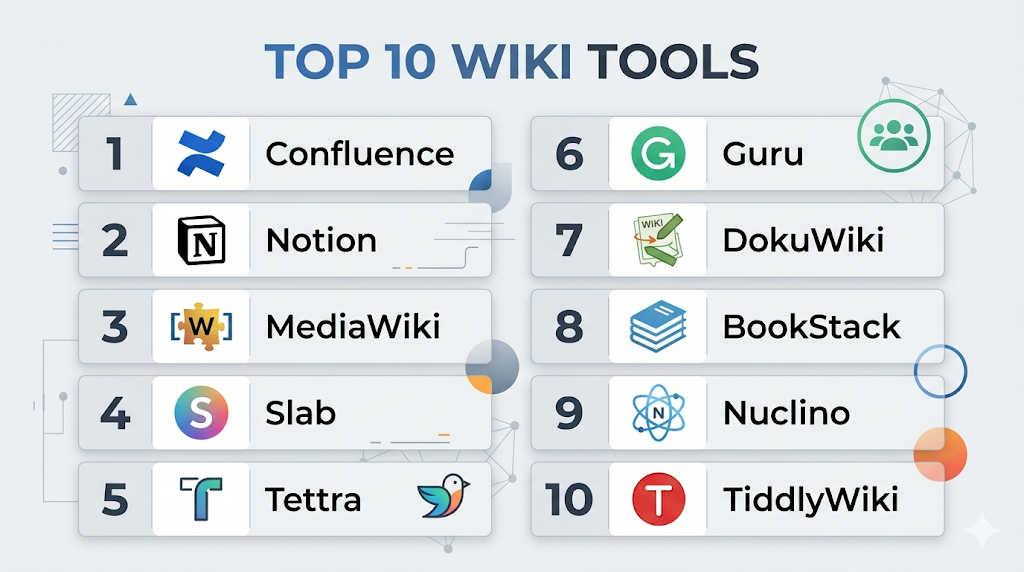
Top 10 Wiki Tools
#1 — Confluence
Short description: A leading team collaboration and wiki platform widely used for internal documentation.
Key Features
- Rich text editor
- Real-time collaboration
- Templates and content organization
- Version control
- Permissions management
- Integration with Jira
- Content search
Pros
- Strong collaboration features
- Large ecosystem
Cons
- Can become cluttered
- Requires proper organization
Platforms / Deployment
Cloud / Self-hosted
Security & Compliance
SSO, RBAC (others not publicly stated)
Integrations & Ecosystem
Extensive integrations within Atlassian ecosystem.
- Jira
- APIs
- Plugins
Support & Community
Large global community and documentation.
#2 — Notion
Short description: Flexible workspace combining wiki, notes, and databases.
Key Features
- Block-based editor
- Templates
- Databases
- Collaboration tools
- Content linking
- Custom workflows
- Integration support
Pros
- Easy to use
- Highly customizable
Cons
- Performance issues at scale
- Limited enterprise governance
Platforms / Deployment
Web / Windows / macOS / iOS / Android
Security & Compliance
Basic controls (not publicly stated)
Integrations & Ecosystem
Growing ecosystem.
- APIs
- Automation tools
- Third-party integrations
Support & Community
Large and active community.
#3 — MediaWiki
Short description: Open-source wiki software used by large-scale knowledge platforms.
Key Features
- Open-source architecture
- Version control
- Extensions and plugins
- Multi-language support
- Content categorization
- User permissions
- API access
Pros
- Highly scalable
- Fully customizable
Cons
- Requires technical setup
- Outdated UI
Platforms / Deployment
Self-hosted
Security & Compliance
RBAC, authentication (others not publicly stated)
Integrations & Ecosystem
Flexible open-source ecosystem.
- APIs
- Extensions
- Custom integrations
Support & Community
Strong open-source community.
#4 — Slab
Short description: Modern and simple wiki for internal team documentation.
Key Features
- Clean editor
- Search functionality
- Collaboration tools
- Version control
- Permissions
- Content organization
- Integrations
Pros
- Easy to use
- Clean UI
Cons
- Limited advanced features
- Not ideal for large enterprises
Platforms / Deployment
Web
Security & Compliance
Basic controls (not publicly stated)
Integrations & Ecosystem
Moderate integrations.
- APIs
- Third-party tools
Support & Community
Growing community.
#5 — Tettra
Short description: Lightweight wiki designed for teams using Slack.
Key Features
- Slack integration
- Content verification workflows
- Templates
- Search
- Permissions
- Collaboration tools
- Internal documentation
Pros
- Simple setup
- Slack-focused
Cons
- Limited scalability
- Basic features
Platforms / Deployment
Web
Security & Compliance
Basic security (not publicly stated)
Integrations & Ecosystem
Slack-centric ecosystem.
- APIs
- Slack integration
Support & Community
Small but focused community.
#6 — Guru
Short description: AI-powered wiki and knowledge platform for teams.
Key Features
- AI knowledge suggestions
- Browser extension
- Content cards
- Verification workflows
- Analytics
- Permissions
- Integrations
Pros
- AI-driven knowledge delivery
- Great for internal use
Cons
- Limited external wiki features
- Pricing
Platforms / Deployment
Web
Security & Compliance
SSO, RBAC (others not publicly stated)
Integrations & Ecosystem
Strong integrations.
- Slack
- CRM tools
- APIs
Support & Community
Good support and adoption.
#7 — DokuWiki
Short description: Lightweight open-source wiki that does not require a database.
Key Features
- File-based storage
- Access control
- Plugins
- Version control
- Templates
- Backup support
- Lightweight architecture
Pros
- Easy to deploy
- No database required
Cons
- Limited scalability
- Basic UI
Platforms / Deployment
Self-hosted
Security & Compliance
RBAC, authentication (others not publicly stated)
Integrations & Ecosystem
Plugin-based ecosystem.
- Extensions
- APIs
Support & Community
Active open-source community.
#8 — BookStack
Short description: Open-source wiki with structured documentation approach.
Key Features
- Book-style organization
- WYSIWYG editor
- Role permissions
- API support
- Multi-language support
- Content hierarchy
- Authentication
Pros
- Structured documentation
- Easy to use
Cons
- Limited scalability
- Requires hosting
Platforms / Deployment
Self-hosted
Security & Compliance
RBAC, authentication (others not publicly stated)
Integrations & Ecosystem
Moderate integrations.
- APIs
- Plugins
Support & Community
Strong open-source support.
#9 — Nuclino
Short description: Lightweight collaborative wiki with modern interface.
Key Features
- Real-time collaboration
- Graph view
- Markdown support
- Version history
- Search
- Integrations
- Content linking
Pros
- Fast and simple
- Modern UI
Cons
- Limited enterprise features
- Less customization
Platforms / Deployment
Web / Desktop
Security & Compliance
Basic controls (not publicly stated)
Integrations & Ecosystem
Moderate integrations.
- APIs
- Third-party tools
Support & Community
Growing community.
#10 — TiddlyWiki
Short description: Unique single-file wiki for personal and small-scale use.
Key Features
- Single-file storage
- Customizable interface
- Plugin support
- Offline usage
- Content linking
- Versioning
- Lightweight
Pros
- Extremely flexible
- No server required
Cons
- Not suitable for teams
- Limited scalability
Platforms / Deployment
Web / Self-hosted
Security & Compliance
Not publicly stated
Integrations & Ecosystem
Limited integrations.
- Plugins
- Custom scripts
Support & Community
Niche but dedicated community.
Comparison Table (Top 10)
| Tool Name | Best For | Platform(s) Supported | Deployment | Standout Feature | Public Rating |
|---|---|---|---|---|---|
| Confluence | Enterprise teams | Web | Cloud/Self-hosted | Collaboration tools | N/A |
| Notion | Flexible teams | Web/Desktop/Mobile | Cloud | All-in-one workspace | N/A |
| MediaWiki | Large-scale wiki | Web | Self-hosted | Open-source scalability | N/A |
| Slab | Internal teams | Web | Cloud | Simplicity | N/A |
| Tettra | Slack teams | Web | Cloud | Slack integration | N/A |
| Guru | Internal knowledge | Web | Cloud | AI suggestions | N/A |
| DokuWiki | Small setups | Web | Self-hosted | No database needed | N/A |
| BookStack | Structured docs | Web | Self-hosted | Book-style format | N/A |
| Nuclino | Modern teams | Web/Desktop | Cloud | Real-time collaboration | N/A |
| TiddlyWiki | Personal use | Web | Self-hosted | Single-file wiki | N/A |
Evaluation & Scoring of Wikis
| Tool Name | Core (25%) | Ease (15%) | Integrations (15%) | Security (10%) | Performance (10%) | Support (10%) | Value (15%) | Weighted Total |
|---|---|---|---|---|---|---|---|---|
| Confluence | 9 | 7 | 9 | 8 | 8 | 9 | 7 | 8.3 |
| Notion | 8 | 9 | 7 | 6 | 7 | 8 | 9 | 8.0 |
| MediaWiki | 9 | 5 | 7 | 7 | 8 | 8 | 9 | 7.8 |
| Slab | 7 | 9 | 6 | 6 | 7 | 7 | 8 | 7.4 |
| Tettra | 6 | 9 | 6 | 6 | 7 | 7 | 8 | 7.2 |
| Guru | 8 | 8 | 8 | 7 | 8 | 8 | 7 | 7.9 |
| DokuWiki | 7 | 7 | 6 | 7 | 7 | 7 | 9 | 7.4 |
| BookStack | 7 | 8 | 6 | 7 | 7 | 7 | 8 | 7.5 |
| Nuclino | 7 | 9 | 7 | 6 | 8 | 7 | 8 | 7.8 |
| TiddlyWiki | 6 | 7 | 5 | 6 | 7 | 6 | 9 | 6.9 |
Interpretation:
Scores are relative comparisons across usability, features, and value. Enterprise tools rank higher in integrations and scalability, while lightweight tools perform better in ease of use and affordability.
Which Wiki Tool Is Right for You?
Solo / Freelancer
- Best: TiddlyWiki, Notion
- Lightweight and flexible
SMB
- Best: Slab, Nuclino
- Easy collaboration and setup
Mid-Market
- Best: Confluence, Guru
- Balanced features and integrations
Enterprise
- Best: Confluence, MediaWiki
- Scalability and governance
Budget vs Premium
- Budget: DokuWiki, BookStack
- Premium: Confluence, Guru
Feature Depth vs Ease of Use
- Feature-heavy: Confluence, MediaWiki
- Easy-to-use: Notion, Slab
Integrations & Scalability
- Strong: Confluence, Guru
- Moderate: Slab, Tettra
Security & Compliance Needs
- Enterprise-grade: Confluence
- Basic: TiddlyWiki, Tettra
Frequently Asked Questions (FAQs)
What is a wiki?
A wiki is a collaborative platform where users can create, edit, and organize content collectively.
How is a wiki different from a knowledge base?
Wikis focus on collaboration, while knowledge bases are more structured for support and documentation.
Are wikis suitable for businesses?
Yes, they are widely used for internal documentation and collaboration.
Do wikis support real-time editing?
Many modern wiki tools offer real-time collaboration features.
Are wikis secure?
Security depends on the platform and configuration.
Can wikis integrate with other tools?
Yes, most tools support integrations with project management and communication tools.
Do I need coding skills?
Most modern wikis are no-code or low-code.
Can wikis be public and private?
Yes, they can be configured for both internal and external use.
What are the limitations of wikis?
They may lack advanced workflows and personalization features.
What are alternatives to wikis?
Knowledge bases, CMS platforms, and collaboration tools.
Conclusion
Wiki software remains a foundational tool for organizations aiming to improve knowledge sharing, collaboration, and documentation efficiency. From enterprise-grade platforms like Confluence to lightweight solutions like TiddlyWiki and Nuclino, there are options available for every team size and use case. The right wiki depends on your specific needs—whether it’s scalability, simplicity, or integration with existing tools. While some platforms excel in structured documentation, others prioritize ease of use and flexibility. To make the best choice, shortlist a few tools, test their collaboration features, evaluate integrations, and ensure they align with your workflow and long-term knowledge management strategy.
