Introduction
Subtitle and captioning tools help users create, edit, translate, synchronize, and publish text for video and audio content. These tools are used to make videos more accessible, searchable, understandable, and usable across different platforms, languages, and audiences. They can support closed captions, open captions, subtitles, transcripts, speaker labels, timecodes, translations, and export formats for video platforms.
Subtitle and captioning tools matter because video content is now used everywhere: marketing, education, training, social media, webinars, online courses, podcasts, product demos, internal communication, and customer support. Without captions, many viewers may miss the message, especially when watching without sound or consuming content in a second language.
Common use cases include YouTube captions, online course subtitles, social media video captions, webinar transcripts, corporate training accessibility, podcast transcription, multilingual subtitles, and compliance-focused captioning.
Buyers should evaluate accuracy, editing workflow, translation support, export formats, turnaround time, collaboration features, security controls, integrations, pricing, and support quality.
Best for: video editors, marketers, educators, podcasters, course creators, media teams, agencies, accessibility teams, corporate training teams, and businesses publishing regular video or audio content.
Not ideal for: users who rarely publish video, teams that only need basic built-in captions from social platforms, or organizations requiring fully custom broadcast workflows without needing a dedicated captioning platform.
Key Trends in Subtitle & Captioning Tools
- AI-generated captions are becoming standard, helping creators produce subtitles faster than fully manual workflows.
- Human review remains important for high-stakes content such as legal, medical, education, compliance, public communication, and enterprise training.
- Multilingual subtitle workflows are growing as brands, educators, and creators publish content for global audiences.
- Short-form video captioning is now a major use case, especially for social media posts, reels, ads, and vertical videos.
- Accessibility expectations are rising, making accurate captions and transcripts more important for businesses, schools, and public-facing organizations.
- Video editing and captioning are merging, with tools offering captions, trimming, resizing, branding, translation, and publishing in one workflow.
- Searchable transcripts are becoming valuable for webinars, podcasts, training libraries, and internal knowledge bases.
- Speaker identification and timestamps are improving, helping teams create cleaner transcripts for interviews, meetings, podcasts, and panel discussions.
- API-based captioning workflows are growing for platforms that need to process large volumes of videos automatically.
- Security and privacy controls are becoming more important as teams caption internal meetings, customer calls, training videos, and confidential content.
How We Selected These Tools
The tools in this list were selected based on practical value for subtitle creation, caption editing, transcription, translation, video publishing, accessibility workflows, and business use.
Selection criteria included:
- Market adoption and recognition among creators, educators, marketers, agencies, and enterprises
- Core captioning and subtitle capabilities such as transcription, timing, editing, translation, and export formats
- Accuracy options, including AI transcription and human-reviewed captioning where available
- Ease of use for non-technical users such as marketers, trainers, teachers, and creators
- Workflow support for video editing, social publishing, webinars, podcasts, and online courses
- Security posture signals such as access controls, privacy settings, and business account options
- Integration ecosystem with video platforms, editing tools, cloud storage, learning platforms, and APIs
- Fit for different segments, including freelancers, SMBs, education teams, media teams, and enterprises
- Support quality, documentation, onboarding resources, and customer assistance
- Value for money based on captioning volume, accuracy needs, team workflow, and output formats
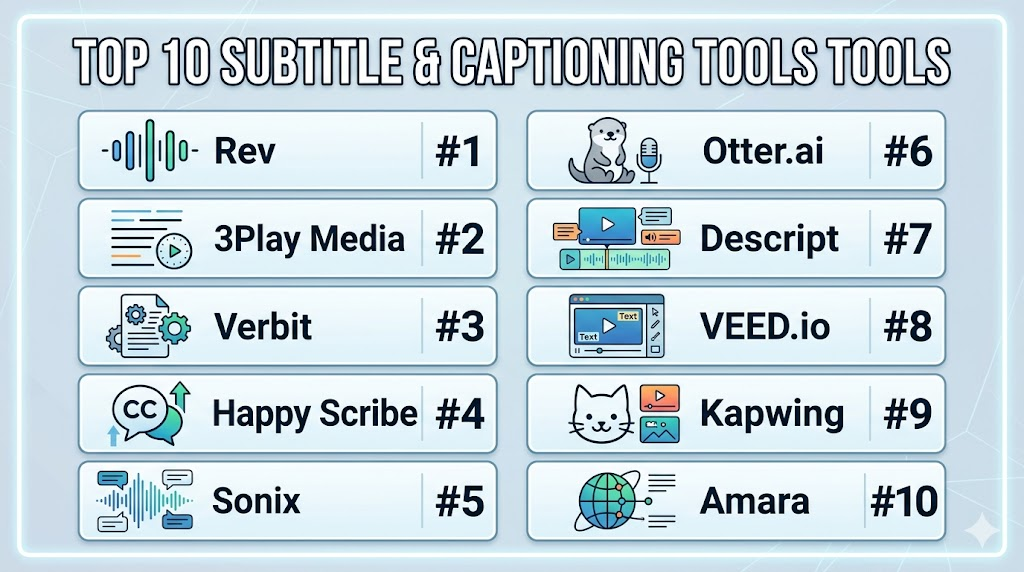
Top 10 Subtitle & Captioning Tools Tools
#1 — Rev
Short description: Rev is a transcription, captioning, and subtitle service used by creators, businesses, educators, media teams, and professionals who need accurate transcripts and captions. It offers both automated and human-assisted workflows depending on accuracy and turnaround needs.
Key Features
- Automated transcription and captioning options
- Human transcription and captioning services where available
- Subtitle and caption file exports for common video platforms
- Support for transcripts, captions, and subtitles
- Speaker identification options depending on service type
- Useful for interviews, webinars, podcasts, training, and media content
- Business workflow options for teams with recurring captioning needs
Pros
- Strong option when accuracy matters more than basic auto-captions
- Useful for businesses and creators with regular transcription needs
- Supports common caption and subtitle delivery workflows
Cons
- Human-reviewed services may cost more than fully automated tools
- Turnaround time can vary depending on service type and content volume
- Users should review privacy and usage requirements before uploading sensitive content
Platforms / Deployment
Web
Cloud
Security & Compliance
Rev provides account-based access and business service options. Specific security certifications, compliance commitments, SSO, audit logs, and enterprise controls should be verified directly by plan or contract. Unknown details should be treated as Not publicly stated.
Integrations & Ecosystem
Rev is commonly used as a captioning and transcription service across many video and audio workflows. It works well when teams need finished caption files or transcripts for publishing and documentation.
Common ecosystem areas include:
- Video hosting platforms
- Podcast workflows
- Webinar recordings
- Online course content
- Media production workflows
- Business documentation
Support & Community
Rev provides help resources, service guidance, and customer support options. It is especially useful for users who want a service-led captioning workflow instead of editing everything manually.
#2 — 3Play Media
Short description: 3Play Media is a captioning, transcription, audio description, and accessibility-focused media service platform. It is commonly used by education institutions, enterprises, government-related teams, media organizations, and businesses with accessibility requirements.
Key Features
- Captioning and transcription services
- Audio description support for accessibility workflows
- Translation and subtitling options depending on service need
- Integrations with video platforms and learning systems
- Workflow support for larger media libraries
- Useful for compliance-oriented captioning needs
- Centralized tools for managing captioning projects
Pros
- Strong fit for accessibility-focused organizations
- Useful for education, enterprise, and structured media workflows
- Supports more than basic subtitles, including accessibility services
Cons
- May be more advanced than casual creators need
- Pricing and workflow setup can depend on service requirements
- Teams should review turnaround time and service scope before purchase
Platforms / Deployment
Web
Cloud
Security & Compliance
3Play Media supports business and institutional workflows where privacy, accessibility, and account management are important. Specific certifications, SSO, audit logs, and compliance documentation should be verified directly. Unknown details should be written as Not publicly stated.
Integrations & Ecosystem
3Play Media is useful for organizations that need captioning connected to video learning, media hosting, and accessibility workflows.
Common integrations and ecosystem areas include:
- Video hosting platforms
- Learning management systems
- Lecture capture systems
- Accessibility workflows
- Media management platforms
- Enterprise video libraries
Support & Community
3Play Media provides documentation, support resources, and account assistance for structured captioning and accessibility workflows. It is especially relevant for teams that need reliable processes rather than one-off captioning.
#3 — Verbit
Short description: Verbit is a captioning, transcription, and speech-to-text platform used by education, legal, media, corporate, and accessibility-focused teams. It combines technology-led transcription with review workflows depending on the use case.
Key Features
- Automated transcription and captioning workflows
- Human review options depending on service type
- Live captioning support depending on use case
- Support for education, legal, media, and enterprise workflows
- Speaker identification and timestamping options
- Caption and transcript delivery for video and audio content
- Scalable workflow options for larger organizations
Pros
- Strong fit for organizations with recurring captioning and transcription needs
- Useful for education, legal, and enterprise communication workflows
- Supports both live and recorded content use cases depending on plan
Cons
- May be too advanced for basic social media captioning
- Exact pricing and service options may vary by workflow
- Teams should confirm accuracy requirements, turnaround, and privacy terms
Platforms / Deployment
Web
Cloud
Security & Compliance
Verbit provides business-focused transcription and captioning workflows. Specific compliance details, enterprise security controls, authentication options, and audit features should be verified directly. If not clearly confirmed, write Not publicly stated.
Integrations & Ecosystem
Verbit works well in structured environments where captioning must connect with meetings, recordings, learning, legal, or media workflows.
Common ecosystem areas include:
- Video conferencing platforms
- Learning management systems
- Enterprise video platforms
- Legal transcription workflows
- Media production workflows
- Accessibility support processes
Support & Community
Verbit provides support and onboarding options depending on customer type and service model. It is better suited to organizations that need managed captioning workflows rather than only lightweight creator tools.
#4 — Happy Scribe
Short description: Happy Scribe is a transcription and subtitle tool used by creators, video teams, educators, researchers, marketers, and businesses. It supports automatic transcription, subtitle editing, translation workflows, and export formats for video publishing.
Key Features
- Automatic transcription for audio and video files
- Subtitle generation and editing
- Translation support for multilingual subtitle workflows
- Interactive editor for reviewing and correcting text
- Export options for subtitle and transcript formats
- Speaker labels and timestamp support depending on file type
- Useful for creators, podcasters, educators, and marketing teams
Pros
- Easy to use for subtitles, transcripts, and translations
- Good fit for multilingual content workflows
- Helpful editor for cleaning up AI-generated text
Cons
- Automated accuracy can vary based on audio quality and speaker accents
- Human review or manual editing may still be required for professional content
- Advanced enterprise controls should be verified before business-wide use
Platforms / Deployment
Web
Cloud
Security & Compliance
Happy Scribe provides account-based access and online file processing. Specific enterprise security features, compliance certifications, SSO, audit logs, and role-based controls should be verified directly. Unknown details should be listed as Not publicly stated.
Integrations & Ecosystem
Happy Scribe fits well into creator, education, research, podcast, and video publishing workflows where users need transcripts and subtitles quickly.
Common ecosystem areas include:
- Video publishing platforms
- Podcast production
- Online courses
- Translation workflows
- Social video production
- Research interviews
Support & Community
Happy Scribe provides help documentation and customer support resources. It is especially useful for individuals and teams that want a straightforward subtitle editor with multilingual support.
#5 — Sonix
Short description: Sonix is an automated transcription, subtitle, and translation platform used by creators, researchers, journalists, marketers, and business teams. It helps users convert audio and video into searchable transcripts and subtitle files.
Key Features
- Automated transcription for audio and video
- Subtitle generation and export options
- Translation workflows depending on language support
- Searchable transcript editor
- Speaker labeling and timestamps
- Collaboration features for teams
- Useful for interviews, podcasts, webinars, research, and videos
Pros
- Strong searchable transcript experience
- Useful for both subtitle creation and content documentation
- Good fit for teams managing many audio or video files
Cons
- Accuracy depends on audio quality, background noise, and speaker clarity
- Manual review may be required for client-facing or compliance content
- Users should verify enterprise security features before sensitive use
Platforms / Deployment
Web
Cloud
Security & Compliance
Sonix provides account-based access and business workflow features. Specific security certifications, SSO, audit logs, RBAC, and compliance details should be verified directly. Unknown items should be written as Not publicly stated.
Integrations & Ecosystem
Sonix is useful for teams that need transcription, searchable archives, and subtitles as part of content production and documentation workflows.
Common ecosystem areas include:
- Cloud storage platforms
- Video publishing workflows
- Podcast production
- Research and interview workflows
- Content marketing operations
- Team collaboration
Support & Community
Sonix provides documentation, help content, and customer support options. It is accessible for individuals but also useful for teams with recurring transcription and subtitle needs.
#6 — Otter.ai
Short description: Otter.ai is a transcription and meeting notes platform that converts conversations, meetings, interviews, and recordings into searchable text. While it is not only a subtitle tool, it is useful for generating transcripts that can support captioning, summaries, and content repurposing.
Key Features
- Automated transcription for meetings and recordings
- Speaker identification and searchable notes
- Meeting summaries and collaboration features
- Real-time transcription support depending on use case
- Import and recording options depending on plan
- Useful for interviews, webinars, meetings, and content planning
- Team workspace features for business users
Pros
- Strong for meeting transcription and searchable notes
- Useful for turning conversations into content drafts or transcripts
- Easy for business users and non-technical teams
Cons
- Not a dedicated subtitle editor for advanced video caption formatting
- Export and caption workflow needs should be tested before relying on it for publishing
- Accuracy may vary with audio quality and multiple speakers
Platforms / Deployment
Web / iOS / Android
Cloud
Security & Compliance
Otter.ai provides account security and business plan options. Specific compliance certifications, SSO, audit logs, and enterprise controls should be verified directly by plan. Unknown details should be treated as Not publicly stated.
Integrations & Ecosystem
Otter.ai is strongest in meeting, collaboration, and business documentation workflows, especially where spoken content needs to become searchable text.
Common ecosystem areas include:
- Video conferencing platforms
- Calendar tools
- Team collaboration workflows
- Interview documentation
- Webinar note-taking
- Content repurposing
Support & Community
Otter.ai provides documentation, product guidance, and support options depending on plan. It is widely used by business professionals, creators, and teams that record meetings or interviews often.
#7 — Descript
Short description: Descript is an audio and video editing platform that includes transcription, captions, subtitles, screen recording, and text-based editing. It is useful for podcasters, video creators, marketers, educators, and teams that want editing and captions in one workflow.
Key Features
- Text-based audio and video editing
- Automatic transcription
- Caption and subtitle generation
- Screen recording and video editing tools
- Speaker detection and transcript editing
- Social video export and content repurposing workflows
- Collaboration options for teams
Pros
- Combines transcription, editing, and captions in one platform
- Strong fit for podcasts, short videos, tutorials, and social content
- Text-based editing can save time for non-traditional video editors
Cons
- Not always ideal for complex enterprise captioning compliance workflows
- Accuracy and formatting may still require human review
- Users needing only simple captions may find it broader than necessary
Platforms / Deployment
Web / Windows / macOS
Cloud
Security & Compliance
Descript provides account-based access and team features depending on plan. Specific enterprise security certifications, SSO, audit logs, and compliance details should be verified directly. Unknown details should be marked as Not publicly stated.
Integrations & Ecosystem
Descript fits into modern creator and marketing workflows where editing, transcription, captions, and content repurposing happen together.
Common ecosystem areas include:
- Podcast production
- Video editing workflows
- Screen recording
- Social media video creation
- Content repurposing
- Team collaboration
Support & Community
Descript provides help documentation, learning resources, tutorials, and support options. It has a strong creator-focused user base and is useful for teams that want an all-in-one production workflow.
#8 — VEED.io
Short description: VEED.io is an online video editing platform with subtitle, captioning, translation, recording, branding, and social video tools. It is popular among marketers, creators, educators, and small teams creating fast video content for online channels.
Key Features
- Automatic subtitle and caption generation
- Online subtitle editor and styling options
- Translation support depending on plan
- Video editing, trimming, resizing, and branding tools
- Social media export formats
- Screen recording and simple video creation workflows
- Browser-based collaboration and publishing support
Pros
- Very easy for non-technical users and creators
- Good for social media captions and fast video production
- Combines editing and captioning in one browser-based tool
Cons
- Not the best fit for large-scale enterprise captioning operations
- Accuracy may require manual review for professional use
- Advanced security and admin features should be verified by plan
Platforms / Deployment
Web
Cloud
Security & Compliance
VEED.io provides account-based access and team features depending on plan. Specific security certifications, SSO, audit logs, and compliance details should be verified directly. Unknown details should be written as Not publicly stated.
Integrations & Ecosystem
VEED.io is built around lightweight online video creation and works well for teams publishing videos across social, marketing, education, and internal communication channels.
Common ecosystem areas include:
- Social media publishing workflows
- Online video editing
- Screen recording
- Marketing content production
- Subtitle translation workflows
- Brand content creation
Support & Community
VEED.io provides help resources, tutorials, and customer support options depending on plan. It is especially useful for teams that want quick editing and captioning without complex software setup.
#9 — Kapwing
Short description: Kapwing is an online content creation platform that includes video editing, subtitles, captions, resizing, templates, and collaborative editing. It is useful for social media teams, creators, educators, marketers, and small businesses creating quick video content.
Key Features
- Automatic subtitle generation
- Subtitle editing and styling
- Online video editing and resizing
- Templates for social and marketing content
- Collaboration features for teams
- Export options for social platforms
- Useful for memes, tutorials, ads, educational clips, and short videos
Pros
- Easy browser-based tool for quick captioned videos
- Strong fit for social media and lightweight marketing workflows
- Good for teams that need simple collaboration and fast exports
Cons
- Not built primarily for enterprise captioning compliance
- Advanced subtitle workflows may be limited compared with dedicated services
- Accuracy should be reviewed before publishing important videos
Platforms / Deployment
Web
Cloud
Security & Compliance
Kapwing provides account-based access and team collaboration options depending on plan. Specific enterprise security features, compliance certifications, SSO, audit logs, and RBAC details should be verified directly. Unknown items should be treated as Not publicly stated.
Integrations & Ecosystem
Kapwing fits well into fast content creation workflows where captions are part of editing, resizing, and publishing.
Common ecosystem areas include:
- Social media workflows
- Short-form video production
- Education content
- Marketing videos
- Team collaboration
- Template-based editing
Support & Community
Kapwing provides help documentation, tutorials, and user support resources. It is approachable for creators and teams that want fast browser-based editing.
#10 — Amara
Short description: Amara is a subtitle and captioning platform known for collaborative subtitle creation and accessibility-focused workflows. It is useful for organizations, educators, nonprofits, communities, and teams that need subtitle collaboration across languages or contributors.
Key Features
- Collaborative subtitle creation and editing
- Support for captions and translated subtitles
- Team and community subtitle workflows
- Useful for accessibility and multilingual content
- Subtitle timing and review tools
- Export support for caption files
- Workflow support for organizations and distributed contributors
Pros
- Strong fit for collaborative and community subtitle projects
- Useful for multilingual accessibility workflows
- Good option when human review and distributed editing matter
Cons
- May not be as automated or design-focused as modern video editing tools
- Not always ideal for quick social video caption styling
- Teams should verify business security and support needs before scaling
Platforms / Deployment
Web
Cloud
Security & Compliance
Amara provides account-based access and team-oriented workflows depending on offering. Specific security certifications, SSO, audit logs, and compliance details should be verified directly. Unknown details should be written as Not publicly stated.
Integrations & Ecosystem
Amara is useful for teams that need subtitle collaboration, translation review, and accessibility-focused workflows.
Common ecosystem areas include:
- Educational video projects
- Nonprofit media workflows
- Community translation workflows
- Accessibility programs
- Multilingual content projects
- Video publishing workflows
Support & Community
Amara has a community-oriented background and provides resources for subtitle creation and collaboration. Support depth may vary by plan or organizational arrangement.
Comparison Table
| Tool Name | Best For | Platform(s) Supported | Deployment | Standout Feature | Public Rating |
|---|---|---|---|---|---|
| Rev | Accurate transcription and captioning services | Web | Cloud | Human and automated captioning workflows | N/A |
| 3Play Media | Accessibility-focused organizations and education teams | Web | Cloud | Captioning, transcription, and audio description support | N/A |
| Verbit | Enterprise, education, legal, and media captioning | Web | Cloud | Scalable transcription and captioning workflows | N/A |
| Happy Scribe | Creators, educators, and multilingual subtitle workflows | Web | Cloud | Subtitle editing and translation workflow | N/A |
| Sonix | Searchable transcripts and subtitle file creation | Web | Cloud | Automated transcription with searchable editor | N/A |
| Otter.ai | Meeting transcription and content repurposing | Web / iOS / Android | Cloud | Real-time notes and meeting transcripts | N/A |
| Descript | Creators needing editing, captions, and transcription together | Web / Windows / macOS | Cloud | Text-based audio and video editing | N/A |
| VEED.io | Social video creators and marketing teams | Web | Cloud | Browser-based video editing with auto captions | N/A |
| Kapwing | Fast social video editing and captions | Web | Cloud | Simple collaborative subtitle editing | N/A |
| Amara | Collaborative subtitles and accessibility projects | Web | Cloud | Community and multilingual subtitle workflows | N/A |
Evaluation & Scoring of Subtitle & Captioning Tools
The scoring below is comparative and practical. It is based on common captioning needs such as accuracy, subtitle editing, translation, integrations, security posture, ease of use, support, and value. A higher score does not mean the tool is the best for every workflow. For example, a creator may prefer a fast video editor, while an enterprise may prefer a managed captioning provider.
| Tool Name | Core (25%) | Ease (15%) | Integrations (15%) | Security (10%) | Performance (10%) | Support (10%) | Value (15%) | Weighted Total (0–10) |
|---|---|---|---|---|---|---|---|---|
| Rev | 9 | 8 | 7 | 7 | 8 | 8 | 7 | 7.90 |
| 3Play Media | 9 | 7 | 8 | 8 | 8 | 9 | 7 | 8.05 |
| Verbit | 9 | 7 | 8 | 8 | 8 | 8 | 7 | 7.95 |
| Happy Scribe | 8 | 9 | 7 | 6 | 8 | 7 | 8 | 7.75 |
| Sonix | 8 | 8 | 7 | 7 | 8 | 7 | 8 | 7.70 |
| Otter.ai | 7 | 9 | 8 | 7 | 8 | 7 | 8 | 7.75 |
| Descript | 8 | 8 | 7 | 7 | 8 | 8 | 8 | 7.75 |
| VEED.io | 8 | 9 | 7 | 6 | 8 | 7 | 8 | 7.70 |
| Kapwing | 7 | 9 | 7 | 6 | 8 | 7 | 8 | 7.45 |
| Amara | 7 | 7 | 7 | 6 | 7 | 7 | 8 | 7.00 |
How to interpret these scores:
- These scores are comparative, not absolute guarantees of performance.
- Accuracy depends heavily on audio quality, accents, background noise, speaker overlap, and review process.
- Enterprise teams should weigh security, support, integrations, and workflow governance more heavily.
- Creators and small teams may care more about speed, ease of use, translation, styling, and price.
- Always test tools with your real audio or video before choosing one for regular use.
Which Subtitle & Captioning Tools Tool Is Right for You?
Solo / Freelancer
Solo creators and freelancers usually need fast, affordable, and easy captioning without complex setup. They may need subtitles for YouTube videos, short-form clips, podcasts, client videos, interviews, online courses, and social posts.
Good options include:
- Happy Scribe for subtitles, transcripts, and translations
- Sonix for searchable transcripts and subtitle exports
- Descript for editing and captions together
- VEED.io for quick social video captions
- Kapwing for lightweight video editing and subtitle styling
For solo users, the best tool is usually the one that saves editing time and gives clean export options without requiring a heavy workflow.
SMB
Small and mid-sized businesses often need captions for training videos, webinars, ads, social content, product demos, podcasts, and customer education. They need reasonable accuracy, easy editing, team access, and predictable pricing.
Good options include:
- Rev for reliable transcription and captioning workflows
- Happy Scribe for multilingual subtitles and editing
- Descript for content teams that edit videos and captions together
- VEED.io for marketing and social media teams
- Sonix for searchable transcripts and internal documentation
SMBs should compare accuracy, file exports, team collaboration, editing workflow, and whether the tool supports their main video platforms.
Mid-Market
Mid-market teams usually manage higher content volume, multiple departments, recurring webinars, internal training, customer education, and marketing video libraries. They need better collaboration, workflow reliability, permissions, and support.
Good options include:
- Rev for recurring captioning and transcription work
- 3Play Media for accessibility-focused captioning workflows
- Verbit for scalable organizational captioning needs
- Sonix for searchable transcript libraries
- Descript for content teams managing production and editing
Mid-market buyers should test team workflows, turnaround expectations, review processes, export formats, and integration with existing video systems.
Enterprise
Enterprise teams often need higher accuracy, privacy, accessibility workflows, service reliability, admin controls, vendor review, procurement support, and captioning at scale. They may also need live captions, transcripts, audio description, multilingual workflows, and integration with learning or video platforms.
Good options include:
- 3Play Media for accessibility-focused captioning and audio description workflows
- Verbit for enterprise, education, legal, and media use cases
- Rev for managed transcription and captioning services
- Amara for collaborative multilingual subtitle workflows
- Sonix where searchable transcript management is important
Enterprise buyers should involve accessibility, legal, IT, security, learning, media, and communications teams before choosing a platform.
Budget vs Premium
Budget-conscious users often prefer AI-based captioning tools or video editors with built-in captions. These tools can work well for social content, creator videos, internal drafts, and low-risk projects.
Budget-friendly options may include:
- VEED.io
- Kapwing
- Happy Scribe
- Sonix
- Otter.ai
- Descript
Premium or service-focused options may include:
- Rev
- 3Play Media
- Verbit
The right choice depends on whether speed, accuracy, accessibility, legal confidence, or workflow control matters most.
Feature Depth vs Ease of Use
Some tools focus on simple captions and editing, while others support managed captioning, accessibility, enterprise workflows, or multilingual review.
For ease of use:
- VEED.io
- Kapwing
- Happy Scribe
- Otter.ai
- Descript
For deeper captioning workflows:
- 3Play Media
- Verbit
- Rev
- Sonix
- Amara
If your main need is quick social video captions, a lightweight editor may be best. If your organization needs accessibility, compliance review, or high accuracy, a specialized captioning provider is usually more appropriate.
Integrations & Scalability
Subtitle and captioning tools become more useful when they connect with video hosting platforms, learning systems, editing tools, cloud storage, webinar platforms, and team workflows.
Strong integration-focused choices include:
- 3Play Media for education, accessibility, and video platform workflows
- Verbit for enterprise, legal, and learning workflows
- Rev for common captioning and transcription delivery
- Otter.ai for meetings and collaboration workflows
- Descript for creator production workflows
- Sonix for searchable transcript workflows
Scalability should include file volume, turnaround needs, team roles, review workflow, export formats, translation needs, API access, and long-term transcript storage.
Security & Compliance Needs
Security matters when teams upload internal meetings, customer interviews, legal recordings, healthcare-related content, training materials, product briefings, executive messages, or confidential media. Captioning tools process spoken content, so buyers must review privacy and access controls carefully.
Teams should evaluate:
- User permissions and team roles
- SSO or enterprise authentication options
- MFA availability
- Audit logs
- Data retention policies
- File deletion controls
- Encryption practices
- Vendor review documents
- Compliance documentation
- Confidentiality terms
- Human reviewer handling where applicable
- Regional data processing needs
For sensitive content, enterprise teams should avoid relying only on public feature descriptions. They should request security documentation and test internal approval workflows before scaling usage.
Frequently Asked Questions
1. What are subtitle and captioning tools?
Subtitle and captioning tools help create text versions of spoken audio for videos, podcasts, webinars, meetings, and online courses. They can generate captions, subtitles, transcripts, translations, and timecoded files.
2. What is the difference between subtitles and captions?
Subtitles usually translate or display spoken dialogue for viewers who can hear the audio. Captions are often designed for accessibility and may include speaker labels, sound effects, music cues, and other audio context.
3. Are AI-generated captions accurate enough?
AI captions can be very useful, but accuracy depends on audio quality, accents, background noise, speaker overlap, and technical vocabulary. Professional or compliance-sensitive content should still be reviewed by humans.
4. Which subtitle tool is best for social media videos?
VEED.io, Kapwing, Descript, Happy Scribe, and Canva-style video workflows can be useful for social media captions. The best choice depends on whether you need styling, resizing, translation, or fast exports.
5. Which tools are best for enterprise captioning?
3Play Media, Verbit, and Rev are strong options for organizations that need structured captioning workflows. Enterprises should also verify security, accessibility support, integrations, and service-level expectations.
6. Do subtitle tools support multiple languages?
Many subtitle tools support translation or multilingual workflows, but language availability and translation quality vary. Happy Scribe, Sonix, Verbit, 3Play Media, and Amara are useful options to review for multilingual needs.
7. What pricing models do captioning tools use?
Pricing may be based on minutes processed, subscription plans, human review, translation, live captioning, team features, or enterprise contracts. Buyers should compare cost based on real monthly video or audio volume.
8. Can captioning tools help with accessibility?
Yes. Captions and transcripts improve accessibility for people who are deaf or hard of hearing and help viewers who watch without sound. For formal accessibility needs, choose tools with stronger caption quality and review workflows.
9. What common mistakes should teams avoid?
Common mistakes include publishing unreviewed AI captions, ignoring speaker labels, using poor audio, choosing the wrong export format, skipping translation review, and not checking privacy terms before uploading sensitive content.
10. Can I use meeting transcription tools for subtitles?
You can use meeting transcription tools to create transcripts, but they may not provide full subtitle timing, styling, or export formats. For polished video publishing, a dedicated subtitle editor may be better.
Conclusion
Subtitle and captioning tools help teams make video and audio content more accessible, searchable, reusable, and globally understandable. The right platform depends on your workflow. A solo creator may prefer VEED.io, Kapwing, Descript, Happy Scribe, or Sonix for fast captions and editing. A business team may choose Rev, Sonix, or Otter.ai for transcripts and recurring content workflows. An enterprise, education institution, or accessibility-focused organization may need 3Play Media, Verbit, Rev, or Amara for more structured captioning and review processes. The best next step is to shortlist two or three tools, test them with real audio quality, compare accuracy, review export formats, validate privacy controls, and choose the platform that fits your publishing workflow and accuracy needs.
