Introduction
Runbook Automation Tools help teams standardize, automate, and execute operational procedures during incidents, maintenance, and routine IT tasks. In simple terms, they convert manual step-by-step operational guides (runbooks) into automated workflows that can be executed with minimal human intervention. This reduces errors, speeds up resolution, and ensures consistent operations across teams.
In modern cloud-native environments, where systems are distributed and incidents can escalate quickly, manual processes are no longer efficient. Runbook automation enables teams to respond faster, reduce downtime, and improve reliability. Common use cases include incident response automation, infrastructure remediation, deployment workflows, compliance operations, and routine maintenance tasks. Buyers should evaluate automation capabilities, ease of workflow creation, integrations with monitoring tools, security controls, audit logging, scalability, scripting flexibility, role-based access, reporting, and cost efficiency.
Best for: DevOps teams, SREs, IT operations teams, platform engineers, and enterprises managing complex infrastructure. Not ideal for: very small teams with minimal operational complexity, where manual processes are still manageable.
Key Trends in Runbook Automation Tools
- Automation-first incident response is replacing manual troubleshooting
- Integration with observability tools is critical for triggering automated workflows
- Low-code and no-code automation builders are becoming more popular
- AI-assisted runbook recommendations are emerging in advanced tools
- Security and compliance automation is gaining importance
- ChatOps integration is improving collaboration during incidents
- Self-healing infrastructure workflows are becoming a reality
- API-first automation platforms are enabling flexibility
- Audit logging and governance features are increasing for enterprises
- Cross-team workflow orchestration is becoming a key requirement
How We Selected These Tools (Methodology)
- Focused on tools with strong market adoption and reliability
- Evaluated automation capabilities and workflow flexibility
- Assessed ease of use and onboarding experience
- Reviewed integration ecosystem with monitoring and DevOps tools
- Considered security posture (RBAC, audit logs where known)
- Included tools for SMB, mid-market, and enterprise teams
- Evaluated scalability and performance
- Considered developer vs low-code usability balance
- Factored in real-world operational use cases
- Compared value vs cost efficiency
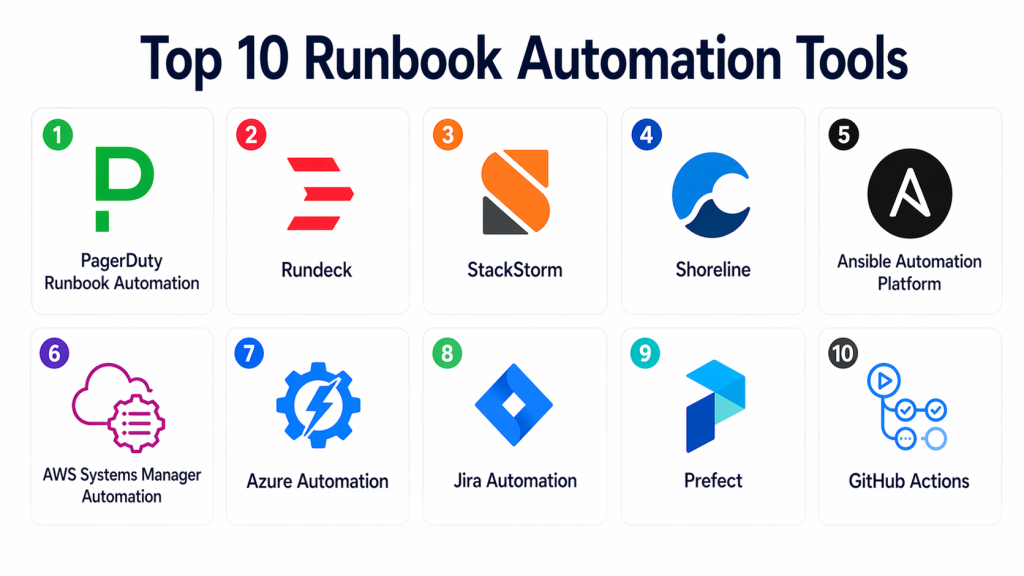
Top 10 Runbook Automation Tools
#1 — PagerDuty Runbook Automation
Short description : PagerDuty Runbook Automation is a powerful solution for automating operational tasks and incident response workflows. It allows teams to execute predefined actions during incidents. It integrates deeply with alerting systems. It is widely used by enterprise teams. It improves response speed and consistency. It is ideal for large-scale environments.
Key Features
- Automated runbook execution
- Integration with alerting systems
- Role-based access control
- Audit logging
- Workflow automation
- Incident response integration
- API support
Pros
- Strong enterprise capabilities
- Reliable automation workflows
- Good integration ecosystem
Cons
- Expensive for small teams
- Complex setup
- Requires training
Platforms / Deployment
- Web
- Cloud
Security & Compliance
- RBAC: Supported
- Encryption: Supported
- Audit logs: Supported
Integrations & Ecosystem
Integrates with monitoring, alerting, and DevOps tools to automate workflows.
- Monitoring tools
- APIs
- Incident management platforms
Support & Community
Strong enterprise support and documentation.
#2 — Rundeck
Short description : Rundeck is a widely used open-source and enterprise runbook automation tool. It allows teams to automate operational tasks across infrastructure. It supports both manual and automated execution. It is highly flexible. It is popular among DevOps teams. It works well in hybrid environments.
Key Features
- Job scheduling and automation
- CLI and GUI support
- Access control
- Workflow orchestration
- Plugin ecosystem
- Audit logging
Pros
- Open-source flexibility
- Strong automation capabilities
- Good for hybrid environments
Cons
- Requires setup and maintenance
- Learning curve
- UI can feel outdated
Platforms / Deployment
- Web / Linux
- Self-hosted / Cloud
Security & Compliance
- RBAC: Supported
- Audit logs: Supported
Integrations & Ecosystem
Rundeck integrates with infrastructure and DevOps tools for automation.
- APIs
- Plugins
- Infrastructure tools
Support & Community
Strong open-source community and enterprise support options.
#3 — StackStorm
Short description : StackStorm is an event-driven automation platform designed for DevOps teams. It connects monitoring tools to automated actions. It enables self-healing workflows. It is highly flexible. It is ideal for complex environments. It is best for technically strong teams.
Key Features
- Event-driven automation
- Workflow engine
- Integration packs
- API-first design
- Trigger-based actions
- Extensibility
Pros
- Highly flexible
- Strong integration capabilities
- Good for advanced automation
Cons
- Complex setup
- Requires technical expertise
- Not beginner-friendly
Platforms / Deployment
- Linux
- Self-hosted
Security & Compliance
- Not publicly stated
Integrations & Ecosystem
Supports integrations through packs and APIs for automation workflows.
- Monitoring tools
- APIs
- DevOps tools
Support & Community
Active community and developer support.
#4 — Shoreline
Short description : Shoreline is a modern runbook automation platform focused on real-time operational automation. It helps teams detect and fix issues automatically. It is designed for cloud environments. It offers automation scripts and workflows. It is ideal for SRE teams. It improves incident resolution.
Key Features
- Automated remediation
- Script-based workflows
- Real-time monitoring integration
- Cloud-native design
- API support
Pros
- Modern platform
- Good for real-time automation
- Strong cloud integration
Cons
- Limited adoption compared to older tools
- Smaller ecosystem
- Requires configuration
Platforms / Deployment
- Web
- Cloud
Security & Compliance
- Not publicly stated
Integrations & Ecosystem
Integrates with cloud and monitoring tools for automation.
- Monitoring tools
- APIs
- Cloud platforms
Support & Community
Growing community and documentation.
#5 — Ansible Automation Platform
Short description : Ansible Automation Platform provides automation for IT operations, including runbook workflows. It uses simple YAML-based playbooks. It is widely adopted. It is suitable for enterprise environments. It supports large-scale automation. It is ideal for infrastructure automation.
Key Features
- Playbook automation
- Agentless architecture
- Workflow orchestration
- Role-based access
- Integration with IT systems
Pros
- Easy to learn
- Scalable
- Strong ecosystem
Cons
- Requires setup
- Less visual interface
- Not purely runbook-focused
Platforms / Deployment
- Linux
- Cloud / Self-hosted
Security & Compliance
- RBAC: Supported
Integrations & Ecosystem
Strong integration with IT and DevOps tools.
- APIs
- Infrastructure tools
- Cloud platforms
Support & Community
Large community and enterprise support.
#6 — AWS Systems Manager Automation
Short description : AWS Systems Manager Automation allows teams to automate operational tasks in AWS environments. It supports runbooks for cloud operations. It integrates with AWS services. It is ideal for cloud-native teams. It simplifies infrastructure management. It is best for AWS users.
Key Features
- Runbook automation
- AWS integration
- Workflow execution
- Logging and reporting
- Access control
Pros
- Native AWS integration
- Scalable
- Secure
Cons
- AWS-only focus
- Limited cross-platform support
- Requires AWS knowledge
Platforms / Deployment
- Web
- Cloud
Security & Compliance
- RBAC: Supported
Integrations & Ecosystem
Works within AWS ecosystem for automation workflows.
- AWS services
- APIs
Support & Community
Strong AWS documentation and support.
#7 — Azure Automation
Short description : Azure Automation provides runbook automation for Microsoft environments. It supports process automation and configuration management. It integrates with Azure services. It is ideal for enterprises using Microsoft stack. It simplifies cloud operations. It is widely used.
Key Features
- Runbook automation
- PowerShell and Python support
- Integration with Azure
- Workflow automation
- Logging and monitoring
Pros
- Strong Microsoft integration
- Scalable
- Flexible scripting
Cons
- Azure dependency
- Requires technical expertise
- Complex setup
Platforms / Deployment
- Web
- Cloud
Security & Compliance
- RBAC: Supported
Integrations & Ecosystem
Integrates with Azure and enterprise systems.
- Azure services
- APIs
Support & Community
Strong enterprise support.
#8 — Jira Automation (Atlassian)
Short description : Jira Automation provides workflow automation within the Jira ecosystem. It allows teams to automate processes and incident workflows. It is easy to use. It is ideal for teams already using Jira. It supports rule-based automation. It is suitable for SMB and enterprise.
Key Features
- Workflow automation
- Rule-based triggers
- Integration with Jira
- Notifications
- Reporting
Pros
- Easy to use
- Good integration with Jira
- Flexible rules
Cons
- Limited outside Jira ecosystem
- Not full runbook automation
- Requires Jira usage
Platforms / Deployment
- Web
- Cloud
Security & Compliance
- Not publicly stated
Integrations & Ecosystem
Works within Atlassian ecosystem for workflow automation.
- Jira
- APIs
Support & Community
Strong documentation and adoption.
#9 — Prefect
Short description : Prefect is a workflow automation tool designed for data and operational pipelines. It allows automation of tasks with monitoring. It is flexible and modern. It is ideal for data teams. It supports orchestration. It is developer-friendly.
Key Features
- Workflow orchestration
- Task automation
- Monitoring
- API support
- Scheduling
Pros
- Modern design
- Flexible workflows
- Good for data pipelines
Cons
- Not dedicated runbook tool
- Requires coding
- Smaller ecosystem
Platforms / Deployment
- Web / Linux
- Cloud / Self-hosted
Security & Compliance
- Not publicly stated
Integrations & Ecosystem
Supports integration with data and DevOps tools.
- APIs
- Data systems
Support & Community
Growing community.
#10 — GitHub Actions
Short description : GitHub Actions is a CI/CD tool that can also automate runbook tasks. It allows workflow automation using code. It integrates with GitHub. It is widely used. It is flexible. It is ideal for developer teams.
Key Features
- Workflow automation
- Event triggers
- Integration with GitHub
- Automation scripts
- CI/CD workflows
Pros
- Developer-friendly
- Flexible
- Widely adopted
Cons
- Not dedicated runbook tool
- Requires coding
- Limited UI workflows
Platforms / Deployment
- Web
- Cloud
Security & Compliance
- Not publicly stated
Integrations & Ecosystem
Integrates with DevOps workflows and tools.
- APIs
- CI/CD pipelines
Support & Community
Large developer community.
Comparison Table (Top 10)
| Tool Name | Best For | Platform(s) | Deployment | Standout Feature | Public Rating |
|---|---|---|---|---|---|
| PagerDuty | Enterprise | Web | Cloud | Incident automation | N/A |
| Rundeck | DevOps teams | Web/Linux | Hybrid | Open-source automation | N/A |
| StackStorm | Advanced automation | Linux | Self-hosted | Event-driven workflows | N/A |
| Shoreline | SRE teams | Web | Cloud | Real-time remediation | N/A |
| Ansible | Infrastructure | Linux | Hybrid | Playbook automation | N/A |
| AWS Systems Manager | AWS users | Web | Cloud | Native AWS runbooks | N/A |
| Azure Automation | Microsoft stack | Web | Cloud | Azure integration | N/A |
| Jira Automation | Jira users | Web | Cloud | Rule-based workflows | N/A |
| Prefect | Data teams | Web/Linux | Hybrid | Workflow orchestration | N/A |
| GitHub Actions | Developers | Web | Cloud | CI/CD automation | N/A |
Evaluation & Scoring of Runbook Automation Tools
| Tool | Core | Ease | Integrations | Security | Performance | Support | Value | Total |
|---|---|---|---|---|---|---|---|---|
| PagerDuty | 9.5 | 8.0 | 9.5 | 8.5 | 9.0 | 8.5 | 7.0 | 8.65 |
| Rundeck | 8.5 | 7.5 | 8.5 | 8.0 | 8.5 | 8.0 | 8.5 | 8.25 |
| StackStorm | 8.8 | 6.5 | 9.0 | 7.5 | 8.5 | 7.5 | 8.0 | 8.00 |
| Shoreline | 8.5 | 8.0 | 8.0 | 7.5 | 8.5 | 7.5 | 8.0 | 8.05 |
| Ansible | 9.0 | 8.0 | 9.0 | 8.0 | 9.0 | 8.5 | 8.5 | 8.60 |
| AWS SSM | 8.5 | 7.5 | 8.5 | 8.5 | 8.5 | 8.0 | 8.0 | 8.15 |
| Azure Automation | 8.5 | 7.5 | 8.5 | 8.5 | 8.5 | 8.0 | 8.0 | 8.15 |
| Jira Automation | 7.5 | 9.0 | 7.5 | 7.5 | 7.5 | 7.5 | 8.5 | 7.95 |
| Prefect | 8.0 | 7.5 | 8.0 | 7.5 | 8.0 | 7.5 | 8.0 | 7.90 |
| GitHub Actions | 8.5 | 8.5 | 8.5 | 7.5 | 8.5 | 8.5 | 8.5 | 8.30 |
These scores are comparative and should guide evaluation based on your needs.
Which Runbook Automation Tool Is Right for You?
Solo / Freelancer
Use GitHub Actions or Prefect for lightweight automation.
SMB
Rundeck, Better tools, Jira Automation work well.
Mid-Market
Ansible, Shoreline provide scalability.
Enterprise
PagerDuty, AWS, Azure Automation are best.
Budget vs Premium
- Budget: Rundeck, Prefect
- Premium: PagerDuty, Ansible
Feature Depth vs Ease of Use
- Easy: Jira Automation
- Advanced: StackStorm
Integrations & Scalability
- Best: Ansible, PagerDuty
Security & Compliance Needs
Frequently Asked Questions (FAQs)
1. What is runbook automation?
Runbook automation is the process of converting manual operational procedures into automated workflows. Instead of following step-by-step guides manually, teams can execute predefined scripts or actions automatically. This reduces human error and speeds up incident response. It is widely used in DevOps and IT operations. It also ensures consistency across teams.
2. Why is runbook automation important?
Runbook automation helps teams respond faster to incidents and reduces downtime. It minimizes manual intervention and ensures that best practices are followed every time. It also improves operational efficiency and reduces the risk of human mistakes. In complex environments, it becomes essential for maintaining reliability. It also supports scaling operations without increasing team size.
3. Can runbook automation replace manual processes completely?
Runbook automation can replace many repetitive and predictable tasks, but not all manual processes. Complex decision-making and edge-case scenarios may still require human involvement. However, it significantly reduces the workload for operations teams. It allows engineers to focus on higher-value tasks. Over time, more processes can be automated as systems mature.
4. Do small teams need runbook automation tools?
Small teams may not need full-scale runbook automation initially. However, as systems grow and complexity increases, automation becomes valuable. Even basic automation can save time and reduce stress during incidents. It also helps establish structured processes early. Starting small and scaling automation gradually is a good approach.
5. Is coding required to use runbook automation tools?
Some tools require coding or scripting knowledge, especially developer-focused platforms. However, many modern tools offer low-code or no-code interfaces. These allow non-technical users to create workflows easily. The level of coding depends on the complexity of automation required. Teams can choose tools based on their technical expertise.
6. Can runbook automation integrate with monitoring tools?
Yes, most runbook automation tools integrate with monitoring and alerting systems. This allows automated workflows to be triggered when an issue is detected. For example, a server restart or scaling action can be executed automatically. Integration ensures faster response times. It also enables self-healing infrastructure in some cases.
7. What is self-healing infrastructure?
Self-healing infrastructure refers to systems that can detect and fix issues automatically without human intervention. Runbook automation plays a key role in enabling this capability. When a failure occurs, predefined actions are triggered to resolve it. This reduces downtime and improves system reliability. It is commonly used in cloud-native environments.
8. Are runbook automation tools secure?
Security depends on the tool and its configuration. Most tools offer role-based access control, encryption, and audit logging features. These help ensure that only authorized users can execute automation workflows. It is important to follow best practices when configuring permissions. Security is especially critical in enterprise environments.
9. What is the biggest benefit of runbook automation?
The biggest benefit is faster and more consistent incident response. Teams can resolve issues quickly without relying on manual steps. It also reduces operational stress and improves team productivity. Automation ensures that tasks are executed the same way every time. This leads to better reliability and fewer errors.
10. How much do runbook automation tools cost?
The cost of runbook automation tools varies widely depending on features and scale. Open-source tools may be free but require infrastructure and maintenance. Enterprise platforms can be expensive but offer advanced capabilities. Pricing often depends on usage, number of users, or automation runs. Organizations should evaluate cost against value and efficiency gains.
- Strong: AWS, Azure
Conclusion
Runbook automation tools are essential for modern IT operations, helping teams automate repetitive tasks, reduce errors, and respond faster to incidents. They play a critical role in improving system reliability and operational efficiency. While tools like PagerDuty and Ansible provide enterprise-grade capabilities, options like Rundeck and GitHub Actions offer flexibility for smaller teams. The best choice depends on your infrastructure, team expertise, and automation needs. Start by identifying your workflows, test a few tools, and ensure they integrate well with your monitoring systems before making a decision.
