Introduction
Room scheduling displays are digital systems designed to help organizations efficiently manage meeting rooms, workspaces, and collaborative areas. They provide real-time availability, booking capabilities, and integration with calendars, helping teams optimize office space utilization and minimize scheduling conflicts.
These tools are particularly useful for coordinating meetings, allocating conference rooms, managing shared desks, and ensuring smooth operations in hybrid workplaces. They also enhance the employee experience by providing clear, visible information about room availability, capacity, and upcoming reservations.
Best for: Facilities managers, IT administrators, office managers, and team leaders in corporate, educational, and healthcare environments. Suitable for small to enterprise-scale organizations.
Not ideal for: Teams with minimal shared space or organizations using informal scheduling practices. Smaller offices may rely on calendar-based solutions without dedicated displays.
Key criteria buyers should evaluate:
- Real-time room availability and booking
- Calendar and software integrations
- Display hardware compatibility
- Scheduling automation and conflict resolution
- User interface and ease of use
- Security and access controls
- Reporting and analytics
- Scalability for multiple locations
- Cost and subscription flexibility
- Mobile and remote access
Key Trends in Room Scheduling Displays
- Integration with workplace management and room booking platforms
- AI-powered recommendations for room allocation
- Touchless booking and QR code access
- Cloud-based management for multi-location offices
- Enhanced analytics for space utilization and efficiency
- Voice-activated room booking and smart assistant integration
- Digital signage capabilities for public spaces
- Mobile app controls and remote monitoring
- Energy-efficient and low-power display hardware
- Enhanced security and user authentication features
How We Selected These Tools
- Market adoption and recognition among corporate and educational users
- Feature completeness including booking, display, and analytics capabilities
- Reliability and performance under continuous operation
- Security features and compliance signals
- Integration with calendars, collaboration tools, and smart office systems
- Customer fit across industries, company sizes, and deployment models
- User-friendliness and accessibility
- Ongoing updates, vendor support, and community resources
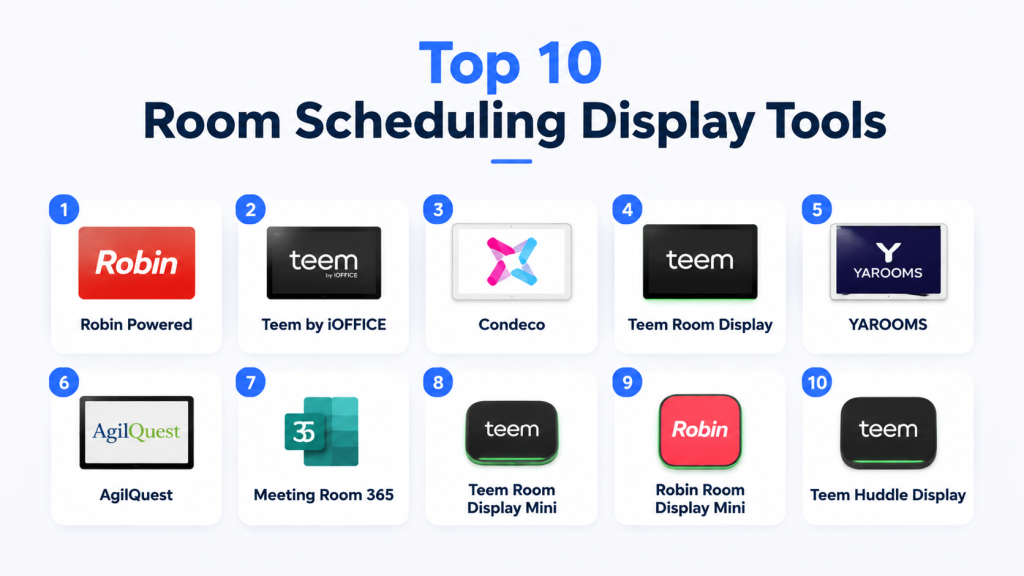
Top 10 Room Scheduling Display Tools
#1 — Robin Powered
Short description: Cloud-based scheduling solution providing digital room displays and workplace analytics for flexible office environments.
Key Features
- Real-time room availability display
- Calendar integration with Outlook and Google Calendar
- Mobile app for booking and check-in
- Occupancy and utilization analytics
- Touch and tap booking interface
- Notifications for upcoming meetings
Pros
- Intuitive and modern interface
- Scalable across multiple locations
- Strong analytics for workplace planning
Cons
- Premium pricing for advanced features
- Dependent on cloud connectivity
- Hardware compatibility may vary
Platforms / Deployment
- iOS, Android, Web, Display Hardware
- Cloud
Security & Compliance
- SSO/SAML, encryption, MFA
- SOC 2, ISO 27001, GDPR
Integrations & Ecosystem
Works with Microsoft 365, Google Workspace, Slack, Zoom, and workplace sensors.
- Outlook/Google Calendar
- Slack notifications
- Zoom meeting linking
- Sensor integrations
Support & Community
Comprehensive documentation, customer support tiers, and active user forums.
#2 — Teem by iOFFICE
Short description: Provides smart displays for rooms and collaborative spaces, focusing on booking and space management analytics.
Key Features
- Interactive room booking displays
- Outlook and Google Calendar sync
- Visitor management integration
- Utilization reporting and analytics
- Mobile app booking
- Alerts for no-shows or conflicts
Pros
- Easy-to-use touch displays
- Strong integration ecosystem
- Real-time reporting and dashboards
Cons
- Some features require premium plans
- Learning curve for advanced analytics
Platforms / Deployment
- iOS, Android, Web, Display Hardware
- Cloud
Security & Compliance
- MFA, encryption
- Not publicly stated
Integrations & Ecosystem
Integrates with workplace management software, calendars, and collaboration platforms.
- Google Workspace
- Microsoft 365
- Visitor management systems
Support & Community
Documentation, email support, and dedicated onboarding resources.
#3 — Condeco
Short description: Enterprise-grade room and desk booking platform with interactive displays and advanced analytics.
Key Features
- Room availability displays
- Calendar integration
- Interactive touch screen booking
- Analytics and reporting dashboards
- Mobile and web booking
- Policy enforcement and automated conflict resolution
Pros
- Suitable for large organizations
- Robust analytics for utilization
- Multi-location management
Cons
- Higher cost for enterprise features
- Implementation can be complex
Platforms / Deployment
- Web, iOS, Android, Display Hardware
- Cloud / Hybrid
Security & Compliance
- SSO/SAML, encryption
- ISO 27001, GDPR
Integrations & Ecosystem
Connects with Outlook, Google Workspace, enterprise apps, and sensors.
- Microsoft 365
- Google Workspace
- IoT sensor integrations
Support & Community
Enterprise support plans, documentation, and training resources.
#4 — Teem Room Display
Short description: Focused hardware solution for visualizing room schedules and supporting flexible office operations.
Key Features
- Digital room displays with current meeting info
- One-tap booking and check-in
- Calendar integration
- Occupancy sensors and reporting
- Conflict alerts and notifications
Pros
- Clear and intuitive displays
- Integrates with mobile booking apps
- Improves space utilization
Cons
- Limited analytics on standalone hardware
- Requires compatible software ecosystem
Platforms / Deployment
- iOS, Android, Display Hardware
- Cloud
Security & Compliance
- Encryption, MFA
- Not publicly stated
Integrations & Ecosystem
Supports Google Workspace, Outlook, Slack, and building management systems.
Support & Community
Documentation, support tickets, and online resources.
#5 — YAROOMS
Short description: Simple and effective room scheduling solution with a focus on interactive displays and calendar integration.
Key Features
- Real-time availability displays
- One-click booking
- Integration with Outlook and Google Calendar
- Mobile app access
- Notifications for no-shows
- Analytics dashboard
Pros
- Affordable and scalable
- User-friendly interface
- Good calendar integration
Cons
- Limited advanced analytics
- Hardware purchase required
Platforms / Deployment
- Web, iOS, Android, Display Hardware
- Cloud
Security & Compliance
- Encryption, MFA
- Not publicly stated
Integrations & Ecosystem
Works with Slack, Teams, Outlook, Google Workspace.
- Microsoft 365
- Google Workspace
- Slack integration
Support & Community
Documentation and email-based support.
#6 — AgilQuest
Short description: Enterprise workplace management system with room scheduling displays, desk booking, and analytics.
Key Features
- Interactive displays for rooms
- Calendar synchronization
- Occupancy tracking
- Analytics and utilization reporting
- Mobile booking app
- Policy enforcement
Pros
- Scalable for multi-site offices
- Strong analytics and reporting
- Integration with workplace systems
Cons
- Higher implementation complexity
- Premium features increase cost
Platforms / Deployment
- Web, iOS, Android, Display Hardware
- Cloud / Hybrid
Security & Compliance
- MFA, SSO, encryption
- ISO 27001, GDPR
Integrations & Ecosystem
Works with Outlook, Google Workspace, sensors, and IoT devices.
Support & Community
Enterprise support, documentation, and training.
#7 — Meeting Room 365
Short description: Affordable and simple room scheduling solution with digital display support.
Key Features
- Digital room signage
- Calendar sync with Office 365
- Booking and check-in
- Reporting and usage analytics
- Mobile and web interface
- Notification system
Pros
- Cost-effective for small to mid-size organizations
- Simple setup
- Cloud-based management
Cons
- Limited advanced features
- Fewer integrations than enterprise solutions
Platforms / Deployment
- Windows, iOS, Android, Display Hardware
- Cloud
Security & Compliance
- SSO, encryption
- Not publicly stated
Integrations & Ecosystem
Works with Outlook, Teams, and building management systems.
Support & Community
Documentation and email support.
#8 — Teem Room Display Mini
Short description: Compact display solution for smaller rooms and huddle spaces.
Key Features
- Real-time room status
- One-touch booking
- Calendar integration
- Analytics for usage
- Mobile notifications
- Conflict resolution alerts
Pros
- Compact and affordable
- Easy for small meeting spaces
- Integrates with existing software
Cons
- Limited analytics
- Requires software subscription
Platforms / Deployment
- iOS, Android, Display Hardware
- Cloud
Security & Compliance
- Encryption, MFA
- Not publicly stated
Integrations & Ecosystem
Integrates with Google Workspace, Outlook, and Slack.
Support & Community
Documentation and online support.
#9 — Robin Room Display Mini
Short description: Small-format room displays for huddle rooms with real-time availability and mobile integration.
Key Features
- Current meeting status
- Quick booking and check-in
- Calendar sync
- Occupancy analytics
- Notifications for schedule changes
- Mobile app integration
Pros
- Compact and efficient
- Easy to deploy
- Cloud-managed
Cons
- Limited for large spaces
- Some features require premium plan
Platforms / Deployment
- iOS, Android, Display Hardware
- Cloud
Security & Compliance
- Encryption, SSO
- SOC 2, ISO 27001
Integrations & Ecosystem
Works with Outlook, Google Calendar, Slack, and workplace sensors.
Support & Community
Documentation, customer support, and online community.
#10 — Teem Huddle Display
Short description: Small-scale display for quick huddle room booking with mobile notifications.
Key Features
- One-tap booking
- Real-time status
- Calendar integration
- Usage analytics
- Notifications for conflicts
- Occupancy sensor support
Pros
- Simple and effective for huddle rooms
- Easy to install and use
- Integrates with mobile app
Cons
- Limited analytics for enterprise use
- Smaller screen may restrict information display
Platforms / Deployment
- iOS, Android, Display Hardware
- Cloud
Security & Compliance
- Encryption, MFA
- Not publicly stated
Integrations & Ecosystem
Supports Google Workspace, Outlook, Slack, and Teem cloud services.
Support & Community
Documentation and email support.
Comparison Table (Top 10)
| Tool Name | Best For | Platform(s) Supported | Deployment | Standout Feature | Public Rating |
|---|---|---|---|---|---|
| Robin Powered | Enterprise | iOS, Android, Web, Display | Cloud | Advanced analytics | N/A |
| Teem by iOFFICE | SMB & Enterprise | iOS, Android, Web, Display | Cloud | Interactive displays | N/A |
| Condeco | Enterprise | Web, iOS, Android, Display | Cloud/Hybrid | Policy enforcement | N/A |
| Teem Room Display | Huddle rooms | iOS, Android, Display | Cloud | Real-time booking | N/A |
| YAROOMS | SMB | Web, iOS, Android, Display | Cloud | Affordable & intuitive | N/A |
| AgilQuest | Multi-site offices | Web, iOS, Android, Display | Cloud/Hybrid | Occupancy analytics | N/A |
| Meeting Room 365 | SMB | Windows, iOS, Android, Display | Cloud | Simplicity & cost | N/A |
| Teem Room Display Mini | Small rooms | iOS, Android, Display | Cloud | Compact solution | N/A |
| Robin Room Display Mini | Huddle rooms | iOS, Android, Display | Cloud | Mobile integration | N/A |
| Teem Huddle Display | Huddle rooms | iOS, Android, Display | Cloud | Quick booking | N/A |
Evaluation & Scoring of Room Scheduling Displays
| Tool Name | Core (25%) | Ease (15%) | Integrations (15%) | Security (10%) | Performance (10%) | Support (10%) | Value (15%) | Weighted Total |
|---|---|---|---|---|---|---|---|---|
| Robin Powered | 9 | 8 | 9 | 9 | 8 | 8 | 7 | 8.5 |
| Teem by iOFFICE | 8 | 8 | 8 | 8 | 8 | 7 | 8 | 8.0 |
| Condeco | 9 | 7 | 8 | 9 | 8 | 7 | 7 | 8.1 |
| Teem Room Display | 7 | 9 | 7 | 8 | 7 | 7 | 8 | 7.7 |
| YAROOMS | 7 | 8 | 7 | 7 | 7 | 6 | 8 | 7.3 |
| AgilQuest | 8 | 7 | 8 | 8 | 8 | 7 | 7 | 7.9 |
| Meeting Room 365 | 7 | 8 | 7 | 7 | 7 | 6 | 8 | 7.3 |
| Teem Room Display Mini | 6 | 9 | 6 | 7 | 7 | 6 | 8 | 7.1 |
| Robin Room Display Mini | 6 | 8 | 7 | 8 | 7 | 6 | 7 | 7.1 |
| Teem Huddle Display | 6 | 8 | 6 | 7 | 7 | 6 | 7 | 6.9 |
Interpretation: Scores are comparative. Higher weighted totals indicate stronger overall solutions considering core features, integrations, security, performance, support, and value.
Which Room Scheduling Display Tool Is Right for You?
Solo / Freelancer
YAROOMS or Teem Room Display Mini for low-cost, easy-to-use displays.
SMB
Teem by iOFFICE, Robin Powered, and Meeting Room 365 provide a balance of cost, usability, and integrations.
Mid-Market
AgilQuest, Condeco, and Robin Powered offer advanced analytics, multi-location management, and enterprise-grade security.
Enterprise
Condeco, Robin Powered, and AgilQuest provide scalable solutions, policy enforcement, and robust reporting.
Budget vs Premium
Budget: YAROOMS, Teem Room Display Mini
Premium: Robin Powered, Condeco, AgilQuest
Feature Depth vs Ease of Use
Feature-rich tools (Condeco, AgilQuest) require some training; simpler tools (YAROOMS, Mini displays) offer immediate usability.
Integrations & Scalability
Evaluate calendars, collaboration platforms, and workplace sensors for smooth adoption.
Security & Compliance Needs
Highly regulated environments should prioritize SOC 2, ISO 27001, encryption, and MFA support.
Frequently Asked Questions (FAQs)
1. What pricing models do room scheduling displays use?
Most offer subscription-based pricing with hardware included or separately, tiered by user count and features.
2. Are these displays easy to install?
Many are plug-and-play, while enterprise solutions may require IT setup and software integration.
3. Can they handle multiple office locations?
Yes. Enterprise solutions like Condeco and Robin scale across multiple offices with centralized management.
4. How secure are these systems?
Leading solutions provide encryption, MFA, SSO, and adhere to SOC 2, ISO 27001, and GDPR where applicable.
5. Do they integrate with calendars?
Yes. Most sync with Outlook, Google Calendar, and other scheduling platforms.
6. Can displays show room occupancy?
Yes. Many solutions integrate with sensors to provide live occupancy and utilization data.
7. Are mobile apps available?
Yes. Most platforms include iOS and Android apps for booking, notifications, and remote management.
8. Can these systems reduce scheduling conflicts?
Yes. Real-time updates, conflict alerts, and automated scheduling reduce overlaps.
9. Do they provide analytics?
Enterprise solutions offer utilization dashboards, reports on room usage, and insights for office planning.
10. How do I choose the right display for my team?
Consider team size, office layout, integrations, security, and budget. Pilot solutions before full deployment.
Conclusion
Room scheduling displays can transform workplace efficiency by optimizing space usage, reducing conflicts, and improving meeting experiences. Choosing the right tool depends on office size, budget, desired features, and compliance needs. Start by shortlisting 2–3 solutions, test their usability, and ensure seamless integration with calendars and collaboration platforms. Prioritize intuitive interfaces, scalability, and analytics to maximize ROI and team productivity.
