Introduction
Resource Management Tools help businesses plan, allocate, track, and optimize people, budgets, time, equipment, and project capacity. In simple terms, these platforms ensure the right resources are assigned to the right work at the right time. As organizations handle hybrid teams, global delivery models, tighter budgets, and faster project cycles, resource visibility has become critical.
Modern businesses use these tools for project staffing, workload balancing, utilization tracking, forecasting hiring needs, managing billable capacity, and improving delivery timelines. Agencies use them for client planning, IT teams use them for project allocation, and enterprises rely on them for portfolio capacity planning.
Buyers should evaluate:
- Capacity planning features
- Scheduling and forecasting accuracy
- Time tracking support
- Integrations with PM/ERP/HR tools
- Ease of use for managers and teams
- Reporting and dashboards
- Security controls
- Mobile accessibility
- Pricing scalability
- Automation and AI capabilities
Best for: PMOs, agencies, consulting firms, IT teams, operations leaders, engineering managers, and enterprises managing multiple projects.
Not ideal for: Very small teams with simple workloads may prefer spreadsheets or lightweight task tools instead of full resource planning systems.
Key Trends in Resource Management Tools
- AI-driven staffing recommendations based on skills and availability
- Predictive hiring and capacity forecasting
- Real-time workload balancing across departments
- Native integration with project management suites
- Skills matrix and competency-based scheduling
- Hybrid workforce planning for remote/on-site teams
- Advanced utilization analytics for services firms
- Stronger security with SSO, RBAC, and audit logs
- Scenario planning for budgets and demand changes
- Modular pricing for growing organizations
How We Selected These Tools (Methodology)
- Strong market recognition and user adoption
- Broad resource planning feature coverage
- Reliable performance for daily operational use
- Quality reporting and analytics capabilities
- Security and admin control signals
- Integration ecosystem with common business tools
- Suitability across SMB to enterprise segments
- Product maturity and roadmap relevance
- Ease of onboarding and user experience
- Overall value relative to capability depth
Top 10 Resource Management Tools
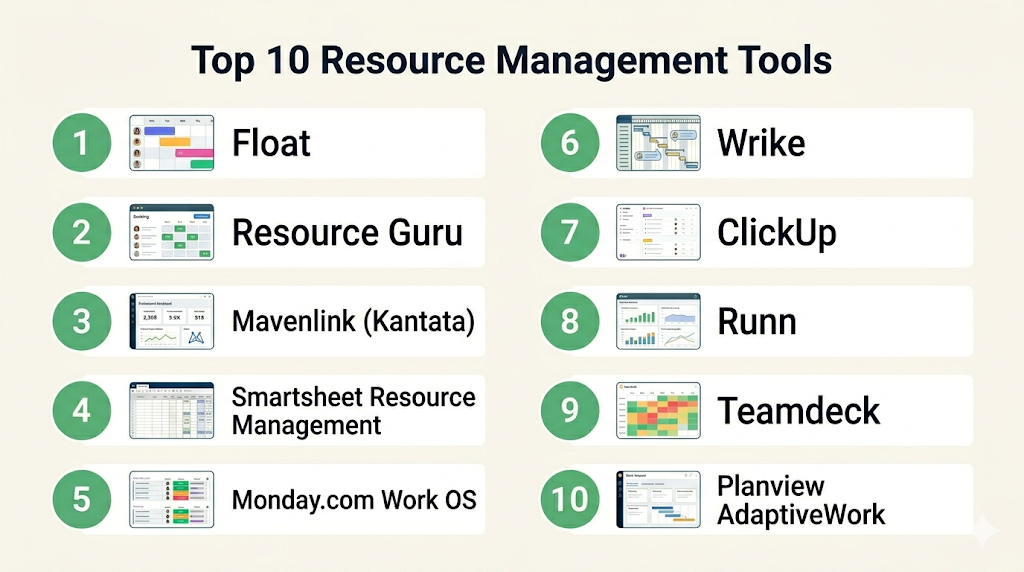
Top 10 Tool Names
- Float
- Resource Guru
- Mavenlink (Kantata)
- Smartsheet Resource Management
- Monday.com Work OS
- Wrike
- ClickUp
- Runn
- Teamdeck
- Planview AdaptiveWork
#1 — Float
Short description (2–3 lines): Float is a popular resource planning platform focused on scheduling people, tracking capacity, and forecasting workloads. Ideal for agencies, consultancies, and project teams.
Key Features
- Drag-and-drop scheduling
- Capacity management
- Utilization tracking
- Time tracking
- Project forecasting
- Availability planning
- Reporting dashboards
Pros
- Very easy to use
- Excellent visual scheduler
- Fast onboarding
Cons
- Limited deep enterprise workflows
- Advanced reporting may require exports
Platforms / Deployment
Web / iOS / Android
Cloud
Security & Compliance
SSO, permissions, encryption. Other certifications not publicly stated.
Integrations & Ecosystem
Connects with project and productivity systems.
- Asana
- Jira
- Slack
- Google Calendar
- API
Support & Community
Strong documentation, responsive support, good SMB adoption.
#2 — Resource Guru
Short description (2–3 lines): Resource Guru focuses on team scheduling, leave management, and utilization visibility. Great for growing service teams.
Key Features
- Team scheduling
- Leave management
- Capacity charts
- Clash detection
- Booking approvals
- Utilization reports
- Custom fields
Pros
- Clean interface
- Strong scheduling controls
- Good value pricing
Cons
- Less suited for complex portfolios
- Limited advanced analytics
Platforms / Deployment
Web
Cloud
Security & Compliance
SSO, permissions, encryption.
Integrations & Ecosystem
- Google Calendar
- Outlook
- Zapier
- API
Support & Community
Helpful onboarding and reliable support.
#3 — Mavenlink (Kantata)
Short description (2–3 lines): Kantata is an enterprise-grade PSA and resource management platform for consulting and services organizations.
Key Features
- Resource forecasting
- Financial planning
- Skills management
- Time & expense tracking
- Portfolio visibility
- Revenue forecasting
- Advanced reporting
Pros
- Strong enterprise depth
- Excellent services automation
- Robust forecasting
Cons
- Higher complexity
- Premium pricing
Platforms / Deployment
Web
Cloud
Security & Compliance
SSO/SAML, RBAC, audit controls. Additional compliance varies.
Integrations & Ecosystem
- Salesforce
- QuickBooks
- Jira
- API
- BI tools
Support & Community
Enterprise onboarding and dedicated support tiers.
#4 — Smartsheet Resource Management
Short description (2–3 lines): Formerly 10,000ft, this tool adds advanced resource planning to the Smartsheet ecosystem.
Key Features
- Capacity planning
- Project staffing
- Budget tracking
- Utilization reports
- Forecasting
- Scenario planning
- Portfolio visibility
Pros
- Great for Smartsheet users
- Strong dashboards
- Scalable
Cons
- Best value within Smartsheet ecosystem
- Some learning curve
Platforms / Deployment
Web
Cloud
Security & Compliance
Enterprise controls, SSO available.
Integrations & Ecosystem
- Smartsheet
- Microsoft 365
- Jira
- API
Support & Community
Strong documentation and enterprise support.
#5 — Monday.com Work OS
Short description (2–3 lines): Monday.com offers resource planning through workload views, automation, and project collaboration.
Key Features
- Workload management
- Team planning
- Automation rules
- Dashboards
- Time tracking
- Templates
- Cross-team collaboration
Pros
- Highly flexible
- Easy adoption
- Strong automation
Cons
- Advanced setups need admin effort
- Costs rise with scale
Platforms / Deployment
Web / Windows / macOS / iOS / Android
Cloud
Security & Compliance
SSO, permissions, enterprise controls.
Integrations & Ecosystem
- Slack
- Teams
- Jira
- Google Workspace
- CRM apps
Support & Community
Large user community and many templates.
#6 — Wrike
Short description (2–3 lines): Wrike combines project management with resource allocation and enterprise collaboration.
Key Features
- Workload charts
- Capacity planning
- Project templates
- Reporting
- Request forms
- Automation
- Proofing tools
Pros
- Strong enterprise PM features
- Good visibility
- Flexible workflows
Cons
- Interface can feel dense
- Advanced plans required for some features
Platforms / Deployment
Web / Mobile
Cloud
Security & Compliance
SSO, permissions, enterprise security features.
Integrations & Ecosystem
- Adobe
- Salesforce
- Slack
- Jira
- API
Support & Community
Well-established vendor with support tiers.
#7 — ClickUp
Short description (2–3 lines): ClickUp offers resource planning through workload, time tracking, and project visibility in one workspace.
Key Features
- Workload view
- Time tracking
- Goals
- Dashboards
- Docs
- Automation
- Templates
Pros
- Strong all-in-one value
- Frequent product updates
- Good customization
Cons
- Can feel feature-heavy
- Some teams need cleanup governance
Platforms / Deployment
Web / Windows / macOS / iOS / Android
Cloud
Security & Compliance
SSO on higher plans, permissions, encryption.
Integrations & Ecosystem
- Slack
- GitHub
- Google Drive
- Zapier
- API
Support & Community
Large community and broad learning resources.
#8 — Runn
Short description (2–3 lines): Runn specializes in modern capacity planning, forecasting, and scenario modeling.
Key Features
- Capacity planning
- Forecasting
- Scenario planning
- Utilization analytics
- Timesheets
- Financial metrics
- Skills tagging
Pros
- Strong forecasting UX
- Great for agencies/consulting
- Modern interface
Cons
- Smaller ecosystem than giants
- Less broad PM functionality
Platforms / Deployment
Web
Cloud
Security & Compliance
Permissions and encryption. More details vary.
Integrations & Ecosystem
- Harvest
- WorkflowMax
- API
Support & Community
Good product guidance and onboarding.
#9 — Teamdeck
Short description (2–3 lines): Teamdeck provides resource scheduling, leave management, and timesheets for project teams.
Key Features
- Scheduling
- Availability tracking
- Time tracking
- Leave management
- Custom reports
- Utilization metrics
- Custom fields
Pros
- Good pricing flexibility
- Easy scheduling workflows
- Useful for agencies
Cons
- Smaller brand ecosystem
- Limited enterprise depth
Platforms / Deployment
Web
Cloud
Security & Compliance
Permissions and encryption.
Integrations & Ecosystem
- Zapier
- API
- Spreadsheet exports
Support & Community
Helpful support for SMB users.
#10 — Planview AdaptiveWork
Short description (2–3 lines): Planview AdaptiveWork is an enterprise project portfolio and resource management platform.
Key Features
- Portfolio planning
- Resource capacity management
- Scenario modeling
- Financial planning
- Governance workflows
- Enterprise reporting
- Strategic alignment tools
Pros
- Strong enterprise controls
- Excellent portfolio planning
- Scalable globally
Cons
- Complex implementation
- Higher cost
Platforms / Deployment
Web
Cloud
Security & Compliance
SSO/SAML, enterprise admin controls.
Integrations & Ecosystem
- ERP systems
- CRM tools
- API
- BI connectors
Support & Community
Best suited for structured enterprise rollouts.
Comparison Table (Top 10)
| Tool Name | Best For | Platform(s) Supported | Deployment | Standout Feature | Public Rating |
|---|---|---|---|---|---|
| Float | Agencies | Web/Mobile | Cloud | Visual scheduling | N/A |
| Resource Guru | SMB teams | Web | Cloud | Clash-free booking | N/A |
| Kantata | Consulting firms | Web | Cloud | PSA + RM | N/A |
| Smartsheet RM | PMOs | Web | Cloud | Portfolio staffing | N/A |
| Monday.com | Flexible teams | Multi-platform | Cloud | Automation | N/A |
| Wrike | Enterprise PM | Web/Mobile | Cloud | Workload management | N/A |
| ClickUp | Growing teams | Multi-platform | Cloud | All-in-one workspace | N/A |
| Runn | Forecasting teams | Web | Cloud | Scenario planning | N/A |
| Teamdeck | Agencies | Web | Cloud | Timesheets + scheduling | N/A |
| Planview AdaptiveWork | Enterprise PMO | Web | Cloud | Strategic planning | N/A |
Evaluation & Scoring of Resource Management Tools
| Tool Name | Core | Ease | Integrations | Security | Performance | Support | Value | Weighted Total |
|---|---|---|---|---|---|---|---|---|
| Float | 9 | 9 | 8 | 8 | 9 | 8 | 8 | 8.55 |
| Resource Guru | 8 | 9 | 7 | 8 | 8 | 8 | 9 | 8.20 |
| Kantata | 9 | 7 | 9 | 9 | 9 | 9 | 7 | 8.45 |
| Smartsheet RM | 9 | 8 | 8 | 8 | 8 | 8 | 7 | 8.10 |
| Monday.com | 8 | 9 | 9 | 8 | 8 | 8 | 8 | 8.35 |
| Wrike | 9 | 7 | 9 | 9 | 8 | 8 | 7 | 8.20 |
| ClickUp | 8 | 8 | 8 | 7 | 8 | 8 | 9 | 8.10 |
| Runn | 8 | 9 | 7 | 7 | 8 | 7 | 8 | 7.85 |
| Teamdeck | 7 | 8 | 7 | 7 | 7 | 7 | 8 | 7.45 |
| Planview AdaptiveWork | 9 | 6 | 8 | 9 | 9 | 9 | 6 | 8.05 |
These scores are comparative, not absolute. Higher totals usually indicate broader capability and stronger enterprise readiness. Smaller teams may prefer easier lower-cost tools even if totals are lower.
Which Resource Management Tools Tool Is Right for You?
Solo / Freelancer
Choose ClickUp or Monday.com for affordable planning plus task management.
SMB
Choose Float, Resource Guru, or Teamdeck for quick setup and scheduling visibility.
Mid-Market
Choose Smartsheet Resource Management, Wrike, or Runn for scaling operations.
Enterprise
Choose Kantata or Planview AdaptiveWork for governance, forecasting, and portfolio control.
Budget vs Premium
Budget: ClickUp, Teamdeck, Resource Guru
Premium: Kantata, Planview, Wrike
Feature Depth vs Ease of Use
Ease: Float, Resource Guru
Depth: Kantata, Planview
Integrations & Scalability
Choose Monday.com, Wrike, Smartsheet for strong ecosystems.
Security & Compliance Needs
Enterprise buyers should prioritize vendors with SSO, RBAC, audit logs, and admin controls.
Frequently Asked Questions (FAQs)
1. What is a resource management tool?
It helps assign people, time, and budgets efficiently across projects.
2. Are these tools only for large companies?
No. Many options serve freelancers, agencies, SMBs, and enterprises.
3. Do I need time tracking?
Not always, but it improves forecasting and utilization accuracy.
4. Can these tools replace spreadsheets?
Yes, especially when multiple managers need live visibility.
5. How long does implementation take?
SMB tools may take days. Enterprise rollouts may take weeks or months.
6. What is utilization tracking?
It measures how much available team capacity is used productively.
7. Can they integrate with Jira or Asana?
Many leading tools support common PM integrations.
8. Are they secure?
Most offer encryption and permissions. Advanced controls vary by plan.
9. What is the biggest buying mistake?
Choosing too much complexity for a small team.
10. Can I switch later?
Yes, but migration of schedules and historical data needs planning.
Conclusion
Resource management tools help organizations turn limited capacity into better delivery results. The best platform depends on your team size, reporting needs, project complexity, and integration requirements. Smaller teams often win with simplicity and speed, while enterprises need forecasting, governance, and portfolio visibility. Start by shortlisting two or three tools that match your operating model, run a pilot with real workloads, and validate integrations, adoption, and reporting before full rollout.
