Introduction
Load Testing Tools are software solutions used to evaluate how applications, APIs, and servers perform under different levels of user traffic. They simulate real-world load conditions to measure speed, stability, scalability, and reliability of systems before production deployment.
In modern cloud-native and microservices architectures, performance issues can directly impact user experience and business revenue. Load testing ensures systems can handle peak traffic, prevent downtime, and maintain performance consistency.
Real-world use cases:
- Testing website performance under heavy traffic
- Validating API scalability
- Measuring server stability during peak usage
- Identifying performance bottlenecks
- Supporting CI/CD performance testing pipelines
What buyers should evaluate:
- Ability to simulate high concurrent users
- Support for APIs, web apps, and microservices
- Real-time performance analytics
- Ease of script creation and maintenance
- Cloud and on-premise testing support
- Integration with DevOps tools
- Reporting and visualization features
- Scalability of test infrastructure
- Cost and licensing model
Best for:
QA engineers, DevOps teams, developers, performance testers, and enterprises running high-traffic applications.
Not ideal for:
Small static websites or applications without performance-critical workloads.
Key Trends in Load Testing Tools
- Shift toward cloud-based load testing platforms
- Integration with CI/CD pipelines
- AI-driven performance insights
- Real-time observability and monitoring
- Support for microservices and APIs
- Scriptless and low-code testing approaches
- Kubernetes-native load testing tools
- Distributed and geo-based load simulation
- Integration with APM and observability tools
How We Selected These Tools (Methodology)
- Market adoption and enterprise usage
- Ability to simulate large-scale traffic
- Protocol and API support
- Integration with DevOps and CI/CD tools
- Reporting and analytics capabilities
- Ease of scripting and test creation
- Cloud and on-premise flexibility
- Performance accuracy and reliability
- Community and vendor support
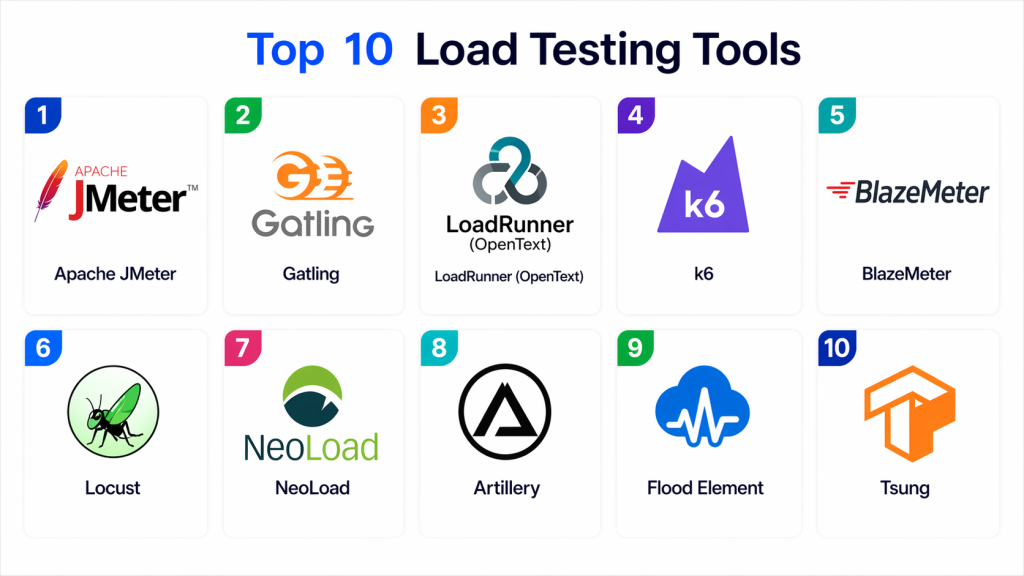
Top 10 Load Testing Tools
#1 — Apache JMeter
Short description:
Apache JMeter is one of the most widely used open-source load testing tools for performance testing web applications and APIs. It allows users to simulate heavy loads and analyze system performance. Organizations use it for functional and performance testing. It is ideal for developers and QA teams.
Key Features
- Web and API load testing
- Distributed testing support
- Plugin-based architecture
- Real-time reporting
- Multiple protocol support
Pros
- Free and open-source
- Highly flexible
Cons
- Complex UI
- Requires technical knowledge
Platforms / Deployment
Windows / Linux / macOS / On-premise / Cloud
Security & Compliance
Basic authentication and secure protocol support
Integrations & Ecosystem
- CI/CD tools
- DevOps pipelines
- Monitoring tools
Support & Community
Large open-source community
#2 — Gatling
Short description:
Gatling is a modern load testing tool designed for high-performance testing of web applications and APIs. It is widely used for automated performance testing in DevOps pipelines. It is ideal for developers and engineering teams.
Key Features
- Code-based test creation
- High-performance simulation
- Real-time metrics
- CI/CD integration
- API testing support
Pros
- Fast and efficient
- Developer-friendly
Cons
- Requires coding skills
- Limited GUI
Platforms / Deployment
Cloud / On-premise
Security & Compliance
Secure protocol support
Integrations & Ecosystem
- Jenkins
- GitHub Actions
- CI/CD tools
Support & Community
Active developer community
#3 — LoadRunner (OpenText)
Short description:
LoadRunner is a powerful enterprise-grade performance testing tool used for large-scale load simulations. It supports multiple protocols and enterprise applications. Organizations use it for mission-critical systems. It is ideal for large enterprises.
Key Features
- Multi-protocol testing
- Enterprise scalability
- Performance analytics
- Cloud integration
- Advanced reporting
Pros
- Highly powerful
- Enterprise-ready
Cons
- Expensive
- Complex setup
Platforms / Deployment
On-premise / Cloud
Security & Compliance
Enterprise security standards
Integrations & Ecosystem
- DevOps tools
- Monitoring platforms
Support & Community
Enterprise support
#4 — k6
Short description:
k6 is a modern open-source load testing tool designed for developers and DevOps teams. It focuses on API and cloud-native performance testing. It is ideal for CI/CD pipelines and automation workflows.
Key Features
- JavaScript-based scripting
- API load testing
- Cloud execution support
- CI/CD integration
- Real-time metrics
Pros
- Lightweight
- Developer-friendly
Cons
- Limited GUI
- Requires scripting
Platforms / Deployment
Cloud / On-premise
Security & Compliance
Secure API testing
Integrations & Ecosystem
- CI/CD tools
- Grafana
Support & Community
Strong open-source community
#5 — BlazeMeter
Short description:
BlazeMeter is a cloud-based performance testing platform built for scalable load testing. It supports JMeter and other frameworks. Organizations use it for enterprise-grade testing. It is ideal for teams needing cloud scalability.
Key Features
- Cloud load testing
- JMeter compatibility
- API testing
- Real-time analytics
- CI/CD integration
Pros
- Easy scalability
- Cloud-based
Cons
- Paid service
- Dependency on cloud
Platforms / Deployment
Cloud
Security & Compliance
Enterprise-grade security
Integrations & Ecosystem
- JMeter
- CI/CD pipelines
Support & Community
Strong vendor support
#6 — Locust
Short description:
Locust is an open-source load testing tool written in Python. It allows users to define user behavior in code for performance testing. It is ideal for developers testing APIs and web applications.
Key Features
- Python-based scripting
- Distributed testing
- Real-time metrics
- Scalable architecture
- API testing
Pros
- Flexible
- Open-source
Cons
- Requires coding
- Limited GUI
Platforms / Deployment
Cloud / On-premise
Security & Compliance
Secure testing capabilities
Integrations & Ecosystem
- Python ecosystem
- DevOps tools
Support & Community
Active community
#7 — NeoLoad
Short description:
NeoLoad is an enterprise load testing tool designed for continuous performance testing. It supports modern applications and APIs. Organizations use it for scalable performance validation. It is ideal for enterprise DevOps environments.
Key Features
- Automated load testing
- API testing
- CI/CD integration
- Real-time reporting
- Cloud testing
Pros
- Easy automation
- Enterprise-ready
Cons
- Expensive
- Learning curve
Platforms / Deployment
Cloud / On-premise
Security & Compliance
Enterprise security support
Integrations & Ecosystem
- DevOps tools
- Monitoring systems
Support & Community
Strong enterprise support
#8 — Artillery
Short description:
Artillery is a modern load testing toolkit for APIs and microservices. It is lightweight and designed for cloud-native applications. It is ideal for developers building scalable systems.
Key Features
- API load testing
- YAML-based configuration
- CI/CD integration
- Real-time reporting
- Cloud-native support
Pros
- Simple configuration
- Lightweight
Cons
- Limited enterprise features
- Requires scripting
Platforms / Deployment
Cloud / On-premise
Security & Compliance
API security testing support
Integrations & Ecosystem
- CI/CD tools
- Node.js ecosystem
Support & Community
Growing community
#9 — Flood Element
Short description:
Flood Element is a cloud-based load testing platform designed for scalable performance testing. It supports distributed testing across multiple regions. Organizations use it for global performance validation. It is ideal for enterprise-grade testing.
Key Features
- Distributed load testing
- Cloud execution
- API testing
- Real-time analytics
- CI/CD integration
Pros
- Scalable
- Easy cloud usage
Cons
- Paid service
- Cloud dependency
Platforms / Deployment
Cloud
Security & Compliance
Enterprise security controls
Integrations & Ecosystem
- CI/CD tools
- DevOps platforms
Support & Community
Strong vendor support
#10 — Tsung
Short description:
Tsung is an open-source distributed load testing tool designed for high-performance testing of servers and applications. It supports multiple protocols and large-scale simulations. It is ideal for advanced performance testing.
Key Features
- Distributed testing
- Multi-protocol support
- High scalability
- Performance monitoring
- Script-based configuration
Pros
- Highly scalable
- Free and open-source
Cons
- Complex setup
- Limited UI
Platforms / Deployment
Linux / Cloud
Security & Compliance
Protocol-level security support
Integrations & Ecosystem
- DevOps tools
- Monitoring systems
Support & Community
Moderate community
Comparison Table (Top 10)
| Tool Name | Best For | Platform(s) Supported | Deployment | Standout Feature | Public Rating |
|---|---|---|---|---|---|
| JMeter | General testing | Multi | Hybrid | Flexibility | N/A |
| Gatling | Developers | Multi | Cloud | Speed | N/A |
| LoadRunner | Enterprise | Multi | Hybrid | Protocol support | N/A |
| k6 | DevOps | Multi | Cloud | CI/CD integration | N/A |
| BlazeMeter | Cloud testing | Multi | Cloud | Scalability | N/A |
| Locust | Developers | Multi | Hybrid | Python scripting | N/A |
| NeoLoad | Enterprise | Multi | Hybrid | Automation | N/A |
| Artillery | APIs | Multi | Cloud | Simplicity | N/A |
| Flood Element | Enterprise | Multi | Cloud | Global testing | N/A |
| Tsung | Advanced users | Multi | Hybrid | Distributed testing | N/A |
Evaluation & Scoring of Load Testing Tools
| Tool Name | Core | Ease | Integrations | Security | Performance | Support | Value | Total |
|---|---|---|---|---|---|---|---|---|
| JMeter | 9 | 7 | 9 | 8 | 9 | 9 | 10 | 8.7 |
| Gatling | 9 | 8 | 9 | 8 | 10 | 8 | 9 | 8.7 |
| LoadRunner | 10 | 6 | 9 | 9 | 10 | 10 | 7 | 8.7 |
| k6 | 9 | 8 | 10 | 8 | 9 | 8 | 10 | 8.9 |
| BlazeMeter | 9 | 8 | 9 | 9 | 9 | 9 | 8 | 8.7 |
| Locust | 8 | 8 | 8 | 8 | 9 | 8 | 10 | 8.4 |
| NeoLoad | 9 | 7 | 9 | 9 | 9 | 9 | 8 | 8.6 |
| Artillery | 8 | 8 | 8 | 8 | 8 | 7 | 10 | 8.1 |
| Flood Element | 9 | 8 | 9 | 9 | 9 | 8 | 8 | 8.6 |
| Tsung | 8 | 6 | 7 | 8 | 10 | 7 | 10 | 8.0 |
Which Load Testing Tool Is Right for You?
Solo / Freelancer
Artillery or k6 for lightweight testing.
SMB
JMeter and Locust for cost-effective performance testing.
Mid-Market
Gatling and NeoLoad for automation and scalability.
Enterprise
LoadRunner and BlazeMeter for large-scale systems.
Budget vs Premium
Open-source tools reduce cost; enterprise tools offer advanced analytics.
Feature Depth vs Ease of Use
k6 is simple; LoadRunner is feature-rich.
Integrations & Scalability
k6 and BlazeMeter excel.
Security Needs
Enterprise tools provide stronger compliance and reporting.
Frequently Asked Questions (FAQs)
1. What is load testing?
Load testing measures system performance under expected and peak user traffic.
2. Why is load testing important?
It helps prevent downtime and performance issues in production.
3. Are load testing tools necessary?
Yes, for any scalable application or API.
4. What is the difference between load testing and stress testing?
Load testing checks normal usage; stress testing pushes systems beyond limits.
5. Are open-source tools reliable?
Yes, but they may require technical expertise.
6. Can load testing be automated?
Yes, most tools integrate with CI/CD pipelines.
7. Do these tools support APIs?
Yes, most modern tools support API testing.
8. What industries use load testing tools?
E-commerce, banking, SaaS, and enterprise IT.
9. Are cloud load testing tools better?
They offer scalability and global testing advantages.
10. How do I choose a tool?
Consider scalability, ease of use, integrations, and budget.
Conclusion
Load Testing Tools are essential for ensuring application performance, scalability, and reliability under real-world conditions. They help organizations identify bottlenecks, optimize infrastructure, and deliver better user experiences.
Each tool offers unique strengths, from open-source flexibility to enterprise-grade performance analytics. The right choice depends on your technical needs, application complexity, and budget.
A practical approach is to test multiple tools in real scenarios before final selection. This ensures accuracy and performance alignment.
Choosing the right load testing tool will significantly improve system stability, scalability, and production readiness.
