Introduction
Call Recording & QA Tools are software platforms designed to capture, store, and analyze calls for quality assurance, compliance, and performance improvement. They are widely used by call centers, customer support teams, sales organizations, and remote collaboration teams to ensure conversations meet internal standards and regulatory requirements.
These tools help organizations reduce errors, improve customer experience, and provide actionable insights for training and operational improvements. AI-driven analytics can detect sentiment, compliance issues, and agent performance automatically.
Real-world use cases include:
- Monitoring customer service calls for compliance and quality
- Training new agents using recorded calls for role-playing and feedback
- Analyzing sales calls to improve pitch effectiveness
- Tracking and scoring technical support interactions for knowledge gaps
- Detecting fraud or sensitive data exposure in finance or healthcare calls
Key evaluation criteria for buyers:
- Ease of use and interface
- Recording quality and storage management
- AI analytics and reporting capabilities
- Security and compliance features
- Integration with CRM, ticketing, and workflow tools
- Scalability and deployment flexibility
- Real-time monitoring and coaching
- Support and training options
Best for: customer support managers, sales leaders, compliance officers, and IT teams in SMBs to enterprises.
Not ideal for: organizations with minimal call volume or primarily text-based communication, where simpler monitoring tools may suffice.
Key Trends in Call Recording & QA Tools
- AI-driven quality scoring for automatic evaluation
- Real-time coaching and feedback during calls
- Omnichannel integration including chat, video, and social platforms
- Cloud-first deployment for scalability and low maintenance
- Compliance automation for GDPR, HIPAA, and financial regulations
- Speech analytics and sentiment detection
- End-to-end encryption, secure storage, and audit logging
- Low-code API integrations for CRM and workflow tools
- Adaptive storage and automated retention policies
- Flexible pricing models including per-minute or per-seat options
How We Selected These Tools
- Evaluated market adoption and customer base across SMB to enterprise
- Assessed feature completeness: recording, analytics, QA, coaching
- Considered performance and reliability
- Reviewed security posture: encryption, compliance certifications, RBAC
- Analyzed integration capabilities and ecosystem support
- Considered customer fit across industries and business sizes
- Evaluated ease of use for non-technical users
- Reviewed support quality, documentation, and onboarding
- Considered price-to-value ratio
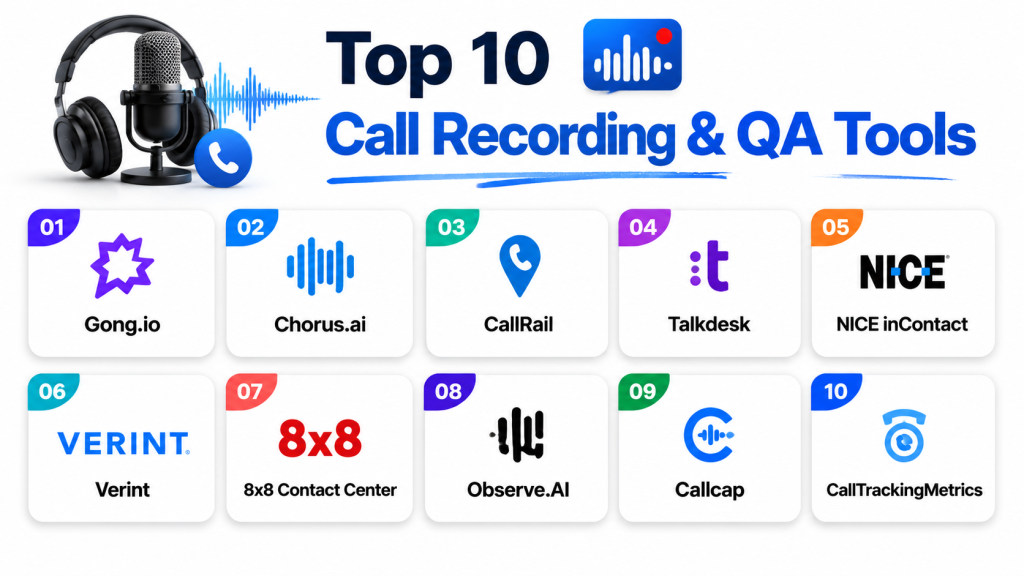
Top 10 Call Recording & QA Tools
1 — Gong.io
Short description: Captures and analyzes sales conversations to provide actionable insights for sales and revenue teams.
Key Features
- AI-driven conversation analytics
- Call transcription and sentiment detection
- Deal risk scoring
- Real-time coaching suggestions
- CRM integration
- Automatic highlight reels
Pros
- Provides detailed sales insights
- Improves agent performance
Cons
- Pricing may be high for smaller teams
- Primarily focused on sales
Platforms / Deployment
- Web / Windows / macOS / iOS / Android
- Cloud
Security & Compliance
- SSO/SAML, MFA, encryption, audit logs
- SOC 2, GDPR
Integrations & Ecosystem
Integrates with major CRMs and communication platforms:
- Salesforce
- HubSpot
- Microsoft Teams
- Zoom
- Slack
Support & Community
Comprehensive documentation, onboarding support, active user community
2 — Chorus.ai
Short description: Captures and analyzes customer calls for sales and service teams to optimize conversations and improve performance.
Key Features
- Conversation intelligence and transcription
- Real-time sentiment analysis
- Automated coaching
- Deal insights and trend reporting
- Omnichannel conversation tracking
Pros
- Strong AI analytics
- Enhances team performance
Cons
- Limited customization for complex workflows
- Can be resource-intensive
Platforms / Deployment
- Web / Windows / macOS / iOS / Android
- Cloud
Security & Compliance
- SSO/SAML, MFA, encryption, audit logs
- SOC 2, GDPR
Integrations & Ecosystem
- Salesforce
- HubSpot
- Slack
- Zoom
- Microsoft Teams
Support & Community
Detailed knowledge base, responsive support team
3 — CallRail
Short description: Provides call tracking, recording, and analytics for marketing and sales teams, ideal for SMBs.
Key Features
- Call recording and tracking
- Lead source attribution
- Conversation analytics
- Keyword-level insights
- Custom dashboards
Pros
- Affordable and scalable
- Strong marketing analytics
Cons
- Advanced AI is limited
- Less suited for enterprise QA
Platforms / Deployment
- Web / iOS / Android
- Cloud
Security & Compliance
- Encryption
- Not publicly stated
Integrations & Ecosystem
- Google Ads
- HubSpot
- Salesforce
- Zapier
Support & Community
Responsive support, guides, tutorials
4 — Talkdesk
Short description: Cloud contact center software with call recording, QA, and AI analytics for support teams.
Key Features
- Call recording and QA
- AI analytics and sentiment detection
- Real-time coaching
- Omnichannel support
- CRM integrations
Pros
- Comprehensive contact center features
- Real-time insights improve quality
Cons
- Complex for small teams
- High cost for full features
Platforms / Deployment
- Web / Windows / macOS / iOS / Android
- Cloud
Security & Compliance
- Encryption, SSO/SAML, audit logs
- SOC 2, GDPR, HIPAA
Integrations & Ecosystem
- Salesforce
- Zendesk
- Slack
- Microsoft Teams
- HubSpot
Support & Community
Strong support and extensive documentation
5 — NICE inContact
Short description: Cloud-based call center solution offering recording, QA, and AI analytics for enterprise teams.
Key Features
- Call recording and QA
- Speech analytics
- Real-time agent feedback
- Workflow automation
- Multi-channel support
Pros
- Enterprise-ready, robust security
- Advanced analytics
Cons
- Learning curve
- Pricing may be high for SMBs
Platforms / Deployment
- Web / Windows / macOS / iOS / Android
- Cloud
Security & Compliance
- Encryption, audit logs, RBAC
- SOC 2, GDPR, HIPAA
Integrations & Ecosystem
- Salesforce
- Microsoft Dynamics
- Zendesk
- Slack
Support & Community
Professional onboarding, dedicated support, active community
6 — Verint
Short description: Offers call recording, speech analytics, and workforce optimization for contact centers and compliance teams.
Key Features
- Voice recording and QA
- Speech and sentiment analytics
- Compliance monitoring
- Workforce optimization
- Custom reporting
Pros
- Strong compliance and analytics
- Scalable for large teams
Cons
- Interface may feel dated
- High cost for full suite
Platforms / Deployment
- Web / Windows / macOS
- Cloud / On-premise
Security & Compliance
- Encryption, audit logs, RBAC
- SOC 2, GDPR, HIPAA
Integrations & Ecosystem
- CRM systems
- Microsoft Teams
- Custom APIs
Support & Community
Comprehensive support and training programs
7 — 8×8 Contact Center
Short description: Cloud-based voice, video, and chat services with call recording and QA for distributed teams.
Key Features
- Call recording and analytics
- Real-time monitoring and coaching
- Speech analytics
- Multi-channel support
- Reporting dashboards
Pros
- Flexible for remote teams
- Integrates with collaboration tools
Cons
- Limited advanced AI
- Smaller feature set than enterprise platforms
Platforms / Deployment
- Web / Windows / macOS / iOS / Android
- Cloud
Security & Compliance
- Encryption, MFA
- SOC 2, GDPR
Integrations & Ecosystem
- Salesforce
- Microsoft Teams
- Slack
Support & Community
Varies / Not publicly stated
8 — Observe.AI
Short description: AI-powered platform to improve call center performance with call recording, QA, and agent coaching.
Key Features
- Real-time transcription
- AI QA scoring
- Agent coaching insights
- Sentiment and emotion analysis
- Analytics dashboards
Pros
- Strong AI insights
- Real-time recommendations
Cons
- Focused on contact centers
- Smaller user base
Platforms / Deployment
- Web / Windows / macOS
- Cloud
Security & Compliance
- Encryption, audit logs
- SOC 2, GDPR
Integrations & Ecosystem
- CRM systems
- Workforce management tools
Support & Community
Responsive support and documentation
9 — Callcap
Short description: Call recording, scoring, and analytics for SMB and mid-market sales and support teams.
Key Features
- Call recording and monitoring
- Agent scoring and QA
- Lead tracking
- Custom reporting
- Real-time alerts
Pros
- Affordable and simple
- Good for SMBs
Cons
- Limited AI analytics
- Less suitable for enterprises
Platforms / Deployment
- Web / Windows / macOS / iOS / Android
- Cloud
Security & Compliance
- Encryption
- Not publicly stated
Integrations & Ecosystem
- CRM and lead management
Support & Community
Varies / Not publicly stated
10 — CallTrackingMetrics
Short description: Call tracking, recording, and analytics to optimize marketing and sales workflows.
Key Features
- Call recording and transcription
- Agent performance tracking
- Lead source attribution
- Real-time monitoring
- Reporting dashboards
Pros
- Useful for marketing-driven call analytics
- Integrates with CRM and marketing tools
Cons
- Limited QA analytics
- Basic AI features
Platforms / Deployment
- Web / iOS / Android
- Cloud
Security & Compliance
- Encryption, audit logs
- Not publicly stated
Integrations & Ecosystem
- Salesforce
- HubSpot
- Google Ads
Support & Community
Responsive support and tutorials
Comparison Table
| Tool Name | Best For | Platform(s) Supported | Deployment | Standout Feature | Public Rating |
|---|---|---|---|---|---|
| Gong.io | Sales teams | Web / Windows / macOS / iOS / Android | Cloud | AI-driven conversation analytics | N/A |
| Chorus.ai | Sales & support | Web / Windows / macOS / iOS / Android | Cloud | Real-time sentiment analysis | N/A |
| CallRail | Marketing & SMB | Web / iOS / Android | Cloud | Lead source tracking | N/A |
| Talkdesk | Support teams | Web / Windows / macOS / iOS / Android | Cloud | Real-time coaching | N/A |
| NICE inContact | Enterprise | Web / Windows / macOS / iOS / Android | Cloud | Multi-channel support | N/A |
| Verint | Contact centers | Web / Windows / macOS | Cloud / On-premise | Compliance analytics | N/A |
| 8×8 Contact Center | Remote teams | Web / Windows / macOS / iOS / Android | Cloud | Multi-channel voice/video | N/A |
| Observe.AI | AI-powered QA | Web / Windows / macOS | Cloud | AI-driven agent coaching | N/A |
| Callcap | SMB & mid-market | Web / Windows / macOS / iOS / Android | Cloud | Affordable QA monitoring | N/A |
| CallTrackingMetrics | Marketing | Web / iOS / Android | Cloud | Call attribution analytics | N/A |
Evaluation & Scoring
| Tool Name | Core (25%) | Ease (15%) | Integrations (15%) | Security (10%) | Performance (10%) | Support (10%) | Value (15%) | Weighted Total (0–10) |
|---|---|---|---|---|---|---|---|---|
| Gong.io | 9 | 8 | 9 | 9 | 9 | 8 | 7 | 8.8 |
| Chorus.ai | 8 | 8 | 8 | 8 | 8 | 8 | 7 | 8.0 |
| CallRail | 7 | 9 | 7 | 7 | 7 | 8 | 8 | 7.6 |
| Talkdesk | 9 | 8 | 9 | 9 | 9 | 8 | 7 | 8.8 |
| NICE inContact | 9 | 7 | 8 | 9 | 9 | 8 | 7 | 8.5 |
| Verint | 8 | 7 | 7 | 9 | 8 | 7 | 7 | 7.7 |
| 8×8 Contact Center | 7 | 8 | 8 | 8 | 7 | 7 | 8 | 7.6 |
| Observe.AI | 8 | 8 | 7 | 8 | 8 | 7 | 7 | 7.7 |
| Callcap | 6 | 8 | 7 | 7 | 6 | 7 | 8 | 6.9 |
| CallTrackingMetrics | 7 | 8 | 8 | 7 | 7 | 7 | 7 | 7.3 |
Higher scores indicate better balance across features, usability, and value. Scores are comparative among the top 10 tools.
Which Tool Is Right for You?
Solo / Freelancer
CallRail or CallTrackingMetrics offer simplicity, cost-efficiency, and easy setup.
SMB
Gong.io or Chorus.ai provide AI insights and integration capabilities.
Mid-Market
Talkdesk, 8×8 Contact Center, and Observe.AI deliver multi-channel support and analytics.
Enterprise
NICE inContact, Verint, and Talkdesk provide compliance, performance monitoring, and workflow automation.
Budget vs Premium
Budget: CallRail, Callcap
Premium: Gong.io, NICE inContact, Talkdesk
Feature Depth vs Ease of Use
Feature depth: NICE inContact, Gong.io
Ease of use: CallRail, CallTrackingMetrics
Integrations & Scalability
Enterprise: Talkdesk, NICE inContact, Verint
SMB: CallRail, CallTrackingMetrics
Security & Compliance Needs
High compliance: Verint, NICE inContact, Talkdesk
Standard compliance: CallRail, Callcap
Frequently Asked Questions
1. What pricing models do Call Recording & QA Tools use?
Most tools offer per-user subscriptions, per-minute billing, or tiered plans. Add-ons may include AI analytics or multi-channel support.
2. How difficult is onboarding?
SaaS platforms like CallRail are simple, while enterprise tools like NICE inContact require structured training.
3. Can these tools record multiple channels?
Many support voice, chat, video, and email, though some focus on voice only.
4. Are AI analytics reliable?
AI provides insights but should supplement human evaluation, especially for sensitive interactions.
5. What are common mistakes when implementing?
Ignoring privacy regulations, over-monitoring agents, and not integrating with CRM or workflow tools.
6. How secure is call data?
Enterprise platforms provide encryption, audit logs, and role-based access controls.
7. Can these tools scale?
Most SaaS platforms scale by licenses or cloud storage expansion.
8. How do integrations work?
Integrations use APIs or native connectors for CRM, ticketing, and collaboration tools.
9. Can I switch vendors easily?
Migration requires exporting recordings, QA data, and integration setups.
10. Are open-source options available?
Limited; most top tools are commercial SaaS with AI-driven insights.
Conclusion
The best Call Recording & QA Tool depends on business size, use case, budget, and compliance requirements. Solo users and SMBs may prioritize simplicity and affordability, while mid-market and enterprise teams need AI analytics, multi-channel monitoring, and compliance features. Next steps: shortlist 2–3 tools, run a pilot to evaluate integration and user experience, and validate security and analytics before full deployment.
