Introduction
AutoML Platforms automate key steps in the machine learning lifecycle—data preprocessing, feature engineering, model selection, hyperparameter tuning, and sometimes deployment. The goal is to make machine learning faster, more accessible, and more consistent, even for teams without deep ML expertise.
In today’s AI-first environment, AutoML is becoming a standard capability across enterprises. It reduces experimentation time, improves productivity, and enables organizations to scale ML adoption across business units. With growing demand for faster insights and reduced dependency on specialized talent, AutoML platforms play a critical role in democratizing AI.
Common use cases include:
- Predictive modeling and forecasting
- Customer segmentation and churn prediction
- Fraud detection and anomaly detection
- Marketing analytics and personalization
- Demand planning and optimization
Key evaluation criteria buyers should consider:
- Level of automation and control
- Model performance and explainability
- Integration with existing data pipelines
- Ease of use for non-technical users
- Scalability and performance
- Deployment capabilities
- Security and compliance
- Cost and pricing flexibility
Best for: Data analysts, business users, data scientists, and organizations scaling AI adoption quickly.
Not ideal for: Highly customized ML workflows requiring deep control over model architecture or advanced experimentation.
Key Trends in AutoML Platforms
- AI copilots and assistants: Guided model building and recommendations
- Explainable AI (XAI): Better transparency and model interpretability
- Low-code/no-code adoption: Increased accessibility for business users
- Integration with MLOps: Seamless deployment and monitoring
- Cloud-native dominance: Managed AutoML services leading adoption
- Hybrid AI pipelines: Combining AutoML with custom ML workflows
- Data governance features: Compliance and auditability improvements
- Real-time and batch support: Unified processing capabilities
How We Evaluated AutoML Platforms (Methodology)
- Market adoption and industry relevance
- Breadth of AutoML capabilities
- Model performance and optimization
- Security and compliance features
- Integration with data ecosystems
- Ease of use and onboarding
- Community and enterprise support
- Pricing and scalability
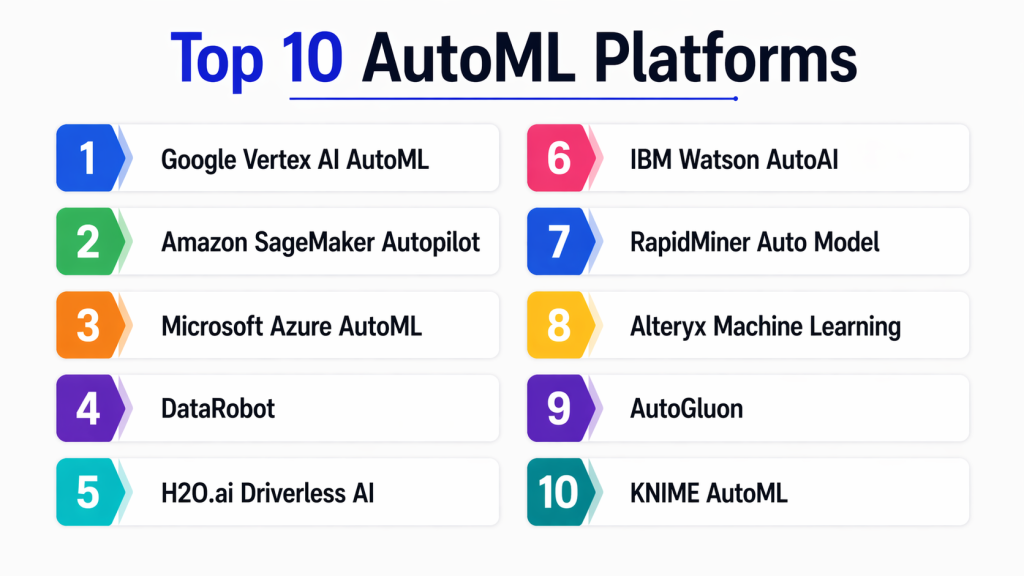
Top 10 AutoML Platforms
#1 — Google AutoML (Vertex AI AutoML)
Short description:
Google AutoML is part of Vertex AI and provides powerful automated model building capabilities for vision, text, tabular data, and more. It enables both beginners and experts to create high-quality models with minimal effort. It is widely used for scalable AI workloads on Google Cloud.
Key Features
- AutoML for multiple data types
- Model training and deployment
- Feature engineering automation
- Integration with Vertex AI pipelines
- Model evaluation tools
Pros
- High-quality models
- Strong scalability
Cons
- Requires GCP knowledge
- Pricing complexity
Platforms / Deployment
- Cloud
Security & Compliance
- IAM, encryption, audit logs
Integrations & Ecosystem
Integrates with Google Cloud services and ML tools.
- BigQuery
- Cloud Storage
- Kubernetes
Support & Community
Strong enterprise support from Google.
#2 — Amazon SageMaker Autopilot
Short description:
SageMaker Autopilot automates the process of building and deploying machine learning models within AWS. It provides transparency into model selection and tuning.
Key Features
- Automated model generation
- Feature engineering
- Model explainability
- Integration with SageMaker
- Deployment pipelines
Pros
- Strong AWS integration
- Transparent AutoML process
Cons
- AWS dependency
- Complex setup for beginners
Platforms / Deployment
- Cloud
Security & Compliance
- IAM, encryption
Integrations & Ecosystem
- S3
- Lambda
- AWS analytics tools
Support & Community
Strong AWS support.
#3 — Microsoft Azure AutoML
Short description:
Azure AutoML provides automated model training and optimization within Azure Machine Learning. It supports both code-first and no-code approaches.
Key Features
- Automated model selection
- Hyperparameter tuning
- Integration with Azure ML
- Experiment tracking
- Deployment tools
Pros
- Flexible workflows
- Enterprise-grade security
Cons
- Azure dependency
- Learning curve
Platforms / Deployment
- Cloud
Security & Compliance
- Azure AD, encryption
Integrations & Ecosystem
- Power BI
- Azure Data Factory
- Databricks
Support & Community
Strong Microsoft ecosystem.
#4 — DataRobot
Short description:
DataRobot is a leading enterprise AutoML platform that automates model building, deployment, and monitoring. It is widely used for predictive analytics.
Key Features
- Automated model training
- Model deployment
- AI lifecycle management
- Explainability tools
- Monitoring
Pros
- Easy to use
- Fast results
Cons
- Expensive
- Less flexibility for custom models
Platforms / Deployment
- Cloud / On-premise
Security & Compliance
- Enterprise security features
Integrations & Ecosystem
- APIs
- Databases
- Cloud tools
Support & Community
Strong enterprise support.
#5 — H2O.ai AutoML
Short description:
H2O.ai provides open-source and enterprise AutoML capabilities with strong performance and flexibility for developers and data scientists.
Key Features
- Open-source AutoML
- Distributed ML
- Model interpretability
- Integration with Python/R
- Scalable processing
Pros
- Flexible and powerful
- Strong community
Cons
- Requires technical knowledge
- UI limitations
Platforms / Deployment
- Cloud / On-premise
Security & Compliance
- Not publicly stated
Integrations & Ecosystem
- Python
- R
- Spark
Support & Community
Active open-source community.
#6 — AutoGluon
Short description:
AutoGluon is an open-source AutoML toolkit focused on ease of use and strong performance for tabular, text, and vision tasks.
Key Features
- Automated model selection
- Multi-modal support
- Easy API
- Strong performance
- Open-source
Pros
- Easy to use
- High performance
Cons
- Limited enterprise features
- Smaller ecosystem
Platforms / Deployment
- Self-hosted
Security & Compliance
- Not publicly stated
Integrations & Ecosystem
- Python
- Deep learning frameworks
Support & Community
Growing community support.
#7 — RapidMiner Auto Model
Short description:
RapidMiner provides AutoML capabilities through its Auto Model feature, enabling users to build models using visual workflows.
Key Features
- Drag-and-drop interface
- Automated model building
- Data preparation tools
- Visualization
- Deployment options
Pros
- Beginner-friendly
- No-code approach
Cons
- Limited scalability
- Fewer advanced features
Platforms / Deployment
- Desktop / Cloud
Security & Compliance
- Not publicly stated
Integrations & Ecosystem
- Databases
- APIs
Support & Community
Moderate community support.
#8 — KNIME AutoML
Short description:
KNIME offers AutoML extensions within its analytics platform, allowing users to automate model building using visual workflows.
Key Features
- Visual pipelines
- AutoML extensions
- Open-source core
- Data integration
- Analytics tools
Pros
- Free and flexible
- Strong community
Cons
- UI limitations
- Performance constraints
Platforms / Deployment
- Desktop / Server
Security & Compliance
- Not publicly stated
Integrations & Ecosystem
- Python
- R
- Databases
Support & Community
Strong open-source community.
#9 — Dataiku AutoML
Short description:
Dataiku provides AutoML capabilities within its collaborative data science platform, supporting both technical and business users.
Key Features
- Visual workflows
- Automated ML
- Data preparation
- Collaboration tools
- Deployment automation
Pros
- User-friendly
- Strong collaboration
Cons
- Expensive
- Requires training
Platforms / Deployment
- Cloud / On-premise
Security & Compliance
- RBAC, governance features
Integrations & Ecosystem
- Databases
- APIs
- Cloud platforms
Support & Community
Enterprise support.
#10 — SAS AutoML
Short description:
SAS AutoML provides enterprise-grade automated machine learning capabilities with strong analytics and governance features.
Key Features
- Automated model building
- Advanced analytics
- Model governance
- Deployment tools
- Visualization
Pros
- Reliable and scalable
- Enterprise-grade features
Cons
- Expensive
- Requires expertise
Platforms / Deployment
- Cloud / On-premise
Security & Compliance
- Enterprise compliance support
Integrations & Ecosystem
- Databases
- Enterprise systems
- APIs
Support & Community
Strong enterprise support.
Comparison Table (Top 10)
| Tool | Best For | Platform(s) | Deployment | Standout Feature | Rating |
|---|---|---|---|---|---|
| Google AutoML | GCP users | Cloud | Cloud | Multi-data AutoML | N/A |
| SageMaker Autopilot | AWS users | Cloud | Cloud | Transparent ML | N/A |
| Azure AutoML | Enterprise ML | Cloud | Cloud | Integrated ML | N/A |
| DataRobot | Predictive analytics | Multi | Hybrid | Fast deployment | N/A |
| H2O.ai | Open-source ML | Multi | Hybrid | Flexible AutoML | N/A |
| AutoGluon | Developers | Self | Self-hosted | Easy API | N/A |
| RapidMiner | Beginners | Desktop | Cloud | No-code ML | N/A |
| KNIME | Open-source | Desktop | Self-hosted | Visual workflows | N/A |
| Dataiku | Collaboration | Multi | Hybrid | Team workflows | N/A |
| SAS AutoML | Enterprises | Multi | Hybrid | Advanced analytics | N/A |
Evaluation & Scoring of AutoML Platforms
| Tool | Core | Ease | Integrations | Security | Performance | Support | Value | Total |
|---|---|---|---|---|---|---|---|---|
| DataRobot | 9 | 8 | 7 | 8 | 8 | 8 | 7 | 8.1 |
| SageMaker Autopilot | 9 | 7 | 9 | 9 | 8 | 8 | 7 | 8.3 |
| Google AutoML | 9 | 7 | 8 | 9 | 8 | 8 | 7 | 8.2 |
| Azure AutoML | 8 | 8 | 9 | 9 | 8 | 8 | 7 | 8.2 |
| H2O.ai | 8 | 7 | 7 | 6 | 8 | 7 | 8 | 7.5 |
| Dataiku | 8 | 8 | 7 | 8 | 7 | 7 | 7 | 7.6 |
| SAS AutoML | 9 | 6 | 8 | 9 | 8 | 8 | 6 | 7.8 |
| AutoGluon | 7 | 8 | 6 | 6 | 7 | 7 | 9 | 7.3 |
| KNIME | 7 | 8 | 6 | 6 | 6 | 7 | 9 | 7.0 |
| RapidMiner | 6 | 9 | 6 | 6 | 6 | 6 | 8 | 6.8 |
How to interpret scores:
These scores provide a comparative view based on weighted criteria. A higher score indicates a more balanced platform, but the right choice depends on your specific requirements such as scalability, ease of use, and integration needs.
Which AutoML Platform Is Right for You?
Solo / Freelancer
- KNIME, AutoGluon
SMB
- RapidMiner, H2O.ai
Mid-Market
- Dataiku, Azure AutoML
Enterprise
- DataRobot, SageMaker Autopilot, SAS
Budget vs Premium
- Budget: KNIME, AutoGluon
- Premium: DataRobot, SAS
Feature Depth vs Ease of Use
- Deep: DataRobot, SageMaker
- Easy: RapidMiner, KNIME
Integrations & Scalability
- Best integrations: Azure AutoML, SageMaker
- Best scalability: Google AutoML, DataRobot
Security & Compliance Needs
- Strongest: Azure AutoML, SageMaker, SAS
Frequently Asked Questions (FAQs)
1. What is an AutoML platform?
AutoML platforms automate the process of building machine learning models, including data preparation, feature engineering, model selection, and tuning. They help users create high-quality models quickly without requiring deep expertise in machine learning. These platforms are widely used to accelerate AI adoption across organizations.
2. Who should use AutoML platforms?
AutoML platforms are ideal for data analysts, business users, and data scientists who want to speed up model development. They are especially useful for organizations that lack large ML teams but still want to leverage AI for decision-making and automation.
3. Are AutoML platforms suitable for enterprises?
Yes, many AutoML platforms are designed for enterprise use, offering scalability, security, and integration with existing systems. Tools like DataRobot, Azure AutoML, and SageMaker Autopilot provide enterprise-grade capabilities.
4. Can AutoML replace data scientists?
AutoML does not replace data scientists but complements their work. It automates repetitive tasks, allowing experts to focus on more complex problems, model optimization, and strategic decision-making.
5. How accurate are AutoML models?
AutoML models can achieve high accuracy, often comparable to manually built models. However, results depend on data quality, problem complexity, and the platform used.
6. What are the limitations of AutoML?
AutoML may lack flexibility for highly customized models and advanced experimentation. It may also require careful validation to ensure models meet business requirements.
7. How do AutoML platforms handle scalability?
Most modern AutoML platforms are cloud-based and can scale automatically based on workload demands. They use distributed computing to handle large datasets efficiently.
8. Are AutoML platforms secure?
Security varies by platform. Enterprise tools provide strong encryption, access control, and compliance features, while open-source tools may require additional configuration.
9. What industries use AutoML?
AutoML is used across industries such as finance, healthcare, retail, and manufacturing for predictive analytics, automation, and optimization.
10. How do I choose the right AutoML platform?
Consider your use case, budget, technical expertise, and integration needs. Evaluate platforms based on ease of use, scalability, and support for your data workflows.
Conclusion
AutoML platforms are transforming how organizations approach machine learning by making it faster, more accessible, and more scalable. Whether you are a beginner looking for no-code solutions or an enterprise seeking advanced automation, these platforms offer a wide range of capabilities to meet different needs. From cloud-native tools like Google AutoML and SageMaker Autopilot to flexible open-source options like H2O.ai and AutoGluon, the ecosystem provides diverse choices.
Choosing the right AutoML platform depends on your goals, technical expertise, and infrastructure. Instead of focusing on a single “best” tool, evaluate how each platform fits into your data ecosystem, supports your workflows, and meets your scalability and security requirements. A practical approach is to shortlist a few platforms, test them with real-world data, and validate their performance before making a final decision.
