Introduction
Service Catalog Platforms help organizations publish, manage, and automate the services that employees, customers, or internal teams can request. In simple words, these platforms work like a structured digital menu for IT, HR, finance, facilities, legal, security, procurement, and business services. Instead of asking users to send emails, call support desks, or search through scattered documents, a service catalog gives them a clear place to request laptops, software access, password help, onboarding support, benefits changes, equipment repairs, approvals, and many other services.
Service Catalog Platforms matter because organizations need faster service delivery, better request tracking, clear ownership, automated approvals, and improved employee experience. When service requests are handled manually, teams often face delays, duplicate tickets, missing information, unclear approvals, and poor visibility into workload. A strong service catalog platform helps standardize request intake, automate routing, connect with workflows, improve SLA visibility, reduce support workload, and give users a better self-service experience.
Real-world use cases include:
- IT service requests for software access, hardware support, password resets, device provisioning, and network help.
- Employee onboarding and offboarding across IT, HR, facilities, security, and finance.
- HR service requests for benefits, letters, payroll questions, leave requests, and employee documents.
- Facilities requests for office equipment, repairs, workspace changes, and access badges.
- Finance and procurement requests for vendor setup, purchase approvals, invoice help, and expense support.
- Security and compliance requests for access reviews, policy exceptions, and incident reporting.
- Enterprise self-service portals for employees to find knowledge articles, request services, and track progress.
Evaluation Criteria for Buyers:
- Service catalog design for creating clear, searchable, and user-friendly request items.
- Workflow automation for routing, approvals, fulfillment tasks, escalations, and notifications.
- Self-service portal quality for employees, customers, requesters, and business users.
- Form and intake flexibility for collecting the right request details without creating friction.
- ITSM and ESM capabilities for incident, request, change, asset, knowledge, and service management.
- Integration support with identity, HR, ERP, collaboration, monitoring, and productivity systems.
- SLA and performance tracking for service delivery, request aging, workload, and team performance.
- Security controls such as RBAC, SSO, MFA, audit logs, encryption, and permission management.
- Scalability for multiple departments, locations, service teams, user groups, and business units.
- Ease of administration for service owners, workflow builders, IT admins, HR teams, and platform managers.
Best for: Service Catalog Platforms are best for IT service management teams, enterprise service management teams, HR operations, facilities teams, finance operations, procurement teams, service desk teams, shared service centers, and organizations that want a structured self-service experience for internal or external requests.
Not ideal for: Very small teams with only a few simple requests may not need a dedicated service catalog platform. If requests are low volume and can be handled through a basic help desk or shared inbox, a full service catalog may be unnecessary until request complexity, approval needs, or service volume increases.
Key Trends in Service Catalog Platforms
- Enterprise service management is expanding beyond IT as HR, finance, facilities, legal, procurement, and security teams use service catalogs for structured request intake.
- AI-assisted self-service is becoming more useful as platforms recommend catalog items, summarize requests, suggest knowledge articles, and route tickets more intelligently.
- Low-code workflow design is becoming essential because service owners want to create and update catalog workflows without heavy development effort.
- Employee experience is becoming a major buying factor as organizations want one simple portal for requests, knowledge, approvals, and status tracking.
- Service catalogs are becoming more personalized based on user role, department, location, device, access level, and employment status.
- Automation is reducing manual fulfillment work through approval routing, task creation, notifications, provisioning, and system updates.
- Integration with identity and HR systems is growing because onboarding, access requests, and role-based services depend on accurate employee data.
- Knowledge management and service catalog design are becoming more connected so users can solve simple issues before submitting requests.
- Governance and catalog hygiene are becoming more important because outdated services, duplicate items, and unclear forms reduce adoption.
- Analytics are helping service teams improve catalog performance by tracking request volume, SLA performance, popular services, bottlenecks, and fulfillment quality.
How We Selected These Tools
The tools in this list were selected based on their relevance to service catalog management, ITSM, enterprise service management, self-service portals, workflow automation, request fulfillment, integrations, scalability, and practical buyer fit.
Evaluation logic included:
- Service catalog depth across request items, forms, approvals, workflows, routing, and fulfillment.
- Market recognition and adoption among ITSM, ESM, service desk, HR service delivery, and enterprise operations teams.
- Self-service portal quality for employees, requesters, service owners, and support teams.
- Workflow automation capability for multi-step approvals, escalations, task assignment, and cross-team fulfillment.
- ITSM and ESM coverage including incident, request, change, asset, knowledge, and service management where relevant.
- Integration ecosystem with identity, HRIS, ERP, collaboration, monitoring, endpoint, CMDB, and productivity tools.
- Security and governance signals such as permissions, audit trails, authentication, and administrative controls.
- Scalability for SMB, mid-market, and enterprise service environments.
- Ease of use for administrators, agents, service owners, and end users.
- Practical buyer fit across IT, HR, finance, facilities, operations, education, healthcare, public sector, and enterprise support teams.
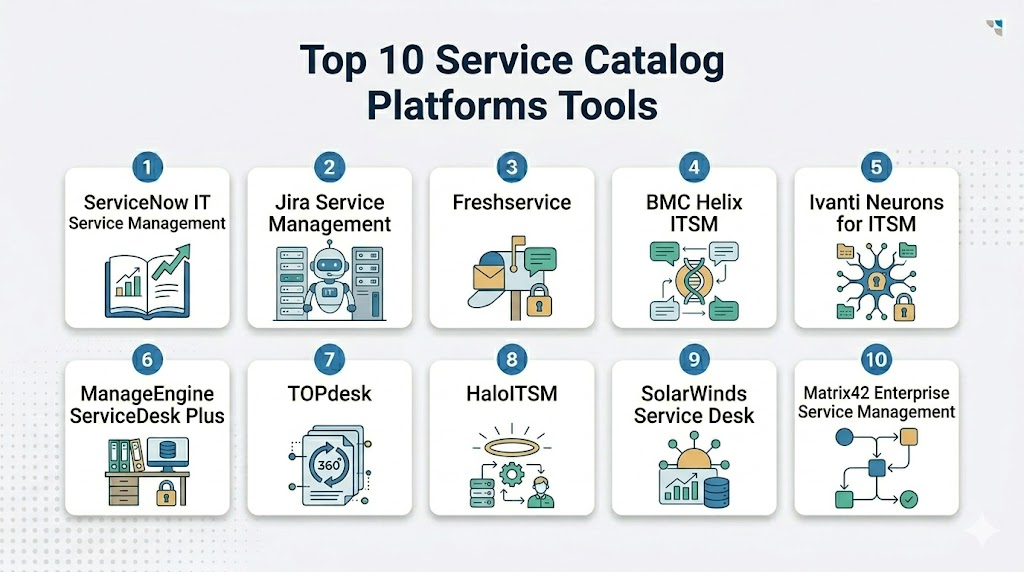
Top 10 Service Catalog Platforms Tools
1- ServiceNow IT Service Management
Short description: ServiceNow IT Service Management is an enterprise ITSM and workflow platform that supports service catalogs, self-service portals, request management, incident management, change management, knowledge, asset workflows, and enterprise service delivery. It is best suited for large organizations that need scalable, governed, and highly configurable service catalog workflows.
Key Features
- Enterprise service catalog and request management.
- Self-service portal and knowledge base integration.
- Workflow automation for approvals, routing, tasks, and fulfillment.
- ITSM capabilities for incidents, problems, changes, and service requests.
- Integration with CMDB, assets, monitoring, HR, security, and business systems.
- AI and automation capabilities for service delivery and ticket routing.
- Dashboards for SLA performance, catalog usage, and service operations.
Pros
- Strong fit for large enterprises with complex service workflows.
- Highly scalable across IT and enterprise service management use cases.
- Broad platform ecosystem for automation, integrations, and governance.
Cons
- Implementation can be complex and resource-intensive.
- Requires strong administration and governance to avoid catalog sprawl.
- May be more advanced than needed for smaller teams.
Platforms / Deployment
Web / Cloud
Security & Compliance
ServiceNow commonly supports enterprise access controls, SSO, role-based permissions, audit logs, workflow governance, encryption options, and administrative security settings. Specific certifications and compliance requirements should be confirmed during vendor evaluation.
Integrations & Ecosystem
ServiceNow connects service catalog workflows with IT, HR, security, operations, monitoring, asset, and enterprise systems. It is useful when service requests must trigger actions across many teams and platforms.
Common integration areas include:
- Identity and access management systems.
- HR systems.
- CMDB and asset management tools.
- Monitoring and observability tools.
- Collaboration platforms.
- ERP and business workflow systems.
Support & Community
ServiceNow provides enterprise support, documentation, training, implementation partners, marketplace apps, and customer success resources. Its community is strong among ITSM leaders, enterprise architects, service management teams, workflow administrators, and large-scale operations teams.
2- Jira Service Management
Short description: Jira Service Management is an ITSM and service management platform from Atlassian that supports service portals, request types, approvals, automation, incident management, change management, assets, and knowledge through Atlassian ecosystem integration. It is best suited for IT, DevOps, support, and business teams already using Jira or Confluence.
Key Features
- Service catalog through request types and portal groups.
- Self-service portal for employees and customers.
- Approval workflows and automation rules.
- Incident, change, problem, and request management.
- Knowledge base integration with Confluence.
- Asset and configuration management capabilities.
- Strong integration with Jira Software and Atlassian tools.
Pros
- Strong fit for organizations using Atlassian products.
- Flexible workflows for IT, DevOps, and business teams.
- Good balance of usability, automation, and service management depth.
Cons
- Complex enterprise configurations may require careful governance.
- Some advanced needs may depend on add-ons or higher plans.
- Organizations outside the Atlassian ecosystem may need more setup work.
Platforms / Deployment
Web / Cloud / Data Center options may vary
Security & Compliance
Atlassian products commonly support access controls, SSO options, audit logs, permissions, and administrative security settings. Specific certifications and compliance requirements should be confirmed directly with the vendor.
Integrations & Ecosystem
Jira Service Management connects service catalog workflows with development, collaboration, knowledge, assets, monitoring, and IT operations systems.
Common integration areas include:
- Jira Software.
- Confluence.
- Identity platforms.
- Monitoring and incident tools.
- Collaboration platforms.
- Marketplace apps and automation tools.
Support & Community
Atlassian provides documentation, support resources, training, marketplace partners, and a large community. Its community is strong among IT teams, DevOps teams, agile teams, service desk admins, and technical support organizations.
3- Freshservice
Short description: Freshservice is a cloud-based ITSM and enterprise service management platform that supports service catalogs, self-service portals, incident management, change management, asset management, knowledge base, automation, and service desk operations. It is well suited for SMB and mid-market organizations that want a modern and easier-to-adopt service catalog platform.
Key Features
- Service catalog and self-service portal.
- Request management with approvals and workflow automation.
- Incident, problem, change, and release management.
- Asset and configuration management support.
- Knowledge base and employee self-service.
- AI-assisted service management capabilities.
- Reporting dashboards for SLA and service team performance.
Pros
- Easy to adopt compared with many enterprise-heavy ITSM platforms.
- Good fit for SMB and mid-market service teams.
- Strong balance of service catalog, automation, and ITSM features.
Cons
- Very complex enterprise workflows may require validation.
- Reporting and customization depth may vary by plan.
- Large organizations may need deeper governance and integration planning.
Platforms / Deployment
Web / Cloud / iOS / Android
Security & Compliance
Freshservice commonly supports role-based access, authentication options, permissions, auditability, and secure service management workflows. Specific certifications and compliance requirements should be confirmed during vendor review.
Integrations & Ecosystem
Freshservice integrates with IT, HR, collaboration, identity, asset, monitoring, and productivity systems.
Common integration areas include:
- Identity and directory systems.
- Collaboration tools.
- Endpoint and asset tools.
- Monitoring systems.
- HR systems.
- Business productivity platforms.
Support & Community
Freshservice provides documentation, onboarding resources, customer support, training content, and marketplace integrations. Its community is strong among SMB and mid-market ITSM teams, IT support managers, and service desk administrators.
4- BMC Helix ITSM
Short description: BMC Helix ITSM is an enterprise IT service management platform that supports service catalogs, request management, incident management, change management, asset management, CMDB, automation, AI-driven service operations, and enterprise service workflows. It is best suited for large organizations with mature ITSM processes.
Key Features
- Enterprise service catalog and request fulfillment.
- Self-service portal and knowledge management.
- Incident, problem, change, and asset management.
- CMDB and service dependency visibility.
- AI-assisted service management and automation.
- Workflow routing, approvals, and escalations.
- Reporting for SLA, service performance, and IT operations.
Pros
- Strong fit for mature enterprise ITSM environments.
- Deep ITIL-aligned service management capabilities.
- Useful for complex IT operations and service governance.
Cons
- Implementation and administration can require experienced teams.
- May be more complex than needed for small organizations.
- User experience and configuration should be tested carefully.
Platforms / Deployment
Web / Cloud / Enterprise deployment options may vary
Security & Compliance
BMC Helix commonly supports enterprise access controls, authentication options, role-based permissions, auditability, encryption options, and administrative governance. Specific certifications and compliance details should be confirmed with the vendor.
Integrations & Ecosystem
BMC Helix connects ITSM workflows with IT operations, monitoring, CMDB, asset, automation, and enterprise systems.
Common integration areas include:
- CMDB and asset systems.
- Monitoring and observability tools.
- Identity platforms.
- Collaboration tools.
- Automation platforms.
- ERP and enterprise systems.
Support & Community
BMC provides enterprise support, documentation, implementation services, customer success resources, and training. Its community is strong among enterprise ITSM teams, IT operations leaders, service management professionals, and large infrastructure organizations.
5- Ivanti Neurons for ITSM
Short description: Ivanti Neurons for ITSM supports service catalog management, request fulfillment, incident management, change management, asset management, automation, and enterprise service workflows. It is useful for organizations that want ITSM connected with endpoint, asset, security, and automation capabilities.
Key Features
- Service catalog and request management.
- Self-service portal and knowledge base support.
- Incident, problem, change, and asset workflows.
- Workflow automation and approval routing.
- Integration with endpoint and asset intelligence.
- AI and automation capabilities across IT operations.
- Reporting for service performance and SLA tracking.
Pros
- Strong fit for IT organizations connecting service desk and asset workflows.
- Useful for endpoint-aware service management.
- Flexible platform for IT and enterprise service workflows.
Cons
- Configuration can require careful planning.
- Some advanced workflows may need experienced administration.
- Smaller teams may find the platform broader than necessary.
Platforms / Deployment
Web / Cloud / Enterprise deployment options may vary
Security & Compliance
Ivanti commonly supports access controls, authentication options, permissions, audit logs, and administrative governance. Specific certifications and compliance needs should be confirmed during vendor evaluation.
Integrations & Ecosystem
Ivanti connects service catalog workflows with IT assets, endpoints, security, identity, and operations systems.
Common integration areas include:
- Endpoint management tools.
- Asset management systems.
- Identity providers.
- Monitoring tools.
- Collaboration platforms.
- Security operations systems.
Support & Community
Ivanti provides documentation, support services, implementation partners, training, and customer success resources. Its community is strong among IT operations, endpoint management, service desk, and ITSM administrators.
6- ManageEngine ServiceDesk Plus
Short description: ManageEngine ServiceDesk Plus is an ITSM platform that supports service catalog, incident management, request management, asset management, change management, knowledge base, automation, and reporting. It is a practical choice for SMB, mid-market, and cost-conscious IT teams.
Key Features
- Service catalog and self-service portal.
- Request fulfillment and approval workflows.
- Incident, problem, change, and asset management.
- Knowledge base and end-user self-service.
- SLA tracking and service desk dashboards.
- Automation for routing, notifications, and task assignment.
- Deployment flexibility across cloud and on-premises options.
Pros
- Strong value for cost-conscious ITSM teams.
- Good balance of ITSM features and practical administration.
- Flexible deployment options for different organizations.
Cons
- Enterprise-scale complexity should be tested carefully.
- User experience may require configuration for best adoption.
- Advanced ESM workflows may need additional setup.
Platforms / Deployment
Web / Cloud / On-premises options may vary / iOS / Android
Security & Compliance
ManageEngine commonly supports access controls, role-based permissions, authentication options, audit logs, and administrative settings. Specific certifications and compliance requirements should be confirmed directly with the vendor.
Integrations & Ecosystem
ManageEngine ServiceDesk Plus connects with IT operations, endpoint, identity, monitoring, and business systems.
Common integration areas include:
- Identity and directory systems.
- Endpoint management tools.
- Monitoring platforms.
- Asset management systems.
- Collaboration tools.
- Zoho and ManageEngine ecosystem tools.
Support & Community
ManageEngine provides documentation, support resources, training content, implementation guidance, and an active user ecosystem. Its community is strong among SMB IT teams, IT admins, service desk managers, and cost-conscious ITSM teams.
7- TOPdesk
Short description: TOPdesk is a service management platform that supports service catalogs, self-service portals, incident management, asset management, change management, knowledge management, and enterprise service delivery. It is often used by IT, facilities, HR, education, healthcare, and public-sector teams.
Key Features
- Service catalog and self-service portal.
- Incident and request management.
- Knowledge base and user self-service.
- Asset management and change workflows.
- Workflow automation for approvals and routing.
- Multi-department service management support.
- Reporting dashboards for service performance.
Pros
- Strong fit for IT and enterprise service management.
- Useful for organizations expanding service management beyond IT.
- Practical for education, healthcare, public sector, and facilities use cases.
Cons
- Advanced customization needs should be validated.
- Large enterprise integrations may require planning.
- Some organizations may need training for multi-department adoption.
Platforms / Deployment
Web / Cloud / Enterprise deployment options may vary
Security & Compliance
TOPdesk commonly supports permissions, authentication options, access controls, auditability, and administrative governance. Specific certifications and compliance requirements should be confirmed during vendor evaluation.
Integrations & Ecosystem
TOPdesk connects service catalog workflows with IT, HR, facilities, assets, knowledge, and business systems.
Common integration areas include:
- Identity systems.
- Asset management tools.
- Collaboration platforms.
- Monitoring tools.
- HR systems.
- Reporting tools.
Support & Community
TOPdesk provides documentation, customer support, onboarding assistance, training, and service management guidance. Its community is strong among IT service teams, facilities teams, education institutions, public-sector organizations, and ESM users.
8- HaloITSM
Short description: HaloITSM is an ITSM platform that supports service catalogs, self-service portals, incident management, request fulfillment, change management, asset management, automation, and reporting. It is useful for IT teams that want a modern service desk and configurable service catalog experience.
Key Features
- Service catalog and portal management.
- Incident, request, problem, and change management.
- Workflow automation for approvals and fulfillment.
- Asset and configuration management support.
- Knowledge base and self-service support.
- SLA tracking and service dashboards.
- Automation and integration options for IT operations.
Pros
- Modern interface and strong ITSM workflow coverage.
- Good fit for teams wanting configurable service catalog workflows.
- Useful for IT departments improving self-service and automation.
Cons
- Enterprise-scale implementation should be validated carefully.
- Some complex integrations may require technical support.
- Best value depends on workflow design and adoption.
Platforms / Deployment
Web / Cloud / On-premises options may vary
Security & Compliance
HaloITSM commonly supports permissions, access controls, authentication options, auditability, and administrative settings. Specific certifications and compliance needs should be confirmed directly with the vendor.
Integrations & Ecosystem
HaloITSM integrates with IT, collaboration, monitoring, asset, endpoint, and productivity tools.
Common integration areas include:
- Identity providers.
- Collaboration tools.
- Monitoring systems.
- Asset management tools.
- Endpoint tools.
- Reporting platforms.
Support & Community
HaloITSM provides support, documentation, onboarding resources, and implementation guidance. Its community is strongest among ITSM teams, service desk leaders, managed service providers, and IT operations users.
9- SolarWinds Service Desk
Short description: SolarWinds Service Desk is a cloud-based ITSM platform that supports service catalog, incident management, asset management, change management, knowledge base, automation, and service desk reporting. It is suitable for IT teams that want practical service catalog functionality with asset and support workflows.
Key Features
- Service catalog and self-service portal.
- Incident and request management.
- Asset management and discovery support.
- Change management workflows.
- Knowledge base and self-service content.
- Automation for ticket routing and approvals.
- Reporting dashboards for service desk performance.
Pros
- Practical option for IT teams needing service desk and asset workflows.
- Useful for service catalog and request management.
- Good fit for teams seeking cloud-based ITSM features.
Cons
- Complex ESM workflows may require validation.
- Deep enterprise customization may be limited compared with larger platforms.
- Best fit depends on ITSM maturity and integration needs.
Platforms / Deployment
Web / Cloud
Security & Compliance
SolarWinds Service Desk commonly supports access controls, permissions, authentication options, auditability, and administrative settings. Specific certifications and compliance details should be confirmed during vendor review.
Integrations & Ecosystem
SolarWinds Service Desk connects service catalog workflows with IT assets, monitoring, productivity, and support systems.
Common integration areas include:
- Asset management tools.
- Monitoring systems.
- Identity providers.
- Collaboration platforms.
- Productivity suites.
- Reporting systems.
Support & Community
SolarWinds provides documentation, customer support, training resources, and implementation guidance. Its community is strong among IT administrators, service desk teams, IT operations users, and infrastructure support teams.
10- Matrix42 Enterprise Service Management
Short description: Matrix42 Enterprise Service Management supports service catalog, self-service portal, ITSM, asset management, endpoint management, workflow automation, and enterprise service management. It is useful for organizations that want service catalog capabilities connected with IT asset and endpoint operations.
Key Features
- Service catalog and request fulfillment.
- Self-service portal for employees and business users.
- ITSM workflows for incidents, changes, and service requests.
- Asset and endpoint management alignment.
- Workflow automation and approval routing.
- Reporting for service delivery and operations.
- Support for enterprise service management use cases.
Pros
- Strong fit for organizations connecting service catalog with IT asset management.
- Useful for enterprise service delivery beyond basic help desk workflows.
- Good option for teams wanting ITSM and endpoint visibility together.
Cons
- Implementation may require process and platform expertise.
- Smaller teams may not need the full service management scope.
- Integration and customization needs should be validated before purchase.
Platforms / Deployment
Web / Cloud / Enterprise deployment options may vary
Security & Compliance
Matrix42 commonly supports permissions, access controls, authentication options, auditability, and administrative governance. Specific certifications and compliance requirements should be confirmed directly with the vendor.
Integrations & Ecosystem
Matrix42 connects service catalog workflows with ITSM, asset, endpoint, identity, and business systems.
Common integration areas include:
- IT asset management systems.
- Endpoint management tools.
- Identity platforms.
- Collaboration tools.
- Monitoring systems.
- Business workflow platforms.
Support & Community
Matrix42 provides documentation, support resources, implementation services, and customer success guidance. Its community is strongest among ITSM teams, endpoint management teams, enterprise service management users, and IT operations leaders.
Comparison Table
| Tool Name | Best For | Platform Supported | Deployment | Standout Feature | Public Rating |
|---|---|---|---|---|---|
| ServiceNow IT Service Management | Large enterprise service catalogs | Web | Cloud | Scalable workflow automation and ESM depth | N/A |
| Jira Service Management | Atlassian-centered IT and DevOps teams | Web | Cloud / Data Center options may vary | Request portals connected with Jira and Confluence | N/A |
| Freshservice | SMB and mid-market ITSM teams | Web / iOS / Android | Cloud | Easy service catalog and ITSM adoption | N/A |
| BMC Helix ITSM | Mature enterprise ITSM teams | Web | Cloud / Enterprise options may vary | Deep ITSM and service operations capabilities | N/A |
| Ivanti Neurons for ITSM | ITSM connected with endpoint and asset operations | Web | Cloud / Enterprise options may vary | Service management tied to assets and automation | N/A |
| ManageEngine ServiceDesk Plus | Cost-conscious IT service teams | Web / iOS / Android | Cloud / On-premises options may vary | Practical ITSM features with flexible deployment | N/A |
| TOPdesk | Multi-department service management | Web | Cloud / Enterprise options may vary | IT and enterprise service management usability | N/A |
| HaloITSM | Configurable modern service desk teams | Web | Cloud / On-premises options may vary | Modern portal and workflow configuration | N/A |
| SolarWinds Service Desk | IT teams needing service desk and asset workflows | Web | Cloud | Service catalog with asset and support workflows | N/A |
| Matrix42 Enterprise Service Management | ITSM and endpoint-aligned service delivery | Web | Cloud / Enterprise options may vary | Service catalog connected with IT asset operations | N/A |
Evaluation & Scoring of Service Catalog Platforms
| Tool Name | Core 25% | Ease 15% | Integrations 15% | Security 10% | Performance 10% | Support 10% | Value 15% | Weighted Total |
| ServiceNow IT Service Management | 10 | 7 | 10 | 9 | 9 | 9 | 7 | 8.75 |
| Jira Service Management | 8 | 8 | 9 | 8 | 8 | 8 | 8 | 8.15 |
| Freshservice | 8 | 9 | 8 | 8 | 8 | 8 | 9 | 8.35 |
| BMC Helix ITSM | 9 | 7 | 9 | 9 | 9 | 8 | 7 | 8.25 |
| Ivanti Neurons for ITSM | 8 | 7 | 8 | 8 | 8 | 8 | 7 | 7.60 |
| ManageEngine ServiceDesk Plus | 8 | 8 | 8 | 8 | 8 | 8 | 9 | 8.15 |
| TOPdesk | 8 | 8 | 7 | 8 | 8 | 8 | 8 | 7.85 |
| HaloITSM | 8 | 8 | 8 | 8 | 8 | 8 | 8 | 8.00 |
| SolarWinds Service Desk | 7 | 8 | 8 | 8 | 8 | 8 | 8 | 7.75 |
| Matrix42 Enterprise Service Management | 8 | 7 | 8 | 8 | 8 | 8 | 7 | 7.60 |
The scoring is comparative and should be used as a practical starting point, not a final buying decision. Enterprise teams may value workflow depth, integration scale, security governance, and ESM capabilities more than ease of setup. SMB and mid-market teams may prioritize faster adoption, clear catalog design, and practical request automation. A tool with a slightly lower score may still be the best fit if it matches your service volume, departments, ITSM maturity, approval complexity, and budget. Buyers should test each platform with real request items, approval flows, employee portal scenarios, and fulfillment processes before final selection.
Which Service Catalog Platform Is Right for You?
Solo / Freelancer
Solo professionals and freelancers usually do not need a full Service Catalog Platform unless they manage service operations for clients or run a small managed service business. A simple request form, help desk, or project management tool may be enough for personal service tracking.
If a freelancer supports multiple clients with structured IT or business service requests, Freshservice, Jira Service Management, HaloITSM, or ManageEngine ServiceDesk Plus may be practical. The focus should be on simple request intake, clear service options, and easy status tracking rather than heavy enterprise customization.
SMB
SMBs should focus on easy setup, self-service portal quality, clear catalog items, approval automation, ticket routing, and affordable administration. Freshservice, ManageEngine ServiceDesk Plus, Jira Service Management, HaloITSM, and SolarWinds Service Desk can be strong options depending on internal skills and integration needs.
Small businesses should avoid building overly complex catalogs early. The best starting point is to publish the most common services, add simple approval rules, connect the knowledge base, and measure request volume. Once more departments join, the catalog can expand gradually.
Mid-Market
Mid-market organizations often need stronger service catalog management because request volume, departments, approvals, and user expectations grow quickly. Jira Service Management, Freshservice, TOPdesk, HaloITSM, ManageEngine ServiceDesk Plus, Ivanti, and SolarWinds Service Desk can all be relevant depending on ITSM maturity.
If the company uses Atlassian tools, Jira Service Management is often a strong fit. If ease of adoption is the priority, Freshservice can be practical. If the organization wants multi-department ESM, TOPdesk or HaloITSM may be worth evaluating. If endpoint and asset alignment matter, Ivanti or Matrix42 may be relevant.
Enterprise
Enterprises usually need advanced workflows, service ownership, approval governance, multi-department portals, identity integration, CMDB, asset management, SLA tracking, automation, and global scalability. ServiceNow, BMC Helix, Ivanti, Jira Service Management, Matrix42, and TOPdesk are strong enterprise candidates.
Enterprise buyers should focus on catalog governance, workflow flexibility, integration architecture, permissions, analytics, user experience, and long-term platform administration. The best platform is the one that supports both simple self-service and complex fulfillment across many departments.
Budget vs Premium
Budget-focused buyers should begin with tools that offer practical service catalog features without heavy customization. Freshservice, ManageEngine ServiceDesk Plus, Jira Service Management, HaloITSM, and SolarWinds Service Desk may offer strong value depending on team size and requirements.
Premium buyers should evaluate ServiceNow, BMC Helix, Ivanti, Matrix42, and enterprise-grade Jira Service Management when service catalog needs are complex. These platforms are better suited for global workflows, cross-department service delivery, CMDB alignment, compliance controls, and large-scale automation.
Feature Depth vs Ease of Use
ServiceNow, BMC Helix, Ivanti, and Matrix42 provide deeper enterprise ITSM and service management capabilities. They are useful when the organization needs complex approvals, integrations, governance, and multi-department service delivery.
Freshservice, Jira Service Management, ManageEngine ServiceDesk Plus, TOPdesk, HaloITSM, and SolarWinds Service Desk may be easier to adopt depending on the use case. Buyers should choose feature depth when service complexity is high and choose ease of use when adoption speed and simple self-service matter most.
Integrations & Scalability
Service catalog platforms become more valuable when they integrate with identity providers, HR systems, endpoint tools, asset management, monitoring, collaboration platforms, ERP systems, and automation tools. For example, an onboarding service may need to create IT tasks, assign equipment, provision access, notify HR, and update records automatically.
Scalability depends on number of users, request items, departments, approval rules, locations, business units, and fulfillment teams. Large organizations should validate APIs, connector availability, catalog governance, permission models, workflow performance, audit logs, and reporting flexibility before final selection.
Security & Compliance Needs
Service catalog platforms can expose sensitive employee, customer, access, asset, HR, finance, and operational data. Buyers should review RBAC, SSO, MFA, encryption, audit logs, approval history, request visibility, administrative permissions, and data retention settings before purchase.
Highly regulated organizations should also evaluate access request workflows, segregation of duties, identity integration, approval evidence, user activity tracking, and compliance reporting. A strong service catalog platform should make service requests easier while protecting sensitive data and approval processes.
Frequently Asked Questions
1- What are Service Catalog Platforms?
Service Catalog Platforms are software systems that let organizations publish available services, collect requests, route approvals, assign fulfillment tasks, and track delivery. They are commonly used in ITSM and enterprise service management.
2- Who should use Service Catalog Platforms?
IT teams, HR operations, facilities, finance, procurement, legal, security, shared service centers, and enterprise support teams can use service catalog platforms. They are especially useful when service requests need structured intake, approvals, and tracking.
3- What is the difference between a service catalog and a self-service portal?
A service catalog lists available services and request options, while a self-service portal is the user-facing place where people search, request, and track those services. Many platforms combine both into one employee or customer service experience.
4- What features are most important in service catalog software?
Important features include catalog item creation, custom forms, approval workflows, routing, SLA tracking, knowledge base integration, self-service portal, automation, reporting, permissions, and integrations with identity, HR, IT, and business systems.
5- How much do Service Catalog Platforms cost?
Pricing varies by vendor, number of agents, number of users, modules, service volume, integrations, deployment model, and support level. Many enterprise vendors use custom pricing, so buyers should request quotes based on actual service management needs.
6- How long does implementation take?
Implementation depends on catalog complexity, workflow design, integrations, approval rules, data migration, and user training. A simple catalog can launch faster, while enterprise service catalogs across many departments usually require phased rollout and governance planning.
7- What are common mistakes when building a service catalog?
Common mistakes include creating too many catalog items, using unclear service names, asking for too much form data, skipping service ownership, failing to maintain catalog content, and not connecting knowledge articles with service requests.
8- Can Service Catalog Platforms support HR and finance requests?
Yes, many service catalog platforms support enterprise service management beyond IT. HR can use them for onboarding and employee requests, while finance can use them for purchase requests, invoice help, vendor setup, and approval workflows.
9- Do service catalog platforms integrate with identity systems?
Most leading service catalog platforms integrate with identity systems to support SSO, user profiles, access requests, role-based services, and approval workflows. Buyers should validate identity integration carefully when access management is a major use case.
10- Can service catalogs reduce ticket volume?
Yes, service catalogs can reduce unnecessary tickets by guiding users to the right request, showing knowledge articles, collecting complete information upfront, and automating fulfillment steps. The impact depends on catalog design and user adoption.
Conclusion
Service Catalog Platforms help organizations create a clear, structured, and automated way for users to request services across IT and business teams. The right platform can improve employee experience, reduce manual work, standardize approvals, connect knowledge with requests, track SLAs, and give service owners better visibility into demand and performance. ServiceNow and BMC Helix are strong enterprise options, Jira Service Management is ideal for Atlassian-centered teams, Freshservice and ManageEngine are practical for SMB and mid-market needs, and TOPdesk, HaloITSM, SolarWinds, Ivanti, and Matrix42 serve different service management and enterprise workflow scenarios. The best choice depends on your service volume, departments, integration needs, security requirements, ITSM maturity, and budget. Start by shortlisting two or three tools, test them with real catalog items and approval workflows, validate integrations and permissions, and then scale once users and service teams trust the self-service experience.
