Introduction
Team messaging apps help people communicate, share updates, discuss projects, exchange files, and collaborate in real time from one central workspace. Instead of depending only on long email threads or scattered phone calls, teams can use channels, groups, direct messages, file sharing, search, voice, video, and integrations to keep work organized.
These tools matter because modern teams are often remote, hybrid, distributed, or cross-functional. Marketing, sales, support, engineering, HR, operations, and leadership teams all need a faster way to communicate without losing context. A good team messaging app reduces confusion, improves response time, and helps teams keep conversations connected to work.
Common real-world use cases include:
- Daily team updates and quick internal communication
- Project-based channels for departments and clients
- File sharing and document discussion
- Integration with project management and CRM tools
- Remote team collaboration through chat, audio, and video
Buyers should evaluate:
- Ease of use
- Channel and group management
- Search quality
- File sharing
- Voice and video support
- Security and admin controls
- App integrations
- Mobile experience
- Guest access
- Pricing and scalability
Best for: remote teams, hybrid companies, startups, agencies, IT teams, support teams, product teams, enterprises, and organizations that need faster internal communication.
Not ideal for: teams that only need formal email communication, companies with very strict communication rules, or organizations that already use a full intranet, ticketing system, and collaboration suite without needing real-time chat.
Key Trends in Team Messaging Apps
- AI-assisted communication is becoming more common: Many tools now focus on message summaries, smart search, auto-replies, meeting notes, and conversation insights.
- Unified collaboration is a major trend: Messaging apps are moving beyond chat and adding video, calls, file sharing, task updates, workflow automation, and app integrations.
- Security is now a buying priority: Businesses want SSO, MFA, admin controls, audit logs, retention policies, encryption, and compliance-friendly features.
- Remote and hybrid work needs better context: Teams need organized channels, searchable history, pinned messages, threads, and structured project conversations.
- Integrations matter more than ever: Businesses want messaging apps to connect with tools like CRM, help desk, calendar, cloud storage, DevOps tools, and project management systems.
- Async communication is growing: Teams are using scheduled messages, threaded discussions, voice notes, and focused channels to reduce meeting overload.
- Guest collaboration is becoming important: Many companies need secure ways to invite clients, vendors, freelancers, and partners into selected workspaces.
- Mobile-first communication is expected: Team members need smooth access from phones and tablets, especially sales, field, support, and operations teams.
- Admin governance is becoming stronger: Larger companies need user management, data retention, legal hold, workspace policies, and detailed permissions.
- Simple user experience remains critical: Even powerful tools fail when employees find them confusing, noisy, or difficult to manage.
How We Selected These Tools
The tools below were selected based on practical business usage, market recognition, collaboration depth, security controls, integrations, and fit across different team sizes.
Selection factors included:
- Market adoption and brand awareness
- Channel, group, and direct messaging quality
- Ease of use for non-technical users
- Voice, video, and file sharing support
- Integration ecosystem and workflow automation
- Security posture and admin controls
- Fit for small, mid-sized, and enterprise teams
- Guest access and external collaboration options
- Mobile and desktop app availability
- Practical value for business communication
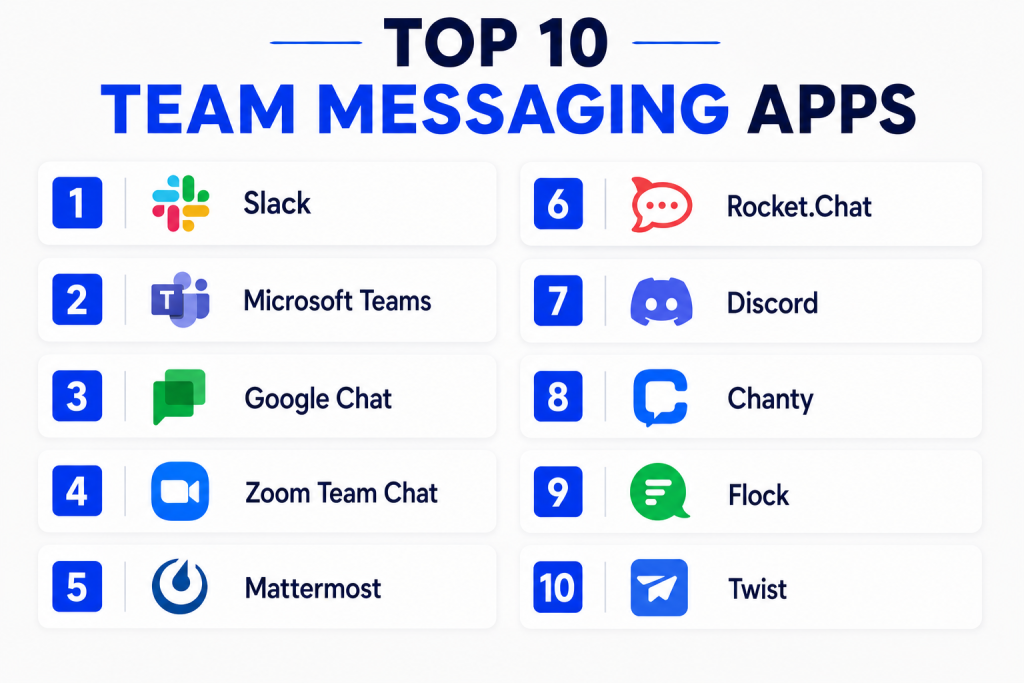
Top 10 Team Messaging Apps
#1 — Slack
Short description:
Slack is a popular team messaging app built around channels, direct messages, and workplace collaboration.
It is widely used by startups, agencies, product teams, engineering teams, and large organizations.
Slack is strong for fast communication, searchable conversations, app integrations, and workflow automation.
It works well for teams that want flexible, organized, and integration-rich collaboration.
Key Features
- Public and private channels for team conversations
- Direct messaging and group messaging
- File sharing and searchable message history
- Workflow automation for repetitive tasks
- Voice and video huddles
- Large app integration marketplace
- Guest access for external collaboration
Pros
- Very easy to use for daily team communication
- Strong integration ecosystem for business tools
- Flexible workspace structure for teams and projects
Cons
- Can become noisy without proper channel management
- Costs may increase for growing teams
- Some advanced admin controls may require higher plans
Platforms / Deployment
Web / Windows / macOS / Linux / iOS / Android
Cloud deployment
Security & Compliance
Slack supports enterprise security features such as SSO, MFA, encryption, admin controls, audit logs, and compliance-related options depending on plan.
Specific compliance coverage should be verified based on the selected plan and business requirement.
Integrations & Ecosystem
Slack has one of the strongest integration ecosystems among team messaging apps. It connects well with business, engineering, sales, support, productivity, and automation tools.
- Google Workspace
- Microsoft 365
- Jira
- GitHub
- Salesforce
- Zoom
Support & Community
Slack provides documentation, help resources, onboarding guides, and business support options. Its user community is strong because many teams already use Slack in daily work.
#2 — Microsoft Teams
Short description:
Microsoft Teams is a team messaging, video meeting, and collaboration platform from Microsoft.
It is best suited for organizations already using Microsoft 365, Outlook, SharePoint, and OneDrive.
Teams combines chat, channels, meetings, calls, files, and apps in one workplace hub.
It is especially strong for enterprises and Microsoft-first businesses.
Key Features
- Team channels and direct chat
- Video meetings and voice calls
- File sharing through Microsoft 365 ecosystem
- Integration with Outlook, SharePoint, and OneDrive
- App support and workflow automation
- Enterprise admin and compliance controls
- Guest access and external collaboration
Pros
- Strong fit for Microsoft 365 users
- Combines messaging, meetings, and files in one platform
- Enterprise-ready security and administration options
Cons
- Can feel heavy for small teams
- Interface may require training for new users
- Best experience depends on Microsoft ecosystem adoption
Platforms / Deployment
Web / Windows / macOS / Linux / iOS / Android
Cloud deployment
Security & Compliance
Microsoft Teams supports SSO, MFA, encryption, RBAC, audit logs, retention controls, and compliance features through Microsoft 365 and Microsoft security tools.
Compliance capabilities depend on Microsoft plan and configuration.
Integrations & Ecosystem
Microsoft Teams works best inside the Microsoft ecosystem. It connects deeply with productivity, identity, file storage, calendar, and enterprise security tools.
- Microsoft 365
- Outlook
- SharePoint
- OneDrive
- Power Automate
- Microsoft Planner
Support & Community
Microsoft provides detailed documentation, enterprise support, partner assistance, admin training, and a large user community. Support strength is high for business and enterprise customers.
#3 — Google Chat
Short description:
Google Chat is a team messaging app built into the Google Workspace ecosystem.
It is useful for teams that already use Gmail, Google Drive, Google Meet, and Google Calendar.
Google Chat supports spaces, direct messages, file collaboration, and simple team communication.
It is a practical choice for Google-first organizations that want lightweight workplace chat.
Key Features
- Spaces for team and project conversations
- Direct messaging and group chat
- Integration with Google Drive and Google Docs
- Google Meet connection for video meetings
- File sharing and collaboration
- Search through Google Workspace
- Admin controls through Google Workspace
Pros
- Easy fit for Google Workspace users
- Simple and clean interface
- Good for document-centered collaboration
Cons
- May feel less advanced than Slack for integrations
- Not ideal for teams outside Google Workspace
- Some advanced governance features depend on Workspace plan
Platforms / Deployment
Web / iOS / Android
Cloud deployment
Security & Compliance
Google Chat security is managed through Google Workspace admin controls.
Features may include SSO, MFA, encryption, admin controls, audit logs, and compliance options depending on Workspace edition.
Integrations & Ecosystem
Google Chat works naturally with Google’s productivity tools. It is useful for teams that collaborate heavily on documents, calendars, meetings, and shared drives.
- Gmail
- Google Drive
- Google Docs
- Google Meet
- Google Calendar
- Google Workspace admin tools
Support & Community
Google provides documentation, Workspace support, admin resources, and broad user guidance. Community support is strong because Google Workspace is widely used.
#4 — Zoom Team Chat
Short description:
Zoom Team Chat is a messaging tool included within the Zoom collaboration platform.
It is best for teams already using Zoom for meetings, webinars, phone, and collaboration.
It brings chat, channels, file sharing, meetings, and calls into one connected experience.
It is useful for organizations that want messaging and meetings in the same environment.
Key Features
- Team chat and direct messaging
- Channels for departments and projects
- Meeting and chat connection
- File sharing and searchable conversations
- Integration with Zoom Meetings and Zoom Phone
- External collaboration support
- Mobile and desktop access
Pros
- Strong fit for existing Zoom users
- Smooth transition from chat to meeting
- Useful for meeting-heavy teams
Cons
- May not replace advanced collaboration tools for every team
- Best value depends on Zoom platform adoption
- Integration ecosystem may not be as broad as Slack
Platforms / Deployment
Web / Windows / macOS / Linux / iOS / Android
Cloud deployment
Security & Compliance
Zoom provides security controls such as encryption, admin settings, user management, and authentication options.
Specific compliance features and audit capabilities should be checked based on the selected Zoom plan.
Integrations & Ecosystem
Zoom Team Chat fits well into the wider Zoom workplace ecosystem. It is especially practical for teams that communicate through meetings, calls, webinars, and chat.
- Zoom Meetings
- Zoom Phone
- Zoom Calendar
- Google Workspace
- Microsoft 365
- Project and productivity tools
Support & Community
Zoom provides support resources, documentation, customer support plans, and onboarding materials. Its community is strong because Zoom is widely used for business communication.
#5 — Mattermost
Short description:
Mattermost is a team messaging platform designed for secure collaboration and technical teams.
It is often used by developers, IT teams, security teams, and organizations needing more control.
Mattermost supports self-hosted and cloud deployment options depending on business needs.
It is strong for teams that want privacy, customization, and operational collaboration.
Key Features
- Team channels and direct messaging
- Self-hosted and cloud deployment options
- File sharing and searchable message history
- Developer and DevOps workflow integrations
- Playbooks and operational workflows
- Enterprise admin controls
- Customization and API support
Pros
- Strong control for security-conscious teams
- Good fit for technical and DevOps workflows
- Flexible deployment options
Cons
- May require more setup than simple cloud-only tools
- Less familiar to general business users than Slack or Teams
- Administration can require technical knowledge
Platforms / Deployment
Web / Windows / macOS / Linux / iOS / Android
Cloud / Self-hosted / Hybrid
Security & Compliance
Mattermost supports security-focused deployment, admin controls, encryption, access management, and enterprise governance features.
Specific compliance and certification details should be verified based on deployment and plan.
Integrations & Ecosystem
Mattermost is strong for technical teams that need messaging connected with development, operations, incident response, and internal systems.
- GitHub
- GitLab
- Jira
- Jenkins
- Kubernetes workflows
- Custom APIs and webhooks
Support & Community
Mattermost offers documentation, enterprise support, open-source community resources, and implementation guidance. Its community is especially strong among technical users.
#6 — Rocket.Chat
Short description:
Rocket.Chat is an open-source team messaging and collaboration platform.
It is suitable for organizations that want more control, customization, and deployment flexibility.
Rocket.Chat can be used for internal messaging, customer communication, and secure collaboration.
It is a strong choice for teams that prefer open-source or self-managed options.
Key Features
- Team channels and direct messaging
- Open-source foundation
- Self-hosted and cloud deployment options
- Omnichannel communication support
- File sharing and searchable conversations
- Guest and external collaboration options
- APIs and customization support
Pros
- Flexible deployment and customization
- Good option for open-source-focused teams
- Useful for both internal and customer messaging workflows
Cons
- Self-hosting requires technical resources
- User experience may need configuration
- Advanced features may depend on edition or plan
Platforms / Deployment
Web / Windows / macOS / Linux / iOS / Android
Cloud / Self-hosted / Hybrid
Security & Compliance
Rocket.Chat supports admin controls, encryption options, authentication features, and self-hosted control.
Specific certifications and compliance capabilities should be verified based on selected deployment and plan.
Integrations & Ecosystem
Rocket.Chat is flexible and can connect with business tools, developer systems, and customer support workflows through APIs and integrations.
- GitHub
- GitLab
- Jira
- Zapier
- Webhooks
- Custom applications
Support & Community
Rocket.Chat has documentation, commercial support, and an open-source community. Support depth depends on whether the organization uses community or enterprise options.
#7 — Discord
Short description:
Discord is a communication platform known for chat, voice, video, and community collaboration.
It is widely used by communities, creators, gaming groups, learning groups, and some small teams.
Discord can support channels, roles, voice rooms, announcements, and community engagement.
It is best for informal collaboration rather than strict enterprise governance.
Key Features
- Text channels and direct messages
- Voice channels and video calls
- Roles and permissions
- Community servers
- File sharing and media support
- Bots and automation options
- Mobile and desktop apps
Pros
- Easy and engaging communication experience
- Strong for communities and informal teams
- Good voice channel experience
Cons
- Not ideal for regulated enterprise communication
- Business admin and compliance controls are limited compared with enterprise tools
- Can become distracting without proper moderation
Platforms / Deployment
Web / Windows / macOS / Linux / iOS / Android
Cloud deployment
Security & Compliance
Discord provides account security features and permission controls.
Enterprise compliance, audit logs, retention management, and advanced governance are limited compared with business-focused platforms.
Integrations & Ecosystem
Discord has a strong bot and community automation ecosystem. It works well for community engagement, announcements, live discussion, and lightweight collaboration.
- Bots
- Webhooks
- Community automation
- Streaming workflows
- Learning communities
- Creator ecosystems
Support & Community
Discord has strong community knowledge, help resources, and user-driven support. Business-grade support and enterprise onboarding are not its primary strength.
#8 — Chanty
Short description:
Chanty is a team messaging app designed for simple communication and task-focused collaboration.
It is useful for small teams, agencies, startups, and businesses that want an easy chat tool.
Chanty combines messaging, task management, file sharing, and team conversations.
It is a good option for teams that want a lightweight alternative to larger platforms.
Key Features
- Team chat and direct messaging
- Channels for organized conversations
- Built-in task management
- File sharing and message search
- Voice and video calling options
- Simple interface for small teams
- Mobile and desktop apps
Pros
- Easy to understand and use
- Good for small teams needing chat plus tasks
- Less complex than large enterprise platforms
Cons
- Integration ecosystem may be smaller than Slack or Teams
- Not ideal for complex enterprise governance
- Advanced controls may be limited
Platforms / Deployment
Web / Windows / macOS / Linux / iOS / Android
Cloud deployment
Security & Compliance
Chanty offers business communication security features, but advanced compliance details should be verified.
For strict regulated industries, buyers should confirm encryption, audit logs, SSO, and retention controls before adoption.
Integrations & Ecosystem
Chanty supports useful integrations for small teams that need simple productivity connections without a complex setup.
- Google Drive
- Trello
- GitHub
- Zapier
- Dropbox
- Productivity tools
Support & Community
Chanty provides documentation, support resources, and onboarding help. Community depth is smaller than larger platforms but practical for small business users.
#9 — Flock
Short description:
Flock is a team messaging and collaboration app for businesses that need chat, channels, file sharing, and productivity tools.
It is designed for teams that want a simpler workplace communication platform.
Flock includes messaging, video calls, reminders, notes, polls, and task-related features.
It is useful for SMBs and teams that want communication with built-in collaboration features.
Key Features
- Team channels and direct messages
- Video and audio calling
- File sharing and search
- Notes, reminders, and polls
- Task and productivity features
- App integrations
- Admin controls for team management
Pros
- Simple and practical for SMB teams
- Includes helpful productivity features
- Good alternative for teams that find larger tools too complex
Cons
- May not match enterprise depth of Microsoft Teams or Slack
- Integration ecosystem may be more limited
- Advanced compliance features should be checked carefully
Platforms / Deployment
Web / Windows / macOS / iOS / Android
Cloud deployment
Security & Compliance
Flock provides standard business communication controls and admin management.
Specific advanced compliance, audit, and certification details should be verified before regulated use.
Integrations & Ecosystem
Flock supports common productivity and business integrations for teams that need messaging connected with daily work.
- Google Drive
- Trello
- GitHub
- Jira
- Todoist
- Webhooks
Support & Community
Flock offers support resources, documentation, and customer assistance. Its community is smaller than Slack or Microsoft Teams but suitable for practical business adoption.
#10 — Twist
Short description:
Twist is a team communication app built around organized, async conversations.
It is useful for remote teams that want fewer interruptions and less chat noise.
Twist focuses on threads, clarity, and calm communication instead of constant real-time messaging.
It is best for teams that prefer structured discussion over fast-moving chat streams.
Key Features
- Thread-based team conversations
- Channels for organized discussion
- Direct messaging
- Async communication support
- Searchable message history
- Reduced notification noise
- Simple collaboration interface
Pros
- Strong for async remote work
- Helps reduce noisy real-time chat culture
- Good for thoughtful project discussions
Cons
- Not ideal for teams needing fast live chat all day
- Smaller ecosystem than Slack or Teams
- May require culture change for teams used to instant messaging
Platforms / Deployment
Web / Windows / macOS / iOS / Android
Cloud deployment
Security & Compliance
Twist provides standard security controls for team communication.
Advanced compliance, SSO, audit logs, and enterprise governance details should be verified based on plan and business needs.
Integrations & Ecosystem
Twist works best for teams that value thoughtful async work and structured communication. Its integration ecosystem is useful but more focused than larger platforms.
- Todoist
- Google Drive
- GitHub
- Zapier
- Calendar workflows
- Productivity tools
Support & Community
Twist provides documentation, help resources, and support from the product team. Its community is smaller but strong among async-first and remote-first teams.
Comparison Table
| Tool Name | Best For | Platform(s) Supported | Deployment | Standout Feature | Public Rating |
|---|---|---|---|---|---|
| Slack | Fast team collaboration and integrations | Web, Windows, macOS, Linux, iOS, Android | Cloud | Large integration ecosystem | N/A |
| Microsoft Teams | Microsoft 365 organizations | Web, Windows, macOS, Linux, iOS, Android | Cloud | Deep Microsoft 365 integration | N/A |
| Google Chat | Google Workspace teams | Web, iOS, Android | Cloud | Native Google Workspace collaboration | N/A |
| Zoom Team Chat | Meeting-heavy teams | Web, Windows, macOS, Linux, iOS, Android | Cloud | Chat connected with Zoom meetings | N/A |
| Mattermost | Technical and security-conscious teams | Web, Windows, macOS, Linux, iOS, Android | Cloud / Self-hosted / Hybrid | Flexible secure deployment | N/A |
| Rocket.Chat | Open-source and customizable messaging | Web, Windows, macOS, Linux, iOS, Android | Cloud / Self-hosted / Hybrid | Open-source collaboration platform | N/A |
| Discord | Communities and informal teams | Web, Windows, macOS, Linux, iOS, Android | Cloud | Voice channels and community features | N/A |
| Chanty | Small teams needing simple chat | Web, Windows, macOS, Linux, iOS, Android | Cloud | Chat with built-in task management | N/A |
| Flock | SMB team communication | Web, Windows, macOS, iOS, Android | Cloud | Messaging with productivity features | N/A |
| Twist | Async remote teams | Web, Windows, macOS, iOS, Android | Cloud | Thread-based calm communication | N/A |
Evaluation & Scoring of Team Messaging Apps
| Tool Name | Core (25%) | Ease (15%) | Integrations (15%) | Security (10%) | Performance (10%) | Support (10%) | Value (15%) | Weighted Total (0–10) |
|---|---|---|---|---|---|---|---|---|
| Slack | 9 | 9 | 10 | 8 | 9 | 9 | 8 | 8.90 |
| Microsoft Teams | 9 | 7 | 10 | 9 | 8 | 9 | 9 | 8.75 |
| Google Chat | 7 | 8 | 8 | 8 | 8 | 8 | 8 | 7.75 |
| Zoom Team Chat | 7 | 8 | 8 | 8 | 8 | 8 | 8 | 7.75 |
| Mattermost | 8 | 7 | 8 | 9 | 8 | 8 | 8 | 8.00 |
| Rocket.Chat | 8 | 7 | 8 | 8 | 8 | 7 | 8 | 7.75 |
| Discord | 8 | 9 | 7 | 6 | 8 | 7 | 9 | 7.75 |
| Chanty | 7 | 9 | 7 | 7 | 8 | 7 | 8 | 7.60 |
| Flock | 7 | 8 | 7 | 7 | 8 | 7 | 8 | 7.45 |
| Twist | 7 | 8 | 6 | 7 | 8 | 7 | 8 | 7.25 |
These scores are comparative and should be used as a starting point, not a final decision.
A high score does not mean a tool is best for every team or every business model.
Slack may be stronger for integrations, while Microsoft Teams may be better for Microsoft-first organizations.
Mattermost or Rocket.Chat may be better when control, customization, or self-hosting is important.
Which Team Messaging App Is Right for You?
Solo / Freelancer
Solo professionals usually do not need a heavy team messaging platform unless they work with clients, contractors, or project partners. A simple tool with direct messaging, file sharing, and mobile access may be enough.
Good options include:
- Slack for client and project channels
- Google Chat for Google Workspace users
- Microsoft Teams for Microsoft 365 users
- Discord for informal communities
- Twist for async project discussions
For solo users, the best tool is the one clients can use easily without training.
SMB
Small and medium businesses need simple communication, low setup effort, and affordable pricing. They should avoid overcomplicated tools unless they have a clear reason.
Good options include:
- Slack for flexible collaboration
- Microsoft Teams for Microsoft 365 users
- Google Chat for Google Workspace users
- Chanty for simple chat and tasks
- Flock for SMB productivity features
SMBs should focus on ease of use, team adoption, mobile apps, and integration with existing tools.
Mid-Market
Mid-market companies need better structure, admin control, guest access, file sharing, and integration with business systems. They may also need stronger security and reporting.
Good options include:
- Slack
- Microsoft Teams
- Zoom Team Chat
- Mattermost
- Rocket.Chat
- Flock
Mid-market buyers should test user management, channel governance, search quality, integrations, and admin reporting.
Enterprise
Enterprise teams need strong security, governance, compliance alignment, identity management, retention policies, and scalability. They often prefer tools that fit into existing enterprise ecosystems.
Good options include:
- Microsoft Teams
- Slack
- Mattermost
- Rocket.Chat
- Google Chat
- Zoom Team Chat
Enterprises should review SSO, MFA, RBAC, audit logs, retention settings, legal hold options, data residency needs, and admin control depth before selecting a tool.
Budget vs Premium
Budget-focused teams may start with Google Chat, Microsoft Teams, Chanty, Flock, Discord, or existing suite-based tools. These options may reduce extra spending if the company already pays for a productivity suite.
Premium tools are better when the team needs:
- Strong app integrations
- Advanced admin controls
- Enterprise security
- Guest collaboration
- Workflow automation
- Better support options
- Large-scale workspace governance
Feature Depth vs Ease of Use
Feature-rich tools like Slack, Microsoft Teams, Mattermost, and Rocket.Chat can support complex business workflows. However, they may require stronger governance and setup planning.
Easier tools like Chanty, Flock, Google Chat, and Twist may be better for teams that want simple communication without too much complexity. The right choice depends on how technical the team is and how many tools must connect with chat.
Integrations & Scalability
If your team relies on many business tools, choose a messaging app with strong integrations. Slack and Microsoft Teams are strong choices for large integration ecosystems. Mattermost and Rocket.Chat are useful when custom integrations and technical workflows matter.
Teams should evaluate integrations with:
- Calendar tools
- Cloud storage
- Project management platforms
- CRM systems
- Help desk tools
- DevOps tools
- Automation tools
- Video meeting platforms
Security & Compliance Needs
Security-focused teams should not choose only based on interface design. They should review encryption, authentication, admin roles, audit logs, message retention, guest permissions, and data control.
For stronger enterprise governance, Microsoft Teams, Slack, Mattermost, Rocket.Chat, and Google Chat are worth evaluating. For informal communities, Discord may work well, but it may not be ideal for regulated business communication.
Frequently Asked Questions
1. What are team messaging apps?
Team messaging apps are tools that help employees communicate through chat, channels, groups, and direct messages.
They often include file sharing, search, voice calls, video meetings, and integrations.
They reduce dependency on long email threads and scattered communication.
Businesses use them to keep teams connected and organized.
2. Are team messaging apps better than email?
Team messaging apps are better for quick updates, project discussions, and daily collaboration.
Email is still useful for formal communication, external notices, and detailed approvals.
Most companies need both tools instead of replacing email fully.
The best setup depends on communication style and business needs.
3. Which team messaging app is best for small businesses?
Small businesses can consider Slack, Microsoft Teams, Google Chat, Chanty, or Flock.
The best choice depends on the tools the company already uses.
If the team uses Microsoft 365, Microsoft Teams is practical.
If the team uses Google Workspace, Google Chat may be easier.
4. Which team messaging app is best for enterprises?
Enterprises often compare Microsoft Teams, Slack, Mattermost, Rocket.Chat, and Google Chat.
The right choice depends on security, governance, integrations, and admin control.
Microsoft Teams is strong for Microsoft-first companies.
Slack is strong for flexible collaboration and integrations.
5. Do team messaging apps support video calls?
Yes, many team messaging apps support voice and video communication.
Microsoft Teams, Zoom Team Chat, Slack, Google Chat, and Discord are strong in this area.
Some tools focus more on chat and async communication than meetings.
Buyers should test call quality and meeting workflows before adoption.
6. Are team messaging apps secure?
Most business-focused team messaging apps offer basic security controls.
Enterprise tools may include SSO, MFA, encryption, audit logs, retention, and admin policies.
Security strength depends on the plan, configuration, and user practices.
Companies should verify controls before using chat for sensitive data.
7. What is the biggest mistake when choosing a messaging app?
The biggest mistake is choosing a tool without planning channel structure and usage rules.
Even a good app can become noisy if every conversation happens everywhere.
Teams should define naming rules, notification practices, and ownership.
Clear communication habits are as important as the tool itself.
8. Can external clients or vendors join team messaging apps?
Yes, many tools support guest users, shared channels, or external collaboration.
Slack, Microsoft Teams, and other platforms offer controlled external access options.
Guest access should be managed carefully to protect internal information.
Admins should review permissions before inviting outside users.
9. How do team messaging apps help remote teams?
Team messaging apps help remote teams stay connected through organized conversations.
They reduce delays by giving everyone a shared place for updates and decisions.
Features like channels, search, files, and integrations improve visibility.
Async tools also help teams working across different time zones.
10. How should a company switch to a new messaging app?
A company should start with a pilot team before a full rollout.
It should test channels, permissions, integrations, mobile access, and search.
Training should explain when to use chat, email, meetings, and project tools.
A phased rollout reduces confusion and improves adoption.
Conclusion
Team messaging apps have become essential for modern workplace communication because they help teams move faster, reduce confusion, and keep important conversations organized. However, the best tool depends on team size, work style, existing software stack, security needs, and budget. Slack is strong for flexible collaboration and integrations, Microsoft Teams is excellent for Microsoft-first organizations, Google Chat works well for Google Workspace teams, and Mattermost or Rocket.Chat may fit organizations that need more control. Small teams may prefer Chanty, Flock, Twist, or Zoom Team Chat depending on their workflow. The best next step is to shortlist two or three tools, run a small pilot, test real communication scenarios, review security controls, and choose the platform your team can use consistently.
