Introduction
Stock media libraries are online platforms where users can find ready-to-use photos, videos, illustrations, vectors, music, sound effects, templates, and other creative assets. These libraries help marketers, designers, agencies, content creators, publishers, educators, startups, and enterprise creative teams produce professional content faster without creating every asset from scratch.
Stock media matters because visual content is now used across websites, social media, ads, presentations, videos, eCommerce pages, blogs, newsletters, apps, and brand campaigns. A reliable stock media platform helps teams save production time, maintain quality, reduce licensing risk, and support consistent creative output.
Common use cases include social media creatives, advertising campaigns, blog visuals, product mockups, video editing, website design, training content, presentations, and brand storytelling.
Buyers should evaluate asset quality, licensing clarity, search accuracy, pricing, content variety, contributor standards, AI search features, commercial usage rights, integrations, team management, and support.
Best for: marketers, designers, agencies, video editors, content teams, eCommerce brands, publishers, educators, startups, and enterprise creative departments that need high-quality visual or audio assets regularly.
Not ideal for: teams that create all content in-house, brands needing fully exclusive custom photography, or users who only need occasional free images and can manage licensing carefully.
Key Trends in Stock Media Libraries
- AI-powered search and discovery are improving how users find images, videos, audio, and templates using natural language, visual similarity, mood, topic, and style-based search.
- Generative AI content support is becoming more common, but buyers must carefully review licensing, usage rights, and brand safety policies before using AI-generated assets.
- Authentic and diverse visuals are in higher demand, with brands looking for real-life, inclusive, regionally relevant, and less staged media.
- Video-first asset libraries are growing because short-form video, product explainers, online learning, and social campaigns require more motion content.
- Subscription bundles are becoming popular for teams that need predictable costs across images, videos, music, templates, and creative resources.
- Rights management and licensing clarity remain key buying factors, especially for commercial campaigns, paid advertising, client work, and enterprise usage.
- Creative workflow integrations are becoming more important, especially with design tools, video editors, presentation software, digital asset management systems, and marketing platforms.
- Brand safety expectations are rising, with teams needing better controls around model releases, editorial restrictions, sensitive topics, and commercial usage.
- Team collaboration features such as shared folders, license history, approval workflows, and admin controls are increasingly useful for agencies and enterprise teams.
- Flexible pricing models are expanding, including free libraries, credit packs, subscriptions, enterprise plans, and unlimited-download creative bundles.
How We Selected These Tools
The tools in this list were selected based on practical value for creative, marketing, design, and business teams that use stock media in real workflows.
Selection criteria included:
- Market recognition and adoption among creators, agencies, brands, and enterprise teams
- Breadth of asset types, including photos, videos, vectors, illustrations, templates, music, and sound effects
- Search quality, filtering options, and discovery experience
- Licensing clarity for personal, commercial, editorial, and client use cases
- Content quality, contributor ecosystem, and asset freshness
- Suitability for different users, from freelancers to enterprise creative teams
- Pricing flexibility, including subscriptions, credits, free access, and enterprise licensing
- Integration options with creative, design, video, and productivity tools
- Team management features, admin controls, and security-related capabilities
- Support resources, documentation quality, and buyer confidence
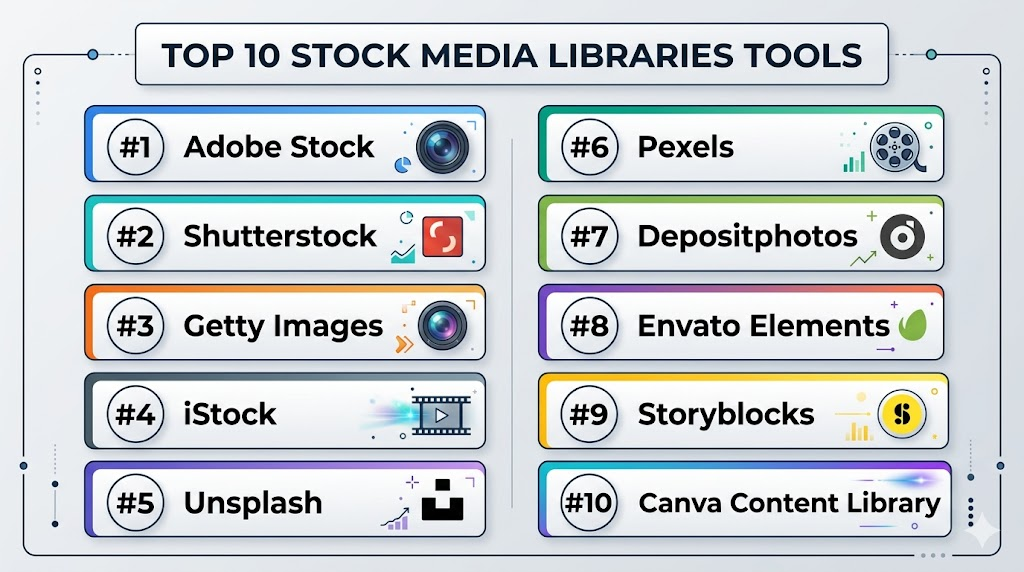
Top 10 Stock Media Libraries Tools
#1 — Adobe Stock
Short description: Adobe Stock is a stock media library offering photos, videos, vectors, illustrations, templates, music, and other creative assets. It is especially useful for designers, marketers, agencies, and creative teams already working with Adobe creative tools.
Key Features
- Large library of stock photos, videos, vectors, illustrations, templates, and audio
- Strong integration with Adobe creative applications
- Search filters for asset type, orientation, color, style, and usage needs
- Commercial and editorial asset options
- Templates and creative assets useful for design production
- Contributor marketplace with broad creative coverage
- Team and enterprise options for larger organizations
Pros
- Strong fit for design teams using Adobe workflows
- Broad asset coverage across images, videos, templates, and music
- Smooth creative workflow experience for designers and marketers
Cons
- Costs can increase for high-volume usage
- Users must review license type before using assets in sensitive or large-scale campaigns
- Some teams may not need the deeper Adobe ecosystem connection
Platforms / Deployment
Web / Windows / macOS / iOS / Android
Cloud
Security & Compliance
Adobe Stock is part of a broader enterprise software ecosystem with account controls and business plan options. Specific security certifications, compliance details, and administrative controls should be verified by plan. Unknown details should be treated as Not publicly stated.
Integrations & Ecosystem
Adobe Stock is strongest for teams that already use Adobe creative tools and want stock assets inside their design and production workflow.
Common ecosystem areas include:
- Graphic design tools
- Photo editing tools
- Video editing tools
- Presentation and layout workflows
- Creative cloud storage
- Enterprise creative operations
Support & Community
Adobe provides documentation, help resources, contributor guidance, account support, and business plan assistance. The user community is broad because Adobe tools are widely used by creative professionals.
#2 — Shutterstock
Short description: Shutterstock is a large stock media library offering images, videos, music, editorial content, vectors, illustrations, and creative assets. It is widely used by marketers, publishers, agencies, designers, and businesses needing broad content coverage.
Key Features
- Large collection of stock photos, videos, illustrations, vectors, and music
- Search filters for orientation, people, color, category, and content type
- Editorial and commercial content options
- Licensing choices for different business needs
- Creative workflow tools and team options
- AI-assisted discovery features where available
- Broad global contributor network
Pros
- Strong asset variety across many business and creative needs
- Useful for marketing, publishing, advertising, and web content
- Good choice when teams need both commercial and editorial media
Cons
- Licensing details must be reviewed carefully for each use case
- Premium or high-volume usage can become expensive
- Asset quality can vary because of the size of the library
Platforms / Deployment
Web / iOS / Android
Cloud
Security & Compliance
Shutterstock provides account-based access and business options. Enterprise security, admin controls, and compliance documentation should be verified directly based on the selected plan. If not clearly available, use Not publicly stated.
Integrations & Ecosystem
Shutterstock is commonly used across marketing, design, publishing, and content production workflows. It can support teams that need stock assets for multiple channels.
Common ecosystem areas include:
- Design platforms
- Content creation tools
- Publishing workflows
- Marketing campaign production
- Video production workflows
- Enterprise creative teams
Support & Community
Shutterstock offers help documentation, licensing guidance, contributor resources, and customer support options. Larger business users may require account-level assistance depending on plan.
#3 — Getty Images
Short description: Getty Images is a premium stock media and editorial content library known for high-quality photography, news, sports, entertainment, archival content, and commercial imagery. It is often used by publishers, agencies, enterprises, and brands that need premium or editorial-grade assets.
Key Features
- Premium photography and editorial content library
- Strong coverage of news, sports, entertainment, culture, and business
- Commercial creative imagery for brand and advertising use
- Rights-managed and royalty-free licensing options depending on asset type
- High-quality archival and documentary-style content
- Enterprise licensing and account support options
- Useful for publishers, corporate communications, and major campaigns
Pros
- Strong reputation for premium and editorial content
- Good fit for media, publishing, enterprise, and high-value campaigns
- Useful when asset quality and credibility are important
Cons
- Pricing may be higher than general stock libraries
- Licensing terms can be more complex than simple subscription libraries
- Not always the best fit for casual or low-budget users
Platforms / Deployment
Web
Cloud
Security & Compliance
Getty Images provides business and enterprise account options. Specific security controls, compliance documentation, and administrative features should be verified directly. Unknown details should be treated as Not publicly stated.
Integrations & Ecosystem
Getty Images is commonly used in editorial, publishing, communications, advertising, and corporate branding workflows where quality and rights clarity are important.
Common ecosystem areas include:
- Newsroom workflows
- Publishing platforms
- Brand campaign planning
- Corporate communication teams
- Agency production workflows
- Enterprise media licensing
Support & Community
Getty Images provides professional customer support, licensing assistance, contributor resources, and enterprise account guidance. It is suitable for teams that need help understanding usage rights and media licensing.
#4 — iStock
Short description: iStock is a stock media library offering photos, illustrations, vectors, and videos for marketers, designers, small businesses, and content creators. It is often used by teams that want access to professional stock content with flexible pricing options.
Key Features
- Stock photos, vectors, illustrations, and videos
- Royalty-free content options
- Search filters for style, subject, orientation, and asset type
- Credit-based and subscription-style access options
- Suitable for websites, ads, blogs, social media, and presentations
- Broad collection for small business and marketing use
- Premium content options depending on collection type
Pros
- Good balance of professional content and accessibility
- Useful for small businesses, bloggers, designers, and marketers
- Flexible for common web, print, and marketing use cases
Cons
- Users must understand license limits before commercial use
- Premium assets may cost more than basic assets
- Not as broad for enterprise editorial needs as some premium libraries
Platforms / Deployment
Web
Cloud
Security & Compliance
iStock uses account-based access and licensing controls. Specific enterprise security features and compliance documentation should be verified directly. Unknown details should be written as Not publicly stated.
Integrations & Ecosystem
iStock is commonly used as a standalone stock media source for marketers, designers, and business content teams.
Common ecosystem areas include:
- Website design workflows
- Blog and content marketing
- Social media production
- Advertising design
- Presentation creation
- Small business branding
Support & Community
iStock provides help documentation, licensing information, and customer support resources. It is generally easy to use for teams with standard stock media needs.
#5 — Unsplash
Short description: Unsplash is a popular stock photo library known for free-to-use, high-quality photography. It is widely used by bloggers, startups, designers, educators, and content creators who need modern-looking images without a complex buying process.
Key Features
- Large library of free photography
- Clean and simple search experience
- Modern lifestyle, business, nature, technology, and creative visuals
- Useful for blogs, websites, presentations, and social posts
- Contributor-driven photography community
- Collections and curated discovery options
- Premium or business-related options may vary by offering
Pros
- Easy access to high-quality images
- Strong choice for fast content creation and lightweight projects
- Popular among creators and startups
Cons
- Licensing should still be reviewed carefully for sensitive or commercial use
- Not ideal when exclusive rights or highly controlled usage is required
- Asset variety is stronger for photography than for video, audio, or templates
Platforms / Deployment
Web / iOS
Cloud
Security & Compliance
Unsplash provides account-based access for users. Enterprise-grade security and compliance details are Not publicly stated unless specifically documented for the selected offering.
Integrations & Ecosystem
Unsplash is commonly used in design, publishing, website, and productivity tools because of its simple image discovery model.
Common ecosystem areas include:
- Website builders
- Design tools
- Blogging platforms
- Presentation workflows
- Social media content creation
- Creative inspiration workflows
Support & Community
Unsplash has a strong creator community, contributor ecosystem, and help resources. Support depth may vary depending on user type and offering.
#6 — Pexels
Short description: Pexels is a free stock photo and video library used by creators, marketers, designers, educators, and small businesses. It is helpful for users who need simple access to visual content for digital projects without managing complex subscriptions.
Key Features
- Free stock photos and videos
- Search by keyword, topic, style, and category
- Useful for social media, blogs, videos, websites, and presentations
- Contributor-driven creative library
- Simple download experience
- Curated collections and discovery pages
- Good choice for quick creative projects
Pros
- Free access makes it useful for small teams and creators
- Includes both photos and videos
- Easy to use without a steep learning curve
Cons
- Licensing and usage should be checked carefully for commercial or sensitive campaigns
- Asset exclusivity is not available in typical use
- Advanced team, enterprise, and approval features are limited
Platforms / Deployment
Web / iOS / Android
Cloud
Security & Compliance
Pexels provides basic account access where applicable. Detailed enterprise security, compliance certifications, and advanced administrative controls are Not publicly stated.
Integrations & Ecosystem
Pexels is useful for lightweight creative workflows where users need quick visual assets for content production.
Common ecosystem areas include:
- Social media content
- Blogging workflows
- Website visuals
- Video editing projects
- Educational presentations
- Creative inspiration
Support & Community
Pexels has a strong contributor community and simple help resources. It is not mainly positioned as a complex enterprise media management platform.
#7 — Depositphotos
Short description: Depositphotos is a stock media library offering photos, vectors, illustrations, videos, and music for businesses, designers, marketers, and agencies. It is often used by teams looking for broad media access with flexible plans.
Key Features
- Stock photos, vectors, illustrations, videos, and music
- Search filters for media type, orientation, color, and category
- Subscription and credit-style access options
- Commercial content suitable for marketing and design work
- Large contributor-driven asset library
- Useful for ads, blogs, websites, presentations, and creative campaigns
- Team and business usage options may be available depending on plan
Pros
- Broad asset variety across common creative formats
- Useful for businesses needing regular stock media
- Flexible access models for different usage levels
Cons
- Asset quality can vary across a large marketplace
- Users must review license rules before using assets in paid campaigns
- Enterprise-level workflow features may be limited compared with broader creative platforms
Platforms / Deployment
Web / iOS / Android
Cloud
Security & Compliance
Depositphotos provides account access and business purchasing options. Specific enterprise security certifications and compliance details should be verified directly. If uncertain, write Not publicly stated.
Integrations & Ecosystem
Depositphotos is commonly used as a standalone stock media source by marketers, designers, agencies, and small businesses.
Common ecosystem areas include:
- Marketing design workflows
- Website content production
- Advertising campaigns
- Social media content creation
- Presentation design
- Video production
Support & Community
Depositphotos provides help documentation, licensing information, and user support resources. Contributor and customer support options may vary by account type.
#8 — Envato Elements
Short description: Envato Elements is a subscription-based creative asset library offering stock photos, videos, music, sound effects, graphics, templates, fonts, themes, and other digital assets. It is popular with designers, video editors, marketers, freelancers, and agencies that need many asset types under one subscription.
Key Features
- Wide range of creative assets beyond stock photos
- Stock video, audio, templates, graphics, fonts, and presentation assets
- Subscription-based access model
- Useful for designers, video creators, marketers, and web professionals
- Large marketplace-style creative ecosystem
- Templates for design, video, web, and presentation workflows
- Good value for teams needing frequent downloads across asset types
Pros
- Strong value for high-volume creative asset users
- Broad coverage across visual, audio, web, and design resources
- Useful for freelancers, agencies, and content teams
Cons
- Users must understand licensing terms for each project use
- Asset quality and style can vary across contributors
- Not mainly focused on premium editorial photography
Platforms / Deployment
Web
Cloud
Security & Compliance
Envato Elements provides account-based access and subscription management. Specific enterprise security certifications, audit controls, and compliance documentation are Not publicly stated unless confirmed directly.
Integrations & Ecosystem
Envato Elements supports many creative workflows because it includes more than traditional stock images.
Common ecosystem areas include:
- Video editing
- Graphic design
- Web design
- Presentation creation
- Audio production
- Template-based creative work
Support & Community
Envato provides documentation, licensing guidance, contributor resources, and support options. Its creative marketplace community is broad and useful for inspiration and asset discovery.
#9 — Storyblocks
Short description: Storyblocks is a stock media platform focused on video, audio, images, templates, and motion assets. It is especially useful for video editors, content creators, social media teams, educators, and businesses producing regular video content.
Key Features
- Stock video, motion backgrounds, images, music, and sound effects
- Strong focus on video production workflows
- Subscription-style access model
- Useful for social media videos, ads, tutorials, and explainers
- Search and filtering for footage, audio, and visual assets
- Templates and motion content for faster production
- Suitable for creators and teams with frequent video needs
Pros
- Strong fit for video-first content teams
- Useful combination of footage, music, sound effects, and visuals
- Predictable subscription model for regular creators
Cons
- May not be the best choice for premium editorial photography
- Users should review licensing before high-visibility commercial use
- Asset style and quality may vary by contributor and category
Platforms / Deployment
Web
Cloud
Security & Compliance
Storyblocks uses account-based access and subscription controls. Detailed enterprise security certifications and compliance documentation are Not publicly stated unless verified directly.
Integrations & Ecosystem
Storyblocks is commonly used in video editing and digital content creation workflows.
Common ecosystem areas include:
- Video editing tools
- Social video production
- Online course creation
- Advertising video workflows
- YouTube-style content production
- Audio and sound design workflows
Support & Community
Storyblocks provides help documentation, licensing information, and support resources. It is especially useful for creators who need repeatable access to video and audio assets.
#10 — Canva Content Library
Short description: Canva Content Library provides stock photos, videos, graphics, templates, audio, icons, and design elements inside Canva’s design platform. It is useful for marketers, small businesses, social media teams, educators, and non-designers who want stock media directly inside a simple design workflow.
Key Features
- Stock photos, videos, graphics, icons, templates, and audio
- Built directly into Canva’s design workspace
- Useful for social media posts, presentations, ads, flyers, and simple videos
- Template-driven design workflows
- Team collaboration and brand kit features depending on plan
- Easy drag-and-drop asset usage
- Helpful for non-designers and fast-moving marketing teams
Pros
- Very easy for non-designers to use
- Combines stock assets with design creation in one platform
- Strong for quick marketing, social, and presentation content
Cons
- Not ideal for advanced professional editing workflows
- Licensing and asset usage should be reviewed carefully by project type
- Some teams may need deeper stock libraries or premium editorial media
Platforms / Deployment
Web / Windows / macOS / iOS / Android
Cloud
Security & Compliance
Canva offers account controls, team management, permissions, and business features depending on plan. Specific security certifications and compliance details should be verified directly. Unknown details should be treated as Not publicly stated.
Integrations & Ecosystem
Canva Content Library is strongest when teams want media, templates, and design creation in one workspace.
Common ecosystem areas include:
- Social media content creation
- Presentation design
- Brand kit workflows
- Marketing campaign assets
- Print design
- Lightweight video creation
Support & Community
Canva has a large user community, extensive templates, help documentation, learning resources, and support options. It is highly accessible for beginners and useful for fast creative production.
Comparison Table
| Tool Name | Best For | Platform(s) Supported | Deployment | Standout Feature | Public Rating |
|---|---|---|---|---|---|
| Adobe Stock | Designers, agencies, and Adobe workflow users | Web / Windows / macOS / iOS / Android | Cloud | Deep fit with Adobe creative workflows | N/A |
| Shutterstock | Marketers, publishers, and broad stock media users | Web / iOS / Android | Cloud | Large multi-format stock media library | N/A |
| Getty Images | Publishers, enterprises, and premium editorial users | Web | Cloud | Premium editorial and commercial imagery | N/A |
| iStock | Small businesses, marketers, and designers | Web | Cloud | Professional stock assets with flexible access | N/A |
| Unsplash | Bloggers, startups, creators, and lightweight design teams | Web / iOS | Cloud | Free modern photography library | N/A |
| Pexels | Creators, educators, and small teams needing free visuals | Web / iOS / Android | Cloud | Free stock photos and videos | N/A |
| Depositphotos | Businesses needing broad stock media access | Web / iOS / Android | Cloud | Flexible access to images, videos, vectors, and music | N/A |
| Envato Elements | Designers, freelancers, and agencies needing many asset types | Web | Cloud | Subscription access to broad creative assets | N/A |
| Storyblocks | Video creators and social media production teams | Web | Cloud | Strong video, audio, and motion asset focus | N/A |
| Canva Content Library | Non-designers, marketers, and small business teams | Web / Windows / macOS / iOS / Android | Cloud | Stock media built into design creation | N/A |
Evaluation & Scoring of Stock Media Libraries
The scoring below is comparative and practical. It is based on suitability for common business, marketing, design, and creative production needs. A higher score does not always mean the tool is best for every team. Some users may need free access, while others may need enterprise licensing, premium editorial content, or video-first production assets.
| Tool Name | Core (25%) | Ease (15%) | Integrations (15%) | Security (10%) | Performance (10%) | Support (10%) | Value (15%) | Weighted Total (0–10) |
|---|---|---|---|---|---|---|---|---|
| Adobe Stock | 9 | 8 | 9 | 8 | 8 | 8 | 7 | 8.20 |
| Shutterstock | 9 | 8 | 8 | 7 | 8 | 8 | 7 | 8.00 |
| Getty Images | 9 | 7 | 7 | 8 | 8 | 9 | 6 | 7.70 |
| iStock | 8 | 8 | 7 | 7 | 8 | 8 | 7 | 7.60 |
| Unsplash | 7 | 9 | 8 | 6 | 8 | 7 | 9 | 7.70 |
| Pexels | 7 | 9 | 7 | 6 | 8 | 7 | 9 | 7.55 |
| Depositphotos | 8 | 8 | 7 | 6 | 8 | 7 | 8 | 7.50 |
| Envato Elements | 9 | 8 | 7 | 6 | 8 | 8 | 9 | 8.00 |
| Storyblocks | 8 | 8 | 7 | 6 | 8 | 7 | 8 | 7.50 |
| Canva Content Library | 8 | 10 | 8 | 7 | 8 | 8 | 8 | 8.15 |
How to interpret these scores:
- The scores compare tools across common stock media buying needs, not every possible use case.
- A free tool may score high on value but lower on security, licensing depth, or enterprise controls.
- A premium tool may score lower on price/value but higher on content quality, licensing support, or editorial depth.
- Teams should compare the score with their real workflow, not select based on total score alone.
- Always test search quality, licensing fit, download limits, and approval workflows before making a final choice.
Which Stock Media Libraries Tool Is Right for You?
Solo / Freelancer
Freelancers usually need affordable access, quick downloads, simple licensing, and enough variety for client projects, websites, social posts, videos, and presentations. They may not need enterprise controls or complex team features.
Good options include:
- Unsplash for free photography and simple visual needs
- Pexels for free photos and videos
- Envato Elements for frequent use of templates, graphics, video, audio, and design assets
- Canva Content Library for fast design creation with built-in stock media
- iStock for professional images and videos when a paid stock option is needed
For freelancers, the best platform is usually the one that reduces production time while keeping licensing clear enough for client work.
SMB
Small and mid-sized businesses often need stock media for websites, ads, blogs, social media, sales presentations, videos, and brand campaigns. They need a balance between cost, quality, speed, and ease of use.
Good options include:
- Canva Content Library for non-designers and fast marketing content
- Shutterstock for broad asset variety
- Adobe Stock for design teams using Adobe creative tools
- Depositphotos for flexible stock access
- Envato Elements for businesses needing many different creative asset types
SMBs should focus on asset variety, predictable pricing, team access, licensing clarity, and whether the platform supports their most common content formats.
Mid-Market
Mid-market teams may manage multiple brands, products, campaigns, channels, and creative stakeholders. They need stronger content quality, shared access, asset history, predictable licensing, and workflow compatibility.
Good options include:
- Adobe Stock for design-heavy teams
- Shutterstock for broad commercial and editorial-style media needs
- Envato Elements for high-volume creative production
- Storyblocks for video-first content teams
- Canva Content Library for marketing teams that need easy content creation
Mid-market buyers should check license management, team permissions, usage tracking, brand safety, and integration with existing creative tools.
Enterprise
Enterprise teams often need strong licensing controls, purchasing workflows, premium content, legal clarity, admin management, brand safety, and support. They may also need assets for global campaigns, public relations, internal communications, paid ads, training, and product launches.
Good options include:
- Getty Images for premium editorial and high-quality commercial imagery
- Adobe Stock for enterprise creative teams using Adobe workflows
- Shutterstock for broad content access and business use cases
- iStock for professional stock assets with flexible usage needs
- Canva Content Library for enterprise teams that support non-designers and brand templates
Enterprise buyers should involve legal, brand, procurement, security, and creative operations teams before selecting a stock media provider.
Budget vs Premium
Budget-conscious users may prefer free or subscription-based platforms that provide enough content without high one-off costs.
Good budget-friendly choices include:
- Unsplash
- Pexels
- Canva Content Library
- Envato Elements
- Depositphotos
Premium-focused users may prefer platforms that offer higher-end content, editorial quality, stronger licensing support, or enterprise buying options.
Premium-oriented choices include:
- Getty Images
- Adobe Stock
- Shutterstock
- iStock
Budget should not be judged only by download price. Teams should also consider licensing risk, asset quality, time saved, usage limits, and whether the same assets can support multiple campaigns.
Feature Depth vs Ease of Use
Some platforms are built for professional media licensing and broad asset discovery. Others are built for simple creative production inside a design workflow.
For ease of use:
- Canva Content Library
- Unsplash
- Pexels
- iStock
For deeper media access:
- Adobe Stock
- Shutterstock
- Getty Images
- Envato Elements
- Storyblocks
If your team has trained designers, deeper platforms may provide better creative control. If your team has many non-designers, simple tools with templates and built-in media may be more effective.
Integrations & Scalability
Stock media becomes more valuable when it fits naturally into the creative workflow. Teams should evaluate whether the platform works with design tools, video editing workflows, content planning tools, and brand management processes.
Strong choices for workflow fit include:
- Adobe Stock for Adobe creative workflows
- Canva Content Library for template-based design workflows
- Envato Elements for broad creative asset production
- Storyblocks for video workflows
- Shutterstock for broad creative and publishing workflows
Scalability also depends on how licenses are tracked, how team access is managed, and how easily assets can be reused across campaigns.
Security & Compliance Needs
Security and compliance needs are important when teams manage sensitive campaigns, regulated industries, client assets, confidential launches, or paid media campaigns. Stock media libraries are not the same as internal security platforms, but buyers should still review account controls, permissions, licensing records, and usage history.
Teams should evaluate:
- Team access and role management
- SSO or enterprise authentication options
- Download and license history
- Invoice and purchase controls
- Model release and property release information
- Editorial restrictions
- Usage limitations for commercial campaigns
- Support for legal or procurement review
- Enterprise account management
- Data handling and privacy terms
Enterprise teams should not rely only on public marketing pages. They should request security and licensing information directly before committing.
Frequently Asked Questions
1. What are stock media libraries?
Stock media libraries are platforms that provide ready-to-use creative assets such as photos, videos, vectors, illustrations, templates, music, and sound effects. Teams use them to create content faster without producing every asset from scratch.
2. Are stock media libraries safe for commercial use?
Many stock media libraries allow commercial use, but each asset may have specific license rules. Users should always review usage rights, model releases, editorial restrictions, and commercial limitations before publishing.
3. What is the difference between free and paid stock media libraries?
Free libraries usually offer easy access and strong value but may provide fewer licensing controls, support options, or exclusive assets. Paid libraries often provide broader collections, clearer licensing options, premium content, and business support.
4. Which stock media library is best for small businesses?
Small businesses often do well with Canva Content Library, Adobe Stock, Shutterstock, Depositphotos, Envato Elements, Unsplash, or Pexels. The best choice depends on budget, asset type, design skills, and frequency of use.
5. Which stock media library is best for video creators?
Storyblocks, Adobe Stock, Shutterstock, Envato Elements, Pexels, and Canva Content Library can support video creators. Teams should compare footage quality, music options, sound effects, licensing, and download limits.
6. Do stock media libraries include music and sound effects?
Some do, while others focus mostly on images. Envato Elements, Storyblocks, Adobe Stock, Shutterstock, Depositphotos, and Canva Content Library may offer audio assets depending on plan and availability.
7. What common mistakes should buyers avoid?
Common mistakes include ignoring license terms, using editorial assets in commercial ads, assuming all free images are risk-free, failing to track downloads, and choosing a library without checking content quality for real projects.
8. Can agencies use stock media libraries for client projects?
Yes, agencies commonly use stock media for client campaigns, ads, websites, social posts, and videos. However, agencies should review whether the license allows client work, resale use, templates, paid campaigns, and broad distribution.
9. How do pricing models usually work?
Pricing models may include free downloads, subscriptions, credit packs, per-asset purchases, team plans, and enterprise contracts. Buyers should compare download limits, license type, asset categories, and renewal terms.
10. Are AI-generated assets available in stock media libraries?
Some platforms offer AI-generated content or AI-assisted discovery features. Buyers should review license terms, disclosure policies, commercial rights, and brand safety rules before using AI-generated media.
11. How should teams manage stock media licensing?
Teams should keep records of downloaded assets, license type, project usage, invoice history, and any restrictions. Larger teams should create approval rules so assets are not used outside permitted terms.
12. Can stock media libraries replace custom photography?
They can replace custom photography for many general use cases, but not all. Brands needing exclusive visuals, product-specific shoots, real employees, original campaigns, or sensitive storytelling may still need custom production.
13. What should enterprise buyers evaluate first?
Enterprise buyers should evaluate licensing, legal clarity, admin controls, team access, procurement needs, support, security documentation, usage history, and whether the platform can support global creative workflows.
14. Are stock media libraries useful for social media teams?
Yes, social media teams use stock media for posts, ads, reels, thumbnails, stories, carousels, and campaign visuals. Canva Content Library, Pexels, Unsplash, Adobe Stock, Shutterstock, and Envato Elements are commonly useful for this type of work.
15. What are the best alternatives to stock media libraries?
Alternatives include custom photography, in-house video production, user-generated content, creator partnerships, brand asset libraries, design templates, AI image tools, and digital asset management systems.
Conclusion
Stock media libraries help creative and business teams produce better content faster by giving access to ready-made photos, videos, graphics, templates, audio, and other digital assets. The best platform depends on your team size, budget, content type, licensing needs, and creative workflow. A solo creator may prefer Unsplash, Pexels, Canva Content Library, or Envato Elements. A marketing team may need Adobe Stock, Shutterstock, Depositphotos, or Storyblocks. An enterprise publisher or brand may prefer Getty Images, Adobe Stock, or Shutterstock for stronger content depth and licensing support. The right next step is to shortlist two or three platforms, test search quality with real campaign needs, review licensing carefully, compare pricing models, and confirm whether the platform fits your team’s design, video, and approval workflow.
