Introduction
Interactive Voice Response (IVR) Design Tools are software solutions that help businesses create automated phone systems capable of interacting with callers through voice and keypad inputs. These tools simplify the design, deployment, and optimization of IVR flows without requiring advanced programming skills.
IVR Design Tools have become essential for businesses looking to deliver seamless customer experiences, reduce wait times, and improve call center efficiency. They allow organizations to route calls intelligently, gather customer data, and provide self-service solutions, enhancing overall satisfaction. Common use cases include routing calls to the correct department, collecting caller information, processing payments, conducting surveys, and integrating with CRM or support systems for personalized engagement.
When selecting an IVR Design Tool, buyers should evaluate:
- Ease of designing and editing call flows
- Multichannel support including voice, SMS, and chatbots
- AI and natural language processing capabilities
- Integration with existing telephony, CRM, and support platforms
- Scalability and performance under high call volumes
- Reporting and analytics capabilities
- Security and compliance features
- Pricing and licensing flexibility
- Vendor support and community engagement
- Cross-platform compatibility and deployment options
Best for: Call center managers, IT managers, customer experience teams, SMBs, and large enterprises seeking advanced telephony automation.
Not ideal for: Organizations with minimal phone interactions or businesses relying primarily on digital channels where IVR may not add value.
Key Trends in IVR Design Tools
- AI-driven conversational IVR with natural language understanding
- Cloud-first deployment models replacing traditional on-premises systems
- Omnichannel communication integrating voice, SMS, and chat
- Real-time analytics and reporting for operational insights
- Low-code or no-code IVR builders for faster deployment
- Enhanced security and compliance including SOC 2, ISO 27001, GDPR
- Predictive routing using AI to reduce wait times and transfers
- Voice biometrics for secure authentication
- Integration with CRM, support, and ticketing systems
- Subscription-based pricing models for flexible budgeting
How We Selected These Tools
- Market adoption and mindshare in enterprise and SMB segments
- Completeness of IVR design and automation features
- Reliability and performance under high call volumes
- Security posture and compliance certifications
- Integration capabilities with telephony, CRM, and analytics systems
- Support for multichannel communication
- Quality of documentation, onboarding, and support tiers
- Usability and low-code/no-code design capabilities
- Innovative AI and NLP functionalities
- Overall value for different business sizes
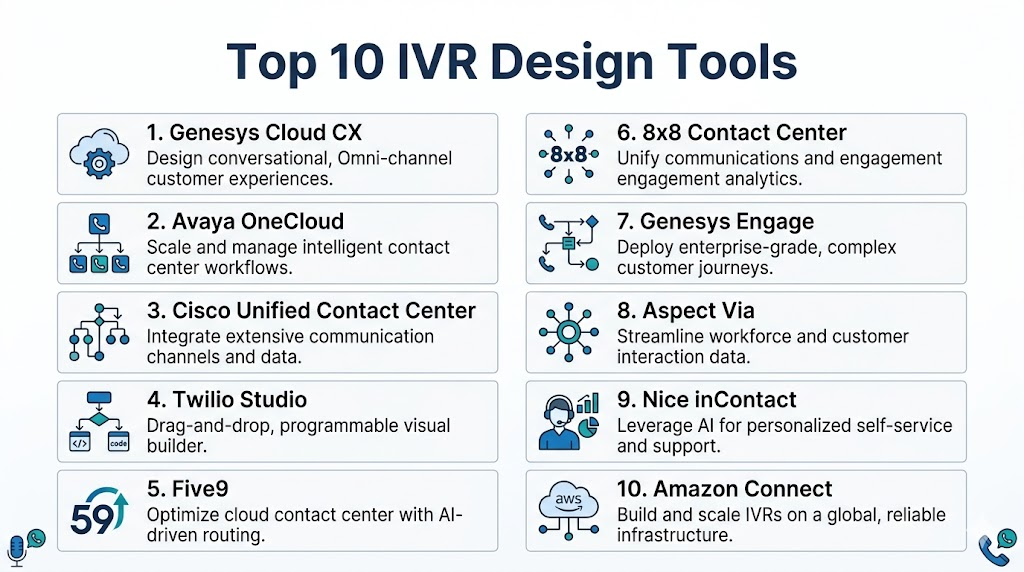
Top 10 IVR Design Tools
#1 — Genesys Cloud CX
Short description: Cloud-based IVR platform offering AI-driven call routing and omnichannel design for enterprises.
Key Features
- Drag-and-drop IVR flow builder
- AI-based natural language recognition
- Omnichannel integration (voice, chat, email)
- Advanced reporting and analytics
- CRM and telephony integration
- Predictive routing for call optimization
- Cloud deployment for scalability
Pros
- Enterprise-grade reliability
- Rich AI and automation capabilities
- Extensive integration options
Cons
- Complex for small teams
- Higher pricing for smaller businesses
Platforms / Deployment
- Web / Cloud
Security & Compliance
- SOC 2, ISO 27001, GDPR
- SSO/SAML, encryption, RBAC
Integrations & Ecosystem
Supports CRM, ERP, and communication platforms
- Salesforce, Zendesk, Microsoft Dynamics
- APIs for custom extensions
- Cloud telephony providers
Support & Community
Comprehensive documentation, onboarding, tiered support, active user community
#2 — Avaya OneCloud
Short description: Enterprise IVR and contact center solution with AI routing and self-service automation
Key Features
- Visual IVR flow builder
- AI-powered speech recognition
- Multichannel support
- Predictive and skills-based routing
- Analytics dashboards
- Cloud and hybrid deployment
Pros
- Strong enterprise adoption
- Flexible deployment options
Cons
- Implementation can be time-intensive
- Costly for smaller businesses
Platforms / Deployment
- Web / Cloud / Hybrid
Security & Compliance
- SOC 2, ISO 27001, Not publicly stated
Integrations & Ecosystem
Integrates with CRM, workforce management, and telephony
- Salesforce, Microsoft Teams
- APIs and SDKs for extensions
- Third-party telephony support
Support & Community
Global enterprise support, extensive documentation, active community
#3 — Cisco Unified Contact Center
Short description: Robust IVR platform offering call routing, AI, and integration with the Cisco ecosystem
Key Features
- Interactive voice menus
- AI-driven call analysis
- Omnichannel routing
- Real-time reporting
- Workflow automation
- Cisco telephony integration
Pros
- Reliable for large-scale deployments
- Seamless Cisco ecosystem integration
Cons
- Complex configuration
- Best suited for Cisco environments
Platforms / Deployment
- Web / Windows / Cloud / Hybrid
Security & Compliance
- ISO 27001, GDPR, Not publicly stated
Integrations & Ecosystem
Integrates with Cisco collaboration tools
- Webex, Cisco Jabber
- CRM and telephony APIs
- Workflow automation extensions
Support & Community
Extensive enterprise support and knowledge base
#4 — Twilio Studio
Short description: Low-code IVR designer for developers and SMBs enabling fast voice and messaging flow deployment
Key Features
- Drag-and-drop workflow builder
- Voice and SMS integration
- API-based extensibility
- Real-time monitoring
- Multichannel support
- Programmable call routing
Pros
- Flexible and developer-friendly
- Rapid deployment and testing
Cons
- Requires technical knowledge
- Limited out-of-the-box enterprise reporting
Platforms / Deployment
- Web / Cloud
Security & Compliance
- SOC 2, ISO 27001, GDPR
- MFA, encryption
Integrations & Ecosystem
API-driven for telephony and CRM
- Zapier, Salesforce, HubSpot
- Webhooks and SDKs
- Programmable voice and messaging
Support & Community
Strong documentation, active developer forums
#5 — Five9
Short description: Cloud contact center platform with IVR design, AI, and analytics
Key Features
- Visual IVR editor
- AI-powered routing
- Predictive and skill-based routing
- Reporting dashboards
- Multichannel support
- CRM integrations
Pros
- User-friendly interface
- Cloud-native and scalable
Cons
- Pricing can be high for SMBs
- Limited offline deployment
Platforms / Deployment
- Web / Cloud
Security & Compliance
- SOC 2, GDPR, ISO 27001
- Encryption, RBAC
Integrations & Ecosystem
Integrates with Salesforce, Zendesk, and other CRMs
- APIs and SDKs
- Workflow automation
- Third-party telephony integrations
Support & Community
Comprehensive support and active community
#6 — 8×8 Contact Center
Short description: Cloud IVR platform for SMBs and mid-market companies with omnichannel capabilities
Key Features
- Drag-and-drop IVR builder
- AI/NLP support
- Multichannel routing
- Analytics and reporting
- Cloud telephony integration
Pros
- Affordable for mid-market
- Easy deployment
Cons
- Limited enterprise features
- Less customization than larger vendors
Platforms / Deployment
- Web / Cloud
Security & Compliance
- SOC 2, GDPR, Not publicly stated
Integrations & Ecosystem
Supports CRMs and helpdesk platforms
- Salesforce, Microsoft Dynamics
- APIs for custom workflows
Support & Community
Standard support tiers, documentation available
#7 — Genesys Engage
Short description: Enterprise IVR tool with AI-driven experience design
Key Features
- Omnichannel IVR designer
- AI routing and predictive engagement
- Speech recognition and NLP
- Real-time analytics
- CRM integration
- Automated workflows
Pros
- Highly scalable
- Advanced AI features
Cons
- Complex implementation
- Premium pricing
Platforms / Deployment
- Web / Cloud / Hybrid
Security & Compliance
- SOC 2, ISO 27001
- Encryption, RBAC, MFA
Integrations & Ecosystem
Integrates with Salesforce, Zendesk, and enterprise systems
- API access
- Third-party telephony connectors
- Workflow automation
Support & Community
Enterprise-grade support and knowledge base
#8 — Aspect Via
Short description: IVR and contact center solution focusing on self-service automation
Key Features
- Visual IVR builder
- AI/NLP capabilities
- Omnichannel routing
- Reporting and analytics
- Predictive routing
- CRM integration
Pros
- Strong self-service focus
- Flexible deployment
Cons
- Smaller community
- Enterprise pricing
Platforms / Deployment
- Web / Cloud / Hybrid
Security & Compliance
- Not publicly stated
Integrations & Ecosystem
Supports CRM and telephony platforms
- Salesforce, Microsoft Dynamics
- API and workflow integrations
Support & Community
Standard documentation and support
#9 — Nice inContact
Short description: Cloud contact center with IVR, AI, and automation
Key Features
- Drag-and-drop IVR
- AI-powered routing
- Omnichannel support
- Analytics dashboards
- CRM integrations
Pros
- Scalable cloud solution
- Customizable flows
Cons
- Complexity for small teams
- Premium pricing
Platforms / Deployment
- Web / Cloud
Security & Compliance
- SOC 2, GDPR
- Encryption
Integrations & Ecosystem
Integrates with Salesforce, Zendesk, and CRMs
- APIs for workflows
- Telephony integrations
Support & Community
Good documentation and support, active community
#10 — Amazon Connect
Short description: Cloud IVR and contact center platform with AI and self-service automation
Key Features
- Visual IVR flow designer
- AI and Lex-powered speech recognition
- Omnichannel support
- Real-time analytics
- API-driven customization
Pros
- Highly scalable
- Deep AI/NLP integration
Cons
- Requires technical expertise
- Cost varies with usage
Platforms / Deployment
- Web / Cloud
Security & Compliance
- SOC 2, ISO 27001
- Encryption, MFA
Integrations & Ecosystem
Supports CRM, analytics, and telephony integration
- Salesforce, Zendesk
- API and SDK access
- AWS ecosystem
Support & Community
Extensive AWS documentation and developer community
Comparison Table
| Tool Name | Best For | Platform(s) Supported | Deployment | Standout Feature | Public Rating |
|---|---|---|---|---|---|
| Genesys Cloud CX | Enterprise | Web | Cloud | AI routing + omnichannel | N/A |
| Avaya OneCloud | Enterprise | Web | Cloud / Hybrid | Flexible IVR deployment | N/A |
| Cisco Unified Contact Center | Enterprise | Web / Windows | Cloud / Hybrid | Cisco ecosystem | N/A |
| Twilio Studio | Developers / SMB | Web | Cloud | Low-code, API extensible | N/A |
| Five9 | SMB / Mid-market | Web | Cloud | Cloud-native IVR | N/A |
| 8×8 Contact Center | SMB / Mid-market | Web | Cloud | Affordable omnichannel | N/A |
| Genesys Engage | Enterprise | Web | Cloud / Hybrid | AI engagement | N/A |
| Aspect Via | Enterprise | Web | Cloud / Hybrid | Self-service automation | N/A |
| Nice inContact | Enterprise / Mid-market | Web | Cloud | Scalable cloud | N/A |
| Amazon Connect | Developers / Enterprise | Web | Cloud | AI/NLP integration | N/A |
Evaluation & Scoring
| Tool Name | Core | Ease | Integrations | Security | Performance | Support | Value | Weighted Total |
|---|---|---|---|---|---|---|---|---|
| Genesys Cloud CX | 9 | 8 | 9 | 9 | 9 | 9 | 7 | 8.7 |
| Avaya OneCloud | 8 | 7 | 8 | 8 | 8 | 8 | 6 | 7.6 |
| Cisco Unified Contact Center | 8 | 7 | 8 | 8 | 9 | 7 | 6 | 7.6 |
| Twilio Studio | 7 | 9 | 9 | 8 | 8 | 8 | 8 | 8.2 |
| Five9 | 8 | 8 | 8 | 8 | 8 | 8 | 7 | 7.9 |
| 8×8 Contact Center | 7 | 8 | 7 | 7 | 7 | 7 | 8 | 7.4 |
| Genesys Engage | 9 | 7 | 9 | 9 | 9 | 9 | 7 | 8.6 |
| Aspect Via | 7 | 7 | 7 | 7 | 7 | 7 | 6 | 7.0 |
| Nice inContact | 8 | 8 | 8 | 8 | 8 | 8 | 7 | 7.9 |
| Amazon Connect | 8 | 8 | 9 | 9 | 9 | 8 | 7 | 8.2 |
Interpretation: Weighted totals compare overall strengths, helping identify tools that best match business size, complexity, and feature requirements.
Which IVR Design Tools Tool Is Right for You
Solo / Freelancer
- Twilio Studio, Amazon Connect: low-cost, flexible, developer-friendly
SMB
- Five9, 8×8 Contact Center, Twilio Studio: scalable, easy to deploy, cloud-native
Mid-Market
- Genesys Cloud CX, Five9, Nice inContact: AI routing, CRM integration, multichannel support
Enterprise
- Genesys Engage, Avaya OneCloud, Cisco Unified Contact Center: robust, high-volume capable, AI-powered
Budget vs Premium
- Budget: 8×8 Contact Center, Twilio Studio
- Premium: Genesys Engage, Cisco Unified Contact Center, Avaya OneCloud
Feature Depth vs Ease of Use
- Depth: Genesys Cloud CX, Genesys Engage, Cisco Unified Contact Center
- Ease: Twilio Studio, Five9, 8×8 Contact Center
Integrations & Scalability
- High: Genesys Cloud CX, Amazon Connect, Cisco Unified Contact Center
- Moderate: 8×8 Contact Center, Aspect Via
Security & Compliance Needs
- Enterprise-grade: Genesys Cloud CX, Cisco Unified Contact Center, Amazon Connect
- SMB: 8×8 Contact Center, Five9
Frequently Asked Questions (FAQs)
1. What is an IVR Design Tool?
IVR Design Tools allow businesses to create automated phone systems for call routing, self-service, and data collection. They streamline telephony automation and reduce manual intervention.
2. How much do IVR tools cost?
Pricing varies by vendor, deployment, and usage. Cloud subscriptions are common, some offering per-minute or per-seat models.
3. Do I need technical expertise to use IVR tools?
Low-code/no-code tools require minimal skills. Enterprise-grade platforms may need IT or developer support.
4. Can IVR integrate with CRM systems?
Yes. Most platforms support Salesforce, Microsoft Dynamics, Zendesk, and APIs for custom integration.
5. Are IVR systems secure?
Many offer SOC 2, ISO 27001, encryption, SSO, and MFA. Verify vendor-specific details for compliance requirements.
6. Can IVR handle high call volumes?
Enterprise platforms are designed for thousands of concurrent calls. SMB-focused tools scale moderately.
7. How do AI and NLP improve IVR?
AI/NLP enables natural language interactions, predictive routing, and intelligent self-service, reducing wait times and transfers.
8. What deployment options exist?
Options include cloud, hybrid, and on-premises. Cloud offers flexibility; hybrid supports legacy systems.
9. Can IVR be multichannel?
Yes. Modern IVR platforms often integrate voice, SMS, and chat for omnichannel engagement.
10. How do I select the right IVR tool?
Evaluate volume, integrations, budget, AI/NLP capabilities, and usability. Pilot 2–3 tools to determine fit before full deployment.
Conclusion
IVR Design Tools are essential for delivering efficient, automated, and personalized customer experiences. The right solution depends on organizational size, technical resources, integration needs, and budget. Solo developers may favor Twilio Studio or Amazon Connect, mid-market companies can leverage Five9 or Genesys Cloud CX, and enterprises benefit from Genesys Engage or Cisco Unified Contact Center for high-volume, AI-powered IVR. Shortlist 2–3 tools, conduct a pilot, and validate integration, security, and performance before full implementation to ensure optimal outcomes.
