Introduction
Configuration management tools help IT teams automate and maintain consistent software, infrastructure, and system settings across multiple environments. They reduce human error, improve operational efficiency, and allow organizations to implement standardized configurations across servers, virtual machines, and cloud resources.
These tools are essential for modern IT landscapes where hybrid cloud, containers, and microservices are widely used. They allow teams to enforce compliance, automate deployment, and simplify versioning and rollback procedures, ensuring stability and scalability.
Real-world use cases
- Automating server setup and application deployment
- Detecting and correcting configuration drift
- Enforcing security policies across systems
- Provisioning infrastructure in cloud or on-prem environments
- Managing containerized environments and microservices
Evaluation criteria for buyers
- Platform and OS compatibility
- Cloud, hybrid, and on-premises deployment support
- Integration with CI/CD pipelines and DevOps workflows
- Ease of use and learning curve
- Scalability and performance
- Security features including encryption and access control
- Audit and compliance capabilities
- Community support and vendor reliability
- Cost and licensing models
Best for: DevOps engineers, system administrators, IT operations teams, enterprises managing complex infrastructure, and organizations implementing automated workflows
Not ideal for: Small organizations with minimal infrastructure or static configurations where manual management suffices
Key Trends in Configuration Management Tools
- AI-powered automation for predictive configuration and error detection
- Cloud-native and hybrid environment support
- Enhanced security and compliance monitoring
- Integration with container orchestration platforms like Kubernetes and Docker
- GitOps-style workflows for infrastructure as code
- Real-time auditing, drift detection, and version control
- Expanded APIs and SDKs for custom automation
- Self-healing automation and anomaly detection
- Managed SaaS offerings alongside self-hosted tools
- Low-latency performance for large-scale deployments
How We Selected These Tools
- Evaluated market adoption and mindshare across enterprises and SMBs
- Assessed feature completeness including automation, drift detection, and compliance
- Reviewed reliability and performance in production environments
- Analyzed security posture and access control capabilities
- Considered integrations with DevOps toolchains and orchestration platforms
- Measured suitability across company sizes and infrastructure complexity
- Balanced open-source tools with enterprise-grade solutions
- Reviewed documentation, support tiers, and community activity
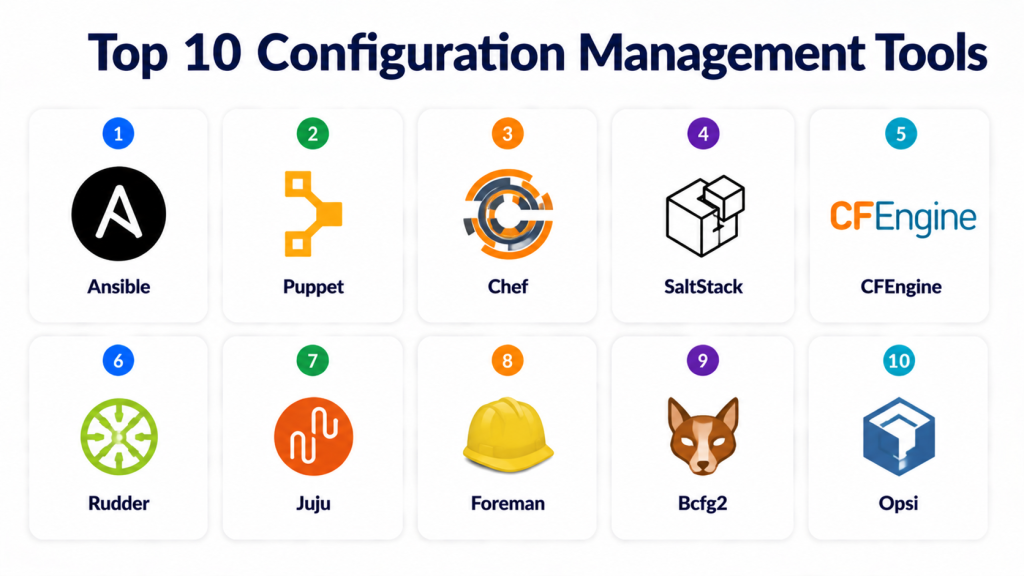
Top 10 Configuration Management Tools
#1 — Ansible
Short description: Agentless configuration management tool that automates tasks across servers and cloud environments
Key Features
- Agentless automation using SSH
- Playbooks for task orchestration
- Role-based reuse of automation tasks
- Integration with cloud providers
- Idempotent operations to avoid conflicts
- Inventory management
- Multi-platform support
Pros
- Simple, agentless architecture
- Strong community support
- Scales across hybrid environments
Cons
- Performance may slow in large deployments
- Advanced playbooks require expertise
Platforms / Deployment
Linux / Windows / macOS
Cloud / Self-hosted / Hybrid
Security & Compliance
Encryption, RBAC
Not publicly stated
Integrations & Ecosystem
- CI/CD pipelines
- AWS, Azure, GCP automation
- API integration for custom workflows
Support & Community
Active open-source community
Enterprise support available
Comprehensive documentation
#2 — Puppet
Short description: Enterprise-grade configuration management tool for automating infrastructure and compliance
Key Features
- Declarative language for configuration
- Node management and orchestration
- Compliance reporting and auditing
- Cloud and on-prem integration
- Role-based access control
- Environment segregation
Pros
- Strong enterprise support
- Detailed compliance features
- Scales for large infrastructures
Cons
- Requires agent installation on nodes
- Steep learning curve
Platforms / Deployment
Linux / Windows / macOS
Cloud / Self-hosted / Hybrid
Security & Compliance
RBAC, encryption, audit logs
Not publicly stated
Integrations & Ecosystem
- CI/CD tools
- Cloud providers
- Service discovery and monitoring
Support & Community
Enterprise support available
Extensive documentation and tutorials
#3 — Chef
Short description: Automation platform for managing infrastructure as code and consistent application deployment
Key Features
- Declarative language for configurations
- Test-driven automation
- Environment and role management
- Compliance and policy enforcement
- Integration with cloud and containers
- Versioned cookbooks for reuse
Pros
- Enterprise-ready
- Comprehensive automation and compliance
- Cloud-native integrations
Cons
- Requires learning cookbooks
- Chef Server needed for full functionality
Platforms / Deployment
Linux / Windows / macOS
Cloud / Self-hosted / Hybrid
Security & Compliance
Encryption, RBAC, audit logs
Not publicly stated
Integrations & Ecosystem
- Cloud providers
- Kubernetes and container support
- CI/CD pipelines
Support & Community
Enterprise support available
Active community and documentation
#4 — SaltStack
Short description: Configuration management and orchestration tool designed for large-scale automation
Key Features
- Event-driven automation
- Remote execution across multiple nodes
- State management and configuration
- Real-time monitoring
- Cloud integration
- Extensible modules
Pros
- Efficient at scale
- Strong automation capabilities
- Flexible deployment
Cons
- Can be complex for small teams
- Learning Salt language required
Platforms / Deployment
Linux / Windows / macOS
Cloud / Self-hosted / Hybrid
Security & Compliance
RBAC, SSL/TLS encryption
Not publicly stated
Integrations & Ecosystem
- Cloud providers
- CI/CD pipelines
- Monitoring tools
Support & Community
Enterprise support tiers
Active community forums
#5 — CFEngine
Short description: Lightweight, agent-based tool focused on continuous compliance and automated management
Key Features
- Declarative language for configuration
- Policy-based automation
- Compliance enforcement
- Scalable for large environments
- Cross-platform support
- Reporting and auditing
Pros
- Lightweight and efficient
- Strong compliance focus
- Works on resource-constrained systems
Cons
- Limited enterprise support
- Older documentation in some areas
Platforms / Deployment
Linux / Windows / macOS
Cloud / Self-hosted / Hybrid
Security & Compliance
Encryption, ACLs
Not publicly stated
Integrations & Ecosystem
- Cloud integration
- CI/CD pipelines
- Monitoring APIs
Support & Community
Community-driven support
Documentation available
#6 — Rudder
Short description: Configuration management tool with integrated compliance automation and web reporting
Key Features
- Policy-driven automation
- Real-time configuration reporting
- Role-based access control
- CI/CD integration
- Compliance dashboards
- Multi-platform support
Pros
- Combines management and compliance
- Web-based interface
- Scales to medium/large infrastructure
Cons
- Less widely adopted
- Limited community resources
Platforms / Deployment
Linux / Windows
Cloud / Self-hosted / Hybrid
Security & Compliance
RBAC, encryption
Not publicly stated
Integrations & Ecosystem
- CI/CD pipelines
- Cloud provider integration
- APIs for automation
Support & Community
Enterprise support available
Documentation and tutorials
#7 — Juju
Short description: Orchestration and configuration tool for deploying cloud-native applications
Key Features
- Model-driven deployment
- Multi-cloud support
- Kubernetes and container integration
- Automated scaling and health checks
- Versioned charms for applications
- Monitoring and observability
Pros
- Cloud-native friendly
- Scales across hybrid environments
- Supports multi-service applications
Cons
- Limited adoption
- Requires learning charms
Platforms / Deployment
Linux / macOS
Cloud / Self-hosted / Hybrid
Security & Compliance
SSL/TLS encryption
Not publicly stated
Integrations & Ecosystem
- Kubernetes
- Cloud providers
- CI/CD pipelines
Support & Community
Active community
Documentation available
#8 — Foreman
Short description: Lifecycle management tool for provisioning, configuration, and monitoring
Key Features
- Configuration management integration
- Provisioning automation
- Role-based access control
- Multi-environment management
- Reporting and monitoring
- Plugin extensibility
Pros
- Combines provisioning and configuration
- Active community and plugins
- Scales for medium/large infrastructure
Cons
- Complexity for small teams
- Resource-intensive setup
Platforms / Deployment
Linux / macOS / Windows
Cloud / Self-hosted / Hybrid
Security & Compliance
RBAC, encryption
Not publicly stated
Integrations & Ecosystem
- Puppet, Ansible, Chef
- Cloud providers
- Monitoring tools
Support & Community
Community support
Documentation available
#9 — Bcfg2
Short description: Lightweight configuration system for small to medium infrastructures
Key Features
- Declarative configuration
- Version control integration
- Reporting and auditing
- Multi-platform support
- Policy-based automation
Pros
- Lightweight and efficient
- Simple architecture
- Easy to integrate with version control
Cons
- Limited enterprise support
- Smaller user base
Platforms / Deployment
Linux / macOS
Self-hosted
Security & Compliance
Encryption, ACLs
Not publicly stated
Integrations & Ecosystem
- Version control systems
- CI/CD pipelines
- Monitoring tools
Support & Community
Community-based support
Documentation available
#10 — Opsi
Short description: Open-source endpoint management and configuration tool for enterprise Windows/Linux environments
Key Features
- Software deployment automation
- Configuration management
- Inventory and reporting
- Policy-based management
- Role-based access control
- Remote execution
Pros
- Enterprise endpoint focus
- Open-source with updates
- Supports large deployments
Cons
- Limited cloud-native support
- Smaller community
Platforms / Deployment
Windows / Linux
Self-hosted
Security & Compliance
RBAC, encryption
Not publicly stated
Integrations & Ecosystem
- Software deployment tools
- Monitoring systems
- APIs for automation
Support & Community
Community support
Documentation available
Comparison Table
| Tool Name | Best For | Platform(s) Supported | Deployment | Standout Feature | Public Rating |
|---|---|---|---|---|---|
| Ansible | Agentless automation | Linux / Windows / macOS | Cloud / Self-hosted / Hybrid | Playbooks + agentless | N/A |
| Puppet | Enterprise | Linux / Windows / macOS | Cloud / Self-hosted / Hybrid | Compliance reporting | N/A |
| Chef | Infrastructure as code | Linux / Windows / macOS | Cloud / Self-hosted / Hybrid | Cookbooks and versioning | N/A |
| SaltStack | Large-scale automation | Linux / Windows / macOS | Cloud / Self-hosted / Hybrid | Event-driven automation | N/A |
| CFEngine | Lightweight automation | Linux / Windows / macOS | Cloud / Self-hosted / Hybrid | Continuous compliance | N/A |
| Rudder | Compliance automation | Linux / Windows | Cloud / Self-hosted / Hybrid | Web-based reporting | N/A |
| Juju | Cloud-native apps | Linux / macOS | Cloud / Self-hosted / Hybrid | Model-driven orchestration | N/A |
| Foreman | Lifecycle management | Linux / macOS / Windows | Cloud / Self-hosted / Hybrid | Provisioning + config | N/A |
| Bcfg2 | Small/medium infra | Linux / macOS | Self-hosted | Lightweight configuration | N/A |
| Opsi | Enterprise endpoints | Windows / Linux | Self-hosted | Policy-based management | N/A |
Evaluation & Scoring
| Tool Name | Core | Ease | Integrations | Security | Performance | Support | Value | Weighted Total |
|---|---|---|---|---|---|---|---|---|
| Ansible | 9 | 9 | 8 | 8 | 9 | 8 | 8 | 8.5 |
| Puppet | 9 | 7 | 8 | 8 | 9 | 9 | 7 | 8.2 |
| Chef | 9 | 7 | 8 | 8 | 9 | 8 | 7 | 8.0 |
| SaltStack | 8 | 7 | 8 | 7 | 8 | 7 | 8 | 7.6 |
| CFEngine | 7 | 8 | 7 | 7 | 8 | 7 | 8 | 7.4 |
| Rudder | 8 | 8 | 7 | 7 | 8 | 7 | 7 | 7.5 |
| Juju | 8 | 8 | 8 | 7 | 8 | 7 | 8 | 7.7 |
| Foreman | 8 | 7 | 8 | 7 | 8 | 7 | 7 | 7.4 |
| Bcfg2 | 7 | 8 | 7 | 6 | 7 | 6 | 7 | 6.9 |
| Opsi | 7 | 7 | 7 | 7 | 7 | 6 | 7 | 7.0 |
Which Configuration Management Tool Is Right for You?
Solo / Freelancer
- Ansible or Bcfg2 for simple automation and minimal setup
SMB
- Rudder or SaltStack for hybrid cloud and compliance support
Mid-Market
- Puppet or Chef for enterprise-level orchestration and CI/CD integration
Enterprise
- Ansible Enterprise, Puppet Enterprise, or Foreman for large-scale automation
Budget vs Premium
- Budget: Bcfg2, Opsi, Rudder
- Premium: Ansible Enterprise, Puppet Enterprise, Chef
Feature Depth vs Ease of Use
- Feature-heavy: Puppet, Chef
- Ease of use: Ansible, Bcfg2
Integrations & Scalability
- SaltStack, Ansible, Juju for multi-cloud or large-scale infrastructures
Security & Compliance Needs
- Puppet, Rudder, Ansible Enterprise for encryption, access control, and audit logs
Frequently Asked Questions
1. What pricing models are common?
Open-source tools are free; enterprise editions or managed services are subscription or usage-based.
2. How complex is onboarding?
Ansible and Bcfg2 are beginner-friendly; Puppet and Chef require expertise.
3. Can these tools improve reliability?
Yes, automation and drift prevention reduce errors and improve uptime.
4. Are they compatible with cloud platforms?
Most support AWS, GCP, Azure, and hybrid infrastructures.
5. Can they handle large-scale deployments?
Yes, Puppet, SaltStack, and Ansible scale efficiently for hundreds of nodes.
6. How do they enhance security?
Through RBAC, encryption, audit logs, and policy enforcement.
7. What are common mistakes?
Overcomplicating scripts, ignoring drift detection, and improper role management.
8. How easy is switching between tools?
Migration requires testing, translating existing automation scripts, and re-registering nodes.
9. Do they integrate with CI/CD pipelines?
Yes, most integrate with Jenkins, GitLab CI, and other DevOps tools.
10. Can they manage hybrid or multi-cloud infrastructure?
Yes, Ansible, Puppet, and SaltStack provide multi-cloud and hybrid support.
Conclusion
Configuration management tools are essential for automating, standardizing, and securing infrastructure. Solo developers may prefer Ansible or Bcfg2, while enterprises benefit from Puppet Enterprise or Chef. Evaluate 2–3 shortlisted tools, run a pilot, and validate integration, compliance, and automation before full deployment.
