Introduction
Catering Management Software (CMS) is designed to help catering businesses, event planners, and hospitality companies streamline their operations. These platforms manage event scheduling, client orders, menu planning, inventory, invoicing, and staff allocation. By consolidating operational workflows into a single system, CMS reduces errors, saves time, and improves customer satisfaction.
In catering businesses face higher client expectations for personalized menus, timely delivery, and seamless event execution. A reliable CMS enables teams to manage multiple events, optimize resource usage, and analyze performance for better profitability.
Use cases include:
- Managing orders and events for corporate and private catering
- Planning and pricing customized menus for clients
- Scheduling staff and assigning tasks for events
- Tracking inventory and food costs in real time
- Generating invoices, contracts, and post-event reporting
Key evaluation criteria:
- Event and client management features
- Menu planning and costing tools
- Order tracking and delivery management
- Inventory management and supplier integration
- Staff scheduling and resource allocation
- Reporting and analytics dashboards
- Integration with POS and accounting systems
- Multi-location and multi-event support
- Mobile app support for on-site management
- Security and compliance features
Best for: Catering companies, event management firms, and hospitality operators seeking operational efficiency and accurate event execution.
Not ideal for: Small or one-person catering operations that can manage tasks manually without software support.
Key Trends in Catering Management Software
- Cloud-based CMS for remote access and multi-location management
- AI-driven menu planning and cost optimization
- Integration with POS, RMS, and inventory management systems
- Automated event scheduling and staff allocation
- Online booking and client portal for event orders
- Real-time reporting on costs, revenue, and profitability
- Mobile apps for on-site management and coordination
- CRM integration for client relationship management
- Menu analytics and food cost tracking
- Data-driven insights for marketing, promotions, and upselling
How We Selected These Tools (Methodology)
- Evaluated market adoption among catering companies and event planners
- Assessed feature completeness: event management, menu planning, inventory, and analytics
- Reviewed reliability, performance, and uptime
- Verified security measures: encryption, access control, and data privacy
- Analyzed integrations with POS, RMS, accounting, and client management systems
- Considered suitability for small, mid-market, and enterprise catering businesses
- Evaluated scalability for multiple events and locations
- Assessed ease of use and staff training requirements
- Reviewed pricing and value for operational efficiency
- Evaluated innovation in automation, analytics, and mobile accessibility
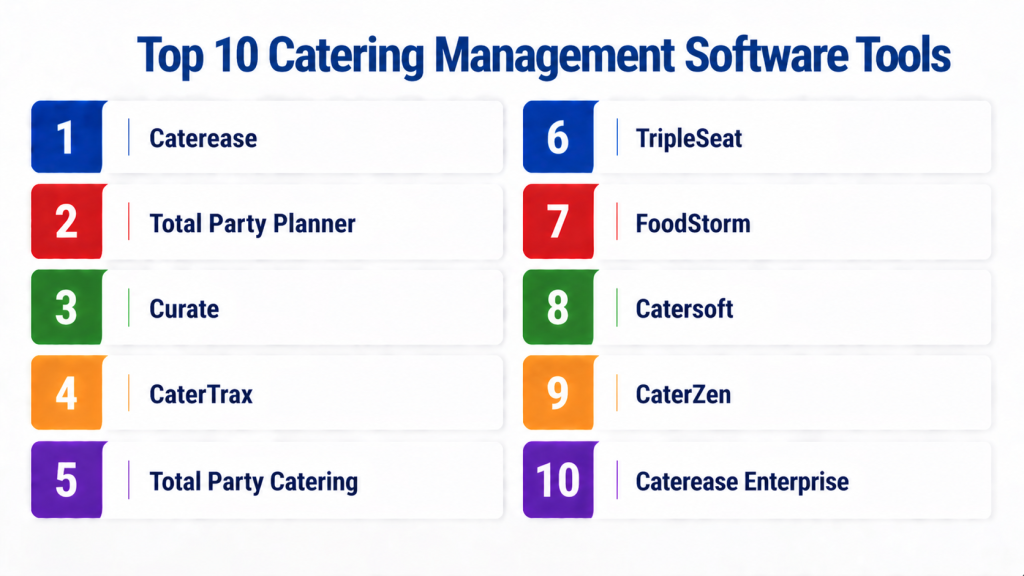
Top 10 Catering Management Software Tools
#1 — Caterease
Short description (: Caterease is a comprehensive catering management platform for planning, quoting, and managing events. It provides tools for menu creation, staffing, and inventory management. The software supports multi-location operations and integrates with POS and accounting systems. Caterease is suitable for small to enterprise catering companies. Its reporting dashboards enable real-time insights into profitability, inventory usage, and event performance. Event planners can efficiently track orders, manage contracts, and coordinate resources.
Key Features
- Event scheduling and client management
- Menu planning and costing
- Inventory tracking
- Staff assignment and scheduling
- Reporting and analytics dashboards
- Multi-location support
Pros
- Comprehensive event and menu management
- Scalable for multiple locations
Cons
- May require training for new users
- Premium pricing for enterprise features
Platforms / Deployment
- Windows, Web / Cloud
Security & Compliance
- SSL encryption
- Data privacy compliant
Integrations & Ecosystem
- POS systems
- Accounting software
- CRM platforms
Support & Community
Email, phone support, and documentation resources.
#2 — Total Party Planner
Short description : Total Party Planner offers catering and event management software for small to mid-sized catering businesses. It provides tools for client management, menu costing, and event scheduling. The platform supports automated invoicing and payment tracking. Total Party Planner is suitable for event planners, wedding caterers, and corporate catering operations. It integrates with accounting and POS systems for accurate financial tracking. Reporting features allow insights into menu profitability and event performance.
Key Features
- Event scheduling and client management
- Menu planning and cost tracking
- Invoicing and payment management
- Staff scheduling
- Reporting dashboards
Pros
- Affordable for SMB catering companies
- Easy to use and implement
Cons
- Limited advanced analytics
- Smaller integration ecosystem
Platforms / Deployment
- Web, Windows / Cloud
Security & Compliance
- SSL encryption
- Data privacy compliant
Integrations & Ecosystem
- Accounting software
- POS systems
Support & Community
Email support and online documentation.
#3 — Curate
Short description : Curate is a modern cloud-based catering software designed for event planning, client management, and menu optimization. It provides tools to manage event orders, track inventory, and schedule staff. Curate integrates with POS and accounting systems for seamless operations. It is ideal for small to mid-sized catering businesses. The platform includes dashboards for analyzing profitability and monitoring event execution in real time. Curate enhances communication between clients and catering teams for better service.
Key Features
- Event and client management
- Menu planning and cost analysis
- Staff scheduling
- Inventory and supplier management
- Reporting and analytics
Pros
- Modern, intuitive interface
- Streamlines communication and workflow
Cons
- Limited enterprise-level features
- Integration options may be limited
Platforms / Deployment
- Web, iOS / Cloud
Security & Compliance
- SSL encryption
- Data privacy compliant
Integrations & Ecosystem
- POS platforms
- Accounting and CRM systems
Support & Community
Email support and knowledge base.
#4 — CaterTrax
Short description : CaterTrax offers catering management solutions for restaurants, hotels, and event management companies. It provides tools for online ordering, menu customization, and client management. The platform supports inventory tracking and staff assignment for events. CaterTrax is suitable for multi-location operations and enterprise catering companies. Dashboards provide real-time insights into order status, inventory usage, and revenue. Integration with POS and accounting software helps streamline operational workflows.
Key Features
- Online ordering and event management
- Menu planning and customization
- Inventory and resource tracking
- Staff scheduling
- Reporting and analytics dashboards
Pros
- Scalable for multi-location businesses
- Integrates with online ordering platforms
Cons
- Requires training for full utilization
- Pricing may be high for SMBs
Platforms / Deployment
- Web, iOS / Cloud
Security & Compliance
- SSL encryption
- Data privacy compliant
Integrations & Ecosystem
- POS and RMS systems
- Accounting software
- CRM tools
Support & Community
Dedicated support, online documentation, and training resources.
#5 — Total Party Catering
Short description : Total Party Catering is a cloud-based platform for event planning, client management, and menu tracking. It provides tools for invoicing, inventory, and staff scheduling. The software supports small and medium-sized catering companies. It integrates with POS and accounting systems for accurate financial management. Reporting dashboards provide insights into menu profitability, resource allocation, and event efficiency. It simplifies client communications and order tracking.
Key Features
- Event scheduling and client management
- Menu cost tracking and pricing
- Inventory management
- Staff scheduling and assignments
- Reporting dashboards
Pros
- Simple and user-friendly
- Suitable for small to mid-sized caterers
Cons
- Limited advanced analytics
- Integration options may be fewer
Platforms / Deployment
- Web, Windows / Cloud
Security & Compliance
- SSL encryption
- Data privacy compliant
Integrations & Ecosystem
- POS systems
- Accounting software
Support & Community
Email and phone support; documentation.
#6 — Caterease
Short description : Caterease offers software for menu and event management, inventory, and reporting. It allows catering companies to track client orders, manage staff, and optimize menus. Caterease is suitable for enterprise and mid-sized catering businesses. It provides real-time dashboards for profitability, cost tracking, and resource allocation. Integration with POS and accounting systems ensures accurate data flow. The platform helps streamline operations for multiple events simultaneously.
Key Features
- Event scheduling and management
- Menu planning and costing
- Inventory and supplier tracking
- Staff management and scheduling
- Analytics and reporting
Pros
- Comprehensive features for large operations
- Real-time profitability tracking
Cons
- Steeper learning curve
- Premium pricing
Platforms / Deployment
- Windows, Web / Cloud
Security & Compliance
- SSL encryption
- Data privacy compliant
Integrations & Ecosystem
- POS and RMS systems
- Accounting software
- CRM platforms
Support & Community
Email, phone support; training resources.
#7 — TripleSeat
Short description : TripleSeat is a cloud-based catering and event management platform for restaurants, hotels, and independent caterers. It provides tools for booking management, menu planning, and client communications. TripleSeat supports multiple event types and integrates with POS and accounting systems. Reporting dashboards provide insights into profitability, event performance, and resource allocation. It is suitable for small to mid-sized catering businesses seeking streamlined operations.
Key Features
- Event and reservation management
- Menu and pricing management
- Staff scheduling
- Client communications and CRM
- Reporting and analytics
Pros
- Cloud-based and scalable
- Centralizes event and menu management
Cons
- Some advanced features require higher-tier plans
- Limited customization options
Platforms / Deployment
- Web, iOS / Cloud
Security & Compliance
- SSL encryption
- Data privacy compliant
Integrations & Ecosystem
- POS systems
- Accounting software
- CRM platforms
Support & Community
Online support and documentation.
#8 — FoodStorm
Short description : FoodStorm provides catering management software with event scheduling, menu planning, and inventory management. It is suitable for restaurants, corporate caterers, and multi-location businesses. FoodStorm integrates with POS and accounting software for accurate cost tracking and reporting. It provides dashboards for profitability and resource allocation. Client communication features streamline event planning and confirmation processes.
Key Features
- Event and client management
- Menu cost tracking and optimization
- Inventory management
- Staff scheduling
- Reporting and analytics
Pros
- Comprehensive multi-location support
- Cloud-based for remote access
Cons
- More complex setup
- Premium pricing for advanced features
Platforms / Deployment
- Web, iOS / Cloud
Security & Compliance
- SSL encryption
- Data privacy compliant
Integrations & Ecosystem
- POS systems
- Accounting and CRM platforms
Support & Community
Dedicated support and online documentation.
#9 — Catersoft
Short description : Catersoft is a catering and event management software that provides menu planning, cost tracking, and client management. It helps small to mid-sized caterers manage multiple events efficiently. Reporting dashboards provide insights into profitability and resource usage. Integration with POS and accounting ensures accurate financial management. The platform streamlines staff scheduling and client communications for better event execution.
Key Features
- Event scheduling and client management
- Menu and cost analysis
- Inventory and resource tracking
- Staff scheduling
- Reporting dashboards
Pros
- Affordable and user-friendly
- Helps manage multiple events
Cons
- Limited advanced analytics
- Smaller integration ecosystem
Platforms / Deployment
- Web, Windows / Cloud
Security & Compliance
- SSL encryption
- Data privacy compliant
Integrations & Ecosystem
- POS systems
- Accounting platforms
Support & Community
Email support and documentation.
#10 — CaterZen
Short description : CaterZen provides cloud-based catering management with tools for menu planning, event scheduling, and inventory management. It is suitable for small to mid-sized catering companies. The platform provides dashboards for cost tracking, profitability, and staff allocation. Integration with POS and accounting systems ensures accurate operational data. CaterZen simplifies client communication, menu customization, and order tracking for efficient event management.
Key Features
- Menu planning and costing
- Event and client management
- Inventory tracking
- Staff scheduling
- Reporting dashboards
Pros
- Cloud-based and accessible
- Simplifies event and menu management
Cons
- Limited enterprise-level features
- Advanced integrations require custom setup
Platforms / Deployment
- Web, iOS / Cloud
Security & Compliance
- SSL encryption
- Data privacy compliant
Integrations & Ecosystem
- POS systems
- Accounting software
- CRM platforms
Support & Community
Email support and documentation.
Comparison Table
| Tool Name | Best For | Platform(s) Supported | Deployment | Standout Feature | Public Rating |
|---|---|---|---|---|---|
| Caterease | Enterprise | Windows, Web | Cloud | Event + menu management | N/A |
| Total Party Planner | SMB | Windows, Web | Cloud | Menu + event tracking | N/A |
| Curate | SMB | Web, iOS | Cloud | Client + menu optimization | N/A |
| CaterTrax | Multi-location | Web, iOS | Cloud | Online ordering + event tracking | N/A |
| Total Party Catering | SMB | Windows, Web | Cloud | Simple menu + event workflow | N/A |
| Caterease | Enterprise | Windows, Web | Cloud | Multi-event & menu dashboards | N/A |
| TripleSeat | SMB | Web, iOS | Cloud | Event booking + CRM | N/A |
| FoodStorm | Multi-location | Web, iOS | Cloud | Inventory + menu analytics | N/A |
| Catersoft | SMB | Windows, Web | Cloud | Multi-event management | N/A |
| CaterZen | SMB | Web, iOS | Cloud | Cloud menu + event management | N/A |
Frequently Asked Questions (FAQs)
1. Can these tools handle multiple events simultaneously?
Yes. Most catering management software platforms allow you to manage multiple events at the same time. You can schedule bookings, track staff assignments, and monitor menu preparation. This ensures that resources are allocated efficiently and avoids scheduling conflicts. Multi-event management is especially useful for large catering businesses or multi-location operations.
2. Do these platforms integrate with POS and accounting systems?
Yes. Integration with POS and accounting systems ensures accurate sales tracking, inventory management, and financial reporting. Most CMS platforms support popular POS solutions and accounting software. This reduces manual data entry and ensures consistency across operations. Integrations also enable real-time tracking of costs and revenue per event.
3. Can I track menu profitability using these tools?
Yes. Catering software provides insights into menu item costs, ingredient usage, and profit margins. By analyzing which dishes generate the highest revenue, operators can optimize menus. Some platforms also suggest pricing adjustments to improve profitability. This helps maintain financial health while enhancing client satisfaction.
4. Are these tools suitable for small catering businesses?
Yes. Platforms like Total Party Planner, Curate, and TripleSeat are designed for small to mid-sized caterers. They offer essential features such as event scheduling, menu planning, and invoicing without overwhelming complexity. Cloud-based deployment ensures low upfront cost and easy setup. Small businesses can scale as they grow.
5. Can staff schedules be managed within these systems?
Yes. Most CMS platforms allow managers to assign tasks, schedule staff, and track work hours for events. This ensures that all events are properly staffed and reduces operational errors. Automated scheduling features can also help optimize labor costs. Staff can access schedules through mobile apps or web dashboards.
6. Do these platforms support online client bookings?
Yes. Many catering management tools provide client-facing portals for online bookings. Customers can view available dates, select menu options, and submit event requests. This reduces administrative workload and improves the client experience. Integration with notifications ensures confirmations and reminders are sent automatically.
7. Can inventory and supplier management be handled within the software?
Yes. Catering software often includes inventory tracking and supplier management features. It monitors stock levels, calculates required ingredients per event, and tracks vendor orders. This reduces waste, ensures timely procurement, and helps control food costs. Integration with POS provides real-time stock updates.
8. Are reporting and analytics available in these tools?
Yes. Platforms provide dashboards with insights into revenue, event performance, menu profitability, and staff efficiency. Reports can be filtered by event, location, or date range. Analytics help managers make data-driven decisions for scheduling, menu planning, and client management. Some tools also support exporting data for accounting purposes.
9. Is mobile access supported for on-site event management?
Yes. Most modern catering management platforms are cloud-based with mobile apps. Staff can update event progress, track inventory, and communicate with the team on-site. Mobile access ensures real-time data and allows for quick adjustments during events. This increases operational efficiency and reduces errors.
10. How long does it take to implement these systems?
Implementation time varies depending on business size and platform complexity. Small catering companies can often start using cloud-based tools in a few days. Enterprise or multi-location setups may take a few weeks for full integration with POS, accounting, and CRM systems. Staff training ensures smooth adoption and operational efficiency.
Conclusion
Catering Management Software streamlines event planning, menu engineering, and operational workflows for catering businesses. Cloud-based solutions provide analytics, inventory tracking, and staff management, enabling operators to improve profitability and client satisfaction.
Small businesses can leverage Total Party Planner, Curate, and TripleSeat for efficient event and menu management. Enterprise and multi-location caterers benefit from Caterease, CaterTrax, and FoodStorm, which provide advanced reporting, POS integrations, and scalability.
To select the right CMS, shortlist 2–3 platforms based on business size, menu complexity, and event volume. Test features, validate reporting and integrations, and ensure mobile accessibility for on-site management. This approach ensures efficient event execution, optimized menu profitability, and improved customer satisfaction.
