Introduction
Computer Vision Platforms are specialized AI systems that enable machines to interpret, analyze, and understand visual data such as images and videos. These platforms provide tools for building, training, and deploying computer vision models for tasks like object detection, image classification, facial recognition, and visual inspection.
In today’s AI-driven world, computer vision is a core technology powering industries such as healthcare, automotive, retail, manufacturing, and security. With the rise of edge AI, generative vision models, and real-time analytics, these platforms have become essential for scaling visual intelligence across applications.
Common use cases include:
- Object detection and tracking
- Facial recognition and biometric authentication
- Medical image analysis
- Autonomous vehicles and robotics
- Quality inspection in manufacturing
- Retail analytics and customer behavior tracking
Key evaluation criteria buyers should consider:
- Accuracy of vision models
- Pre-trained model availability
- Training and annotation tools
- Scalability and performance
- Real-time inference capabilities
- Integration with AI/ML pipelines
- Security and compliance features
- Edge and cloud deployment support
Best for: AI engineers, data scientists, computer vision developers, and enterprises building image/video-based AI applications.
Not ideal for: Teams working only with structured/tabular data or basic analytics without visual data requirements.
Key Trends in Computer Vision Platforms
- Edge AI expansion: Real-time processing on devices like cameras and IoT systems
- Vision transformer models: Adoption of advanced deep learning architectures
- Auto-labeling tools: AI-assisted data annotation and labeling
- Multimodal AI integration: Combining vision with text and audio models
- Cloud-native CV platforms: Scalable managed vision services
- Real-time analytics: Instant image and video processing
- Synthetic data generation: Training models using generated datasets
- Responsible AI: Bias detection in facial recognition and vision systems
How We Evaluated Computer Vision Platforms (Methodology)
- Market adoption and enterprise usage
- Model accuracy and performance benchmarks
- Availability of pre-trained models
- Ease of use and developer experience
- Scalability and real-time processing capability
- Security and compliance readiness
- Integration with ML ecosystems
- Cost and deployment flexibility
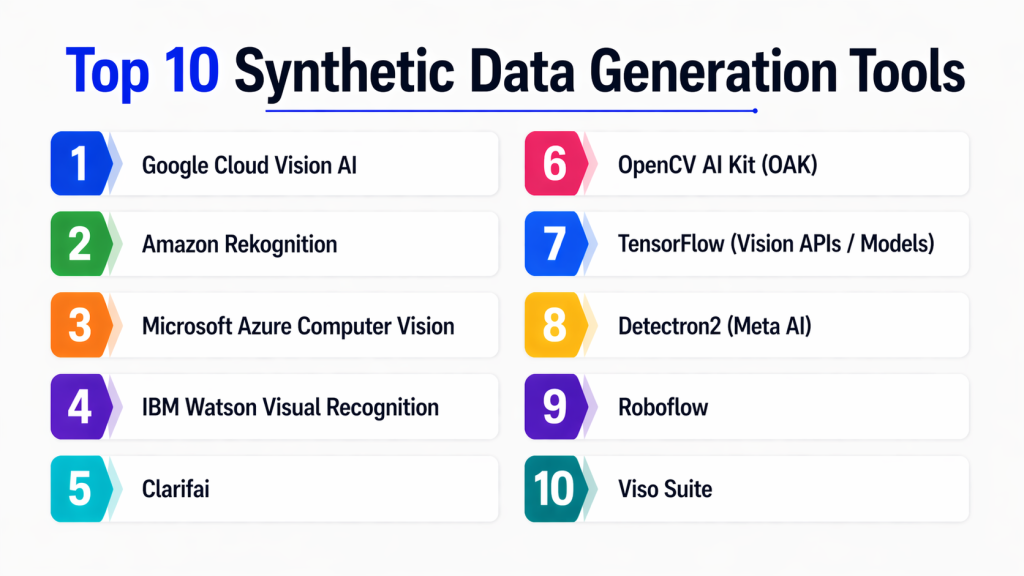
Top 10 Computer Vision Platforms
#1 — Google Cloud Vision AI
Short description:
Google Cloud Vision AI is a powerful computer vision platform that provides pre-trained models for image classification, object detection, and text extraction. It enables developers to quickly integrate visual intelligence into applications without deep model training expertise. It is widely used in enterprise-scale image and video analysis.
Key Features
- Image classification
- Object detection
- OCR (text extraction)
- Face detection
- Label detection
- Content moderation
Pros
- Highly accurate pre-trained models
- Easy API-based integration
Cons
- Cloud dependency
- Pricing can scale quickly
Platforms / Deployment
- Cloud
Security & Compliance
- Encryption, IAM, audit logging
Integrations & Ecosystem
- Google Cloud Storage
- BigQuery
- Vertex AI
- APIs
Support & Community
Strong enterprise support and documentation.
#2 — Amazon Rekognition
Short description:
Amazon Rekognition provides image and video analysis capabilities powered by deep learning. It is widely used for facial recognition, object detection, and content moderation in AWS environments.
Key Features
- Face analysis and recognition
- Object and scene detection
- Video analysis
- Text detection in images
- Safety and moderation tools
Pros
- Strong AWS integration
- Scalable real-time processing
Cons
- AWS lock-in
- Cost increases with usage
Platforms / Deployment
- Cloud
Security & Compliance
- IAM, encryption, compliance support
Integrations & Ecosystem
- S3
- Lambda
- AWS AI services
Support & Community
Strong AWS enterprise support.
#3 — Microsoft Azure Computer Vision
Short description:
Azure Computer Vision provides advanced image analysis capabilities including OCR, object detection, and spatial analysis. It is part of Azure AI services.
Key Features
- Image tagging and classification
- OCR and text extraction
- Object detection
- Spatial analysis
- Face recognition
Pros
- Strong enterprise integration
- Reliable performance
Cons
- Azure dependency
- Limited customization
Platforms / Deployment
- Cloud
Security & Compliance
- Azure AD, encryption
Integrations & Ecosystem
- Azure ML
- Power BI
- Cognitive Services
Support & Community
Strong Microsoft ecosystem support.
#4 — IBM Watson Visual Recognition
Short description:
IBM Watson Visual Recognition helps analyze images for classification, object detection, and custom model training in enterprise environments.
Key Features
- Image classification
- Custom model training
- Object detection
- Content moderation
- Visual insights
Pros
- Enterprise-grade reliability
- Strong customization
Cons
- Complex setup
- Higher cost
Platforms / Deployment
- Cloud / Hybrid
Security & Compliance
- Enterprise security controls
Integrations & Ecosystem
- IBM Cloud
- APIs
- Data systems
Support & Community
Enterprise-level support.
#5 — Clarifai
Short description:
Clarifai is a leading AI vision platform offering powerful tools for image and video recognition, annotation, and model training.
Key Features
- Image and video recognition
- Custom model training
- Data labeling tools
- Pre-trained models
- Workflow automation
Pros
- Easy to use
- Flexible AI pipelines
Cons
- Pricing limitations
- Advanced features require learning
Platforms / Deployment
- Cloud / On-premise
Security & Compliance
- Encryption, RBAC
Integrations & Ecosystem
- APIs
- ML pipelines
- Cloud services
Support & Community
Strong developer support.
#6 — OpenCV AI Kit (OAK)
Short description:
OAK is a hardware + software ecosystem for edge-based computer vision applications, enabling real-time processing on devices.
Key Features
- Edge AI processing
- Real-time object detection
- Depth sensing
- Embedded vision models
- Low-latency inference
Pros
- Ideal for edge devices
- Real-time processing
Cons
- Hardware dependency
- Limited cloud integration
Platforms / Deployment
- Edge / Device
Security & Compliance
- Not publicly stated
Integrations & Ecosystem
- OpenCV
- Python
- Embedded systems
Support & Community
Active developer community.
#7 — TensorFlow Vision APIs
Short description:
TensorFlow provides computer vision capabilities through models and APIs for image classification and object detection.
Key Features
- Pre-trained vision models
- Custom model training
- Object detection
- Image classification
- Edge deployment
Pros
- Highly flexible
- Strong open-source ecosystem
Cons
- Requires ML expertise
- Setup complexity
Platforms / Deployment
- Cloud / Self-hosted
Security & Compliance
- Not publicly stated
Integrations & Ecosystem
- TensorFlow ecosystem
- Python
- GPUs
Support & Community
Very large open-source community.
#8 — Meta Detectron2
Short description:
Detectron2 is an open-source computer vision framework for object detection and segmentation tasks.
Key Features
- Object detection
- Image segmentation
- Pre-trained models
- Research-friendly framework
- Extensible architecture
Pros
- High accuracy models
- Strong research adoption
Cons
- Not beginner-friendly
- Requires coding expertise
Platforms / Deployment
- Self-hosted
Security & Compliance
- Not publicly stated
Integrations & Ecosystem
- PyTorch
- Python
- ML research tools
Support & Community
Strong research community.
#9 — Roboflow
Short description:
Roboflow is a computer vision platform focused on dataset management, annotation, and model training workflows.
Key Features
- Image annotation tools
- Dataset management
- Model training pipelines
- Pre-processing tools
- Deployment support
Pros
- Easy dataset handling
- Great for beginners
Cons
- Limited enterprise features
- Cloud dependency
Platforms / Deployment
- Cloud
Security & Compliance
- Not publicly stated
Integrations & Ecosystem
- APIs
- Python
- ML frameworks
Support & Community
Strong developer community.
#10 — Viso Suite
Short description:
Viso Suite is an enterprise computer vision platform for building, deploying, and scaling vision applications without heavy coding.
Key Features
- No-code CV development
- Edge AI deployment
- Workflow automation
- Real-time analytics
- Model management
Pros
- Easy deployment
- Strong enterprise focus
Cons
- Premium pricing
- Less flexibility for deep customization
Platforms / Deployment
- Cloud / Edge
Security & Compliance
- Enterprise-grade security features
Integrations & Ecosystem
- APIs
- Edge devices
- Cloud services
Support & Community
Enterprise support available.
Comparison Table (Top 10)
| Tool Name | Best For | Platform(s) Supported | Deployment | Standout Feature | Public Rating |
|---|---|---|---|---|---|
| Google Vision AI | Cloud CV apps | Web | Cloud | Pre-trained models | N/A |
| AWS Rekognition | AWS users | Web | Cloud | Face recognition | N/A |
| Azure Vision | Enterprise AI | Web | Cloud | OCR tools | N/A |
| IBM Watson Vision | Enterprise AI | Web | Hybrid | Custom models | N/A |
| Clarifai | Developers | Web | Hybrid | Workflow AI | N/A |
| OpenCV AI Kit | Edge AI | Device | Edge | Real-time inference | N/A |
| TensorFlow Vision | Developers | Multi | Hybrid | Flexibility | N/A |
| Detectron2 | Research | Python | Self-hosted | Accuracy | N/A |
| Roboflow | Dataset mgmt | Web | Cloud | Annotation tools | N/A |
| Viso Suite | Enterprise CV | Web | Hybrid | No-code CV | N/A |
Evaluation & Scoring of Computer Vision Platforms
| Tool Name | Core (25%) | Ease (15%) | Integrations (15%) | Security (10%) | Performance (10%) | Support (10%) | Value (15%) | Weighted Total (0–10) |
|---|---|---|---|---|---|---|---|---|
| Google Vision AI | 9 | 8 | 9 | 9 | 9 | 8 | 7 | 8.5 |
| AWS Rekognition | 9 | 7 | 9 | 9 | 9 | 8 | 7 | 8.4 |
| Azure Vision | 8 | 8 | 9 | 9 | 8 | 8 | 7 | 8.2 |
| IBM Watson Vision | 8 | 6 | 8 | 9 | 8 | 8 | 6 | 7.7 |
| Clarifai | 8 | 8 | 8 | 8 | 8 | 8 | 7 | 8.0 |
| OpenCV AI Kit | 8 | 7 | 7 | 6 | 9 | 7 | 8 | 7.6 |
| TensorFlow Vision | 9 | 6 | 8 | 7 | 9 | 9 | 8 | 8.1 |
| Detectron2 | 9 | 6 | 7 | 7 | 9 | 8 | 8 | 8.0 |
| Roboflow | 8 | 9 | 8 | 7 | 8 | 8 | 8 | 8.2 |
| Viso Suite | 8 | 8 | 8 | 9 | 8 | 8 | 6 | 7.9 |
Which Computer Vision Platform Is Right for You?
Solo / Freelancer
- Roboflow, TensorFlow Vision
SMB
- Clarifai, Azure Vision
Mid-Market
- Google Vision AI, AWS Rekognition
Enterprise
- IBM Watson Vision, Viso Suite
Budget vs Premium
- Budget: Roboflow, TensorFlow
- Premium: IBM Watson, Viso Suite
Feature Depth vs Ease of Use
- Deep features: Detectron2, TensorFlow
- Easy to use: Clarifai, Roboflow
Edge AI Focus
- OpenCV AI Kit, Viso Suite
Cloud Integration
- Google Vision AI, AWS Rekognition, Azure Vision
Frequently Asked Questions (FAQs)
1. What is a computer vision platform?
A computer vision platform is a system that enables machines to analyze and interpret images and videos. It provides tools for building AI models that can recognize objects, detect faces, and extract visual insights.
2. What are the main applications of computer vision?
It is used in healthcare, automotive, retail, security, manufacturing, and robotics. Common applications include facial recognition, object detection, and medical imaging.
3. Do I need coding skills to use these platforms?
Some platforms like Roboflow and Viso Suite offer no-code or low-code interfaces, while others like TensorFlow and Detectron2 require programming skills.
4. Are cloud-based computer vision platforms better?
Cloud platforms offer scalability and managed services, but edge-based solutions are better for real-time processing and low-latency applications.
5. What is real-time computer vision?
Real-time computer vision processes images or video streams instantly, enabling applications like surveillance, autonomous driving, and live analytics.
6. Can these platforms work offline?
Some edge-based tools like OpenCV AI Kit can work offline, but most cloud platforms require internet connectivity.
7. Are computer vision platforms expensive?
Costs vary widely. Cloud APIs are pay-per-use, while enterprise platforms may have subscription-based pricing.
8. What industries use computer vision the most?
Healthcare, automotive, retail, security, and manufacturing are the primary industries using computer vision technologies.
9. How accurate are these platforms?
Accuracy depends on the model, dataset quality, and platform. Enterprise solutions often provide highly optimized pre-trained models.
10. How do I choose the right platform?
Choose based on your use case, technical expertise, budget, and whether you need cloud or edge deployment.
Conclusion
Computer vision platforms are transforming how machines interpret and interact with visual data. From cloud-based APIs to edge AI systems, these platforms enable powerful applications across industries. Whether it’s detecting objects in real-time, analyzing medical images, or enabling autonomous systems, computer vision is a foundational AI capability.
The right platform depends on your goals, technical skills, and deployment needs. Cloud solutions like Google Vision AI and AWS Rekognition are ideal for scalability, while tools like TensorFlow and Detectron2 offer deep customization. A practical approach is to test multiple platforms with real datasets before making a final decision.
