Introduction
Privileged Access Management (PAM) is a cybersecurity practice and set of tools designed to secure, control, and monitor access to critical systems, accounts, and sensitive data. Privileged accounts—such as administrators, root users, and service accounts—have elevated permissions, making them prime targets for cyberattacks. PAM solutions ensure that only authorized users can access these accounts, and all activity is tracked and controlled.
In today’s environment, where cloud adoption, remote access, and insider threats are increasing, PAM has become a core component of Zero Trust security strategies. Organizations must manage privileged access across hybrid infrastructures while maintaining compliance and minimizing risk.
Real-world use cases:
- Securing admin and root account access
- Managing access to critical infrastructure
- Protecting cloud and DevOps environments
- Monitoring privileged session activity
- Enforcing least-privilege access policies
What buyers should evaluate:
- Credential vaulting and rotation
- Session monitoring and recording
- Role-based access control (RBAC)
- Integration with IAM/SSO systems
- Automation capabilities
- Compliance and audit reporting
- Ease of deployment
- Scalability
- Cloud vs on-prem support
- Pricing and licensing
Best for: Enterprises, IT teams, DevOps teams, financial institutions, healthcare organizations, and security-focused environments
Not ideal for: Small setups with minimal privileged access requirements
Key Trends in Privileged Access Management (PAM)
- Shift toward Zero Trust security models
- AI-based risk detection and behavior analytics
- Cloud-native PAM solutions
- Just-in-Time (JIT) access provisioning
- Integration with DevOps and CI/CD pipelines
- Passwordless privileged access
- Increased use of session recording
- Automation of credential rotation
- Expansion into identity governance
- API-first security platforms
How We Selected These Tools (Methodology)
- Market adoption and enterprise usage
- Feature completeness in PAM capabilities
- Security posture and compliance support
- Integration with existing identity systems
- Ease of deployment and scalability
- Support for hybrid and cloud environments
- Reliability and performance
- Vendor reputation and maturity
- Automation capabilities
- Fit across industries and company sizes
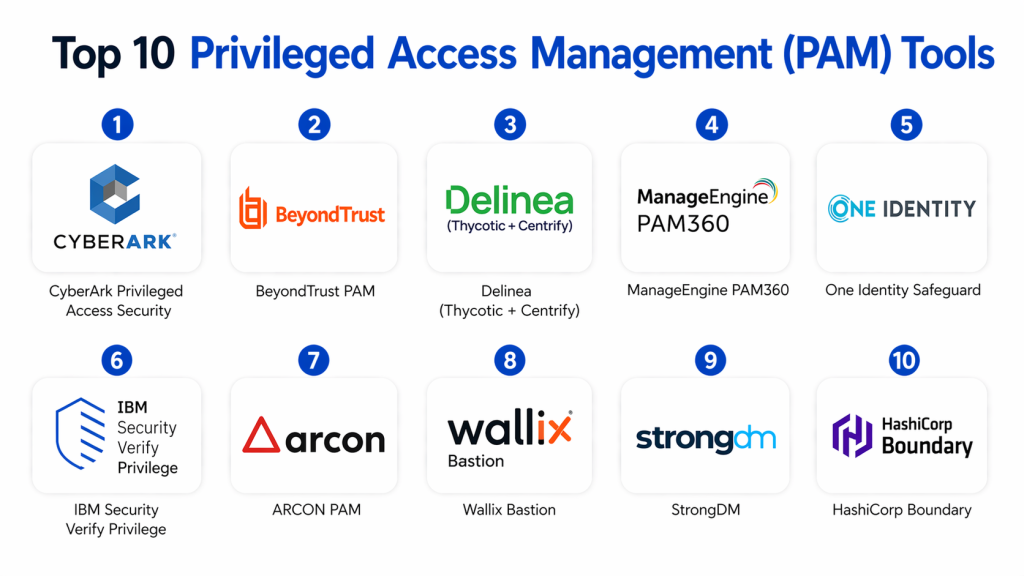
Top 10 Privileged Access Management (PAM) Tools
#1 — CyberArk Privileged Access Security
Short description :
CyberArk is one of the most recognized PAM platforms for enterprise environments. It provides secure credential vaulting and session management. It is designed for large organizations with complex security needs. It supports automation and monitoring. It offers strong compliance features. It is widely used in regulated industries.
Key Features
- Credential vaulting
- Session monitoring
- Privileged account discovery
- Password rotation
- Access control
- Threat detection
Pros
- Industry leader
- Strong security features
- Enterprise-grade
Cons
- Complex deployment
- High cost
Platforms / Deployment
- Cloud / On-prem / Hybrid
Security & Compliance
- RBAC, encryption, MFA
- Compliance: Not publicly stated
Integrations & Ecosystem
- Enterprise systems
- APIs
- Identity platforms
Support & Community
- Enterprise support
- Strong ecosystem
#2 — BeyondTrust PAM
Short description :
BeyondTrust offers a comprehensive PAM platform for securing privileged accounts and access. It provides session monitoring and credential management. It supports both cloud and on-prem environments. It is widely used in enterprises. It offers strong security features. It is scalable.
Key Features
- Privileged account management
- Session recording
- Password vault
- Endpoint privilege management
- Access policies
Pros
- Flexible deployment
- Strong reporting
- Scalable
Cons
- Complex setup
- Learning curve
Platforms / Deployment
- Cloud / Hybrid
Security & Compliance
- RBAC, MFA
- Compliance: Not publicly stated
Integrations & Ecosystem
- IT systems
- APIs
Support & Community
- Enterprise support
#3 — Delinea (Thycotic + Centrify)
Short description :
Delinea provides PAM solutions focused on simplicity and scalability. It offers credential vaulting and access management. It supports hybrid environments. It is suitable for enterprises. It provides strong automation. It focuses on ease of use.
Key Features
- Credential vault
- Access management
- Privilege elevation
- Automation
- Reporting
Pros
- User-friendly
- Strong automation
- Flexible
Cons
- Limited customization
- Pricing varies
Platforms / Deployment
- Cloud / Hybrid
Security & Compliance
- MFA, RBAC
- Compliance: Not publicly stated
Integrations & Ecosystem
- APIs
- Enterprise tools
Support & Community
- Good support
#4 — ManageEngine PAM360
Short description :
ManageEngine PAM360 is a cost-effective PAM solution for SMBs and enterprises. It provides password vaulting and session management. It is easy to deploy. It supports compliance reporting. It is scalable. It is widely used in IT teams.
Key Features
- Password vault
- Session monitoring
- Access control
- Audit logs
- Reporting
Pros
- Affordable
- Easy to use
- Good features
Cons
- UI improvements needed
- Limited enterprise depth
Platforms / Deployment
- On-prem / Cloud
Security & Compliance
- Encryption, RBAC
- Compliance: Not publicly stated
Integrations & Ecosystem
- IT tools
- APIs
Support & Community
- Good support
- #5 — One Identity Safeguard
Short description :
One Identity Safeguard provides secure privileged access management with strong monitoring capabilities. It supports password vaulting and session control. It is designed for enterprises. It offers compliance features. It is scalable. It is widely used.
Key Features
- Password vault
- Session monitoring
- Access control
- Reporting
- Compliance
Pros
- Strong monitoring
- Enterprise-grade
- Scalable
Cons
- Complex setup
- Costly
Platforms / Deployment
- Cloud / Hybrid
Security & Compliance
- MFA, RBAC
- Compliance: Not publicly stated
Integrations & Ecosystem
- Enterprise apps
- APIs
Support & Community
- Enterprise support
#6 — IBM Security Verify Privilege
Short description :
IBM Security Verify Privilege offers enterprise PAM capabilities with strong identity integration. It provides secure access and monitoring. It supports compliance requirements. It is suitable for large enterprises. It offers scalability. It integrates with IBM ecosystem.
Key Features
- Privileged access control
- Monitoring
- Credential vault
- Automation
- Reporting
Pros
- Enterprise-grade
- Scalable
- Strong integration
Cons
- Complex
- Expensive
Platforms / Deployment
- Cloud / Hybrid
Security & Compliance
- MFA, encryption
- Compliance: Not publicly stated
Integrations & Ecosystem
- IBM tools
- APIs
Support & Community
- Enterprise support
#7 — ARCON PAM
Short description :
ARCON PAM provides privileged access management with strong security controls. It offers credential vaulting and monitoring. It is used in enterprises. It supports compliance. It is scalable. It is suitable for regulated industries.
Key Features
- Credential vault
- Monitoring
- Access control
- Reporting
- Automation
Pros
- Strong security
- Compliance support
- Scalable
Cons
- UI limitations
- Less global presence
Platforms / Deployment
- Cloud / Hybrid
Security & Compliance
- RBAC, MFA
- Compliance: Not publicly stated
#8 — Wallix Bastion
Short description :
Wallix Bastion is a PAM solution focused on access control and monitoring. It provides secure access to critical systems. It supports compliance. It is used in regulated environments. It offers session monitoring. It is scalable.
Key Features
- Access control
- Session monitoring
- Audit logs
- Compliance
- Reporting
Pros
- Strong compliance
- Good monitoring
- Reliable
Cons
- Limited features
- Complex UI
Platforms / Deployment
- Cloud / On-prem
Security & Compliance
- MFA, RBAC
- Compliance: Not publicly stated
#9 — StrongDM
Short description :
StrongDM provides modern PAM capabilities with focus on infrastructure access. It simplifies access to databases and servers. It supports cloud environments. It offers strong monitoring. It is developer-friendly. It is scalable.
Key Features
- Access control
- Monitoring
- Infrastructure access
- Audit logs
- RBAC
Pros
- Developer-friendly
- Easy deployment
- Modern approach
Cons
- Limited traditional PAM features
- Smaller ecosystem
Platforms / Deployment
- Cloud
Security & Compliance
- RBAC, encryption
- Compliance: Not publicly stated
- #10 — HashiCorp Boundary
Short description :
HashiCorp Boundary provides secure access management without exposing credentials. It focuses on identity-based access. It supports cloud-native environments. It is suitable for DevOps teams. It offers modern security. It is scalable.
Key Features
- Credential-less access
- Identity-based access
- Access control
- Monitoring
- Integration
Pros
- Modern approach
- Secure
- Flexible
Cons
- Requires expertise
- Limited traditional PAM features
Platforms / Deployment
- Cloud / Self-hosted
Security & Compliance
- RBAC, encryption
- Compliance: Not publicly stated
Comparison Table
| Tool | Best For | Platform | Deployment | Feature | Rating |
|---|---|---|---|---|---|
| CyberArk | Enterprise | Multi | Hybrid | Vaulting | N/A |
| BeyondTrust | Enterprise | Multi | Hybrid | Monitoring | N/A |
| Delinea | Enterprise | Multi | Hybrid | Automation | N/A |
| ManageEngine | SMB | Multi | Hybrid | Cost-effective | N/A |
| One Identity | Enterprise | Multi | Hybrid | Compliance | N/A |
| IBM Verify | Enterprise | Multi | Hybrid | Integration | N/A |
| ARCON | Enterprise | Multi | Hybrid | Security | N/A |
| Wallix | Enterprise | Multi | Hybrid | Monitoring | N/A |
| StrongDM | DevOps | Cloud | Cloud | Access control | N/A |
| HashiCorp | DevOps | Multi | Hybrid | Identity-based | N/A |
Evaluation & Scoring of PAM Tools
| Tool | Core | Ease | Integration | Security | Performance | Support | Value | Total |
|---|---|---|---|---|---|---|---|---|
| CyberArk | 10 | 7 | 9 | 10 | 9 | 9 | 7 | 8.9 |
| BeyondTrust | 9 | 7 | 9 | 10 | 9 | 9 | 7 | 8.7 |
| Delinea | 9 | 8 | 8 | 9 | 8 | 8 | 8 | 8.5 |
| ManageEngine | 8 | 9 | 7 | 8 | 8 | 8 | 9 | 8.4 |
| One Identity | 9 | 7 | 8 | 9 | 8 | 8 | 7 | 8.2 |
| IBM | 9 | 6 | 9 | 9 | 8 | 8 | 7 | 8.1 |
| ARCON | 8 | 7 | 7 | 9 | 8 | 7 | 8 | 7.9 |
| Wallix | 8 | 7 | 7 | 9 | 8 | 7 | 8 | 7.9 |
| StrongDM | 8 | 8 | 8 | 8 | 8 | 8 | 8 | 8.0 |
| HashiCorp | 8 | 7 | 8 | 9 | 8 | 7 | 8 | 8.0 |
Which PAM Tool Is Right for You?
Solo / Freelancer
- Not typically required
SMB
- ManageEngine PAM360
Mid-Market
- Delinea, BeyondTrust
Enterprise
- CyberArk, BeyondTrust, IBM
Budget vs Premium
- Budget → ManageEngine
- Premium → CyberArk
Feature Depth vs Ease
- Easy → ManageEngine
- Advanced → CyberArk
Security Needs
- High security → CyberArk
Frequently Asked Questions (FAQs)
1. What is Privileged Access Management (PAM)?
Privileged Access Management (PAM) is a security solution that controls and monitors access to critical systems and sensitive accounts. It focuses on protecting privileged credentials like admin or root accounts. PAM tools store credentials securely and enforce strict access policies. They also track user activity for auditing. This helps reduce insider threats and unauthorized access risks.
2. Why is PAM important for cybersecurity?
PAM is essential because privileged accounts are the most targeted entry points for attackers. If compromised, they can lead to full system control. PAM reduces this risk by limiting access and enforcing least-privilege principles. It also provides monitoring and logging for all privileged activities. This improves overall security posture and compliance readiness.
3. How does PAM work?
PAM works by storing privileged credentials in a secure vault and controlling access through authentication policies. Users request access when needed, and permissions are granted based on roles. Sessions are monitored and often recorded for auditing. Many tools also rotate passwords automatically. This ensures credentials are never exposed or misused.
4. Who should use PAM solutions?
PAM is mainly used by enterprises, IT teams, and organizations handling sensitive data. It is especially important for industries like finance, healthcare, and government. DevOps teams also use PAM to secure infrastructure access. Any organization with privileged accounts should consider PAM. It becomes critical as systems scale.
5. Is PAM expensive to implement?
PAM solutions can be expensive, especially for enterprise-grade platforms. However, there are cost-effective options available for SMBs. Pricing depends on features, number of users, and deployment model. While initial costs may be high, PAM reduces the risk of costly breaches. This makes it a valuable long-term investment.
6. Can PAM prevent data breaches?
PAM significantly reduces the chances of data breaches by controlling access to critical systems. It enforces strict authentication and monitors user activity. Even if credentials are compromised, attackers cannot easily gain full access. Session recording also helps detect suspicious behavior. While not foolproof, it is a strong defense layer.
7. Does PAM support cloud environments?
Yes, most modern PAM tools support cloud, hybrid, and on-prem environments. Cloud-native PAM solutions are becoming increasingly popular. They allow organizations to manage access across distributed systems. This is especially useful for remote teams and DevOps workflows. Flexibility is a key advantage of modern PAM tools.
8. What is Zero Trust in PAM?
Zero Trust means that no user or system is trusted by default, even inside the network. PAM aligns with this by verifying every access request. It ensures users only get access when necessary and for a limited time. Continuous monitoring is applied during sessions. This reduces the risk of unauthorized access.
9. Is PAM difficult to implement?
Implementation depends on the tool and organization size. Enterprise PAM solutions can be complex and require planning. However, many modern tools offer simplified deployment. Proper training and configuration are important. Starting with a phased rollout can make implementation smoother.
10. What are alternatives to PAM?
PAM works alongside tools like IAM, SSO, and MFA, but does not replace them. IAM manages identities, SSO simplifies login, and MFA adds authentication layers. PAM specifically focuses on privileged accounts. Organizations typically use all these tools together. This creates a comprehensive security strategy.
Conclusion
Privileged Access Management (PAM) tools are essential for securing critical systems and sensitive accounts in modern organizations. As cyber threats continue to evolve, managing privileged access has become a top priority for enterprises adopting Zero Trust security models.
The right PAM solution depends on your organization’s size, complexity, and security requirements. Enterprise tools like CyberArk and BeyondTrust offer deep security capabilities, while solutions like ManageEngine provide cost-effective alternatives. Organizations should evaluate their needs carefully, test solutions, and implement PAM as part of a broader identity security strategy.
