Introduction
Shader authoring tools are specialized software used to create and manage shaders—small programs that control how surfaces, lighting, and effects are rendered in 2D and 3D graphics. In simple terms, they define how objects look in games, simulations, AR/VR environments, and real-time applications.
shader tools have become more critical due to the rise of real-time rendering, immersive experiences, and GPU-driven workflows. With advancements in AI-assisted content creation and cross-platform graphics pipelines, shader authoring is no longer limited to graphics programmers—it’s now accessible to technical artists, designers, and even indie developers.
Common use cases include:
- Game development (real-time rendering and visual effects)
- AR/VR and spatial computing experiences
- Film and animation pipelines
- Architectural visualization
- Simulation and digital twins
Key evaluation criteria for buyers:
- Ease of use (node-based vs code-based)
- Performance optimization capabilities
- Cross-platform compatibility
- Integration with game engines and pipelines
- Real-time preview and debugging tools
- Collaboration features
- AI-assisted workflows
- Documentation and community support
- Licensing and pricing flexibility
Best for: game developers, technical artists, VFX professionals, and studios building real-time or high-fidelity visual experiences across industries like gaming, film, architecture, and simulation.
Not ideal for: teams working only on simple 2D applications or static visuals where shader complexity is unnecessary; in such cases, basic rendering tools or prebuilt materials may suffice.
Key Trends in Shader Authoring Tools
- AI-assisted shader generation: Tools increasingly offer AI-driven node suggestions, auto-optimization, and material generation from prompts or textures.
- Node-based dominance: Visual scripting interfaces are becoming standard, reducing reliance on low-level shader languages.
- Real-time ray tracing integration: Native support for modern GPU features like ray tracing and path tracing is becoming essential.
- Cross-engine compatibility: Tools are focusing on interoperability across engines like Unity, Unreal, and custom pipelines.
- Cloud-based collaboration: Teams are adopting shared shader libraries and version control integrations.
- Performance profiling tools: Built-in GPU profiling and optimization insights are now expected features.
- Platform abstraction layers: Tools simplify deployment across PC, console, mobile, and XR devices.
- Procedural material workflows: Integration with procedural tools is expanding for scalable asset creation.
- Security awareness: Enterprise users expect role-based access and secure asset pipelines, though details are often not publicly stated.
- Hybrid workflows: Combining node-based editing with direct code access for flexibility is becoming standard.
How We Selected These Tools (Methodology)
- Evaluated market adoption and industry usage across gaming, VFX, and simulation sectors
- Assessed feature completeness, including node-based editing, real-time preview, and debugging
- Reviewed performance and rendering capabilities, especially for modern GPU features
- Considered ecosystem integration, particularly with major engines and pipelines
- Analyzed developer and artist usability, including learning curve and UI design
- Looked at community strength, documentation quality, and third-party resources
- Reviewed platform support across operating systems and devices
- Evaluated extensibility, APIs, and scripting capabilities
- Considered security posture signals where applicable
- Ensured coverage across segments, from indie developers to enterprise studios
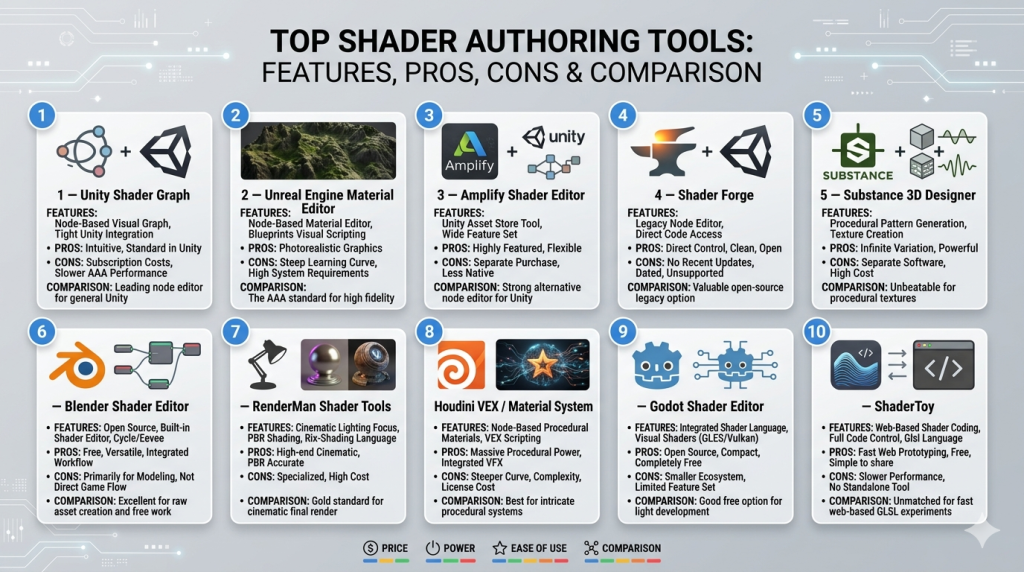
Top Shader Authoring Tools
#1 — Unity Shader Graph
Short description: A node-based shader creation tool integrated into Unity, designed for artists and developers to build shaders visually without writing code.
Key Features
- Node-based shader editor
- Real-time preview within Unity
- Integration with Universal and HDRP pipelines
- Custom function nodes for advanced logic
- Shader variant management
- GPU instancing support
Pros
- Easy to learn for non-programmers
- Seamless Unity integration
- Strong community and tutorials
Cons
- Limited outside Unity ecosystem
- Complex shaders may require code fallback
Platforms / Deployment
- Windows / macOS
- Local development environment
Security & Compliance
- Not publicly stated
Integrations & Ecosystem
Deep integration with Unity’s rendering pipelines and asset ecosystem.
- Unity Asset Store
- Visual Effect Graph
- C# scripting
- Third-party plugins
Support & Community
Extensive documentation, large global community, and active forums.
#2 — Unreal Engine Material Editor
Short description: A powerful node-based shader system within Unreal Engine for creating complex materials and visual effects.
Key Features
- Advanced node-based material system
- Real-time rendering preview
- Support for ray tracing and Lumen
- Material instances for reuse
- Custom HLSL integration
- High-end VFX capabilities
Pros
- Industry-leading visual fidelity
- Highly flexible and scalable
- Strong AAA adoption
Cons
- Steeper learning curve
- Resource-intensive
Platforms / Deployment
- Windows / macOS / Linux
- Local development environment
Security & Compliance
- Not publicly stated
Integrations & Ecosystem
Works seamlessly with Unreal Engine’s full toolchain.
- Niagara VFX system
- Blueprint scripting
- Marketplace assets
- External DCC tools
Support & Community
Strong enterprise and community support with extensive documentation.
#3 — Amplify Shader Editor
Short description: A third-party node-based shader editor for Unity offering advanced customization and flexibility.
Key Features
- Visual shader creation
- Full shader code generation
- Template-based workflows
- Cross-pipeline support
- Custom node scripting
- Debugging tools
Pros
- More flexibility than native tools
- Strong Unity integration
- Efficient workflow
Cons
- Paid tool
- Requires Unity knowledge
Platforms / Deployment
- Windows / macOS
- Local
Security & Compliance
- Not publicly stated
Integrations & Ecosystem
- Unity pipelines
- Custom shader libraries
- Plugin ecosystem
Support & Community
Active user base and good documentation.
#4 — Shader Forge
Short description: A legacy Unity shader editor that still has usage in certain pipelines.
Key Features
- Node-based interface
- Real-time preview
- Custom shader export
- Lightweight workflow
Pros
- Simple interface
- Fast prototyping
Cons
- Limited updates
- Less modern features
Platforms / Deployment
- Windows / macOS
Security & Compliance
- Not publicly stated
Integrations & Ecosystem
- Unity integration
- Basic extensibility
Support & Community
Limited ongoing support.
#5 — Substance 3D Designer
Short description: A procedural material and shader creation tool widely used in game and film industries.
Key Features
- Node-based procedural system
- Material generation and editing
- PBR workflow support
- Extensive asset library
- Automation tools
Pros
- Industry-standard for materials
- Highly flexible
- Strong ecosystem
Cons
- Steep learning curve
- Resource-heavy
Platforms / Deployment
- Windows / macOS
- Local
Security & Compliance
- Not publicly stated
Integrations & Ecosystem
- Game engines (Unity, Unreal)
- 3D tools (Blender, Maya)
- Asset libraries
Support & Community
Strong enterprise support and global community.
#6 — Blender Shader Editor
Short description: A built-in node-based shader editor within Blender for rendering and material creation.
Key Features
- Node-based system
- Cycles and Eevee rendering support
- Real-time viewport preview
- Open-source flexibility
- Python scripting
Pros
- Free and open-source
- Highly flexible
- Strong community
Cons
- Not optimized for real-time engines
- UI complexity for beginners
Platforms / Deployment
- Windows / macOS / Linux
Security & Compliance
- Not publicly stated
Integrations & Ecosystem
- Blender ecosystem
- Python API
- Export pipelines
Support & Community
Extensive community-driven support.
#7 — RenderMan Shader Tools
Short description: A professional shader system used in film and high-end animation pipelines.
Key Features
- Physically-based rendering
- Advanced shading language
- Production-grade tools
- Integration with DCC tools
Pros
- High-quality rendering
- Industry-proven
- Robust pipeline support
Cons
- Complex setup
- Less suited for real-time
Platforms / Deployment
- Windows / macOS / Linux
Security & Compliance
- Not publicly stated
Integrations & Ecosystem
- Maya, Houdini
- Studio pipelines
- Rendering frameworks
Support & Community
Enterprise-level support.
#8 — Houdini VEX / Material System
Short description: A procedural shader and material system within Houdini for advanced effects and simulations.
Key Features
- Procedural workflows
- VEX scripting
- Node-based shading
- Simulation integration
- High customization
Pros
- Extremely powerful
- Procedural flexibility
- Industry use
Cons
- Steep learning curve
- Overkill for simple projects
Platforms / Deployment
- Windows / macOS / Linux
Security & Compliance
- Not publicly stated
Integrations & Ecosystem
- Film pipelines
- Game engines
- Simulation tools
Support & Community
Strong professional community.
#9 — Godot Shader Editor
Short description: A lightweight shader editor within the Godot engine for indie and open-source projects.
Key Features
- Shader language support
- Real-time editing
- Lightweight engine integration
- Cross-platform deployment
Pros
- Free and open-source
- Easy to use
- Fast iteration
Cons
- Limited advanced features
- Smaller ecosystem
Platforms / Deployment
- Windows / macOS / Linux
Security & Compliance
- Not publicly stated
Integrations & Ecosystem
- Godot engine
- Community plugins
Support & Community
Growing open-source community.
#10 — ShaderToy
Short description: A web-based shader experimentation platform focused on GLSL coding and sharing.
Key Features
- Real-time shader coding
- Web-based interface
- Community sharing
- GLSL support
Pros
- Great for learning
- No setup required
- Strong community
Cons
- Not production-focused
- Limited integration
Platforms / Deployment
- Web
Security & Compliance
- Not publicly stated
Integrations & Ecosystem
- Standalone environment
- Minimal integrations
Support & Community
Active community of developers and artists.
Comparison Table (Top 10)
| Tool Name | Best For | Platform(s) Supported | Deployment | Standout Feature | Public Rating |
|---|---|---|---|---|---|
| Unity Shader Graph | Unity developers | Windows, macOS | Local | Visual shader editing | N/A |
| Unreal Material Editor | AAA game studios | Windows, macOS, Linux | Local | High-end rendering | N/A |
| Amplify Shader Editor | Advanced Unity users | Windows, macOS | Local | Flexible shader generation | N/A |
| Shader Forge | Legacy workflows | Windows, macOS | Local | Simplicity | N/A |
| Substance 3D Designer | Material artists | Windows, macOS | Local | Procedural materials | N/A |
| Blender Shader Editor | Open-source users | Windows, macOS, Linux | Local | Free flexibility | N/A |
| RenderMan Tools | Film studios | Windows, macOS, Linux | Local | Production rendering | N/A |
| Houdini VEX | Procedural experts | Windows, macOS, Linux | Local | Procedural shaders | N/A |
| Godot Shader Editor | Indie devs | Windows, macOS, Linux | Local | Lightweight engine | N/A |
| ShaderToy | Learning & experimentation | Web | Cloud | Real-time GLSL | N/A |
Evaluation & Scoring of Shader Authoring Tools
| Tool Name | Core | Ease | Integrations | Security | Performance | Support | Value | Weighted Total |
|---|---|---|---|---|---|---|---|---|
| Unity Shader Graph | 9 | 9 | 8 | 6 | 8 | 9 | 8 | 8.3 |
| Unreal Material Editor | 10 | 7 | 9 | 6 | 10 | 9 | 7 | 8.6 |
| Amplify Shader Editor | 9 | 8 | 8 | 6 | 8 | 8 | 7 | 8.0 |
| Shader Forge | 6 | 8 | 6 | 5 | 6 | 5 | 6 | 6.2 |
| Substance Designer | 10 | 7 | 9 | 6 | 9 | 9 | 7 | 8.5 |
| Blender Shader Editor | 8 | 7 | 7 | 5 | 7 | 9 | 10 | 8.0 |
| RenderMan Tools | 10 | 6 | 8 | 6 | 10 | 8 | 6 | 8.2 |
| Houdini VEX | 10 | 6 | 8 | 6 | 9 | 8 | 6 | 8.1 |
| Godot Shader Editor | 7 | 8 | 6 | 5 | 7 | 7 | 9 | 7.5 |
| ShaderToy | 6 | 9 | 4 | 5 | 6 | 8 | 10 | 7.2 |
How to interpret these scores:
- Scores are relative comparisons, not absolute measures.
- A higher score indicates better alignment with modern workflows and capabilities.
- Enterprise tools score higher in performance but may lose points in ease of use.
- Open-source tools often score higher in value but lower in integrations.
- Choose based on your specific workflow rather than just the total score.
Which Shader Authoring Tools Is Right for You?
Solo / Freelancer
- Best choices: Blender Shader Editor, Godot Shader Editor, ShaderToy
- Focus on low-cost, ease of use, and flexibility.
SMB
- Best choices: Unity Shader Graph, Amplify Shader Editor
- Balance between usability and performance.
Mid-Market
- Best choices: Unreal Material Editor, Substance Designer
- Require scalable workflows and better integration.
Enterprise
- Best choices: Unreal Material Editor, RenderMan, Houdini
- Focus on performance, scalability, and pipeline integration.
Budget vs Premium
- Budget: Blender, Godot
- Premium: Substance Designer, RenderMan
Feature Depth vs Ease of Use
- Deep features: Houdini, Unreal
- Ease of use: Unity Shader Graph, ShaderToy
Integrations & Scalability
- Strong integrations: Unreal, Substance
- Limited integrations: ShaderToy
Security & Compliance Needs
- Enterprise tools offer better controls, though details are often not publicly stated
- Smaller tools may lack formal security features
Frequently Asked Questions (FAQs)
What are shader authoring tools used for?
They are used to create visual effects, materials, and rendering behaviors in real-time and offline graphics applications.
Are shader tools only for programmers?
No, modern tools offer node-based interfaces that allow artists and designers to create shaders visually.
What is the difference between node-based and code-based shaders?
Node-based shaders use visual graphs, while code-based shaders require writing languages like GLSL or HLSL.
Are free tools sufficient for professional work?
Yes, tools like Blender and Godot are capable, but enterprise workflows may require advanced tools.
How long does it take to learn shader authoring?
Basic concepts can be learned in weeks, but mastering advanced techniques can take months or longer.
Do shader tools support AI features?
Some modern tools are starting to integrate AI for material generation and optimization.
Can shaders be reused across projects?
Yes, most tools allow saving and reusing shader templates or libraries.
What are common mistakes beginners make?
Overcomplicating shaders, ignoring performance optimization, and not understanding lighting models.
Do shader tools affect performance?
Yes, poorly optimized shaders can significantly impact GPU performance.
Can I switch between tools easily?
Switching is possible but may require reworking shaders due to differences in engines and formats.
Conclusion
Shader authoring tools have evolved from niche, programmer-centric utilities into essential creative platforms that power modern digital experiences across gaming, film, simulation, and immersive technologies. As real-time rendering continues to dominate workflows in 2026 and beyond, the importance of selecting the right shader tool cannot be overstated. Whether you are an indie developer experimenting with lightweight engines, a mid-sized studio building cross-platform experiences, or an enterprise team managing complex rendering pipelines, the landscape offers a wide spectrum of options tailored to different needs. Tools like Unreal Material Editor and Substance 3D Designer excel in high-end production environments, while Blender and Godot provide accessible, cost-effective alternatives without sacrificing flexibility. At the same time, the rise of AI-assisted workflows, procedural generation, and cross-platform compatibility is reshaping how shaders are created, optimized, and deployed. Ultimately, there is no single “best” tool—only the one that aligns with your team’s technical expertise, project requirements, and long-term scalability goals. The most practical next step is to shortlist two or three tools that match your workflow, test them in a small pilot project, and validate how well they integrate with your existing pipeline, performance expectations, and collaboration needs before committing fully.
