Introduction
Room scheduling displays are digital devices or software solutions that show real-time meeting room availability, bookings, and occupancy. They help organizations manage shared spaces efficiently, reduce scheduling conflicts, and improve resource utilization. In 2026, with hybrid work models and dynamic office environments, these tools are increasingly important for workplaces aiming to streamline collaboration and optimize space usage.
Real-world use cases include:
- Displaying room availability outside meeting rooms for quick booking decisions.
- Integrating with calendar systems to automatically update schedules.
- Reducing no-shows through check-in and automatic release of unclaimed rooms.
- Optimizing office space usage and occupancy analytics.
- Supporting hybrid meetings with room capacity and equipment status visibility.
What buyers should evaluate:
- Compatibility with existing calendar platforms (Outlook, Google Workspace).
- Screen size, resolution, and touch capabilities.
- Ease of installation and mounting options.
- Integration with room sensors and occupancy analytics.
- User interface simplicity and accessibility.
- Scalability for multiple rooms or locations.
- Security and compliance standards.
- Remote management and reporting dashboards.
- Power options and connectivity (PoE, Wi-Fi).
- Price and total cost of ownership.
Best for: Facilities managers, IT teams, office administrators, and workplace operations teams in mid-size to large organizations with multiple meeting rooms.
Not ideal for: Small offices with few rooms or teams that rely on informal scheduling methods like shared spreadsheets or chat apps.
Key Trends in Room Scheduling Displays for 2026 and Beyond
- Integration with Microsoft Teams, Google Workspace, and Zoom for real-time bookings.
- Touchless and sensor-driven occupancy detection to reduce contact.
- AI-based analytics to optimize room allocation and predict peak usage times.
- Voice-controlled booking and virtual assistant integration.
- Cloud-based dashboards for centralized management of multiple sites.
- Power over Ethernet (PoE) and battery-powered display options for flexible installations.
- Interactive displays with check-in, release, and scheduling functionality.
- GDPR and workplace data privacy compliance for user and occupancy data.
- Multi-language support for global office environments.
- Hybrid collaboration indicators showing room availability and connected equipment status.
How We Selected These Tools (Methodology)
- Assessed market adoption and presence in mid-market and enterprise segments.
- Evaluated core scheduling display features and integration capabilities.
- Reviewed platform reliability, uptime, and hardware performance.
- Analyzed security and compliance posture.
- Examined ecosystem and integration with calendar systems and sensors.
- Verified scalability across multiple rooms and locations.
- Considered installation simplicity and device durability.
- Assessed user interface design and accessibility.
- Evaluated support, documentation, and community resources.
- Included AI or advanced analytics capabilities when available.
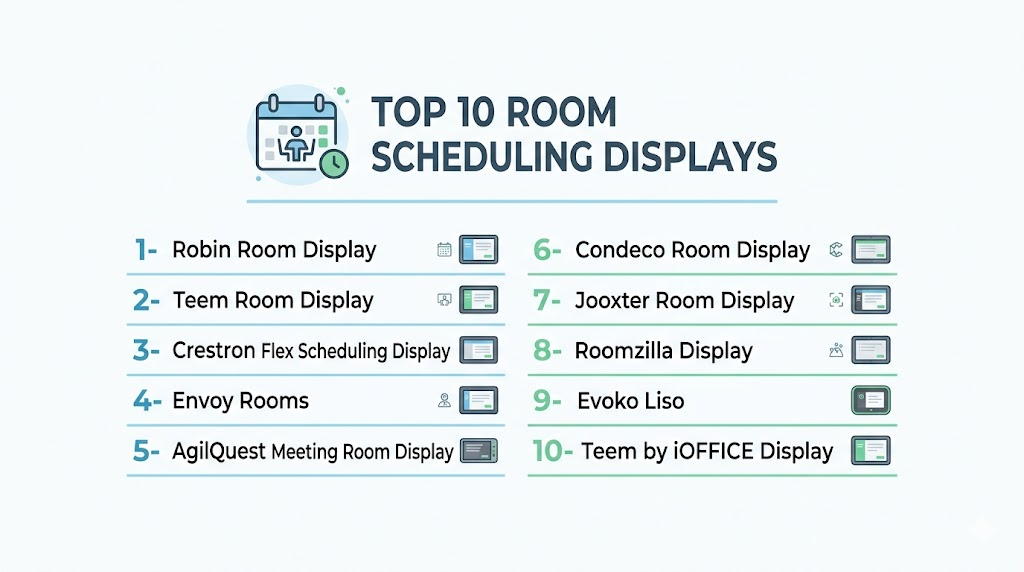
Top 10 Room Scheduling Displays
1- Robin Room Display
Short description: A touchscreen display designed for smart office rooms, offering real-time availability, check-in, and calendar integration.
Key Features
- Real-time room occupancy status.
- Calendar integration with Google Workspace, Outlook, and Office 365.
- One-touch booking and check-in.
- Analytics on room utilization.
- Customizable display themes.
Pros
- Intuitive interface for employees.
- Centralized cloud management.
Cons
- Requires cloud subscription for full features.
- Hardware pricing may be high for smaller offices.
Platforms / Deployment
- Web, iOS, Android
- Cloud
Security & Compliance
- Not publicly stated
Integrations & Ecosystem
Works with calendar platforms and workplace apps.
- Google Workspace
- Microsoft Outlook/Office 365
- Slack
- Workplace analytics platforms
Support & Community
Email and chat support, setup guides, and active user forums.
2- Teem Room Display
Short description: A smart display solution enabling instant bookings, room availability, and analytics, suitable for hybrid offices.
Key Features
- Real-time room status.
- One-touch reservation and check-in.
- Integration with multiple calendar systems.
- Occupancy sensors for no-show management.
- Dashboard for usage analytics.
Pros
- Reduces scheduling conflicts.
- Strong analytics and reporting.
Cons
- Limited offline functionality.
- Some features require premium subscription.
Platforms / Deployment
- Web, iOS, Android
- Cloud
Security & Compliance
- Not publicly stated
Integrations & Ecosystem
- Outlook, Google Workspace, Slack, Teams, and sensor integrations.
Support & Community
Documentation, email support, and customer success resources.
3- Crestron Flex Scheduling Display
Short description: Enterprise-grade display for room management, integrating scheduling with AV and collaboration systems.
Key Features
- Touchscreen booking and calendar integration.
- Compatible with Microsoft Teams and Zoom Rooms.
- Room utilization analytics.
- Multi-language support.
- Integration with AV systems.
Pros
- Enterprise-ready with strong hardware build.
- Supports hybrid meeting environments.
Cons
- Installation complexity.
- Higher cost for small offices.
Platforms / Deployment
- Web, Windows, iOS, Android
- Cloud / Hybrid
Security & Compliance
- Not publicly stated
Integrations & Ecosystem
- Teams, Zoom, Outlook, AV systems, occupancy sensors.
Support & Community
Technical support, training resources, and partner network.
4- Envoy Rooms
Short description: Cloud-based room scheduling display with simple UI, real-time availability, and check-in features.
Key Features
- One-touch room booking.
- Calendar integration with Google and Outlook.
- Occupancy tracking and no-show release.
- Customizable room signage.
- Reporting dashboards.
Pros
- Easy deployment and management.
- Clean and simple interface.
Cons
- Limited advanced analytics.
- Hardware compatibility required.
Platforms / Deployment
- Web, iOS, Android
- Cloud
Security & Compliance
- Not publicly stated
Integrations & Ecosystem
- Google Workspace, Outlook, Slack, Teams.
Support & Community
Knowledge base, email support, and online tutorials.
5- AgilQuest Meeting Room Display
Short description: Flexible display for scheduling rooms, with occupancy detection and analytics for enterprise environments.
Key Features
- Real-time booking and check-in.
- Occupancy sensors integration.
- Calendar syncing.
- Utilization analytics.
- Custom alerts for room availability.
Pros
- Flexible deployment options.
- Supports large-scale office environments.
Cons
- Advanced features may require add-ons.
- Interface less modern than competitors.
Platforms / Deployment
- Web, iOS, Android
- Cloud / Hybrid
Security & Compliance
- Not publicly stated
Integrations & Ecosystem
- Outlook, Google Workspace, Exchange, workplace management APIs.
Support & Community
Customer support and implementation guides.
6- Condeco Room Display
Short description: Enterprise scheduling solution combining room displays with workspace management and analytics.
Key Features
- Real-time occupancy display.
- One-touch reservation and check-in.
- Analytics dashboards.
- Integration with calendar systems.
- Customizable display options.
Pros
- Enterprise-ready with scalability.
- Good reporting features.
Cons
- Higher cost for SMBs.
- Hardware requires professional installation.
Platforms / Deployment
- Web, iOS, Android
- Cloud
Security & Compliance
- Not publicly stated
Integrations & Ecosystem
- Office 365, Google Workspace, Teams, Exchange.
Support & Community
Email, chat support, and online resources.
7- Jooxter Room Display
Short description: Digital display for room bookings and real-time availability with simple UI for office teams.
Key Features
- Touchscreen booking.
- Calendar sync with Google and Outlook.
- Occupancy monitoring.
- Reporting dashboards.
- Custom signage options.
Pros
- Simple and easy to deploy.
- Cost-effective for mid-size offices.
Cons
- Limited advanced analytics.
- Smaller ecosystem integrations.
Platforms / Deployment
- Web, iOS, Android
- Cloud
Security & Compliance
- Not publicly stated
Integrations & Ecosystem
- Google Workspace, Outlook, Exchange, Slack.
Support & Community
Documentation, email support, and user guides.
8- Roomzilla Display
Short description: Affordable room scheduling display offering real-time availability, check-in, and calendar integration.
Key Features
- Touchscreen interface.
- Calendar integration with Google and Outlook.
- Occupancy tracking.
- Mobile app for booking.
- Reporting and analytics.
Pros
- Cost-effective for SMBs.
- Simple interface.
Cons
- Fewer enterprise features.
- Limited sensor integration.
Platforms / Deployment
- Web, iOS, Android
- Cloud
Security & Compliance
- Not publicly stated
Integrations & Ecosystem
- Google Workspace, Outlook, Exchange.
Support & Community
Knowledge base and email support.
9- Evoko Liso
Short description: Stylish room display with real-time scheduling and occupancy insights for modern office environments.
Key Features
- Touch and color-coded availability display.
- Calendar integration.
- Occupancy sensor compatibility.
- Remote management.
- Analytics dashboards.
Pros
- Visually appealing display.
- Easy to read at a glance.
Cons
- Limited software features.
- Higher hardware cost.
Platforms / Deployment
- Web
- Cloud / Hybrid
Security & Compliance
- Not publicly stated
Integrations & Ecosystem
- Outlook, Google Workspace, Exchange, sensors.
Support & Community
Email support, user manuals, and online documentation.
10- Teem by iOFFICE Display
Short description: Comprehensive scheduling display integrating with workplace management tools for hybrid and large offices.
Key Features
- Real-time room availability.
- One-touch booking and check-in.
- Occupancy tracking.
- Calendar integrations.
- Reporting dashboards.
Pros
- Comprehensive feature set.
- Strong hybrid meeting support.
Cons
- Requires subscription for full features.
- Installation and setup require professional support.
Platforms / Deployment
- Web, iOS, Android
- Cloud
Security & Compliance
- Not publicly stated
Integrations & Ecosystem
- Outlook, Google Workspace, Teams, sensor systems.
Support & Community
Documentation, tutorials, and customer support.
Comparison Table (Top 10)
| Tool Name | Best For | Platform(s) Supported | Deployment | Standout Feature | Public Rating |
|---|---|---|---|---|---|
| Robin | SMB / Enterprise | Web, iOS, Android | Cloud | Real-time room booking | N/A |
| Teem | Mid-Market / Enterprise | Web, iOS, Android | Cloud | Occupancy tracking | N/A |
| Crestron Flex | Enterprise | Web, Windows, iOS, Android | Cloud/Hybrid | AV integration | N/A |
| Envoy Rooms | SMB | Web, iOS, Android | Cloud | Simple check-in | N/A |
| AgilQuest | Enterprise | Web, iOS, Android | Cloud/Hybrid | Flexible deployment | N/A |
| Condeco | Enterprise | Web, iOS, Android | Cloud | Workspace analytics | N/A |
| Jooxter | Mid-Market | Web, iOS, Android | Cloud | Simple UI | N/A |
| Roomzilla | SMB | Web, iOS, Android | Cloud | Affordable | N/A |
| Evoko Liso | Mid-Market | Web | Cloud/Hybrid | Stylish color-coded display | N/A |
| Teem by iOFFICE | Enterprise | Web, iOS, Android | Cloud | Hybrid support | N/A |
Evaluation & Scoring of Room Scheduling Displays
| Tool Name | Core (25%) | Ease (15%) | Integrations (15%) | Security (10%) | Performance (10%) | Support (10%) | Value (15%) | Weighted Total (0–10) |
|---|---|---|---|---|---|---|---|---|
| Robin | 9 | 9 | 8 | 7 | 8 | 8 | 7 | 8.3 |
| Teem | 8 | 8 | 8 | 7 | 8 | 8 | 7 | 8.0 |
| Crestron Flex | 9 | 7 | 8 | 8 | 9 | 8 | 6 | 8.1 |
| Envoy Rooms | 7 | 9 | 7 | 6 | 7 | 7 | 8 | 7.5 |
| AgilQuest | 8 | 8 | 7 | 7 | 8 | 8 | 7 | 7.9 |
| Condeco | 8 | 7 | 8 | 7 | 8 | 7 | 6 | 7.6 |
| Jooxter | 7 | 8 | 7 | 6 | 7 | 7 | 7 | 7.2 |
| Roomzilla | 6 | 9 | 6 | 6 | 7 | 7 | 8 | 7.0 |
| Evoko Liso | 7 | 8 | 6 | 6 | 7 | 7 | 6 | 6.8 |
| Teem by iOFFICE | 8 | 8 | 8 | 7 | 8 | 8 | 7 | 7.9 |
Interpretation: Scores are comparative. Higher totals indicate balanced features, ease of use, integrations, security, performance, support, and value. Choose based on office size, room count, and budget.
Which Room Scheduling Displays Tool Is Right for You?
Solo / Freelancer
- Roomzilla or Envoy Rooms for simple and affordable deployment.
SMB
- Robin, Jooxter, or Teem for easy booking and analytics without high costs.
Mid-Market
- AgilQuest, Evoko Liso for advanced occupancy tracking and dashboards.
Enterprise
- Crestron Flex, Condeco, Teem by iOFFICE for hybrid collaboration and large-scale management.
Budget vs Premium
- Budget-focused: Roomzilla, Envoy Rooms.
- Premium/Enterprise: Crestron Flex, Condeco, Teem by iOFFICE.
Feature Depth vs Ease of Use
- Lightweight tools prioritize speed and adoption.
- Enterprise tools offer dashboards, AV integration, and sensor analytics but require setup.
Integrations & Scalability
- Prioritize tools supporting Outlook, Google Workspace, Teams, and occupancy sensors for multi-site scalability.
Security & Compliance Needs
- Enterprise deployments should focus on secure cloud connections, SSO, and audit logging for compliance.
Frequently Asked Questions
- Can these displays integrate with Google Workspace or Outlook?
Yes, most room scheduling displays sync directly with popular calendar systems for real-time booking updates. - Do displays require occupancy sensors?
Some tools include occupancy detection for automatic no-show release, though basic functionality works without sensors. - Are the displays touch-enabled?
Most modern solutions feature touchscreens for on-site booking and check-in. - Can multiple rooms be managed centrally?
Yes, cloud-based dashboards allow IT and facilities teams to manage multiple rooms across locations. - Do these tools support hybrid meetings?
Many enterprise displays integrate with Zoom or Teams to show equipment status and availability for hybrid meetings. - Is installation complicated?
Installation varies: SMB-focused tools are plug-and-play, while enterprise solutions may require professional setup. - Can room availability be released automatically?
Yes, occupancy detection or check-in timeouts automatically release rooms if meetings aren’t attended. - Are analytics available?
Enterprise tools provide dashboards showing utilization trends, peak usage, and room occupancy metrics. - Can displays be customized for branding?
Most solutions allow custom themes, logos, and room names on the display interface. - What is the typical cost model?
Costs vary: SMB tools charge per device or subscription, while enterprise platforms may require site licensing and hardware bundles.
Conclusion
Room scheduling displays are vital in optimizing office space and improving collaboration efficiency in hybrid and modern work environments. Selecting the right tool depends on your office size, budget, integration needs, and desired feature set. SMBs benefit from affordable, user-friendly options like Envoy Rooms or Roomzilla, while enterprises gain value from robust solutions like Crestron Flex or Condeco with occupancy analytics and AV integration. To implement effectively, shortlist 2–3 tools, run a pilot in a few rooms, and validate integration, usability, and reporting before scaling across the
