Introduction
PCB (Printed Circuit Board) design software enables engineers to design, simulate, and prepare electronic circuits for manufacturing. These tools allow users to create schematics, place components, route electrical connections, and validate designs before production—reducing costly errors and accelerating development cycles.
Today, PCB design software plays a critical role as electronics become more complex, compact, and performance-driven. From IoT devices to automotive systems and consumer electronics, modern design tools integrate simulation, collaboration, and increasingly AI-assisted workflows.
Common Use Cases
- Consumer electronics (smartphones, wearables, gadgets)
- Embedded systems and IoT devices
- Automotive electronics (ADAS, EV systems)
- Industrial automation and robotics
- Aerospace and defense systems
What Buyers Should Evaluate
- Ease of use and onboarding
- Feature depth (routing, simulation, 3D visualization)
- Component library availability
- Collaboration and version control
- Integration with mechanical CAD (MCAD)
- Simulation capabilities (thermal, signal integrity)
- Performance for complex boards
- Security and access control
- Pricing and licensing flexibility
Best for: Hardware engineers, PCB designers, embedded developers, startups building electronics products, and enterprises managing complex hardware systems.
Not ideal for: Software-only teams, early-stage concept validation without hardware needs, or users requiring only basic circuit simulation tools.
Key Trends in PCB Design Software
- AI-assisted routing and layout optimization reducing manual design effort
- Cloud-native collaboration enabling distributed engineering teams
- Integrated simulation environments (thermal, RF, signal integrity)
- Digital twin workflows for real-world validation before manufacturing
- Tighter ECAD-MCAD integration for mechanical-electrical co-design
- Subscription-based pricing models replacing perpetual licenses
- Growth of open-source tools for accessibility and innovation
- Security-first architectures with role-based access and audit logs
- Integration with manufacturing pipelines (DFM/DFA automation)
- Component intelligence systems for real-time part selection and availability
How We Selected These Tools (Methodology)
- Evaluated market adoption and industry recognition
- Assessed feature completeness across PCB workflows
- Reviewed performance and scalability for large designs
- Considered simulation and validation capabilities
- Analyzed integration ecosystems and extensibility
- Checked support for different user segments (beginner to enterprise)
- Observed active development and product updates
- Considered community strength and documentation quality
- Evaluated deployment flexibility (cloud vs desktop)
Top 10 PCB Design Software Tools
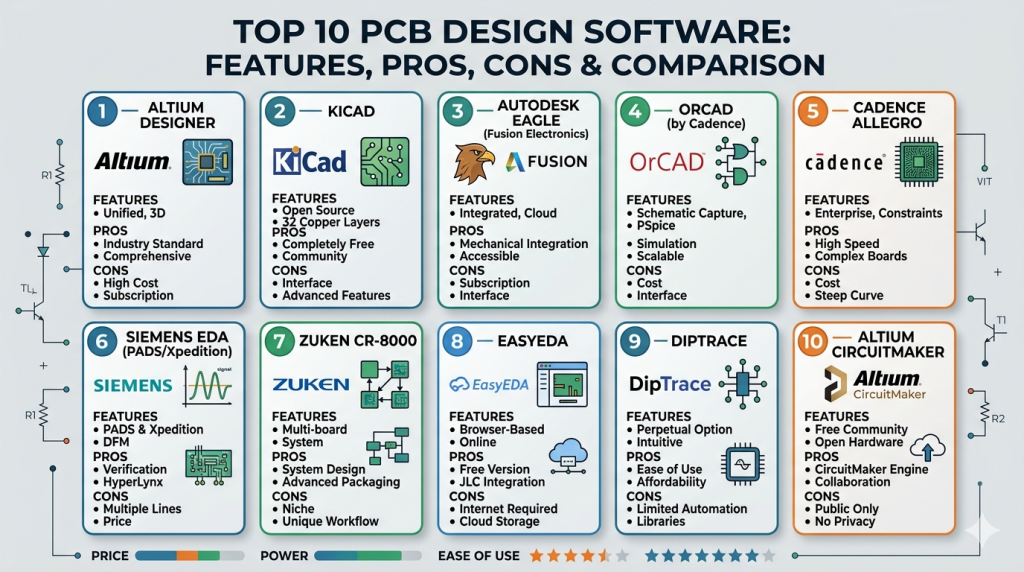
#1 — Altium Designer
Short description: A professional-grade PCB design platform offering a unified environment for schematic capture, layout, and simulation.
Key Features
- Unified design environment
- Advanced routing and rule checking
- 3D PCB visualization
- Real-time collaboration
- Extensive component libraries
- High-speed design support
Pros
- Streamlined workflow
- Strong usability for professionals
- Widely adopted
Cons
- Expensive
- High system requirements
- Learning curve
Platforms / Deployment
Windows / Cloud / Hybrid
Security & Compliance
SSO, RBAC supported; other details not publicly stated
Integrations & Ecosystem
Robust ecosystem with integration into mechanical CAD and supply chain tools.
- MCAD integration
- Cloud collaboration
- Component databases
- APIs for customization
Support & Community
Strong enterprise support and active user community.
#2 — KiCad
Short description: A free, open-source PCB design suite suitable for individuals, startups, and educational use.
Key Features
- Schematic capture and PCB layout
- 3D viewer
- SPICE simulation
- No design limitations
- Cross-platform compatibility
Pros
- Free and open-source
- Large community
- Flexible usage
Cons
- Less polished UI
- Limited enterprise features
- Fewer integrations
Platforms / Deployment
Windows / macOS / Linux
Security & Compliance
Not publicly stated
Integrations & Ecosystem
Community-driven plugins and extensions.
- Plugin system
- Library contributions
- Git workflows
Support & Community
Strong open-source community support.
#3 — Autodesk EAGLE (Fusion Electronics)
Short description: A beginner-friendly PCB design tool integrated with a broader product design ecosystem.
Key Features
- Schematic and PCB layout
- Cloud collaboration
- Integration with 3D CAD
- Library management
Pros
- Easy to learn
- Good for prototyping
- Integrated workflows
Cons
- Limited scalability
- Subscription-based
- Reduced standalone focus
Platforms / Deployment
Windows / macOS / Cloud
Security & Compliance
Not publicly stated
Integrations & Ecosystem
Connected to broader design workflows.
- 3D CAD integration
- Cloud storage
- Collaboration tools
Support & Community
Moderate support and documentation.
#4 — OrCAD (by Cadence)
Short description: A mid-range PCB design solution known for its strong simulation capabilities.
Key Features
- PCB layout tools
- PSpice simulation
- Design rule checks
- Component libraries
Pros
- Strong simulation
- Industry-recognized
- Scalable
Cons
- Outdated UI
- Expensive
- Learning curve
Platforms / Deployment
Windows
Security & Compliance
Not publicly stated
Integrations & Ecosystem
Part of a broader design ecosystem.
- Simulation tools
- Design verification
- Component libraries
Support & Community
Strong enterprise support resources.
#5 — Cadence Allegro
Short description: High-end PCB design software for complex and high-speed electronic systems.
Key Features
- Advanced routing
- Signal integrity analysis
- Constraint management
- Multi-layer design
- High-speed optimization
Pros
- Enterprise-grade capabilities
- Excellent performance
- Industry standard
Cons
- Very expensive
- Complex
- Requires training
Platforms / Deployment
Windows
Security & Compliance
Not publicly stated
Integrations & Ecosystem
Deep integration with design and simulation tools.
- Verification tools
- IC design integration
- Enterprise workflows
Support & Community
Enterprise-level support.
#6 — Siemens EDA (PADS/Xpedition)
Short description: Enterprise PCB design tools for large-scale and system-level design.
Key Features
- Multi-board design
- Signal integrity tools
- Advanced routing
- Manufacturing integration
Pros
- Scalable
- Reliable
- Enterprise features
Cons
- Complex interface
- High cost
- Not beginner-friendly
Platforms / Deployment
Windows
Security & Compliance
Not publicly stated
Integrations & Ecosystem
Strong enterprise integrations.
- PLM systems
- Simulation tools
- Manufacturing pipelines
Support & Community
Enterprise-focused support.
#7 — Zuken CR-8000
Short description: Advanced PCB design platform used in automotive and aerospace industries.
Key Features
- Multi-board design
- Signal and power integrity
- 3D visualization
- System-level design
Pros
- High reliability
- Industry-specific features
- Strong system design
Cons
- Expensive
- Niche adoption
- Requires training
Platforms / Deployment
Windows
Security & Compliance
Not publicly stated
Integrations & Ecosystem
System-level design integrations.
- Automotive tools
- Manufacturing systems
- Simulation tools
Support & Community
Enterprise support; limited community.
#8 — EasyEDA
Short description: A cloud-based PCB design platform ideal for beginners and rapid prototyping.
Key Features
- Web-based design
- Schematic and PCB tools
- Integrated component library
- Online simulation
Pros
- Easy access
- No installation
- Beginner-friendly
Cons
- Limited advanced features
- Internet dependency
- Not enterprise-ready
Platforms / Deployment
Web / Cloud
Security & Compliance
Not publicly stated
Integrations & Ecosystem
Cloud-first environment.
- Component libraries
- Fabrication services
- Online collaboration
Support & Community
Active beginner community.
#9 — DipTrace
Short description: User-friendly PCB design software balancing simplicity and functionality.
Key Features
- Schematic capture
- PCB layout
- 3D preview
- Library management
Pros
- Easy to learn
- Affordable
- Good for SMBs
Cons
- Limited advanced features
- Smaller ecosystem
- Less widely adopted
Platforms / Deployment
Windows / macOS
Security & Compliance
Not publicly stated
Integrations & Ecosystem
Basic integrations available.
- Library tools
- Export/import features
Support & Community
Moderate support and documentation.
#10 — Altium CircuitMaker
Short description: A free PCB design tool for makers and community-driven projects.
Key Features
- PCB design tools
- Community collaboration
- Altium-based engine
- Shared projects
Pros
- Free
- Good UI
- Strong community
Cons
- Limited features
- Cloud dependency
- Not enterprise-ready
Platforms / Deployment
Windows / Cloud
Security & Compliance
Not publicly stated
Integrations & Ecosystem
Connected to Altium ecosystem.
- Shared libraries
- Community designs
- Collaboration tools
Support & Community
Strong maker community support.
Comparison Table (Top 10)
| Tool Name | Best For | Platform(s) Supported | Deployment | Standout Feature | Public Rating |
|---|---|---|---|---|---|
| Altium Designer | Professional PCB | Windows | Hybrid | Unified workflow | N/A |
| KiCad | Open-source | Win/Mac/Linux | Self-hosted | Free usage | N/A |
| EAGLE | Beginners | Win/Mac | Cloud | Ease of use | N/A |
| OrCAD | Simulation | Windows | Self-hosted | PSpice | N/A |
| Allegro | Enterprise | Windows | Self-hosted | High-speed design | N/A |
| Siemens EDA | Enterprise | Windows | Self-hosted | System-level tools | N/A |
| Zuken | Automotive | Windows | Self-hosted | Multi-board | N/A |
| EasyEDA | Beginners | Web | Cloud | Browser-based | N/A |
| DipTrace | SMB | Win/Mac | Self-hosted | Simplicity | N/A |
| CircuitMaker | Makers | Windows | Cloud | Free access | N/A |
Evaluation & Scoring of PCB Design Software
| Tool Name | Core | Ease | Integrations | Security | Performance | Support | Value | Weighted Total |
|---|---|---|---|---|---|---|---|---|
| Altium Designer | 9 | 8 | 9 | 7 | 9 | 8 | 7 | 8.3 |
| KiCad | 7 | 7 | 6 | 5 | 7 | 8 | 10 | 7.3 |
| EAGLE | 7 | 8 | 7 | 5 | 7 | 7 | 7 | 7.0 |
| OrCAD | 8 | 6 | 8 | 6 | 8 | 7 | 6 | 7.3 |
| Allegro | 10 | 5 | 9 | 7 | 10 | 8 | 5 | 8.0 |
| Siemens EDA | 9 | 5 | 9 | 7 | 9 | 8 | 5 | 7.9 |
| Zuken | 9 | 5 | 8 | 7 | 9 | 7 | 5 | 7.7 |
| EasyEDA | 6 | 9 | 6 | 5 | 6 | 6 | 9 | 6.9 |
| DipTrace | 6 | 8 | 5 | 5 | 6 | 6 | 8 | 6.7 |
| CircuitMaker | 6 | 8 | 6 | 5 | 6 | 7 | 9 | 6.9 |
How to interpret:
These scores provide a relative comparison across tools. Enterprise platforms score higher in features and performance, while free tools score higher in value. Choose based on your needs rather than just total score.
Which PCB Design Software Tool Is Right for You?
Solo / Freelancer
- Best: KiCad, EasyEDA, CircuitMaker
- Focus on affordability and ease
SMB
- Best: DipTrace, EAGLE, KiCad
- Balance cost and features
Mid-Market
- Best: Altium Designer, OrCAD
- Collaboration and simulation matter
Enterprise
- Best: Cadence Allegro, Siemens EDA, Zuken
- Focus on scalability and performance
Budget vs Premium
- Budget: KiCad, EasyEDA
- Premium: Altium, Cadence
Feature Depth vs Ease of Use
- Deep: Allegro, Siemens
- Easy: EAGLE, DipTrace
Integrations & Scalability
- Strong: Siemens, Cadence
- Moderate: Altium
Security & Compliance Needs
- Enterprise tools provide better controls
- Open-source tools require self-managed security
Frequently Asked Questions (FAQs)
What is PCB design software?
It is used to design and simulate electronic circuit boards before manufacturing.
Is free PCB software reliable?
Yes for small projects, but limited for complex designs.
Which tool is best for beginners?
EasyEDA and KiCad are common starting points.
How expensive are PCB tools?
Costs range from free to high enterprise licensing fees.
Do these tools support simulation?
Many do, but capabilities vary.
Can I use PCB tools on Mac?
Some tools support macOS, but many are Windows-focused.
What is the learning curve?
Basic usage is quick, advanced features take time.
Are cloud PCB tools safe?
Security varies; enterprise tools offer stronger protections.
Can I switch tools later?
Yes, but migration may require rework.
Do PCB tools support collaboration?
Modern tools include collaboration features.
Conclusion
PCB design software is essential for modern electronics development, enabling efficient and accurate circuit creation. While enterprise tools dominate in performance and scalability, open-source and cloud solutions make PCB design accessible to a wider audience.
There is no universal best tool—your choice depends on budget, complexity, and workflow requirements.
