Introduction
Motion Capture Software (often called mocap software) is used to record, process, and translate human or object movements into digital data for animation, gaming, film production, virtual reality, and simulation. It allows creators to capture real-world motion and apply it to 3D characters or environments, significantly improving realism and reducing manual animation effort.
, motion capture is no longer limited to large studios with expensive hardware. Advances in AI, computer vision, and markerless tracking have democratized mocap, enabling indie developers, content creators, and even marketers to produce high-quality animations with minimal setup.
Common use cases include:
- Game character animation and prototyping
- Film and VFX production
- Virtual influencers and avatars
- Sports and biomechanics analysis
- AR/VR and metaverse experiences
What buyers should evaluate:
- Accuracy and tracking quality
- Marker-based vs markerless support
- Real-time vs offline processing
- Hardware compatibility
- AI-assisted motion cleanup
- Integration with game engines and 3D tools
- Scalability for team workflows
- Performance and latency
- Pricing and licensing model
Best for: Game developers, animation studios, VFX teams, AR/VR creators, and research labs seeking realistic motion data and efficient animation pipelines. Works well for both enterprise production teams and increasingly for indie creators leveraging AI-driven tools.
Not ideal for: Static design workflows, simple 2D animation needs, or teams without 3D pipelines. If your use case doesn’t require realistic movement or character animation, simpler tools may be more cost-effective.
Key Trends in Motion Capture Software
- AI-powered markerless tracking: Advanced computer vision eliminates the need for suits or markers in many scenarios.
- Real-time pipelines: Increasing demand for live streaming motion data into engines for virtual production.
- Cloud-based processing: Teams are leveraging cloud compute for heavy motion solving and retargeting tasks.
- Integration with game engines: Tight coupling with Unity, Unreal Engine, and real-time rendering tools.
- Virtual production workflows: Mocap is now central to real-time filmmaking and digital sets.
- Affordable hardware ecosystems: Depth cameras and mobile-based capture are expanding access.
- Automation in cleanup: AI-driven noise reduction, retargeting, and pose correction reduce manual work.
- Cross-platform compatibility: Tools are supporting multiple devices, OS environments, and pipelines.
- Subscription pricing models: Shift from perpetual licenses to flexible SaaS pricing.
- Security awareness growing: Especially in enterprise pipelines handling sensitive production assets.
How We Selected These Tools (Methodology)
- Evaluated market adoption and industry usage across gaming, film, and AR/VR
- Assessed feature completeness, including tracking, retargeting, and export capabilities
- Reviewed performance and accuracy benchmarks based on known capabilities
- Considered hardware compatibility and flexibility
- Examined integration ecosystems with engines and 3D tools
- Looked at ease of use vs professional depth
- Included a mix of enterprise-grade and accessible tools
- Reviewed community support and documentation quality
- Considered innovation trends, especially AI and real-time capabilities
- Ensured representation of both marker-based and markerless solutions
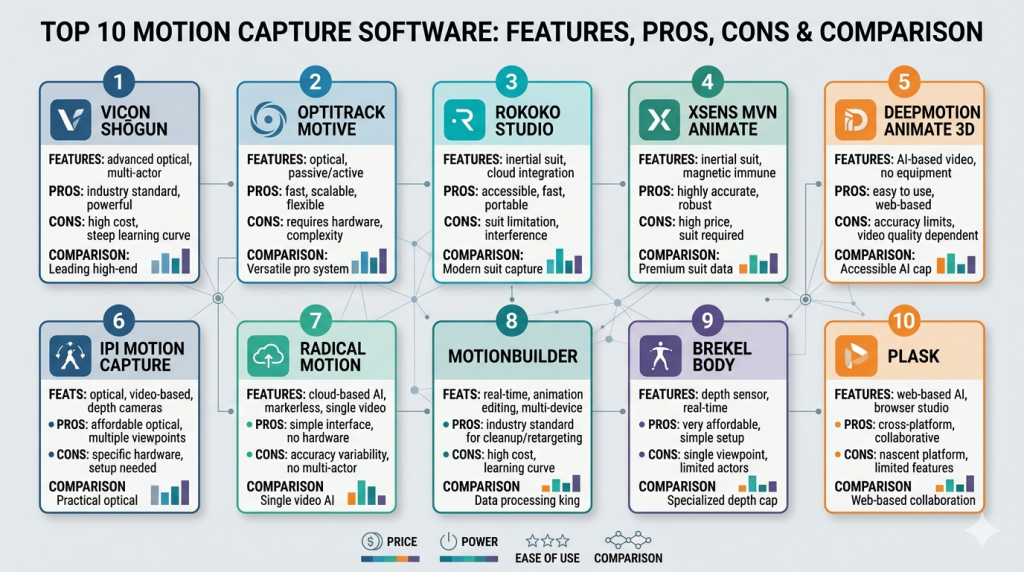
Top 10 Motion Capture Software
#1 — Vicon Shōgun
Short description: A high-end motion capture software used in film and AAA game production. Designed for studios requiring maximum precision and scalability.
Key Features
- High-precision optical tracking
- Real-time motion visualization
- Advanced calibration tools
- Multi-actor capture support
- Robust data cleanup workflows
- Integration with Vicon hardware ecosystem
Pros
- Industry-leading accuracy
- Ideal for complex multi-character scenes
Cons
- Expensive hardware dependency
- Steep learning curve
Platforms / Deployment
Windows
On-premise
Security & Compliance
Not publicly stated
Integrations & Ecosystem
Strong integration with production pipelines and 3D tools.
- Unreal Engine
- Unity
- MotionBuilder
- Proprietary hardware systems
Support & Community
Enterprise-grade support with professional documentation and training programs.
#2 — OptiTrack Motive
Short description: A professional motion capture solution widely used in animation, robotics, and research.
Key Features
- Real-time tracking and streaming
- Rigid body and skeleton tracking
- Calibration tools
- Multi-device synchronization
- SDK for custom development
Pros
- Flexible for multiple industries
- Reliable performance
Cons
- Requires specialized hardware
- Setup complexity
Platforms / Deployment
Windows
On-premise
Security & Compliance
Not publicly stated
Integrations & Ecosystem
Supports integration with simulation and game engines.
- Unity
- Unreal Engine
- MATLAB
- Custom APIs
Support & Community
Strong documentation and technical support; widely used in academia.
#3 — Rokoko Studio
Short description: A popular, user-friendly mocap tool focused on accessibility and indie creators.
Key Features
- Real-time motion capture
- Cloud-based processing
- Markerless and suit-based options
- Motion library access
- Easy retargeting tools
Pros
- Beginner-friendly
- Affordable entry point
Cons
- Less accurate than high-end systems
- Limited advanced controls
Platforms / Deployment
Windows / macOS
Cloud / Hybrid
Security & Compliance
Not publicly stated
Integrations & Ecosystem
Designed for quick integration with creative tools.
- Blender
- Unity
- Unreal Engine
- MotionBuilder
Support & Community
Active community with tutorials and growing ecosystem.
#4 — Xsens MVN Animate
Short description: A leading inertial motion capture system known for portability and accuracy.
Key Features
- Markerless inertial tracking
- Real-time data streaming
- Indoor and outdoor capture
- High-fidelity motion data
- Live retargeting
Pros
- No camera setup required
- Highly portable
Cons
- Hardware cost
- Drift over long sessions
Platforms / Deployment
Windows
On-premise
Security & Compliance
Not publicly stated
Integrations & Ecosystem
Widely used in production workflows.
- Unreal Engine
- Unity
- Maya
- MotionBuilder
Support & Community
Strong enterprise support and documentation.
#5 — DeepMotion Animate 3D
Short description: AI-driven markerless motion capture from video input.
Key Features
- AI pose estimation
- Video-to-animation pipeline
- No hardware required
- Cloud-based processing
- Automatic rigging
Pros
- Extremely accessible
- Fast setup
Cons
- Limited precision
- Dependent on video quality
Platforms / Deployment
Web
Cloud
Security & Compliance
Not publicly stated
Integrations & Ecosystem
Focused on ease of export.
- FBX export
- Unity
- Unreal Engine
Support & Community
Growing community with simple onboarding.
#6 — iPi Motion Capture
Short description: Affordable markerless mocap using depth sensors or video cameras.
Key Features
- Multi-camera tracking
- Depth sensor support
- Motion cleanup tools
- Skeleton tracking
- Export to 3D tools
Pros
- Cost-effective
- Flexible camera setups
Cons
- Requires calibration
- Lower accuracy than premium tools
Platforms / Deployment
Windows
On-premise
Security & Compliance
Not publicly stated
Integrations & Ecosystem
Compatible with common animation pipelines.
- Blender
- 3ds Max
- Unity
Support & Community
Moderate community with solid documentation.
#7 — RADiCAL Motion
Short description: AI-powered motion capture from standard video footage.
Key Features
- Browser-based processing
- AI skeleton tracking
- No hardware needed
- Fast turnaround
- Cloud rendering
Pros
- Very accessible
- No setup required
Cons
- Limited customization
- Accuracy varies
Platforms / Deployment
Web
Cloud
Security & Compliance
Not publicly stated
Integrations & Ecosystem
Simple export-based workflow.
- FBX export
- Game engines
Support & Community
Basic support; growing adoption.
#8 — MotionBuilder
Short description: A professional animation and motion editing tool widely used in production.
Key Features
- Real-time animation editing
- Motion retargeting
- Character rigging
- Data cleanup tools
- Live link capabilities
Pros
- Industry standard tool
- Advanced editing features
Cons
- Complex interface
- Requires training
Platforms / Deployment
Windows / macOS
On-premise
Security & Compliance
Not publicly stated
Integrations & Ecosystem
Core part of animation pipelines.
- Maya
- Unreal Engine
- Unity
Support & Community
Strong community and enterprise support.
#9 — Brekel Body
Short description: Lightweight mocap tool for Kinect and depth sensors.
Key Features
- Real-time tracking
- Skeleton detection
- Recording tools
- Export options
- Multi-sensor support
Pros
- Affordable
- Easy setup
Cons
- Limited advanced features
- Hardware dependency
Platforms / Deployment
Windows
On-premise
Security & Compliance
Not publicly stated
Integrations & Ecosystem
Basic integration support.
- Unity
- Blender
Support & Community
Smaller community; limited support.
#10 — Plask
Short description: Web-based motion capture and animation tool with AI features.
Key Features
- Browser-based editing
- AI motion capture
- Animation blending
- Real-time preview
- Cloud storage
Pros
- No installation needed
- Beginner-friendly
Cons
- Limited professional depth
- Internet dependency
Platforms / Deployment
Web
Cloud
Security & Compliance
Not publicly stated
Integrations & Ecosystem
Modern lightweight integrations.
- FBX export
- Game engines
Support & Community
Active and growing community.
Comparison Table (Top 10)
| Tool Name | Best For | Platform(s) Supported | Deployment | Standout Feature | Public Rating |
|---|---|---|---|---|---|
| Vicon Shōgun | Enterprise studios | Windows | On-premise | High-precision tracking | N/A |
| OptiTrack Motive | Research & robotics | Windows | On-premise | Real-time streaming | N/A |
| Rokoko Studio | Indie creators | Windows, macOS | Cloud/Hybrid | Ease of use | N/A |
| Xsens MVN Animate | Portable mocap | Windows | On-premise | Inertial tracking | N/A |
| DeepMotion | AI mocap | Web | Cloud | Video-based capture | N/A |
| iPi Soft | Budget setups | Windows | On-premise | Multi-camera tracking | N/A |
| RADiCAL | AI pipelines | Web | Cloud | Browser mocap | N/A |
| MotionBuilder | Animation editing | Windows, macOS | On-premise | Retargeting tools | N/A |
| Brekel | Entry-level | Windows | On-premise | Kinect support | N/A |
| Plask | Web creators | Web | Cloud | Browser-based editing | N/A |
Evaluation & Scoring of Motion Capture Software
| Tool Name | Core | Ease | Integrations | Security | Performance | Support | Value | Weighted Total |
|---|---|---|---|---|---|---|---|---|
| Vicon | 10 | 6 | 9 | 6 | 10 | 9 | 5 | 8.2 |
| OptiTrack | 9 | 6 | 8 | 6 | 9 | 8 | 6 | 7.8 |
| Rokoko | 7 | 9 | 8 | 5 | 7 | 7 | 9 | 7.8 |
| Xsens | 9 | 7 | 8 | 6 | 9 | 8 | 6 | 8.0 |
| DeepMotion | 7 | 9 | 6 | 5 | 7 | 6 | 8 | 7.4 |
| iPi | 7 | 7 | 6 | 5 | 7 | 6 | 8 | 7.0 |
| RADiCAL | 6 | 9 | 6 | 5 | 6 | 6 | 8 | 6.9 |
| MotionBuilder | 9 | 6 | 9 | 6 | 9 | 8 | 6 | 8.0 |
| Brekel | 6 | 8 | 5 | 5 | 6 | 5 | 7 | 6.5 |
| Plask | 6 | 9 | 6 | 5 | 6 | 6 | 8 | 6.9 |
How to interpret:
- Scores are comparative, not absolute.
- Higher “Core” and “Performance” scores indicate professional-grade capability.
- “Ease” and “Value” highlight accessibility for smaller teams.
- Enterprise tools tend to score high on performance but lower on cost/value.
- Choose based on your workflow, not just total score.
Which Motion Capture Software Is Right for You?
Solo / Freelancer
Choose tools like Plask, Rokoko, or DeepMotion. They offer low setup complexity and minimal hardware requirements.
SMB
Rokoko and iPi provide a balance of affordability and capability for small studios.
Mid-Market
Xsens and MotionBuilder offer strong pipelines without full enterprise cost overhead.
Enterprise
Vicon and OptiTrack are best for high-end production environments requiring precision and scalability.
Budget vs Premium
- Budget: RADiCAL, DeepMotion
- Premium: Vicon, Xsens
Feature Depth vs Ease of Use
- Easy: Plask, Rokoko
- Advanced: MotionBuilder, Vicon
Integrations & Scalability
- Strong ecosystems: MotionBuilder, Vicon
- Basic export workflows: RADiCAL, Plask
Security & Compliance Needs
Most tools do not publicly state compliance certifications—enterprise buyers should validate internally.
Frequently Asked Questions (FAQs)
What is motion capture software used for?
It captures real-world movement and converts it into digital animation data for games, films, and simulations.
Do I need special hardware?
Some tools require suits or cameras, while others use AI from standard video.
Is markerless mocap accurate?
It’s improving rapidly but still less precise than high-end optical systems.
Can beginners use mocap tools?
Yes, tools like Rokoko and Plask are designed for beginners.
How expensive is mocap software?
Costs vary from free/low-cost cloud tools to expensive enterprise systems.
What industries use mocap?
Gaming, film, sports science, healthcare, and AR/VR industries.
Can mocap be done in real time?
Yes, many modern tools support real-time capture and streaming.
What file formats are supported?
Common formats include FBX, BVH, and CSV.
Is cloud mocap secure?
Security varies; most platforms do not publicly state certifications.
Can I switch between tools easily?
Switching is possible via standard formats, but workflows may differ.
Conclusion
Motion capture software has evolved from a niche, hardware-heavy domain into a diverse ecosystem of tools accessible to creators at all levels. Whether you’re a solo developer experimenting with AI-driven animation or an enterprise studio producing cinematic experiences, there’s a solution tailored to your needs.
The “best” motion capture software depends on your priorities—accuracy, cost, ease of use, or integration depth. High-end systems deliver unmatched precision, while newer AI tools offer speed and accessibility.
A practical next step is to shortlist two or three tools that align with your workflow, run a pilot project, and validate how well they integrate with your existing pipeline, performance requirements, and long-term scalability goals.
