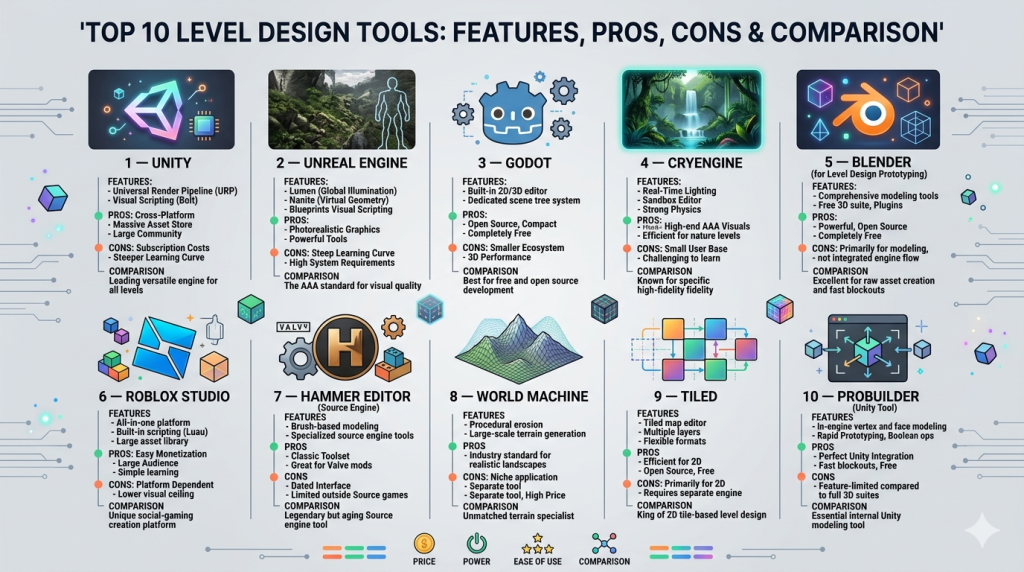
Introduction
Level design tools are software platforms used to create, structure, and refine game environments—everything from simple 2D maps to complex 3D worlds. These tools allow designers to shape gameplay experiences by controlling layout, pacing, player flow, and interactions within a game world. In plain terms, they are the “building blocks” behind how players navigate and experience a game.
In level design tools are becoming more advanced due to AI-assisted workflows, real-time collaboration, and cross-platform development demands. As games expand into immersive formats like VR, AR, and open-world ecosystems, efficient level design tools are critical for faster iteration and scalable development.
Common use cases include:
- Designing game levels for AAA or indie games
- Creating immersive VR/AR environments
- Prototyping gameplay mechanics quickly
- Building interactive simulations for training or education
- Developing procedural worlds and sandbox environments
Key evaluation criteria for buyers:
- Ease of use and learning curve
- Engine compatibility (Unity, Unreal, etc.)
- Performance optimization tools
- Collaboration and version control
- Asset management capabilities
- AI-assisted design features
- Cross-platform deployment
- Integration with pipelines (CI/CD, asset tools)
- Cost and licensing model
Best for: Game developers, level designers, indie studios, AAA game studios, simulation developers, and XR creators across industries like gaming, education, architecture, and defense.
Not ideal for: Non-technical users or teams only needing simple visual mockups—lighter tools like basic 3D modeling or prototyping software may be more appropriate in those cases.
Key Trends in Level Design Tools
- AI-assisted level generation: Tools now offer procedural generation powered by AI to create environments, terrain, and layouts automatically.
- Real-time collaboration: Multi-user editing environments are becoming standard for distributed teams.
- Cross-platform design pipelines: Developers increasingly target PC, console, mobile, and XR from a single toolkit.
- Procedural content workflows: Greater emphasis on scalable world-building using rules-based systems.
- Integration with game engines: Deeper native integrations with engines reduce friction in development pipelines.
- Cloud-based development: Some tools now support browser-based editing and asset streaming.
- Performance optimization tools: Built-in profiling and optimization tools for large environments.
- Photorealism and ray tracing support: Enhanced rendering capabilities for realistic environments.
- Modular asset ecosystems: Growing reliance on reusable assets and marketplaces.
- Security and IP protection: Increasing importance of access controls and versioning for distributed teams.
How We Selected These Tools (Methodology)
- Evaluated market adoption and industry usage across indie and AAA studios
- Assessed feature completeness, especially level editing and environment tools
- Reviewed performance and scalability capabilities
- Considered ecosystem strength and integrations
- Analyzed ease of use and learning curve for different user segments
- Looked at community size and support availability
- Evaluated cross-platform compatibility
- Reviewed workflow efficiency and collaboration features
- Considered pricing flexibility and accessibility
Top 10 Level Design Tools
#1 — Unity
Short description: A widely used game engine with powerful level design tools, ideal for both beginners and professionals building 2D, 3D, and XR experiences.
Key Features
- Scene editor with real-time rendering
- Terrain and environment tools
- Asset store ecosystem
- AI-assisted workflows (increasingly integrated)
- Cross-platform deployment
- Visual scripting support
- Physics and lighting systems
Pros
- Beginner-friendly with extensive documentation
- Large ecosystem and community
- Strong cross-platform capabilities
Cons
- Can become complex for large projects
- Performance tuning may require expertise
Platforms / Deployment
- Windows / macOS / Linux / iOS / Android
- Cloud / Self-hosted
Security & Compliance
- Not publicly stated
Integrations & Ecosystem
Unity integrates with a wide range of tools across development pipelines.
- Version control systems
- 3D modeling tools
- Analytics platforms
- AR/VR SDKs
- Custom APIs
Support & Community
Very strong global community with extensive tutorials, forums, and documentation.
#2 — Unreal Engine
Short description: A high-end engine known for photorealistic environments and advanced level design capabilities.
Key Features
- Blueprint visual scripting
- Advanced lighting and rendering
- World partition system
- Procedural generation tools
- Real-time editing
- Physics simulation
- Cinematic tools
Pros
- Industry-leading visuals
- Powerful for large-scale environments
- Strong AAA support
Cons
- Steeper learning curve
- High system requirements
Platforms / Deployment
- Windows / macOS / Linux / consoles / mobile
- Self-hosted
Security & Compliance
- Not publicly stated
Integrations & Ecosystem
- 3D modeling tools
- Animation pipelines
- VR/AR frameworks
- Version control systems
Support & Community
Very strong community and enterprise-level support options.
#3 — Godot
Short description: Open-source game engine with lightweight level design tools for indie developers.
Key Features
- Scene-based architecture
- Built-in scripting language
- Lightweight editor
- 2D and 3D support
- Open-source flexibility
- Fast iteration workflows
Pros
- Free and open-source
- Lightweight and fast
- Easy to learn
Cons
- Smaller ecosystem
- Limited AAA capabilities
Platforms / Deployment
- Windows / macOS / Linux / mobile
- Self-hosted
Security & Compliance
- Not publicly stated
Integrations & Ecosystem
- Open-source libraries
- Custom plugins
- Community tools
Support & Community
Growing community with active contributors.
#4 — CryEngine
Short description: A powerful engine known for realistic environments and terrain design.
Key Features
- Advanced terrain editor
- Real-time lighting
- Sandbox editor
- Physics engine
- Visual scripting
- AI tools
Pros
- Strong visual quality
- Great for realistic environments
Cons
- Complex setup
- Smaller community
Platforms / Deployment
- Windows / consoles
- Self-hosted
Security & Compliance
- Not publicly stated
Integrations & Ecosystem
- 3D tools
- Custom scripting
Support & Community
Moderate community support.
#5 — Blender (for Level Design Prototyping)
Short description: Primarily a 3D modeling tool, but widely used for level prototyping and asset creation.
Key Features
- 3D modeling and sculpting
- Environment design tools
- Animation system
- Rendering engine
- Open-source
- Asset creation workflows
Pros
- Free and powerful
- Highly flexible
Cons
- Not a full game engine
- Requires integration with engines
Platforms / Deployment
- Windows / macOS / Linux
- Self-hosted
Security & Compliance
- Not publicly stated
Integrations & Ecosystem
- Game engines
- Asset pipelines
- Plugins
Support & Community
Large global community.
#6 — Roblox Studio
Short description: A platform for creating and publishing user-generated game environments.
Key Features
- Drag-and-drop level editor
- Scripting system
- Multiplayer support
- Asset marketplace
- Real-time testing
- Monetization features
Pros
- Easy for beginners
- Built-in distribution platform
Cons
- Limited for complex AAA projects
- Platform lock-in
Platforms / Deployment
- Windows / macOS
- Cloud
Security & Compliance
- Not publicly stated
Integrations & Ecosystem
- Roblox ecosystem tools
- APIs
Support & Community
Very large community.
#7 — Hammer Editor (Source Engine)
Short description: Classic level editor used for Source engine games.
Key Features
- Brush-based level design
- Lighting tools
- Asset placement
- Map compilation tools
- Optimization tools
Pros
- Proven workflow
- Great for specific engines
Cons
- Outdated UI
- Limited modern features
Platforms / Deployment
- Windows
- Self-hosted
Security & Compliance
- Not publicly stated
Integrations & Ecosystem
- Source engine tools
- Modding tools
Support & Community
Niche but dedicated community.
#8 — World Machine
Short description: A terrain generation tool used in level design pipelines.
Key Features
- Procedural terrain generation
- Node-based workflows
- High-resolution output
- Erosion simulation
- Export to game engines
Pros
- Excellent terrain realism
- Scalable environments
Cons
- Not a full level editor
- Requires integration
Platforms / Deployment
- Windows
- Self-hosted
Security & Compliance
- Not publicly stated
Integrations & Ecosystem
- Unity
- Unreal Engine
- Asset pipelines
Support & Community
Moderate community support.
#9 — Tiled
Short description: A 2D level editor used for tile-based game design.
Key Features
- Tilemap editor
- Multi-layer support
- Custom scripting
- Export formats
- Lightweight design
Pros
- Simple and efficient
- Great for 2D games
Cons
- Limited to 2D
- Basic features
Platforms / Deployment
- Windows / macOS / Linux
- Self-hosted
Security & Compliance
- Not publicly stated
Integrations & Ecosystem
- Game engines
- Custom tools
Support & Community
Strong indie community.
#10 — ProBuilder (Unity Tool)
Short description: A level design tool integrated within Unity for rapid prototyping.
Key Features
- In-editor level creation
- Geometry editing
- Rapid prototyping
- UV editing
- Mesh creation
Pros
- Fast iteration
- Native Unity integration
Cons
- Limited outside Unity
- Not a standalone tool
Platforms / Deployment
- Windows / macOS
- Self-hosted
Security & Compliance
- Not publicly stated
Integrations & Ecosystem
- Unity ecosystem
- Asset store
Support & Community
Strong Unity-based support.
Comparison Table (Top 10)
| Tool Name | Best For | Platform(s) Supported | Deployment | Standout Feature | Public Rating |
|---|---|---|---|---|---|
| Unity | All-purpose development | Multi-platform | Hybrid | Cross-platform engine | N/A |
| Unreal Engine | AAA games | Multi-platform | Self-hosted | Photorealistic rendering | N/A |
| Godot | Indie developers | Multi-platform | Self-hosted | Open-source flexibility | N/A |
| CryEngine | Realistic environments | Windows | Self-hosted | Terrain realism | N/A |
| Blender | Asset creation | Multi-platform | Self-hosted | 3D modeling power | N/A |
| Roblox Studio | Beginners | Windows/macOS | Cloud | Built-in distribution | N/A |
| Hammer Editor | Source engine | Windows | Self-hosted | Classic workflows | N/A |
| World Machine | Terrain design | Windows | Self-hosted | Procedural terrain | N/A |
| Tiled | 2D games | Multi-platform | Self-hosted | Tile-based editing | N/A |
| ProBuilder | Unity users | Windows/macOS | Self-hosted | Rapid prototyping | N/A |
Evaluation & Scoring of Level Design Tools
| Tool Name | Core | Ease | Integrations | Security | Performance | Support | Value | Weighted Total |
|---|---|---|---|---|---|---|---|---|
| Unity | 9 | 8 | 9 | 6 | 8 | 9 | 8 | 8.2 |
| Unreal Engine | 10 | 6 | 9 | 6 | 9 | 9 | 7 | 8.1 |
| Godot | 7 | 9 | 7 | 5 | 7 | 8 | 9 | 7.6 |
| CryEngine | 8 | 6 | 7 | 5 | 8 | 6 | 7 | 7.1 |
| Blender | 7 | 7 | 8 | 5 | 7 | 9 | 10 | 7.8 |
| Roblox Studio | 6 | 9 | 6 | 5 | 7 | 9 | 8 | 7.4 |
| Hammer Editor | 6 | 6 | 5 | 5 | 6 | 6 | 7 | 6.0 |
| World Machine | 7 | 7 | 7 | 5 | 8 | 6 | 7 | 7.0 |
| Tiled | 6 | 9 | 6 | 5 | 7 | 8 | 9 | 7.3 |
| ProBuilder | 7 | 8 | 8 | 5 | 7 | 8 | 8 | 7.5 |
How to interpret scores:
- Scores are relative comparisons across tools in this category.
- A higher score does not mean universally “better”—it reflects broader capability and fit.
- Weighting prioritizes core features and value, making them more influential.
- Tools with lower scores may still be ideal for niche use cases.
- Always align scoring with your project requirements before deciding.
Which Level Design Tools Tool Is Right for You?
Solo / Freelancer
Choose tools like Godot, Tiled, or Blender for affordability and flexibility. These tools offer strong capabilities without heavy infrastructure requirements.
SMB
Unity or Roblox Studio works well due to ease of use and faster development cycles. They balance functionality with accessibility.
Mid-Market
Teams should consider Unity or Unreal Engine depending on project complexity. Collaboration and scalability become key factors.
Enterprise
Unreal Engine and Unity dominate here due to performance, scalability, and ecosystem support. Custom pipelines and integrations matter most.
Budget vs Premium
- Budget: Godot, Blender, Tiled
- Premium: Unreal Engine, Unity
Feature Depth vs Ease of Use
- Feature depth: Unreal Engine
- Ease of use: Roblox Studio, Unity
Integrations & Scalability
Choose tools with strong ecosystems like Unity or Unreal for long-term scalability.
Security & Compliance Needs
Enterprise teams should validate internal controls, as most tools list Not publicly stated for compliance.
Frequently Asked Questions (FAQs)
What are level design tools used for?
They are used to create game environments, maps, and interactive spaces that define gameplay flow.
Are level design tools only for game development?
No, they are also used in simulations, VR training, and virtual environments.
Do I need coding skills?
Some tools require scripting, but many offer visual tools for non-coders.
What is the best free level design tool?
Godot and Blender are popular free options.
Can I use multiple tools together?
Yes, many workflows combine modeling tools with game engines.
How long does it take to learn?
Basic skills can take weeks, while mastery may take months or years.
Are these tools cloud-based?
Some support cloud workflows, but many are desktop-based.
Do they support collaboration?
Modern tools increasingly offer real-time collaboration features.
How do I choose the right tool?
Match your project size, team skill level, and platform requirements.
Can I switch tools later?
Yes, but migration can be complex depending on assets and workflows.
Conclusion
Choosing the right level design tool is less about finding a single “best” option and more about aligning capabilities with your specific project goals, team structure, and long-term development strategy. As the gaming and interactive experience landscape continues to evolve in 2026 and beyond, level design tools are no longer just map editors—they are comprehensive ecosystems that integrate AI-assisted workflows, real-time collaboration, procedural generation, and cross-platform deployment. Whether you are an indie developer experimenting with creative ideas, a mid-sized studio balancing speed and scalability, or an enterprise team building highly immersive environments, the tools you select will directly influence your productivity, performance, and creative output. It’s important to carefully evaluate not just features, but also ecosystem strength, integration flexibility, and community support, as these factors significantly impact long-term success. Instead of committing immediately, a practical approach is to shortlist two or three tools that align with your requirements, run small pilot projects, test integration with your existing workflows, and validate performance under real-world conditions. By doing this, you ensure that your chosen platform not only meets your current needs but also scales with your future ambitions in an increasingly complex and immersive digital landscape.
