Introduction
Electronic Design Automation (EDA) software refers to a category of tools used by engineers to design, simulate, verify, and manufacture electronic systems such as integrated circuits (ICs), printed circuit boards (PCBs), and embedded hardware. In simple terms, EDA tools help transform complex electronic ideas into production-ready designs with accuracy and efficiency.
In today’s rapidly evolving hardware landscape, EDA software plays a critical role. With increasing demand for AI chips, IoT devices, automotive electronics, and high-performance computing, manual design processes are no longer viable. EDA tools enable automation, reduce errors, and accelerate time-to-market.
Common use cases include:
- Designing and verifying semiconductor chips (ASICs and SoCs)
- PCB layout and routing for consumer and industrial devices
- Signal integrity, power, and thermal analysis
- Embedded systems prototyping
- Hardware-software co-design workflows
Key evaluation criteria for buyers:
- Breadth of design capabilities (PCB, IC, FPGA, analog/digital)
- Simulation and verification depth
- Ease of use and onboarding time
- Performance and scalability for large designs
- Integration with manufacturing and supply chain systems
- Licensing model and total cost of ownership
- Collaboration and version control features
- Security controls and IP protection
- Vendor support and ecosystem maturity
Best for: Electrical engineers, hardware designers, semiconductor companies, embedded developers, and R&D teams across industries such as automotive, aerospace, telecom, and consumer electronics.
Not ideal for: Non-technical users or teams that only need simple schematic drawing tools. In such cases, lightweight PCB editors or CAD tools may be more appropriate.
Key Trends in Electronic Design Automation (EDA) Software for and Beyond
- AI-assisted design and optimization: Machine learning models are increasingly used to automate routing, placement, and performance tuning.
- Cloud-native EDA platforms: Vendors are offering scalable cloud environments to handle compute-intensive simulations and collaboration.
- Shift-left verification: Design validation is moving earlier in the lifecycle to reduce costly downstream errors.
- Chiplet-based architectures: EDA tools are evolving to support modular chip design and heterogeneous integration.
- Digital twin and simulation environments: Real-time simulation of hardware behavior is becoming standard in advanced workflows.
- Open-source EDA growth: Tools like KiCad and OpenROAD are gaining traction among startups and academia.
- Security-first design practices: Increased focus on hardware-level security and IP protection features.
- Integration with DevOps workflows: EDA tools are aligning with CI/CD pipelines for faster iteration and automation.
- Flexible pricing models: Subscription and usage-based pricing are replacing traditional perpetual licenses.
- Cross-domain collaboration: Improved workflows connecting electrical, mechanical, and software engineering teams.
How We Selected These Tools (Methodology)
The following tools were selected based on a comprehensive evaluation framework:
- Strong industry adoption and long-term market presence
- Feature completeness across design, simulation, and verification
- Proven reliability in complex, production-grade environments
- Performance benchmarks for large-scale designs
- Integration capabilities with manufacturing and engineering workflows
- Vendor ecosystem strength, including third-party support and extensions
- Suitability across different company sizes (individual to enterprise)
- Flexibility in deployment models (cloud, on-premise, hybrid)
- Availability of documentation, training, and onboarding resources
- Alignment with modern trends such as AI, automation, and cloud computing
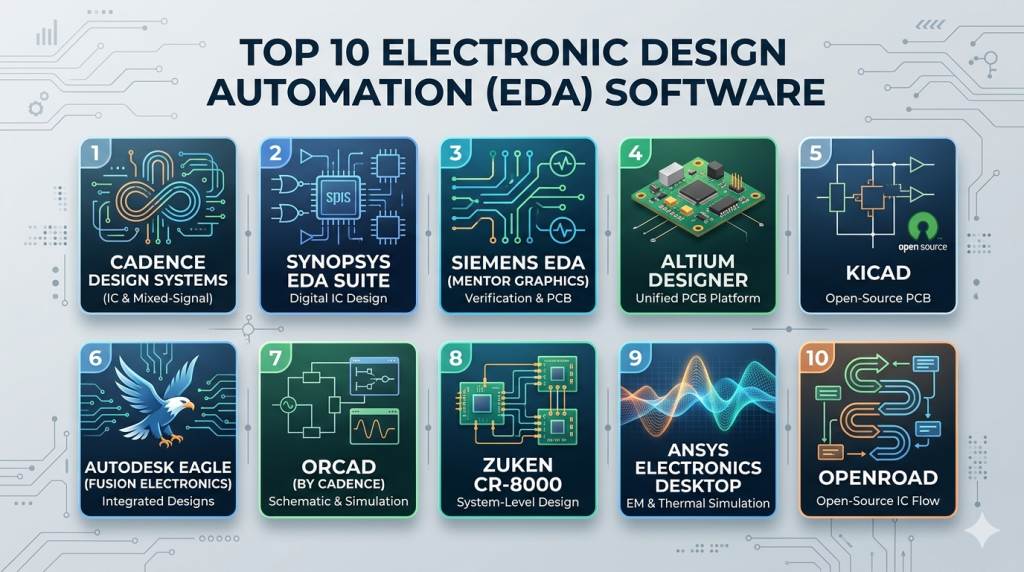
Top 10 Electronic Design Automation (EDA) Software Tools
#1 — Cadence Design Systems
Short description: A comprehensive enterprise-grade EDA suite offering end-to-end solutions for IC, PCB, and system design. Widely used by semiconductor companies and large engineering teams.
Key Features
- Advanced IC design and verification tools
- PCB design suite (Allegro)
- AI-driven optimization for layout and routing
- Signal integrity and power analysis
- Analog and mixed-signal design tools
- Cloud-enabled simulation capabilities
Pros
- Industry-leading performance for complex designs
- Full-stack EDA ecosystem under one vendor
Cons
- High licensing cost
- Steep learning curve for new users
Platforms / Deployment
Windows / Linux
Cloud / Self-hosted / Hybrid
Security & Compliance
Not publicly stated
Integrations & Ecosystem
Cadence integrates deeply with semiconductor manufacturing and engineering workflows, offering automation and extensibility.
- Foundry toolchain compatibility
- Python and Tcl scripting support
- Integration with third-party simulators
- Data management and PLM integrations
Support & Community
Enterprise-grade support with dedicated account teams, structured onboarding, and extensive documentation.
#2 — Synopsys EDA Suite
Short description: A leading platform for ASIC and SoC design, verification, and IP integration, commonly used in advanced semiconductor development.
Key Features
- End-to-end ASIC and SoC design tools
- Verification and debugging solutions
- Large IP library ecosystem
- AI-enhanced design workflows
- Power and performance optimization tools
Pros
- Strong verification capabilities
- Extensive reusable IP ecosystem
Cons
- Complex setup and configuration
- High cost for smaller teams
Platforms / Deployment
Windows / Linux
Cloud / Hybrid
Security & Compliance
Not publicly stated
Integrations & Ecosystem
Synopsys provides strong ecosystem integration across chip design workflows.
- Integration with CI/CD pipelines
- APIs for automation
- Foundry ecosystem compatibility
- Third-party tool support
Support & Community
Comprehensive enterprise support, training programs, and detailed documentation.
#3 — Siemens EDA (Mentor Graphics)
Short description: A powerful EDA suite focused on PCB design, IC verification, and system-level simulation, widely used in regulated industries.
Key Features
- PCB design tools (Xpedition)
- IC verification and validation
- Digital twin simulation capabilities
- Thermal and mechanical analysis
- Industry-specific compliance support
Pros
- Strong system-level simulation
- Well-suited for automotive and aerospace
Cons
- Complex interface
- Expensive licensing
Platforms / Deployment
Windows / Linux
Cloud / Hybrid
Security & Compliance
Not publicly stated
Integrations & Ecosystem
- Integration with PLM systems
- APIs for customization
- Manufacturing workflow compatibility
- Simulation ecosystem integrations
Support & Community
Strong enterprise support and industry-specific expertise.
#4 — Altium Designer
Short description: A widely used PCB design tool known for its intuitive interface and strong collaboration features.
Key Features
- PCB layout and schematic design
- 3D visualization capabilities
- Real-time collaboration tools
- Component lifecycle management
- Cloud workspace integration
Pros
- User-friendly interface
- Excellent collaboration features
Cons
- Subscription pricing
- Limited IC design support
Platforms / Deployment
Windows
Cloud / Hybrid
Security & Compliance
Not publicly stated
Integrations & Ecosystem
Altium supports integration across design and collaboration workflows.
- Mechanical CAD integrations
- Cloud-based collaboration tools
- Component libraries
- APIs for customization
Support & Community
Active community, strong documentation, and responsive vendor support.
#5 — KiCad
Short description: A free, open-source PCB design platform suitable for individuals, startups, and educational institutions.
Key Features
- Schematic capture and PCB layout
- Cross-platform compatibility
- 3D PCB viewer
- Extensive component libraries
- Plugin and extension support
Pros
- Free and open-source
- Strong global community
Cons
- Limited advanced simulation features
- UI less polished than commercial tools
Platforms / Deployment
Windows / macOS / Linux
Self-hosted
Security & Compliance
Not publicly stated
Integrations & Ecosystem
KiCad offers flexibility through open formats and community-driven extensions.
- Plugin ecosystem
- Integration with external simulators
- Open file formats
- Community-developed libraries
Support & Community
Highly active community with extensive tutorials and forums.
#6 — Autodesk EAGLE (Fusion Electronics)
Short description: A PCB design tool integrated into Autodesk’s design ecosystem, suitable for engineers and product designers.
Key Features
- PCB layout and schematic tools
- Integration with Fusion 360
- Cloud collaboration capabilities
- Component libraries
- Design rule checks
Pros
- Strong integration with mechanical design
- Easy learning curve
Cons
- Limited advanced capabilities
- Subscription-based pricing
Platforms / Deployment
Windows / macOS
Cloud / Hybrid
Security & Compliance
Not publicly stated
Integrations & Ecosystem
- Fusion 360 integration
- Cloud-based libraries
- APIs for automation
- Mechanical CAD compatibility
Support & Community
Well-documented with a strong user base and community support.
#7 — OrCAD (by Cadence)
Short description: A mid-tier PCB design solution that balances usability with advanced features, ideal for growing teams.
Key Features
- PCB layout and schematic capture
- Integrated simulation tools
- Design rule checks
- Component management
- Integration with Allegro
Pros
- Easier to learn than enterprise tools
- Strong simulation capabilities
Cons
- Windows-only platform
- Limited scalability compared to full Cadence suite
Platforms / Deployment
Windows
Self-hosted
Security & Compliance
Not publicly stated
Integrations & Ecosystem
- Integration with Cadence ecosystem
- Simulation engines
- Component libraries
- APIs for automation
Support & Community
Reliable documentation and vendor-backed support.
#8 — Zuken CR-8000
Short description: A high-end PCB design platform focused on complex systems and manufacturing integration.
Key Features
- Advanced PCB design tools
- Design-for-manufacturing (DFM) capabilities
- System-level design support
- Signal integrity analysis
- Data and lifecycle management
Pros
- Strong manufacturing integration
- High-performance design tools
Cons
- Expensive
- Smaller community compared to competitors
Platforms / Deployment
Windows
Self-hosted / Hybrid
Security & Compliance
Not publicly stated
Integrations & Ecosystem
- PLM and manufacturing system integration
- APIs for automation
- Data management tools
- Engineering workflow compatibility
Support & Community
Enterprise support with limited public community resources.
#9 — Ansys Electronics Desktop
Short description: A simulation-focused platform specializing in electromagnetic, thermal, and signal integrity analysis.
Key Features
- Electromagnetic simulation
- Thermal and signal analysis
- Multiphysics modeling
- High-performance computing support
- Accurate real-world modeling
Pros
- Industry-leading simulation accuracy
- Strong HPC support
Cons
- Not a full design suite
- Requires specialized expertise
Platforms / Deployment
Windows / Linux
Cloud / Hybrid
Security & Compliance
Not publicly stated
Integrations & Ecosystem
- Integration with CAD tools
- HPC environments
- APIs for scripting
- Simulation workflow support
Support & Community
Strong enterprise support and detailed technical documentation.
#10 — OpenROAD
Short description: An open-source toolchain for automated digital ASIC design, widely used in research and early-stage innovation.
Key Features
- Automated RTL-to-GDS flow
- Open-source architecture
- Scriptable workflows
- Integration with open PDKs
- Emerging AI optimization capabilities
Pros
- Free and flexible
- Rapid innovation in academia
Cons
- Limited enterprise support
- Not suitable for all production use cases
Platforms / Deployment
Linux
Self-hosted
Security & Compliance
Not publicly stated
Integrations & Ecosystem
- Open-source EDA ecosystem
- APIs and scripting support
- Academic collaborations
- PDK compatibility
Support & Community
Active research community with limited commercial support.
Comparison Table (Top 10)
| Tool Name | Best For | Platform(s) Supported | Deployment | Standout Feature | Public Rating |
|---|---|---|---|---|---|
| Cadence | Enterprise IC design | Windows, Linux | Hybrid | AI-driven design optimization | N/A |
| Synopsys | Advanced SoC design | Windows, Linux | Hybrid | Large IP ecosystem | N/A |
| Siemens EDA | System-level design | Windows, Linux | Hybrid | Digital twin simulation | N/A |
| Altium Designer | PCB teams | Windows | Cloud/Hybrid | Collaboration features | N/A |
| KiCad | Open-source users | Windows, macOS, Linux | Self-hosted | Free and extensible | N/A |
| Autodesk EAGLE | Product designers | Windows, macOS | Cloud/Hybrid | Fusion integration | N/A |
| OrCAD | SMB PCB teams | Windows | Self-hosted | Balanced feature set | N/A |
| Zuken CR-8000 | Manufacturing-focused teams | Windows | Hybrid | DFM capabilities | N/A |
| Ansys Electronics | Simulation-heavy workflows | Windows, Linux | Hybrid | Multiphysics simulation | N/A |
| OpenROAD | Research/startups | Linux | Self-hosted | Open-source ASIC flow | N/A |
Evaluation & Scoring of Electronic Design Automation (EDA) Software
| Tool Name | Core (25%) | Ease (15%) | Integrations (15%) | Security (10%) | Performance (10%) | Support (10%) | Value (15%) | Weighted Total |
|---|---|---|---|---|---|---|---|---|
| Cadence | 10 | 6 | 9 | 7 | 10 | 9 | 6 | 8.45 |
| Synopsys | 10 | 6 | 9 | 7 | 10 | 9 | 5 | 8.30 |
| Siemens EDA | 9 | 6 | 8 | 7 | 9 | 8 | 6 | 7.95 |
| Altium Designer | 8 | 9 | 7 | 6 | 8 | 8 | 7 | 7.85 |
| KiCad | 7 | 7 | 6 | 5 | 7 | 7 | 10 | 7.25 |
| Autodesk EAGLE | 7 | 8 | 7 | 6 | 7 | 7 | 7 | 7.15 |
| OrCAD | 8 | 7 | 7 | 6 | 8 | 8 | 6 | 7.40 |
| Zuken CR-8000 | 9 | 5 | 7 | 7 | 9 | 7 | 5 | 7.40 |
| Ansys Electronics | 9 | 6 | 8 | 7 | 10 | 8 | 6 | 7.95 |
| OpenROAD | 6 | 5 | 6 | 5 | 7 | 5 | 10 | 6.65 |
How to interpret these scores:
- These scores are relative comparisons, not absolute benchmarks.
- Enterprise tools rank higher in performance and features, but may score lower in value.
- Open-source tools offer excellent value but may lack enterprise-grade support.
- The best tool depends on your priorities—cost, scalability, or feature depth.
- Use the scores to shortlist options, not to make a final decision alone.
Which Electronic Design Automation (EDA) Software Tool Is Right for You?
Solo / Freelancer
- Recommended: KiCad, Autodesk EAGLE
- Focus on low cost, ease of learning, and community support.
- Open-source tools are often sufficient for smaller projects.
SMB
- Recommended: Altium Designer, OrCAD
- Balance between usability and advanced features.
- Look for tools with strong documentation and moderate pricing.
Mid-Market
- Recommended: Altium Designer, Siemens EDA
- Need better collaboration, scalability, and integration with manufacturing workflows.
Enterprise
- Recommended: Cadence, Synopsys, Zuken CR-8000
- Prioritize performance, full-stack capabilities, and vendor support.
- Ideal for complex chip design and regulated industries.
Budget vs Premium
- Budget: KiCad, OpenROAD
- Premium: Cadence, Synopsys
Feature Depth vs Ease of Use
- Deep features: Cadence, Synopsys
- Ease of use: Altium Designer, Autodesk EAGLE
Integrations & Scalability
- Strong ecosystems: Cadence, Siemens EDA
- Flexible/open: KiCad, OpenROAD
Security & Compliance Needs
- Enterprise tools may provide stronger IP protection and access control features (details vary).
- Open-source tools require internal governance for security.
Frequently Asked Questions (FAQs)
What is the typical pricing model for EDA software?
EDA tools typically use subscription or perpetual licensing models. Enterprise tools are often expensive, while open-source tools are free.
How long does implementation take?
Implementation can range from a few days for simple tools to several months for enterprise platforms with complex workflows.
Are EDA tools cloud-based?
Many modern EDA tools support cloud or hybrid deployment, but some still rely heavily on on-premise setups.
What are common mistakes when choosing EDA software?
Common mistakes include underestimating training requirements, ignoring integration needs, and selecting tools that don’t scale.
Are open-source EDA tools suitable for professional use?
Yes, especially for startups and smaller teams. However, they may lack advanced features and enterprise support.
How important is simulation in EDA?
Simulation is critical as it helps identify issues early, reducing costly errors during manufacturing.
Can EDA tools integrate with CI/CD workflows?
Yes, many modern tools support automation and scripting for integration into DevOps pipelines.
Is security a major concern in EDA tools?
Yes, especially for protecting intellectual property and sensitive design data.
How difficult is it to switch EDA tools?
Switching can be challenging due to file compatibility, retraining, and workflow changes.
What are alternatives to EDA software?
For simpler use cases, basic PCB tools or general CAD software may be sufficient.
Conclusion
Electronic Design Automation (EDA) software is essential for modern hardware innovation. As electronic systems grow more complex, these tools provide the automation, accuracy, and scalability required to bring designs to life.
There is no single “best” tool for everyone:
- Enterprise teams benefit from powerful ecosystems like Cadence and Synopsys.
- SMBs should focus on balance with tools like Altium Designer or OrCAD.
- Individuals and startups can leverage cost-effective solutions like KiCad or OpenROAD.
