Introduction
Color grading software is used to enhance, correct, and stylize the color of video footage or images. In simple terms, it helps creators adjust brightness, contrast, tones, and color palettes to achieve a specific visual look—whether cinematic, natural, or stylized.
color grading has become more critical than ever due to the rise of high-resolution content (4K/8K), HDR formats, social media video demand, and AI-assisted editing workflows. Content creators, filmmakers, marketers, and even enterprises rely on consistent visual branding across channels.
Real-world use cases:
- Film and TV post-production for cinematic color correction
- YouTube and social media content optimization
- Advertising and brand campaigns requiring visual consistency
- Product videos and e-commerce visuals
- Documentary and news editing workflows
What buyers should evaluate:
- Color grading precision tools (scopes, curves, LUTs)
- AI-assisted features (auto color match, scene detection)
- Performance with high-resolution footage (4K/8K)
- Integration with editing/VFX pipelines
- Platform compatibility (Windows, macOS, Linux)
- Collaboration features
- Hardware acceleration (GPU usage)
- Learning curve and usability
- Pricing model (subscription vs perpetual)
- Export formats and delivery options
Best for: Video editors, filmmakers, content creators, agencies, and production studios across SMB to enterprise levels.
Not ideal for: Users needing only basic video trimming or simple filters—lightweight video editors or mobile apps may be sufficient in those cases.
Key Trends in Color Grading Software
- AI-assisted grading: Automated color matching, skin tone detection, and scene-based grading are becoming standard.
- Cloud collaboration: Teams increasingly work remotely with shared timelines and grading sessions.
- HDR and Dolby Vision workflows: Support for advanced color spaces and delivery formats is expanding.
- GPU acceleration: Real-time playback and rendering improvements through advanced GPU usage.
- Node-based workflows: More tools are adopting flexible node systems for complex grading pipelines.
- Cross-platform ecosystems: Seamless workflows between editing, VFX, and grading tools.
- LUT marketplaces and presets: Growing ecosystem of reusable grading styles.
- Automation for bulk processing: Batch grading for large-scale content production.
- Integration with AI video tools: Compatibility with generative AI editing and enhancement pipelines.
- Subscription pricing dominance: Shift toward SaaS models with cloud features.
How We Selected These Tools (Methodology)
- Evaluated market adoption and industry usage across film, media, and digital content sectors
- Assessed feature completeness, including grading tools, scopes, LUTs, and HDR support
- Considered performance benchmarks, especially for 4K/8K workflows
- Reviewed integration capabilities with editing, VFX, and audio tools
- Analyzed ease of use vs professional depth
- Looked at community support and training resources
- Evaluated cross-platform availability
- Considered AI and automation capabilities
- Reviewed pricing accessibility across segments
- Ensured coverage across freelancers, SMBs, and enterprise studios
Top 10 Color Grading Software
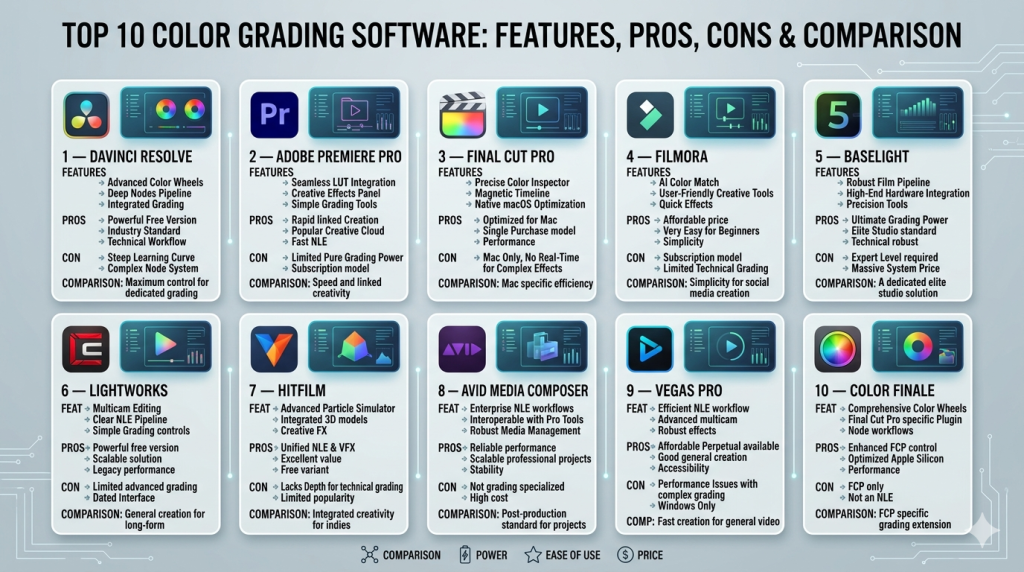
#1 — DaVinci Resolve
Short description: A professional-grade video editing and color grading suite widely used in film and television production.
Key Features
- Advanced node-based color grading system
- HDR grading and color space management
- Built-in scopes (waveform, vectorscope, histogram)
- AI tools like color matching and object tracking
- Fusion VFX and Fairlight audio integration
- Multi-user collaboration tools
Pros
- Industry-standard color grading capabilities
- Free version with robust features
- All-in-one editing, VFX, and audio suite
Cons
- Steep learning curve for beginners
- Requires high-performance hardware
Platforms / Deployment
Windows / macOS / Linux
Security & Compliance
Not publicly stated
Integrations & Ecosystem
Strong ecosystem across post-production workflows.
- Editing and VFX tools (Fusion)
- Audio production (Fairlight)
- Third-party plugins
- Hardware panels for grading
Support & Community
Large global community, extensive tutorials, and strong documentation.
#2 — Adobe Premiere Pro
Short description: A widely used video editing tool with integrated color grading features through Lumetri Color.
Key Features
- Lumetri Color panel for grading
- LUT support and presets
- Integration with Creative Cloud
- AI-powered auto color adjustments
- Timeline-based editing workflow
- Seamless After Effects integration
Pros
- Easy integration with Adobe ecosystem
- Familiar UI for editors
- Strong plugin support
Cons
- Subscription-only pricing
- Less advanced grading than dedicated tools
Platforms / Deployment
Windows / macOS
Security & Compliance
SSO/MFA available via Adobe ecosystem; others not publicly stated
Integrations & Ecosystem
Deep integration within Adobe tools.
- After Effects
- Photoshop
- Media Encoder
- Third-party plugins
Support & Community
Extensive documentation and global user base.
#3 — Final Cut Pro
Short description: Apple’s professional video editing software with powerful color grading tools.
Key Features
- Color wheels and curves
- HDR support
- Magnetic timeline workflow
- Optimized for Apple silicon
- Built-in LUT support
- Real-time playback performance
Pros
- Excellent performance on macOS
- Intuitive UI
- One-time purchase model
Cons
- macOS-only
- Limited advanced grading compared to Resolve
Platforms / Deployment
macOS
Security & Compliance
Not publicly stated
Integrations & Ecosystem
Strong Apple ecosystem integration.
- Motion
- Compressor
- Third-party plugins
Support & Community
Strong community among Apple users.
#4 — Filmora
Short description: Beginner-friendly video editor with basic color grading tools.
Key Features
- Preset-based color correction
- Basic LUT support
- Drag-and-drop interface
- AI enhancements
- Built-in effects library
- Fast export options
Pros
- Easy to learn
- Affordable pricing
- Good for quick edits
Cons
- Limited professional grading tools
- Not suitable for high-end workflows
Platforms / Deployment
Windows / macOS
Security & Compliance
Not publicly stated
Integrations & Ecosystem
Limited integrations.
- Stock media libraries
- Built-in effects ecosystem
Support & Community
Good beginner documentation; smaller professional community.
#5 — Baselight
Short description: High-end color grading system used in film and broadcast industries.
Key Features
- Advanced color grading tools
- HDR and wide color gamut support
- Real-time playback
- Layer-based grading system
- High-end hardware integration
- Precision color control
Pros
- Extremely powerful grading tools
- Used in major film productions
Cons
- Expensive
- Requires specialized training
Platforms / Deployment
Windows / Linux
Security & Compliance
Not publicly stated
Integrations & Ecosystem
Enterprise-level integrations.
- Film pipelines
- Broadcast systems
- Hardware control panels
Support & Community
Professional support; niche user base.
#6 — Lightworks
Short description: Professional video editor with integrated color grading capabilities.
Key Features
- Real-time effects
- Multi-camera editing
- Color correction tools
- GPU acceleration
- Export presets
- Timeline editing
Pros
- Flexible pricing
- Good for professional editing
Cons
- UI can feel outdated
- Limited advanced grading tools
Platforms / Deployment
Windows / macOS / Linux
Security & Compliance
Not publicly stated
Integrations & Ecosystem
Moderate ecosystem.
- Export tools
- Plugin support
Support & Community
Moderate community and documentation.
#7 — HitFilm
Short description: Combined video editing and VFX tool with color grading capabilities.
Key Features
- Built-in VFX tools
- Color grading presets
- Layer-based editing
- Particle effects
- LUT support
- Compositing tools
Pros
- Great for VFX-heavy projects
- All-in-one solution
Cons
- Learning curve
- Performance limitations on large projects
Platforms / Deployment
Windows / macOS
Security & Compliance
Not publicly stated
Integrations & Ecosystem
Focus on internal tools.
- VFX engine
- Plugin support
Support & Community
Active community among creators.
#8 — Avid Media Composer
Short description: Industry-standard editing platform with professional color correction tools.
Key Features
- Advanced color correction
- Collaborative workflows
- Media management tools
- High-end editing features
- Integration with Avid ecosystem
Pros
- Trusted in film/TV industry
- Strong collaboration tools
Cons
- Complex interface
- Expensive licensing
Platforms / Deployment
Windows / macOS
Security & Compliance
Not publicly stated
Integrations & Ecosystem
Strong enterprise integrations.
- Avid audio tools
- Broadcast workflows
Support & Community
Professional support; strong industry presence.
#9 — Vegas Pro
Short description: Video editing software with integrated color grading tools.
Key Features
- Color wheels and curves
- HDR support
- GPU acceleration
- AI tools
- Timeline editing
- Plugin support
Pros
- Flexible editing workflow
- Good performance
Cons
- Windows-only
- Smaller ecosystem
Platforms / Deployment
Windows
Security & Compliance
Not publicly stated
Integrations & Ecosystem
Moderate plugin ecosystem.
Support & Community
Decent documentation and user base.
#10 — Color Finale
Short description: Professional color grading plugin for Final Cut Pro.
Key Features
- Advanced grading tools
- LUT management
- HDR workflows
- Color wheels and curves
- Plugin integration
- Real-time grading
Pros
- Enhances Final Cut Pro significantly
- Professional-level grading tools
Cons
- Requires Final Cut Pro
- Additional cost
Platforms / Deployment
macOS
Security & Compliance
Not publicly stated
Integrations & Ecosystem
Works within Final Cut Pro ecosystem.
- Plugin architecture
- LUT libraries
Support & Community
Niche but growing user base.
Comparison Table (Top 10)
| Tool Name | Best For | Platform(s) Supported | Deployment | Standout Feature | Public Rating |
|---|---|---|---|---|---|
| DaVinci Resolve | Professional grading | Win/macOS/Linux | Local | Node-based grading | N/A |
| Adobe Premiere Pro | Editors in Adobe ecosystem | Win/macOS | Cloud/Local | Lumetri Color | N/A |
| Final Cut Pro | Mac users | macOS | Local | Apple optimization | N/A |
| Filmora | Beginners | Win/macOS | Local | Ease of use | N/A |
| Baselight | Film studios | Win/Linux | Local | High-end precision | N/A |
| Lightworks | Indie editors | Win/macOS/Linux | Local | Real-time effects | N/A |
| HitFilm | VFX creators | Win/macOS | Local | Built-in VFX | N/A |
| Avid Media Composer | Broadcast/TV | Win/macOS | Local | Media management | N/A |
| Vegas Pro | Windows editors | Windows | Local | Flexible workflow | N/A |
| Color Finale | Final Cut users | macOS | Local | Advanced plugin | N/A |
Evaluation & Scoring of Color Grading Software
| Tool Name | Core | Ease | Integrations | Security | Performance | Support | Value | Weighted Total |
|---|---|---|---|---|---|---|---|---|
| DaVinci Resolve | 10 | 7 | 9 | 6 | 9 | 9 | 9 | 8.6 |
| Adobe Premiere Pro | 8 | 8 | 10 | 7 | 8 | 9 | 7 | 8.2 |
| Final Cut Pro | 8 | 9 | 7 | 6 | 9 | 8 | 8 | 8.2 |
| Filmora | 6 | 9 | 5 | 5 | 7 | 7 | 9 | 7.1 |
| Baselight | 10 | 5 | 8 | 6 | 10 | 7 | 5 | 8.0 |
| Lightworks | 7 | 6 | 6 | 5 | 7 | 6 | 7 | 6.6 |
| HitFilm | 7 | 7 | 6 | 5 | 7 | 7 | 7 | 6.9 |
| Avid Media Composer | 9 | 5 | 9 | 6 | 9 | 8 | 6 | 7.9 |
| Vegas Pro | 7 | 7 | 6 | 5 | 8 | 7 | 7 | 7.0 |
| Color Finale | 8 | 7 | 6 | 5 | 8 | 7 | 7 | 7.3 |
How to interpret scores:
- Scores are relative comparisons, not absolute benchmarks.
- A higher score indicates better balance across features, usability, and value.
- Enterprise tools may score lower on value but higher on performance.
- Choose based on use case fit, not just total score.
- Consider your workflow, not just feature depth.
Which Color Grading Software Is Right for You?
Solo / Freelancer
- Best picks: DaVinci Resolve, Filmora, Final Cut Pro
- Focus on affordability and ease of use
- Free or one-time pricing models are ideal
SMB
- Best picks: Adobe Premiere Pro, Final Cut Pro, Vegas Pro
- Need balance between features and productivity
- Integration with marketing tools is valuable
Mid-Market
- Best picks: DaVinci Resolve, Adobe Premiere Pro, Avid Media Composer
- Require collaboration and scalable workflows
- Performance becomes critical
Enterprise
- Best picks: Baselight, Avid Media Composer
- Focus on precision, reliability, and pipeline integration
- Dedicated teams justify higher costs
Budget vs Premium
- Budget: Filmora, DaVinci Resolve (free)
- Premium: Baselight, Avid Media Composer
Feature Depth vs Ease of Use
- Easy: Filmora, Final Cut Pro
- Advanced: DaVinci Resolve, Baselight
Integrations & Scalability
- Strong ecosystems: Adobe Premiere Pro, Avid
- Standalone: Vegas Pro, Filmora
Security & Compliance Needs
- Enterprise workflows may require internal compliance validation
- Most tools: “Not publicly stated”
Frequently Asked Questions (FAQs)
What is color grading software used for?
It adjusts and enhances the color of video footage to achieve a desired visual style or correct inconsistencies.
Is color grading different from color correction?
Yes. Correction fixes issues, while grading adds creative style and mood.
Are there free color grading tools?
Yes. Some tools like DaVinci Resolve offer free versions with professional features.
Do I need a powerful computer?
For 4K/8K workflows, a high-performance GPU and sufficient RAM are recommended.
Can beginners use color grading software?
Yes, tools like Filmora and Final Cut Pro are beginner-friendly.
What are LUTs?
Lookup Tables (LUTs) are presets that apply a specific color style to footage.
Is cloud-based grading available?
Some tools offer cloud collaboration, but most grading remains local due to performance needs.
How long does it take to learn color grading?
Basic skills can be learned in weeks; professional mastery takes months or years.
Can I switch between tools easily?
Switching is possible but may require workflow adjustments and retraining.
What integrations matter most?
Editing tools, VFX software, and export pipelines are key for most workflows.
Conclusion
Color grading software plays a crucial role in modern video production, from social media content to Hollywood films. The right tool depends heavily on your workflow, budget, and expertise level.
- DaVinci Resolve stands out for professional grading.
- Adobe Premiere Pro excels in ecosystem integration.
- Final Cut Pro offers performance and simplicity.
- Baselight dominates high-end production environments.
There is no single “best” tool—only the best fit for your needs
