Introduction
CAD/CAM (Computer-Aided Design and Computer-Aided Manufacturing) software is used to design products digitally and then translate those designs into instructions for manufacturing machines like CNC mills, lathes, and 3D printers. CAD focuses on creating precise 2D and 3D models, while CAM converts those designs into toolpaths and machine-readable code for production.
As manufacturing becomes more automated and data-driven, CAD/CAM software plays a critical role in improving efficiency, reducing errors, and accelerating product development cycles. With the rise of smart factories, Industry 4.0, and digital manufacturing workflows, these tools are essential for staying competitive.
Common use cases include:
- Product design and prototyping
- CNC machining and toolpath generation
- Sheet metal and industrial fabrication
- Automotive and aerospace component manufacturing
- Custom part production and mass manufacturing
Key evaluation criteria:
- CAD modeling capabilities (2D/3D, parametric design)
- CAM features (toolpath strategies, simulation)
- Machine compatibility (CNC, multi-axis support)
- Ease of use and learning curve
- Integration with PLM, ERP, and simulation tools
- Performance with complex assemblies
- Automation and AI-assisted machining
- File format compatibility (STEP, IGES, STL)
- Deployment model (cloud vs local)
- Pricing and licensing flexibility
Best for: Mechanical engineers, product designers, CNC programmers, manufacturing firms, and industrial production teams.
Not ideal for: Users who only need basic drafting or conceptual design—lightweight CAD tools may be sufficient.
Key Trends in CAD/CAM Manufacturing Software
- AI-assisted toolpath optimization: Automatic selection of cutting strategies and parameters
- Cloud-based CAD/CAM platforms: Collaboration and remote access to design and manufacturing workflows
- Digital twin integration: Simulation of manufacturing processes before execution
- Multi-axis machining support: Increasing demand for 5-axis and advanced CNC capabilities
- Additive + subtractive hybrid workflows: Integration of 3D printing with CNC machining
- Automation and scripting: APIs and macros for repetitive manufacturing tasks
- Real-time simulation: Collision detection and machining previews
- Interoperability improvements: Better support for industry-standard file formats
- Subscription pricing models: Shift from perpetual licenses to SaaS
- Enhanced security features: Role-based access, encryption, and secure data handling
How We Selected These Tools (Methodology)
- Evaluated industry adoption and market presence
- Assessed feature completeness across CAD and CAM workflows
- Reviewed performance in handling complex designs and machining tasks
- Considered ease of use and onboarding requirements
- Analyzed integration capabilities with manufacturing ecosystems
- Looked at security posture and enterprise readiness
- Included tools for various business sizes and industries
- Balanced cloud-based and desktop solutions
- Prioritized active development and support ecosystems
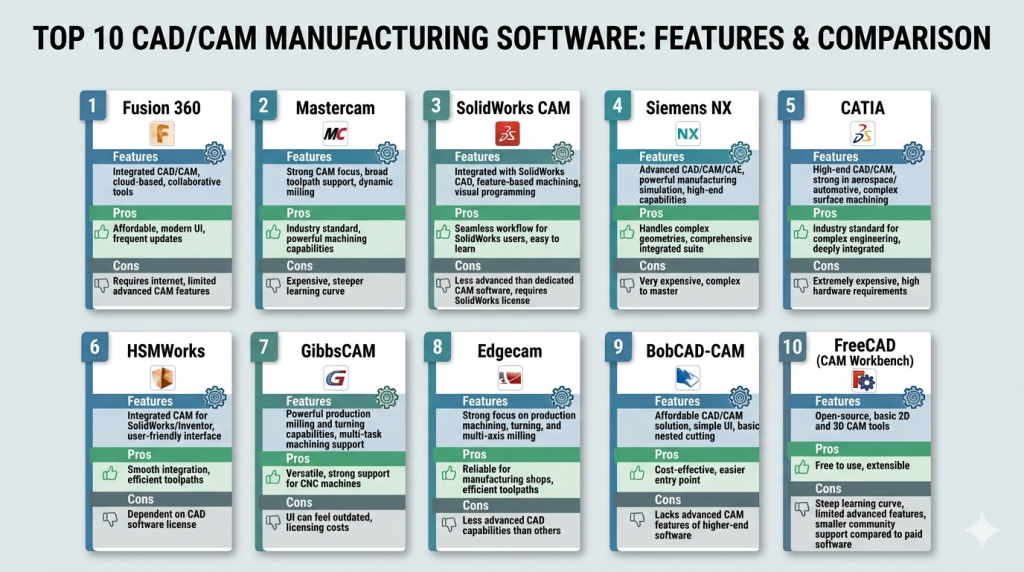
Top 10 CAD/CAM Manufacturing Software
#1 — Fusion 360
Short description: A cloud-based CAD/CAM platform that combines design, engineering, and manufacturing tools in a single environment.
Key Features
- Integrated CAD, CAM, and CAE
- Cloud collaboration
- 3-axis to 5-axis machining
- Generative design tools
- Simulation and validation
- API and scripting support
Pros
- All-in-one platform
- Strong cloud collaboration
Cons
- Requires internet for full functionality
- Subscription-based pricing
Platforms / Deployment
Windows / macOS | Cloud / Hybrid
Security & Compliance
Not publicly stated
Integrations & Ecosystem
Strong integration with design and manufacturing workflows.
- CAD tools
- Simulation platforms
- APIs for customization
- PLM integrations
Support & Community
Large global community with extensive tutorials and documentation.
#2 — Mastercam
Short description: A leading CAM software widely used for CNC programming and machining operations.
Key Features
- Advanced toolpath strategies
- Multi-axis machining
- CAD design tools
- Simulation and verification
- Post-processing support
Pros
- Industry-standard CAM tool
- Highly customizable
Cons
- Expensive
- Requires training
Platforms / Deployment
Windows
Security & Compliance
Not publicly stated
Integrations & Ecosystem
- CNC machines
- CAD systems
- Post-processors
Support & Community
Strong industry support and training ecosystem.
#3 — SolidWorks CAM
Short description: A CAM solution integrated into SolidWorks for seamless design-to-manufacturing workflows.
Key Features
- Integrated CAM within CAD
- Rule-based machining
- Toolpath generation
- Simulation tools
- Feature recognition
Pros
- Seamless integration with SolidWorks
- Easy transition from design to manufacturing
Cons
- Requires SolidWorks license
- Limited standalone capability
Platforms / Deployment
Windows
Security & Compliance
Not publicly stated
Integrations & Ecosystem
- SolidWorks ecosystem
- Manufacturing tools
Support & Community
Strong support with a large user base.
#4 — Siemens NX
Short description: A high-end CAD/CAM/CAE solution used in aerospace, automotive, and industrial manufacturing.
Key Features
- Advanced modeling and simulation
- Multi-axis machining
- Digital twin capabilities
- Automation tools
- Integrated workflows
Pros
- Extremely powerful
- Enterprise-ready
Cons
- High cost
- Complex interface
Platforms / Deployment
Windows
Security & Compliance
Not publicly stated
Integrations & Ecosystem
- PLM systems
- Enterprise workflows
- APIs
Support & Community
Enterprise-grade support and training.
#5 — CATIA
Short description: A comprehensive CAD/CAM platform used in large-scale engineering and manufacturing projects.
Key Features
- Advanced surface modeling
- Multi-discipline design
- Simulation tools
- Manufacturing workflows
- Collaboration features
Pros
- Industry leader in aerospace
- Highly scalable
Cons
- Expensive
- Steep learning curve
Platforms / Deployment
Windows
Security & Compliance
Not publicly stated
Integrations & Ecosystem
- PLM systems
- Engineering tools
Support & Community
Strong enterprise ecosystem.
#6 — HSMWorks
Short description: A CAM solution integrated into CAD tools for efficient machining workflows.
Key Features
- CAM integration with CAD
- Toolpath strategies
- Simulation tools
- Post-processing
Pros
- Seamless workflow
- Easy to use
Cons
- Limited standalone features
- Requires compatible CAD software
Platforms / Deployment
Windows
Security & Compliance
Not publicly stated
Integrations & Ecosystem
- CAD platforms
- CNC systems
Support & Community
Moderate documentation and support.
#7 — GibbsCAM
Short description: A CAM software known for ease of use and efficient CNC programming.
Key Features
- User-friendly interface
- Multi-axis machining
- Toolpath optimization
- Simulation tools
Pros
- Easy to learn
- Efficient workflows
Cons
- Limited advanced features
- Smaller ecosystem
Platforms / Deployment
Windows
Security & Compliance
Not publicly stated
Integrations & Ecosystem
- CNC machines
- Manufacturing systems
Support & Community
Good support with niche community.
#8 — Edgecam
Short description: A CAM solution focused on intelligent machining and automation.
Key Features
- Knowledge-based machining
- Toolpath automation
- Simulation tools
- Multi-axis support
Pros
- Strong automation features
- Efficient machining
Cons
- Requires training
- Cost considerations
Platforms / Deployment
Windows
Security & Compliance
Not publicly stated
Integrations & Ecosystem
- CAD systems
- CNC workflows
Support & Community
Professional support and training resources.
#9 — BobCAD-CAM
Short description: A cost-effective CAD/CAM solution for small to medium-sized manufacturers.
Key Features
- CAD design tools
- CAM toolpaths
- Simulation
- CNC support
Pros
- Affordable
- Good entry-level tool
Cons
- Limited advanced features
- UI can feel dated
Platforms / Deployment
Windows
Security & Compliance
Not publicly stated
Integrations & Ecosystem
- CNC machines
- Basic CAD tools
Support & Community
Moderate support and resources.
#10 — FreeCAD (CAM Workbench)
Short description: An open-source CAD tool with CAM capabilities via plugins.
Key Features
- Parametric modeling
- Open-source flexibility
- CAM workbench
- Custom scripting
Pros
- Free to use
- Highly customizable
Cons
- Less polished UI
- Limited advanced CAM features
Platforms / Deployment
Windows / macOS / Linux
Security & Compliance
Not publicly stated
Integrations & Ecosystem
- Open-source tools
- Plugin ecosystem
Support & Community
Active open-source community.
Comparison Table (Top 10)
| Tool Name | Best For | Platform(s) Supported | Deployment | Standout Feature | Public Rating |
|---|---|---|---|---|---|
| Fusion 360 | All-in-one CAD/CAM | Win/macOS | Hybrid | Cloud integration | N/A |
| Mastercam | CNC machining | Windows | Local | Toolpath control | N/A |
| SolidWorks CAM | Integrated workflows | Windows | Local | CAD integration | N/A |
| Siemens NX | Enterprise | Windows | Local | Advanced simulation | N/A |
| CATIA | Aerospace | Windows | Local | Surface modeling | N/A |
| HSMWorks | CAD-integrated CAM | Windows | Local | Workflow efficiency | N/A |
| GibbsCAM | Ease of use | Windows | Local | Simplicity | N/A |
| Edgecam | Automation | Windows | Local | Smart machining | N/A |
| BobCAD-CAM | SMBs | Windows | Local | Affordability | N/A |
| FreeCAD | Open-source | Multi-platform | Local | Customization | N/A |
Evaluation & Scoring of CAD/CAM Manufacturing Software
| Tool Name | Core | Ease | Integrations | Security | Performance | Support | Value | Weighted Total |
|---|---|---|---|---|---|---|---|---|
| Fusion 360 | 9 | 8 | 9 | 7 | 8 | 8 | 8 | 8.3 |
| Mastercam | 9 | 6 | 8 | 7 | 9 | 8 | 6 | 7.9 |
| SolidWorks CAM | 8 | 8 | 9 | 7 | 8 | 8 | 7 | 8.0 |
| Siemens NX | 10 | 5 | 9 | 8 | 10 | 9 | 5 | 8.1 |
| CATIA | 10 | 5 | 9 | 8 | 10 | 9 | 5 | 8.1 |
| HSMWorks | 7 | 8 | 7 | 6 | 7 | 7 | 7 | 7.2 |
| GibbsCAM | 7 | 8 | 7 | 6 | 7 | 7 | 7 | 7.2 |
| Edgecam | 8 | 6 | 8 | 7 | 8 | 7 | 6 | 7.4 |
| BobCAD | 6 | 7 | 6 | 5 | 6 | 6 | 8 | 6.6 |
| FreeCAD | 6 | 6 | 6 | 5 | 6 | 6 | 9 | 6.5 |
How to interpret scores:
- Scores are comparative and not absolute
- Enterprise tools score higher in performance but lower in value
- Open-source tools score higher in value but lower in ease
- Ease of use is critical for smaller teams
- Choose based on workflow needs rather than score alone
Which CAD/CAM Manufacturing Software Is Right for You?
Solo / Freelancer
- FreeCAD or Fusion 360
- Reason: affordability and flexibility
SMB
- BobCAD or GibbsCAM
- Reason: cost-effective and easier learning curve
Mid-Market
- Fusion 360 or SolidWorks CAM
- Reason: balanced features and integrations
Enterprise
- Siemens NX or CATIA
- Reason: scalability and advanced capabilities
Budget vs Premium
- Budget: FreeCAD, BobCAD
- Premium: Siemens NX, CATIA
Feature Depth vs Ease of Use
- Advanced: Siemens NX
- Easy: Fusion 360
Integrations & Scalability
- Best: Fusion 360, Siemens NX
Security & Compliance Needs
- Enterprise users should prioritize tools with secure environments and access controls
Frequently Asked Questions (FAQs)
What is CAD/CAM software?
It combines design and manufacturing tools to create and produce parts digitally.
Is CAD/CAM software expensive?
Costs vary from free open-source tools to high-end enterprise solutions.
Do I need CNC machines?
CAM features are mainly for CNC machining but CAD can be used independently.
Can beginners use CAD/CAM tools?
Yes, but some tools have steep learning curves.
What industries use CAD/CAM?
Manufacturing, aerospace, automotive, and product design.
Is cloud CAD/CAM safe?
Security varies; check encryption and access features.
How long does implementation take?
From days to months depending on complexity.
Can I integrate with ERP systems?
Many enterprise tools support ERP and PLM integration.
What file formats are supported?
Common formats include STEP, IGES, STL.
Are there free options?
Yes, tools like FreeCAD offer basic functionality.
Conclusion
CAD/CAM manufacturing software is a critical component of modern production workflows, enabling efficient design-to-manufacturing processes. The right tool depends on your needs—whether it’s affordability, ease of use, or enterprise-level performance.
