Introduction
3D Scan & Photogrammetry Software enables users to transform real-world objects, environments, or surfaces into precise 3D digital models using images, videos, or sensor data. Photogrammetry works by analyzing multiple overlapping images to reconstruct geometry, while 3D scanning captures accurate spatial data using technologies like LiDAR or structured light.
This category has become essential across industries as organizations increasingly rely on digital replicas for visualization, simulation, and analysis. From immersive experiences to industrial inspections, these tools help bridge the gap between the physical and digital worlds.
Common use cases include:
- Architecture, engineering, and construction (AEC) documentation
- Game development and VFX asset creation
- E-commerce product visualization
- Cultural heritage preservation
- Industrial inspection and digital twin creation
Key evaluation criteria:
- Accuracy and reconstruction quality
- Processing speed and scalability
- Hardware compatibility (cameras, drones, LiDAR)
- Ease of use and learning curve
- AI-assisted automation
- Export formats and interoperability
- Cloud vs local processing
- Integration with CAD, GIS, and 3D tools
- Pricing and licensing flexibility
Best for: Architects, engineers, game developers, VFX artists, surveyors, and enterprises building digital twins or immersive applications.
Not ideal for: Teams that only require basic 3D modeling or simple visualizations—traditional modeling tools may be more suitable.
Key Trends in 3D Scan & Photogrammetry Software
- AI-powered reconstruction: Automated mesh generation, noise cleanup, and texture enhancement
- Real-time processing: Faster workflows using GPU acceleration
- Cloud-native platforms: Scalable processing without heavy local hardware requirements
- Mobile-first capture: Smartphones with LiDAR enabling on-the-go scanning
- Digital twin ecosystems: Integration with simulation and IoT platforms
- Interoperability improvements: Better support for BIM, GIS, and game engines
- Flexible pricing models: Subscription-based and usage-based pricing
- Edge processing capabilities: On-device computation for fieldwork
- Enhanced data security: Growing emphasis on encryption and access control
- AR/VR integration: Direct compatibility with immersive environments
How We Selected These Tools (Methodology)
- Considered market adoption and industry relevance
- Evaluated feature depth and completeness
- Assessed performance and scalability capabilities
- Reviewed ease of use and onboarding experience
- Analyzed integration capabilities and ecosystem support
- Looked at security posture indicators where available
- Included tools for different user segments (beginner to enterprise)
- Balanced open-source and commercial solutions
- Focused on tools actively maintained and widely used
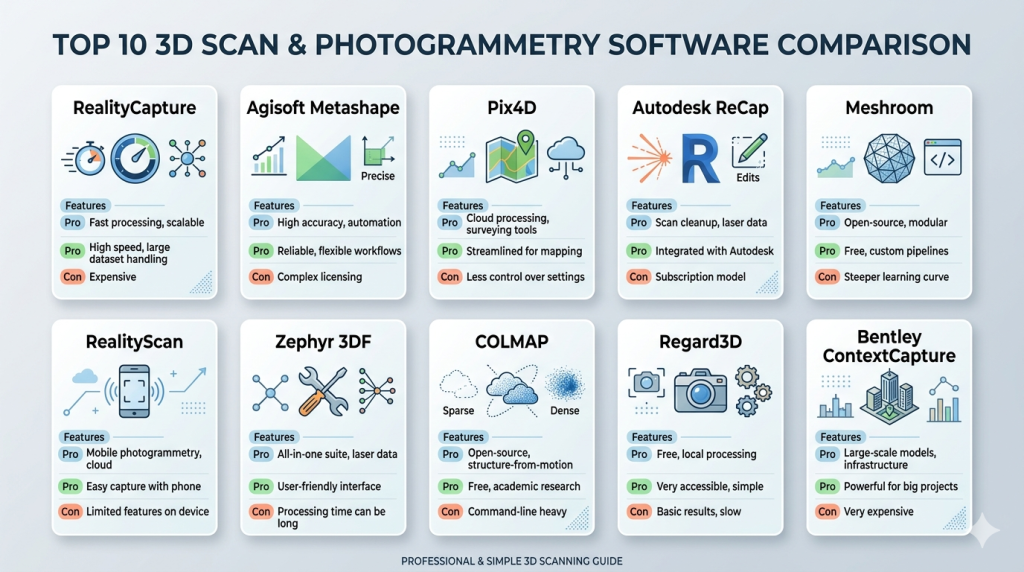
Top 10 3D Scan & Photogrammetry Software
#1 — RealityCapture
Short description: A high-performance photogrammetry software designed for professionals requiring fast processing and high-detail 3D reconstruction.
Key Features
- Ultra-fast image processing
- High-resolution mesh reconstruction
- Hybrid LiDAR and photogrammetry workflows
- Large dataset support
- Advanced texture mapping
- Command-line automation
Pros
- Exceptional speed
- High-quality outputs
Cons
- Requires powerful hardware
- Steeper learning curve
Platforms / Deployment
Windows | Local
Security & Compliance
Not publicly stated
Integrations & Ecosystem
Supports major 3D pipelines and export formats for creative and engineering workflows.
- Game engines
- CAD tools
- 3D modeling software
- API scripting
Support & Community
Strong professional community with solid documentation; beginner resources vary.
#2 — Agisoft Metashape
Short description: A reliable photogrammetry tool widely used in mapping, surveying, and scientific applications.
Key Features
- Dense point cloud generation
- Orthomosaic creation
- DEM/DSM outputs
- Python scripting support
- Multi-camera processing
Pros
- High accuracy
- Strong GIS compatibility
Cons
- Interface can feel dated
- Processing speed varies
Platforms / Deployment
Windows / macOS / Linux
Security & Compliance
Not publicly stated
Integrations & Ecosystem
Commonly used with GIS and mapping ecosystems.
- GIS platforms
- CAD tools
- Surveying workflows
Support & Community
Active community with extensive tutorials and forums.
#3 — Pix4D
Short description: A professional-grade photogrammetry platform tailored for drone mapping and industrial applications.
Key Features
- Drone image processing
- Cloud and desktop workflows
- Survey-grade accuracy
- Automated processing pipelines
- Mobile data capture
Pros
- Enterprise-ready capabilities
- High accuracy for mapping
Cons
- Higher cost
- Complex setup
Platforms / Deployment
Cloud / Windows
Security & Compliance
Not publicly stated
Integrations & Ecosystem
- Drone ecosystems
- GIS platforms
- CAD systems
Support & Community
Professional support tiers and strong enterprise onboarding.
#4 — Autodesk ReCap
Short description: A 3D scanning and reality capture tool integrated into the Autodesk ecosystem for AEC workflows.
Key Features
- LiDAR data processing
- Point cloud editing
- Scan-to-BIM workflows
- Cloud processing
- Seamless Autodesk integration
Pros
- Ideal for AEC professionals
- Strong ecosystem integration
Cons
- Limited flexibility outside Autodesk tools
- Subscription-based
Platforms / Deployment
Cloud / Windows
Security & Compliance
Not publicly stated
Integrations & Ecosystem
- BIM tools
- CAD software
- Construction workflows
Support & Community
Enterprise-level support and documentation.
#5 — Meshroom
Short description: An open-source photogrammetry tool offering a node-based workflow for advanced users.
Key Features
- Node-based pipeline
- GPU acceleration
- Customizable workflows
- Open-source flexibility
Pros
- Free to use
- Highly customizable
Cons
- Technical learning curve
- Less polished UI
Platforms / Deployment
Windows / Linux
Security & Compliance
Not publicly stated
Integrations & Ecosystem
- Open-source 3D tools
- Export to modeling software
Support & Community
Community-driven with active contributors.
#6 — RealityScan
Short description: A mobile-focused photogrammetry app designed for quick and easy 3D capture.
Key Features
- Smartphone scanning
- Cloud processing
- Real-time previews
- Easy sharing
Pros
- Very easy to use
- Fast setup
Cons
- Limited advanced features
- Lower accuracy
Platforms / Deployment
iOS / Android / Cloud
Security & Compliance
Not publicly stated
Integrations & Ecosystem
- 3D platforms
- Game engines
Support & Community
Growing user base; limited advanced documentation.
#7 — Zephyr 3DF
Short description: A balanced photogrammetry solution suitable for professionals and SMBs.
Key Features
- Automated workflows
- 3D reconstruction
- Measurement tools
- Multi-GPU support
Pros
- Good feature balance
- Usable interface
Cons
- Licensing complexity
- Moderate performance
Platforms / Deployment
Windows
Security & Compliance
Not publicly stated
Integrations & Ecosystem
- CAD tools
- Modeling platforms
Support & Community
Reliable documentation and support.
#8 — COLMAP
Short description: A research-oriented photogrammetry tool with advanced customization capabilities.
Key Features
- Structure-from-motion
- Multi-view stereo
- Open-source framework
- High flexibility
Pros
- Powerful and free
- Highly customizable
Cons
- Not beginner-friendly
- Limited UI
Platforms / Deployment
Windows / macOS / Linux
Security & Compliance
Not publicly stated
Integrations & Ecosystem
- Research workflows
- Custom pipelines
Support & Community
Strong academic community support.
#9 — Regard3D
Short description: A beginner-friendly photogrammetry tool for basic 3D reconstruction tasks.
Key Features
- Simple setup
- Basic reconstruction
- Open-source
Pros
- Easy to learn
- Free
Cons
- Limited capabilities
- Lower output quality
Platforms / Deployment
Windows / macOS / Linux
Security & Compliance
Not publicly stated
Integrations & Ecosystem
- Basic export support
Support & Community
Small but helpful community.
#10 — Bentley ContextCapture
Short description: An enterprise-grade solution designed for large-scale infrastructure and reality modeling projects.
Key Features
- Large dataset processing
- Reality modeling
- GIS integration
- Cloud workflows
Pros
- Highly scalable
- Enterprise-ready
Cons
- Expensive
- Complex implementation
Platforms / Deployment
Cloud / Windows
Security & Compliance
Not publicly stated
Integrations & Ecosystem
- Infrastructure platforms
- GIS systems
- Enterprise workflows
Support & Community
Comprehensive enterprise support and onboarding.
Comparison Table (Top 10)
| Tool Name | Best For | Platform(s) Supported | Deployment | Standout Feature | Public Rating |
|---|---|---|---|---|---|
| RealityCapture | High-end photogrammetry | Windows | Local | Speed | N/A |
| Metashape | Mapping & GIS | Win/macOS/Linux | Local | Accuracy | N/A |
| Pix4D | Drone mapping | Cloud/Windows | Hybrid | Precision | N/A |
| ReCap | AEC workflows | Windows | Cloud | BIM integration | N/A |
| Meshroom | Open-source users | Win/Linux | Local | Node workflow | N/A |
| RealityScan | Mobile users | iOS/Android | Cloud | Ease of use | N/A |
| Zephyr 3DF | SMBs | Windows | Local | Balance | N/A |
| COLMAP | Research | Multi-platform | Local | Flexibility | N/A |
| Regard3D | Beginners | Multi-platform | Local | Simplicity | N/A |
| ContextCapture | Enterprise | Windows/Cloud | Hybrid | Scalability | N/A |
Evaluation & Scoring of 3D Scan & Photogrammetry Software
| Tool Name | Core | Ease | Integrations | Security | Performance | Support | Value | Weighted Total |
|---|---|---|---|---|---|---|---|---|
| RealityCapture | 9 | 7 | 8 | 6 | 9 | 7 | 7 | 7.9 |
| Metashape | 8 | 7 | 8 | 6 | 7 | 8 | 8 | 7.6 |
| Pix4D | 9 | 7 | 9 | 7 | 8 | 8 | 6 | 8.0 |
| ReCap | 8 | 8 | 9 | 7 | 7 | 8 | 6 | 7.9 |
| Meshroom | 7 | 5 | 6 | 5 | 7 | 6 | 9 | 6.6 |
| RealityScan | 6 | 9 | 6 | 5 | 6 | 6 | 8 | 6.8 |
| Zephyr | 7 | 7 | 7 | 6 | 7 | 7 | 7 | 7.0 |
| COLMAP | 8 | 4 | 6 | 5 | 8 | 6 | 9 | 6.9 |
| Regard3D | 5 | 7 | 5 | 5 | 5 | 5 | 9 | 6.0 |
| ContextCapture | 9 | 6 | 9 | 7 | 9 | 8 | 5 | 8.1 |
How to interpret scores:
- Scores are relative comparisons across tools
- Higher scores indicate broader capability and balance
- Enterprise tools score higher in performance, lower in value
- Open-source tools score higher in value, lower in ease
- Always prioritize your specific use case over total score
Which 3D Scan & Photogrammetry Software Is Right for You?
Solo / Freelancer
Meshroom or RealityScan for affordability and ease of use.
SMB
Zephyr or Metashape for balanced features and cost.
Mid-Market
RealityCapture or Pix4D for performance and scalability.
Enterprise
ContextCapture or Autodesk ReCap for large-scale workflows.
Budget vs Premium
- Budget: Meshroom, COLMAP
- Premium: Pix4D, ContextCapture
Feature Depth vs Ease of Use
- Advanced: RealityCapture
- Simple: RealityScan
Integrations & Scalability
- Best: Pix4D, ReCap
Security & Compliance Needs
- Enterprise users should prioritize tools with access control and secure environments
Frequently Asked Questions (FAQs)
What is 3D photogrammetry software?
It converts multiple images into 3D models by analyzing spatial relationships.
Is photogrammetry accurate?
Yes, especially with high-quality images and proper workflows.
Do I need special hardware?
High-performance GPUs are recommended for faster processing.
Can I use a smartphone?
Yes, many tools support mobile capture.
Is cloud processing necessary?
Not always, but it helps with scalability.
What industries use it?
AEC, gaming, film, manufacturing, and heritage.
How long does processing take?
Minutes to hours depending on dataset size.
Are there free tools?
Yes, like Meshroom and COLMAP.
Can I integrate with CAD?
Most professional tools support CAD workflows.
What are alternatives?
Manual modeling or direct 3D scanning solutions.
Conclusion
3D Scan & Photogrammetry Software plays a critical role in modern digital workflows, enabling accurate and scalable 3D model creation. The right tool depends on your specific needs, whether it’s ease of use, performance, or enterprise integration.
