Introduction
API Testing Tools are software solutions that enable developers, QA teams, and IT managers to validate and ensure the functionality, performance, and security of application programming interfaces (APIs). They help automate testing workflows, detect errors early, and ensure consistent communication between applications and services.
As organizations increasingly adopt microservices architectures, cloud-native applications, and third-party integrations, API testing has become critical to delivering reliable software. Modern API testing tools help teams test RESTful, SOAP, GraphQL, and WebSocket APIs efficiently, reducing risks associated with system failures and data inconsistencies.
Real-world use cases include
- Testing API endpoints during development
- Validating third-party API integrations
- Load and performance testing of service endpoints
- Continuous integration and deployment pipelines
- Security and compliance validation for sensitive APIs
Buyers should evaluate
- Support for multiple API types (REST, SOAP, GraphQL)
- Automation capabilities for regression testing
- Performance and load testing features
- Security testing (authentication, encryption, vulnerability scanning)
- Integration with CI/CD pipelines
- Reporting and analytics capabilities
- Ease of use and learning curve
- Platform compatibility and deployment options
- Licensing and pricing models
- Vendor support and community resources
Best for: QA teams, developers, IT managers, enterprises, and mid-market organizations seeking API reliability and performance assurance
Not ideal for: Teams with minimal API usage or projects where manual testing is sufficient
Key Trends in API Testing Tools
- AI-assisted test case generation for faster coverage
- Automation of regression and integration tests
- Support for microservices and containerized environments
- Embedded security testing and compliance validation
- Real-time monitoring and analytics for API performance
- Multi-cloud and hybrid API support
- Integration with CI/CD pipelines for continuous testing
- Load and stress testing built into functional testing tools
- Flexible subscription and usage-based pricing
- API-first design testing for GraphQL and WebSocket endpoints
How We Selected These Tools
- Market adoption and brand recognition
- Feature completeness for functional, performance, and security testing
- Reliability and performance signals for large-scale API environments
- Security posture including encryption, authentication, and compliance
- Integration with DevOps and CI/CD pipelines
- Customer fit for SMBs, mid-market, and enterprise organizations
- Vendor stability and roadmap
- Ease of onboarding, usability, and learning curve
- Pricing transparency and scalability
- Support resources, tutorials, and community engagement
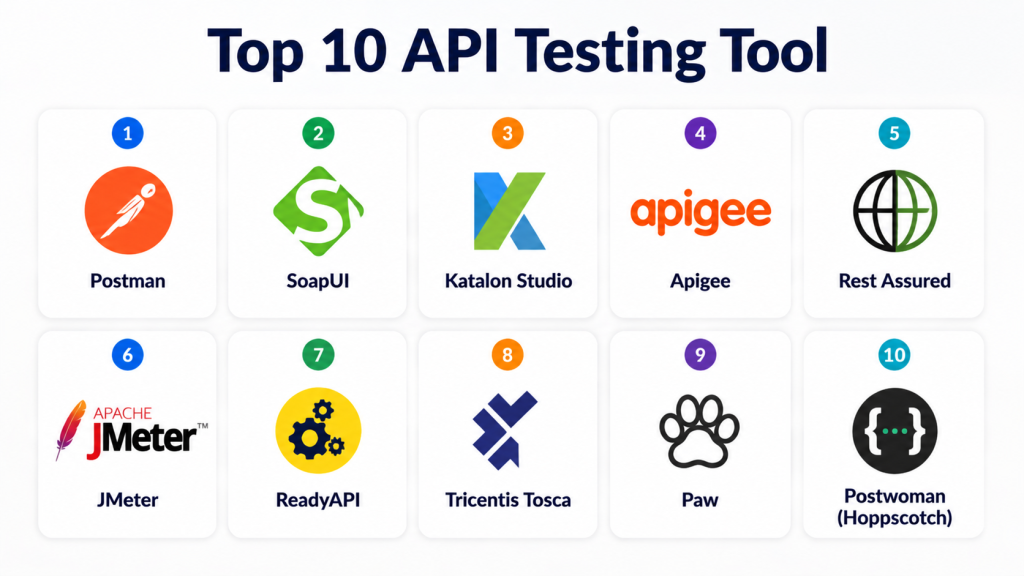
Top 10 API Testing Tools
#1 — Postman
Short description: A comprehensive platform for API development, testing, and collaboration for teams of all sizes
Key Features
- Automated functional testing
- Performance and load testing
- Security and authentication testing
- Mock servers and API simulation
- CI/CD integration
- Collaboration and version control
- Reporting and analytics
Pros
- Intuitive interface for beginners and experts
- Strong collaboration features
Cons
- Advanced load testing requires higher plans
- Can be resource-heavy for large test suites
Platforms / Deployment
- Web, Windows, macOS, Linux
- Cloud
Security & Compliance
- Encryption in transit and at rest
- SOC 2, ISO 27001
Integrations & Ecosystem
- CI/CD pipelines
- Git, Jenkins, Azure DevOps
- API monitoring and alerting tools
Support & Community
- Documentation and tutorials
- Enterprise support tiers
- Large developer community
#2 — SoapUI
Short description: Designed for testing SOAP and REST APIs with advanced functional and security testing capabilities
Key Features
- Functional testing for REST and SOAP APIs
- Load and performance testing
- Security testing and vulnerability scanning
- API mocking and simulation
- CI/CD integration
- Scripting and automation support
Pros
- Comprehensive testing for enterprise APIs
- Advanced security and load testing
Cons
- Interface can be complex for beginners
- Limited cloud-native integration in basic plans
Platforms / Deployment
- Windows, macOS, Linux
- Self-hosted / Cloud
Security & Compliance
- Supports authentication, encryption
- SOC 2, ISO 27001
Integrations & Ecosystem
- Jenkins, GitLab, Azure DevOps
- APIs for automation
- Test management platforms
Support & Community
- Enterprise support
- Knowledge base
- Community forums
#3 — Katalon Studio
Short description: Offers end-to-end API testing with support for REST, SOAP, and GraphQL for both SMBs and enterprises
Key Features
- Automated functional and regression testing
- Security testing and authentication validation
- CI/CD and DevOps integration
- Reporting and analytics
- API mocking
- Scriptless and scripting support
- Multi-environment testing
Pros
- User-friendly for beginners
- Supports multiple API protocols
Cons
- Advanced analytics require premium plans
- Limited load testing features
Platforms / Deployment
- Windows, macOS, Linux
- Cloud / Self-hosted
Security & Compliance
- Encryption, RBAC
- Not publicly stated for compliance
Integrations & Ecosystem
- CI/CD pipelines
- Jira, Jenkins, Git
- API monitoring and alerting
Support & Community
- Enterprise support tiers
- Documentation and tutorials
- Active forums
#4 — Apigee
Short description: API management and testing platform for enterprises focusing on monitoring, testing, and security
Key Features
- Functional API testing
- Load and performance testing
- Security and compliance validation
- API analytics and monitoring
- Versioning and governance
- CI/CD pipeline integration
- Developer portal and collaboration
Pros
- Enterprise-grade API management
- Strong monitoring and security features
Cons
- Premium pricing for full features
- Steeper learning curve
Platforms / Deployment
- Web
- Cloud
Security & Compliance
- Encryption, OAuth, RBAC
- SOC 2, ISO 27001
Integrations & Ecosystem
- Cloud services
- CI/CD tools
- Analytics and logging platforms
Support & Community
- Enterprise support
- Documentation
- Community forums
#5 — Rest Assured
Short description: Java-based API testing library for automated REST API testing, suitable for developers
Key Features
- Automated functional testing
- Supports REST API requests
- Integration with CI/CD tools
- Assertions and validation
- Data-driven testing
- Logging and reporting
- Extensible through Java libraries
Pros
- Lightweight for developers
- Easy CI/CD integration
Cons
- Requires Java expertise
- No GUI, command-line only
Platforms / Deployment
- Windows, macOS, Linux
- Self-hosted
Security & Compliance
- Depends on implementation
- Not publicly stated
Integrations & Ecosystem
- Maven, Gradle, Jenkins
- Git, CI/CD pipelines
- Logging and reporting libraries
Support & Community
- Documentation
- Developer community
- Open-source forums
#6 — JMeter
Short description: Open-source performance and load testing tool for APIs and web applications
Key Features
- Load and stress testing for APIs
- Functional API testing
- Performance monitoring and analytics
- Multi-protocol support
- CI/CD integration
- Scripting support
- Reporting and visualization
Pros
- Open-source and free
- Supports high concurrency testing
Cons
- GUI can be complex
- Limited enterprise-grade support
Platforms / Deployment
- Windows, macOS, Linux
- Self-hosted
Security & Compliance
- Encryption support
- Not publicly stated
Integrations & Ecosystem
- Jenkins, CI/CD pipelines
- Monitoring and alerting tools
- Plugins for extensions
Support & Community
- Open-source support
- Community forums
- Tutorials and guides
#7 — ReadyAPI
Short description: Comprehensive API testing suite for functional, load, and security testing
Key Features
- Functional testing for REST, SOAP, GraphQL
- Load and performance testing
- Security and vulnerability scanning
- Mock services
- CI/CD integration
- Detailed reporting
- Scripting and automation
Pros
- Complete API testing suite
- Supports enterprise requirements
Cons
- Premium pricing
- Steeper learning curve
Platforms / Deployment
- Windows, macOS, Linux
- Cloud / Self-hosted
Security & Compliance
- Encryption, RBAC
- SOC 2, ISO 27001
Integrations & Ecosystem
- Jenkins, GitLab
- CI/CD pipelines
- Monitoring platforms
Support & Community
- Enterprise support
- Documentation
- Community forums
#8 — Tricentis Tosca
Short description: Enterprise testing platform including API testing, automation, and service virtualization
Key Features
- Functional and regression API testing
- Security validation
- Test automation
- Service virtualization
- CI/CD integration
- Analytics dashboards
- API mocking
Pros
- Enterprise-grade testing
- Comprehensive automation features
Cons
- Premium pricing
- Complex setup
Platforms / Deployment
- Windows, Web
- Cloud / Self-hosted
Security & Compliance
- Encryption, RBAC
- SOC 2, ISO 27001
Integrations & Ecosystem
- Jenkins, Azure DevOps
- CI/CD pipelines
- Analytics and monitoring
Support & Community
- Enterprise support
- Documentation
- Community forums
#9 — Paw
Short description: Mac-based API testing and client tool for developers focusing on REST and GraphQL APIs
Key Features
- Manual and automated testing
- REST and GraphQL support
- Request chaining
- Environment management
- Scripting and automation
- API response validation
- Collaboration features
Pros
- User-friendly for macOS developers
- Supports modern API protocols
Cons
- Mac-only
- Limited enterprise integrations
Platforms / Deployment
- macOS
- Cloud / Self-hosted
Security & Compliance
- Encryption
- Not publicly stated
Integrations & Ecosystem
- CI/CD pipelines
- Git integration
- Monitoring tools
Support & Community
- Documentation
- Community forums
- Tutorials
#10 — Postwoman (Hoppscotch)
Short description: Open-source API testing platform with lightweight web interface for REST, GraphQL, and WebSocket APIs
Key Features
- Manual API testing
- Real-time WebSocket support
- Environment management
- Request history and logging
- Collaboration features
- Scripting and automation
- CI/CD integration
Pros
- Open-source and lightweight
- Browser-based and easy to use
Cons
- Limited advanced testing features
- Community support only
Platforms / Deployment
- Web
- Cloud
Security & Compliance
- Encryption
- Not publicly stated
Integrations & Ecosystem
- CI/CD pipelines
- Git integration
- Monitoring platforms
Support & Community
- Open-source community
- Documentation
- Tutorials
Comparison Table
| Tool Name | Best For | Platform(s) Supported | Deployment | Standout Feature | Public Rating |
|---|---|---|---|---|---|
| Postman | Developers & Teams | Web, Windows, macOS, Linux | Cloud | Collaboration & automation | N/A |
| SoapUI | Enterprise QA | Windows, macOS, Linux | Self-hosted / Cloud | Advanced functional & security testing | N/A |
| Katalon Studio | SMB & Enterprise | Windows, macOS, Linux | Cloud / Self-hosted | Multi-protocol support | N/A |
| Apigee | Enterprise | Web | Cloud | API management & monitoring | N/A |
| Rest Assured | Developers | Windows, macOS, Linux | Self-hosted | Java-based automated REST testing | N/A |
| JMeter | SMB & Enterprise | Windows, macOS, Linux | Self-hosted | Load & stress testing | N/A |
| ReadyAPI | Enterprise | Windows, macOS, Linux | Cloud / Self-hosted | All-in-one API testing suite | N/A |
| Tricentis Tosca | Enterprise | Windows, Web | Cloud / Self-hosted | Automation & service virtualization | N/A |
| Paw | macOS Developers | macOS | Cloud / Self-hosted | REST & GraphQL testing | N/A |
| Hoppscotch | SMB & Developers | Web | Cloud | Open-source lightweight testing | N/A |
Evaluation & Scoring
| Tool Name | Core | Ease | Integrations | Security | Performance | Support | Value | Weighted Total |
|---|---|---|---|---|---|---|---|---|
| Postman | 9 | 9 | 9 | 9 | 9 | 8 | 8 | 8.8 |
| SoapUI | 9 | 7 | 8 | 9 | 8 | 7 | 7 | 8.0 |
| Katalon Studio | 8 | 8 | 8 | 8 | 8 | 7 | 7 | 7.8 |
| Apigee | 9 | 7 | 8 | 9 | 9 | 7 | 6 | 8.0 |
| Rest Assured | 8 | 7 | 7 | 8 | 8 | 7 | 7 | 7.5 |
| JMeter | 8 | 7 | 7 | 8 | 8 | 7 | 7 | 7.5 |
| ReadyAPI | 9 | 7 | 8 | 9 | 9 | 8 | 6 | 8.1 |
| Tricentis Tosca | 9 | 7 | 8 | 9 | 9 | 8 | 6 | 8.1 |
| Paw | 8 | 8 | 7 | 8 | 8 | 7 | 7 | 7.7 |
| Hoppscotch | 7 | 9 | 6 | 7 | 7 | 6 | 8 | 7.4 |
Weighted totals reflect comparative strengths across features, usability, integrations, security, performance, support, and value.
Which API Testing Tools Tool Is Right for You?
Solo / Freelancer
Postman or Hoppscotch for lightweight, web-based testing of small projects
SMB
Katalon Studio or Paw for multi-protocol support and collaboration
Mid-Market
SoapUI or ReadyAPI for advanced functional, security, and load testing
Enterprise
Apigee, Tricentis Tosca, or ReadyAPI for scalable, automated, and monitored testing
Budget vs Premium
Budget tools cover functional testing and basic automation; premium tools include load, security, and monitoring features
Feature Depth vs Ease of Use
Feature-rich tools like Apigee or Tricentis Tosca handle complex enterprise environments; Postman or Hoppscotch is ideal for simple use
Integrations & Scalability
Ensure integration with CI/CD pipelines, analytics, monitoring, and cloud platforms
Security & Compliance Needs
Prioritize tools with encryption, authentication, RBAC, and enterprise compliance support
Frequently Asked Questions
1. What is an API testing tool?
A tool used to validate functionality, performance, and security of APIs automatically or manually.
2. Why use API testing tools?
They reduce errors, ensure API reliability, and support continuous integration pipelines.
3. Which APIs can be tested?
REST, SOAP, GraphQL, and WebSocket APIs across cloud and on-premises environments
4. Do these tools support automation?
Yes, all top tools support automated regression and functional testing
5. Can they handle performance testing?
Many include load and stress testing for API endpoints
6. Are security features included?
Leading tools offer encryption, authentication, and compliance checks
7. How do they integrate with CI/CD pipelines?
Tools connect with Jenkins, GitLab, Azure DevOps, and other pipelines
8. Do they support multi-cloud APIs?
Yes, modern API testing tools support AWS, Azure, GCP, and hybrid environments
9. How complex is setup?
Enterprise tools require configuration, while Postman and Hoppscotch are quick to start
10. How long does API testing take?
Depends on the number of endpoints, complexity of tests, and automation level
Conclusion
API Testing Tools are essential for ensuring the functionality, performance, and security of APIs in modern software environments. Solo users benefit from lightweight, web-based tools, SMBs gain from multi-protocol platforms, and enterprises require scalable, automated testing with monitoring. Evaluate features, integrations, security, and performance, shortlist 2–3 tools, and incorporate them into CI/CD pipelines to ensure reliable API delivery
