Introduction
Expense Management Tools are software solutions that help businesses track, control, and optimize employee expenses such as travel, reimbursements, and corporate spending. Instead of relying on manual receipts and spreadsheets, these platforms automate expense reporting, approval workflows, and policy enforcement.
As businesses scale and remote work increases, managing expenses efficiently has become critical for financial transparency and cost control. Modern expense management tools now include AI-driven receipt scanning, real-time reporting, mobile-first experiences, and strong cybersecurity practices like Identity Management, Zero Trust access, and role-based permissions to protect financial data.
Common use cases:
- Employee expense tracking and reimbursement
- Travel expense management
- Receipt capture and categorization
- Policy compliance and approvals
- Financial reporting and analytics
Key evaluation criteria:
- Ease of expense submission and tracking
- Automation and AI capabilities
- Integration with accounting and ERP systems
- Mobile app functionality
- Security features like RBAC, MFA, encryption
- Reporting and analytics capabilities
- Scalability for growing businesses
- Pricing and ROI
Best for: Finance teams, HR departments, SMBs, enterprises, and organizations managing employee reimbursements and corporate expenses.
Not ideal for: Very small businesses with minimal expenses or those using simple manual tracking methods.
Key Trends in Expense Management Tools
- AI-powered receipt scanning and expense categorization
- Real-time expense tracking and reporting
- Cloud-based expense platforms replacing manual processes
- Zero Trust security frameworks for financial data protection
- Integration with ERP, payroll, and accounting systems
- Mobile-first expense submission and approvals
- Automated compliance and policy enforcement
- Corporate card integration for real-time tracking
- Multi-currency and global expense support
- Subscription-based pricing models
How We Selected These Expense Management Tools (Methodology)
- Evaluated market adoption and popularity
- Assessed automation and usability features
- Reviewed integration capabilities with financial systems
- Analyzed security posture including RBAC and encryption
- Considered scalability across SMB and enterprise use cases
- Evaluated reporting and analytics features
- Assessed support quality and onboarding experience
- Reviewed pricing and value for money
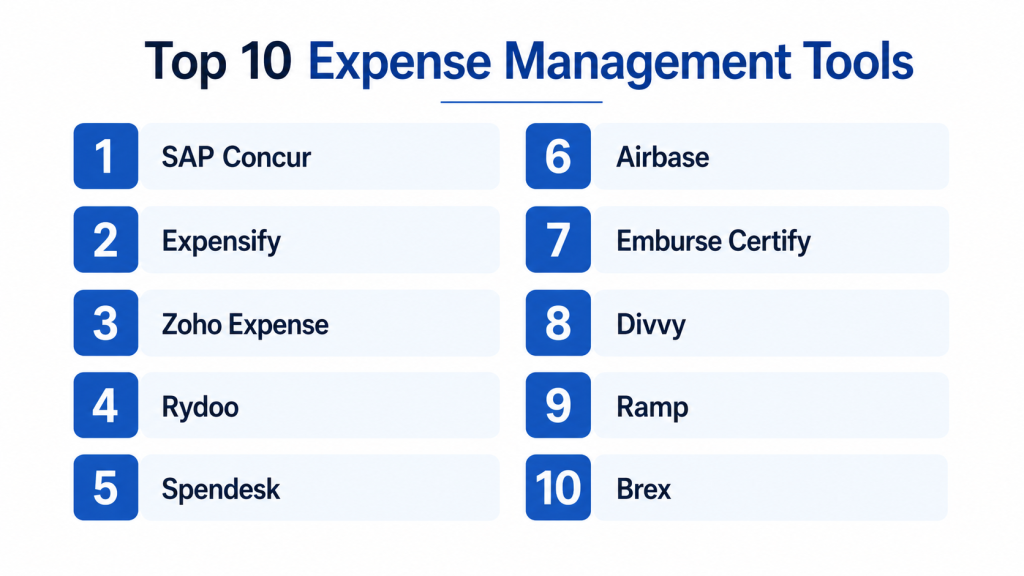
Top 10 Expense Management Tools
#1 — SAP Concur
Short description: SAP Concur is one of the most widely used expense management platforms, offering travel and expense management in one system. Designed for enterprises and mid-market businesses. Provides automation, compliance tracking, and reporting. Integrates with SAP ecosystem. Known for scalability and global support. Ideal for large organizations managing complex expenses.
Key Features
- Expense tracking and reporting
- Travel management integration
- Policy compliance
- Automated approvals
- Analytics dashboards
Pros
- Enterprise-grade solution
- Strong compliance features
Cons
- Complex interface
- Expensive
Platforms / Deployment
Cloud / Mobile
Security & Compliance
SSO, RBAC, encryption
Integrations & Ecosystem
- SAP ERP
- Financial systems
- APIs
Support & Community
Strong enterprise support
#2 — Expensify
Short description: Expensify is a popular expense management tool known for its simplicity and automation. It offers receipt scanning, expense tracking, and reimbursement features. Designed for SMBs and freelancers. Provides mobile-first experience. Easy to use and implement. Ideal for small teams.
Key Features
- Receipt scanning
- Expense tracking
- Reimbursement workflows
- Mobile apps
Pros
- Easy to use
- Fast setup
Cons
- Limited enterprise features
- Basic reporting
Platforms / Deployment
Cloud / Mobile
Security & Compliance
Encryption, RBAC
Integrations & Ecosystem
- Accounting tools
- APIs
Support & Community
Good SMB support
#3 — Zoho Expense
Short description: Zoho Expense is a cost-effective expense management solution for SMBs. It offers automation, receipt scanning, and reporting features. Integrates with Zoho ecosystem. Provides real-time tracking. Easy to use. Ideal for small businesses.
Key Features
- Expense tracking
- Receipt scanning
- Reporting tools
- Workflow automation
Pros
- Affordable
- Easy to use
Cons
- Limited enterprise features
- Best within Zoho ecosystem
Platforms / Deployment
Cloud / Mobile
Security & Compliance
RBAC, encryption
Integrations & Ecosystem
- Zoho apps
- APIs
Support & Community
Good support
#4 — Rydoo
Short description: Rydoo is a modern expense management platform designed for businesses of all sizes. It offers real-time expense tracking and receipt scanning. Provides automation and reporting tools. Known for user-friendly interface. Suitable for mid-market organizations.
Key Features
- Expense tracking
- Receipt scanning
- Real-time reporting
- Mobile apps
Pros
- User-friendly
- Real-time insights
Cons
- Pricing varies
- Limited advanced features
Platforms / Deployment
Cloud / Mobile
Security & Compliance
RBAC
Integrations & Ecosystem
- Accounting tools
- APIs
Support & Community
Moderate support
#5 — Spendesk
Short description: Spendesk is an all-in-one spend management platform combining expense tracking and corporate cards. Designed for SMBs and mid-market businesses. Offers real-time visibility and control. Provides automation and reporting tools. Ideal for managing company-wide spending.
Key Features
- Expense tracking
- Corporate card management
- Reporting tools
- Workflow automation
Pros
- Unified platform
- Real-time visibility
Cons
- Pricing can be high
- Limited enterprise features
Platforms / Deployment
Cloud
Security & Compliance
RBAC, encryption
Integrations & Ecosystem
- Accounting tools
- APIs
Support & Community
Good support
#6 — Airbase
Short description: Airbase is a spend management platform that includes expense management features. It provides automation, reporting, and payment tools. Designed for SMBs and mid-market companies. Offers strong integration capabilities. Easy to implement.
Key Features
- Expense tracking
- Payment automation
- Reporting tools
- Workflow approvals
Pros
- All-in-one platform
- Easy to use
Cons
- Limited enterprise scalability
- Pricing varies
Platforms / Deployment
Cloud
Security & Compliance
RBAC, encryption
Integrations & Ecosystem
- Accounting systems
- APIs
Support & Community
Good support
#7 — Certify (Emburse Certify)
Short description: Certify is an expense management solution focused on simplicity and automation. It offers expense tracking, receipt capture, and reporting. Suitable for SMBs and mid-market businesses. Easy to use and deploy.
Key Features
- Expense tracking
- Receipt capture
- Reporting tools
Pros
- Easy setup
- Affordable
Cons
- Limited advanced features
- UI improvements needed
Platforms / Deployment
Cloud
Security & Compliance
RBAC
Integrations & Ecosystem
- Accounting tools
- APIs
Support & Community
Moderate support
#8 — Divvy
Short description: Divvy combines expense management with corporate cards and budgeting tools. Designed for SMBs. Offers real-time expense tracking. Provides automation and reporting. Known for ease of use. Ideal for managing budgets.
Key Features
- Expense tracking
- Budgeting tools
- Corporate cards
- Reporting
Pros
- Real-time control
- Easy to use
Cons
- Limited enterprise features
- Regional availability varies
Platforms / Deployment
Cloud / Mobile
Security & Compliance
RBAC, encryption
Integrations & Ecosystem
- Accounting tools
- APIs
Support & Community
Good support
#9 — Ramp
Short description: Ramp is a modern expense and spend management platform focused on cost savings. It provides real-time insights and automation. Designed for SMBs and mid-market companies. Offers strong analytics and integrations. Helps reduce expenses.
Key Features
- Expense tracking
- Analytics tools
- Automation
- Corporate cards
Pros
- Strong analytics
- Cost-saving features
Cons
- Limited enterprise features
- Pricing varies
Platforms / Deployment
Cloud
Security & Compliance
RBAC, encryption
Integrations & Ecosystem
- Financial systems
- APIs
Support & Community
Good support
#10 — Brex
Short description: Brex is a financial platform offering expense management, corporate cards, and spend control. Designed for startups and growing businesses. Provides automation and analytics. Known for ease of use. Ideal for fast-growing companies.
Key Features
- Expense tracking
- Corporate cards
- Reporting tools
- Automation
Pros
- Easy to use
- Strong startup focus
Cons
- Limited enterprise features
- Availability varies
Platforms / Deployment
Cloud
Security & Compliance
RBAC, encryption
Integrations & Ecosystem
- Accounting tools
- APIs
Support & Community
Good support
Comparison Table (Top 10)
| Tool Name | Best For | Platform(s) | Deployment | Standout Feature | Public Rating |
|---|---|---|---|---|---|
| SAP Concur | Enterprise | Mobile/Web | Cloud | Travel integration | N/A |
| Expensify | SMB | Mobile/Web | Cloud | Ease of use | N/A |
| Zoho Expense | SMB | Mobile/Web | Cloud | Affordability | N/A |
| Rydoo | Mid-market | Mobile/Web | Cloud | Real-time tracking | N/A |
| Spendesk | SMB/Mid | Web | Cloud | Spend control | N/A |
| Airbase | SMB/Mid | Web | Cloud | All-in-one | N/A |
| Certify | SMB | Web | Cloud | Simplicity | N/A |
| Divvy | SMB | Mobile/Web | Cloud | Budgeting | N/A |
| Ramp | SMB/Mid | Web | Cloud | Analytics | N/A |
| Brex | SMB | Web | Cloud | Startup focus | N/A |
Evaluation & Scoring of Expense Management Tools
| Tool | Core | Ease | Integrations | Security | Performance | Support | Value | Total |
|---|---|---|---|---|---|---|---|---|
| SAP Concur | 9 | 6 | 9 | 9 | 9 | 9 | 6 | 8.4 |
| Expensify | 7 | 9 | 8 | 7 | 8 | 8 | 9 | 8.1 |
| Zoho Expense | 8 | 9 | 8 | 8 | 8 | 8 | 9 | 8.4 |
| Rydoo | 7 | 8 | 7 | 7 | 7 | 7 | 8 | 7.5 |
| Spendesk | 8 | 8 | 8 | 8 | 8 | 8 | 7 | 7.9 |
| Airbase | 8 | 8 | 8 | 8 | 8 | 8 | 8 | 8.0 |
| Certify | 7 | 9 | 7 | 7 | 7 | 7 | 9 | 7.7 |
| Divvy | 7 | 9 | 7 | 7 | 7 | 7 | 9 | 7.7 |
| Ramp | 8 | 8 | 8 | 8 | 8 | 8 | 8 | 8.0 |
| Brex | 8 | 8 | 8 | 8 | 8 | 8 | 8 | 8.0 |
Which Expense Management Tool Is Right for You?
SMB
Expensify, Zoho Expense, Divvy
Mid-Market
Airbase, Spendesk, Ramp
Enterprise
SAP Concur
Budget vs Premium
Budget = Zoho Expense, Expensify
Premium = SAP Concur
Feature Depth vs Ease of Use
Advanced = SAP Concur
Simple = Expensify, Zoho Expense
Frequently Asked Questions (FAQs)
1. What is expense management software?
Expense management software helps businesses track, manage, and control employee expenses. It automates expense reporting, approvals, and reimbursements. Companies use it to improve financial visibility and reduce manual work. It also ensures compliance with company policies. Overall, it streamlines expense processes.
2. How much do expense management tools cost?
Pricing varies depending on features, users, and scale. SMB tools are generally affordable and offer subscription plans. Enterprise solutions can be more expensive due to advanced capabilities. Some tools include corporate cards as part of pricing. Businesses should evaluate ROI before selecting.
3. Is expense management software secure?
Most modern tools include encryption and role-based access control. Many platforms also support multi-factor authentication. Enterprise tools follow strict compliance and security standards. Zero Trust models are becoming common. Always review vendor security practices before adoption.
4. Can expense tools integrate with accounting systems?
Yes, most expense management tools integrate with accounting and ERP systems. APIs allow seamless data flow between platforms. Integration reduces manual data entry and errors. It also improves financial reporting accuracy. Enterprise tools offer deeper integration capabilities.
5. Who should use expense management tools?
Businesses with employee expenses benefit the most from these tools. Finance teams and HR departments commonly use them. SMBs and enterprises both gain value. It is especially useful for companies with frequent reimbursements. Growing organizations benefit significantly.
6. Is expense management software easy to use?
Most SMB-focused tools are designed to be user-friendly. They offer simple interfaces and mobile apps for easy access. Enterprise tools may require training and onboarding. Many vendors provide tutorials and support. Ease of use depends on complexity.
7. Can I switch expense tools later?
Yes, switching tools is possible but requires planning. Data migration and integration updates may be needed. Some tools provide import/export features to simplify migration. Costs and downtime should be considered. Choosing the right tool initially helps avoid issues.
8. Do small businesses need expense management tools?
Yes, they help improve efficiency and reduce errors. Even small teams benefit from automation and tracking. It saves time compared to manual processes. Provides better financial visibility. As businesses grow, these tools become essential.
9. What are alternatives to expense management software?
Spreadsheets and manual tracking are common alternatives. Some accounting tools include basic expense features. However, these options lack automation and scalability. Dedicated tools offer better control and insights. They are more suitable for growing businesses.
10. What industries use expense management tools?
Expense management tools are used across industries like logistics, IT, healthcare, and retail. Any business with employee expenses can benefit. Industry-specific needs may vary. These tools improve financial control and reporting. Adoption is increasing across sectors.
Conclusion
Expense management tools have become essential for businesses aiming to gain better control over spending, improve financial visibility, and streamline reimbursement processes. With features like AI-powered receipt scanning, automated workflows, and real-time reporting, these platforms significantly reduce manual effort and errors. Enterprise-grade tools provide deep functionality and compliance, while SMB-focused solutions emphasize simplicity and affordability.
Choosing the right expense management tool depends on your organization’s size, spending complexity, and integration needs. Instead of focusing only on features, evaluate usability, scalability, and reporting capabilities. Start by shortlisting a few tools, test their workflows, and ensure they align with your financial processes before making a final decision.
