Introduction
Music notation software enables composers, musicians, educators, and producers to create, edit, and share written music digitally. Instead of manually writing sheet music, users can input notes, arrange compositions, and generate professional-quality scores with playback and export capabilities.
and beyond, music notation software has evolved beyond traditional score writing. With AI-assisted composition, cloud collaboration, and integration with digital audio workstations (DAWs), these tools now support end-to-end music creation workflows. Whether you’re composing orchestral scores, teaching music theory, or producing content for film, notation software plays a central role.
Common use cases include:
- Composing and arranging music for orchestras, bands, and solo instruments
- Creating sheet music for education and teaching
- Transcribing audio into notation
- Publishing and distributing scores
- Integrating notation with audio production workflows
Key evaluation criteria:
- Notation accuracy and engraving quality
- Ease of use and learning curve
- Playback realism (sound libraries)
- Collaboration features
- Integration with DAWs and plugins
- File format support (MIDI, MusicXML, PDF)
- Performance and stability
- Platform availability
- Pricing and licensing model
Best for: composers, music educators, arrangers, students, film scorers, and production teams across solo, academic, and professional environments.
Not ideal for: users focused only on audio production (DAWs may be better), or those needing simple note-taking apps without full notation complexity.
Key Trends in Music Notation Software
- AI-assisted composition: Tools increasingly suggest harmonies, chord progressions, and orchestrations automatically.
- Realistic playback engines: High-quality sampled instruments and expression mapping improve audio realism.
- Cloud collaboration: Real-time editing and sharing across teams and classrooms.
- Cross-platform accessibility: Web-based notation tools are growing alongside desktop software.
- Integration with DAWs: Seamless workflows between notation and audio production environments.
- MusicXML standardization: Improved interoperability across tools.
- Subscription-based pricing: Shift from perpetual licenses to SaaS-style models.
- Mobile-first workflows: Tablets and stylus input becoming more common for composers.
- Accessibility features: Improved support for visually impaired musicians.
- Educational ecosystems: Built-in learning tools, exercises, and theory modules.
How We Selected These Tools (Methodology)
The following tools were selected based on a balanced evaluation approach:
- Strong market adoption and industry recognition
- Comprehensive notation and composition feature sets
- Proven performance and reliability in professional use
- Availability across platforms and deployment models
- Integration with external tools (DAWs, plugins, file formats)
- Community support and ecosystem maturity
- Suitability across different user segments (students to professionals)
- Innovation in AI, cloud, and collaboration features
- Longevity and ongoing product development
- Flexibility in pricing and licensing models
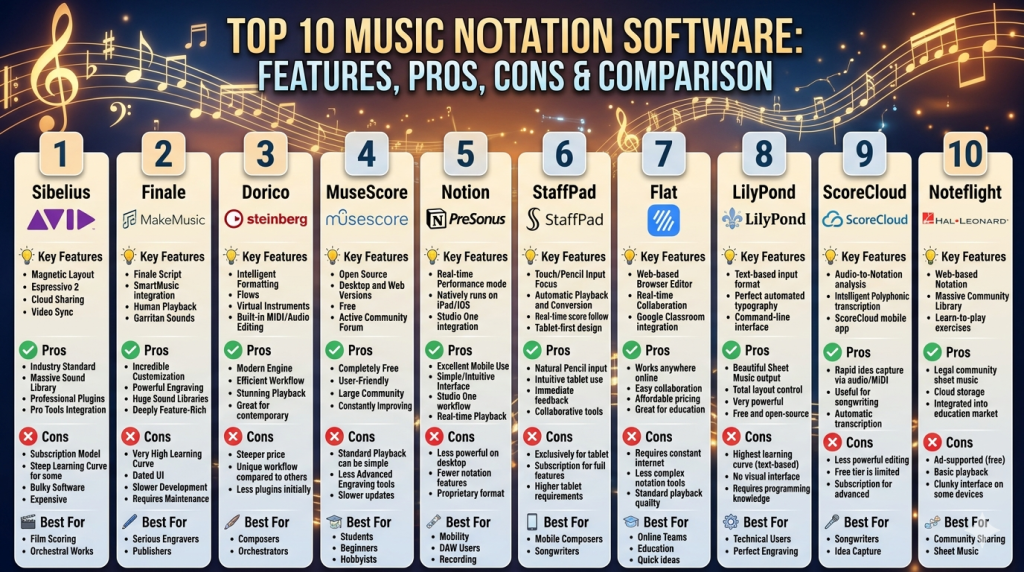
Top 10 Music Notation Software
#1 — Sibelius
Short description: A widely used professional notation tool known for its polished interface and high-quality engraving. Popular among composers, educators, and institutions.
Key Features
- Advanced score layout and engraving tools
- Realistic playback with built-in sound libraries
- Magnetic layout for automatic spacing
- Cloud sharing and collaboration
- Plugin ecosystem for extended functionality
- MIDI and MusicXML support
- Mobile companion app
Pros
- Industry-standard notation quality
- Strong educational adoption
- Efficient workflow for large scores
Cons
- Subscription pricing may not suit all users
- Can feel complex for beginners
- Performance may slow with very large projects
Platforms / Deployment
Windows / macOS / iOS
Cloud / Desktop
Security & Compliance
Not publicly stated
Integrations & Ecosystem
Sibelius integrates with DAWs and supports standard formats like MIDI and MusicXML.
- MIDI devices
- DAWs (via export/import)
- Plugin marketplace
- Cloud storage services
Support & Community
Extensive documentation and large global user base. Educational resources widely available.
#2 — Finale
Short description: A powerful notation software offering deep customization for professional composers and engravers.
Key Features
- Highly customizable notation engine
- Advanced engraving control
- Human playback feature
- Large library of musical symbols
- MusicXML and MIDI support
- Plugin support
- Flexible layout tools
Pros
- Extremely detailed control over notation
- Preferred by engravers
- Mature and feature-rich
Cons
- Steep learning curve
- Interface feels dated to some users
- Performance can vary
Platforms / Deployment
Windows / macOS
Desktop
Security & Compliance
Not publicly stated
Integrations & Ecosystem
Finale supports integration through standard formats and plugins.
- MusicXML compatibility
- MIDI devices
- VST/AU plugins
- Third-party extensions
Support & Community
Long-standing community with extensive tutorials and forums.
#3 — Dorico
Short description: A modern notation tool designed for professional composers with a focus on workflow efficiency and automation.
Key Features
- Intelligent engraving engine
- Flexible layout system
- Advanced playback engine
- Expression maps for realism
- Multi-flow project structure
- VST plugin support
- Automation-driven workflows
Pros
- Streamlined workflow
- High-quality engraving
- Strong performance with complex scores
Cons
- Learning curve for new users
- Requires powerful hardware for best performance
- Smaller community compared to legacy tools
Platforms / Deployment
Windows / macOS / iPad
Desktop
Security & Compliance
Not publicly stated
Integrations & Ecosystem
Dorico integrates well with modern production tools.
- VST plugins
- MIDI controllers
- MusicXML
- Audio export tools
Support & Community
Growing community with active development and regular updates.
#4 — MuseScore
Short description: A free and open-source notation software popular among students and hobbyists.
Key Features
- Free and open-source
- Intuitive interface
- Playback with soundfonts
- Large online score library
- MusicXML and MIDI support
- Plugin system
- Cross-platform support
Pros
- Completely free
- Easy to learn
- Strong community
Cons
- Limited advanced engraving compared to premium tools
- Playback realism is basic
- Performance may vary
Platforms / Deployment
Windows / macOS / Linux
Desktop / Cloud
Security & Compliance
Not publicly stated
Integrations & Ecosystem
MuseScore integrates via standard formats and community plugins.
- MusicXML
- MIDI
- Plugin extensions
- Online score sharing
Support & Community
Very large global community with extensive shared resources.
#5 — Notion
Short description: A notation tool with strong integration into audio production workflows.
Key Features
- Integrated audio and notation
- Realistic playback
- Guitar tab support
- MIDI input
- Mobile support
- Cloud sync
- Plugin support
Pros
- Good balance between notation and audio
- User-friendly interface
- Mobile-friendly
Cons
- Limited advanced engraving
- Smaller ecosystem
- Fewer updates compared to competitors
Platforms / Deployment
Windows / macOS / iOS
Cloud / Desktop
Security & Compliance
Not publicly stated
Integrations & Ecosystem
Notion integrates with production tools and plugins.
- MIDI devices
- DAWs
- VST plugins
- Cloud sync
Support & Community
Moderate community with basic documentation.
#6 — StaffPad
Short description: A tablet-first notation tool focused on handwriting input using stylus devices.
Key Features
- Handwriting recognition
- Touch-based interface
- Realistic playback
- Built-in sound libraries
- Export to MIDI and PDF
- Gesture-based editing
- Cloud sync
Pros
- Natural writing experience
- Ideal for composers on the go
- High-quality playback
Cons
- Limited to specific devices
- Expensive ecosystem
- Less suited for complex engraving
Platforms / Deployment
Windows / iPad
Cloud / Desktop
Security & Compliance
Not publicly stated
Integrations & Ecosystem
Focused on standalone workflow with export capabilities.
- MIDI export
- PDF export
- Sound library add-ons
Support & Community
Smaller but dedicated user base.
#7 — Flat (Flat.io)
Short description: A cloud-based notation tool designed for collaboration and education.
Key Features
- Web-based editing
- Real-time collaboration
- Version history
- Classroom integration
- MIDI input
- Cloud storage
- Browser-based playback
Pros
- Easy collaboration
- No installation required
- Education-friendly
Cons
- Limited offline functionality
- Fewer advanced engraving tools
- Performance depends on internet
Platforms / Deployment
Web
Cloud
Security & Compliance
Not publicly stated
Integrations & Ecosystem
Flat integrates with educational platforms and cloud tools.
- Learning management systems
- Cloud storage
- MIDI devices
- API access
Support & Community
Strong adoption in education with growing support resources.
#8 — LilyPond
Short description: A text-based notation tool focused on high-quality engraving.
Key Features
- Text-based input system
- Professional engraving quality
- Scriptable workflows
- Open-source
- PDF and MIDI output
- Advanced layout control
- Version control compatibility
Pros
- Exceptional engraving quality
- Ideal for developers and engravers
- Free and open-source
Cons
- Steep learning curve
- No graphical interface
- Slower workflow for beginners
Platforms / Deployment
Windows / macOS / Linux
Desktop
Security & Compliance
Not publicly stated
Integrations & Ecosystem
LilyPond integrates with development tools.
- Version control systems
- Text editors
- Script automation
- MusicXML
Support & Community
Strong niche community among advanced users.
#9 — ScoreCloud
Short description: AI-powered notation software that converts audio into sheet music.
Key Features
- Audio-to-score conversion
- Real-time transcription
- MIDI support
- Cloud storage
- Playback tools
- Editing interface
- Export options
Pros
- Fast transcription
- Beginner-friendly
- AI-powered workflow
Cons
- Accuracy varies with complex music
- Limited advanced features
- Requires cleanup after transcription
Platforms / Deployment
Windows / macOS / iOS
Cloud / Desktop
Security & Compliance
Not publicly stated
Integrations & Ecosystem
ScoreCloud focuses on transcription workflows.
- MIDI input
- Audio import
- Export formats
- Cloud sync
Support & Community
Moderate support with growing interest in AI features.
#10 — Noteflight
Short description: A web-based notation tool widely used in education.
Key Features
- Browser-based interface
- Classroom tools
- Cloud storage
- Playback features
- MIDI support
- Collaboration tools
- Score sharing
Pros
- Accessible from any device
- Strong education focus
- Easy to use
Cons
- Limited advanced features
- Internet dependency
- Less suitable for professionals
Platforms / Deployment
Web
Cloud
Security & Compliance
Not publicly stated
Integrations & Ecosystem
Noteflight integrates with education ecosystems.
- LMS platforms
- Cloud storage
- MIDI devices
- Classroom tools
Support & Community
Strong in education sector with good onboarding resources.
Comparison Table (Top 10)
| Tool Name | Best For | Platform(s) Supported | Deployment | Standout Feature | Public Rating |
|---|---|---|---|---|---|
| Sibelius | Professionals | Windows, macOS, iOS | Cloud/Desktop | Magnetic layout | N/A |
| Finale | Engravers | Windows, macOS | Desktop | Deep customization | N/A |
| Dorico | Composers | Windows, macOS, iPad | Desktop | Intelligent engraving | N/A |
| MuseScore | Beginners | Windows, macOS, Linux | Desktop/Cloud | Free & open-source | N/A |
| Notion | Hybrid users | Windows, macOS, iOS | Cloud/Desktop | Audio + notation | N/A |
| StaffPad | Tablet composers | Windows, iPad | Cloud/Desktop | Handwriting input | N/A |
| Flat | Education | Web | Cloud | Real-time collaboration | N/A |
| LilyPond | Developers | Windows, macOS, Linux | Desktop | Text-based engraving | N/A |
| ScoreCloud | Transcription | Windows, macOS, iOS | Cloud/Desktop | AI transcription | N/A |
| Noteflight | Schools | Web | Cloud | Classroom tools | N/A |
Evaluation & Scoring of Music Notation Software
| Tool Name | Core (25%) | Ease (15%) | Integrations (15%) | Security (10%) | Performance (10%) | Support (10%) | Value (15%) | Weighted Total |
|---|---|---|---|---|---|---|---|---|
| Sibelius | 9 | 7 | 8 | 5 | 8 | 8 | 7 | 7.7 |
| Finale | 9 | 6 | 8 | 5 | 7 | 8 | 7 | 7.4 |
| Dorico | 9 | 7 | 8 | 5 | 9 | 7 | 7 | 7.8 |
| MuseScore | 7 | 9 | 7 | 5 | 7 | 9 | 10 | 8.0 |
| Notion | 7 | 8 | 7 | 5 | 7 | 6 | 7 | 7.0 |
| StaffPad | 8 | 8 | 6 | 5 | 8 | 6 | 6 | 7.1 |
| Flat | 6 | 9 | 7 | 5 | 7 | 7 | 8 | 7.3 |
| LilyPond | 9 | 4 | 6 | 5 | 8 | 7 | 10 | 7.4 |
| ScoreCloud | 6 | 9 | 6 | 5 | 7 | 6 | 7 | 6.9 |
| Noteflight | 6 | 9 | 7 | 5 | 7 | 7 | 8 | 7.3 |
How to interpret scores:
- Scores are comparative, not absolute benchmarks.
- Higher scores indicate stronger overall balance across criteria.
- “Core” reflects depth of notation capabilities.
- “Ease” highlights usability for beginners.
- Security scores are conservative due to limited public disclosures.
- Choose based on your specific workflow needs rather than total score alone.
Which Music Notation Software Tool Is Right for You?
Solo / Freelancer
- Best choices: MuseScore, Dorico, StaffPad
- Focus on affordability, ease of use, and flexibility
SMB
- Best choices: Sibelius, Notion, Flat
- Look for collaboration and integration capabilities
Mid-Market
- Best choices: Dorico, Sibelius
- Balance performance, features, and scalability
Enterprise
- Best choices: Sibelius, Finale
- Prioritize reliability, advanced features, and support
Budget vs Premium
- Budget: MuseScore, LilyPond
- Premium: Sibelius, Dorico, Finale
Feature Depth vs Ease of Use
- Deep features: Finale, Dorico
- Ease of use: MuseScore, Noteflight
Integrations & Scalability
- Strong integrations: Sibelius, Dorico
- Scalable cloud: Flat, Noteflight
Security & Compliance Needs
- Most tools: Not publicly stated
- Enterprises should validate vendor security independently
Frequently Asked Questions (FAQs)
What is music notation software used for?
It is used to create, edit, and share written music in digital form, including scores, arrangements, and educational materials.
Is music notation software the same as a DAW?
No. DAWs focus on audio production, while notation software focuses on written music representation.
Are there free options available?
Yes. Tools like MuseScore and LilyPond offer free, open-source solutions.
Can notation software integrate with DAWs?
Many tools support MIDI and MusicXML, enabling integration with DAWs.
How long does it take to learn?
Basic usage can take a few hours, but mastering advanced features may take weeks or months.
Is cloud-based notation reliable?
Yes, but it depends on internet connectivity and platform stability.
Can I collaborate in real time?
Some tools like Flat support real-time collaboration.
What formats are supported?
Common formats include MIDI, MusicXML, PDF, and audio exports.
Is AI used in notation software?
Yes, especially for transcription, composition suggestions, and playback enhancements.
How do I choose the right tool?
Evaluate based on your skill level, workflow, budget, and integration needs.
Conclusion
Music notation software has evolved into a critical component of modern music creation, bridging traditional composition with digital workflows. From beginner-friendly tools like MuseScore to professional-grade platforms like Sibelius and Dorico, there is a wide range of options tailored to different needs.
The “best” tool depends on your goals—whether you prioritize affordability, advanced engraving, collaboration, or integration with production tools.
