Introduction
Game engines are software frameworks used to design, develop, and run video games. In simple terms, they provide developers with the tools needed to create graphics, physics simulations, sound, scripting, and gameplay mechanics—all in one unified environment.
In , game engines matter more than ever. The rise of immersive technologies such as AR/VR, AI-assisted development, and cross-platform distribution has made engines not just game development tools, but full-fledged real-time 3D creation platforms. They are now used beyond gaming—in film production, architecture visualization, training simulations, and even digital twins.
Common use cases include:
- Building 2D and 3D video games
- Creating AR/VR experiences
- Developing simulation and training environments
- Producing real-time cinematic content
- Designing interactive applications
What buyers should evaluate:
- Rendering quality and graphics capabilities
- Ease of use and learning curve
- Scripting/programming language support
- Cross-platform deployment support
- Asset marketplace and ecosystem
- Performance and scalability
- Licensing and pricing model
- Community and documentation
- Integration with external tools
- AI and automation features
Best for: Game developers, indie studios, enterprise simulation teams, AR/VR developers, and creative professionals across industries like media, architecture, and education.
Not ideal for: Simple app developers or teams needing lightweight UI tools—alternative frameworks or low-code platforms may be more suitable.
Key Trends in Game Engines
- AI-assisted development: Built-in AI tools for asset generation, code suggestions, and animation workflows are becoming standard.
- Real-time rendering dominance: Engines are increasingly used in film, TV, and virtual production due to real-time capabilities.
- Cross-platform-first design: Developers expect seamless deployment across PC, console, mobile, web, and XR platforms.
- Cloud-based collaboration: Teams are leveraging cloud workflows for asset sharing, version control, and remote collaboration.
- Low-code/no-code tooling: Visual scripting systems are reducing dependency on deep programming expertise.
- Open ecosystems: Asset stores, plugins, and SDK integrations are expanding rapidly.
- Subscription and revenue-share pricing: More flexible pricing models are replacing upfront licensing.
- Security expectations rising: Enterprise users demand SSO, RBAC, and audit capabilities for large-scale projects.
- Digital twin and simulation growth: Game engines are increasingly used outside gaming for industrial simulations.
- Interoperability standards: Support for open standards like USD and glTF is improving cross-tool workflows.
How We Selected These Tools (Methodology)
The following tools were selected based on a balanced evaluation of:
- Strong market adoption and developer mindshare
- Feature completeness across rendering, physics, and scripting
- Performance and reliability across different platforms
- Evidence of long-term vendor support and updates
- Ecosystem strength including plugins and asset stores
- Flexibility for indie, SMB, and enterprise users
- Cross-platform deployment capabilities
- Community size and documentation quality
- Integration with modern development pipelines
- Relevance to trends including AI and XR support
Top 10 Game Engines Tools
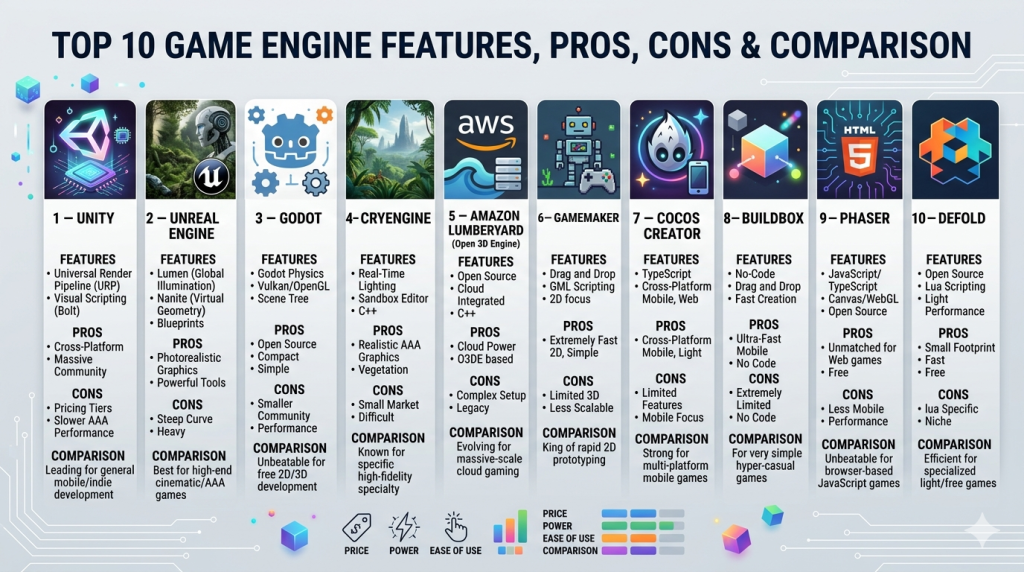
#1 — Unity
Short description: A widely used game engine for 2D, 3D, AR, and VR development, suitable for indie developers to enterprise teams.
Key Features
- Cross-platform deployment (20+ platforms)
- Visual scripting and C# scripting support
- Extensive asset store
- Real-time rendering and lighting tools
- AR/VR development support
- Multiplayer and networking tools
- AI-assisted workflows (emerging)
Pros
- Massive community and ecosystem
- Flexible for both 2D and 3D development
- Strong mobile game support
Cons
- Pricing model changes have caused uncertainty
- Performance tuning can be complex
- Larger projects may require optimization expertise
Platforms / Deployment
Windows / macOS / Linux / iOS / Android / Web
Security & Compliance
Not publicly stated
Integrations & Ecosystem
Unity has one of the largest ecosystems in game development.
- Asset Store plugins
- Third-party SDK integrations
- Cloud build tools
- Analytics and monetization tools
- External IDEs like Visual Studio
Support & Community
Extensive documentation, tutorials, and one of the largest developer communities globally.
#2 — Unreal Engine
Short description: A high-end game engine known for AAA-quality graphics and real-time cinematic rendering.
Key Features
- Photorealistic rendering (Nanite, Lumen)
- Blueprint visual scripting
- C++ support
- Real-time ray tracing
- Virtual production tools
- Open-world development capabilities
Pros
- Industry-leading graphics quality
- Strong for large-scale games and films
- Free to start with revenue-based pricing
Cons
- Steep learning curve
- Heavy system requirements
- Complex workflows for beginners
Platforms / Deployment
Windows / macOS / Linux / iOS / Android / Consoles
Security & Compliance
Not publicly stated
Integrations & Ecosystem
Strong integration with film and production tools.
- Marketplace assets
- External DCC tools (Blender, Maya)
- Version control systems
- VR/AR SDKs
Support & Community
Highly active community, extensive learning resources, strong enterprise support.
#3 — Godot
Short description: An open-source game engine focused on flexibility and ease of use.
Key Features
- Open-source and free
- Lightweight architecture
- GDScript (Python-like language)
- Visual scripting
- 2D-first design with growing 3D support
- Customizable engine
Pros
- No licensing fees
- Fast iteration and lightweight
- Strong indie community
Cons
- Smaller ecosystem than Unity/Unreal
- Limited high-end 3D capabilities
- Fewer enterprise tools
Platforms / Deployment
Windows / macOS / Linux / iOS / Android / Web
Security & Compliance
Not publicly stated
Integrations & Ecosystem
Growing ecosystem with community contributions.
- Git integration
- Plugin system
- External editors
- Open-source libraries
Support & Community
Strong open-source community; documentation improving steadily.
#4 — CryEngine
Short description: A powerful engine known for realistic visuals and environmental rendering.
Key Features
- High-end rendering engine
- Real-time lighting and shadows
- Advanced physics simulation
- Sandbox editor
- VR support
Pros
- Excellent environmental graphics
- Strong physics engine
- No upfront cost
Cons
- Smaller community
- Limited tutorials
- Complex workflows
Platforms / Deployment
Windows / Linux
Security & Compliance
Not publicly stated
Integrations & Ecosystem
Moderate ecosystem.
- Plugin support
- Asset pipeline tools
- External modeling tools
Support & Community
Limited compared to top competitors.
#5 — Amazon Lumberyard (Open 3D Engine)
Short description: A cloud-integrated engine derived from CryEngine, evolving into Open 3D Engine.
Key Features
- AWS cloud integration
- Multiplayer support
- Open-source evolution (O3DE)
- Real-time rendering
- Modular architecture
Pros
- Strong cloud capabilities
- No licensing fees
- Open-source flexibility
Cons
- Transition complexity (Lumberyard to O3DE)
- Smaller user base
- Documentation gaps
Platforms / Deployment
Windows / Linux
Security & Compliance
Not publicly stated
Integrations & Ecosystem
Cloud-focused ecosystem.
- AWS services
- Multiplayer backends
- Asset tools
Support & Community
Growing but still niche.
#6 — GameMaker
Short description: A beginner-friendly engine focused on 2D game development.
Key Features
- Drag-and-drop interface
- GML scripting language
- Rapid prototyping tools
- Built-in asset management
- Cross-platform export
Pros
- Easy to learn
- Ideal for indie developers
- Fast development cycles
Cons
- Limited 3D support
- Not suited for complex games
- Smaller ecosystem
Platforms / Deployment
Windows / macOS / iOS / Android / Web
Security & Compliance
Not publicly stated
Integrations & Ecosystem
Focused on simplicity.
- Asset marketplace
- Export modules
- Basic plugin support
Support & Community
Active indie community and solid tutorials.
#7 — Cocos Creator
Short description: A lightweight engine optimized for mobile and web games.
Key Features
- JavaScript and TypeScript support
- Lightweight runtime
- Mobile-first optimization
- 2D and 3D capabilities
- Open-source core
Pros
- Strong for mobile games
- Lightweight and fast
- Flexible scripting
Cons
- Smaller global community
- Limited AAA capabilities
- Documentation varies
Platforms / Deployment
Windows / macOS / iOS / Android / Web
Security & Compliance
Not publicly stated
Integrations & Ecosystem
Mobile-focused integrations.
- SDK integrations
- Plugin system
- Ad and analytics tools
Support & Community
Stronger presence in Asia; global reach growing.
#8 — Buildbox
Short description: A no-code game engine designed for rapid game creation.
Key Features
- No coding required
- Drag-and-drop builder
- Prebuilt templates
- Monetization tools
- Mobile-first design
Pros
- Extremely easy to use
- Fast prototyping
- Ideal for beginners
Cons
- Limited customization
- Not suitable for complex games
- Subscription pricing
Platforms / Deployment
Windows / macOS / iOS / Android
Security & Compliance
Not publicly stated
Integrations & Ecosystem
Limited ecosystem.
- Built-in monetization tools
- Template marketplace
Support & Community
Moderate support; smaller community.
#9 — Phaser
Short description: A popular open-source framework for HTML5 game development.
Key Features
- JavaScript-based
- Web-first design
- Lightweight framework
- Rich 2D capabilities
- Active plugin ecosystem
Pros
- Ideal for browser games
- Easy integration with web apps
- Lightweight and flexible
Cons
- No native 3D support
- Requires coding knowledge
- Limited enterprise features
Platforms / Deployment
Web / HTML5
Security & Compliance
Not publicly stated
Integrations & Ecosystem
Strong web ecosystem.
- JavaScript libraries
- Web frameworks
- CDN integrations
Support & Community
Active developer community and good documentation.
#10 — Defold
Short description: A lightweight engine for cross-platform game development backed by a strong foundation.
Key Features
- Lua scripting
- Lightweight runtime
- Cross-platform deployment
- Built-in editor
- Free to use
Pros
- Fast performance
- Simple workflow
- No licensing cost
Cons
- Smaller ecosystem
- Limited advanced features
- Less industry adoption
Platforms / Deployment
Windows / macOS / Linux / iOS / Android / Web
Security & Compliance
Not publicly stated
Integrations & Ecosystem
Moderate ecosystem.
- Plugin support
- External tools
- Asset pipelines
Support & Community
Growing community with improving resources.
Comparison Table (Top 10)
| Tool Name | Best For | Platform(s) Supported | Deployment | Standout Feature | Public Rating |
|---|---|---|---|---|---|
| Unity | Cross-platform development | Multi-platform | Hybrid | Versatility | N/A |
| Unreal Engine | AAA games & film | Multi-platform | Hybrid | Photorealistic rendering | N/A |
| Godot | Indie & open-source | Multi-platform | Self-hosted | Open-source flexibility | N/A |
| CryEngine | Realistic environments | Windows/Linux | Self-hosted | Advanced rendering | N/A |
| O3DE | Cloud-based games | Windows/Linux | Hybrid | AWS integration | N/A |
| GameMaker | 2D beginners | Multi-platform | Self-hosted | Ease of use | N/A |
| Cocos Creator | Mobile games | Multi-platform | Self-hosted | Lightweight | N/A |
| Buildbox | No-code games | Multi-platform | Cloud | No-code builder | N/A |
| Phaser | Web games | Web | Self-hosted | HTML5 focus | N/A |
| Defold | Lightweight dev | Multi-platform | Self-hosted | Performance | N/A |
Evaluation & Scoring of Game Engines
| Tool Name | Core | Ease | Integrations | Security | Performance | Support | Value | Weighted Total |
|---|---|---|---|---|---|---|---|---|
| Unity | 9 | 8 | 9 | 6 | 8 | 9 | 7 | 8.2 |
| Unreal Engine | 10 | 6 | 8 | 6 | 9 | 9 | 8 | 8.3 |
| Godot | 7 | 8 | 6 | 5 | 7 | 7 | 10 | 7.5 |
| CryEngine | 8 | 5 | 5 | 5 | 8 | 6 | 7 | 6.7 |
| O3DE | 7 | 5 | 7 | 6 | 7 | 6 | 8 | 6.9 |
| GameMaker | 6 | 9 | 5 | 5 | 6 | 7 | 8 | 7.0 |
| Cocos Creator | 6 | 7 | 6 | 5 | 7 | 6 | 8 | 6.8 |
| Buildbox | 5 | 10 | 4 | 5 | 5 | 6 | 6 | 6.4 |
| Phaser | 6 | 7 | 7 | 5 | 6 | 7 | 9 | 7.0 |
| Defold | 6 | 7 | 5 | 5 | 7 | 6 | 9 | 6.9 |
How to interpret the scores:
- Scores are comparative across tools, not absolute benchmarks.
- Higher weighted totals indicate better overall balance.
- Enterprise needs may prioritize performance and integrations over ease of use.
- Indie developers may value ease and cost more heavily.
- Always validate scores against your specific project requirements.
Which Game Engines Is Right for You?
Solo / Freelancer
Choose Godot, GameMaker, or Buildbox for simplicity, low cost, and fast iteration.
SMB
Unity or Cocos Creator offer a balance of flexibility and scalability.
Mid-Market
Unity and Unreal Engine provide strong ecosystems and scalability for growing teams.
Enterprise
Unreal Engine and Unity are best suited for large-scale production, simulations, and XR projects.
Budget vs Premium
- Budget: Godot, Defold, Phaser
- Premium: Unity, Unreal Engine
Feature Depth vs Ease of Use
- Deep features: Unreal Engine
- Ease of use: GameMaker, Buildbox
Integrations & Scalability
- Strong integrations: Unity, Unreal Engine
- Lightweight scaling: Cocos, Defold
Security & Compliance Needs
Most engines do not publicly emphasize compliance—enterprise users should implement external controls and infrastructure security.
Frequently Asked Questions (FAQs)
What is a game engine?
A game engine is a software framework used to build and run games, handling graphics, physics, and logic.
Are game engines free?
Some are free (Godot, Defold), while others use subscription or revenue-sharing models.
Which engine is best for beginners?
GameMaker and Buildbox are easiest for beginners due to minimal coding requirements.
Which engine is best for AAA games?
Unreal Engine is widely used for high-end AAA game development.
Can I use game engines for non-game projects?
Yes, they are used in simulations, architecture, film, and training applications.
How long does it take to learn a game engine?
It varies—basic proficiency may take weeks, while mastery can take months or years.
Do I need programming skills?
Some engines require coding, while others offer visual scripting or no-code tools.
Can I switch engines mid-project?
Technically possible, but often costly and complex.
Are game engines secure?
Security depends on deployment; most engines do not emphasize compliance features directly.
What are alternatives to game engines?
Custom frameworks, low-code platforms, or web-based tools can be alternatives depending on needs.
Conclusion
Game engines have evolved into powerful, multi-purpose platforms that go far beyond traditional game development. From indie creators to enterprise simulation teams, there is a wide spectrum of tools catering to different needs, budgets, and technical expertise.
There is no single “best” engine—only the best fit for your specific use case. Factors like team size, platform requirements, performance expectations, and budget should guide your decision.
