Introduction
VFX compositing software is used to combine multiple visual elements—such as live-action footage, CGI, matte paintings, and effects—into a single seamless shot. In simple terms, it’s the final step where all visual layers are blended together to create what audiences see on screen.
In 2026 and beyond, compositing tools are more critical than ever. With the rise of virtual production, AI-assisted workflows, and high-resolution content (4K, 8K, and beyond), modern VFX pipelines depend heavily on fast, flexible, and scalable compositing platforms.
Common use cases include:
- Film and television post-production
- Advertising and commercial VFX
- Game cinematics and trailers
- YouTube and creator-led content production
- Virtual production and LED volume workflows
Key evaluation criteria:
- Node-based vs layer-based workflow
- Real-time preview performance
- AI-assisted rotoscoping and tracking
- Integration with 3D tools and pipelines
- Color management and HDR support
- Collaboration and version control
- Hardware acceleration (GPU/CPU)
- Plugin ecosystem and extensibility
- Pricing model and licensing flexibility
Best for: VFX artists, studios, post-production teams, motion designers, and filmmakers—from freelancers to large studios—who need precision compositing and high-end visual effects.
Not ideal for: Beginners looking for simple video editing tools, or teams focused only on basic editing tasks—where simpler tools like video editors or motion graphics software may be more appropriate.
Key Trends in VFX Compositing Software
- AI-powered rotoscoping and masking: Tools increasingly automate tedious tasks like object isolation and edge refinement.
- Real-time compositing workflows: GPU acceleration enables near real-time previews, reducing iteration cycles.
- Cloud-based rendering and collaboration: Teams can work across geographies with centralized assets and versioning.
- Deep compositing support: Handling complex depth data is becoming standard in high-end pipelines.
- Integration with virtual production: Seamless workflows with LED walls, game engines, and camera tracking systems.
- Cross-platform interoperability: Better compatibility with 3D software, editing tools, and asset management systems.
- Node-based workflow dominance: Increasing preference for non-linear, procedural compositing environments.
- HDR and color pipeline advancements: Support for ACES and advanced color grading workflows.
- Subscription and flexible licensing: Shift from perpetual licenses to subscription and usage-based pricing.
- Automation and scripting: Python and API-based automation for pipeline customization.
How We Selected These Tools (Methodology)
- Evaluated market adoption and industry usage in film, TV, and content production.
- Assessed feature completeness, including compositing depth, tracking, and color tools.
- Considered performance and reliability, especially in high-resolution workflows.
- Reviewed security posture signals, where relevant for studio pipelines.
- Examined integration capabilities with 3D, editing, and pipeline tools.
- Analyzed ecosystem maturity, including plugins and community contributions.
- Included tools suitable for different user segments—from freelancers to enterprise studios.
- Considered learning curve and usability across skill levels.
- Factored in long-term viability and innovation trajectory.
- Ensured a balanced mix of commercial, open-source, and hybrid solutions.
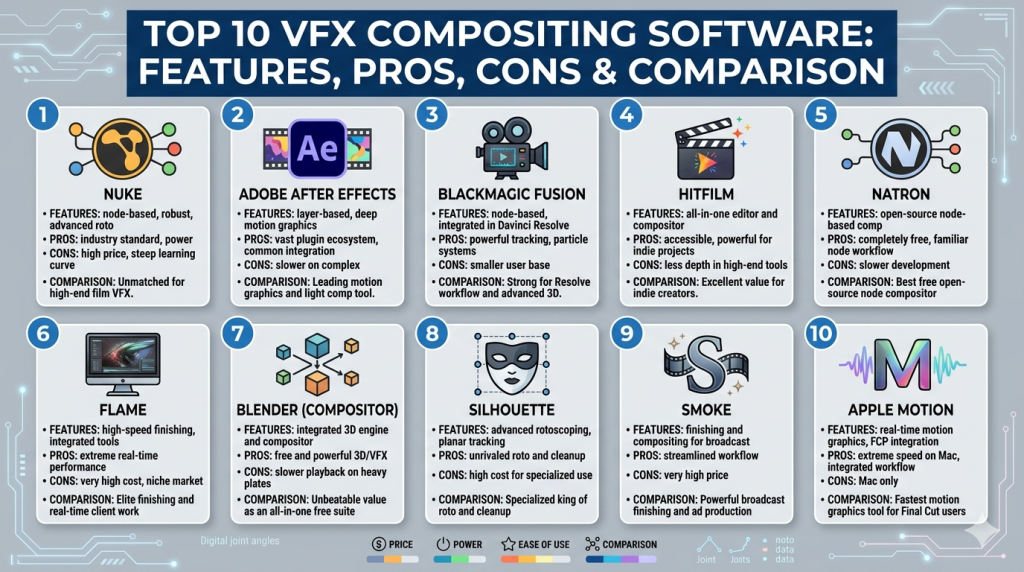
Top 10 VFX Compositing Software
#1 — Nuke
Short description: A high-end, node-based compositing tool widely used in film and television. Best suited for large studios and advanced VFX pipelines.
Key Features
- Node-based compositing workflow
- Deep compositing support
- Advanced 3D compositing environment
- High-end rotoscoping and keying tools
- Python scripting and pipeline integration
- Multi-channel EXR support
- GPU acceleration for performance
Pros
- Industry-standard for film VFX
- Extremely powerful and flexible
- Strong pipeline integration capabilities
Cons
- Steep learning curve
- Expensive for small teams
- Requires high-end hardware
Platforms / Deployment
Windows / macOS / Linux
Security & Compliance
Not publicly stated
Integrations & Ecosystem
Nuke integrates deeply into studio pipelines with strong scripting and API support.
- Python API for automation
- Integration with 3D tools (Maya, Houdini)
- Support for OpenColorIO
- Plugin ecosystem for VFX tools
Support & Community
Strong professional community and extensive documentation. Enterprise support available.
#2 — Adobe After Effects
Short description: A layer-based compositing and motion graphics tool widely used by creators and studios.
Key Features
- Layer-based compositing
- Motion graphics and animation tools
- AI-powered rotoscoping (Roto Brush)
- Extensive plugin ecosystem
- Integration with editing tools
- Template and preset libraries
Pros
- Easy to learn for beginners
- Huge ecosystem of plugins and templates
- Strong integration with creative tools
Cons
- Not ideal for complex VFX pipelines
- Performance limitations with large projects
- Less scalable for enterprise VFX
Platforms / Deployment
Windows / macOS
Security & Compliance
Not publicly stated
Integrations & Ecosystem
- Integration with Premiere Pro
- Plugin marketplace
- Dynamic linking workflows
- Scripting support
Support & Community
Massive global community and tutorials. Strong documentation.
#3 — Blackmagic Fusion
Short description: Node-based compositing tool integrated into DaVinci Resolve, suitable for both professionals and studios.
Key Features
- Node-based compositing
- 3D workspace
- VR and 360 support
- GPU acceleration
- Integration with editing and color grading
- Keying and tracking tools
Pros
- Free version available
- Integrated with full post-production suite
- Powerful node-based workflow
Cons
- Learning curve for beginners
- UI can feel complex
- Less industry dominance than Nuke
Platforms / Deployment
Windows / macOS / Linux
Security & Compliance
Not publicly stated
Integrations & Ecosystem
- Integration with DaVinci Resolve
- Support for plugins
- Scripting via Lua and Python
Support & Community
Active community and good documentation.
#4 — HitFilm
Short description: A hybrid video editor and VFX compositor aimed at creators and small teams.
Key Features
- Combined editing and compositing
- Particle simulation tools
- 3D model import
- Visual effects library
- Keying and tracking tools
Pros
- Beginner-friendly
- All-in-one solution
- Affordable pricing
Cons
- Limited advanced compositing features
- Not suitable for large studios
- Performance constraints
Platforms / Deployment
Windows / macOS
Security & Compliance
Not publicly stated
Integrations & Ecosystem
- Plugin support
- Asset libraries
- Limited API capabilities
Support & Community
Moderate community and tutorials available.
#5 — Natron
Short description: Open-source node-based compositing software similar to Nuke.
Key Features
- Node-based workflow
- OpenFX plugin support
- Multi-threaded rendering
- Rotoscoping and keying tools
- Open-source flexibility
Pros
- Free and open-source
- Familiar interface for Nuke users
- Extensible via plugins
Cons
- Slower development updates
- Limited enterprise support
- Smaller community
Platforms / Deployment
Windows / macOS / Linux
Security & Compliance
Not publicly stated
Integrations & Ecosystem
- OpenFX plugins
- Python scripting
- Integration with open-source tools
Support & Community
Community-driven support. Documentation varies.
#6 — Flame
Short description: High-end compositing and finishing tool used in broadcast and film production.
Key Features
- Timeline-based compositing
- Advanced color grading
- Real-time effects
- 3D compositing tools
- AI-assisted workflows
Pros
- Real-time performance
- Integrated finishing tools
- Strong broadcast use case
Cons
- Expensive
- Requires specialized hardware
- Smaller user base
Platforms / Deployment
Linux
Security & Compliance
Not publicly stated
Integrations & Ecosystem
- Integration with Autodesk tools
- Pipeline integration support
- Scripting capabilities
Support & Community
Professional support available; smaller community.
#7 — Blender (Compositor)
Short description: Open-source 3D software with a built-in compositor for VFX tasks.
Key Features
- Node-based compositor
- Integration with 3D workflows
- Open-source flexibility
- Real-time rendering engine
- Tracking and masking tools
Pros
- Free and versatile
- Strong 3D integration
- Active development
Cons
- Compositor less advanced than dedicated tools
- Learning curve
- Performance limitations for heavy VFX
Platforms / Deployment
Windows / macOS / Linux
Security & Compliance
Not publicly stated
Integrations & Ecosystem
- Python scripting
- Plugin ecosystem
- Integration with 3D pipeline
Support & Community
Very strong global community and tutorials.
#8 — Silhouette
Short description: Specialized compositing and rotoscoping tool for high-end VFX.
Key Features
- Advanced rotoscoping tools
- Paint and cleanup tools
- Node-based compositing
- Tracking and stabilization
- Plugin support
Pros
- Best-in-class rotoscoping
- High-quality cleanup tools
- Used in film production
Cons
- Niche use case
- Expensive
- Limited general compositing features
Platforms / Deployment
Windows / macOS / Linux
Security & Compliance
Not publicly stated
Integrations & Ecosystem
- Plugin support
- Pipeline integration
- Data exchange with compositing tools
Support & Community
Professional support; niche community.
#9 — Smoke
Short description: Video editing and compositing tool focused on finishing workflows.
Key Features
- Timeline-based compositing
- Editing and effects integration
- Color grading tools
- Real-time playback
Pros
- Integrated workflow
- Strong finishing capabilities
- Real-time performance
Cons
- Limited compared to modern tools
- Smaller ecosystem
- Less active development
Platforms / Deployment
macOS
Security & Compliance
Not publicly stated
Integrations & Ecosystem
- Integration with Autodesk ecosystem
- Limited plugin support
Support & Community
Varies / Not publicly stated
#10 — Apple Motion
Short description: Motion graphics and compositing tool designed for Apple ecosystem users.
Key Features
- Real-time playback
- Motion graphics tools
- Template creation
- Integration with video editing
- GPU acceleration
Pros
- Affordable
- Easy to use
- Optimized for Apple hardware
Cons
- Limited advanced compositing
- macOS only
- Not suited for large VFX pipelines
Platforms / Deployment
macOS
Security & Compliance
Not publicly stated
Integrations & Ecosystem
- Integration with Final Cut Pro
- Plugin support
- Template ecosystem
Support & Community
Strong Apple ecosystem support and community.
Comparison Table (Top 10)
| Tool Name | Best For | Platform(s) Supported | Deployment | Standout Feature | Public Rating |
|---|---|---|---|---|---|
| Nuke | Enterprise VFX | Win/macOS/Linux | Self-hosted | Deep compositing | N/A |
| After Effects | Creators | Win/macOS | Cloud | Motion graphics integration | N/A |
| Fusion | Mid-market studios | Win/macOS/Linux | Hybrid | Free node-based compositing | N/A |
| HitFilm | Beginners | Win/macOS | Cloud | All-in-one editor + VFX | N/A |
| Natron | Open-source users | Win/macOS/Linux | Self-hosted | Free Nuke alternative | N/A |
| Flame | Broadcast | Linux | Self-hosted | Real-time finishing | N/A |
| Blender | Indie creators | Win/macOS/Linux | Self-hosted | 3D + compositing | N/A |
| Silhouette | Rotoscoping | Win/macOS/Linux | Self-hosted | Advanced roto tools | N/A |
| Smoke | Editors | macOS | Self-hosted | Timeline compositing | N/A |
| Motion | Apple users | macOS | Self-hosted | Real-time performance | N/A |
Evaluation & Scoring of VFX Compositing Software
| Tool Name | Core (25%) | Ease (15%) | Integrations (15%) | Security (10%) | Performance (10%) | Support (10%) | Value (15%) | Weighted Total |
|---|---|---|---|---|---|---|---|---|
| Nuke | 10 | 6 | 9 | 6 | 9 | 9 | 5 | 8.2 |
| After Effects | 8 | 9 | 9 | 6 | 7 | 9 | 7 | 8.0 |
| Fusion | 8 | 7 | 8 | 6 | 8 | 8 | 9 | 8.1 |
| HitFilm | 6 | 8 | 6 | 5 | 6 | 7 | 8 | 6.8 |
| Natron | 7 | 6 | 7 | 5 | 6 | 6 | 9 | 6.9 |
| Flame | 9 | 6 | 7 | 6 | 9 | 8 | 5 | 7.8 |
| Blender | 7 | 7 | 8 | 5 | 7 | 9 | 10 | 7.9 |
| Silhouette | 8 | 6 | 7 | 6 | 8 | 7 | 6 | 7.4 |
| Smoke | 6 | 7 | 6 | 5 | 7 | 6 | 6 | 6.4 |
| Motion | 6 | 9 | 7 | 5 | 8 | 8 | 9 | 7.6 |
How to interpret scores:
- Scores are relative comparisons, not absolute performance metrics.
- “Core” reflects compositing depth and capabilities.
- “Ease” measures usability and learning curve.
- Weighted totals help identify overall fit, but priorities may vary by use case.
- Enterprise users should prioritize core features and integrations, while freelancers may value ease and cost more.
Which VFX Compositing Software Is Right for You?
Solo / Freelancer
- Best choices: Blender, After Effects, HitFilm
- Focus on affordability and ease of use
- Avoid overly complex tools like Nuke unless required
SMB
- Best choices: Fusion, After Effects
- Balance between power and usability
- Consider integration with editing workflows
Mid-Market
- Best choices: Fusion, Nuke
- Look for pipeline integration and scalability
- Evaluate performance for high-resolution workflows
Enterprise
- Best choices: Nuke, Flame
- Prioritize deep compositing, pipeline integration, and support
- Budget and infrastructure are key considerations
Budget vs Premium
- Budget: Blender, Natron, Fusion (free tier)
- Premium: Nuke, Flame
- Mid-range: After Effects subscription
Feature Depth vs Ease of Use
- High depth: Nuke, Flame
- Balanced: Fusion
- Easy: After Effects, Motion
Integrations & Scalability
- Strong integration: Nuke, After Effects
- Moderate: Fusion, Blender
- Limited: HitFilm
Security & Compliance Needs
- Most tools: Not publicly stated
- Enterprises should validate internally and ensure pipeline security
Frequently Asked Questions (FAQs)
What is VFX compositing software?
It combines multiple visual elements into a single final image or sequence, ensuring seamless integration of effects and footage.
How much does VFX compositing software cost?
Pricing varies widely—from free (Blender, Natron) to high-end enterprise licensing. Many tools use subscription models.
Is node-based compositing better than layer-based?
Node-based workflows offer more flexibility and scalability, while layer-based tools are easier for beginners.
What hardware is required?
High-end GPUs, fast CPUs, and large RAM are recommended for professional workflows, especially with 4K+ content.
Are these tools suitable for beginners?
Some tools like After Effects and HitFilm are beginner-friendly, while Nuke and Flame require experience.
Can I use these tools for YouTube videos?
Yes, especially tools like After Effects, HitFilm, and Blender.
How long does it take to learn compositing?
Basic skills can be learned in weeks, but mastering advanced tools may take months or years.
Do these tools support collaboration?
Some support collaborative workflows via pipelines or cloud integrations, but capabilities vary.
Can I switch tools easily?
Switching is possible but requires adapting to different workflows and interfaces.
What are alternatives to VFX compositing software?
For simpler needs, video editors or motion graphics tools may suffice.
Conclusion
VFX compositing software sits at the heart of modern visual storytelling. Whether you’re producing blockbuster films, YouTube content, or advertising visuals, the right tool can dramatically impact both efficiency and output quality.
There is no single “best” solution—only the best fit for your workflow, budget, and technical requirements. Enterprise studios may lean toward Nuke or Flame, while freelancers and smaller teams often find success with Fusion, Blender, or After Effects.
